Обновлено 7 сентября 2026 года.
Сайт Официальный каталог моделей Grok рекомендует версию 4.6 для чата и программирования. Это делает её удобным вариантом по умолчанию, но в зависимости от вашей рабочей нагрузки может оказаться целесообразнее использовать более экономичную модель, с меньшим объёмом логических выводов или другой продукт. Для длительной работы над кодом, быстрой правки письма и ответа на вопрос в режиме реального времени не следует использовать одинаковые настройки.
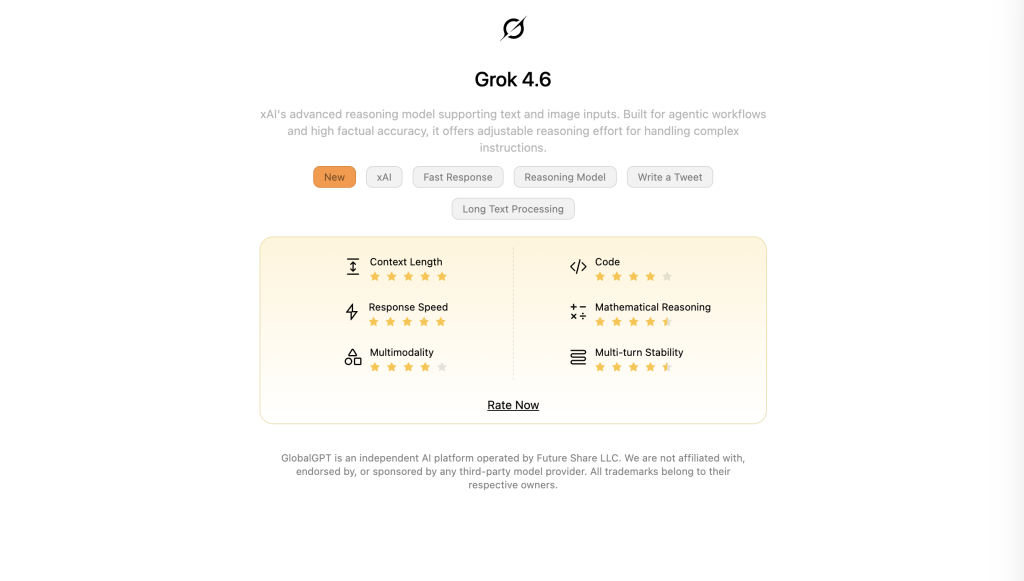
Предпочитаете готовый инструмент для выбора модели? Grok 4,6 на GlobalGPT Это даст вам отправную точку, а в GlobalGPT также указан параметр Grok 4.3. Попробуйте применить один и тот же набор параметров к обеим моделям, прежде чем окончательно выбрать одну из них для регулярной работы.
Лучшая модель Grok для конкретной задачи
Повседневная речь и письмо
нет или низкийДля работы с электронной почтой, мозгового штурма, составления резюме и обычных вопросов начинайте с модели по умолчанию, предлагаемой вашим приложением Grok. Переходите к варианту с более глубоким анализом, когда задача содержит ограничения, которые не учитываются в первом ответе. Трудно оправдать использование дорогостоящего плана исключительно для небольших переформулировок, если имеющийся у вас доступ уже дает полезные ответы.
Если вы выбираете бэкенд API для выполнения повседневных задач, Grok 4.3 с нет или низкий этот вариант является разумным кандидатом на включение в бюджет. Его официальная спецификация модели поддерживает оба варианта настроек. Перед масштабным внедрением более бюджетной конфигурации необходимо проверить достоверность фактов и соблюдение инструкций.
Что касается базовой учетной записи и процесса работы в чате, то Руководство по началу работы с Grok помогает сориентироваться. Воспользуйтесь селектором текущих моделей и экраном использования учетной записи, чтобы ознакомиться с доступными вам на сегодняшний день вариантами.
Логическое мышление и сложный анализ
низкийсреднийвысокийНачните с этого
xhighБольшая задержка
Выберите Grok 4.6 для проведения тщательного анализа, подробного объяснения в процессе устранения неисправностей или решения проблемы, состоящей из нескольких взаимосвязанных этапов. Начните с высокий; рассмотрим xhigh когда стоит подождать, пока мысли проработаются. Это официальные критерии оценки определить эти уровни затрат, включая дополнительную задержку уровня xhigh. Для более тщательного анализа необходимо ещё и проверить ответ.
Программирование и работа с репозиториями
Для работы с репозиторием и непрерывного агентного кодирования начните с Grok 4,6 дюйма Сборка Grok, либо используйте эту же модель в своём собственном агенте. Build предоставляет среду для программирования; версия 4.6 — это модель, лежащая в основе текущего рабочего процесса по умолчанию. Проверьте внесенные изменения с помощью стандартных тестов и ревью кода.
Для API кодирования с учетом стоимости — тест производительности grok-build-0.1 при выполнении собственных задач по исправлению и внедрению. У него более низкие номинальные ставки токенов, но меньшее окно контекста. Этот Обзор Grok 4.6 в этой статье более подробно освещается флагманский продукт, если вам нужно более тщательно изучить его функции и опубликованные результаты.
Информация в режиме реального времени

Чтобы ознакомиться с новостями, информацией о компании или недавними публичными обсуждениями, используйте модель с включенной функцией поиска. API предоставляет Поиск в Интернете что касается интернет-источников; модель, опирающаяся исключительно на данные обучения, не способна обеспечить достоверное освещение текущих событий.
Используйте X Поиск если вопрос конкретно касается постов, профилей или тем на X. Просите предоставить источники с указанием даты и раскрывайте важные ссылки. Grok 4.6 — это разумная модель синтеза; актуальность обеспечивается за счет найденного материала.
Скорость и время отклика
уровень_логического_мышления: "низкий"reasoning_effort: "нет"Для приложения версии 4.6, чувствительного к задержкам, следует начинать с минимальных вычислительных затрат и лаконичных требований к результату. Для более простых задач API, в которых можно полностью обойтись без вычислений, сравните вариант Grok 4.3 с отсутствием вычислений. Измерьте как время до получения первого полезного текста, так и время до получения полного готового к использованию ответа; скорость потоковой передачи сама по себе не отражает время ожидания, связанное с вычислениями или работой инструментов.
Бюджет и стоимость токенов
Grok 4.3 — это наиболее экономичный вариант общего назначения в данном сравнении. Он также предоставляет вам возможность явно контролировать, будет ли выполняться вывод. Версия Grok Build 0.1 имеет ещё более низкие заявленные скорости ввода-вывода, но её ориентация на кодирование делает её выбором другого рода. Сравните общую стоимость успешно выполненных заданий, включая доработки и использование инструментов.
Разработка API
Начните работу с новым общим агентом версии Grok 4.6. Сохраните версию 4.3, если требуется более низкая стоимость, отключение логических выводов или более широкий контекст. Рассмотрите возможность использования все еще доступных вариантов версии 4.20, если существующая интеграция зависит от этой версии или если вам нужен её специализированный рабочий процесс для многоагентных исследований. Модель, поддерживаемая в настоящее время, не всегда является лучшей отправной точкой для нового проекта.
Ограниченные права и доступ к учетной записи
На практике выигрышной является комбинация модели и инструментов, доступная в рамках вашей учетной записи. Модель, доступная через API или отдельную платформу, не обеспечивает доступ через конкретное приложение Grok или подписку X. Уточните точную модель, доступные инструменты и лимит использования для маршрута, которым вы планируете воспользоваться.
Сравнение современных моделей Grok
Ниже приведены семь записей текстового API, указанных на странице официальная страница с ценами 7 сентября 2026 года. Указанные ниже затраты приведены в долларах США на 1 миллион незакешированные токены ввода/вывода по стандартным тарифам на обработку с оперативным выполнением менее 200 000 токенов. Это единицы API, а не стоимость ежемесячной подписки. Доступность для команд и в разных регионах может отличаться.
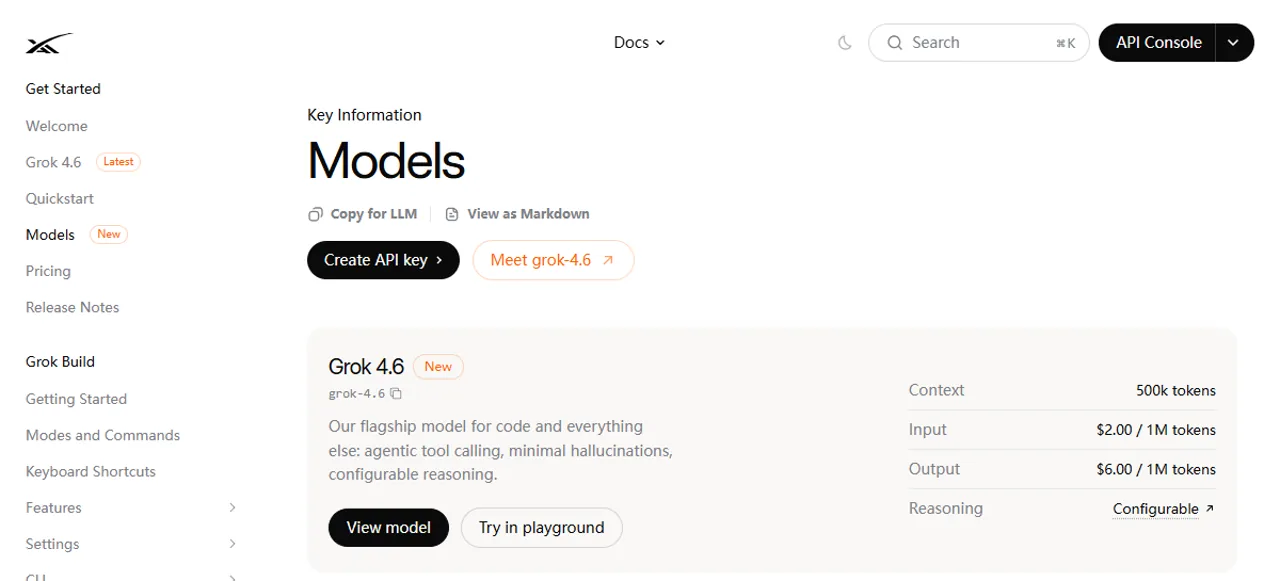
Стандартные настройки для новых ресурсоемких задач
Grok 4,6
grok-4.6Выберите: Логическое мышление, программирование, агенты и работа с информацией.
Возможности / ограничения: Контекст 500K: низкий, средний, высокий или очень высокий. Функцию логического вывода отключить нельзя.
Вход/выход API: $2.00 / $6.00 за 1 млн токенов.
Запись: API; версия Grok. В версии GlobalGPT версия 4.6 указана отдельно.
Выбор бюджета общего назначения
Grok 4.3
grok-4.3Выберите: Стандартные бэкэнды чата, вызов инструментов и более длинные вводные данные.
Возможности / ограничения: Контекст 1M: отсутствие, низкий, средний или высокий уровень логического мышления.
Вход/выход API: $1.25 / $2.50 за 1 млн токенов.
Запись: API; в GlobalGPT пункт 4.3 указан отдельно.
Более экономичный вариант кодирования
Grok, версия 0.1
grok-build-0.1Выберите: Программирование и агентные программные рабочие процессы с ограниченным бюджетом токенов.
Возможности / ограничения: Контекст 256K. Оцените качество кода и его совместимость с вашей рабочей нагрузкой.
Вход/выход API: $1.00 / $2.00 за 1 млн токенов.
Запись: API. Отличается от приложения «Grok Build».
Предыдущая модель, по-прежнему представленная в каталоге
Grok 4,5
grok-4.5Выберите: Существующие интеграции кодирования с проверенной базовой версией 4.5.
Возможности / ограничения: Контекст 500K: низкий, средний или высокий. Без дополнительной глубины xhigh.
Вход/выход API: $2.00 / $6.00 за 1 млн токенов.
Запись: API. Такая же базовая скорость ввода-вывода, что и в версии 4.6; более экономичные попадания в кэш.
Более ранний вариант рассуждений
Grok 4.20 Reasoning
grok-4.20-0309-reasoningВыберите: Интеграции, специфичные для конкретной версии, использующие модель рассуждений версии 4.20.
Возможности / ограничения: Контекст 1M. Отделить идентификатор модели от элементов, не связанных с рассуждениями.
Вход/выход API: $1.25 / $2.50 за 1 млн токенов.
Запись: API. Сохраняйте его, если это оправдано соображениями совместимости или результатами ваших оценок.
Более ранний вариант без обоснования
Grok 4.20 Необоснованность
grok-4.20-0309-без-выводаВыберите: Существующие рабочие процессы версии 4.20, для которых требуется вариант без логического обоснования.
Возможности / ограничения: Контекст 1M. Ставки по токенам указаны так же, как и в варианте с обоснованием.
Вход/выход API: $1.25 / $2.50 за 1 млн токенов.
Запись: API. Одинаковые показатели использования токенов не означают одинакового общего объема использования токенов.
Специализированная исследовательская бета-версия
Grok 4.20 «Мультиагент»
grok-4.20-multi-agent-0309Выберите: Параллельные агенты, занимающиеся сбором и обобщением результатов исследований.
Возможности / ограничения: Контекст 1M. Бета-версия API; количество агентов регулируется в зависимости от затрат ресурсов.
Вход/выход API: $1.25 / $2.50 за 1 млн токенов.
Запись: API. Использование нескольких агентов и инструментов может привести к увеличению общего потребления.
Приведенные выше текстовые модели принимают в качестве входных данных текст и изображения и возвращают текст. Изображение в качестве входных данных может использоваться для анализа документов или визуального анализа; это не делает данную модель генератором изображений. Более широкое контекстное окно также не гарантирует, что каждая деталь в длинном документе будет использована правильно.
«Reasoning», «Fast» и «Heavy»: что означают эти названия
Рассуждение представляет собой либо настройку, либо именованный вариант модели
В версиях 4.6 и 4.5 параметр «Интенсивность рассуждений» относится к одной и той же модели. В версии Grok 4.6 доступны значения «low», «medium», «high» и «xhigh», причем по умолчанию установлено значение «high». Версия Grok 4.5 поддерживает значения «low», «medium» и «high»; согласно документации, значение «xhigh» на моделях, не поддерживающих его, рассматривается как «high». Ни одна из моделей не предоставляет настройку «none».
Версия Grok 4.3 не поддерживает ни одну из них. В семействе версий 4.20 идентификаторы моделей с рассуждениями и без рассуждений указаны отдельно. Эти различия имеют значение при написании кода: изменение настройки, выбор другого варианта и переход на другое поколение — это три разных операции.
Слово «fast» имеет более одного значения
Старые названия «Grok 4 Fast» и «Grok 4.1 Fast» представляли собой реальные варианты моделей API. Они указаны в Список пенсионеров от 15 мая 2026 года. Если продолжать отправлять старый Fast ID, исходная модель и её первоначальная цена не сохранятся.
Сайт Объявление о выпуске Grok 4.6 также рекламирует более быструю версию по цене, в два раза превышающей стандартную. Этот рекламный слоган не содержит отдельной grok-4.6-fast Идентификатор в текущей официальной таблице моделей. Вместо того чтобы составлять имя модели, используйте опцию exact, описанную вашим поставщиком.
Что касается официального API, Приоритетная обработка представляет собой задокументированный запрос на регулирование скорости: запрос service_tier: "priority" при этом сохраняя идентификатор модели. Она изменяет график выполнения заданий и имеет надбавку к цене токена, равную 2x, когда возвращаемый уровень подтверждает приоритет. Её доступность зависит от пропускной способности. Не следует делать выводы о новой модели на основании метки скорости выполнения.
«Heavy» — это не название всех моделей серии Grok премиум-класса
Сайт Июль 2025 г. Grok 4, объявление использованный Grok 4 Heavy для параллельных вычислений на этапе тестирования с учетом нескольких гипотез, а также SuperGrok Heavy для уровня подписки. Это исторический контекст наименования, а не доказательство того, что модель «Heavy» в настоящее время является стандартной в вашей учетной записи.
В текущем API имеется специально задокументированный Grok 4.20 — бета-версия программы для многоагентных исследований. Параметр «effort» определяет количество взаимодействующих агентов. Его не следует рассматривать как синоним подписки типа «Heavy» для потребителей или автоматически отдавать ему предпочтение при коротком чате.
К каким моделям Grok у вас действительно есть доступ?
Пользовательский опыт. Выбор модели, режимы работы и способы использования зависят от учетной записи и введенных данных.
Запросы разработчиков. Явные идентификаторы моделей, доступ для команды, использование токенов и плата за использование инструментов.
Независимая платформа. Собственный каталог моделей, система подписок и управление использованием.
Grok — это семейство помощников и моделей; xAI — поставщик, обеспечивающий работу API. В текущей документации используется брендинг SpaceXAI. Официальный обзор продукта Grok указывает grok.com, iOS и Android как варианты для потребителей и сообщает, что Grok доступен бесплатно на начальном этапе. Названия SuperGrok и X Premium обозначают платный доступ, а не идентификаторы базовых моделей.
Сайт Часто задаваемые вопросы об учетной записи Grok и её использовании Здесь описывается общий еженедельный лимит для платных пользователей, информацию о котором можно посмотреть в разделе «Настройки». Также объясняется, как привязать аккаунт в X, чтобы получить соответствующие преимущества. Само название подписки не дает точного представления о модели, доступе к инструментам или оставшемся лимите.
Для повседневного использования потребителями следует уточнить, что именно предлагает механизм выбора модели. Поведение продукта определяется либо автоматическим выбором, либо более продуманным управлением, если только в интерфейсе явно не указана лежащая в основе модель. Каталог API не устанавливает соотношение «один к одному» для каждого режима приложения Grok или уровня X, а также не обеспечивает универсальный свободный доступ к версии 4.6.
В GlobalGPT начните с проверенная запись Grok 4.6 и использовать информацию о тарифных планах и использовании, предоставляемую самой платформой. В текущем общедоступном каталоге также указан Grok 4.3. Доступ к модели чата через GlobalGPT не означает, что все настройки рассуждений xAI API или инструменты поиска предоставляются одинаковым образом.
Если на самом деле вопрос заключается в том, должен ли Grok стать вашим единственным помощником, то Сравнение работы моделей Grok и ChatGPT расширяет возможности выбора рабочих процессов в области написания текстов, проведения исследований и программирования у различных поставщиков услуг.
Различия в стоимости, влияющие на выбор
Для обычных запросов к API с коротким контекстом, не кешируемых, версия 4.6 требует $2 на 1 млн входных токенов и $6 на 1 млн выходных токенов; версия 4.3 — $1,25 и $2,50. Эта разница делает версию 4.3 достойной рассмотрения для повторяющихся задач. Более низкая стоимость оправдана только в том случае, если она не приводит к увеличению количества повторных попыток или необходимости ручной очистки.
У Grok 4.5 базовые скорости ввода-вывода такие же, как у версии 4.6, поэтому сам по себе номер версии не обеспечивает экономии по базовой скорости. Её скорость кешированного ввода с коротким контекстом ниже: $0.30 против $0.50 на 1 млн кешированных токенов. Поэтому для проверенной рабочей нагрузки версии 4.5 с интенсивным использованием кеша может быть целесообразно остаться на этой версии.
Три фактора могут повлиять на сумму счета: в счет включаются токены обоснования; поиск и другие инструменты могут привести к дополнительным расходам; а также появление подсказки 200 тыс. токенов приводит к применению тарифов для длительного контекста в случае все токены в этом запросе. . официальная таблица цен API удваивает скорость ввода-вывода для перечисленных моделей при данном пороговом значении. Емкость в 1 млн токенов не гарантирует, что в течение всего периода будет действовать тариф для коротких контекстов.
Сравните абонентские планы для потребителей по включенным объемам использования и доступа, а также сравнивайте API по фактическому потреблению токенов и инструментов. В текущем разделе «Часто задаваемые вопросы» для потребителей API даже указаны в разбивке по видам использования, поэтому проверьте конкретные условия вашей учетной записи в консоли. Название тарифного плана для потребителей не является достаточным доказательством наличия неограниченного количества вызовов API или определенного баланса средств на счете API.
Для более подробного сравнения условий подписки и тарифов воспользуйтесь существующим Руководство по ценам на Grok. При выборе модели целесообразно задать более конкретный вопрос: позволяет ли более функциональный или быстрый вариант сэкономить достаточно времени на доработке, чтобы оправдать его общую стоимость?
Как выбрать модель Grok для проекта API
При создании новой интеграции используйте явные идентификаторы моделей. Руководство по API Grok 4.6 содержит описание API «Responses» и поддерживаемых конфигураций логических выводов. Для краткого объяснения при написании кода тело запроса может начинаться следующим образом:
{
  "model": "grok-4.6",
  "reasoning": {
    "effort": "low"
  },
  "input": "Исправить сортировку чисел: [10,2].sort()"
}
Это пример настройки, а не результат производительности. Установите бюджет вывода, соответствующий заданию, включите инструменты поиска, необходимые для нахождения новых источников, и зафиксируйте фактическое использование токенов. Для более глубокой обработки используйте уровень «средний» или «высокий» после того, как убедитесь, что уровень «низкий» соответствует вашим критериям приемлемости.
- Используйте типовые задания: обычный запрос, неоднозначный запрос, длинный ввод, сбой инструмента и сложная задача по логическому мышлению или программированию.
- Следует обеспечить сопоставимость настроек: одни и те же подсказки, документы, инструменты и критерии приемки; фиксируйте идентификатор модели и объем работы по обоснованию.
- Оценивайте полезные результаты: корректность, задержка выполнения задания, количество исправлений, токены ввода/вывода и рассуждений, вызовы инструментов и общие затраты.
- Осознанно выбирайте запасной вариант: Не следует незаметно заменять неработающую текущую модель на снятую с производства версию или на конфигурацию с иным поведением при выводе заключений.
- Повторно проверьте доступ: Список моделей команды в консоли определяет вашу фактическую доступность; общедоступный каталог представляет собой справочник возможностей.
Сайт Руководство по интеграции с API Grok является полезной справочной информацией для рабочего процесса разработчика. При адаптации старых примеров заменяйте идентификатор модели, руководствуясь актуальным официальным каталогом и инструкциями по миграции.
В случае развертывания версии 4.5, которое уже налажено, выполните те же приемочные задачи для версии 4.6 перед перенаправлением производственного трафика. При интеграции версии 4.20 сохраните её явный вариант, если данное поведение входит в ваш базовый набор. Настройки по умолчанию продукта и перемещаемые псевдонимы могут изменяться независимо от вашего приложения.
Старые модели Grok и устаревшие названия API
Grok 3, исходная версия API Grok 4 и старые модели Fast относятся к контексту миграции. В уведомлении о прекращении поддержки от 15 мая 2026 года перечислены grok-3, grok-4-0709, оба grok-4-fast-* варианты, как grok-4-1-fast-* варианты и grok-code-fast-1.
- Отклоненные варианты рассуждений: Уведомление направляет их к Grok 4.3, не требуя больших умственных усилий.
- Исключенные варианты без обоснования и Grok 3: Уведомление перенаправляет их в Grok 4.3 без каких-либо объяснений.
- Код Grok «Fast 1»: В разделе, посвящённом миграции конкретного кода, указан переход на версию Grok Build 0.1; на текущей странице версии 0.1 старый идентификатор кода также указан в качестве псевдонима.
Старое имя запроса может по-прежнему разрешаться, хотя запрос обрабатывается другой моделью и применяются другие тарифы. Ознакомьтесь с официальные инструкции по выходу на пенсию и перенаправлению прежде чем рассматривать старый тест производительности, законопроект об API или метку Fast в качестве доказательства текущего поведения.
Сайт Обзор семейства Grok 4 содержит информацию о предыдущем поколении флагманских моделей. Чтобы ознакомиться с новым ассортиментом, воспользуйтесь приведённым выше сравнением версий 4.6 и 4.3; модели 4.5 и 4.20, которые по-прежнему указаны в списке, остаются конкретными альтернативами, а не снятыми с производства моделями.
А как насчёт изображений, видео и голосовых записей?
Сайт актуальный официальный каталог перенаправляет генерацию изображений в Grok Imagine Image 2.0, создание видео для Grok Imagine Video 1.5 и озвучивание в реальном времени для Grok Voice API. Это отдельные методы и услуги. Выбор модели текстового анализа — это еще не всё, что нужно учесть при разработке медиаприложения.
Для рабочего процесса создания используйте Руководство по созданию изображений и видео в Grok. Не следует смешивать выбор медиафайлов с выбором модели для чата, анализа или кода; стоимость медиафайлов измеряется в единицах, отличных от тех, что используются для текстовых токенов.
Часто задаваемые вопросы
Какая модель Grok сейчас считается лучшей?
Версия Grok 4.6 является базовым вариантом для выполнения сложных задач, связанных с логическим мышлением, программированием и работой с данными. Версия Grok 4.3 представляет собой универсальную бюджетную альтернативу для использования API, отличающуюся более широким контекстным окном и возможностью отключения функции логического мышления.
Какая модель Grok лучше всего подходит для повседневного общения?
Начните с текущих настроек по умолчанию, предлагаемых вашей учетной записью Grok. Для API чата рекомендуется использовать версию Grok 4.3 без логического анализа или с минимальным уровнем анализа для рутинных задач, а переходить на версию 4.6 следует в тех случаях, когда задача требует более глубокого анализа или более сложного программирования.
Может ли Grok 4.6 работать без логического обоснования?
Нет. Официальный API поддерживает уровни «low», «medium», «high» и «xhigh» для версии Grok 4.6, причем по умолчанию установлен уровень «high». Версия Grok 4.3 поддерживает уровень «none», который используется, когда необходимо отключить логическое выведение.
Какую модель Grok следует выбрать разработчикам для программирования?
Начните с Grok 4.6 для ресурсоемких задач программирования и рабочих процессов агентов. Рассмотрите возможность использования grok-build-0.1, если важна более низкая стоимость токенов. Grok Build — это приложение для программирования, а grok-build-0.1 — отдельный идентификатор модели API.
Модель Grok Fast — это то же самое, что и Grok Heavy?
Нет. Предыдущие модели Fast API выведены из эксплуатации; в анонсе версии 4.6 также описан платный вариант Fast API. Модель Grok 4 Heavy была предназначена для параллельных вычислений, тогда как SuperGrok Heavy представляет собой тарифный план по подписке. Уточните точную модель и вариант предоставления услуг для выбранного вами маршрута.
Умеет ли новейшая модель Grok автоматически отслеживать последние новости?
Нет. Для работы с актуальной информацией необходимы инструменты поиска или указанные источники. При необходимости включите «Веб-поиск» или «Поиск X», запрашивайте ссылки с указанием даты и проверяйте важные утверждения в указанных источниках.
Гарантирует ли подписка на SuperGrok или X доступ ко всем моделям API?
Название подписки не гарантирует доступ ко всем моделям API. Проверьте связанную учетную запись, ее селектор моделей и лимит использования, а затем подтвердите доступность команды API и условия оплаты в консоли xAI.
Можно ли использовать Grok 4.6 на GlobalGPT?
Да. В списке GlobalGPT указана позиция Grok 4.6, а также Grok 4.3. Планы, ограничения по использованию и доступные инструменты зависят от платформы; подписка на xAI или функция API не дают таких же прав на GlobalGPT.
Могу ли я и дальше использовать старое имя Fast API «Grok»?
В уведомлении о прекращении поддержки указано, что старые запросы Fast по-прежнему обрабатываются с помощью перенаправлений. При этом исходная модель и тарифы не сохраняются. Используйте явный идентификатор текущей модели и проверьте настройки расчета стоимости и применяемые тарифы.
Какую модель Grok выбрать?
Выберите версию Grok 4.6 для новых ресурсоемких рабочих нагрузок, версию Grok 4.3 — для более экономичного общего рабочего процесса API, а также оцените версию Grok Build 0.1, если приоритетом является снижение затрат на программирование. Используйте версию 4.5 или 4.20, если у вас есть конкретные причины, связанные с совместимостью или оценкой. При обычном использовании приложения начинайте с доступной версии по умолчанию и переходите на более дорогую версию только в том случае, если это оправдано лучшими результатами, более высокими ограничениями или необходимостью использования конкретного инструмента.
Лучшая модель Grok — это та, которая отвечает требованиям вашей задачи при приемлемой общей стоимости. Совместите её с подходящим уровнем логического мышления, инструментами для работы с актуальной информацией и способом доступа, а затем оцените выполненную работу.