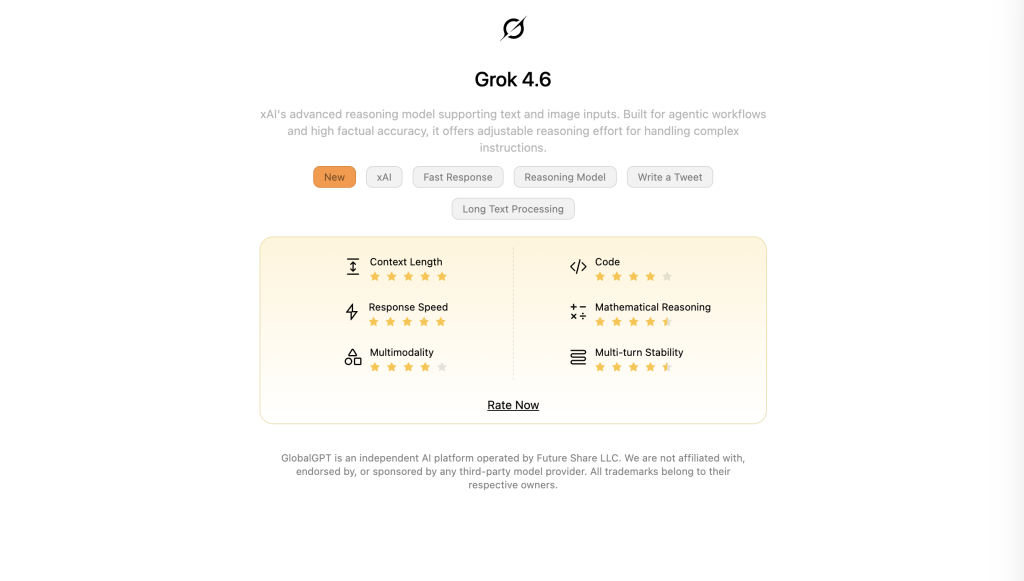
To use Grok in 2026, start with the current official model split: xAI lists Grok 4.6 as its flagship model for code and general chat, with a 500,000-token context and API pricing of $2 per million input tokens and $6 per million output tokens. The official xAI model docs list the same model split. Grok 4.1 Fast remains the long-context agent option with a 2-million-token window, while Grok Imagine Video 1.5 is the dedicated video model. Consumer access is offered through Grok and X products, with plan and regional availability shown at signup.
GlobalGPT is an all-in-one platform that integrates over 100 models, including GPT-5.6 Sol, Claude 4.6, and Grok 4.6. For $10.8, the Pro Plan provides full access to advanced video and image generation without watermark restrictions. This setup allows users to switch between text, image, and video models seamlessly while reducing total subscription costs by over 60%.
| Model | Best for | Context / limit | API price |
|---|---|---|---|
| Grok 4.6 | Code, chat, reasoning, tools | 500k tokens | $2 input / $6 output per 1M tokens |
| Grok 4.1 Fast | Long-context agent workflows | 2M-token context | $0.20 input / $0.50 output per 1M tokens |
| Grok Imagine Video 1.5 | Video generation and editing | 480p, 720p, and 1080p modes | From $0.05 per second |
What Features Make the Grok 4.6 Model Different?
Deep Dive into Aurora Architecture: Mixture-of-Experts (MoE)
- Grok 4 uses the “Aurora” model, which works like a team of specialized experts instead of one single brain.
- When you ask a question, the system picks the best “expert” for that specific topic, which makes the answers more accurate and less likely to be wrong.
- This architecture helps the AI understand complex instructions much better than older versions.
Scaling Limits: Handling the 2-Million Token Context Window in Grok 4.1 Fast
- The “context window” is like the AI’s short-term memory; Grok 4.1 Fast can remember up to 2 million tokens.
- This means you can upload an entire book or hundreds of pages of documents, and the AI will remember everything you said at the beginning.
- It is perfect for students or researchers who need to analyze very long reports without the AI getting confused.
Real-Time Data Advantage: Why Grok 4’s Integration with X Data Outperforms Static LLMs
- Unlike other AI models that only know things from the past, Grok 4 scans the X platform in real-time.
- If a major news event happened five minutes ago, Grok 4 can tell you about it, while other models might say they don’t know yet.
- This makes it the best tool for tracking trending topics, sports scores, or breaking world news.

How to Generate 15-Second AI Videos with Grok Imagine Video 1.5?
Text-to-Video & Image-to-Video: Mastering the New 2026 Media Workflow
- To start, you just need to type a detailed description of what you want to see, such as “a cat drinking space coffee on Mars”.
- Grok 4 can also take a still photo you uploaded and turn it into a moving video clip that lasts between 6 to 15 seconds.
- The transitions in these videos are very smooth, meaning you won’t see weird glitches or jumping objects.
Advanced Prompting: How to Create Cinematic 4K Visuals
- Instead of saying “a car,” try saying “a red sports car driving through a neon city at night with rain reflecting on the road”.
- Mentioning details like lighting (warm, natural, or neon) and camera angles (close-up or wide shot) helps the AI create a professional look.
- Avoid using too many conflicting words, like asking for a “realistic cartoon,” as this confuses the generator.
Beyond Grok: Comparing Imagine Video with Sora 2 Pro and Veo 3.1 on GlobalGPT
- While Grok 4 Imagine is great for social media, you can use GlobalGPT to compare it with more powerful models like Wan 2.6 or Google’s Veo 3.1.
- GlobalGPT lets you try all these video models in one place, including Sora 2 Pro, so you can pick the one that looks the most realistic for your project.

Grok 4.6 vs GPT-5.6 Sol vs Claude 4.6: Which AI Wins in 2026?
Benchmarking Logical Reasoning: Coding and Mathematics
- In 2026 tests, Grok 4 performs exceptionally well in coding tasks, often writing bug-free scripts faster than GPT-5.6 Sol.
- For complex math problems, Grok’s “Thinking Mode” allows it to double-check its work, which reduces mistakes in high-level science questions.
- However, Claude 4.6 is still praised for having a more “human” writing style, making it better for creative essays.
- In 2026 tests, Grok 4 performs exceptionally well in coding tasks, often writing bug-free scripts faster than GPT-5.4.
Multi-Modal Efficiency: Analyzing Complex Documents and Multi-Agent Tasks
- Grok 4 can “see” images and read charts very accurately, which is helpful if you want to explain a complicated financial graph.
- Its “Multi-Agent” feature means the AI can act like a project manager, breaking one big task into smaller steps for other AI agents to handle.
- This makes it much more than just a chatbot; it is a complete digital assistant for your business.
The Pro’s Choice: Toggling Between 100+ Models in One Interface on GlobalGPT
- Professional users rarely stick to just one AI; they use Grok for news and GPT for creative writing.
- GlobalGPT is the smartest choice because it allows you to toggle between 100+ models instantly without paying for five different subscriptions.
- By using one account, you can use the best features of every model while keeping your files in one safe place.

How to Master Grok 4.6’s Reasoning Mode for Agentic Workflows?
Activating “Thinking Mode” for Deep Logical Reasoning
- You can turn on “Thinking Mode” when you have a problem that requires more than a simple answer, such as debugging a 500-line code script.
- In this mode, the AI takes a few extra seconds to “think” and plan its answer, ensuring that the final result is high-quality.
- It is like giving the AI a scratchpad to work out the math before it shows you the final number.
Autonomous Tools: Using Grok 4 for Automated Market Research
- Grok 4 can browse the web and X to find the latest prices or reviews for any product you are researching.
- You can ask it to “create a list of the top 10 best cameras mentioned on X today,” and it will finish the job in seconds.
- This autonomous behavior saves you hours of manual searching and clicking through links.
Coding Mastery: Using Grok Code Fast 1 for Rapid Script Generation
- Grok Code Fast 1 is a specialized version of the model that focuses entirely on programming speed.
- It can generate entire websites or mobile app structures from just a few text prompts.
- If there is an error in your code, you can upload the file and Grok will highlight exactly which line is causing the crash.

What is the Pricing for Grok 4.6 and Is There a Better Value Alternative?
X Premium+ and Enterprise API Pricing Breakdown
- X Premium pricing and included Grok access vary by country, platform, and billing term; use the official X Premium page for the price shown to your account instead of relying on an old universal dollar figure. For the consumer-plan background, see this Grok pricing guide.
- Enterprise users who want to connect Grok 4 to their own apps through an API often pay much more based on how much data they use.
- Enterprise API users should use the current token and tool rates: xAI’s pricing table lists Grok 4.6 at $2 per million input tokens and $6 per million output tokens, with separate long-context rates.
- These plans are strictly tied to your X account, meaning if your account gets restricted, you lose access to the AI.
Cost-Saving Strategy: Accessing Grok 4 Pro for Just $10.8 via GlobalGPT
- Instead of paying for just one model, you can join the GlobalGPT Pro Plan for $10.8.
- This plan gives you access to Grok 4.6 plus all other top-tier models like GPT-5.6 Sol and Sora 2 Pro, making it the best value for your money.
- There are no hidden fees, and you can cancel anytime without losing your work history.

FAQs
Do I own the images I create?
Yes, you own the images and can use them for personal or commercial projects.
Is there a limit for free users?
On X, consumer quotas vary by account and plan; xAI publishes per-model requests-per-second and tokens-per-minute caps by API tier in its official rate-limit documentation. GlobalGPT offers flexible limits based on your plan.
Does it work on mobile?
Yes, both X and GlobalGPT are fully optimized for mobile browsers and apps.
What is the current flagship Grok model?
xAI currently lists Grok 4.6 as its flagship model for code and general work. The official model page lists a 500,000-token context and configurable reasoning.
Does Grok 4.6 have a 2-million-token context window?
No. Grok 4.6 is listed with a 500,000-token context; the 2-million-token window belongs to Grok 4.1 Fast, the long-context agent model described by xAI.
Can I use Grok 4.6 through GlobalGPT?
Yes. GlobalGPT currently provides a Grok 4.6 entry route, so you can use it alongside other models from one account and compare outputs without maintaining separate model workspaces.
Conclusion
Grok 4.6 represents a significant advancement in AI, offering configurable reasoning, agentic tool calling, and search-enabled access to current information. Grok 4.1 Fast remains the 2-million-token option for extensive data analysis, while Grok Imagine Video 1.5 handles video generation. With features ranging from 15-second high-fidelity video generation to deep reasoning modes, Grok serves as a versatile digital assistant for professional and creative workflows. Ultimately, its ability to combine speed with advanced multi-modal tools makes it a leading choice for those navigating the evolving landscape of 2026 technology.
For the current model split, choose Grok 4.6 for general chat and code, Grok 4.1 Fast for long-context agent tasks, and Grok Imagine Video 1.5 for video generation. Start Grok 4.6 on GlobalGPT when you want the model alongside other tools in one workspace.