

Most Grok vs ChatGPT comparisons turn two very different products into a simple winner-and-loser story. That was already too shallow in 2025. In 2026, it is the wrong way to make the decision.
Grok is no longer just “the xAI chatbot.” It now spans X-native use, grok.com, mobile apps, voice and media tools, the SpaceXAI API, and Grok Build. As of August 11, 2026, SpaceXAI lists Grok 4.5 as its flagship model for code and general agentic work.
ChatGPT is no longer just “OpenAI chat.” It now includes the GPT-5.6 family, web search, deep research, file analysis, image generation, connected apps, agent mode, projects, and Codex for coding work.
That changes the real question. The useful comparison is not only “Which model is smarter?” It is:
- Which tool fits the work you actually do?
- Which one turns questions into finished output faster?
- Which one is easier to trust for research, writing, coding, and team workflows?
- Which one makes more economic sense for your usage pattern?
The short answer: Grok is stronger when your work depends on live public conversation, X-native signal, breaking topics, and fast social pulse. ChatGPT is stronger when your work depends on structured research, polished writing, repeatable knowledge workflows, and a broader productivity environment. For developers, the answer is more mixed: Codex is the stronger integrated coding workflow, while Grok Build and the xAI API are increasingly compelling for cost-sensitive and long-context coding or agentic workloads.
For users who do not want to stay locked into one ecosystem, GlobalGPT is also worth considering. It is useful when your workflow depends on comparing Grok-style live signal with ChatGPT-style structured output without paying for separate workspaces.
The newest verified entries for this comparison are GPT-5.6 Sol on GlobalGPT and Grok 4.3 on GlobalGPT. SpaceXAI’s official Grok 4.5 is newer, but a matching GlobalGPT route was not live when checked on August 11, 2026.

Grok vs ChatGPT: the short answer
Here is the practical short version before we get into the tests, pricing, and workflow details.
The 60-second choice
Live public conversation, X-native signal, fast-moving narratives, and SpaceXAI-first workflows.
Structured research, polished writing, files, projects, and integrated Codex work.
Compare GPT-5.6 Sol and Grok 4.3 in GlobalGPT, then use official tools for exclusive workflows.
| If you care most about… | Better fit right now | Why |
|---|---|---|
| Real-time X discussions and public sentiment | Grok | Grok is tied more directly to X-native signal and live public conversation. |
| Structured online research with sources | ChatGPT | ChatGPT is stronger for turning many sources into a documented, reusable answer. |
| Everyday writing, editing, summaries, and knowledge work | ChatGPT | The broader product workflow is more mature for general productivity. |
| Social-native voice and internet-fluent angles | Grok | Grok often feels more natural for fast-moving public conversation and sharper topical phrasing. |
| Formal drafts, client documents, teaching material, and reusable memos | ChatGPT | ChatGPT is easier to steer toward neutral, structured, polished output. |
| Current official model comparison: GPT-5.6 Sol vs Grok 4.5 | Depends | GPT-5.6 Sol is the stronger productivity and Codex choice; Grok 4.5 is compelling for current SpaceXAI API and Grok Build workflows. |
| Coding in an integrated assistant workflow | Codex with GPT-5.6 Sol | Codex connects GPT-5.6 coding work to CLI, IDE, desktop, cloud tasks, and review workflows. |
| API-first coding or custom agent loops | Grok 4.5 or Grok Build | SpaceXAI positions Grok 4.5 for code, tool calling, and direct API use, and the same model powers Grok Build. |
| One official app for broad personal productivity | ChatGPT | ChatGPT is easier to use as a default assistant across research, writing, data, files, and task execution. |
| A multi-model workflow without jumping between tools | GlobalGPT | A single multi-model workspace can reduce switching friction when you compare outputs across systems. |
The key point is that many serious users should not choose only one. A creator may use Grok to catch the live angle and ChatGPT to turn that angle into a clean article. A developer may use Grok Build or the xAI API for custom agent loops and Codex for integrated coding assistance. A founder may use Grok to track market chatter and ChatGPT to turn that chatter into operating decisions.

What Grok is in 2026
Grok is xAI’s AI assistant and model ecosystem. It is available through X, grok.com, mobile apps, paid Grok access, and the xAI API. In practice, that means Grok is both a consumer chatbot and a developer-facing model platform.
Its clearest advantage is live public signal. Grok is especially relevant when the raw material is public conversation, fast-moving social reaction, X-native discourse, memes, launch chatter, or market sentiment. That does not automatically make it more accurate than ChatGPT. It means Grok is often closer to the live conversation.
Use Grok when the job starts with questions like:
- What are people saying right now?
- Which claims are spreading fastest?
- How is this launch or controversy being received?
- What is the emotional or social angle around this topic?
The risk on the ChatGPT side is different: polished answers can feel more settled than the evidence really is. For research, strategy, or business decisions, users should still check sources, compare claims, and separate what the model confirms from what it is inferring.
What ChatGPT is in 2026
ChatGPT is now much broader than a chatbot. It is a general work environment built around the GPT-5.6 family, web search, file analysis, image generation, deep research, projects, connected apps, agent mode, and Codex for coding workflows.
That product layer is the main reason ChatGPT remains the easier default recommendation for many people. A user can search, upload files, compare sources, generate images, analyze data, restructure drafts, use connected apps, and turn a rough question into a more finished artifact without constantly changing tools. If you want a more practical feature-by-feature view, this guide explains what you can do with ChatGPT Plus in everyday work.
ChatGPT is usually the better default when the work involves:
- structured research,
- polished writing,
- file-based analysis,
- reusable documents,
- knowledge work across multiple steps,
- or coding workflows that benefit from Codex.
The risk is mistaking live reaction for settled understanding. Public conversation is noisy. Grok can help you see what is moving, but final synthesis still needs judgment, verification, and structure. If you are new to the product, our step-by-step guide on how to use Grok 4 is the better next read.
GPT-5.6 Sol vs Grok 4.5: what changed in the latest generation
The model-level comparison matters, but it should not be separated from the product-level comparison. GPT-5.6 Sol and Grok 4.5 are not experienced in a vacuum. Most users meet GPT-5.6 through ChatGPT, Codex, or the OpenAI API. Most users meet Grok 4.5 through Grok, X, Grok Build, or the SpaceXAI API.
At a high level, the difference looks like this:
| Factor | GPT-5.6 Sol | Grok 4.5 |
|---|---|---|
| Best product environment | ChatGPT, Codex, OpenAI API | Grok, X, SpaceXAI API, Grok Build |
| Strongest practical advantage | Structured reasoning, research, polished output, and integrated coding workflows | X-native signal, current SpaceXAI tooling, fast agentic workflows, and lower flagship output pricing |
| Context window in current official API materials | 1.05M context window for GPT-5.6 Sol | 500K context window for Grok 4.5 |
| Published API pricing direction | $5 input / $30 output per 1M tokens | $2 input / $6 output per 1M tokens |
| Better for non-technical users | Usually ChatGPT | Better if X-native or live public conversation matters |
| Better for API-first builders | Depends on quality requirements and ecosystem fit | Attractive for code, direct API use, and Grok Build when its cost and workflow fit the product |
| Better as an all-day work assistant | ChatGPT | Grok if the work is centered on live public signal |
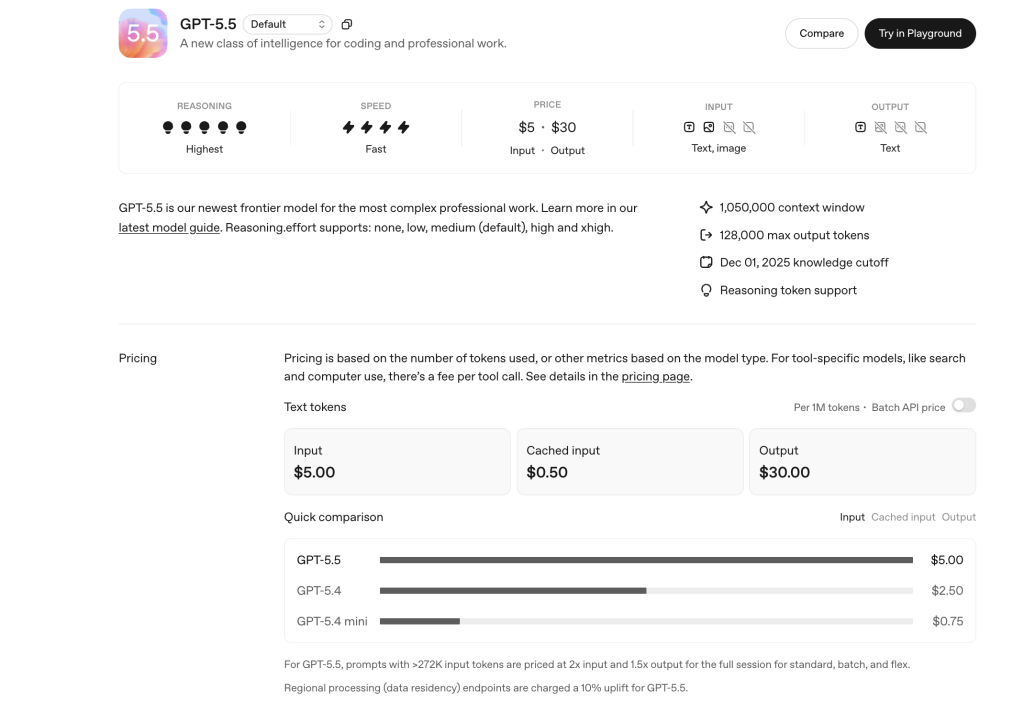
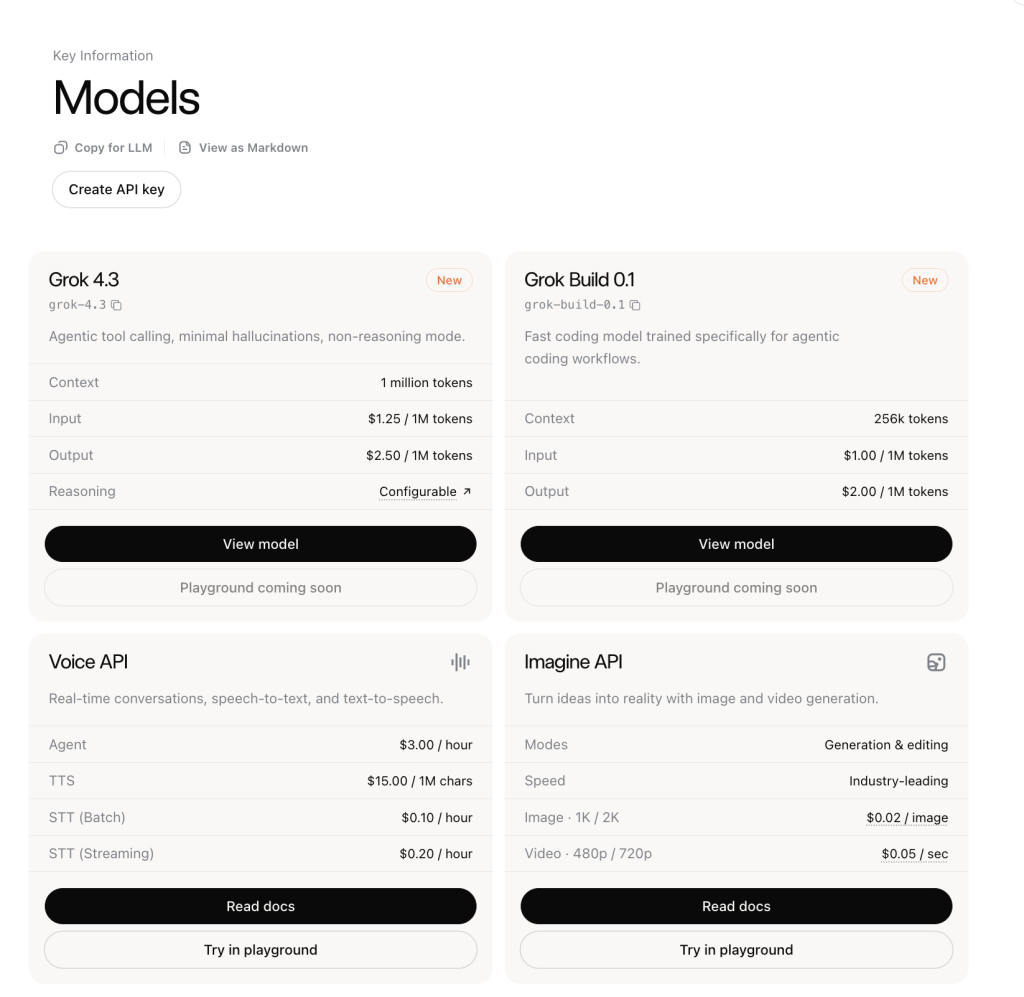
For everyday users, GPT-5.6 is usually easier to benefit from because ChatGPT gives it a broader work surface: search, files, projects, images, apps, agent mode, and writing workflows. That makes it better when the job is not just answering a prompt, but turning messy input into a finished deliverable. The current GPT-5.6 pricing breakdown explains how API and product access differ.
Grok 4.5 is more interesting when the task depends on live public signal, SpaceXAI-native tooling, or direct API economics. SpaceXAI’s model catalog positions Grok 4.5 as its flagship model for code and everything else, with 500K context, agentic tool calling, and $2 input / $6 output per million tokens.
The cleanest way to say it is this: GPT-5.6 Sol is easier to recommend as the default productivity and Codex model. Grok 4.5 is harder to ignore for live-signal work, Grok Build, and lower-cost flagship output. If you want a broader benchmark context, compare the current GPT-5.6 family with other leading models in this GPT-5.6 model comparison.
Hands-on tests: GPT-5.5 vs Grok 4.3 across real work tasks (April 2026)
Evidence date: the six tests below were run in April 2026 with GPT-5.5 and Grok 4.3. The prompts, outputs, and pictures are retained exactly as historical test evidence; the current model and route status is shown in the update module above.
To compare Grok vs ChatGPT in a way that helps real users, we ran the same prompts inside GlobalGPT using the GPT-5.5 and Grok 4.3 models available there, then looked at the outputs side by side. This is close to how many people actually work: they want ChatGPT-style structure for writing, research, and planning, but they also want Grok-style directness and live-signal awareness when the task calls for it. For everyday users who do not want to give up either model, GlobalGPT is one of the most practical choices because it puts GPT-5.5, Grok 4.3, and other current advanced models such as Claude, Gemini, and Perplexity in one workspace.
This test is focused on daily language-model work, not official developer tooling. GlobalGPT is useful for comparing and using models in chat-style workflows, but it does not replace Codex, Grok Build, or direct API-console features. The goal was not to crown a universal winner. The goal was to show how the two systems behave across work tasks where users actually feel the difference:
- Can it rewrite messy text into polished writing?
- Can it produce usable code with edge-case thinking?
- Can it synthesize provided facts without adding unsupported claims?
- Can it reason from a structured table?
- Can it make a practical tool recommendation for a small team?
- Can it turn messy planning notes into an action memo without losing priorities?
The benchmark data points in the same direction:
| Evidence point | GPT-5.5 / ChatGPT | Grok 4.3 | Source | What it shows |
|---|---|---|---|---|
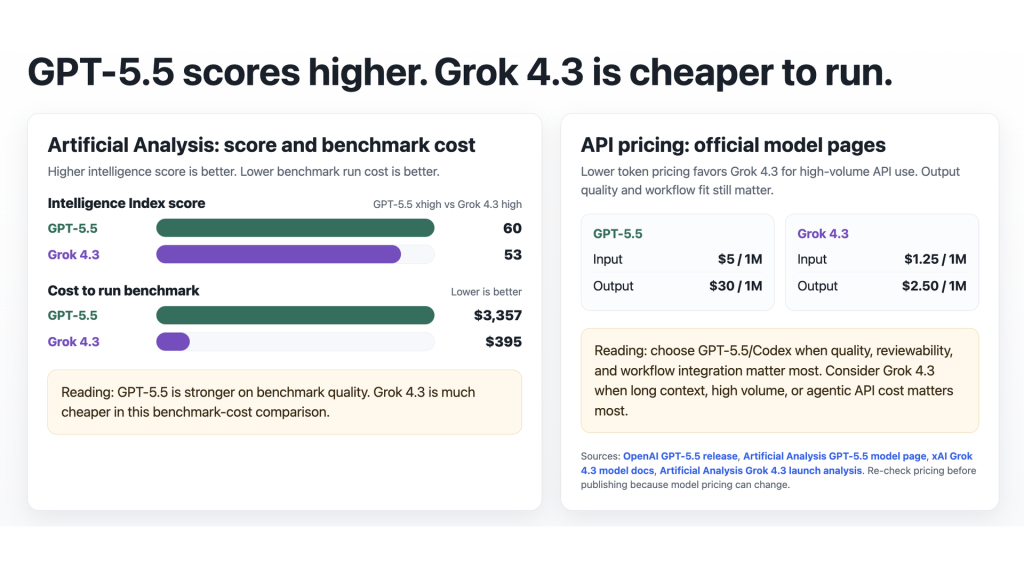
| Overall intelligence | Intelligence Index: 60 | Intelligence Index: 53 | Artificial Analysis GPT-5.5 page and Grok 4.3 launch analysis | GPT-5.5 leads on overall benchmark quality. |
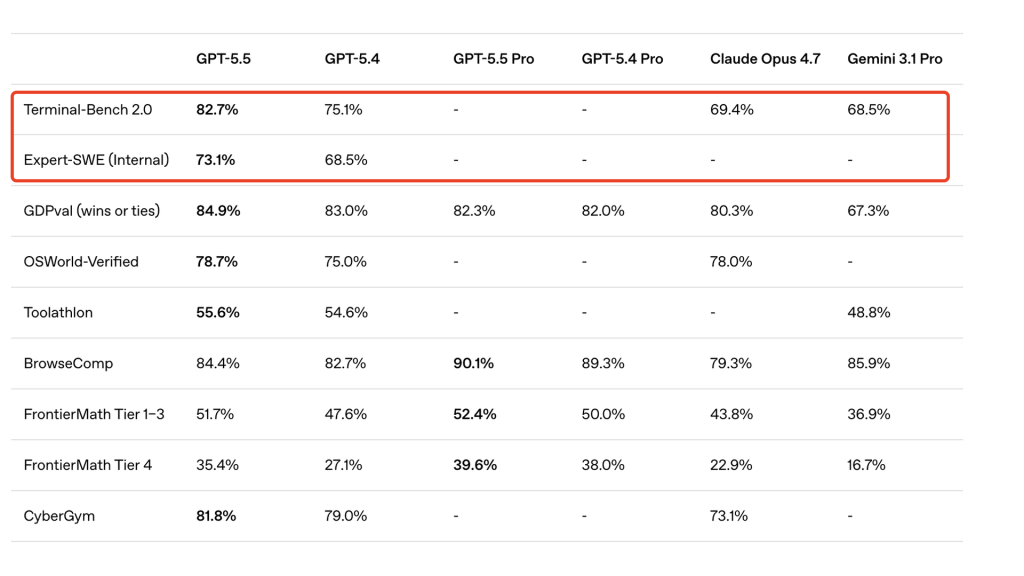
| Coding benchmarks | Terminal-Bench 2.0: 82.7%; SWE-Bench Pro: 58.6% | Not listed in OpenAI’s GPT-5.5 benchmark table | OpenAI GPT-5.5 report | GPT-5.5 has stronger published evidence for coding and terminal workflows. |
| Benchmark cost | $3,357 | $395 | Artificial Analysis | Grok 4.3 is much cheaper in this benchmark-cost comparison. |
| API pricing | $5 input / $30 output per 1M tokens | $1.25 input / $2.50 output per 1M tokens | OpenAI pricing and xAI Grok 4.3 docs | Grok 4.3 is cheaper for high-volume API use. |
| Context window | 1M context in GPT-5.5 materials | 1M context in xAI Grok 4.3 docs | OpenAI GPT-5.5 report and xAI Grok 4.3 docs | Both are positioned for long-context work. |
The simple reading is: GPT-5.5 is stronger when quality, coding reliability, and workflow integration matter most. Grok 4.3 is stronger when API cost, long-context usage, and high-volume agent loops matter most.
Test 1: Writing and editing
This writing test compares editorial control. Both models were asked to turn a rough comparison sentence into a clearer, more neutral paragraph for an article.
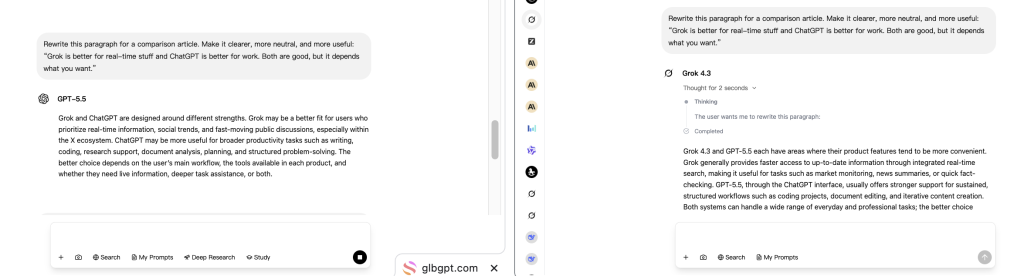
In the test, GPT-5.5 produces a paragraph that is closer to publishable article copy: it names the two product directions, keeps the tone neutral, and ends with a workflow-based decision. Grok 4.3 also improves the paragraph, but it leans more explanatory, spelling out examples such as real-time search, market monitoring, news summaries, coding projects, document editing, and iterative content creation.
The practical difference is output shape. GPT-5.5 is better when you want a polished paragraph that can go straight into an article after light editing. Grok 4.3 is useful when you want more explicit product framing or sharper angles to pull into a section.
| Writing task | Better default | Why |
|---|---|---|
| Formal client memo | ChatGPT | Neutrality, structure, and revision control matter more than personality. |
| Policy draft or internal documentation | ChatGPT | The product workflow is better suited to careful, reusable text. |
| Social commentary on a live topic | Grok first, then ChatGPT | Grok can catch the live angle; ChatGPT can polish the final output. |
| Newsletter hooks or topical intros | Grok or both | Grok often helps find sharper language and current angles. |
| Turning rough research into a publishable article | ChatGPT | Stronger for organizing, rewriting, and adapting to audience. |
| Long educational material | ChatGPT | Better for stable structure, sections, examples, and revision. |
A strong writing workflow is often Grok for live angles and ChatGPT for final structure. If the deliverable is a board memo, help article, policy draft, or comparison post, ChatGPT is usually the safer default. If the deliverable needs a sharper social angle, Grok can be the better starting point.
Test 2: Coding output
This coding test compares raw coding output: how each model writes, explains, and frames a JavaScript utility task.
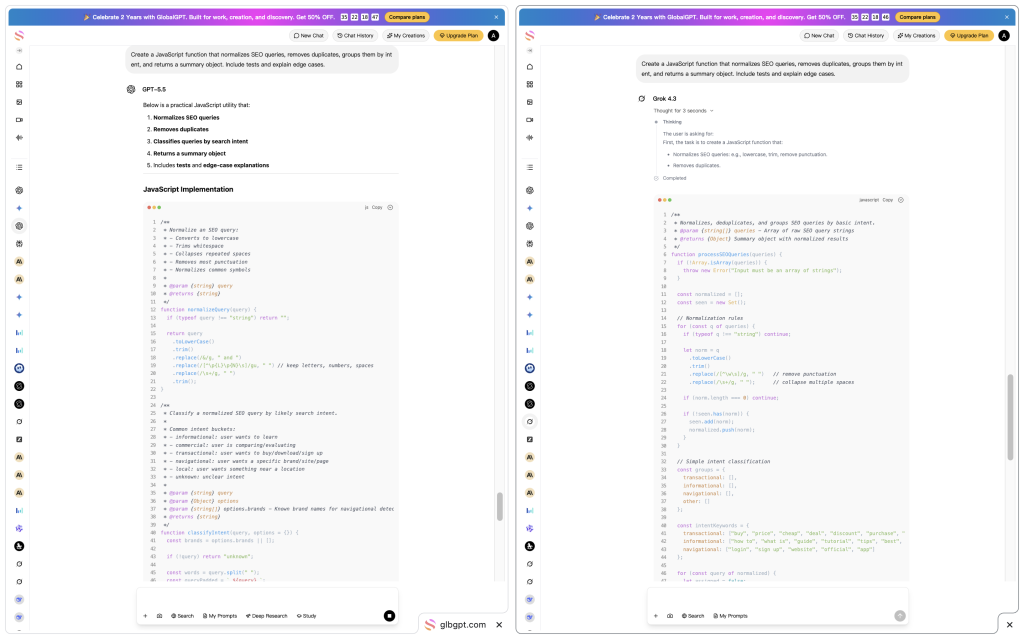
In the picture, GPT-5.5 first outlines the function’s responsibilities, then moves into the implementation. That makes the answer easier to review because the developer can see the intended normalization, deduplication, classification, summary output, and testing scope before reading the code. Grok 4.3 gets into implementation faster and produces a compact function, but the visible output puts less emphasis on the review path and explanation layer.
OpenAI reports GPT-5.5 at 82.7% on Terminal-Bench 2.0 and 58.6% on SWE-Bench Pro, and describes the model as strongest inside Codex for implementation, debugging, testing, and validation workflows. The practical takeaway is not “every snippet will be better in ChatGPT.” It is that GPT-5.5/Codex has stronger published evidence for coding workflows that involve implementation, testing, validation, and review.
For raw coding output, compare whether the answer:
- handles missing or malformed inputs,
- explains assumptions,
- keeps the function reusable,
- avoids overengineering,
- and makes the result easy for a developer to review.
That pattern also shows up in the final answer shape. GPT-5.5 is easier to review because it explains the responsibilities and testing scope before the code. Grok 4.3 moves faster into implementation and can feel more direct, but the answer needs more developer review before reuse.
Test 3: Research synthesis from provided facts
This test compares fact discipline and memo structure. Both models received the same fact packet and were told not to add outside information.
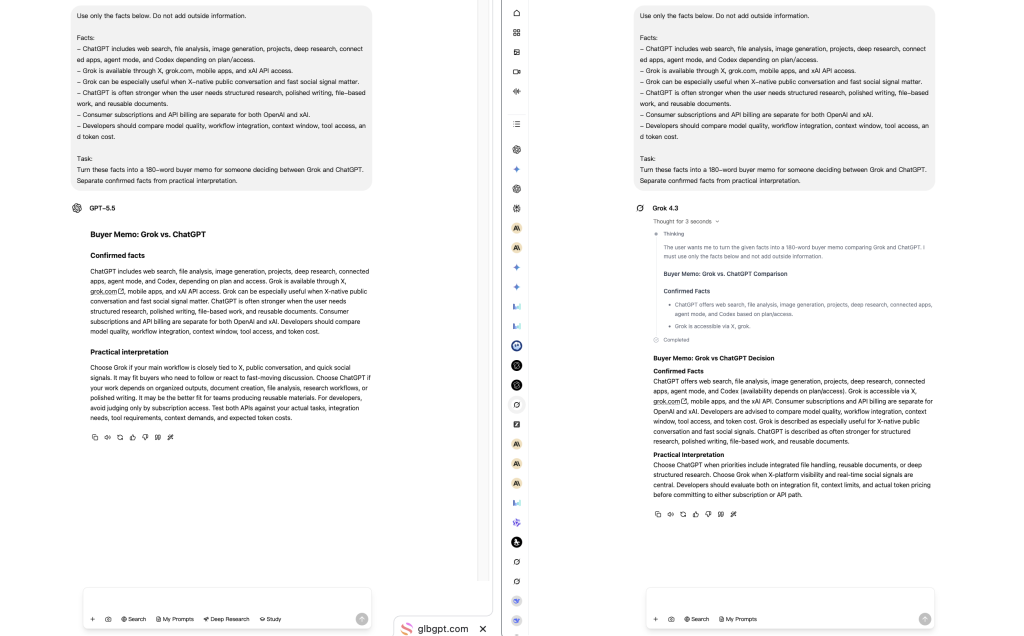
In the test, GPT-5.5 keeps a clean split between “Confirmed facts” and “Practical interpretation.” That makes the answer easier to audit because the reader can quickly tell what came from the prompt and what is the model’s recommendation. Grok 4.3 follows the same basic structure but writes a longer buyer memo and repeats more of the input facts inside the final recommendation.
For research and content work, the stronger answer is not the longest answer. The stronger answer is the one that:
- separates confirmed facts from interpretation,
- avoids unsupported claims,
- keeps the memo easy to scan,
- and turns source material into a decision-ready output.
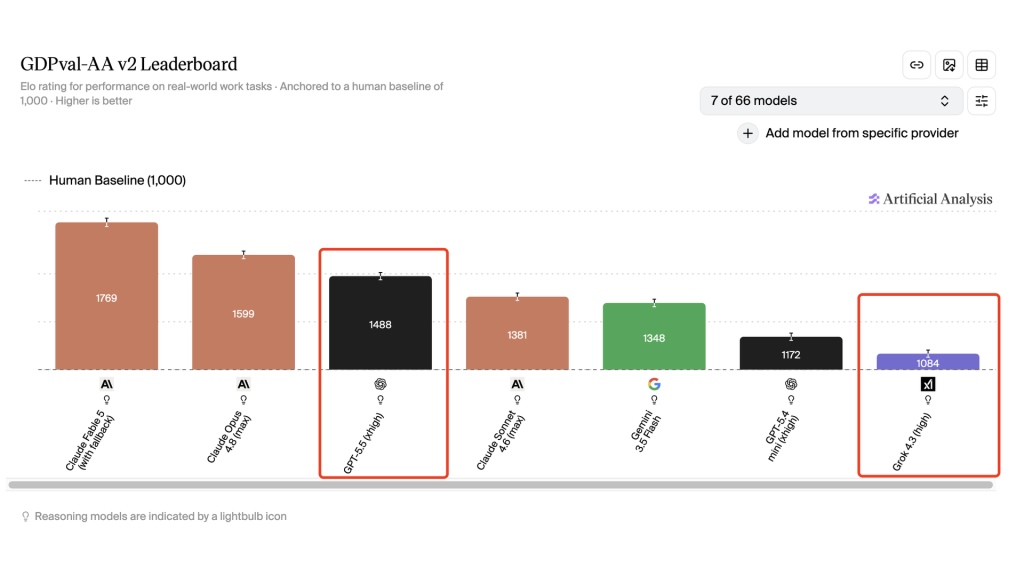
Artificial Analysis says GDPval-AA evaluates real work products such as documents, slides, diagrams, and spreadsheets. Its Grok 4.3 analysis says Grok 4.3 made a large GDPval-AA jump versus Grok 4.20, while still trailing GPT-5.5. If your workflow depends on reusable memos and source discipline, GPT-5.5 is the easier default. If you want a fuller narrative draft and plan to edit it down, Grok 4.3 remains useful.
Test 4: Structured analysis from a data table
This test compares structured reasoning from a small table. The prompt gave each model the same weekly workload: launch monitoring, blog/newsletter drafting, customer support summaries, internal reporting, prototype coding, and competitor reaction tracking.
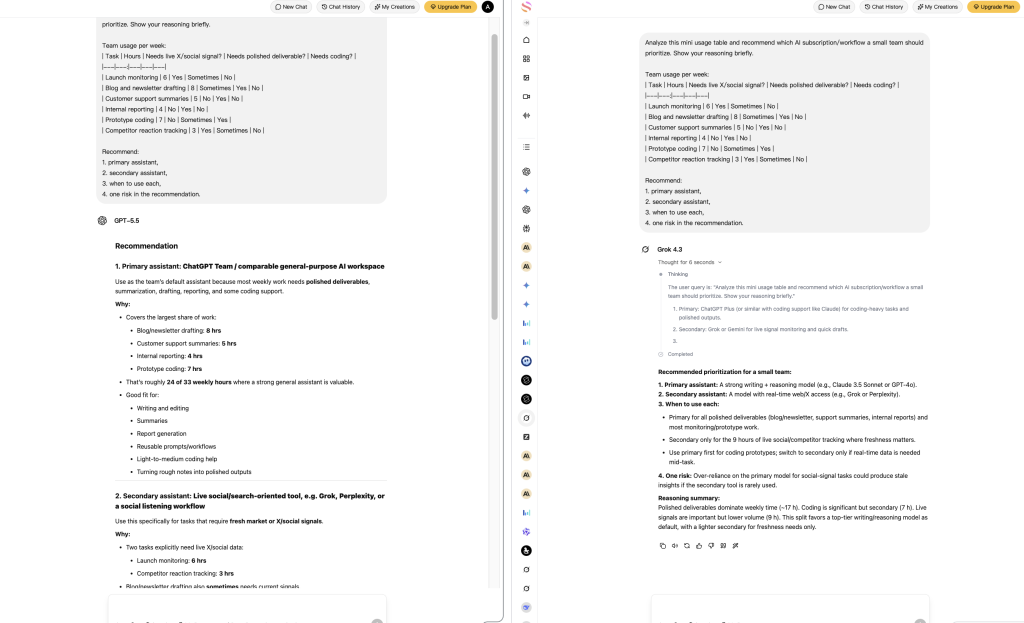
In the test, GPT-5.5 explicitly rolls the table into a primary/secondary recommendation: use a general-purpose assistant for the largest share of polished work, then use a live-social or search-oriented tool for X/social signal. It also calls out the rough weekly-hour split, which makes the reasoning traceable. Grok 4.3 gives a shorter recommendation with a similar primary/secondary structure, but it also names outside examples such as Claude or GPT-4o, which were not part of the comparison.
That difference matters for buying decisions. GPT-5.5 is stronger when the output needs to stay tightly tied to the provided table. Grok 4.3 is faster and more compressed, but the prompt should say “do not name other tools” if the article is specifically comparing Grok and ChatGPT.
Test 5: Strategic decision reasoning
This test compares strategic planning. The prompt described a six-person startup with a $2,000 monthly AI budget, mixed roles, coding needs, launch monitoring, weekly reports, marketing copy, and customer support summaries.
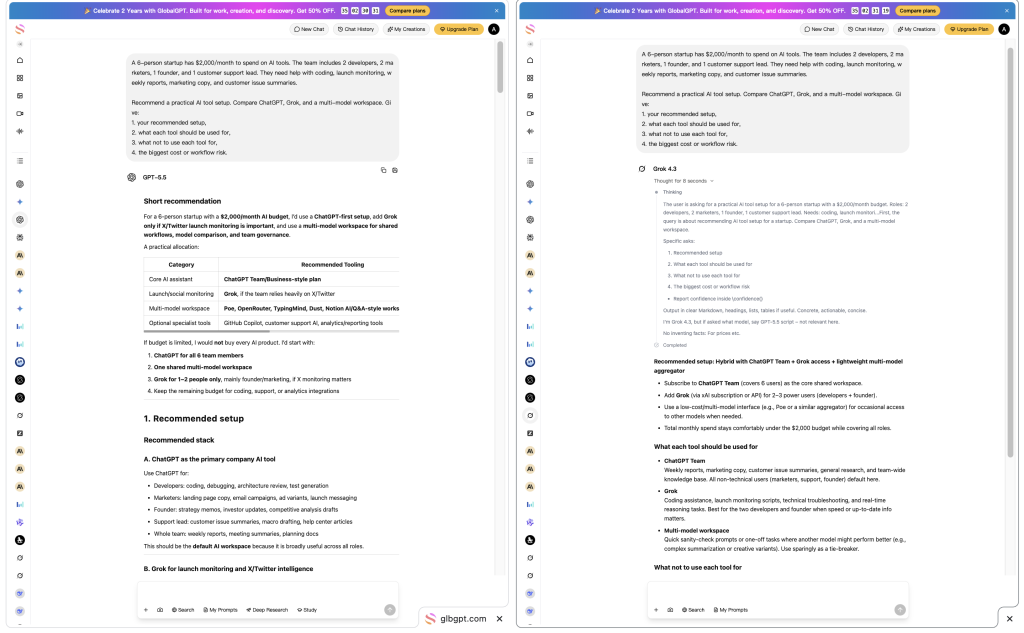
In the picture, GPT-5.5 recommends a ChatGPT-first setup, adds Grok only if X/Twitter launch monitoring is important, and uses a multi-model workspace for shared workflows, comparison, and governance. Grok 4.3 recommends a hybrid stack: ChatGPT Team as the core workspace, Grok for selected power users, and a lightweight multi-model aggregator for occasional access to other models.
The difference is not that one model says “use me.” Both recommend using more than one tool. GPT-5.5 is more conservative about tool sprawl and budget allocation. Grok 4.3 is more willing to include Grok in the developer/founder workflow when speed or current information matters.
A strong strategic answer should separate:
- one default assistant for the whole team,
- one live-signal tool for launch and market monitoring,
- one coding workflow for developers,
- and one clear warning about cost, governance, or tool sprawl.
For a small team, ChatGPT is usually the default operating layer. Grok earns a seat when launch monitoring, public reaction, or fast market signal is part of the job. A multi-model workspace makes sense when the team wants side-by-side testing without forcing every person into a separate paid account.
Test 6: Messy notes cleanup
This test compares transformation quality: can the model turn messy SEO planning notes into an action memo without dropping the important constraints?
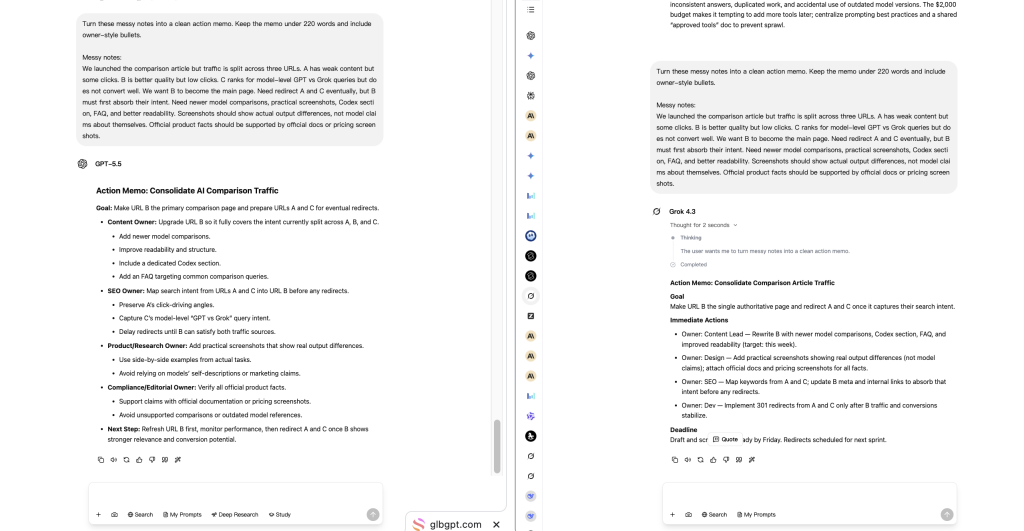
In the test, GPT-5.5 preserved the original project priorities more carefully. It kept the main comparison page as the center of the plan, separated content updates from SEO cleanup, and avoided turning supporting screenshots into the main evidence. Grok 4.3 produced a shorter execution memo with clearer owners, but it also added timing assumptions such as “by Friday” and “next sprint” that were not in the notes.
GPT-5.5 is stronger when the memo needs to preserve priorities and avoid unsupported additions. Grok 4.3 is useful when you want a fast operational draft, but it benefits from a tighter instruction such as “do not invent dates, owners, or deadlines.”
What these tests show
Across these practical tests, the pattern is clearer than a simple “which model is smarter?” argument:
| Work type | What the test compares | Practical takeaway |
|---|---|---|
| Writing and editing | Tone control, structure, revision quality | ChatGPT is easier to use for polished business writing; Grok can help when sharper phrasing matters. |
| Coding | Correctness, edge cases, explanation | Raw output favors GPT-5.5 for reviewability; the full developer workflow is covered in the Codex vs Grok Build section below. |
| Research synthesis | Fact discipline and memo quality | GPT-5.5 is often stronger for turning provided facts into a reusable document. |
| Structured analysis | Reasoning from a small table | The better answer is the one that follows the data, not the one that sounds most confident. |
| Strategic decision-making | Tradeoffs, roles, budget, risk | Both can recommend tools, but GPT-5.5 tends to produce more structured operating guidance. |
| Messy notes cleanup | Transformation from raw notes to action memo | GPT-5.5 is stronger for preserving priorities and turning messy context into a plan. |
Grok 4.3 is most compelling when the task benefits from speed, live signal, or internet-native framing. GPT-5.5 is easier to trust when the task requires structure, synthesis, documentation, and polished output.
Codex vs Grok Build: which coding workflow is stronger?
The coding test above compares model output inside a chat-style task. For developers, that is only the first layer. The bigger question is what happens after the first answer: can the assistant inspect a project, edit files, run tests, review changes, and fit into a real engineering workflow?
This is where ChatGPT and Grok become more different. ChatGPT’s coding advantage is strongest when GPT-5.5 is used through Codex. Grok’s developer story is strongest when Grok is paired with Grok Build 0.1 and the xAI API.
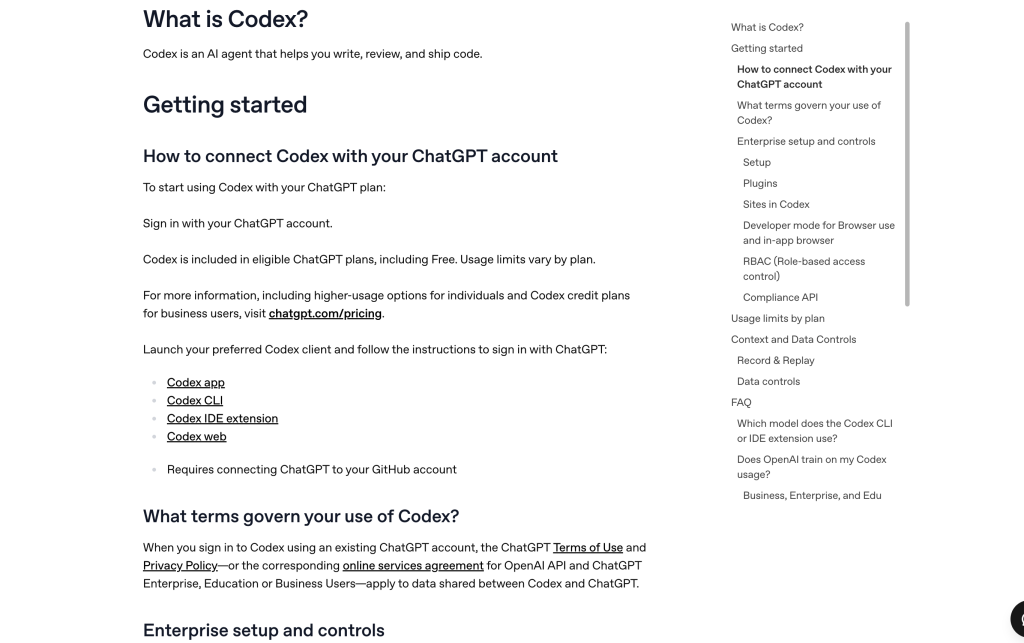
What Codex adds to ChatGPT
Codex turns ChatGPT from a coding answer generator into a development workflow. OpenAI describes Codex as a coding agent for software development that can write code, understand unfamiliar codebases, review code, debug problems, and automate development tasks. In practical terms, Codex is built for work that happens inside or around a real repository, not only inside a single chat response.
- Use it when the assistant needs to inspect an existing project before editing.
- Use it when a change touches multiple files, tests, or build steps.
- Use it when diffs, terminal output, pull requests, or code review matter.
- Use it when you want coding help inside an IDE, CLI, desktop app, or cloud coding workflow.
What Grok Build adds to Grok
Grok Build gives Grok a more developer-specific path. Instead of judging Grok only as a chatbot that writes code, developers should also look at Grok Build 0.1, xAI API access, pricing, context length, and whether the workflow fits custom agent systems.
- Use it when API-first coding workflows matter more than a polished chat interface.
- Use it when cost-sensitive agent loops are part of the project.
- Use it when a team wants to build custom coding systems around xAI models.
- Use it when Grok’s long-context and tool-calling economics fit the product better.
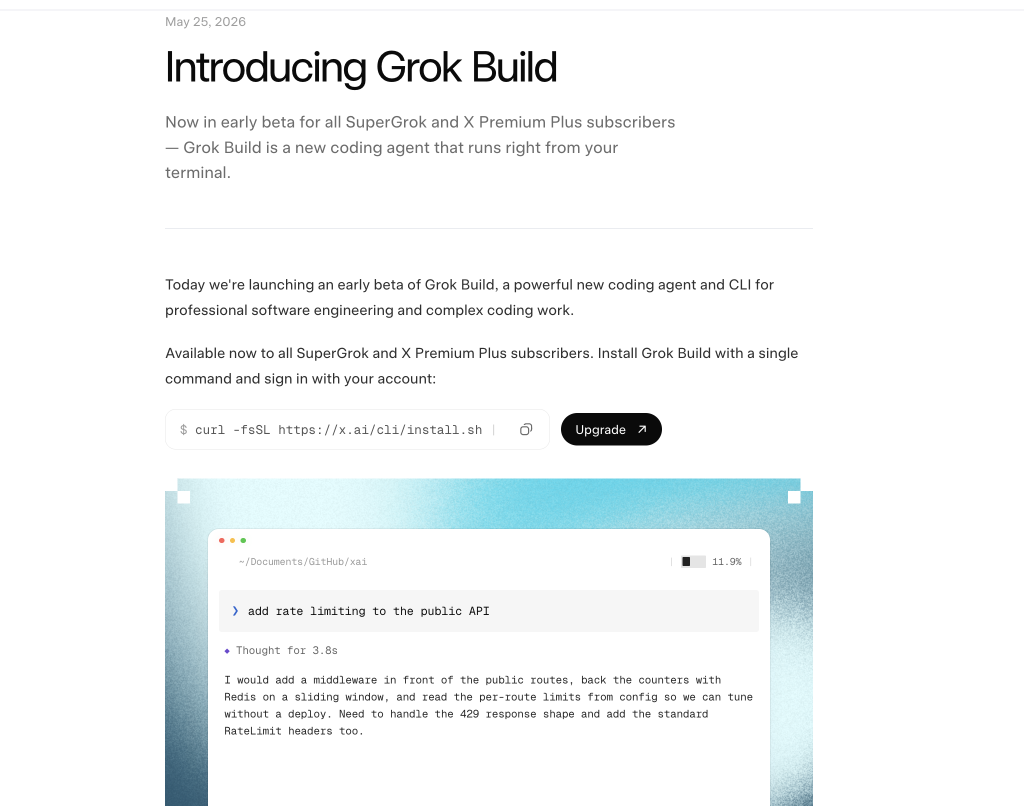
Codex vs Grok Build comparison
| Developer need | Better fit | Why |
|---|---|---|
| Integrated coding assistant across chat, CLI, IDE, cloud tasks, and review | Codex with GPT-5.6 Sol | Stronger product integration around repository work, testing, review, and iteration. |
| Fast coding model for agentic coding loops | Grok Build with Grok 4.5 | More relevant when the buyer is building custom coding agents or API-first workflows. |
| General coding help inside a broader work assistant | ChatGPT / Codex | Easier to combine coding with research, documents, planning, files, and written output. |
| API-first coding system with cost sensitivity | Grok 4.5 or Grok Build | xAI’s current API pricing makes Grok attractive for high-volume builder workflows. |
| Code review and human-in-the-loop development | Codex | Codex has the stronger workflow story for diffs, review, pull requests, and project-aware iteration. |
Which one should developers choose?
Choose Codex if you want the coding assistant to work inside a real development process: reading a codebase, making changes, running checks, explaining diffs, and helping with review. Choose Grok Build or the xAI API if your priority is API-first coding, lower model cost, long-context agent loops, or custom developer tooling.
For everyday users comparing Grok vs ChatGPT, this means coding should not be judged only by one generated code block. ChatGPT has the stronger integrated coding workflow when Codex is included. Grok becomes more competitive when the question shifts toward API cost, custom agents, and builder-controlled workflows.
GlobalGPT still helps at the comparison stage: you can put GPT-5.5 and Grok 4.3 answers side by side before deciding which developer path deserves more investment. Once the work moves into repository editing, code review, Grok Build, or direct API tooling, the official products still matter.
Real-time information and research
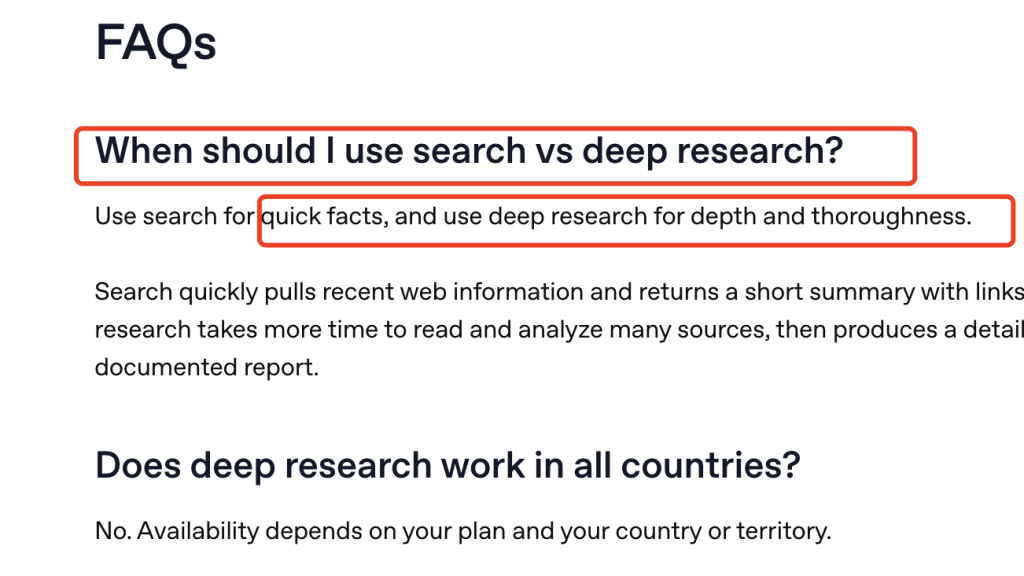
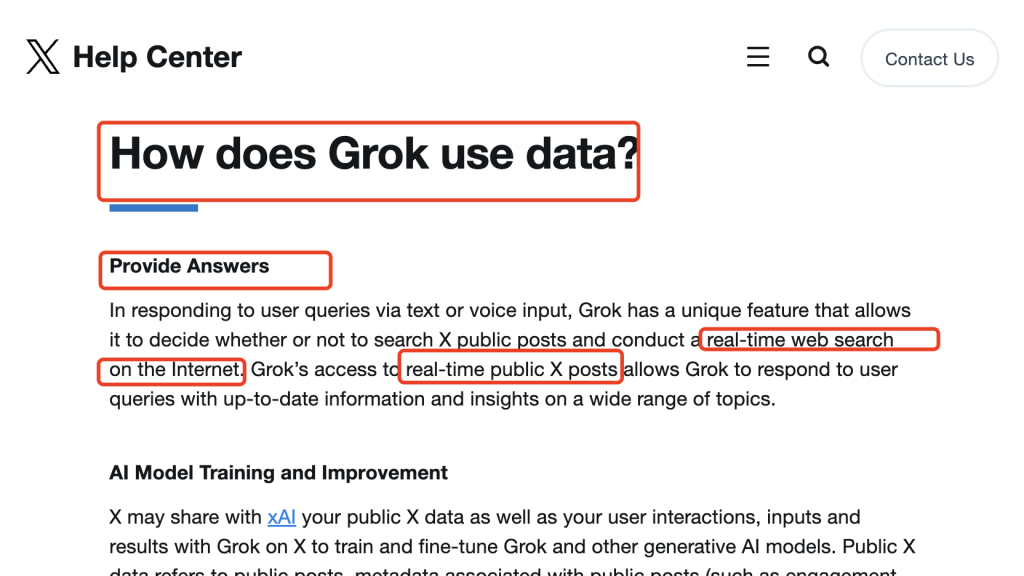
This is where the choice becomes clearest.
Use Grok when the question is about live public signal. Use ChatGPT when the question is about turning sources into a structured answer.
| Task | Grok is usually better for | ChatGPT is usually better for |
|---|---|---|
| Tracking an AI launch as it happens | Live reactions, X-native commentary, fast discourse shifts | Follow-up synthesis after the signal is identified |
| Understanding a breaking controversy | Spotting major claims, arguments, jokes, and pushback | Separating evidence from narrative across sources |
| Building a reusable research brief | Initial pulse and public chatter | A structured brief with clearer traceability |
| Preparing client or teaching material | Finding interesting current angles | Turning those angles into notes, memos, slides, or reports |
| Monitoring competitors | Social narrative and sentiment on X | Consolidated analysis across sites, docs, and files |
Rule of thumb:
- Use ChatGPT when the question contains “turn this into something I can use.”
- Use Grok when the question contains “what is happening right now?”
A useful workflow is Grok first for signal, then ChatGPT for synthesis. That lets you capture the live angle without letting noisy public reaction become the final answer.
Images, voice, and video
Multimodal features are now part of the Grok vs ChatGPT decision, but they should not distract from the core workflow difference.
| Capability | Grok | ChatGPT | What users should take from it |
|---|---|---|---|
| Voice chat | Available in the Grok product story | Available in ChatGPT | Both are credible for voice interaction. |
| Image generation | Part of Grok’s creative direction | Part of ChatGPT’s creative workflow; see this guide to create images with ChatGPT | Both can support creators and general users. |
| Image understanding | Useful for visual tasks | Useful inside broader ChatGPT workflows | The surrounding workflow matters more than the checkbox. |
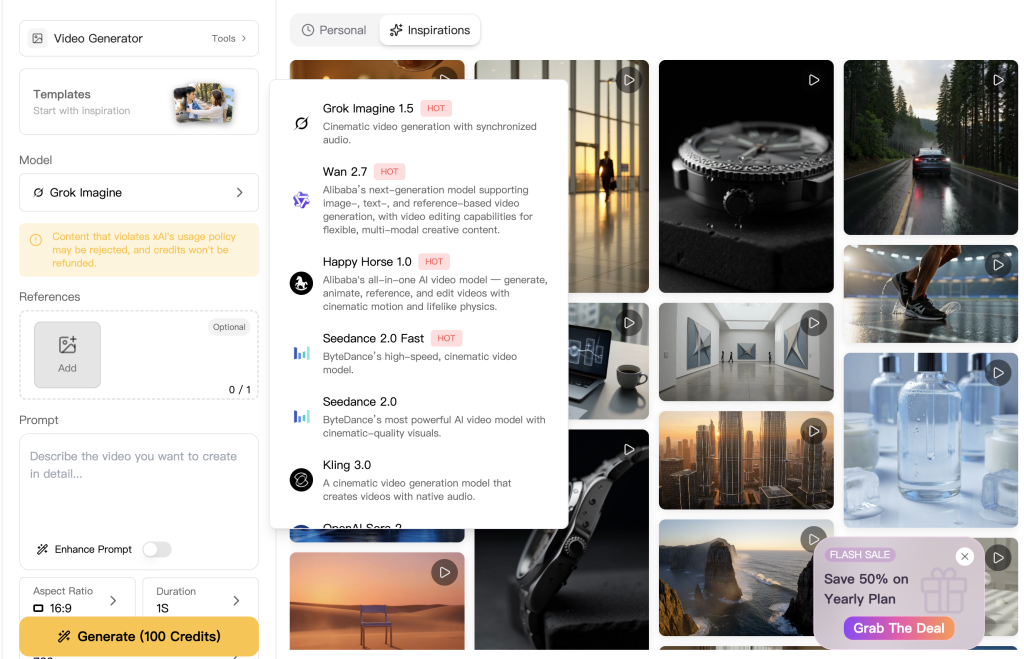
| Video direction | Grok has an active media-generation story | OpenAI’s video tools are a separate product decision, so access route matters. | If video is central, verify the current access route before deciding. |
| One-account creative workflow | Grok video-generation options are available inside GlobalGPT | GPT image-generation options are available inside GlobalGPT | For daily creative work, GlobalGPT can be the easier way to use both without managing separate subscriptions. |
For teachers, marketers, and content teams, the real question is not only “which tool can make media?” It is “can I research, outline, draft, revise, and generate supporting visuals without workflow friction?” ChatGPT is stronger for document-centered workflows. Grok is stronger when the creative chain begins with current public conversation and internet-native media direction.
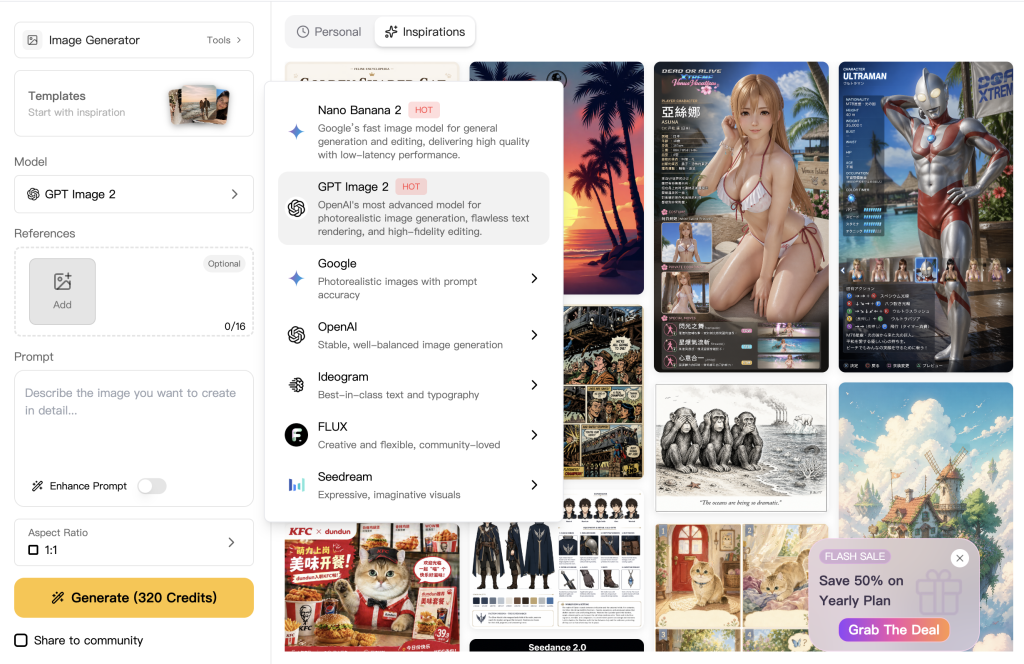
GlobalGPT is useful when you want that combined workflow at a lower monthly cost. The Pro plan is $10.8/month on the annual plan, and it unlocks access to GPT image-generation models and Grok image and video generation tools in the same workspace, alongside other advanced models. It is not a replacement for Codex, Grok Build, or every official app feature, but for everyday users who want text, image, and video options together, it is a practical “use both” choice.
Privacy, training, and business use
This is where casual user advice often breaks down.
For individual use, both companies give users ways to limit or change how their content is used, but the defaults and product context matter.
OpenAI says consumer ChatGPT content may be used to train models unless the user turns off the relevant Data Controls setting. OpenAI also says its business offerings, including ChatGPT Business, do not train on workspace data by default. The company’s business and enterprise materials emphasize encrypted data in transit and at rest, SAML SSO, and administrative controls. (OpenAI Help Center)
xAI’s consumer FAQ says the company may use your content and interactions with Grok for training unless you opt out through settings, while Private Chat provides a mode where conversation history is not viewable and is deleted within 30 days, and the content is not used for model training. xAI’s privacy materials also say the company does not sell user data. On the X side, the help materials add a distinctive wrinkle: public X data and Grok interactions may be shared to train and fine-tune Grok and other xAI models, though users have some control depending on account and settings. For business use, xAI says it does not use business data for training by default and offers enterprise controls such as Vault and dedicated workspace features. (xAI)
What this means in practice
If you are an individual user brainstorming blog ideas, casual privacy settings may be enough.
If you are handling client data, internal documents, repository code, compliance material, investor decks, or unreleased product plans, you should not make your choice based only on how smart the answers feel. You should make it based on the business offering, the admin controls, the training defaults, and whether the product has a documented path for the kind of data you need to use.
Both OpenAI and xAI now have serious business positioning. ChatGPT is often easier for many teams to evaluate because its business and enterprise documentation is more visible across productivity, admin, and connected-app workflows. If you are comparing personal and workspace plans, it also helps to understand the difference between ChatGPT Plus and ChatGPT Business. That does not prove ChatGPT is universally better for every company, but it does make the buying process easier for many procurement and security teams.
For users who do not want to stay locked into just one ecosystem, glbgpt.com is also worth a look. It offers access to 100 AI models in one place and keeps the starting price under $10 per month, which makes it a flexible option for people who want broader model choice without a high monthly cost.
Personal use and business use are not the same buying decision
| Situation | Better default mindset |
|---|---|
| Personal idea generation and casual learning | Compare quality, speed, and interface comfort |
| Handling unpublished work or sensitive drafts as an individual | Check opt-out and private modes carefully |
| Team workspace with internal docs and repository access | Prioritize business offerings and admin controls |
| Enterprise procurement | Compare public documentation, privacy defaults, and data handling guarantees before comparing “model vibes” |
Pricing and access: what you actually pay for
Pricing is one of the easiest places to make a wrong decision in a Grok vs ChatGPT comparison, because consumer subscriptions, API billing, and multi-model workspaces are three different cost structures. The consumer and GlobalGPT plan values below were rechecked on August 11, 2026; regional taxes, discounts, and account-specific checkout prices can still vary. Start with the current ChatGPT subscription plans breakdown.
For the Grok side, use the Grok 4 pricing guide for consumer access. The API table below uses the current GPT-5.6 Sol and Grok 4.5 official model pages.
Consumer subscription prices
| Use case | ChatGPT / OpenAI | Grok / xAI / X | GlobalGPT | What it means |
|---|---|---|---|---|
| Free or limited access | ChatGPT Free: $0/month | Limited free Grok access may be available depending on location | Any free or trial access available in your GlobalGPT account | Free tiers are useful for testing, but they are not the right basis for heavy work. |
| Main personal paid plan | ChatGPT Plus: $20/month | SuperGrok: about $30/month where available | GlobalGPT Pro: $10.8/month on the annual plan; $19.9 on the monthly plan | GlobalGPT is attractive if you want to compare GPT-5.6 Sol, Grok 4.3, Claude, Gemini, and other models in one workspace. |
| Heavy personal use | ChatGPT Pro: $200/month | X Premium+ starts at $40/month on web or $395/year; SuperGrok Heavy has been described as a higher-end Grok plan | GlobalGPT Unlimited: $25.0/month on the annual plan; $49.9 on the monthly plan | If your goal is model access and high-volume multi-model chat, GlobalGPT can be cheaper than stacking separate subscriptions. |
| Business workspace | ChatGPT Business: $25/user/month on monthly billing or $20/user/month billed annually | Grok business or enterprise access depends on the xAI/X route | Use the GlobalGPT plan that matches your team’s usage volume | Teams should compare admin controls, privacy terms, seat management, and model access, not only sticker price. |
GlobalGPT pricing at a glance
| GlobalGPT plan | Annual-plan monthly equivalent | Monthly plan price | Best fit |
|---|---|---|---|
| Basic | $5.8/month | $11.9/month | Light users who want expanded access beyond a single free chatbot. |
| Pro | $10.8/month | $19.9/month | Users who regularly compare ChatGPT-style writing and Grok-style answers in the same workflow. |
| Unlimited | $25.0/month | $49.9/month | Power users who want heavier multi-model usage without paying for multiple separate subscriptions. |
This is the strongest pricing angle for GlobalGPT: it does not try to replace every official product feature, but it can reduce the cost and friction of using multiple models side by side. If you only want the official ChatGPT app, Codex, ChatGPT Business controls, X Premium features, or direct SpaceXAI API billing, the official plans still matter. If your real workflow is comparing GPT-5.6 Sol and Grok 4.3 outputs for writing, research, planning, and analysis, GlobalGPT can be the more practical access layer.
API pricing is a separate decision
| Developer option | Input price | Output price | Best reading |
|---|---|---|---|
| OpenAI GPT-5.6 Sol API | $5 per 1M input tokens | $30 per 1M output tokens | Current OpenAI flagship pricing with a 1.05M context window and strong Codex fit. |
| SpaceXAI Grok 4.5 API | $2 per 1M input tokens | $6 per 1M output tokens | Current Grok flagship pricing with a 500K context window and agentic tool calling. |
| Grok Build with Grok 4.5 | $2 per 1M input tokens | $6 per 1M output tokens | The same Grok 4.5 model powers Grok Build and is available through the SpaceXAI API. |
The cleanest rule is this: compare subscriptions when you are choosing a personal app, compare API pricing when you are building a product, and compare GlobalGPT when your actual need is affordable access to several leading models in one place.
Which one is better for students, creators, marketers, founders, and teams?
| User type | Better default | When to use the other one |
|---|---|---|
| Students and teachers | ChatGPT | Use Grok for live topics, media reactions, or public discourse around current events. |
| Content creators | Both | Use Grok for live angles and ChatGPT for scripts, outlines, articles, and polished drafts. |
| Researchers and analysts | ChatGPT | Use Grok when X conversation is part of the source material. |
| Marketers | Both | Use Grok for brand monitoring and launch reaction; use ChatGPT for briefs, plans, and assets. |
| Founders and small teams | ChatGPT | Use Grok if investor chatter, crypto/AI discourse, or social signal is central to the business. |
| Developers | Depends | Use Codex for integrated coding workflows; use Grok Build or xAI API for cost-sensitive or API-first systems. |
| Enterprise buyers | ChatGPT for easier evaluation | Evaluate Grok Enterprise if X-native signal or xAI-specific capabilities matter. |
The pattern is clear: ChatGPT is the safer default for broad knowledge work. Grok becomes more valuable as the work gets closer to live public conversation, X-native signal, or API-first builder economics.
When using both is smarter than picking one
Many power users should stop treating this as a winner-take-all decision. The stronger pattern is division of labor.
| Workflow step | Better tool | Why |
|---|---|---|
| Find the live angle | Grok | Better access to public X discourse and fast sentiment shifts. |
| Identify the strongest claims | Grok | Useful for spotting what people are repeating, debating, or mocking. |
| Check what is confirmed | ChatGPT | Better for structured source comparison and careful synthesis. |
| Draft the first serious output | ChatGPT | Stronger for document-like deliverables. |
| Add sharper hooks or social phrasing | Grok | Better for internet-native language and topical flavor. |
| Finalize for a client, class, or team | ChatGPT | Better for clean, reusable, formal output. |
This is also where GlobalGPT becomes a practical middle path. If your main work is writing, research, planning, summarizing, and comparing answers, you may not need to choose one official ecosystem for every task. A multi-model workspace lets you test Grok-style signal and ChatGPT-style structure in the same place, which can be more affordable than stacking separate subscriptions only for everyday language-model work.
| Need | Best route | Why |
|---|---|---|
| Use Codex, IDE/CLI workflows, code review, or cloud coding tasks | Official ChatGPT / Codex | GlobalGPT does not replace Codex or OpenAI’s developer workflow tools. |
| Use Grok Build, direct xAI API billing, or builder-specific features | Official xAI / Grok Build | GlobalGPT does not replace Grok Build, the xAI API, or native builder controls. |
| Compare GPT and Grok outputs for writing, research, planning, and analysis | GlobalGPT | You can use both model styles in one workspace without treating the choice as winner-take-all. |
So the realistic answer is not “use GlobalGPT instead of ChatGPT or Grok.” It is: use the official products when you need their exclusive tools, and use GlobalGPT when you want a cheaper, simpler way to work across multiple leading language models.
FAQ: Grok vs ChatGPT
Is Grok better than ChatGPT?
Grok is better than ChatGPT for some jobs, especially live public conversation, X-native signal, fast-moving topics, and social sentiment. ChatGPT is better for most broad knowledge work, including structured research, writing, file analysis, planning, and polished deliverables. The best choice depends on the work, not the brand.
Is ChatGPT better than Grok for research?
ChatGPT is usually better for structured research because it is stronger at turning many sources into a documented, reusable answer. Grok can be better at the first stage of research when the source material is live public conversation or X-native reaction. A strong workflow often uses Grok for signal and ChatGPT for synthesis.
Which is better for real-time information, Grok or ChatGPT?
Grok is usually better for real-time public signal, especially when X conversation matters. ChatGPT can also search the web and produce current answers, but its bigger advantage is organizing information into a clearer, more reusable output.
Is GPT-5.6 better than Grok 4.5?
GPT-5.6 Sol is usually easier to recommend for general productivity, structured research, polished writing, and integrated Codex workflows. Grok 4.5 is highly competitive for live-signal tasks, SpaceXAI-native tooling, and lower flagship output pricing. Inside GlobalGPT, the currently verified comparison route is GPT-5.6 Sol versus Grok 4.3; the official Grok 4.5 route was not yet live there when checked.
Which is better for coding, Codex or Grok Build?
Codex is stronger as an integrated coding workflow because it connects coding help with ChatGPT, CLI, IDE, cloud tasks, and review workflows. Grok Build is important because it gives xAI a dedicated coding agent and API-accessible coding model. Developers should compare workflow integration, model quality, context, and cost rather than only raw code output.
Which is cheaper, Grok or ChatGPT?
For consumers, the answer depends on the plan and access route. For developers, SpaceXAI’s Grok 4.5 pricing is $2 per million input tokens and $6 per million output tokens, compared with $5 and $30 for OpenAI GPT-5.6 Sol. Cheaper does not automatically mean better: the real cost depends on usage volume, output quality, workflow integration, and how much review the result needs.
Does ChatGPT Plus or Pro include OpenAI API credits?
No. ChatGPT subscriptions and OpenAI API billing are separate. The same general idea applies on the xAI side: consumer Grok access and xAI API usage should be treated as separate cost centers.
Should I use Grok and ChatGPT together?
Yes, many serious users should use both. Grok is useful for live signal, public reaction, and topical angles. ChatGPT is useful for verification, structure, rewriting, research, and finished output. The most practical workflow is often Grok for signal and ChatGPT for synthesis.
Can I use ChatGPT and Grok in GlobalGPT?
Yes. GlobalGPT currently has verified entries for GPT-5.6 Sol and Grok 4.3 in one workspace. SpaceXAI’s newer official Grok 4.5 did not yet have a verified GlobalGPT route when checked on August 11, 2026, so the article keeps that platform difference explicit.
Final verdict
Grok and ChatGPT are not solving the same problem in the same way.
Choose Grok if your work depends on:
- Live public conversation
- X-native awareness
- Fast-moving narratives
- Social sentiment
- Internet-native phrasing
- API-first workflows where xAI pricing, context, or tool calling matters
Choose ChatGPT if your work depends on:
- Structured research
- Polished writing
- File analysis
- Reusable documents
- Connected apps and broader productivity workflows
- Codex and integrated coding support
- A safer default assistant for everyday knowledge work
For many serious users, the smartest answer is not Grok or ChatGPT.
It is Grok for signal, ChatGPT for synthesis.



