GPT Image 2.6 vs 2.5: Tests, Pricing and Real Results
Six original prompt pairs compare GPT Image 2.6 and 2.5 on people, storyboards, bilingual labels, layouts, and object placement—with star ratings, time, and output tokens.
 Chloe Murphy
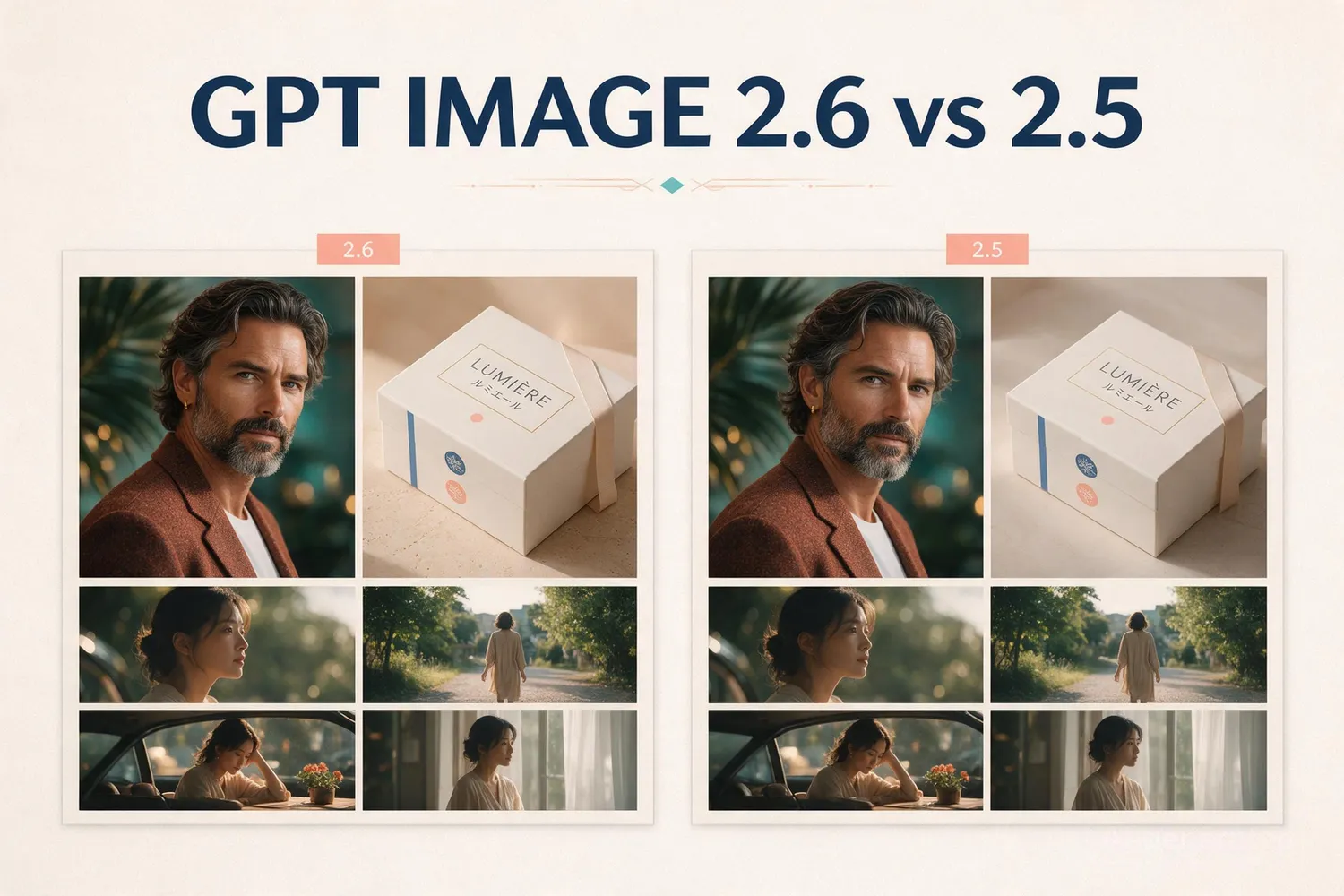
GPT Image 2.6 is a meaningful workflow update rather than a simple quality-score refresh. OpenAI documents a 2.6 family with gpt-image-2.6-sunburst for detailed visual work and gpt-image-2.6-flare for faster iteration. The same documentation adds explicit complexity control, markup-guided edits, SVG output, and animated GIF output.
The ChatGPT model family includes tools for writing a creative brief as well as generating its visuals; those are separate stages of a production workflow.
We wrote six work briefs for packaging, information design, commercial still lifes, fashion photography, advertising, and film storyboards. Each was submitted unchanged to both model routes. The twelve original outputs show specific errors and useful successes; they do not establish an overall model ranking. Generation used Broly/Anywhere aliases, without independently verified native variant mapping.
GPT Image 2.6 vs 2.5: Quick Answer
- What changed: 2.6 offers Sunburst and Flare, as does 2.5. Its documentation adds complexity controls and SVG/GIF workflows; markup-guided editing also covers supported 2.5 models.
- What the matched tests show: 2.6 better follows the specified advertising overlap; 2.5 preserves the crowded still-life object count. Both place fashion buttons on the wrong side and break bag-side continuity in the storyboard.
- What did not change: official image-generation pricing is token-based, with the same headline image-output rate of $30 per 1 million image tokens in the checked pricing documentation.
- Best practical choice: choose 2.6 when its documented controls fit your workflow, but check every object and label. These three pairs do not justify upgrading on image accuracy alone.
The image comparison is a small sample, not an official benchmark or a universal quality ranking.
GPT Image 2.6 vs 2.5: Models and Test Settings
| Setting | Official model options | Used in our comparison |
|---|---|---|
| 2.6 model | Sunburst: detailed visual work; Flare: fast iteration | gpt-image-2.6 third-party alias; Sunburst/Flare not disclosed |
| 2.5 model | Sunburst and Flare | gpt-image-2.5 third-party alias; Sunburst/Flare not disclosed |
| Rendering quality | low, medium, high, xhigh, max | low requested for both routes |
| Complexity | 2.6: low, medium, high; official default high | Not sent; effective third-party setting not returned |
| Canvas and inputs | Depends on model and request | 1024 × 1024 requested; text only, no seed or reference image |
These images do not establish Sunburst-versus-Sunburst or Flare-versus-Flare performance. The saved task responses identify only generic version aliases. Also, quality=low is rendering quality, not proof of low complexity or a Flare model. Official model and complexity definitions.
GPT Image 2.6 vs 2.5: Features and Editing Controls
Model choice
Sunburst and Flare
gpt-image-2.6-sunburst is positioned for detailed visual work. gpt-image-2.6-flare is positioned for faster iteration. The matched provider route used a generic 2.6 alias, so it does not tell us whether it selected either native model.
Control
Complexity is explicit
The guide documents low, medium, and high complexity, with high as the default when omitted. OpenAI says the setting does not carry a separate fee.
Output and edits
Markup, SVG, and GIF
The 2.6 guide highlights markup-guided edits, SVG output, and animated GIF output alongside text and image inputs. Treat these as documented capabilities and validate the exact response shape in your SDK.
Text rendering is still a review task: OpenAI’s guide warns that complex text, recurring characters, and structured compositions can still fail.
The token model remains central: output size, quality, prompt length, reference images, and cache use affect usage; model naming does not create a fixed per-image price.
Native IDs matter: the official route uses the exact Sunburst or Flare model ID. A third-party service may expose an alias such as
gpt-image-2.6, which should be labeled as a route alias.
A commercial label requires commercial-use rights and independent product-fact checks as well as readable lettering.
Time and Output stars compare only these two provider responses within each task: fewer seconds or image output tokens earns more stars. Stars = 5 × the lower value ÷ this value, rounded, minimum 1. These are relative sample ratings, not official model efficiency scores; variants and some returned sizes differ.
Time = provider task submission to completion, including queue time; not pure model inference latency. Tokens = provider-reported image output tokens, excluding prompt input. Different provider routes and undisclosed native variants prevent an official speed or token-efficiency ranking.
GPT Image 2.6 vs 2.5: Harder Text, Layout, and Spatial Tests
We wrote three demanding work briefs: bilingual packaging with numerical tables, a nine-panel poster with a prescribed connector path, and twelve objects with layered occlusion. Each prompt was submitted once to each route. All six first outputs are shown; none was regenerated or retouched.
Requested settings: identical prompt within each pair, 1024 × 1024, low quality, PNG, no reference images. Returned settings differed: all 2.6 images and the 2.5 grid are 1024 × 1024; the 2.5 packaging and spatial images are 1254 × 1254. We compare constraint compliance, not small-text sharpness or resolution superiority. No seed was supplied, and route aliases are not independently verified native OpenAI variants.
| Task / Metric | GPT Image 2.6 | GPT Image 2.5 |
|---|---|---|
| Bilingual label Quality | ★★★★★Text and numbers retained | ★★★★★Text and numbers retained |
| Time | ★★★★★26 s | ★★★☆☆39 s |
| Output | ★★★★★1,758 tokens | ★★★★☆2,058 tokens |
| Nine-panel layout Quality | ★★★★★Panel order and arrows correct | ★★★★★Panel order and arrows correct |
| Time | ★★★★★26 s | ★★★★☆29 s |
| Output | ★☆☆☆☆1,758 tokens | ★★★★★213 tokens |
| 12-object scene Quality | ★★☆☆☆Extra marble; ribbon cropped | ★★★☆☆Key lettering; ribbon cropped |
| Time | ★★★★★18 s | ★★★☆☆36 s |
| Output | ★★★★★1,758 tokens | ★★★★★1,650 tokens |
Editorial ratings of these individual outputs: ★★★★★ no visible issue on the reviewed checks; ★★★★☆ minor correction; ★★★☆☆ important correction; ★★☆☆☆ major correction; ★☆☆☆☆ unusable. Not an overall model benchmark. Exact pixel alignment and small-text sharpness are not rated.
1. Bilingual packaging and numerical fidelity
Exact prompt used for both models
Create one square print-ready flat back-label design for a fictional tea brand on ivory paper, black type and dark green rules. No mockup, perspective, extra text or illustrations. Use a clear two-column grid, English left and Simplified Chinese right. At top render exactly: MOSS & KETTLE / 山苔茶室. Below render exactly: JASMINE GREEN TEA / 茉莉绿茶. Render these paired rows, preserving every number and punctuation: NET WT 80 g / 净含量80克; INGREDIENTS: green tea, jasmine flowers / 配料:绿茶、茉莉花; ORIGIN: Fujian, China / 产地:中国福建; BREW: 3 g + 180 ml / 冲泡:3克+180毫升; WATER: 80°C / 水温:80°C; STEEP: 2 min / 浸泡:2分钟. Add a lower-left boxed table titled BREWING SCHEDULE with columns ROUND | WATER | TIME and exactly these three rows: 1 | 180 ml | 120 s; 2 | 180 ml | 90 s; 3 | 180 ml | 150 s. To its right put a distinct warning box reading exactly: KEEP DRY. RESEAL AFTER OPENING. / 避光干燥保存,开封后密封。 Across the bottom render exactly: LOT JG-0418 | BEST BEFORE 2028-04-18. Keep every line legible, no invented barcode, seal, logo, extra claims or watermark.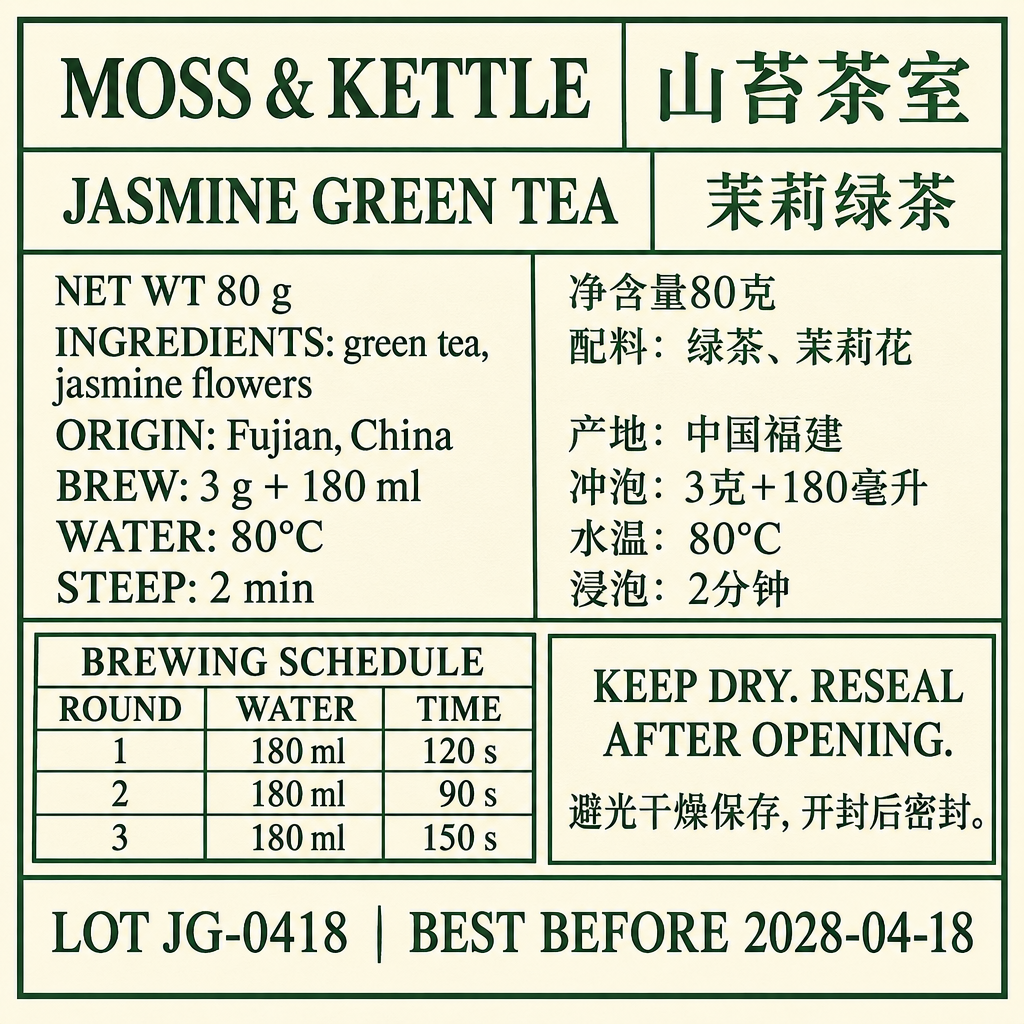
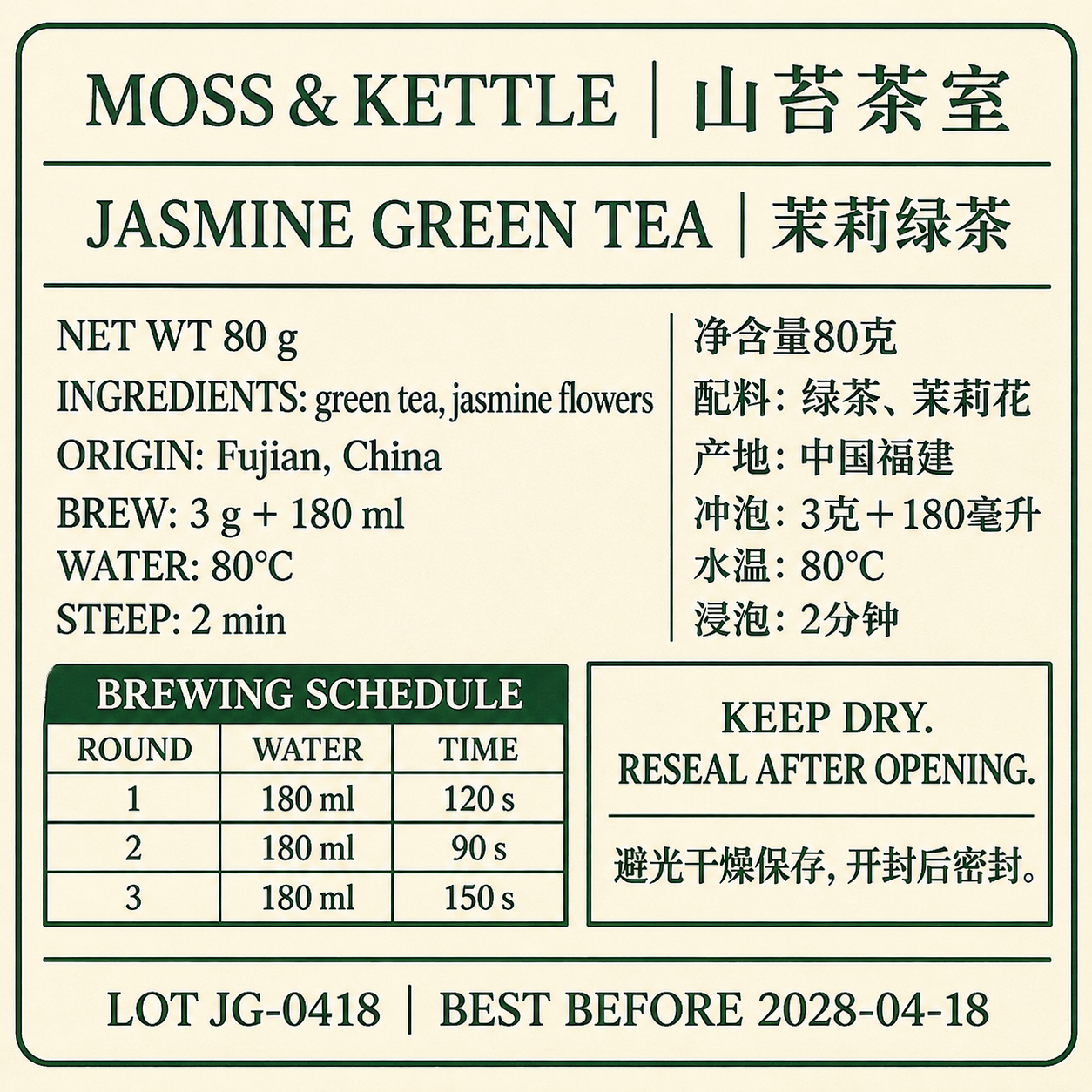
Key difference: Both retain the main bilingual content and numerical table; the larger returned 2.5 canvas prevents a like-for-like sharpness verdict.
2. Nine-panel layout with cross-panel constraints
Exact prompt used for both models
Create a square editorial information poster with a precisely aligned 3 by 3 grid of nine equal rectangular panels, read left to right then top to bottom. White background, black type, thin gray dividers; no perspective, extra words, logos or watermark. Put one large title above the grid exactly: NINE STEPS TO A BETTER LAUNCH. Panels must contain exactly the following numbered headings and second lines: top-left 01 BRIEF / One goal; top-center 02 AUDIENCE / Three interviews; top-right 03 RESEARCH / Five sources; middle-left 04 SKETCH / Two directions; center 05 BUILD / One prototype; middle-right 06 TEST / Six participants; bottom-left 07 REVISE / Fix the top issue; bottom-center 08 LAUNCH / Publish once; bottom-right 09 LEARN / Review after 7 days. Each panel contains one minimal black line icon appropriate to its heading, with identical icon size. Color only the center panel pale coral; leave the other eight white. Draw exactly eight teal connector arrows following this continuous snake path: 01 right to 02, 02 right to 03, 03 down to 06, 06 left to 05, 05 left to 04, 04 down to 07, 07 right to 08, 08 right to 09. Do not renumber panels to follow the snake. Align heading baselines within each row and icon centers within each column. Add exactly one footer below the grid: SMALL TESTS. CLEAR DECISIONS. Keep all text and arrows separate and readable.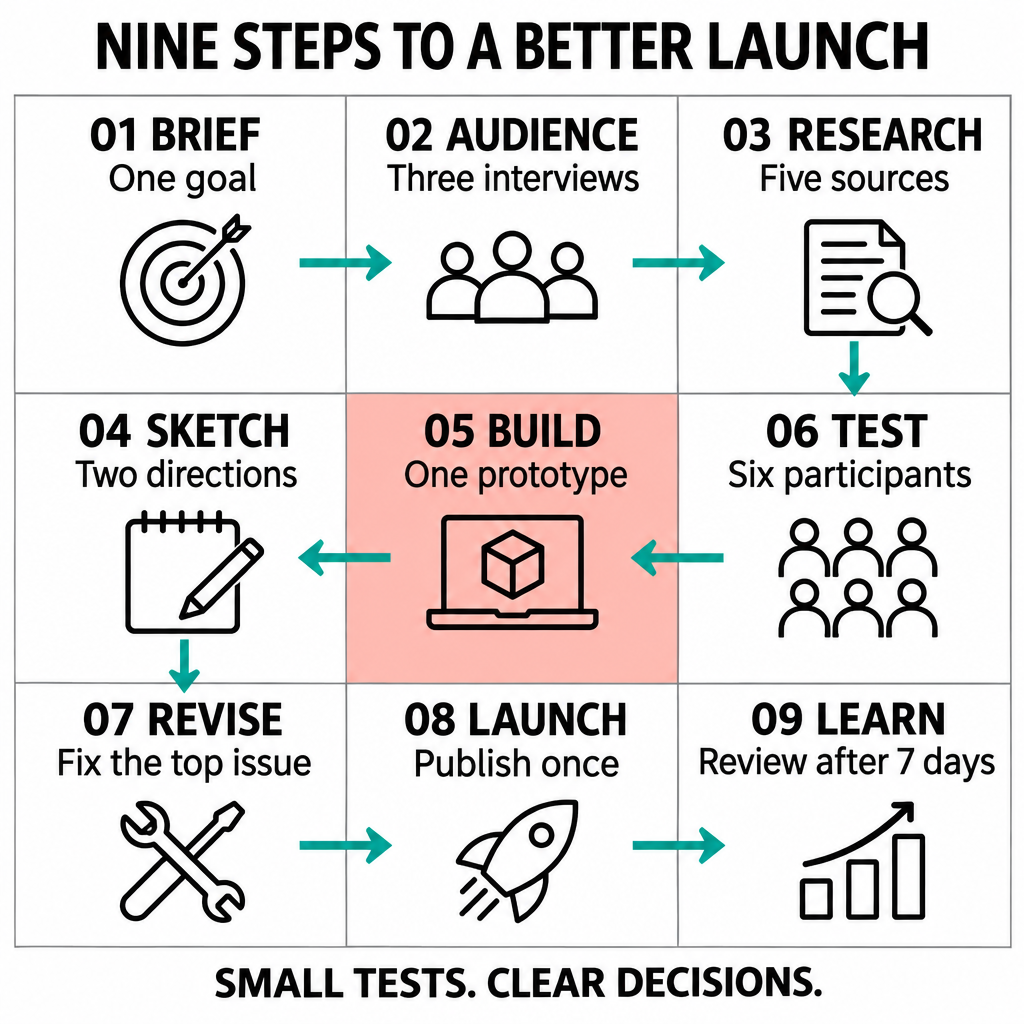
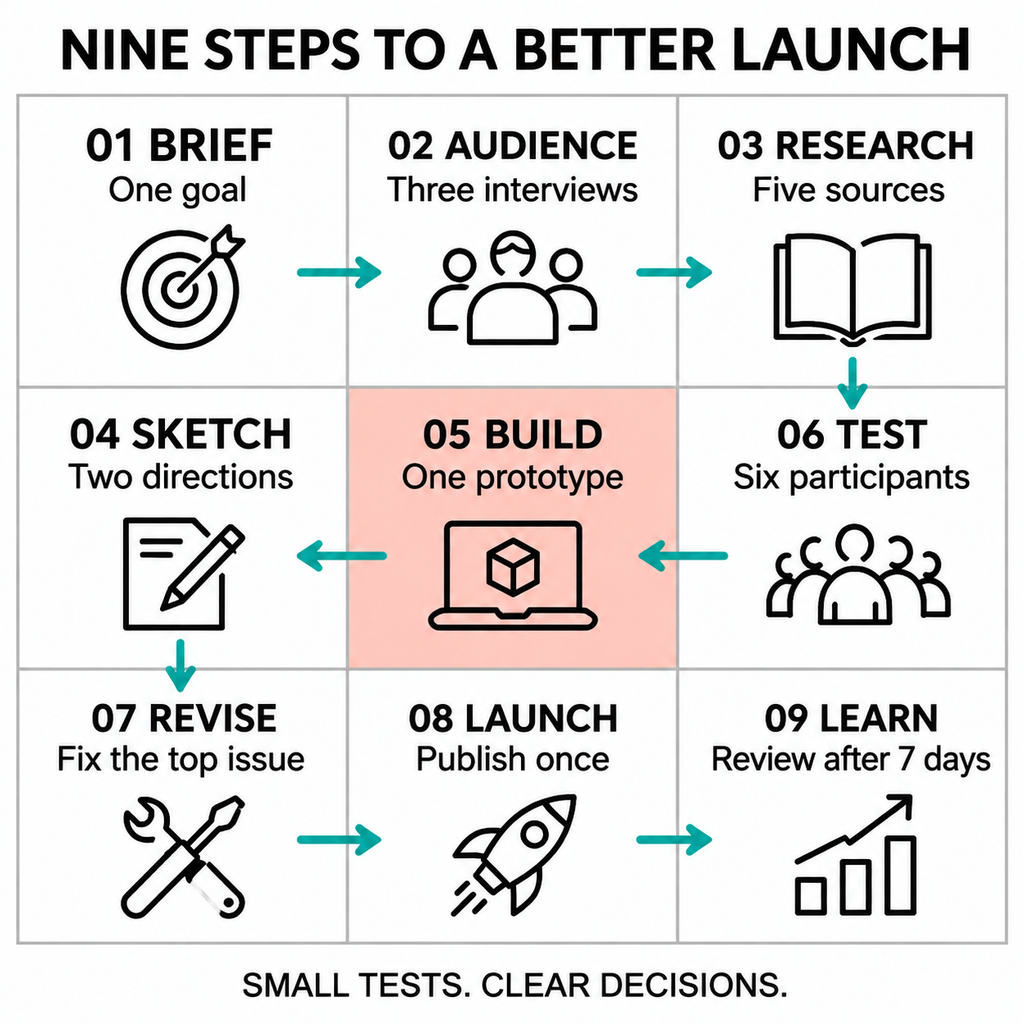
Key difference: Both retain nine panel positions and the eight-arrow snake. No structural-accuracy winner in this pair.
3. Twelve objects, material distinctions and occlusion
Exact prompt used for both models
Create a square photorealistic top-down still life on a plain matte ivory tabletop. Show exactly twelve objects total: one red ceramic mug, one blue glass tumbler, one green metal tin, one whole yellow lemon, one silver teaspoon, one closed black notebook, one orange pencil, one brass key, one white seashell, one purple ribbon strip, one clear glass marble, and one folded pink paper triangle. Arrange the first nine in a three-by-three grid: top row red mug, blue tumbler, green tin; middle row lemon, teaspoon, black notebook; bottom row brass key, white seashell, pink triangle. The teaspoon bowl points toward the blue tumbler and its handle points down toward the seashell. The orange pencil lies diagonally across the notebook from lower-left to upper-right, with both ends extending beyond the notebook. The purple ribbon runs horizontally behind the lemon and teaspoon but in front of the notebook: it must disappear under the lemon and spoon, then remain visibly on top of the notebook. The single glass marble is inside the blue tumbler and visible through its transparent side. The mug is empty; the tin is closed. Exactly those twelve objects, no saucers, lids as separate objects, duplicates, decorative marks, letters, logos or watermark. Keep all objects inside the frame, with realistic contact shadows and visibly distinct ceramic, glass, metal, paper and fabric materials.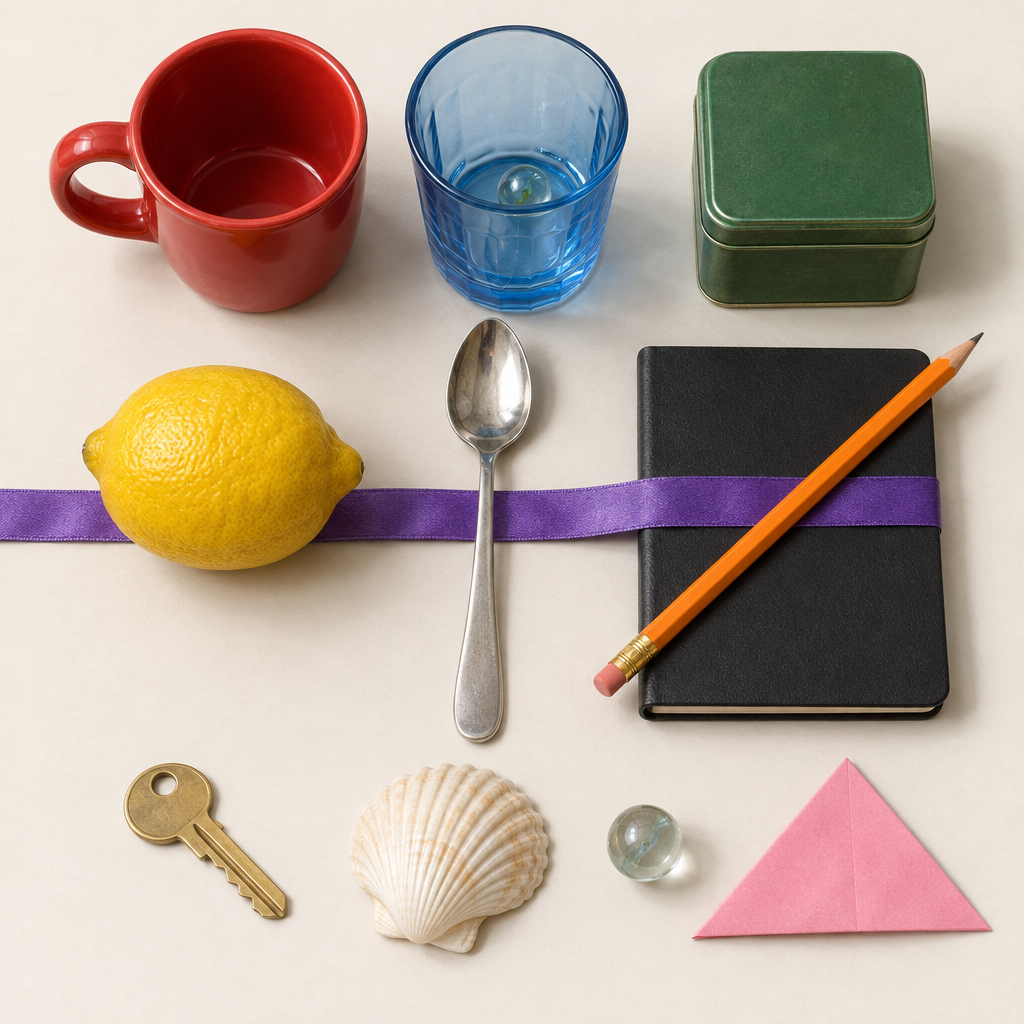
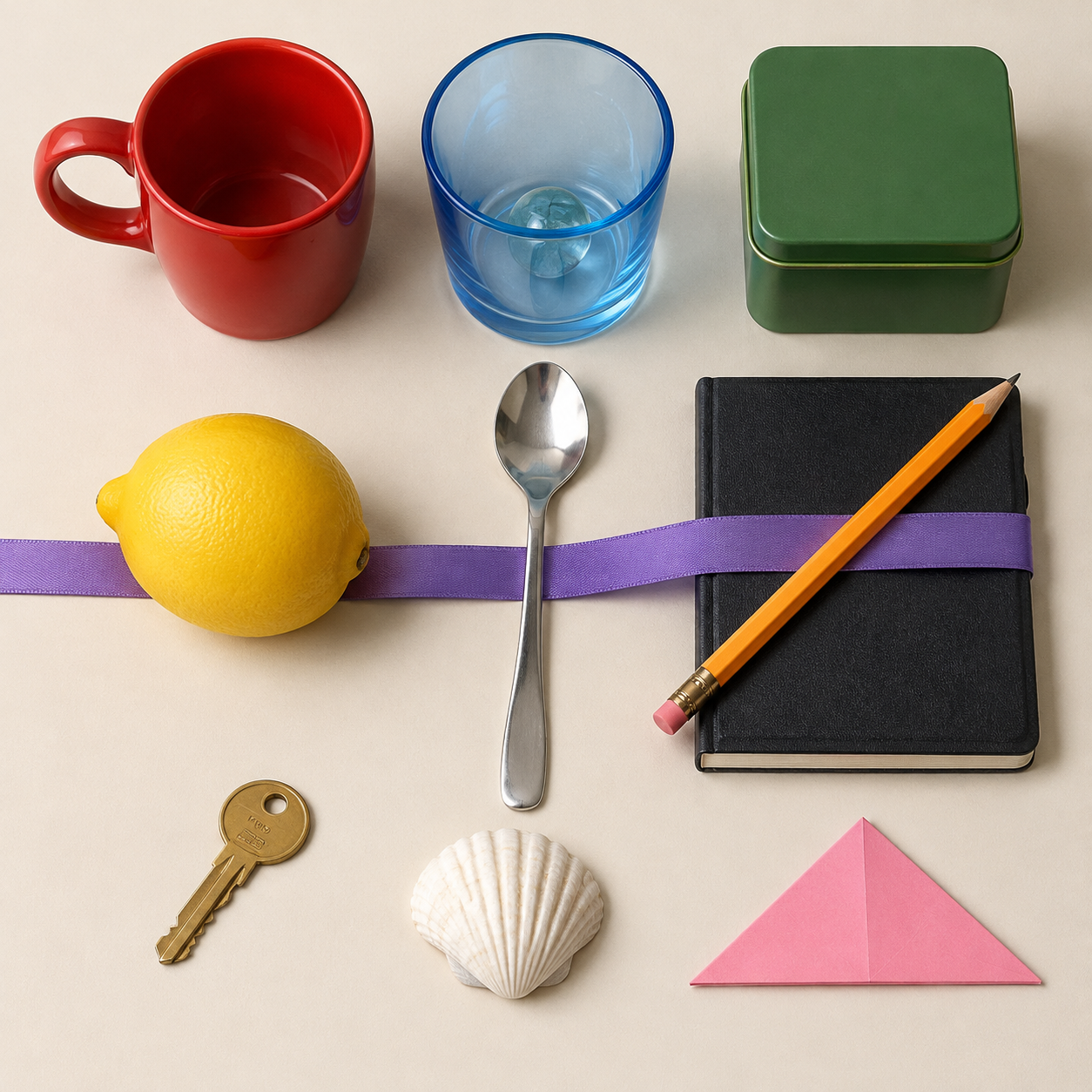
Key difference: 2.6 adds a second marble; 2.5 keeps twelve objects but adds key lettering. Both crop the ribbon.
Dense bilingual labels and connector routing do not separate the models on accuracy in these samples. The crowded still life exposes a specific counting difference. One output per brief cannot establish reliability across repeated jobs.
GPT Image 2.6 vs 2.5 for People: Fashion, Advertising, and Storyboards
These three briefs simulate work for an e-commerce photographer, an advertising art director, and a film preproduction team. We checked details that can force a production revision: garment construction, hands interacting with props, required overlaps, and costume continuity across camera angles.
Each original prompt was submitted once per model route with the same requested 1024 × 1024, low-quality PNG settings and no reference images. All six first outputs are included without retouching. This tests prompt-driven character continuity inside one four-panel image, not reference-based identity preservation across independent requests.
| Task / Metric | GPT Image 2.6 | GPT Image 2.5 |
|---|---|---|
| Fashion catalog Quality | ★★★☆☆Buttons on wrong side | ★★★☆☆Buttons on wrong side |
| Time | ★★★★★20 s | ★★☆☆☆58 s |
| Output | ★☆☆☆☆1,758 tokens | ★★★★★199 tokens |
| Three-person ad Quality | ★★★★☆Overlap correct; thumb partly hidden | ★★★☆☆Overlap missing; thumb partly hidden |
| Time | ★★★★★10 s | ★★☆☆☆24 s |
| Output | ★☆☆☆☆1,758 tokens | ★★★★★201 tokens |
| Character storyboard Quality | ★★☆☆☆Bag-side continuity breaks | ★★☆☆☆Bag-side continuity breaks |
| Time | ★★★★★25 s | ★★★★★27 s |
| Output | ★★★★★1,758 tokens | ★★★★☆2,058 tokens |
Editorial ratings of these individual outputs: ★★★★★ no visible issue on the reviewed checks; ★★★★☆ minor correction; ★★★☆☆ important correction; ★★☆☆☆ major correction; ★☆☆☆☆ unusable. Not an overall model benchmark. Exact pixel alignment and small-text sharpness are not rated.
4. E-commerce: full-body fashion and hand detail
Exact prompt used for both models
Square professional e-commerce fashion photograph, one fictional adult female model age 30, full body head to shoes fully inside frame, neutral light gray studio background, soft even lighting, realistic skin texture. She has a short dark curly bob and wears an open rust-orange tailored blazer over a plain ivory crew-neck shirt, dark navy straight-leg trousers, and white low-top sneakers. The blazer has exactly two black front buttons on the model's right side and one flap pocket on each side. Her right hand holds the curved wooden handle of exactly one closed dark green umbrella pointing down beside her right leg; the umbrella tip touches the floor. Her left hand is raised to chest height with palm facing camera and all five fingers naturally spread and individually visible. No hand in a pocket, no jewelry, no handbag, no extra person, no text, no logo, no watermark. Natural anatomy, two arms and two legs, no merged fingers. Leave visible space around the head and both shoes. The photograph must let an online shopper inspect fabric, seams, buttons, the umbrella grip and the open palm.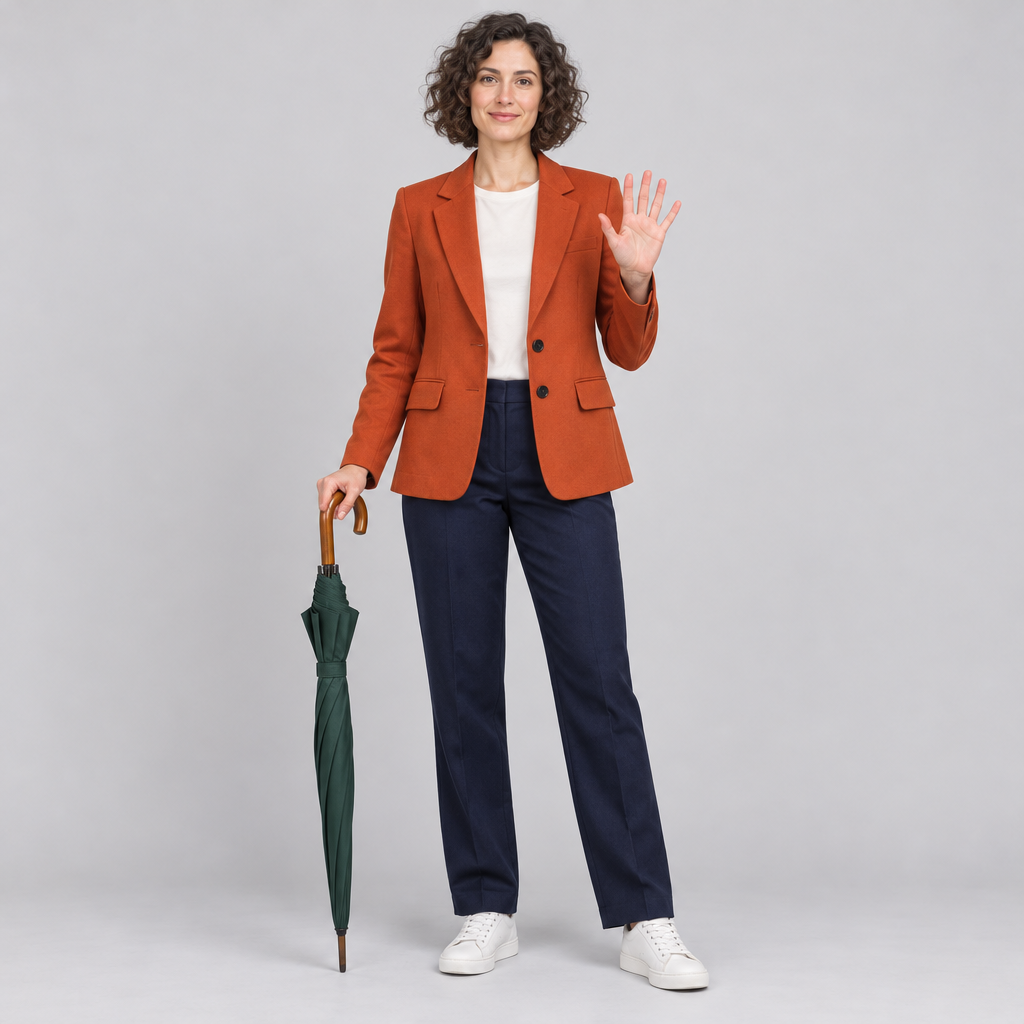
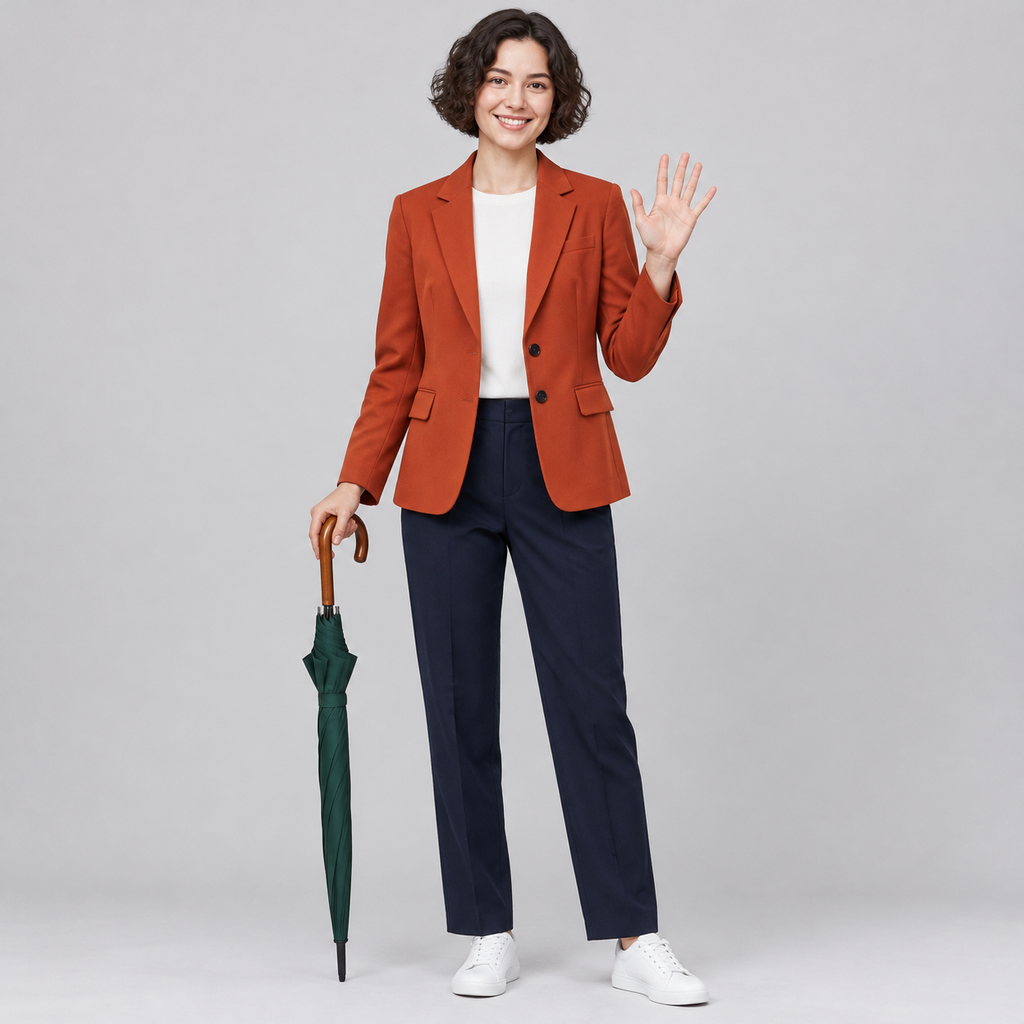
Key difference: Both show the requested pose but put the buttons on the wrong side. Neither is ready as a product-accurate catalog image.
A convincing model photograph still needs precise image edits when garment construction differs from the product being sold. Attractive skin and fabric do not compensate for the wrong button placement.
5. Advertising: three-person collaboration and occlusion
Exact prompt used for both models
Square photorealistic lifestyle advertisement for an unbranded design studio. Exactly three fictional adults age 25 to 55 sit behind a rectangular light oak table, all faces and relevant hands visible. Left: a Black woman with short natural hair wearing a mustard-yellow sweater, holding exactly one red ceramic mug in both hands. Center: an East Asian man with round black glasses wearing a pale blue shirt, pointing with his right index finger at a blank cream paper sheet lying at the exact center of the table; his left hand rests flat on the table with all five fingers visible. Right: a white woman with shoulder-length auburn hair wearing a forest-green shirt, writing on that same sheet with exactly one black pencil in her right hand. The pointing finger must not touch the pencil or merge with the writer's hand. Put exactly one closed cobalt-blue notebook in the foreground, partially hiding the bottom edge of the paper but not the hands. Exactly these tabletop objects: one mug held by left person, one paper sheet, one pencil held by right person, one closed notebook. No laptops, phones, extra cups, text, logos or watermark. Coherent eye lines toward the shared paper, plausible wrists, distinct fingers, natural skin texture and soft window light. No extra or duplicated people or limbs.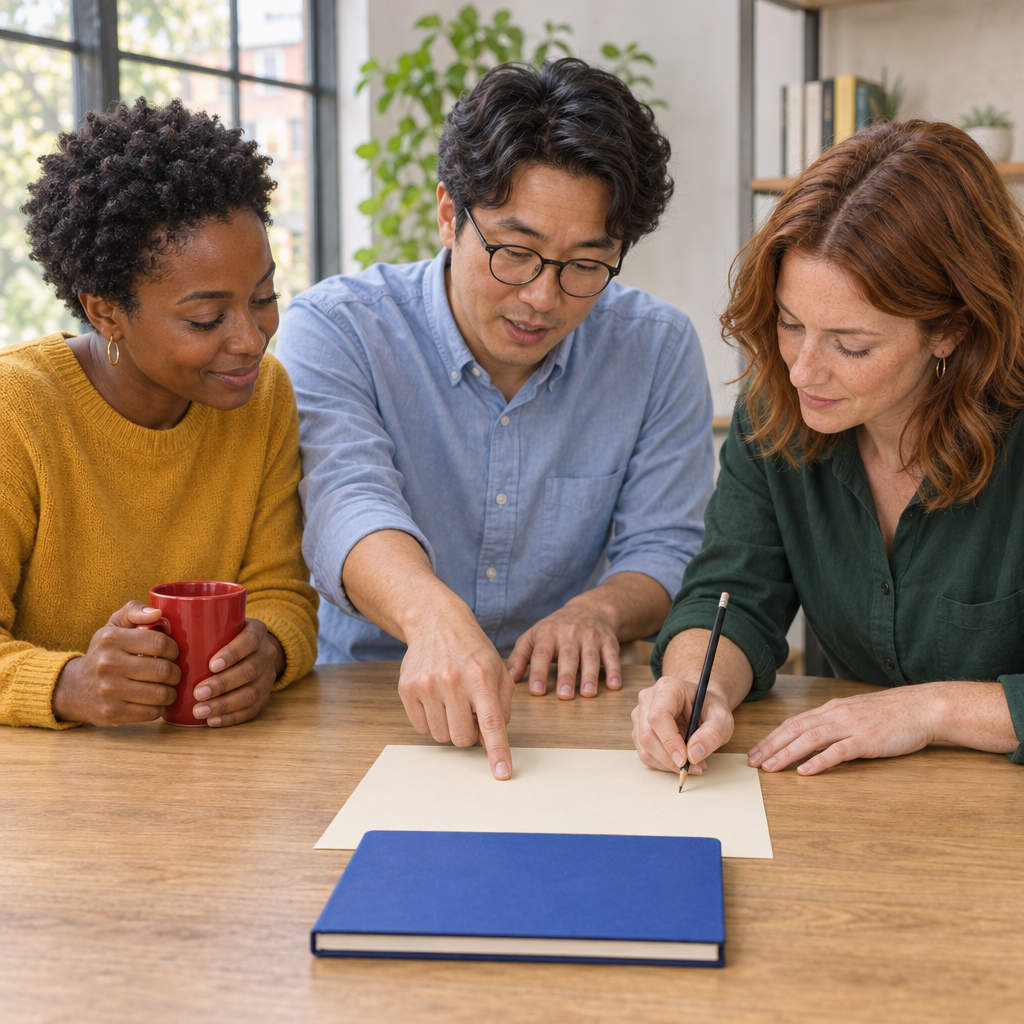
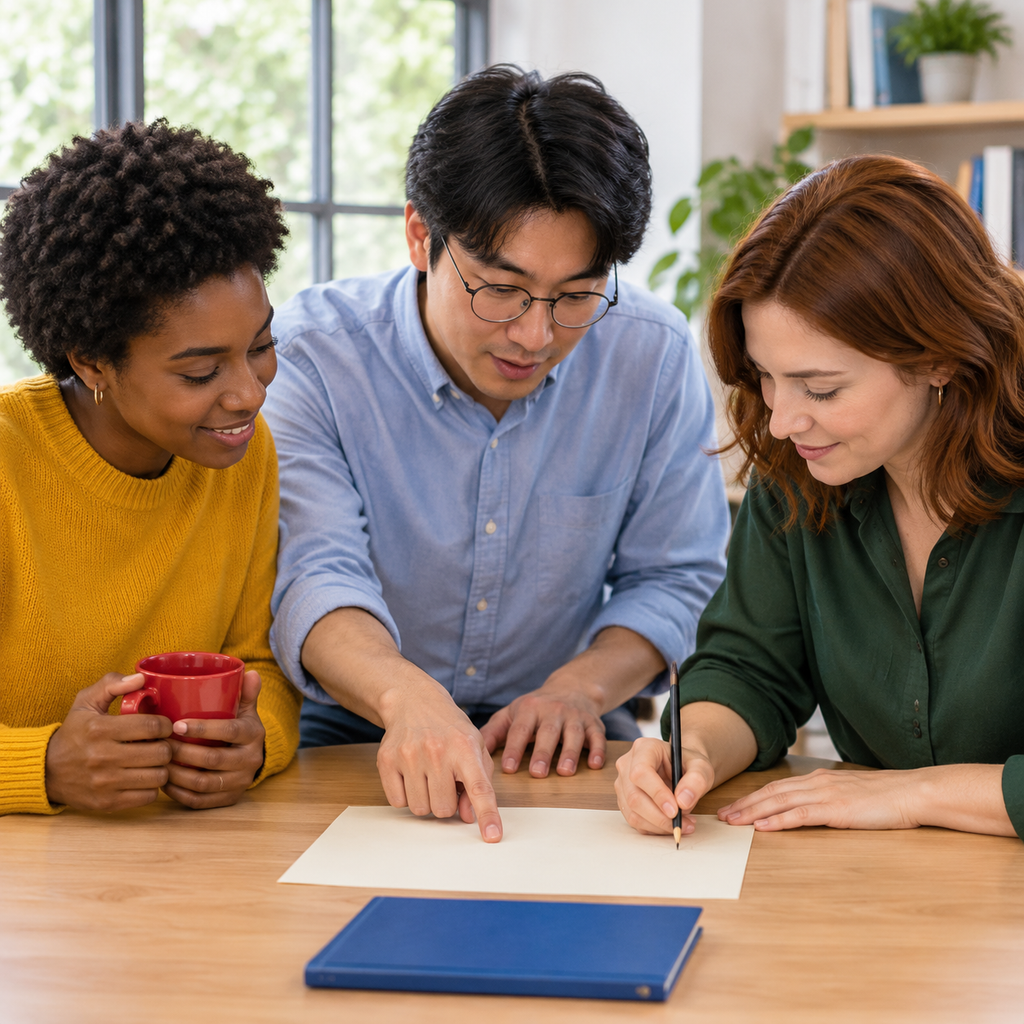
Key difference: 2.6 follows the notebook-over-paper overlap; 2.5 leaves a gap. The difference matters when placement is part of the advertising brief.
Briefs that depend on existing products or people introduce a separate challenge: combining reference images while preserving identity and placement. These text-only outputs do not establish that ability.
6. Film preproduction: four-panel character continuity
Exact prompt used for both models
Create a square photorealistic cinematic storyboard, exactly four equal panels in a precise 2 by 2 grid with thin white gutters. No text, captions, letters, numbers, logos or watermark. All four panels show the SAME fictional adult woman age 35: warm brown skin, short black bob ending at jawline, one distinctive white streak over her LEFT temple, a small round silver stud in each ear, mustard-yellow raincoat with exactly three black buttons, red knitted scarf, dark charcoal trousers, and a small teal crossbody bag with strap running from her RIGHT shoulder to her LEFT hip. Consistent facial identity, costume, white streak placement, bag color and strap direction in every panel. Scene: one quiet brick train platform in soft overcast daylight. Top-left: full-body front view, she stands facing camera holding a folded cream paper ticket in her right hand, left hand at her side. Top-right: waist-up three-quarter view from her right side, she looks at the same ticket held in right hand. Bottom-left: waist-up front view, she hands the ticket with right hand to a station attendant's left hand entering only from the right edge; show no attendant face or body. Bottom-right: full-body rear three-quarter view, she walks away along the same platform, empty right hand visible; the teal bag remains on left hip and the scarf and coat remain unchanged. Exactly one main character in each panel, and the single additional entering hand only in bottom-left. Natural anatomy and coherent light. Do not mirror the character or move the white streak to the opposite temple.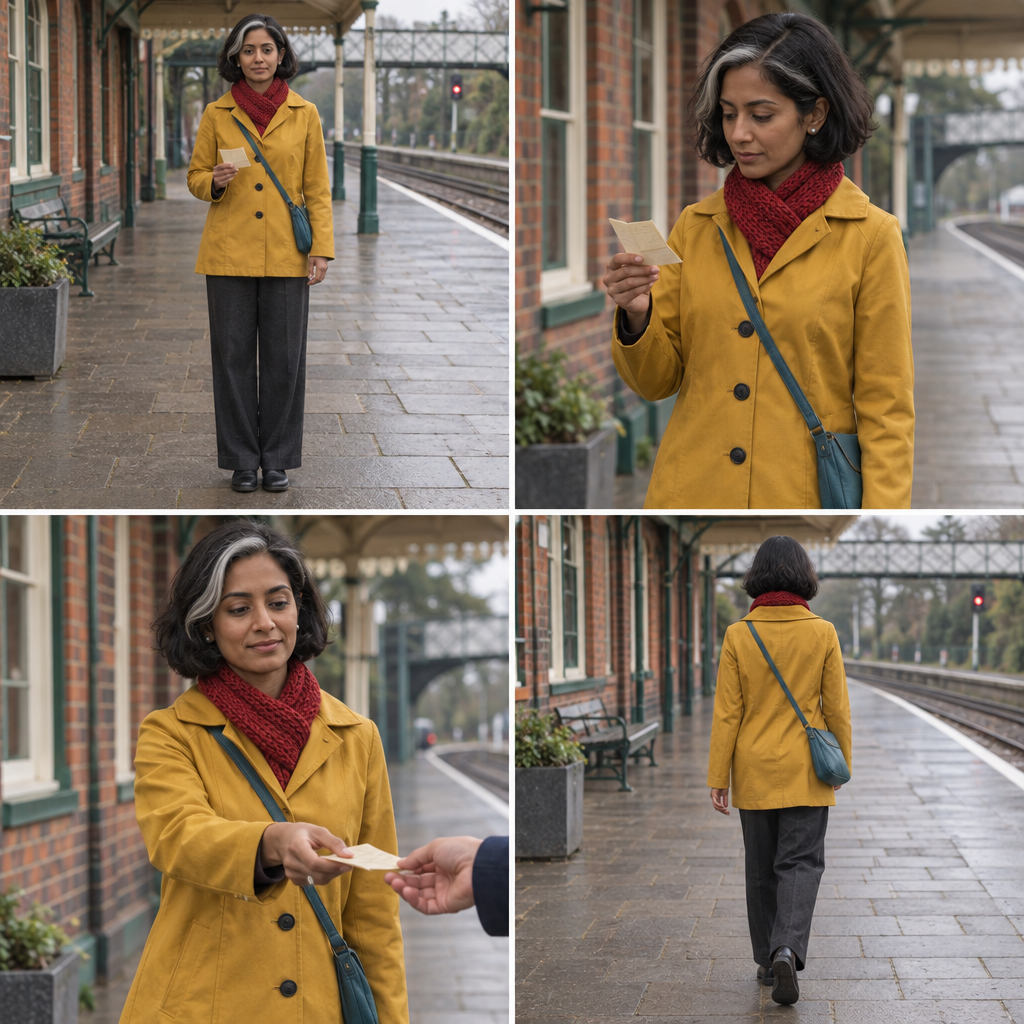
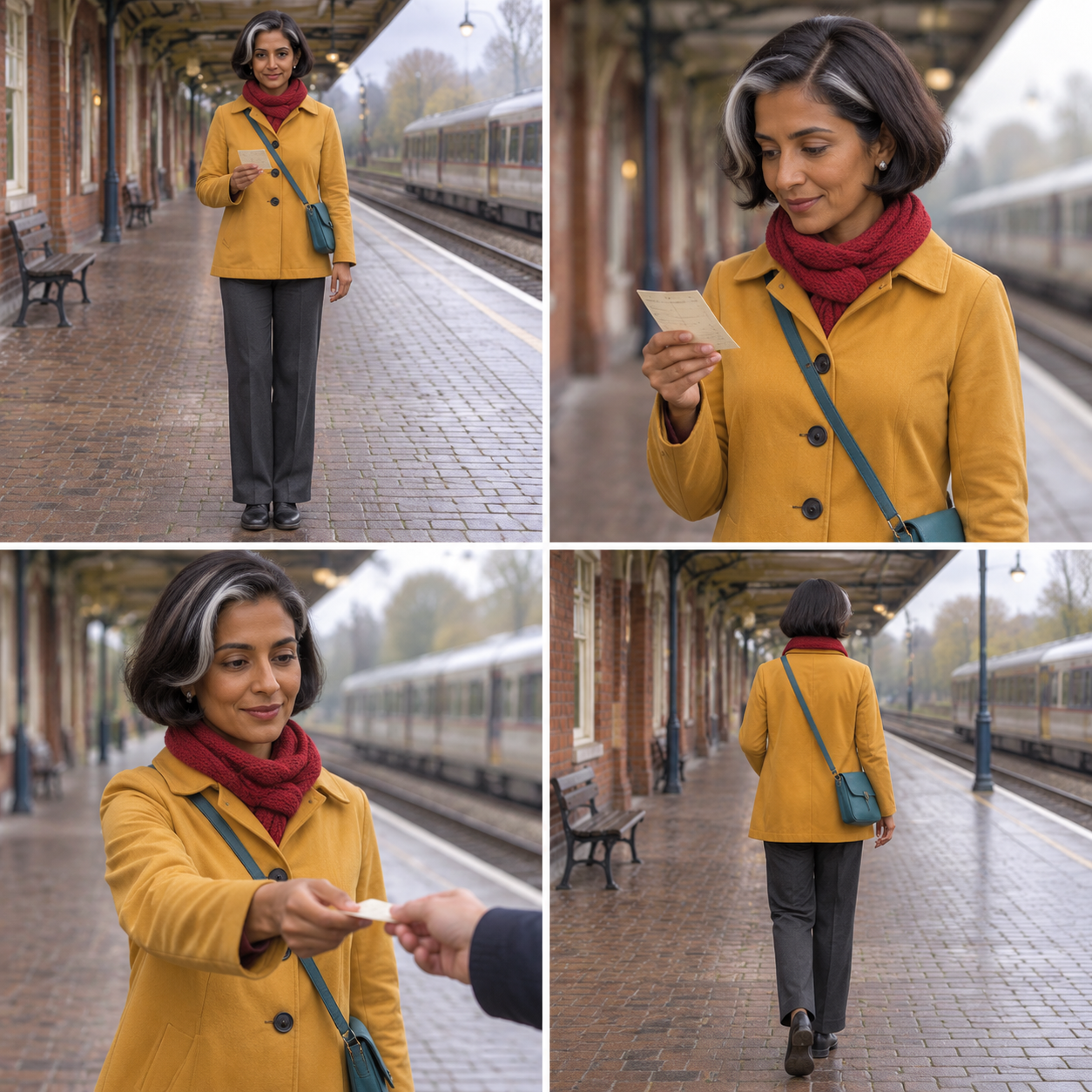
Key difference: Both switch the bag side in the rear panel and miss the requested white-streak side. Neither passes strict costume continuity.
For a production team considering alternatives to ChatGPT Images 2.5, recurring-character continuity deserves its own acceptance check rather than being inferred from one attractive portrait.
A localized correction can be specified with image masks and edit instructions, but changing a bag or garment still requires checking that the face and surrounding costume remain intact.
GPT Image 2.6 vs 2.5: Official Pricing Compared
The four official variants have the same Standard token rates. GPT Image 2.6 has no listed per-token premium over 2.5; equal rates do not guarantee equal cost per generated image.
| Official model | Text input / 1M | Image input / 1M | Image output / 1M |
|---|---|---|---|
| GPT Image 2.6 Sunburst | $5 | $8 | $30 |
| GPT Image 2.6 Flare | $5 | $8 | $30 |
| GPT Image 2.5 Sunburst | $5 | $8 | $30 |
| GPT Image 2.5 Flare | $5 | $8 | $30 |
USD, Standard rates, not Batch or GlobalGPT subscription pricing. Cached rates are $1.25/M text and $2/M image tokens where applicable; cached-input pricing for 2.5 applies to the Responses image tool, not direct Images requests. Output cost is billable image tokens × $30 ÷ 1,000,000; size, quality and model-specific token consumption change the total. Complexity has no separate fee. Official pricing · Cost and billing conditions.
GPT Image 2.6 vs 2.5: Which Should You Choose?
There is no overall winner in these samples. 2.6 handles one advertising overlap better; 2.5 preserves the crowded object count. Both miss garment-side and storyboard-continuity constraints. Choose using the errors that matter to your job, and compare explicit Sunburst or Flare variants before drawing an official-model ranking.
Text fidelity, reference preservation, and realistic materials are separate criteria when choosing among AI image generators; a newer version number does not resolve every tradeoff.
GPT Image 2.6 vs 2.5 FAQ
Is GPT Image 2.6 a completely new model?
OpenAI documents GPT Image 2.6 as a family with Sunburst and Flare model IDs. The public documentation emphasizes workflow controls and model positioning; this article does not infer an undocumented architecture change.
What are the official GPT Image 2.6 model IDs?
gpt-image-2.6-sunburst is documented for detailed visual work, and gpt-image-2.6-flare is documented for fast iteration.
Does GPT Image 2.6 cost more than 2.5?
The Standard rates are identical for all four Sunburst/Flare variants: $5/M text input, $8/M image input and $30/M image output tokens. Actual image cost can differ because token consumption differs.
Did the test prove that 2.6 is better?
No. Across six work briefs, 2.6 better followed one advertising overlap, while 2.5 preserved the crowded still-life count. Both missed garment-side and storyboard-continuity instructions. One output per model per brief cannot establish overall superiority.
Are these our own prompts and generated images?
Yes. We wrote six briefs and submitted each unchanged to both provider routes. The twelve comparison images come from those recorded tasks. No official showcase images are included.
Does this article verify native OpenAI billing or a Sunburst/Flare mapping behind the provider alias?
No. It records the returned provider responses; actual account debits and native OpenAI billing were not verified. Native OpenAI billing and alias-to-model mapping remain unverified here.
GPT Image 2.6 vs 2.5: Sources and Test Limits
OpenAI image-generation guide — 2.6 controls, examples, and workflow notes.
GPT Image 2.6 Sunburst model page — official model ID and positioning.
GPT Image 2.6 Flare model page — official model ID and positioning.
OpenAI image-generation pricing — pricing reference; no measured cost ranking.
Evidence boundary: this article does not claim native OpenAI account generation, a verified alias-to-Sunburst/Flare mapping, actual OpenAI billing, long-term CDN retention, or a universal quality ranking. It reports only successful local outputs and the documented official sources above.
GPT Image 2.6 vs 2.5: Final Verdict
Neither route wins every task. Use the image pairs to judge the constraints your work requires; the undisclosed Sunburst/Flare mapping prevents an official variant ranking.