Ideogram 4.6 vs 4.5: Image Editing Quality Tested
See how Ideogram 4.6 and 4.5 handled a selective recolor, a dense table edit, and a cup-lift pose. Compare official API prices and multi-step benchmark results.
 Chloe Murphy
What are Ideogram 4.6 and 4.5?
Ideogram 4.5 and 4.6 are image generation and editing models for work such as ads, product visuals, and typography. Both have a Generate endpoint that accepts references and a Precise Edit endpoint for targeted changes. Version 4.6 adds native output up to 4K. Ideogram 4.5 · Ideogram 4.6
What changed in Ideogram 4.6?
Both versions can work from reference images and accept an optional mask for a targeted edit. The biggest format upgrade is 4.6’s native 4K generation, which gives designers a larger original to work with. Ideogram also says 4.6 is better at preserving details outside the edited area over successive rounds. That matters when a campaign needs several revisions to the same product image. Ideogram’s 4.6 release page
For more context, see the Ideogram 4.5 review.
For more context, see the comparison with GPT Image 2.5.
What changes in performance and price?
Ideogram reports that 4.6 changes fewer pixels outside the requested edit, holds colors more accurately, and renders finer textures. That is the provider’s assessment. The examples below test how the two models handle single-pass edits on three different source images. Ideogram’s model comparison
Rapidata multi-step image editing
Ideogram 4.61,892 ±32
Ideogram 4.51,866 ±30
4.6 ranked one place ahead of 4.5 in the published snapshot, a difference of 26 points with overlapping reported ranges. The leaderboard follows a sequence of edits. Our tests below are single edits, so they answer a different question: what does each model do with the same image and instruction on the first pass?
| Task | 4.5 | 4.6 |
|---|---|---|
| Character consistency | 69% | 85% |
| Exact color | 46% | 83% |
| Product detail | 61% | 86% |
| Product shots | 66% | 88% |
| Masked edits | 82% | 90% |
High-quality edit cost per image
Ideogram 4.5$0.22
Ideogram 4.6 up to 2K$0.22
Ideogram 4.6 at 4K$0.60
| Quality | 4.5 | 4.6 up to 2K | 4.6 at 4K |
|---|---|---|---|
| Very low | $0.008 | $0.008 | Unavailable |
| Low | $0.03 | $0.03 | $0.06 |
| Medium | $0.06 | $0.06 | $0.20 |
| High | $0.22 | $0.22 | $0.60 |
High editing costs the same at the listed 2K tier. Moving a 4.6 High edit to 4K raises the list price from $0.22 to $0.60 per image. For prompt-only High generation, 4.5 lists $0.10 per image, and 4.6 lists $0.10 at 2K or $0.20 at 4K. These are Ideogram’s own API rates. App credits are priced separately. 4.5 rates · 4.6 rates
What does a batch of edits cost?
At High quality, 100 edits cost $22 with 4.5 or with 4.6 at the up-to-2K tier. The same 100 edits at the 4.6 4K tier cost $60, an extra $38 before any reruns. For High prompt-only generation, moving 4.6 from 2K to 4K doubles the listed cost from $0.10 to $0.20 per image. 4.5 pricing · 4.6 pricing
A clean-looking edit can still alter the wrong reflection, drop a table entry, or move the cup while changing a pose. We compared Ideogram 4.6 and 4.5 on three images built around those details.
How we tested Ideogram 4.6 and 4.5
Each pair received the same source image and instruction with High selected on both models. We generated a different 3:2 source for each task with Ideogram 4.6 and sent each edit one source image with no mask. We reviewed one output per model per task. The examples measure what happened on these specific inputs.
Cap recolor
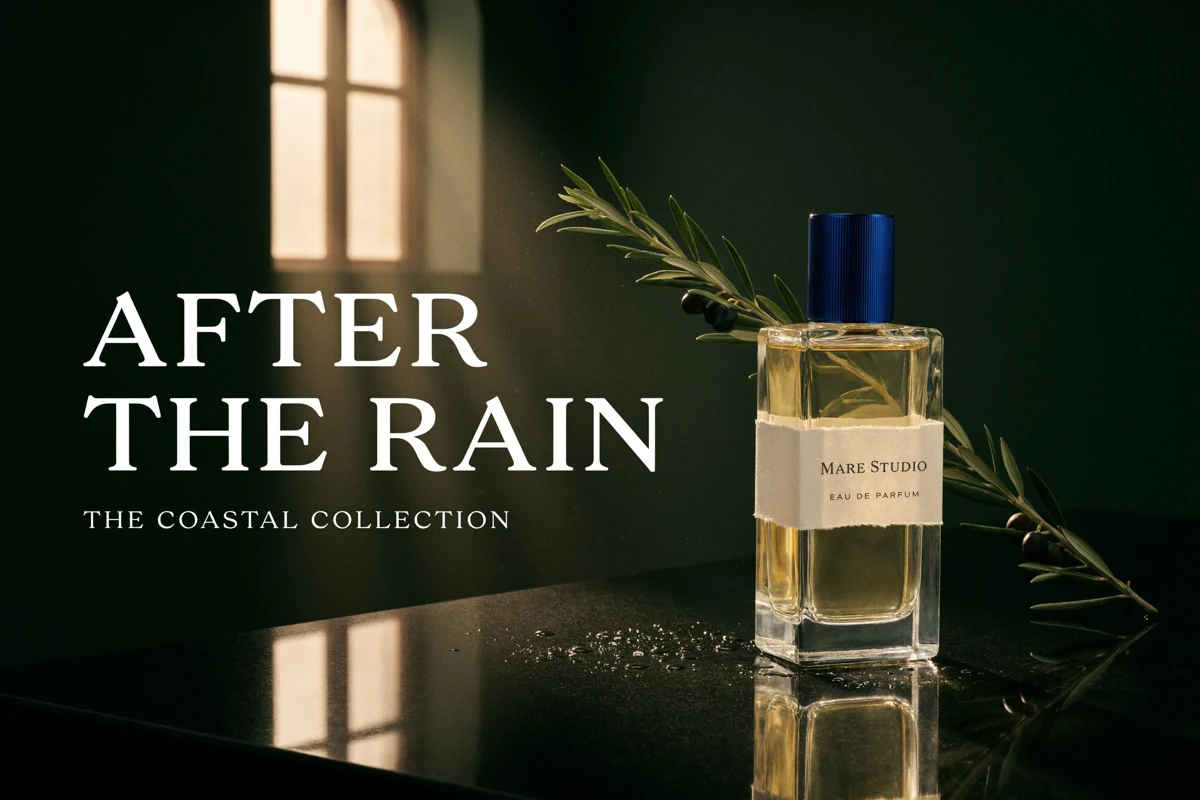
Inspect the cap and its reflection first. A convincing edit keeps the fine ridges visible and carries the new color into the reflection without tinting the amber liquid or changing the typography.
Editing prompt
Change the cobalt-blue metal cap to deep oxblood red (#671F32). Recolor the corresponding visible cap reflection if present. Keep the cap geometry, knurling and highlight shape. Preserve the amber liquid, glass, ivory label and its exact lettering, both left-side lines of typography, the olive branch, stone, lighting and crop. The finish should look like real anodized metal in the original lighting.
Reference image
Edited outputs
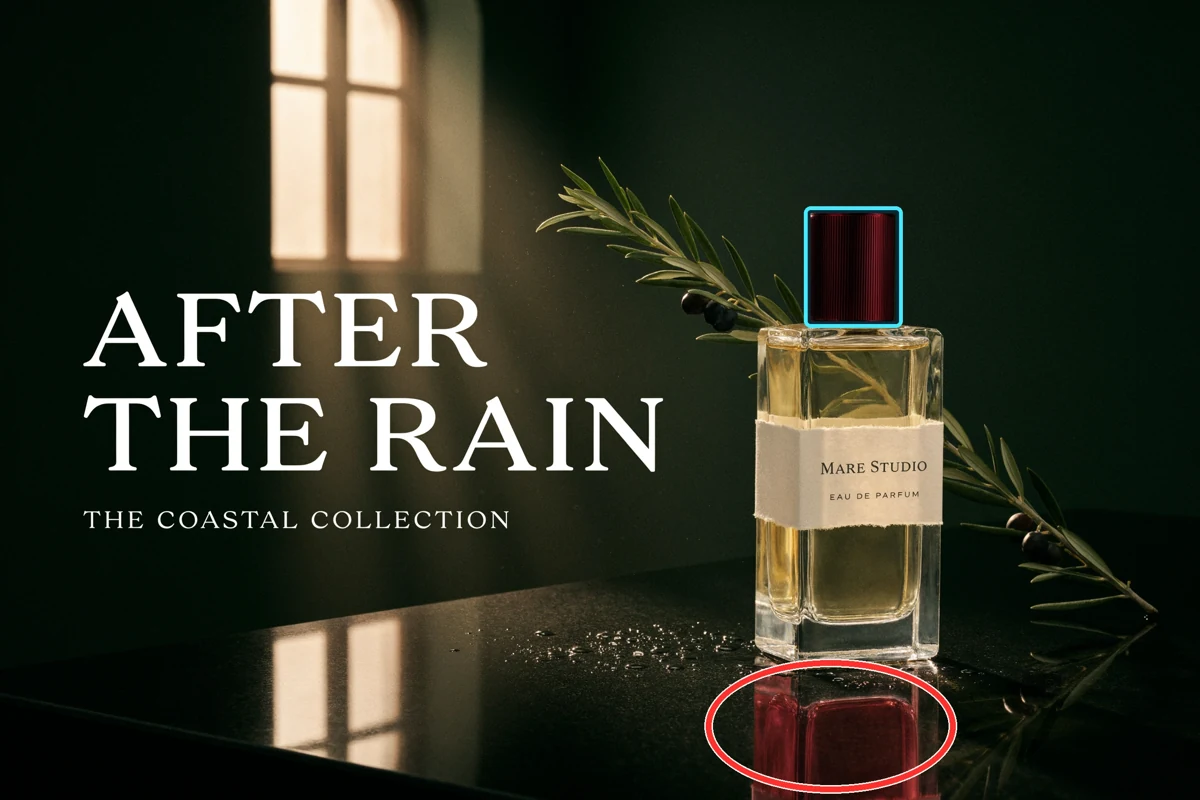
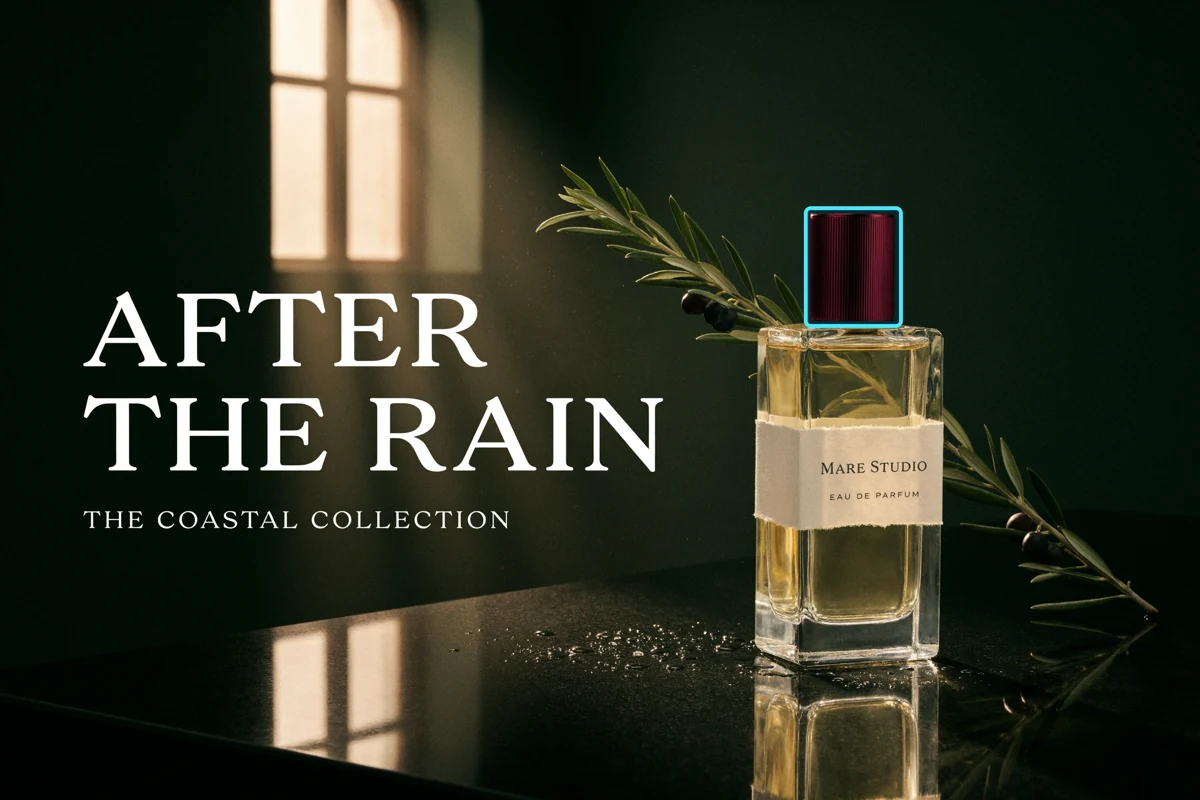
Pick: 4.5. Both recolored the cap deep burgundy, as marked by the cyan frames. The red circle shows where 4.6 also tinted the amber bottle reflection. No cap reflection was visible in the original crop. 4.5 kept the reflection closer to the source.
Adding a column and a row to a dense report
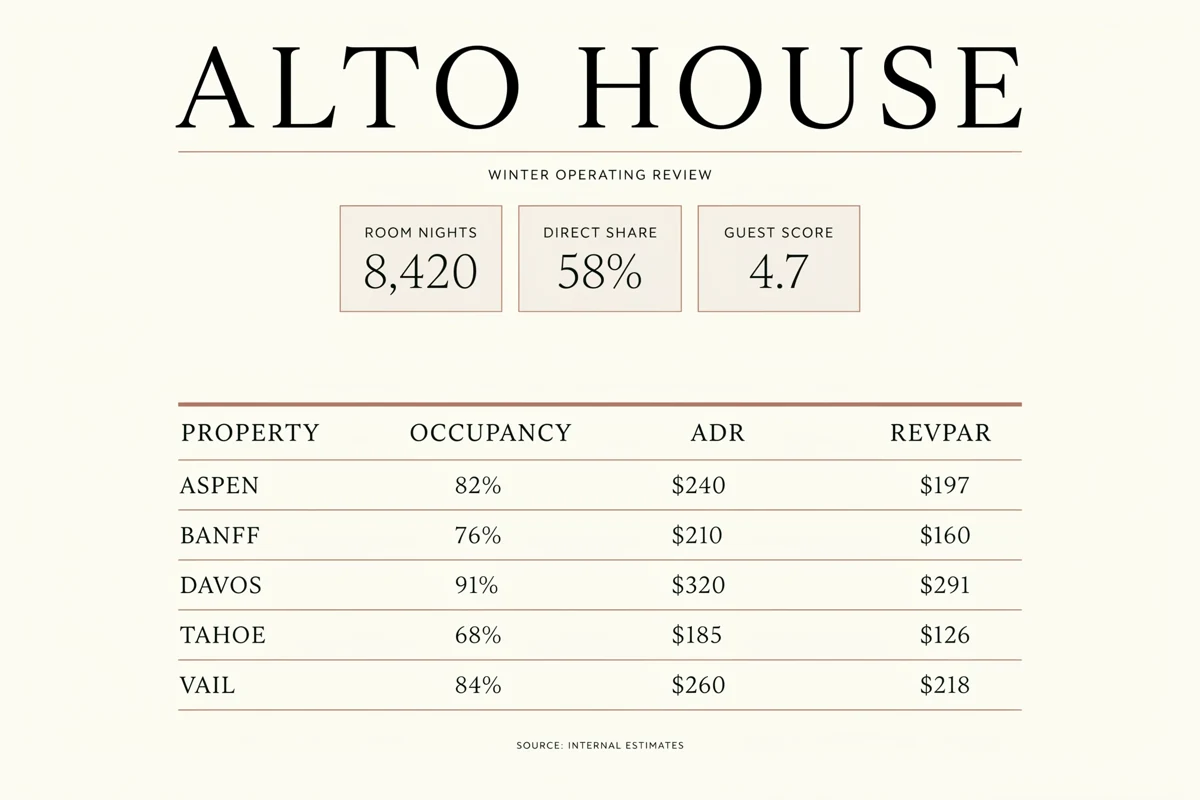
The brief calls for a new YOY column and a sixth property row while keeping every existing KPI and table value. Check the five requested percentages in order, then read across the Whistler row. The cyan frames mark the new column and row.
Editing prompt
Add a fifth column to the right of REVPAR, titled YOY. Fill it top to bottom with +4%, −2%, +7%, −3%, +5%. Add one new row directly below VAIL: WHISTLER | 79% | $225 | $178 | +3%. Preserve all existing text and figures, order, KPI tiles, footer, cream and pine colors, landscape canvas and original style. Expand or reflow the table as needed, but do not duplicate or remove any existing rows or cells. Make every new value legible.
Reference image
Edited outputs
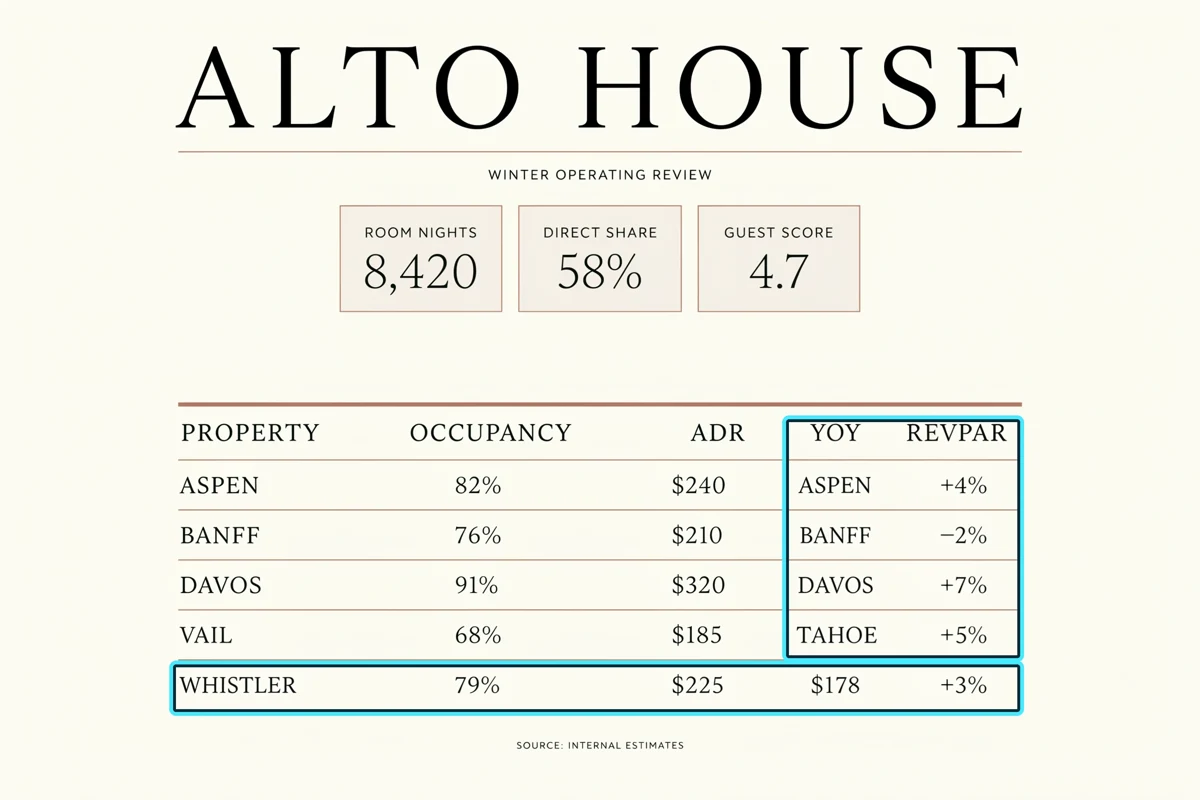
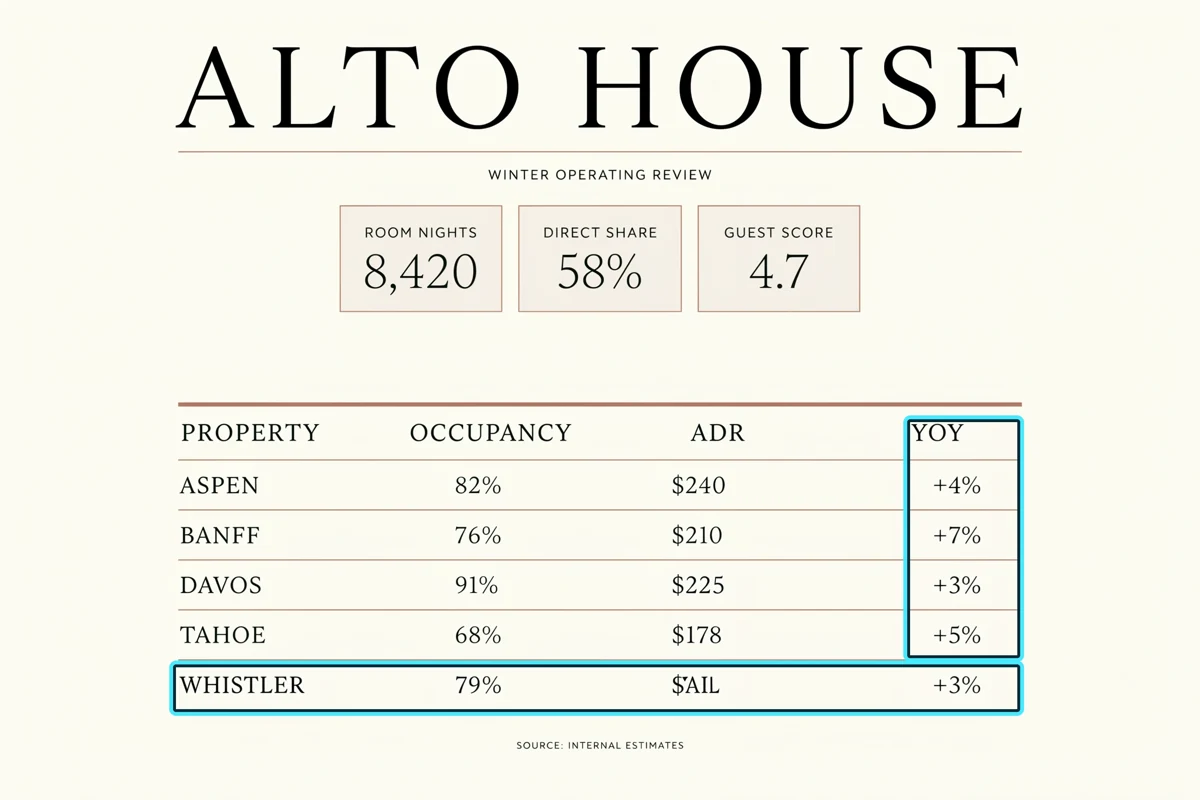
Neither output is ready to use. 4.6 shows five column headings, but puts YOY before REVPAR, places property names under YOY, and puts percentages under REVPAR. It also merges the Tahoe and Vail information into one line. 4.5 replaces REVPAR with YOY, loses Vail as a property row, and puts $225 on the Davos row. Both retain the top KPI tiles and add a Whistler line, but neither preserves the original five rows and adds the sixth correctly. The fictional figures make this easy to audit: count six property rows and verify each old and new value against the prompt.
Lifting a cup from its saucer
In the original, the cup rests on the saucer. The edit asks her to grip its handle and lift the cup, leaving a visible gap below it and the empty saucer on the table.
Editing prompt
Edit the woman so she is visibly holding the existing ivory ceramic cup by its handle with the hand closest to the cup. Lift the cup approximately 10 centimeters clear of the saucer, leaving a clear gap below the cup and the empty saucer in its original place on the table. Show a natural grip with the thumb above the handle and fingers curled through or around it. Keep exactly one cup, its ivory ceramic material, size, and loop handle. Keep her other hand on the table and preserve her face, gaze, hair, sweater, window, landscape, table, framing and lighting. She is holding the cup at chest-to-table height, not drinking.
Reference image

Edited outputs
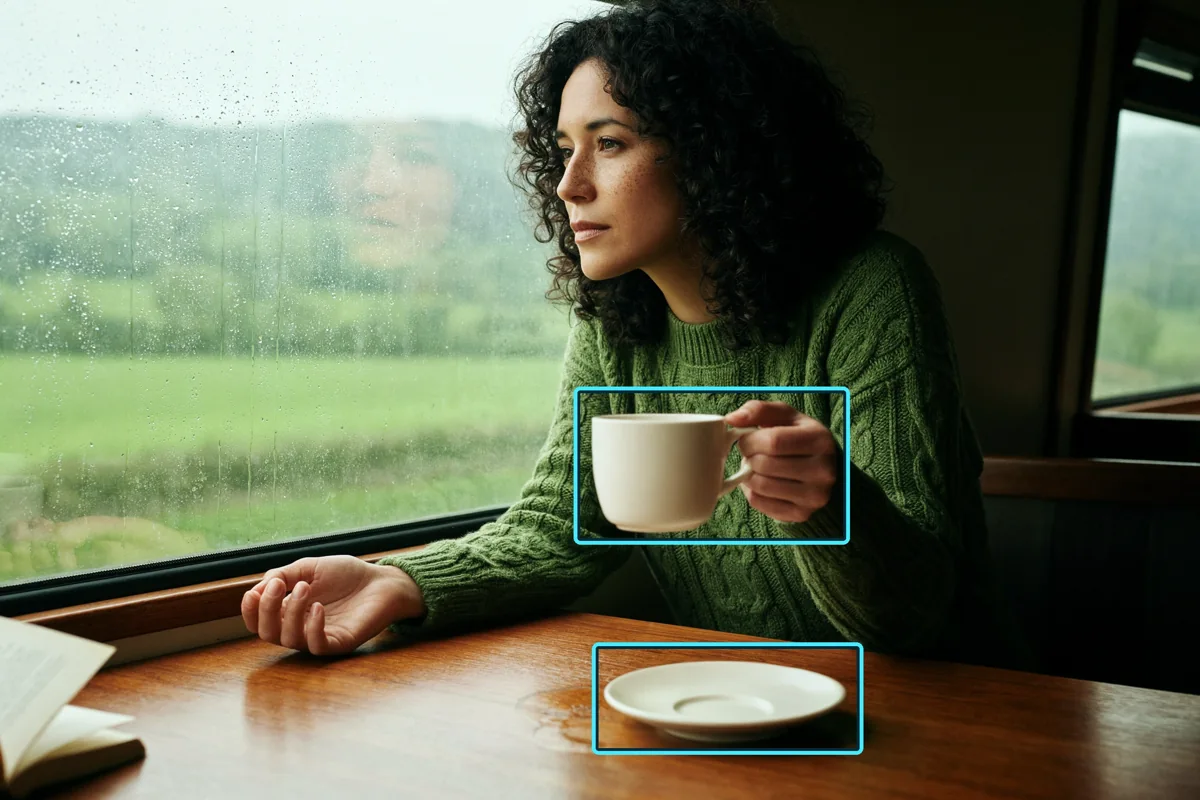
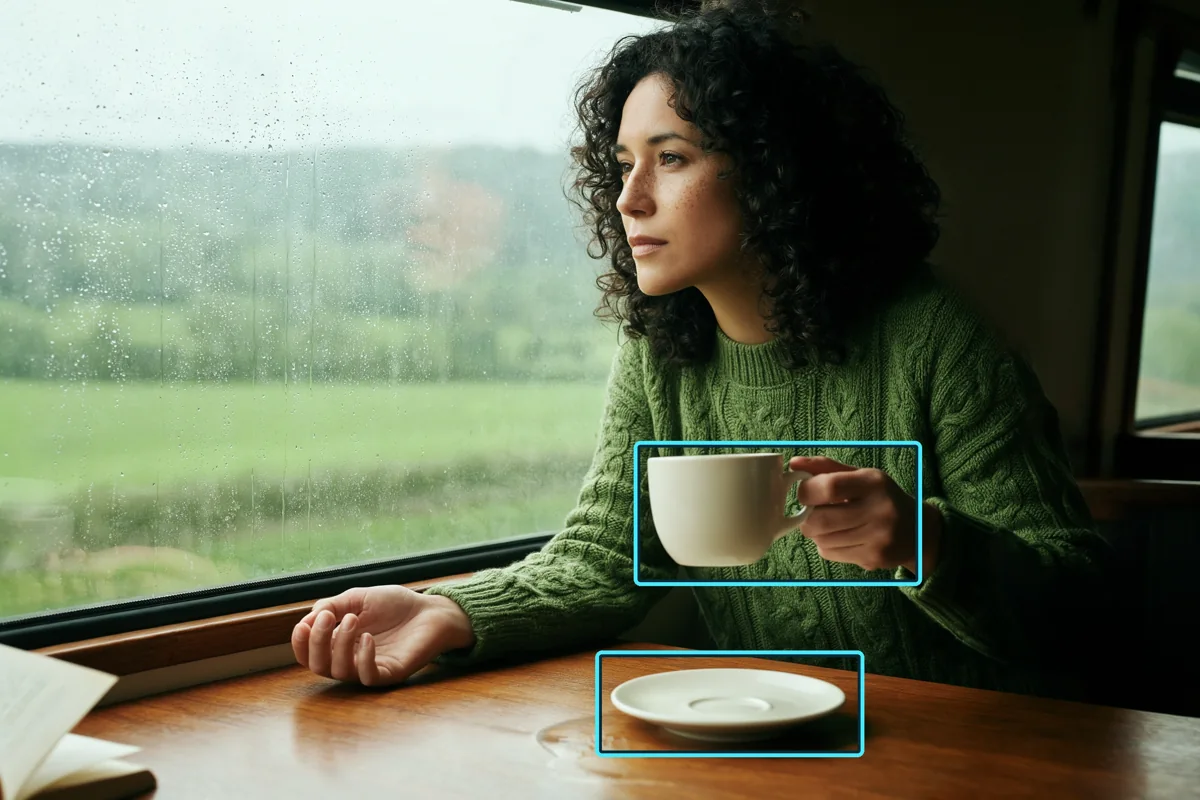
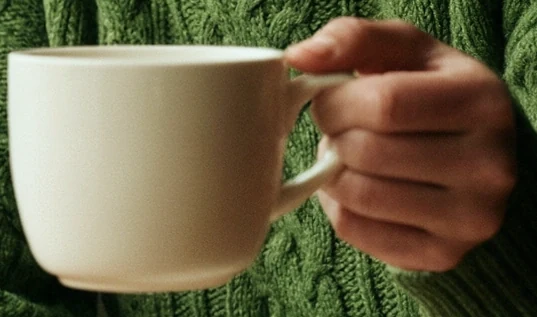
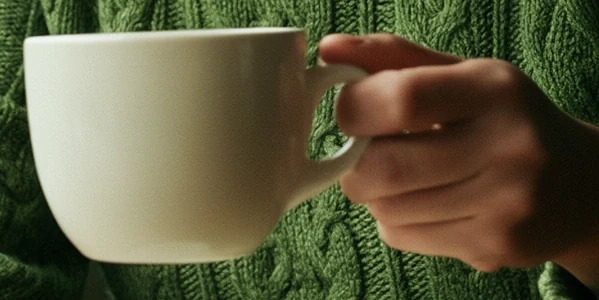
Both versions lift a single ivory cup clear of the saucer. 4.6 is weaker on the grip: its fingers bunch outside the loop, with no finger visibly passing through the handle. The hand looks pressed against the handle. 4.5 gives a more convincing grip, with a finger curling into the opening, although it shifts the resting hand farther from its original position. For the requested action, 4.5 is the better result.
Cup grip close-up
Which model should you use?
4.5 had the cleaner cap recolor and the more convincing grip in these examples. Both reports needed corrections. The cup test shows why it helps to inspect the point of contact at full size: both models lifted the cup, but 4.6 left the fingers bunched against the outside of the handle.
For more on the workflow, see GlobalGPT’s image editing guide.
Frequently asked questions
What is the difference between Ideogram 4.6 and 4.5?
Ideogram positions 4.6 as its newer editing model, with native output up to 4K and a focus on reducing unwanted changes outside the edit area. Our comparison evaluates the visible results from three matched pairs, not the 4K output ceiling.
Does Ideogram 4.6 support masks?
Yes. Ideogram’s Precise Edit API supports an optional mask for a specific area. In our tests, each model received a source image and a text instruction.
Can these results predict performance on my own images?
Use the examples to decide what to inspect on your images. Repeat the edits that matter to your workflow and check legibility, product identity, and any reflections or shadows near the edited area.
How much does a High-quality edit cost?
Ideogram lists $0.22 per image for 4.5 and for 4.6 at up to 2K. A 4.6 High edit at 4K costs $0.60 per image.