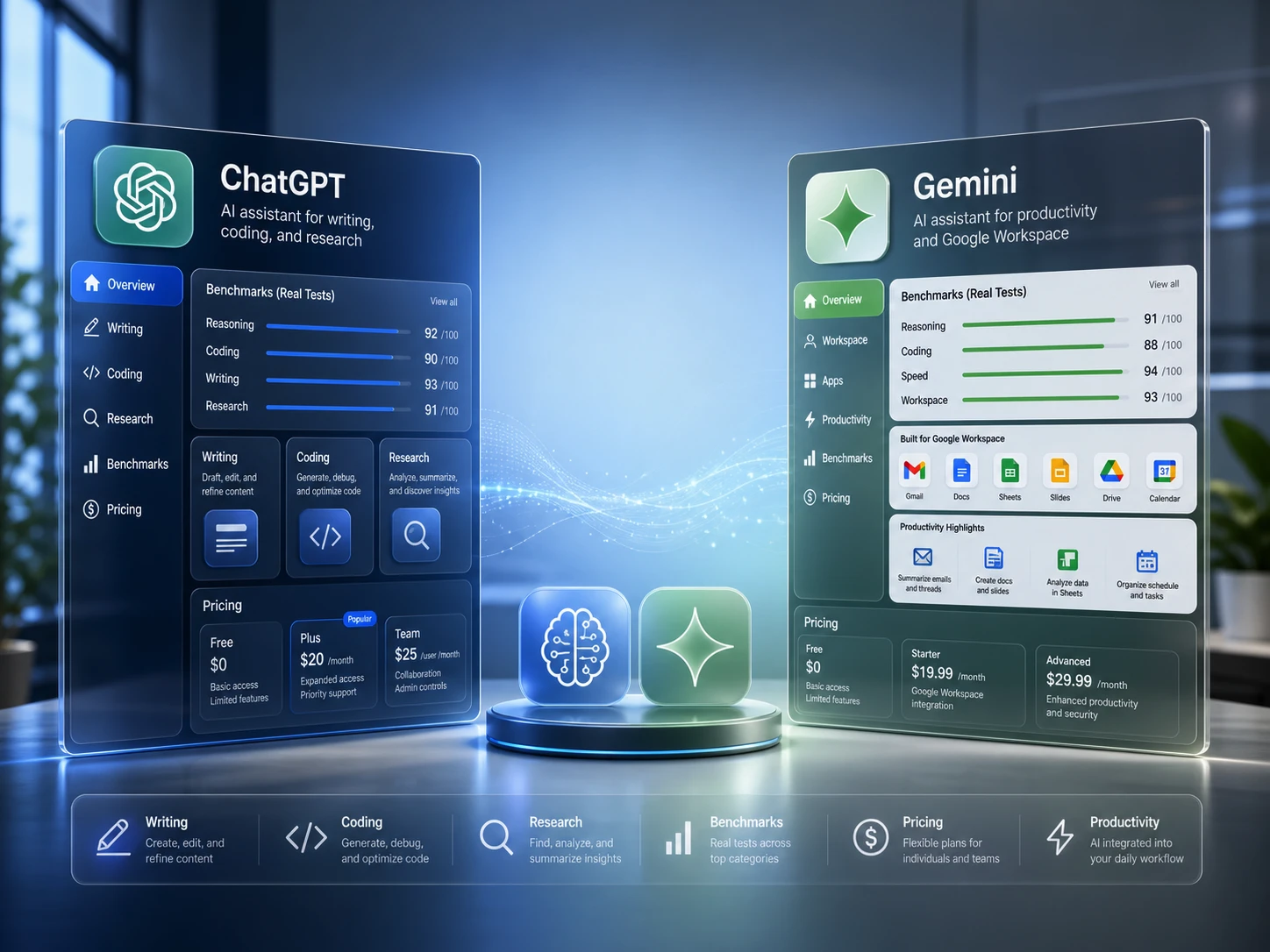
ChatGPT is still the better default for most people who want strong writing, coding help, structured analysis, and broad productivity work. Gemini is the better fit when your day already happens inside Google apps such as Gmail, Docs, Drive, Sheets, Android, and Google Search. If you switch between models often, a multi-model workspace such as GlobalGPT can be more practical than trying to choose only one.
This 2026 update compares ChatGPT and Gemini using three kinds of evidence: current model and pricing information, benchmark signals from official and third-party sources, and hands-on tests run in GlobalGPT with GPT-5.5 and Gemini 3.5 Flash. The point is not to crown one model in every possible situation. It is to show which one fits the work you actually do.

ChatGPT vs Gemini: Quick Comparison
| Category | ChatGPT | Gemini | Practical takeaway |
|---|---|---|---|
| Best default use | Writing, coding, analysis, file work, structured productivity | Google Workspace, Android, Google Search, fast multimodal work | Choose ChatGPT if you want one general-purpose assistant. Choose Gemini if your work is Google-native. |
| Latest model story | GPT-5.5 leads the stronger benchmark and agentic ranking story in the evidence set used for this update. | Gemini 3 Pro and Gemini 3.5 Flash remain competitive, especially around Google workflows, speed, and agentic tasks. | ChatGPT has the stronger raw model-quality case; Gemini has the stronger ecosystem case. |
| Writing | Cleaner, more direct, easier to publish after light editing. | More structured and explanatory, but sometimes more formal. | ChatGPT is usually better for polished drafts; Gemini is useful for organized outlines. |
| Coding | Strong for compact functions, debugging, and developer reasoning. | Can produce useful code, but may add more framing before the answer. | For coding-heavy readers, start with ChatGPT and compare Gemini when speed or Google integration matters. |
| Research synthesis | Good at turning a fact packet into a direct buyer memo. | Good at adding headings and structure, but can feel more template-like. | Both are usable; ChatGPT is usually tighter when you care about concise output. |
| Pricing | Free, Go, Plus, and Pro tiers in the current ChatGPT pricing evidence. | Google AI Pro and Ultra are the main buyer questions for Gemini-heavy users. | Do not compare only by headline price. Check usage limits, included models, and whether you need official app integration. |
| Best alternative path | Use ChatGPT as the primary model and compare with Gemini for Google-heavy tasks. | Use Gemini inside Google workflows and compare ChatGPT for writing/coding quality. | For model switchers, a multi-model workspace can reduce tab switching and subscription confusion. |
If you want a broader model shortlist before deciding, read our guide to the best AI models. If your main concern is coding, the more focused comparison in best AI model for coding is a better next stop.
Latest Model Status: GPT-5.5, Gemini 3 Pro, and Gemini 3.5 Flash
The comparison is no longer just “ChatGPT vs Gemini 2025.” The current decision is closer to this: should you rely on GPT-5.5 through ChatGPT, use Gemini 3 Pro or Gemini 3.5 Flash through Google, or keep both available in a multi-model workflow?
For ChatGPT, GPT-5.5 is the model to watch for advanced reasoning, coding, tool use, and structured work. For Gemini, the picture is split: Gemini 3 Pro is the flagship reasoning model, while Gemini 3.5 Flash is positioned around speed, agentic workflows, coding, and practical day-to-day responsiveness.
That split matters. A reader asking “is Gemini better than ChatGPT?” may really be asking one of three different questions:
- Is Gemini better inside Gmail, Docs, Drive, Sheets, and Android?
- Is Gemini better than ChatGPT for raw reasoning, coding, or benchmark performance?
- Is Gemini cheaper or more convenient for my actual usage?
The answer changes depending on which question you mean. Gemini can be the better workflow product for Google-heavy users while ChatGPT remains the stronger general assistant for writing, coding, and analysis. If you often compare Claude, Grok, Perplexity, Gemini, and GPT outputs, GlobalGPT is also worth considering because it lets you test several models in one place instead of treating model choice as a permanent commitment.
Benchmark Results: Which Model Scores Better?
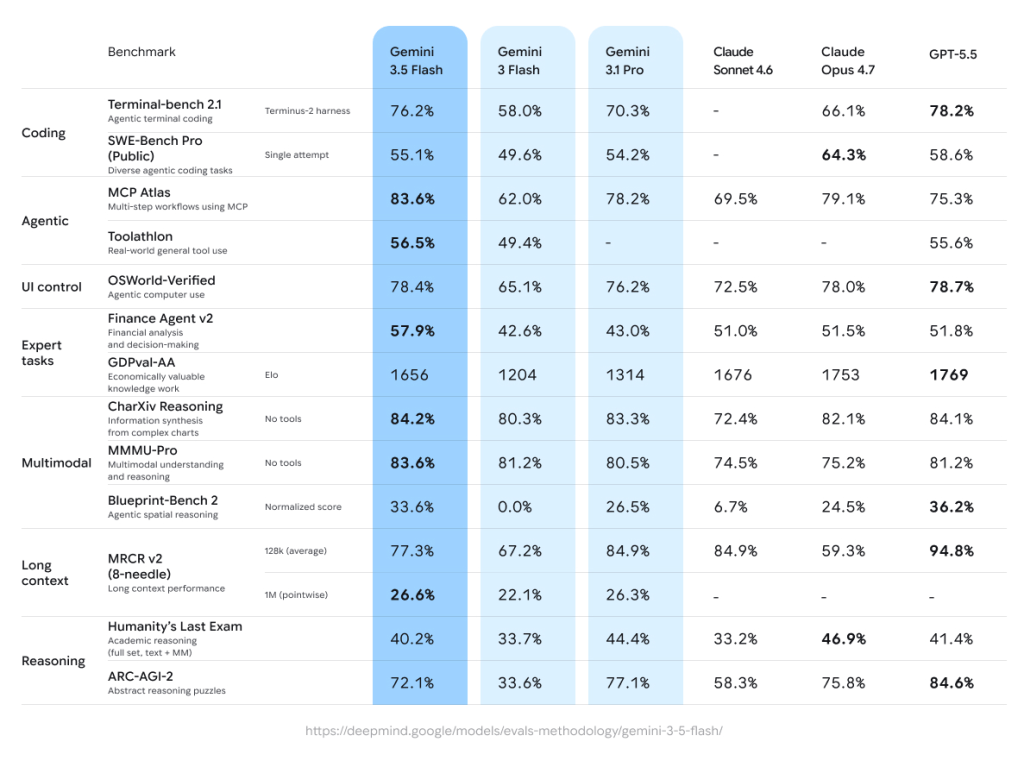
Benchmarks should not replace hands-on testing, but they help show the direction of each model family. For this update, the benchmark picture is best read in layers: OpenAI’s official GPT-5.5 results, Google’s Gemini 3 and Gemini 3.5 Flash results, and third-party ranking signals from Artificial Analysis and Arena Agent.
Overall benchmark picture
The short version is that GPT-5.5 has the stronger benchmark-quality case in the evidence set used for this update. Gemini is still competitive, but its strongest argument is different: Gemini 3 Pro looks like a serious reasoning model, while Gemini 3.5 Flash is better understood as a fast workflow model for coding, long-context work, and Google-connected tasks.
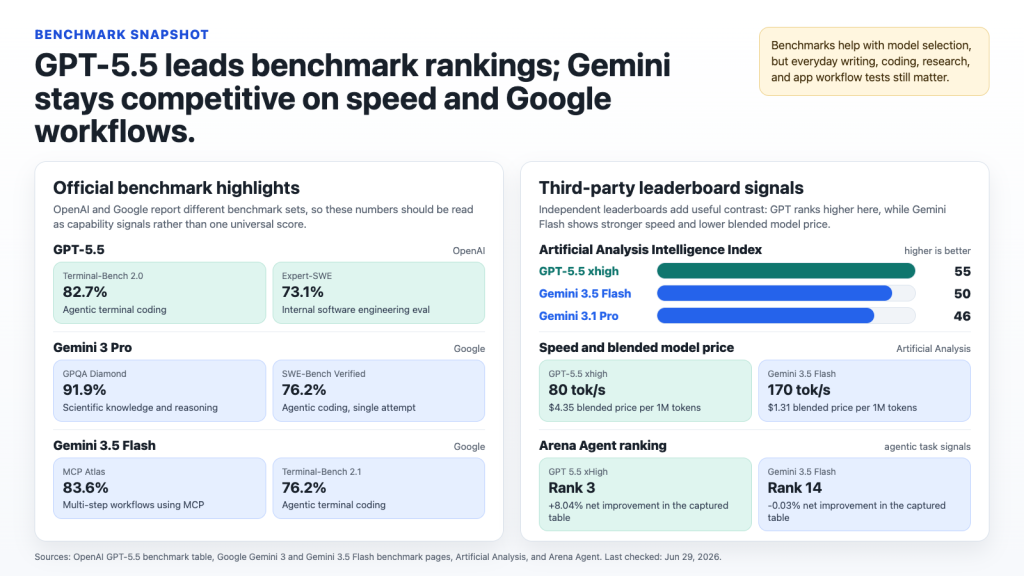
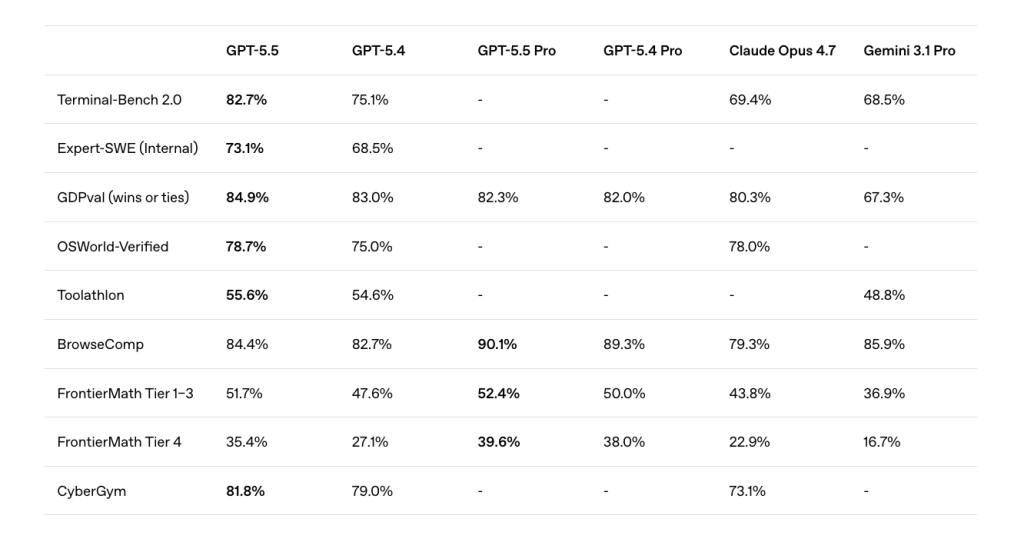
OpenAI’s official benchmark story favors GPT-5.5 for coding and agentic work
OpenAI’s GPT-5.5 benchmark materials report strong results across Terminal-Bench 2.0, Expert-SWE, GDPval, OSWorld, Toolathlon, BrowseComp, FrontierMath, and CyberGym. For buyers, that matters because these evaluations are closer to software work, tool use, difficult reasoning, and agent-style workflows than a simple chatbot preference test.
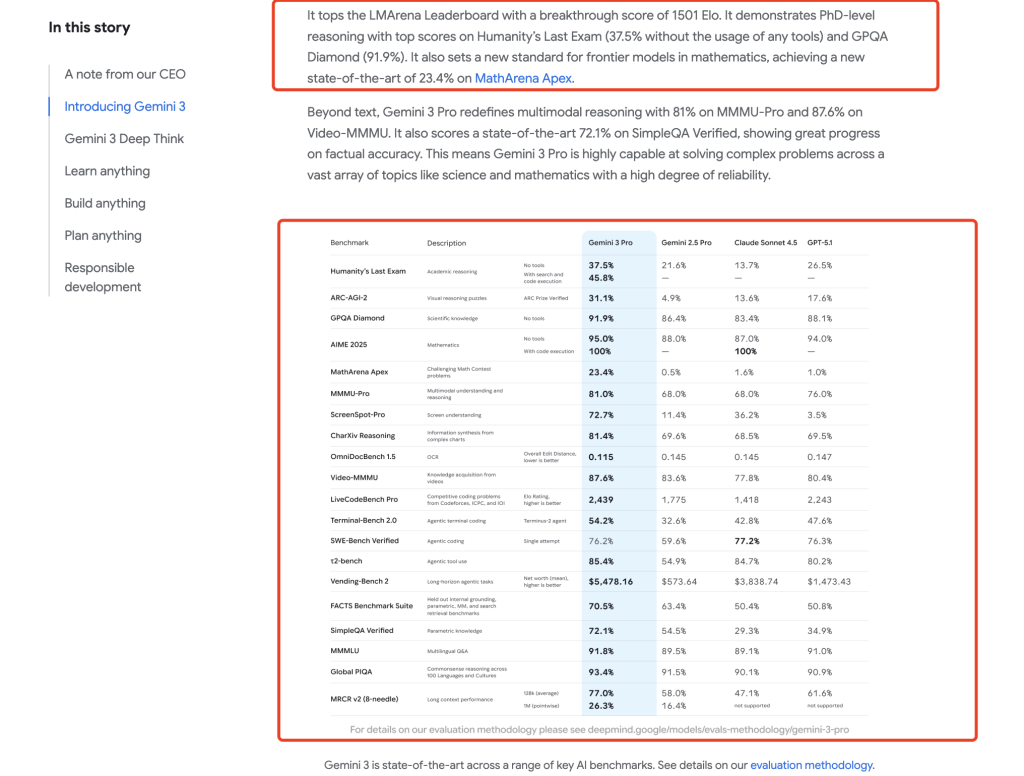
Google’s Gemini 3 results show that Gemini is not just an ecosystem add-on
Google’s Gemini 3 materials show Gemini 3 Pro with strong GPQA Diamond, SWE-Bench Verified, LMArena, and multimodal results. That makes Gemini 3 Pro a real flagship reasoning model rather than just a Google Workspace feature. The practical point is that Gemini should not be dismissed on model quality alone, especially if your work already sits inside Google’s ecosystem.
Gemini 3.5 Flash is best read as a fast workflow model
Google’s Gemini 3.5 Flash evidence positions it around speed, coding, MCP workflows, long-context work, and agentic tasks. In other words, Flash is not only the “cheaper Gemini.” Its strongest case is responsiveness and workflow convenience, especially when the task repeats often or connects to Google tools.
Third-party leaderboards still lean toward GPT-5.5 on quality and agent tasks
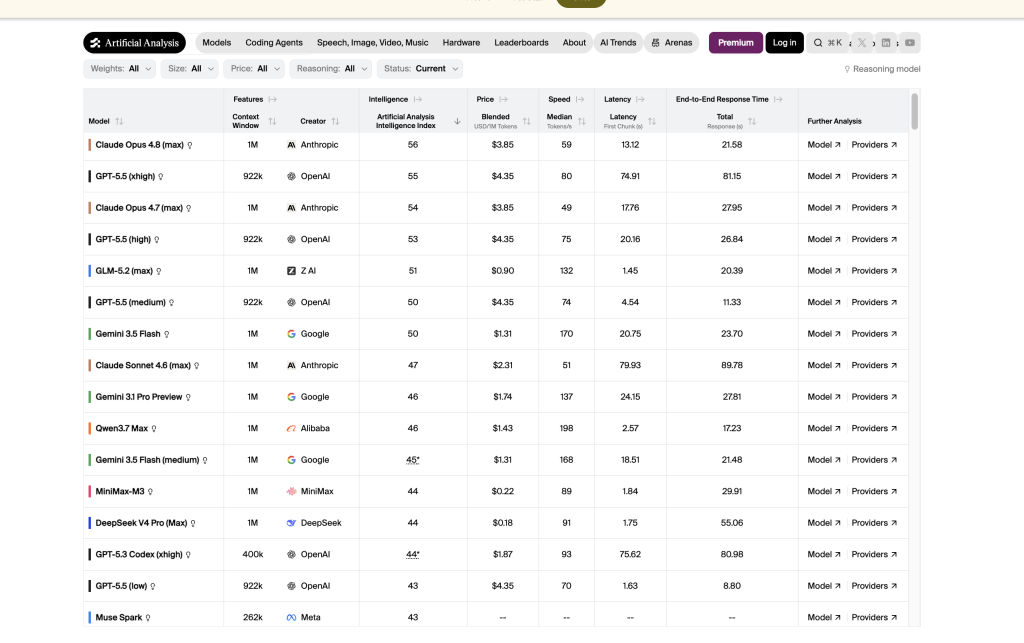
In the Artificial Analysis view used for this update, GPT-5.5 xhigh and GPT-5.5 high rank above the Gemini rows in the Intelligence Index, while Gemini 3.5 Flash shows strong speed and lower blended model price. In the Arena Agent view, GPT 5.5 variants rank above Gemini 3.5 Flash. The user-facing takeaway is simple: ChatGPT has the stronger quality-ranking case, while Gemini Flash can still make sense when speed, cost, and Google workflow fit matter.
What the benchmark section means for your choice
If your decision is mostly about raw benchmark quality, coding reliability, or agentic task ranking, ChatGPT has the advantage. If your decision is about Google Workspace fit, fast responses, and whether Gemini is already bundled into your daily tools, the benchmark gap is not the whole story. Treat the benchmarks as a filter, then use the hands-on tests below to decide which output style fits your work.
Real GlobalGPT Tests: GPT-5.5 vs Gemini 3.5 Flash
To move beyond generic claims, we tested GPT-5.5 and Gemini 3.5 Flash in GlobalGPT on seven everyday tasks: writing, coding, research synthesis, pricing advice, Google Workspace workflow planning, structured table analysis, and messy notes cleanup. These are not lab benchmarks. They are practical tasks a consultant, student, marketer, analyst, or developer might actually run during a normal workday.
Across the tests, the pattern was consistent: GPT-5.5 usually gave the tighter answer with less ceremony. Gemini 3.5 Flash often added more headings, tables, and structure. That structure can be helpful, but it sometimes made the answer feel more formal or less polished.
Writing test: buying-guide intro
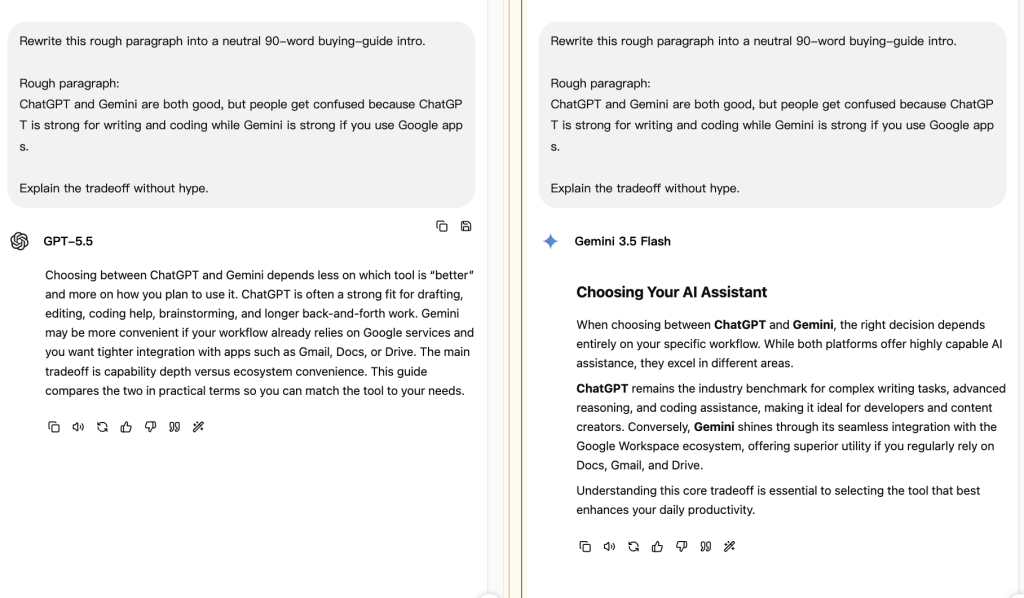
In the writing test, both models were asked to rewrite a rough paragraph into a neutral 90-word buying-guide intro. GPT-5.5 produced a clean paragraph that explained the tradeoff without making the choice sound dramatic. It framed the decision around “capability depth versus ecosystem convenience,” which is a useful way to explain ChatGPT vs Gemini to a normal buyer.
Gemini 3.5 Flash gave a more structured mini-section with a title and multiple paragraphs. It was readable, but it felt more like a generic guide intro. For article writing, GPT-5.5 needed less editing. For outline building, Gemini’s extra structure could still be useful.
If you care about writing quality, see our broader guide to the best AI writing tools. If you specifically want to compare Gemini in blog writing, the focused article on ChatGPT vs Gemini 3 Pro for blog writing is a natural next read.
Coding test: JavaScript query intent classifier
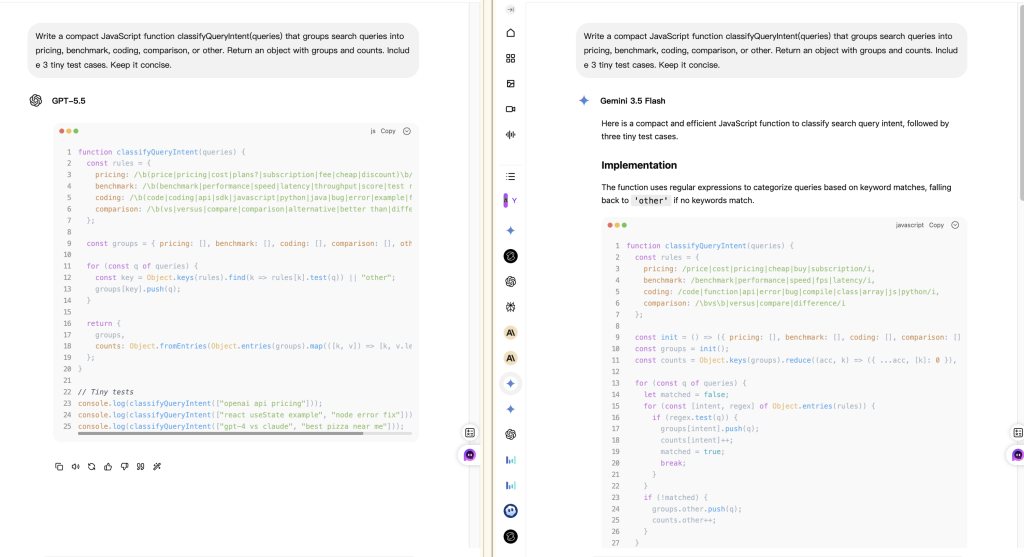
For the coding test, both models were asked to write a compact JavaScript function that groups search queries into pricing, benchmark, coding, comparison, or other. GPT-5.5 jumped directly into code and kept the structure compact. It used rule groups, returned grouped results and counts, and included small tests.
Gemini 3.5 Flash also produced useful code, but it spent more space introducing the implementation. The code was readable, but the answer felt less compact. For a developer who wants to copy, scan, and test quickly, GPT-5.5 was the easier output to work with.
That does not mean Gemini is bad for coding. It means ChatGPT is still the safer default for small developer tasks where concision, edge cases, and fast reuse matter. For more coding-specific comparisons, use our best ChatGPT model for coding and Gemini coding guide.
Research synthesis test: buyer memo from provided facts
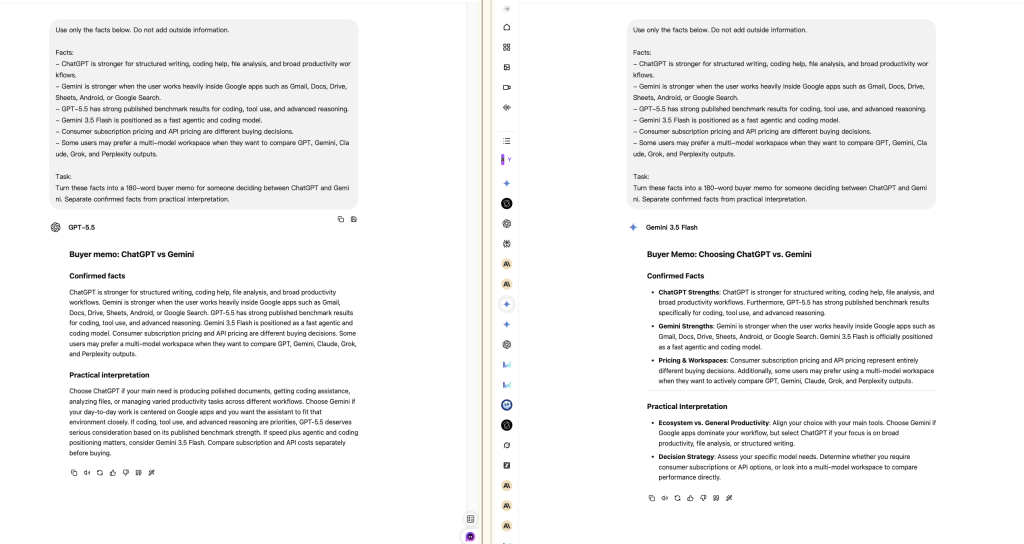
For research synthesis, both models were told to use only a short fact packet and separate confirmed facts from practical interpretation. GPT-5.5 followed the structure closely and wrote a compact buyer memo. It did not drift far from the facts, and its interpretation was direct: choose ChatGPT for polished documents, coding assistance, file analysis, and varied productivity tasks; choose Gemini when the user’s day is centered on Google apps.
Gemini 3.5 Flash was also disciplined. It added bullets under “Confirmed Facts” and “Practical Interpretation,” which made the output easy to scan. The tradeoff is that Gemini’s style looked more templated. In a research workflow, I would use Gemini when I want a structured first pass and GPT-5.5 when I want a tighter memo.
Pricing decision test: Plus, Pro, Google AI Pro, Ultra, or multi-model?
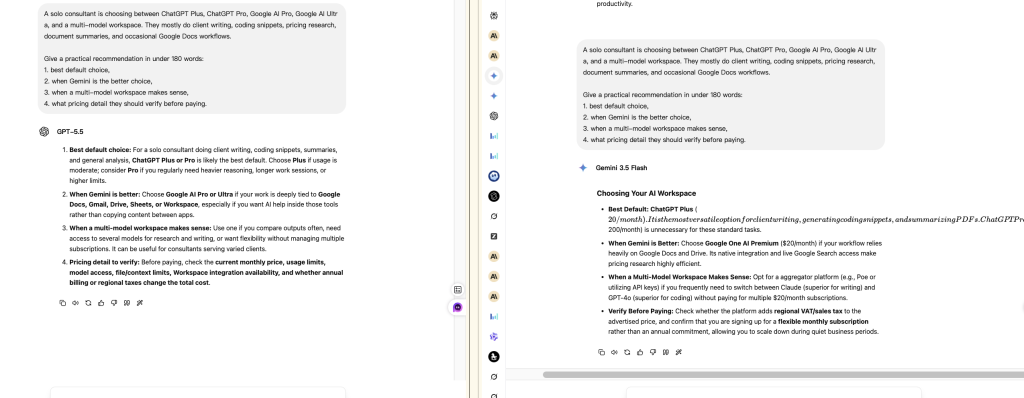
The pricing test asked both models to recommend an AI setup for a solo consultant who does client writing, coding snippets, pricing research, document summaries, and occasional Google Docs workflows. GPT-5.5 gave the clearer recommendation: start with ChatGPT Plus or Pro depending on usage, choose Gemini when work is deeply tied to Google Docs, Gmail, Drive, or Sheets, and consider a multi-model workspace if you compare outputs often.
Gemini 3.5 Flash gave a useful answer, but one part of the output had visible formatting overflow around a price line. That is a small detail, but it matters in real work. A model can have good ideas and still produce a result that needs cleanup before you paste it into a client document.
For pricing, do not rely on a model answer alone. Use official pricing pages and check limits, billing period, regional tax, plan access, and whether the plan includes the model or workflow you actually need.
Google Workspace workflow test
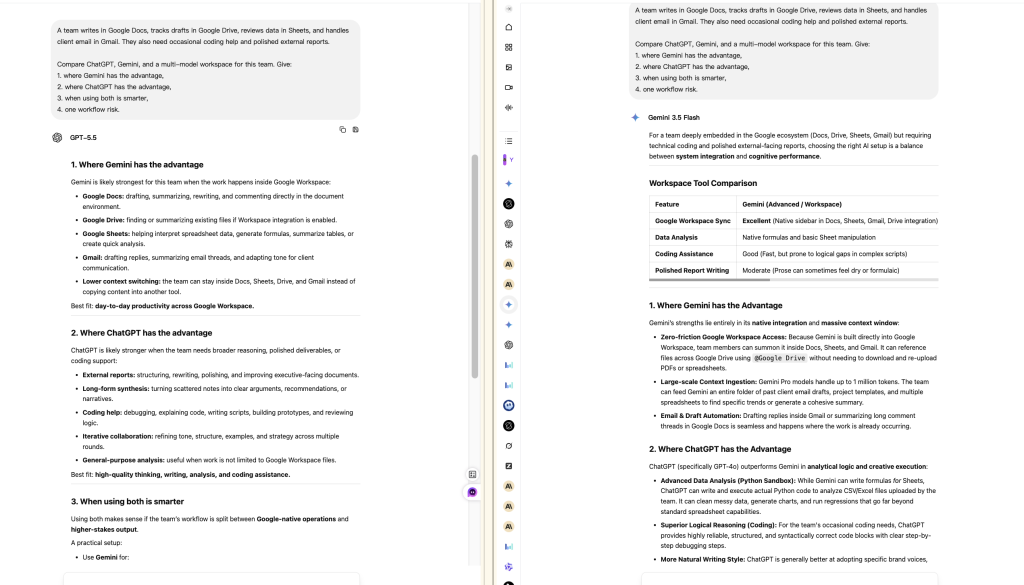
This was the most Gemini-friendly test. The prompt described a team writing in Google Docs, tracking drafts in Drive, reviewing data in Sheets, and handling client email in Gmail. GPT-5.5 gave a balanced answer: Gemini has the advantage when work happens inside Google Workspace; ChatGPT has the advantage for external reports, coding help, synthesis, and general-purpose analysis.
Gemini 3.5 Flash leaned harder into the Google-native argument and produced a comparison table. That was helpful, but it also drifted into a model-specific claim that should not be treated as a verified product fact. This is a good example of how to read AI output: the workflow insight can be useful, but the factual details still need checking against official docs.
Practical takeaway: Gemini is the better fit for teams that live in Google apps all day. ChatGPT is better when the work moves across documents, code, strategy, research, and client-facing writing.
Structured table analysis test
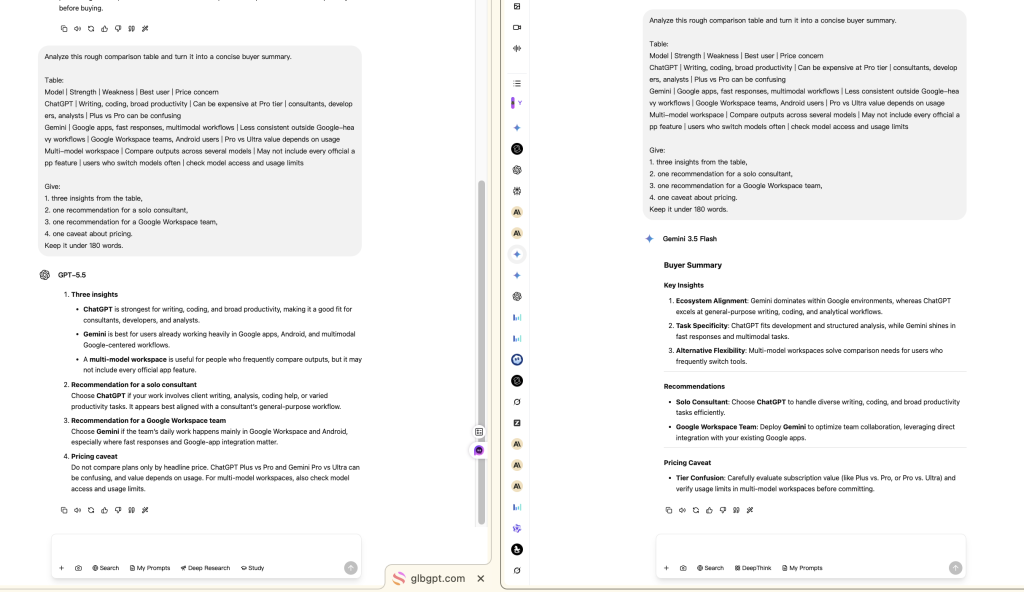
In the structured table analysis test, both models received a rough comparison table and had to turn it into a buyer summary. GPT-5.5 extracted the key points quickly: ChatGPT fits consultants, developers, and analysts; Gemini fits Google-heavy users; multi-model workspaces help people who compare outputs across tools.
Gemini 3.5 Flash made the output more polished with headings such as “Buyer Summary,” “Key Insights,” “Recommendations,” and “Pricing Caveat.” This was one of Gemini’s better outputs because the extra formatting improved scanability. If you are preparing a table-based summary for a nontechnical reader, Gemini’s formatting style can be useful.
For deeper spreadsheet and analysis work, compare this with our guide to the best AI tools for data analysis.
Messy notes cleanup test
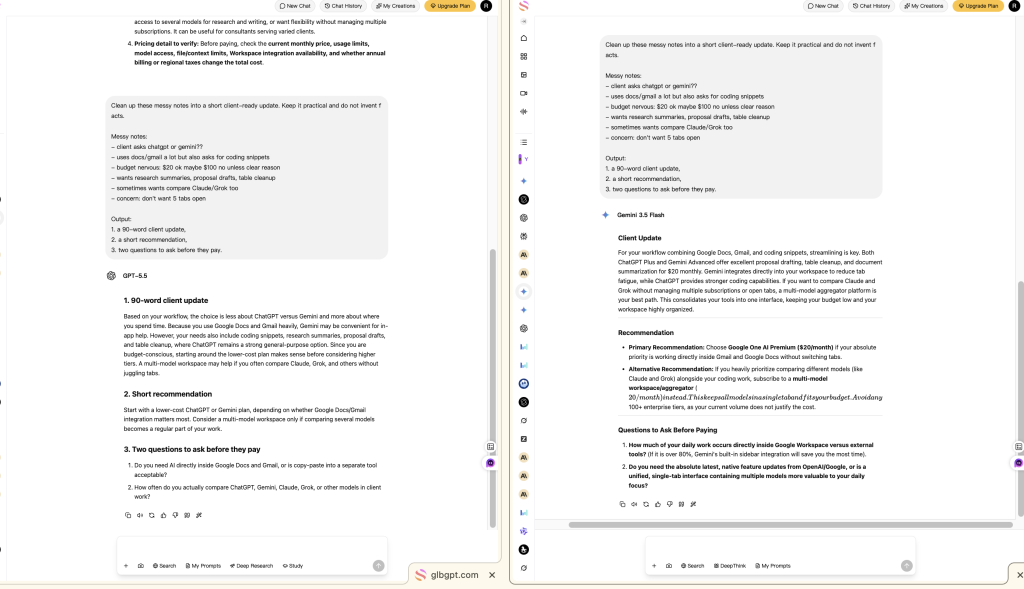
The messy notes test asked both models to turn rough client notes into a short client-ready update. GPT-5.5 wrote a cleaner, more natural update. It kept the budget concern, Google Docs/Gmail context, coding snippets, research summaries, proposal drafts, and multi-model comparison needs without inventing new facts.
Gemini 3.5 Flash produced a more structured answer with a client update, recommendation, and questions to ask before paying. The content was useful, but one line around the multi-model workspace recommendation had visible formatting overflow. Again, this is the tradeoff we saw in several tests: Gemini often organizes well, but GPT-5.5 is usually easier to publish after light editing.
Pricing: ChatGPT Plus / Pro vs Google AI Pro / Ultra vs GlobalGPT
US monthly plan price ladder
USD per month, US consumer plans. Bar length is proportional to the $100 highest starting price shown. “From” means higher access levels or options may cost more.
Takeaway: Plus and Google AI Pro are essentially price peers. Pro and Ultra are power-user purchases and should be justified by limits or exclusive workflows, not by the brand name.
Verified: August 5, 2026. Sources: ChatGPT US pricing and Google AI US plans. The plan families are not feature-for-feature equivalents.
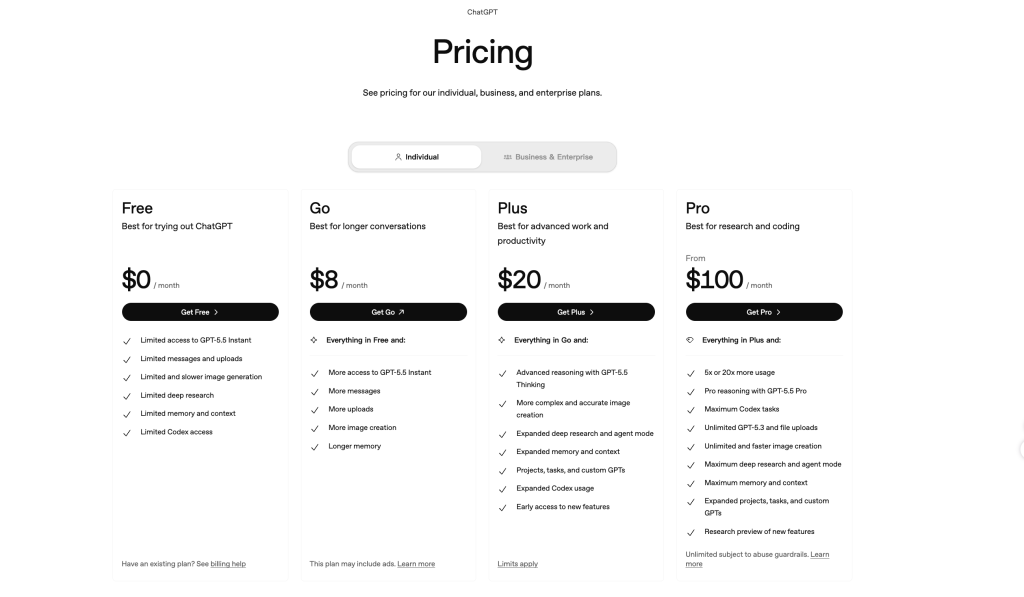
Pricing is one of the biggest reasons people search for ChatGPT vs Gemini. It is also where many comparisons get sloppy. Consumer subscription pricing, API pricing, and multi-model workspace pricing are different buying decisions.
| Buying path | What you are paying for | Best for | What to verify before paying |
|---|---|---|---|
| ChatGPT Free / Go / Plus / Pro | OpenAI’s ChatGPT app experience, with different levels of model access, usage, memory, image generation, deep research, projects, tasks, and Codex-related access depending on plan. | Users who want the strongest general assistant for writing, coding, reasoning, and file-heavy work. | Monthly price, usage caps, access to GPT-5.5 / GPT-5.5 Pro, file limits, Codex limits, deep research limits, and regional billing. |
| Google AI Pro / Ultra | Gemini access packaged with Google’s AI plans and Google ecosystem benefits. | Users who already rely on Gmail, Docs, Drive, Sheets, Android, and Google Search. | Which Gemini model is included, whether Workspace integration is available for your account, storage benefits, family/account rules, and regional pricing. |
| API pricing | Pay-per-token model access for developers and businesses building products or automations. | Teams that need application integration, automation, batch processing, or custom workflows. | Input price, output price, context window, rate limits, caching, tool-use pricing, and whether the model is available in your region. |
| GlobalGPT / multi-model workspace | A single workspace for comparing and using multiple models such as GPT, Gemini, Claude, Grok, Perplexity, and others when available. | Users who do writing, research, planning, summaries, and model comparisons without wanting several separate subscriptions open at once. | Which models are included, usage limits, whether the workflow you need is available, and whether you still need an official app for account-specific features. |
My practical pricing advice is simple: if you mostly need one strong assistant, start with ChatGPT Plus or the closest current ChatGPT plan that fits your usage. If your work is deeply tied to Google Workspace, compare Google AI Pro and Ultra. If you regularly compare answers from multiple models, a multi-model workspace can make more sense than paying for several official apps separately.
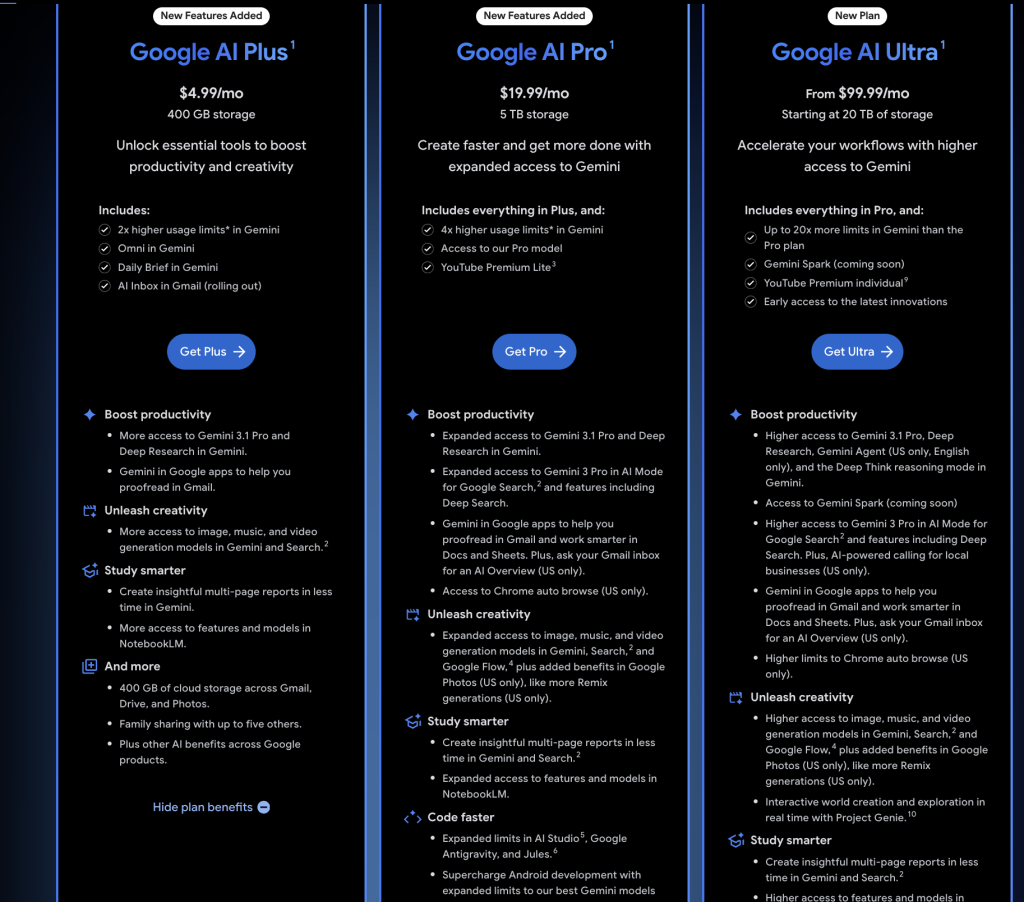
Do not assume ChatGPT Pro is automatically better value than Plus, or Google AI Ultra is automatically better value than Google AI Pro. The right tier depends on how often you hit limits, whether you need the highest reasoning mode, and whether the included workflow saves enough time to justify the monthly price.
ChatGPT vs Gemini for Different Users
Students and educators
Students who need explanations, essay outlines, document summaries, and coding help will usually find ChatGPT easier to use as a general study partner. Gemini is appealing if the school workflow is already built around Google Docs, Drive, Gmail, and Android. For homework-specific comparisons, our guide to the best AI for homework is more focused.
Developers
Developers should start with ChatGPT if they want stronger coding help, cleaner debugging explanations, and compact utility functions. Gemini can still be useful for fast exploration, Google-connected workflows, and multimodal tasks. If coding is your main reason for paying, use coding-specific tests before choosing a plan.
Writers and marketers
For blog intros, landing page copy, editing, and client-facing drafts, ChatGPT is usually easier to polish. Gemini is helpful when you want outlines, campaign structures, and Google Workspace-aware workflows. A good writing workflow is often: use Gemini to organize, use ChatGPT to refine, then compare final wording in GlobalGPT.
Analysts and consultants
Analysts and consultants should care less about brand loyalty and more about output reliability. In our tests, GPT-5.5 was better at concise buyer memos and messy-note cleanup, while Gemini did well at structured summaries and Google Workspace scenarios. If your work moves across PDFs, spreadsheets, documents, emails, and client reports, test both before committing to a high-tier subscription.
Google Workspace teams
Gemini is strongest when the team already collaborates in Gmail, Docs, Drive, Sheets, Calendar, and Android. The time saved by staying inside the same ecosystem can matter more than a benchmark score. ChatGPT still deserves a role for external reports, advanced writing, code snippets, strategy, and cross-tool reasoning.
Model switchers
If you routinely ask “what would Claude say?” or “does Grok answer this differently?” then the real comparison is not only ChatGPT vs Gemini. It is official single-model subscriptions vs a multi-model workspace. For that broader decision, compare this article with our Grok vs ChatGPT workflow comparison and Claude vs ChatGPT guide.
What Reviewers and Communities Are Discussing
Public discussion around ChatGPT and Gemini usually falls into three groups. Benchmark watchers focus on leaderboards such as Artificial Analysis and Arena Agent. Product reviewers focus on whether Gemini’s Google integration saves time. Everyday users focus on price, limits, and whether the answer is good enough to use without rewriting.
For this update, the most useful public discussion sources are not celebrity quotes. They are repeatable comparison sources and reviewer channels you can check again when models change:
- Artificial Analysis model leaderboard for intelligence, speed, latency, and price signals.
- Arena Agent leaderboard for agentic task ranking signals.
- YouTube discussions on GPT-5.5 vs Gemini 3.5 Flash for reviewer-style walkthroughs.
- YouTube discussions on Gemini 3 Pro vs ChatGPT for Google ecosystem comparisons.
- YouTube discussions on ChatGPT Plus vs Gemini pricing for plan-value debates.
- Reddit discussions on ChatGPT vs Gemini for everyday user complaints and use cases.
Use these discussions as context, not as final proof. Model rankings, prices, and plan limits change quickly. A good review should combine public discussion with direct testing, official pricing pages, and your own workflow needs.
Which One Should You Choose?
- Choose ChatGPT for polished writing, coding help, mixed file analysis, careful synthesis, and an assistant that is not anchored to one productivity suite.
- Choose Gemini for Google Workspace, Android, Google-centered research, and large-context document work.
- Choose the cheaper paid tier first if you are unsure. Plus and Google AI Pro are close in US price; a roughly $100 starting tier only makes sense when you can name the limit or exclusive feature you will use.
- Use both through a multi-model workspace when your work spans writing, research, coding help, and media generation and the best model changes by task.
There is no permanent overall winner. ChatGPT is the safer default recommendation; Gemini is the more compelling specialist when Google integration or the 1M-token context window solves a real bottleneck. If you are comparing more model families, continue with Grok vs ChatGPT or Claude vs ChatGPT.
FAQ: ChatGPT vs Gemini
Is Gemini better than ChatGPT?
Gemini is better for users who depend on Google Search, Gmail, Docs, Drive, Android, and very large inputs. ChatGPT is the better general recommendation for writing, coding help, analysis, and polished deliverables.
Which is better for coding, ChatGPT or Gemini?
ChatGPT is usually the stronger default for concise code, debugging explanations, and structured technical work. Gemini remains useful for Google-connected workflows and long-context code or document review. Test both on your own repository pattern before buying a high tier.
Which is better for research?
Both provide web search and Deep Research. ChatGPT is strong when research must turn into a polished memo or draft; Gemini is attractive when Google-grounded discovery and Google Workspace handoff matter most.
Does Gemini have a larger context window than ChatGPT?
Google AI Pro advertises a 1M-token Gemini context window. ChatGPT lists 256K reasoning context on Plus and 400K on Pro. These are plan-level app figures, not the same as file-upload size or every API model’s context window.
Is ChatGPT Plus cheaper than Google AI Pro?
They are nearly the same in the US: ChatGPT Plus is $20 per month and Google AI Pro is $19.99 per month as of August 5, 2026. Compare limits and included workflows, not the one-cent difference.
Can ChatGPT and Gemini search the web?
Yes. Both can use live web information and offer deeper multi-source research workflows. The exact availability and quotas depend on plan, model, account, and region.
Should I use both?
Using both makes sense when Google integration is valuable but you also prefer ChatGPT for writing, coding, or final synthesis. A multi-model workspace can make that workflow easier without turning every task into a separate-app decision.