The best AI data-analysis tool depends on where the data lives and what must happen after the answer. GlobalGPT suits multi-model analysis, Power BI and Tableau fit governed reporting environments, Julius fits conversational file exploration, and Databricks or Zerve suit technical workflows.
Switching between different AI models for data cleaning, coding, and visualization kills efficiency. To solve this instantly, GlobalGPT provides a centralized workspace that eliminates expensive, scattered subscriptions.
Compare the tools by workflow, then use the eight-order model test below to see how duplicate records, refunds and missing values affect the answer.
For a multi-model workflow, GPT-6 Astra, Claude Opus 5, Claude Sonnet 5 and Gemini 3.8 Flash are listed in GlobalGPT’s current catalog. GlobalGPT is a separate subscription; it does not activate another provider’s paid account.
The GlobalGPT annual-plan page lists Basic at $5.80/month, Pro at $10.80/month and Unlimited at $25/month when billed annually. Compare the upfront commitment and included model usage, not just the smaller monthly equivalent.

Try 100+ AI Models on GlobalGPT
Contents
- Quick Answer: Top AI Data Analysis Tools at a Glance
- Why Model Fragmentation is the Biggest Pain Point in 2026
- In-Depth Reviews: The Best AI Tools for Data Analysis
- 1. GlobalGPT
- 2. ML Clever
- 3. Microsoft Power BI Copilot
- 4. Tableau Pulse
- 5. Julius AI
- 6. Databricks AI
- 7. Zerve
- Best AI Data Analysis Tools by Specific Use Case
- How to Choose the Right AI Data Analysis Tool
- Reproducible test: eight synthetic orders
- Frequently asked questions
- Conclusion: Streamline Your Data Workflow Today
Quick Answer: Top AI Data Analysis Tools at a Glance
| Tool | Best-fit workflow | Best for | Price / billing basis | Original review rating / 5 |
|---|---|---|---|---|
| GlobalGPT | Compare model answers in one workspace | Analysts comparing answers across models | $5.80/month with annual billing | 5 |
| ML Clever | No-code exploration candidate | Non-technical spreadsheet users | Freemium; paid plan varies | 4.5 |
| Power BI Copilot | Governed Microsoft reporting | Teams already working in Microsoft BI | Eligible paid capacity required; user license alone is insufficient | 4.5 |
| Tableau Pulse | Metric monitoring and summaries | Business teams tracking shared metrics | $75–$115/user/month reference range | 4 |
| Julius AI | Chat-based file exploration | Beginners exploring individual data files | Free and paid plans; compare usage allowances | 4 |
| Databricks | Engineering and large data systems | Data engineers and machine-learning teams | Usage-based enterprise pricing | 4 |
| Zerve | Collaborative data-science workflow | Data scientists collaborating on projects | $25/month; $18.75/month with annual billing | 4 |
The ratings summarize the original review’s editorial judgment. The eight-order case study below provides a separate, reproducible check of model answers.
Why Model Fragmentation is the Biggest Pain Point in 2026
When doing data analysis today, using just one AI model is rarely enough. Different AI models are good at different things. However, paying for all of them separately creates a massive headache:
- High Costs: Subscribing to Claude, ChatGPT, and Gemini separately easily costs over $60 a month.
- Broken Workflows: Copying and pasting data between different websites ruins your focus and wastes time.
- Strict Limits: Official websites often have region blocks or strict limits on how many questions you can ask per hour.
Instead of fighting with multiple tabs, professionals are moving toward unified platforms where you can access every top-tier AI in one place.

In-Depth Reviews: The Best AI Tools for Data Analysis
Choose a tool based on where your data lives, the output you need and who will use the result.
1. GlobalGPT
1-Sentence Summary: GlobalGPT is the ultimate all-in-one AI platform that lets you switch between 100+ top models (like Claude Opus 5 and Gemini 3.1 Pro) to analyze data without high costs.
Hands-on notes from the original review: We tested it by jumping seamlessly from Claude 4.6 to write complex Python code, and then switching to GPT-5.4 to write the final business report. It completely removed the hassle of managing different tabs and accounts.
For a multi-model workflow, check whether the second model can reproduce the first model’s calculation from the same source. Our controlled sample below tests the answer, not an enterprise data connection. The ChatGPT model and workflow guides on GlobalGPT can help you prepare prompts for that comparison.

Key Features:
- 100+ Models in One Place: Access GPT-6 Astra, Claude Opus 5, Gemini 3.1 Pro, and more.
- Seamless Switching: Move between text, image, and video models instantly.
- No Region Locks: Access top-tier AI from anywhere in the world.

Pros & Cons:
- Pros: Convenient model comparisons in one workspace. Premium requests still follow the selected plan and credit rules.
- Cons: Requires users to know which model is best for their specific task.
Pricing: * Basic plan starts at around $5.8/mo.
- Pro Plan (includes video/image tools like Sora 2 Pro) is $10.80/month with annual billing; review current credits and eligible tools.


2. ML Clever
1-Sentence Summary: ML Clever is a top-tier tool for turning spreadsheets into clear charts and insights without needing to write any SQL code.
Hands-on notes from the original review: We asked it to analyze a mock sales sheet, and it instantly generated a clean chart while explaining its reasoning step-by-step.
Before choosing ML Clever, check whether you can inspect the query or transformation behind an answer, preserve missing values and export a result you can verify.
Key Features:
- Text-to-SQL: It writes database queries automatically based on your simple English questions.
- Transparent Reasoning: It shows you exactly how it got the answer, building trust.
- Auto-Charts: It picks the best chart type for your data automatically.
Pros & Cons:
- Pros: Perfect for non-technical users; easy to trust the results.
- Cons: Currently limited by the types of files you can upload.
Pricing: Freemium (Free tier available, paid plans not publicly specified).
3. Microsoft Power BI Copilot
1-Sentence Summary: Power BI Copilot is the best choice for large companies already using Microsoft tools to build automated, secure dashboards.
Hands-on notes from the original review: It smoothly pulled data from our test Microsoft ecosystem and built a summary dashboard just by us typing a normal sentence.
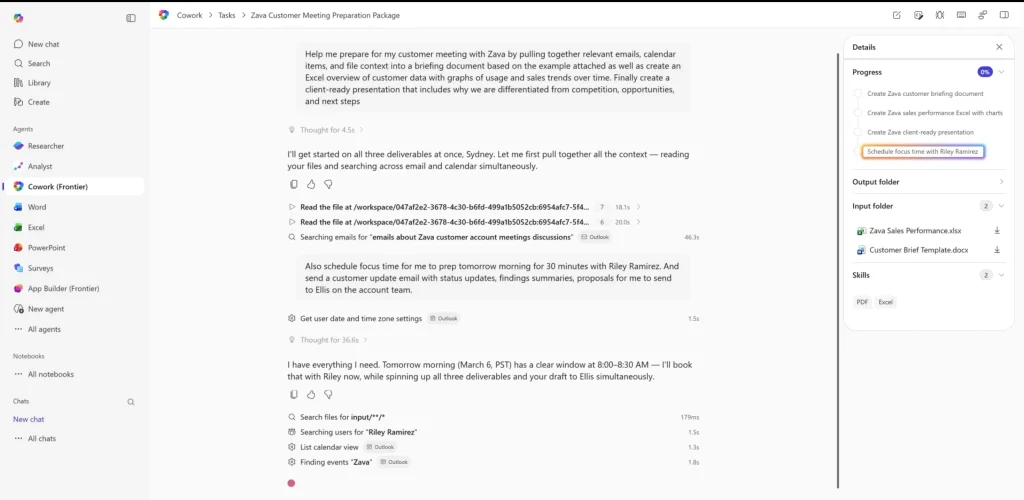
For Power BI, begin with a well-defined semantic model and an eligible capacity. Check that generated measures and summaries use the intended business definitions.
Key Features:
- Deep Integration: Works perfectly with Azure and Microsoft 365.
- Prompt-Driven Visuals: Tell it what to draw, and it creates the report.
- Enterprise Security: Keeps company data safe under Microsoft’s rules.
Pros & Cons:
- Pros: Great for big companies; strong data governance.
- Cons: The results are only as good as your existing data model; high learning curve.
Copilot requirements: Microsoft’s current prerequisites require an eligible paid capacity, supported region and enabled workspace/tenant settings. A Pro user license alone is not the full Copilot cost.
4. Tableau Pulse
1-Sentence Summary: Tableau Pulse uses Einstein AI to create beautiful, interactive stories from your data automatically.
Hands-on notes from the original review: Instead of staring at boring numbers, Tableau Pulse gave us a news-feed style update on our test metrics, making it very easy to read.
For Tableau Pulse, compare a metric summary against its underlying definition and filters. A readable explanation is only useful when it describes the right measure.
Key Features:
- Einstein AI: Gives proactive insights before you even ask.
- Contextual Storytelling: Turns hard numbers into easy-to-read sentences.
- No Dashboard Rebuilds: Updates insights smoothly without breaking old charts.
Pros & Cons:
- Pros: Beautiful visuals; great for sharing data stories with executives.
- Cons: Very expensive for smaller businesses.
Pricing: The reference range is $75–$115 per user per month. Tableau costs depend on the edition, user role and contract, so use an edition-specific quote for your budget.
5. Julius AI
1-Sentence Summary: Julius AI is a highly beginner-friendly tool for quickly uploading a file and exploring data through chat.
Hands-on notes from the original review: We uploaded a simple CSV, and Julius AI instantly offered to clean the data and suggested three different ways to visualize it.
For Julius, use a small file with known answers and verify both the cleaning step and the downloadable output. Keep the original file unchanged for comparison.

Key Features:
- Fast File Uploads: Drop a file and start chatting immediately.
- Code-Visible Analysis: It shows you the exact Python code it used to get the answer.
- Beginner Friendly: Very low barrier to entry.
Pros & Cons:
- Pros: Super fast exploration; great for quick ad-hoc tasks.
- Cons: Strict limits on how big your uploaded files can be.
Pricing: Compare the free and paid plans by file size, message allowance and analysis features before choosing Julius.
6. Databricks AI
1-Sentence Summary: Databricks AI is the heavy-duty engine built for data engineers dealing with massive amounts of machine learning data.
Hands-on notes from the original review: We tested its AI Assistant, which easily helped us troubleshoot a complex Apache Spark query that would have taken hours to fix manually.
For Databricks, test in an approved development environment with representative data and access rules. Code suggestions need execution and review before use in a pipeline.
AI coding tools are getting very good at writing code. But data work is not just code.
Genie Code is built for what happens after. It can build pipelines and models, then keep them running by monitoring pipelines and AI models, triaging failures, and investigating anomalies.
Key Features:
- AI Assistant: Helps engineers write and fix code faster.
- AutoML on Spark: Automates machine learning models on huge datasets.
- Massive Scale: Built to handle millions of rows of data easily.
Pros & Cons:
- Pros: Unmatched power for massive data; highly transparent code.
- Cons: Way too complex for regular business users or beginners.
Pricing: Usage-based enterprise pricing.
7. Zerve
1-Sentence Summary: Zerve is a collaborative workspace where data science teams can work together using context-aware AI agents.
Hands-on notes from the original review: We liked how Zerve allowed multiple team members to code in Python and R in the same space, with the AI jumping in to suggest improvements.
For Zerve, check reproducibility and team handoff: can another analyst rerun the workflow and identify the inputs, transformations and assumptions?

Key Features:
- Context-Aware Agents: The AI understands the specific project you are working on.
- Versatile for Teams: Supports different coding languages seamlessly.
- Cloud Hosted: Easy to share work without complex setups.
Pros & Cons:
- Pros: Great for team collaboration; affordable Pro plan.
- Cons: Still emerging; scalability for giant enterprises is still developing.
Pricing: Zerve’s September 18 page lists Pro at $25/user/month in its FAQ and $18.75/user/month in the annual-discount view. Keep the billing term attached; the page gives conflicting free-credit amounts, so verify the allowance in your account.

Best AI Data Analysis Tools by Specific Use Case
Finding the “best” tool really depends on who is doing the typing. Here is how they break down by user:
- Best AI for Business & Marketing Teams: * Tools like Tableau Pulse and Power BI Copilot are great for managers who need quick, visual dashboard reports.
- For marketing teams, use a model to draft an explanation, then check it against the actual report and business definitions.
- Best AI for Students & Academic Research: Julius AI is fantastic for quick homework help and file scanning.
- GlobalGPT is the clear winner here due to its $5.8 Basic Plan, allowing students to access expensive models like Claude Opus 5 for research without going broke.
- Best AI for Advanced Data Scientists: * Engineers working with Python, R, and massive SQL databases should lean toward Databricks AI or Zerve.
| User Persona | Top Tool Recommendation | Key Reason |
| Business Leaders | Power BI Copilot | Deep M365 integration & security |
| Students / Freelancers | GlobalGPT | $5.80/month with annual billing; model access follows plan terms |
| Data Scientists | Databricks AI | Handles massive scale & Apache Spark |
How to Choose the Right AI Data Analysis Tool
Picking the wrong tool can lead to wasted money and frustrated employees. Follow these simple steps to make the right choice: For document-based reporting prompts, explore GlobalGPT’s Claude models and document guides and check each explanation against your source data.
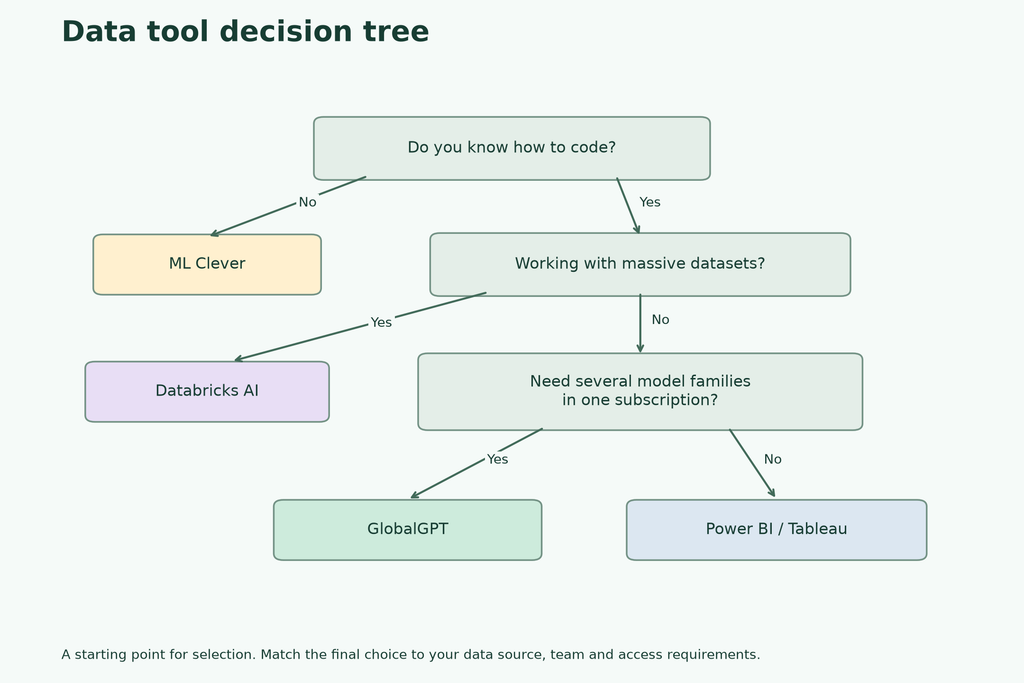
- Step 1: Check Your Data Volume. Are you uploading a small Excel sheet (use ML Clever) or connecting to a massive cloud database (use Databricks)?
- Step 2: Assess Your Technical Skills. If you do not know how to code, pick a tool with “Text-to-SQL” features. If you are a Python expert, pick a tool that leaves the code transparent.
- Step 3: Look at Your Budget. Enterprise tools charge per user, which adds up fast. If budget is tight, look for unified platforms that offer multiple models for one low flat fee.
- Step 4: Verify Security. Make sure the AI tool you choose does not use your private company data to train its public models.
Reproducible test: eight synthetic orders
On September 14, 2026, we attempted the same eight-row synthetic order task with Astra and Gemini 3.8 Flash through the GlobalGPT CLI. Each used the same rules and a 500-word answer limit. We did not rerun a returned answer to improve its score. The input was invented for evaluation and contained no customer data.
| Model | Observed result | End-to-end route time | Ledger credits |
|---|---|---|---|
| gpt-6-astra | CLI exited with code 1; no answer, not scored | 2.268 s | No corresponding new ledger row observed; charge unconfirmed |
| gemini-3.8-flash | Passed all 5 checks on this synthetic task | 8.806 s | 77 credits |
Gemini 3.8 Flash returned the correct $275 known total and preserved the unresolved Email order rather than treating it as zero. It passed all five checks in this single sample. Astra returned no answer through the CLI (exit code 1), so it received no quality score and no speed comparison is justified.
The answer key is $275 of known net revenue: Search $170, Email $75 and Social $30. The newer A record must replace the older one; pending order C is excluded, and order F stays unknown because its gross amount is missing. A model must not silently turn that missing value into zero.
The most useful part of Gemini’s answer was the Email subtotal: it reported “$75 + Unknown” and withheld a complete channel-performance conclusion until the missing amount was resolved. That is safer than a polished report built on an invented zero.
The five checks were latest-record deduplication, pending-payment exclusion, refund arithmetic, channel subtotals and preservation of unknown values. This small synthetic test measures answer accuracy. It does not measure full product capabilities or subscription limits. Reported time includes the CLI/provider route.
The Astra review explains the model-specific scope and the Kimi K3 cost-and-quality review gives separate historical document tests.
Frequently asked questions
Can AI completely replace data analysts?
No, AI cannot completely replace data analysts in 2026. While AI can write code, generate charts, and clean spreadsheets instantly, it still lacks business context. AI acts as a powerful assistant that does the heavy lifting, allowing humans to focus on high-level strategy and decision-making.
Which AI model is best for writing SQL or Python for data analysis?
There is no universal best SQL or Python model established by this guide. Check whether the answer handles joins, duplicates, refunds and missing data, then run the code in an approved environment. Model-written code is a proposal until it has actually executed.
Is it safe to upload company data to AI platforms?
Use the product and account approved for your company data. Verify the applicable contract, retention, training settings and access controls; opting out of training alone does not establish that an upload is authorized or private.
Can I analyze data for free with AI?
Yes, many tools offer free tiers. ML Clever and Julius AI have freemium models for small tasks. However, free tools often have strict limits on file size and daily questions. For serious analysis without the high cost, budget-friendly platforms starting around $5.8 a month offer the best middle ground.
Conclusion: Streamline Your Data Workflow Today
The best AI data analysis tool in 2026 ultimately depends on your specific daily workflow—whether you need no-code spreadsheet parsing, enterprise-grade Microsoft security, or advanced Python generation. By carefully evaluating your data volume, technical skills, and budget, you can stop overpaying for fragmented software subscriptions. Choose a unified platform that seamlessly bridges the gap between raw data and actionable business insights, allowing you to focus on strategy rather than managing multiple AI accounts.