The best AI models to shortlist depend on the work you need to finish. For text, coding and reasoning, compare the current GPT, Claude, Gemini, Grok, DeepSeek and Qwen families. For images, consider GPT Image, Nano Banana and Midjourney; for video, start with the generation and editing controls your project needs. A research assistant also needs search and reliable sources, not just a powerful language model.
Start with your hardest recurring task, then choose the least expensive setup that completes it reliably. A model that writes a convincing paragraph can still misread a document, invent a citation or produce code that fails. The recommendations below use official model documentation and practical selection criteria; they are a shortlist by task, not a league table of scores.
GlobalGPT brings multiple model families and AI functions into one subscription, so you can move from research and writing to images and video in the same workspace. That is a practical, budget-conscious option when your week spans several kinds of work and you want fewer separate subscriptions to manage.
Official model directories checked September 15, 2026. Historical examples are labeled with their original models.
Which AI model should you choose first?
A practical shortlist by task
| Your task | Candidates to compare | What should decide the choice |
|---|---|---|
| Everyday text and coding | GPT-5.6 Terra; Claude Sonnet 5; Gemini 3.8 Flash | Instruction following, useful output and the amount of editing you need. |
| Difficult reasoning or extended coding | GPT-6 Astra; Claude Opus 5 or Fable 5.1; Qwen3.8 | Success on your own difficult cases, with the required tools and permissions. |
| Large documents and mixed inputs | Gemini 3.1 Pro Preview; current GPT and Claude models | File support, accurate retrieval and source references—not capacity alone. |
| Fresh research | A search-enabled assistant; Perplexity; Grok with search tools | Source quality, publication dates and whether citations support the answer. |
| High-volume API work | GPT-5.6 Luna; DeepSeek V4.1 Flash; a suitable smaller Qwen model | Cost per accepted result, plus latency and deployment requirements. |
| Image creation and editing | GPT Image 2.5; Nano Banana family; Midjourney | Text accuracy, reference-image control, visual style and repeatability. |
| Video production | Veo 3.1 and video tools with the controls you need | Motion, continuity, audio, editable workflow and usable export. |
Match the required inputs and tools first, then compare the candidates on a deliverable you can check.
Do not buy the most demanding model for every request. Routine extraction, short rewrites and formatting often have a clear pass/fail target. Save a more capable reasoning model for the cases where a cheaper option cannot meet that target. For a one-off task, the simplest usable app may matter more than a small difference in API cost.
AI models, apps and subscriptions are different choices
An AI model is the system that generates an output from your input. An app adds the working environment: file uploads, search, saved conversations, image tools or connections to other software. A subscription determines how you access that environment and its usage allowances. GPT is a model family, ChatGPT is a product, and a ChatGPT plan is a purchase decision. The same distinction applies to Claude models and Claude Pro.
GlobalGPT is a multi-model platform, so it belongs in the workflow and access discussion. Perplexity is primarily a research-oriented product in this comparison; its API models and developer services are a separate layer. Putting all of these names in a single “best model” ranking makes the purchase decision harder, because the entries solve different problems.

- Choose an app when you want a ready-to-use interface for files, conversations or creative work.
- Choose an API when software needs to send requests automatically and handle the results.
- Choose an open-weight deployment when running the model yourself is part of the requirement. Include hardware, maintenance and security work in that decision.
A model supporting images as input does not automatically generate images as output. Likewise, a large context window does not mean the chat app accepts a file of any size. Match the model, the product features and the plan before comparing prices.
Text, coding and reasoning models worth shortlisting
OpenAI: GPT-6 Astra and the GPT-5.6 family
OpenAI’s model catalog recommends GPT-6 Astra for complex reasoning and coding, GPT-5.6 Terra for balancing intelligence and cost, and GPT-5.6 Luna for cost-sensitive, high-volume work. GPT-5.6 Sol is also listed for complex professional work. These are different budget and task choices within one family, rather than reasons to select the most expensive model automatically.
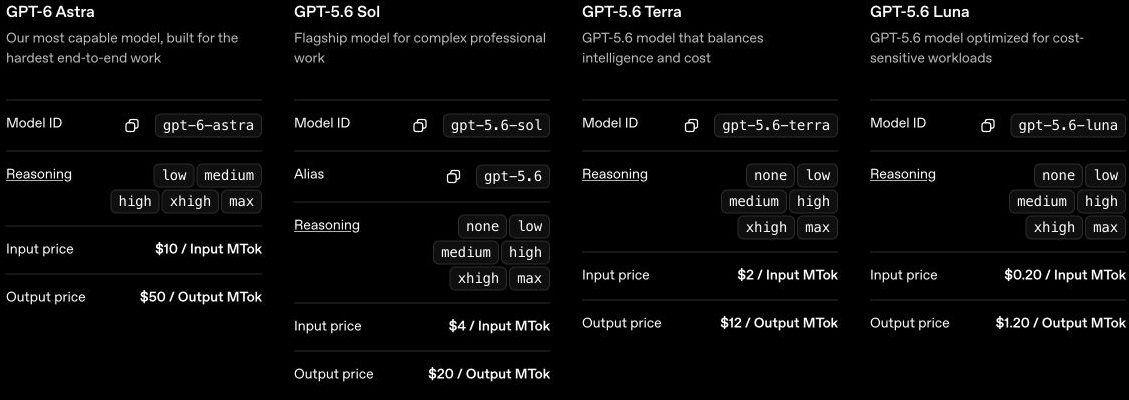
For a developer, a useful comparison is the same failing function, test suite and acceptance criteria across two candidates. For an analyst, use the same source documents and ask both models to identify the evidence behind each conclusion. A fluent explanation is not enough if the code does not run or the quoted document says something else.
- Start here for: a mix of text, structured work, reasoning and coding tasks.
- Compare: Terra or Luna for routine workloads; Sol or Astra when the harder cases justify the added cost.
- Access: the API prices below are developer token charges. They are separate from ChatGPT subscriptions and tool-specific charges.
Claude: Sonnet 5, Opus 5 and Fable 5.1
Anthropic’s current lineup includes Claude Sonnet 5, Opus 5, Fable 5.1 and Haiku 4.5. Anthropic points to Opus 5 for most workloads and Fable 5.1 for demanding reasoning or long-horizon agentic work when evaluations on Opus still fall short. That is a useful upgrade rule: pay for the harder model after identifying a real failure, rather than before trying the task.
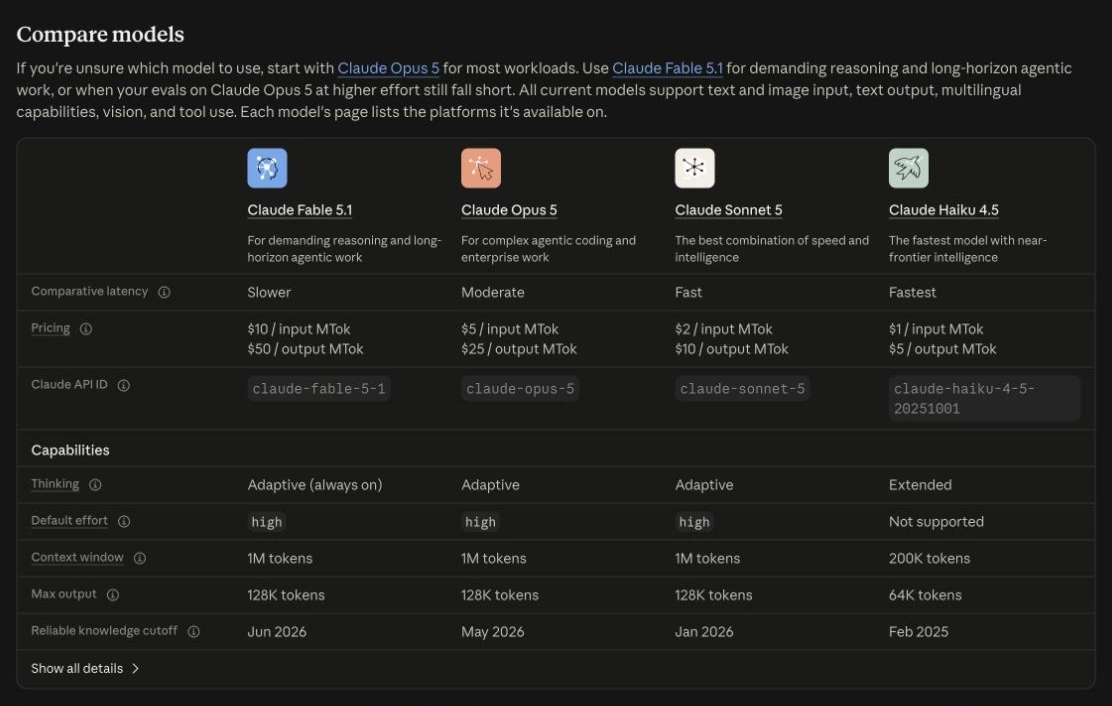
For writing, judge whether the model keeps your facts, voice and constraints through several rounds of editing. For coding, judge the change it produces and the tests it passes. A long answer can be impressive but expensive to review. Ask for the smallest complete deliverable: a revised section, a working patch or a decision with traceable support.
- Start here for: extended writing, code review and projects that need careful use of supplied material.
- Compare: Sonnet 5 for the working baseline; Opus 5 or Fable 5.1 for demanding jobs. This is a selection sequence, not an independent quality ranking.
- Access: Claude app subscriptions and API billing are different. Compare Claude plans and the API and usage breakdown for the route you intend to buy.
If you are choosing between the two ecosystems, the Claude and ChatGPT comparison covers product-level considerations. Do not transfer an older model’s benchmark position to a new release with a similar name.
Gemini: 3.8 Flash and 3.1 Pro Preview
Google’s model directory lists Gemini 3.8 Flash as a stable model and Gemini 3.1 Pro as a preview. It describes 3.8 Flash around software engineering, autonomous agents and complex enterprise workflows; 3.1 Pro remains a candidate for complex problem solving. “Flash” and “Pro” are family labels, so the exact version and release status matter more than the label alone.
Gemini deserves a place on the shortlist when a task involves mixed inputs, such as a report plus images or a video plus a transcript. Test whether the answer refers to the correct page, frame or passage. This catches a common long-context failure: the model accepts the material but retrieves the wrong detail from it.

Google’s original benchmark table supplies the older two-version comparison above. It is useful for reading benchmark conditions. Rows using tools and rows without tools answer different questions. The long-context section also separates a 128K average from a 1M pointwise result. Keep those distinctions when evaluating a claim about “better reasoning” or “longer memory.”
For related purchase and setup questions, see Gemini subscription options and Gemini subscription setup. The Gemini 3.1 Pro versus Claude Opus 4.6 comparison is a version-specific comparison, not evidence about the newer Claude lineup.
Grok 4.6: separate the model from live search
The Grok model documentation lists Grok 4.6 for code and general text tasks, with a 500K-token context window. It also states a crucial boundary: a model does not know current events beyond its training data unless search tools are enabled. For fresh information, the practical choice includes Web Search or X Search, not simply the Grok name.

For a news or trend-monitoring workflow, evaluate whether the assistant finds the original report, distinguishes its date from a repost and links the claim to the source. Search can retrieve material without making the final interpretation correct. For evergreen drafting or code tasks, compare the output against your acceptance criteria instead of assuming the social-search association makes Grok a poor fit.
DeepSeek: current API options and cost controls
DeepSeek’s API table maps deepseek-flash to DeepSeek V4.1 Flash and deepseek-v4-pro to DeepSeek V4 Pro 0813. The same table says Flash supports vision while the listed Pro route does not. A larger-sounding name therefore does not guarantee support for the input you have.
DeepSeek is a useful cost-sensitive API candidate, but compare the complete billing conditions. Its listed rates distinguish cache hits from cache misses and peak from off-peak hours. A quoted minimum price may describe a cached input during a particular period, not the cost of an ordinary uncached request.
- Start here for: recurring API workloads where price and deployment compatibility matter.
- Check first: exact model mapping, image-input support and output requirements.
- Budget correctly: use uncached-input and output rates for a conservative first estimate; apply caching or timing savings only when your workload qualifies.
Qwen: an open model family with several sizes
Qwen’s official repository covers the Qwen3.5 open model series, including 3.6 and the newer Qwen3.8 releases. It lists Qwen3.8-27B and Qwen3.8-2.4T-A95B, while earlier 3.5 sizes include 0.8B, 2B, 4B and 9B. These names represent very different deployment requirements; a small local model and a large flagship are not interchangeable.

The useful question for local work is “What can my hardware run well?” Include model weights, runtime overhead and the memory used by a growing conversation. Quantization can make a model easier to run, but its effect on your task belongs in the evaluation. The repository documents local framework options including llama.cpp and MLX; read the exact model card and license before deployment.
For research, choose sources and search tools as well as a model
Perplexity is a search and research product that combines answers with citations. Its consumer plans determine access to search tools, models and uploads; Sonar and developer API services are a separate choice. A citation-rich answer is useful only when the linked sources actually support its key statements.
For occasional research, start with Free: basic searches, automatic model selection and limited uploads. The official plan comparison, checked September 15, 2026, lists 3 Pro Searches per day and 1 Research query per month for Free, without advanced AI models or image generation. Pro adds advanced models, extended Pro Search and higher upload and analysis limits. Its Pro Search allowance has weekly limits and Research has monthly limits; the consumer table does not give exact Pro counts.
Perplexity’s Individual pricing page, checked September 15, 2026, lists Free at $0/month, Pro at $20/month and Max at $200/month. These are the displayed monthly prices, not annual or tax-inclusive checkout totals. Try Free on a representative research question, then consider a paid plan if its advanced models or higher usage limits address a recurring need.
Build a small source checklist before accepting an answer. Open the source for an important number; check whether it is primary reporting; confirm the publication date; and separate a direct quotation from the assistant’s interpretation. For changing facts such as prices and product access, a vendor’s current documentation is a stronger reference than a recap article.
- For a literature review, ask for original papers and identify the research question each paper addresses.
- For a buying decision, ask for the exact plan, billing basis and date of the quoted terms.
- For recent news, compare the underlying announcement with coverage published afterward.
- For a disputed question, ask which parts the sources agree on and which remain uncertain.
Use Perplexity’s models and modes to understand the available working modes, and Perplexity subscription plans for the purchase decision. A more expensive reasoning model cannot compensate for a source set that omits the relevant document.
Image models: choose editing control, text accuracy or visual style
GPT Image: practical generation and editing
OpenAI’s current catalog lists GPT Image 2.5 Sunburst for image generation and editing, and GPT Image 2.5 Flare for faster everyday generation. Compare the two on the same advertisement, diagram or product-image brief, including the revisions you expect to make.
For a business image, specify the exact text, layout and required objects. Then check the result at its final display size. A beautiful infographic can contain a misspelled label or a plausible but incorrect number. If the visual communicates facts, verify those facts separately from the image’s appearance.

Nano Banana: reference-based image creation and edits
Google’s directory distinguishes Nano Banana Pro, Nano Banana 2 and Nano Banana 2 Lite. Nano Banana Pro maps to gemini-3-pro-image; Nano Banana 2 to gemini-3.1-flash-image; and Lite to gemini-3.1-flash-lite-image. Choose the exact route when comparing generation and editing behavior rather than treating the nickname as one unchanging model.

Reference edits need a different review from one-shot image generation. Did the requested change happen? Did the background, clothing, face or product details change unintentionally? A small edit that preserves the rest of the image can be more useful than a dramatic remake. See getting started with Nano Banana Pro, access routes and Nano Banana Pro costs for the next steps.
Midjourney: evaluate the style against the brief
Midjourney’s official version guide, checked September 15, 2026, names V8.2 as the default version, released July 24. Its update focuses on aesthetics and personalization and introduces an Edit Model that replaces Omni Reference, Character Reference and Retexture. Consider it for mood boards, concept art or a distinctive campaign treatment. A concept sketch needs a convincing style; a labeled product diagram needs exact content. Compare the result and its revisions against that brief.
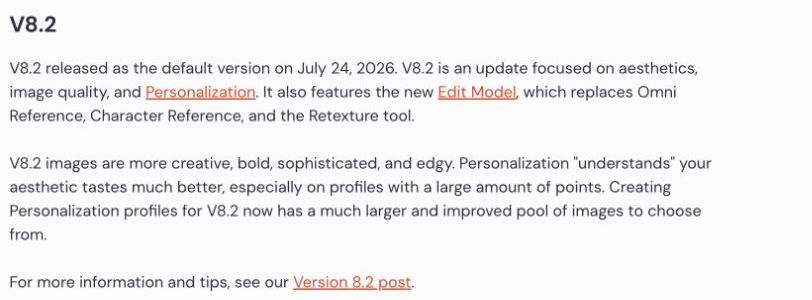

For a useful trial, keep the subject, required composition and export format consistent. Test whether you can revise the chosen direction without starting over. If precise text or identity preservation is essential, make those explicit pass/fail checks. The Nano Banana Pro and Midjourney comparison offers another way to frame that decision.
Video models: evaluate the whole clip, not one attractive frame
Veo 3.1 and the production workflow
Google’s Veo documentation describes Veo 3.1 for video generation with creative controls and audio. Its examples include reference images, scene extension and first/last-frame workflows. Those controls matter if you need several shots to belong to the same story, rather than one isolated clip.
Test the production constraint that is hardest to fix afterward: a consistent character, a product that keeps its shape, readable signage or synchronized dialogue. Watch the full clip at normal speed and inspect any difficult transition. A model can produce a strong opening frame but fail as the camera moves.
Access, usage and exports depend on the product route, so compare the Veo 3.1 subscription and usage options alongside the creative controls. Do not compare a per-second API rate directly with a monthly plan without accounting for included usage and the type of output.
Sora: account for its announced shutdown
OpenAI’s Sora discontinuation notice, read on September 11, 2026, said the web and app experiences had ended on April 26 and scheduled the API shutdown for September 24, 2026. Treat Sora as a migration question for an existing project, rather than a starting point for a new video workflow. Check the notice for any revised dates and current export instructions.

The Sora storyboard workflow, Sora 2 Pro explainer and version-specific Sora duration guide describe historical features. Use them to identify what an existing project needs to preserve, then compare Sora alternatives against those requirements. Keep the prompt, reference material and full output together so that you can evaluate a replacement on the same brief.
Compare API costs on the same workload
API billing charges for input and output tokens; a consumer subscription buys access under a plan. Keep these budgets separate. The calculation below uses 100 requests, each with 10,000 uncached input tokens and 1,000 billed output tokens: 1 million input tokens plus 100,000 output tokens in total. It is an illustrative workload, not a measured bill or a quality benchmark.
USD, standard listed token rates, checked September 15, 2026. Short requests as specified; no cache discount, batch discount, priority tier, taxes or paid tools. The output allowance includes billed reasoning tokens where applicable. Sources: OpenAI model catalog, Anthropic model overview, Grok models and pricing.
The lowest token bill is useful only if the results pass your checks. If a cheaper model needs repeated attempts or substantial manual correction, compare the cost per accepted result. Start with a lower-cost candidate for clear, repetitive tasks, then route difficult cases to a more capable model when the first result fails.
The rates behind the calculation
| Model | Input / 1M tokens | Output / 1M tokens |
|---|---|---|
| GPT-5.6 Luna | $0.20 | $1.20 |
| Claude Haiku 4.5 | $1.00 | $5.00 |
| Grok 4.6 | $2.00 | $6.00 |
| Claude Sonnet 5 | $2.00 | $10.00 |
| GPT-5.6 Terra | $2.00 | $12.00 |
| GPT-5.6 Sol | $4.00 | $20.00 |
| Claude Opus 5 | $5.00 | $25.00 |
| GPT-6 Astra | $10.00 | $50.00 |
| Claude Fable 5.1 | $10.00 | $50.00 |
These are API rates, not monthly subscription fees. The workload above keeps input size and billed output size fixed; it does not assume equal real-world output length, accuracy or speed.
DeepSeek uses a different time-sensitive tariff. Its current V4.1 Flash table lists uncached input at $0.15 off-peak or $0.30 peak, and output at $0.60 off-peak or $1.20 peak, per million tokens. V4 Pro lists $0.66/$1.32 uncached input and $1.98/$3.96 output. The documented peak periods are 01:00–04:00 and 06:00–10:00 UTC, Monday through Friday. Use the rate that applies when the work runs; cached-input prices belong in a separate calculation.
For an everyday mixed workflow, GlobalGPT’s multi-model subscription offers a simpler way to handle research, drafting, coding help and creative generation together. Compare that convenience and breadth with managing several subscriptions or building an API workflow yourself. An API price table does not describe the subscription’s price or usage terms.
Open-weight or hosted: decide how much you want to manage
Open weights give you a deployment option: running a model in an environment you control. They do not automatically make the whole workflow free, private or unrestricted. Review the license attached to the exact model, the hardware required to run it and where the surrounding application sends files or logs.
- Choose a hosted app when you want to get started quickly and do not need to operate the model.
- Choose a hosted API when you need automation without maintaining inference hardware.
- Consider local deployment when offline work, infrastructure control or a specific data-handling requirement makes it worthwhile.
- Compare smaller models on your hardware before assuming a flagship with more parameters is the practical choice.
A local model can reduce external data transfer, but the rest of the system still matters: retrieval, plug-ins, telemetry, saved histories and backups. For a team, make that a deployment review rather than a promise inferred from the word “open.” The AI data privacy guide gives context for comparing data-handling requirements.
Should you use one AI model or several?
One model is enough when it handles your recurring tasks well. Add another when it solves a specific gap: better access to sources, a required input type, a more controllable image edit or a lower-cost batch workload. Collecting subscriptions without assigning each a job creates more decisions and more handoffs.

Build a workflow around the deliverable
| Work | Useful sequence | Acceptance check |
|---|---|---|
| Marketing | Research sources → draft copy → create visuals → review claims | The campaign’s claims are supported, and the copy and visuals tell the same story. |
| Software development | Understand issue → change code → run tests → review diff | The change meets the requirement without unexpected effects elsewhere. |
| Content creation | Outline → script → reference images → video shots → edit | Characters, product details and narrative remain consistent. |
| Startup operations | Summarize inputs → extract decisions → draft follow-up | Decisions have owners and dates, and no unsupported facts enter the record. |
| Enterprise work | Select approved environment → process allowed data → review output | The workflow meets the organization’s access, data and review requirements. |
Start with one finished deliverable. Keep its source notes and acceptance checks with the work as it moves between tools.
GlobalGPT fits the multi-step pattern by bringing model families and creative functions into one place. Keep the useful source notes, brief and acceptance criteria with the work as you switch tasks. The all-in-one AI models overview is a useful next read if the main decision is workspace breadth rather than a single specialist model.
How to choose: a five-step evaluation you can repeat
- Define one deliverable. For example, a 500-word summary with page citations, a patch that passes three tests, or a product image with two exact labels.
- Choose two plausible candidates. Match the required inputs and tools first. Do not compare a search-enabled assistant with a model that was given no retrieval tools and call the difference model intelligence.
- Use the same brief and inputs. Record the model, product, settings and date. Save the first complete result rather than selecting only the most flattering attempt.
- Check correctness before style. Verify citations, execute relevant code tests and inspect image or video details. Record the human corrections needed.
- Repeat the difficult cases. If the choice is close or the result inconsistent, repeat those cases and keep the extra results separate. Choose by accepted output, effort and total cost.
For writing, a useful check is whether all supplied facts survive a rewrite. For extraction, compare the output with a small answer key. For research, open the cited pages. For video, save and watch the entire clip. The GlobalGPT model-testing methodology provides additional context for recording comparisons.
Avoid four shortcuts: buying from a popularity claim, comparing unlike price units, treating a single benchmark as the whole task, and ignoring the review time an output creates. None of these is fixed by choosing the newest model name. A repeatable evaluation is more useful because it can be rerun when a model changes.
Frequently asked questions
What is the best AI model right now?
There is no universal winner. Start with the current GPT, Claude, Gemini, Grok, DeepSeek or Qwen options for text and code, then narrow the choice by your task, required tools, inputs and budget. Use a dedicated image or video model when the deliverable requires it.
Which AI model should I try for coding?
Choose candidates that support your development workflow, such as current GPT, Claude, Gemini or Qwen models. Compare them on the same issue, codebase and tests. A passing change with a small review burden is a better selection criterion than a confident explanation.
Is a larger context window always better?
A larger context window allows more material in a request, but it does not guarantee accurate retrieval or reasoning across that material. Test whether the model can locate the exact passage, page or frame needed for your answer.
Are open-weight AI models free?
The weights may be available under a license, but running them can require hardware, hosting and maintenance. Check the exact model license and deployment cost. A local deployment also needs a review of the surrounding application and its data handling.
Does Grok automatically know live news?
No. The Grok API documentation says current information requires search tools such as Web Search or X Search. A model’s training knowledge and the sources retrieved during a request are different things.
Can I compare API prices with a monthly AI subscription?
Only after defining the workload and what each route includes. API rates are typically metered by tokens or media output, while a subscription provides access under plan-specific usage terms. Compare the total cost of your intended workflow, not unlike headline prices.
Does the most popular AI model have to be the best for me?
No. Popularity does not show whether a model handles your files, follows your constraints or fits your budget. Use current documentation to make a shortlist, then compare real outputs against a task you can verify.
Choose the model that completes the next piece of work with the fewest avoidable corrections. Start small, keep a record of what succeeds, and add another model only when it solves a clear problem. If your work moves across research, text and creative output, try that workflow in GlobalGPT and judge the finished result.