簡単な答え: テキスト読み上げ(TTS)は、書かれたコンテンツを音声に変換する機能です。 幅広い言語や音声の選択肢が必要な場合には、「NaturalReader」が最適です。「TTSReader」は、読み進めた位置の保存や音声エクスポート機能を備えた、シンプルなブラウザ用リーダーです。一方、「GlobalGPT」は、1つのアカウント内で文字起こし、翻訳、会議の要約、執筆、調査、その他のAI関連作業まで一貫して行う場合に適しています。.
テキスト読み上げ機能を使えば、記事を音声で再生したり、勉強のメモをリスニング教材に変えたり、動画用の音声ナレーションの草案を作成したりすることができます。基本的な仕組みはシンプルですが、ツールはどれでも代用できるわけではありません。音声の品質、対応ファイル形式、エクスポート時の権利、そして音声作成後の処理など、あらゆる要素が重要になります。.
このガイドでは、テキスト読み上げの仕組み、NaturalReaderやTTSReaderの優れた点、そしてGlobalGPTのようなオールインワン型ワークスペースがどのような場面で役立つかについて解説します。すでに処理すべき会議やインタビューの記録をお持ちの場合は、直接 GlobalGPT AIノートテイカー.
学習内容
- テキスト読み上げ機能が、どのように文字を音声に変換するのか。.
- 読書、学習、アクセシビリティ、および音声読み上げにおいて、どのような機能が重要か。.
- NaturalReader、TTSReader、GlobalGPTの実際の使い勝手の違い。.
- テキスト読み上げから文字起こしやAIによる会議議事録へと移行すべきタイミング。.
このガイドでは
テキスト読み上げとは?
テキスト読み上げ(TTS)は、書かれたテキストを音声に変換するAI技術です。テキストを入力またはインポートし、言語と音声を選択すると、ブラウザ、アプリ、またはデバイスを通じて音声を聞くことができます。TTSは音声合成とも呼ばれ、ブラウザベースの実装では一般的に次のようなインターフェースが使用されています。 MDNによるSpeechSynthesis APIのドキュメント.
最新のツールでは、発音、間、速度、イントネーションを調整することができます。ただし、結果は依然としてモデルや原文に左右されます。つまり、句読点が明確で洗練された文章は、略語や途切れ途切れの文、説明のない固有名詞が散りばめられた文章よりも、通常は聞き心地が良いものです。.
テキスト読み上げ(TTS)は、音声認識とは異なります。TTSは文章を音声に変換するものであり、音声認識は録音や生の会話を文字に変換するものです。多くの有用なAIワークフローでは、この双方向の処理が活用されています。.
テキスト読み上げはどのように機能するのでしょうか?
ほとんどのオンラインTTSツールは、以下の4つの基本的な段階を踏んでいます:
- テキスト入力: 文章を入力、貼り付け、アップロード、またはインポートします。.
- 言語分析: このシステムは、単語、句読点、数字、および文の区切りを識別します。.
- 音声生成: 音声モデルは、発音、リズム、間、およびイントネーションを予測します。.
- 再生またはエクスポート: ツールやプランで対応している場合は、ブラウザで再生するか、音声をダウンロードしてください。.
最適なテスト対象は、マーケティング用のデモではなく、難易度の高いサンプルです。固有名詞、数字、略語、そして長い文を含めてください。音声認識がこれらを自然に処理できれば、文書全体の認識精度も高まる可能性が高いでしょう。.
テキスト読み上げ機能にはどのような用途がありますか?
記事や文書を読む
画面からの読書が不便な場合、音声で聴くことは役立ちます。通勤中や運動中、あるいは単調な作業をしている際にも役立ち、読者が長い報告書や学習資料に取り組むための別の手段となります。.
学習、校正、語学練習
下書きを声に出して読むと、画面上では見落としがちな言葉の抜けや不自然な表現がしばしば明らかになります。また、学生は音声の再生速度を遅くしたり、特定の箇所を繰り返し再生したり、言語ごとの発音を比較したりすることもできます。.
動画、ポッドキャスト、プレゼンテーションのナレーション
クリエイターは、声優を起用したり最終版を録音したりする前に、台本をナレーションの草案に仕上げることができます。生成された音声がキャラクターに合致する必要がある動画制作ワークフローの場合、そのプロセスはより専門的なものとなります。このガイドでは、以下の内容について解説します。 Veo 3.1 におけるセリフ、音声、リップシンク.
アクセシビリティと代替読み上げ
音声読み上げ機能は、視覚障害、失読症、疲労、その他の読解上の障壁を抱える人々を支援することができます。この機能は、明確なページ構成、キャプション、キーボード操作によるアクセス、および本ガイドに記載されているその他の対策と相まって活用されるべきものです。 W3Cのアクセシビリティツールと手法の概要.
会議、インタビュー、および調査
TTSは、音声処理ワークフローの一部に過ぎません。録音されたインタビューや会議の音声については、その後、文字起こし、話者識別、翻訳、判断、およびアクション項目の整理などが必要になる場合があります。この実用的な考察を通じて、その違いがより明確になります。 ChatGPTは音声を文字起こしできます.
NaturalReader 対 TTSReader 対 GlobalGPT
これらの製品には共通点もありますが、その出発点は異なります。NaturalReaderとTTSReaderは、読み上げと音声生成を主な機能としています。一方、GlobalGPTは、音声がより大規模なAIワークフローの一工程である場合にその真価を発揮します。.
| 必要なもの | NaturalReader | TTSReader | グローバルGPT |
|---|---|---|---|
| 貼り付けたテキストを読み上げる | 主なユースケース | 主なユースケース | より広範なオーディオワークスペースの一部 |
| 言語および音声によるブラウジング | 目立つ音声・言語選択ツール | 複数の音声プロバイダーとアクセント | 選択したオーディオツールによって異なります |
| 文書およびウェブページ | ドキュメント、PDF、Webサイト、書籍のサポートについて説明します | テキスト、ファイル、PDF、電子書籍、ウェブページについて説明します | AI Note Takerは、録音された音声やアップロードされた音声に対応しています |
| オーディオのエクスポート | プランやワークフローによって異なります | MP3形式でのエクスポートが推奨されています。現在の制限事項は、機能やプラットフォームによって異なります。 | ダウンロード可能な文字起こしとメモの出力 |
| 会議の議事録 | このページの主な内容ではありません | 独立した音声認識・文字変換サービス | Core AI Note Taker のワークフロー |
| 翻訳と要約 | このページの主な内容ではありません | TTSプレーヤーの主な機能ではない | 翻訳、要約、主な決定事項、および行動項目 |
| いくつかのAIモデルとツール | その製品の主な役割ではない | その製品の主な役割ではない | チャット、リサーチ、画像、動画、音声、エージェントツールすべてを、1つのアカウントとサブスクリプションで利用可能 |
NaturalReader:音声と言語の選択を最優先したい場合に最適
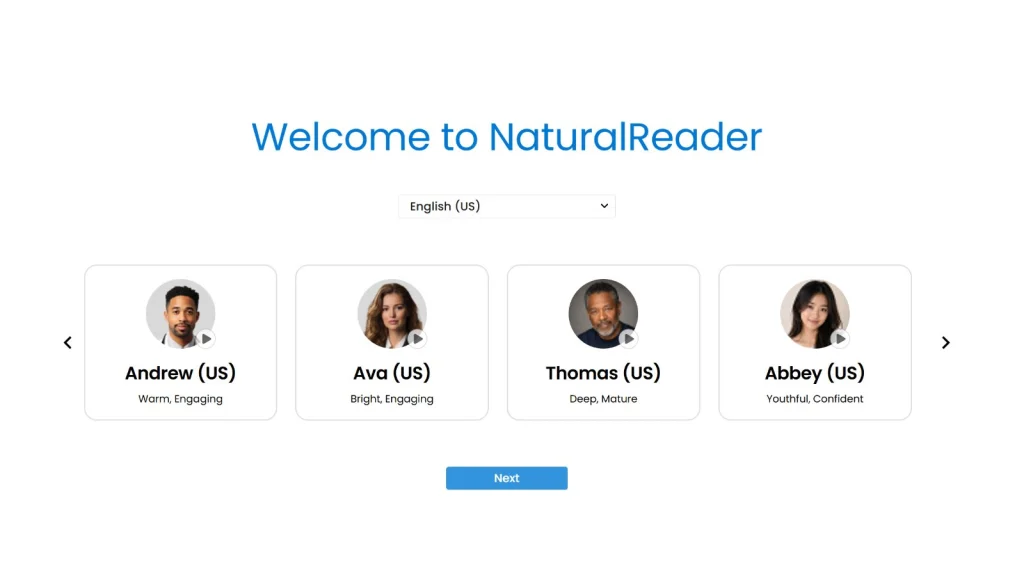
NaturalReaderのオンラインリーダー 最初に言語選択画面が表示され、温かみのある、親しみやすい、明るい、大人っぽいといったトーンで説明されたボイスが紹介されます。そのページには99以上の言語に対応していることが記載されており、文書、PDF、ウェブサイト、書籍の読み上げ機能について説明されています。そのため、ボイスを選ぶ前に製品の内容を簡単に把握することができます。.
TTSReader:ブラウザ上で直接読み上げたり、エクスポートワークフローを行ったりするのに最適
TTSReader リスニングとスタジオ風のナレーションを区別しています。このページでは、プレーンテキスト、ファイル、PDF、電子書籍、ウェブページ、保存された読み位置、複数の音声、MP3エクスポートなどの機能が紹介されています。テキストを貼り付けて再生し、後で再開したり、AIプロジェクトを大掛かりなものにすることなく音声ファイルを作成したい場合に、実用的な選択肢となります。.
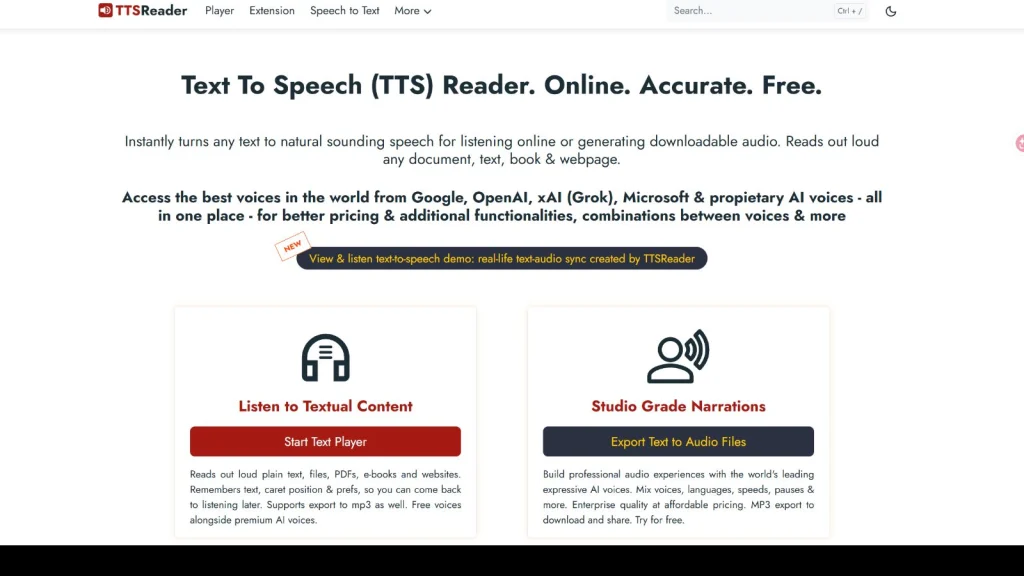
GlobalGPT:オーディオがより大規模なAIワークフローの一部である場合に最も効果を発揮します
GlobalGPTは単なるTTS専用リーダーではありません。その強みは統合性にあります。1つのアカウントとサブスクリプションで、チャット、リサーチ、画像、動画、音声、エージェントをすべてカバーできます。 スクリプトから録音、そして文字起こし、翻訳、要約、フォローアップの草案へと頻繁に切り替える場合、この広範なワークスペースがあれば、各ステップごとに個別のログイン情報やURLを管理する手間が省けます。.
選ぶ前に、より広いカテゴリーを比較したい場合は、こちらのレビューをご覧ください。 オールインワンのAIツールおよびプラットフォーム.
オンラインのテキスト読み上げツールの選び方
- 難しい文章を使って音声を確認してください。. 名前、数字、略語、句読点を含めてください。.
- 正確な言葉遣いやアクセントを確認してください。. 対応言語の数が多いからといって、必要な地域特有の表現が保証されるわけではありません。.
- ファイルの対応状況を確認してください。. PDF、スキャンした文書、EPUBファイル、およびウェブページは、それぞれ動作が異なります。.
- 輸出および商用利用に関する利用規約をお読みください。. 無料のリスニングには、ダウンロード可能な音声や商用音声は自動的に含まれていません。.
- プライバシーと保存期間について確認してください。. 会議や顧客向けの文書には、機密情報が含まれている場合があります。.
- 次の手順を見てください。. リスニングにはスタンドアロンのリーダーだけで十分ですが、会議のワークフローには文字起こし、翻訳、要約、編集が必要です。.
主にナレーションの段階に入る前にサポートが必要な作家の方は、専用の AIライティングツール. 適切な選択は、音声が最終出力となるのか、それとも処理の一段階に過ぎないのかによって異なります。.
オンラインでテキスト読み上げ機能を使う方法
- オンラインのテキスト読み上げツールを開きます。.
- 文書全体をインポートする前に、短いサンプルを貼り付けてください。.
- 言語、アクセント、声質を選択してください。.
- それらの操作機能がある場合は、速度、一時停止、発音を調整してください。.
- 名前や数字、文の区切りに間違いがないか、注意深く聞いてください。.
- プランおよび利用目的がダウンロードを許可している場合は、全文を処理してエクスポートしてください。.
簡単なテストは省略しないでください。30分間のナレーションを生成する前に略語を1つ修正しておく方が、エクスポート後に間違いを見つけるよりもはるかに効率的です。.
テキストから音声へ、そして音声からテキストへ
テキスト読み上げ 記事、スクリプト、または学習ノートを音声に変換します。. 音声認識 会議、インタビュー、音声メモ、または動画を検索可能な文字起こしに変換します。ソースが動画の場合、このガイドでは以下のオプションについて説明しています。 ChatGPTスタイルのツールを使った動画の文字起こし.
実用的なAIオーディオワークフロー
会議では「GlobalGPT AIノートテイカー」を活用しましょう
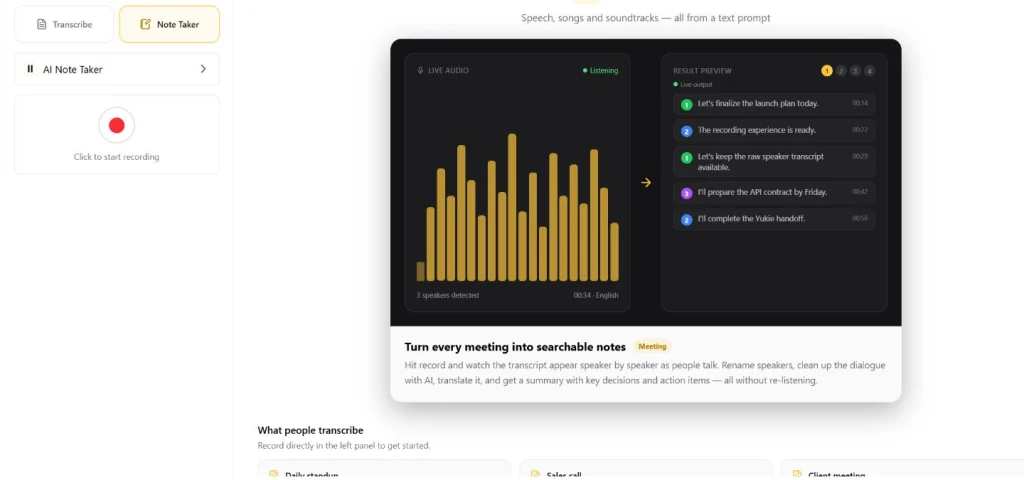
GlobalGPT AIノートテイカー が公開されました。公式ページには、音声の録音やアップロード、話者ごとの文字起こし、翻訳、会議の要約、およびアクションアイテムについて記載されています。このワークフローは、単にテキストを聞くことだけでなく、会話の後に実用的な記録を残すことが真の目的である場合に役立ちます。.
音声を録音またはアップロードする
ブラウザ上で録音を開始したり、既存の音声ファイルをアップロードしたりできます。ライブミーティング中は、インターフェースに録音コントロールが表示され、文字起こしや保存された結果を表示するためのワークスペースも提供されます。.
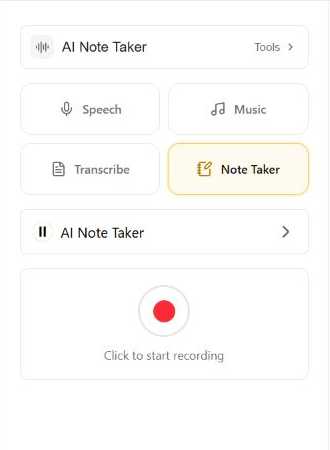
元のスピーカーの原稿をそのまま残す
「オリジナル」ビューでは、話者ごとのテキストとタイムスタンプが利用可能です。AIによる修正を適用する前に、話者の名前を変更したり、AIによる修正前の原文を基準として残したりすることができます。.
会話を整理して翻訳する
「Enhanced」ビューでは、粗いスピーカーラベルを、元の音声を置き換えることなく、より明瞭な会話内容に変換します。製品デモでは、24言語の翻訳に対応していることも紹介されており、営業電話やインタビュー、地域をまたいで活動するチームにとって有用です。.
要約とアクションアイテムを生成する
「概要」ビューには、重要な決定事項やアクションアイテムがまとめられているため、会議の録音全体を改めて聴き直す必要がありません。有用な成果物とは、何が合意されたか、次のステップの責任者は誰か、そして期限はいつか、といった点が明確になっているものです。AIを活用する場合にも、同様の確認原則が適用されます。 主要な論点を損なうことなく記事を要約する.
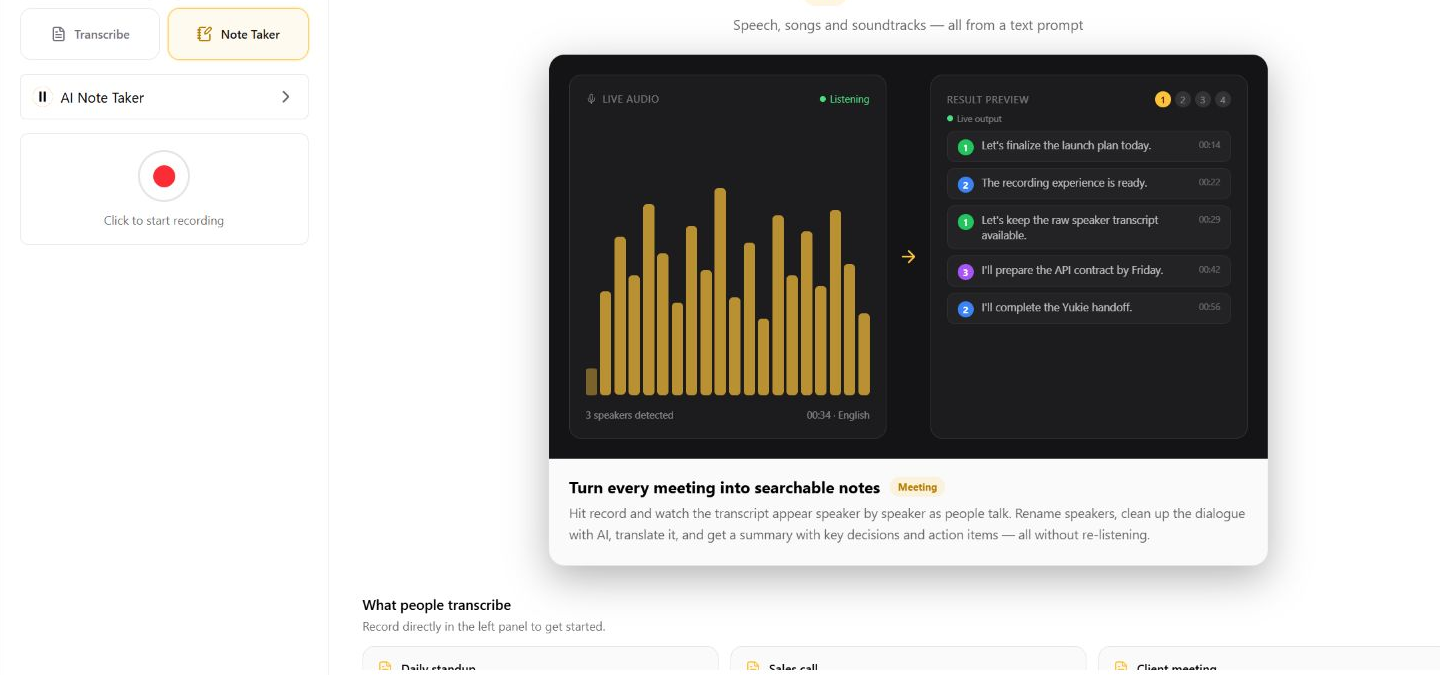
また1時間も試合の再生を見るより、ミーティングの議事録が欲しいですか? Open AI Note Taker を使用して、音声を録音またはアップロードし、より整理された要約を生成する前に、元の文字起こしを保存しておきます。.
GlobalGPTがマルチモデル・ワークフローに適している理由
従来のAIワークフローでは、複数のサービスを開いたり、さまざまなURLを覚えたり、個別のサブスクリプション料金を支払ったりしなければならないことがよくあります。GlobalGPTは、よりシンプルなコンセプトに基づいて構築されています。それは、1つのワークスペース内で、主要なチャット、リサーチ、画像、動画、音声、エージェントツールを、1つのアカウントと1つのサブスクリプションで利用できるというものです。.
これは、タスクの内容が変わる場合に特に役立ちます。たとえば、あるモデルを使ってスクリプトを推敲し、音声を生成または確認し、会議の議事録を作成し、それを翻訳し、アクションアイテムをメールにまとめるといったことが考えられます。その 最適なAIモデルは、その用途によって異なります。, 、ただし、ログイン情報やワークスペースは毎回変更する必要はありません。.
複数のプロバイダーを定期的に利用している人にとっては、各サービスを個別に支払うよりも、1つのサブスクリプション契約の方が安くなる場合もあります。GlobalGPTはVPNなしで利用できるため、アカウントやアクセスに関する手間がさらに軽減されます。まだ各サービスを比較検討中の読者は、以下を参考にしてください。 ChatGPTの代替案およびマルチモデルオプション.
テキスト読み上げのベストプラクティス
- 句読点を使って、自然な間を作ります。.
- 聞き手が聞き間違えた場合は、あまり一般的ではない略語をフルスペルで読み上げてください。.
- テスト名、専門用語、日付、通貨。.
- 学習の際はゆっくりとしたペースで、ナレーションの際は会話のようなペースで進めてください。.
- 音声や動画を公開する際は、キャプションや文字起こしを添付してください。.
- 会議の録画を行う前に、許可を確認してください。.
- AIによる翻訳、要約、固有名詞、締め切りなどを共有する前に、必ず確認してください。.
- 元のトランスクリプトはそのまま残し、補完されたバージョンを編集可能なレイヤーとして扱ってください。.
テキスト読み上げに関するよくある質問
テキスト読み上げとは何ですか?
テキスト読み上げとは、書かれた文字を音声に変換する技術のことです。テキストを入力し、言語と声を選択すると、システムがその内容を読み上げます。この技術は、文書、ウェブページ、学習教材、アクセシビリティ、校正、ナレーションのラフ録音などで広く利用されています。.
テキスト読み上げ機能は無料ですか?
一部のオンライン音声合成ツールでは、無料の音声や限定的な無料利用が提供されています。プレミアム音声、長めのファイル、MP3形式でのエクスポート、商用利用権については、有料となる場合があります。生成された音声を有料コース、広告、ポッドキャスト、またはクライアントのプロジェクトで使用する前に、現在のプランおよび利用規約を確認してください。.
ソフトウェアをインストールせずに、テキスト読み上げ機能は使えますか?
はい。NaturalReaderとTTSReaderはどちらも、ブラウザベースのテキスト読み上げ機能を提供していますが、アカウントの要件やプレミアム機能には違いがあります。デスクトップ用プログラムをインストールせずに、テキストを貼り付け、音声を 선택して、音声で聴きたい場合、ブラウザツールが通常最も手っ取り早い選択肢となります。.
テキスト読み上げ機能では、PDFやウェブページを読み上げることができますか?
ツールによって異なります。NaturalReaderでは、文書、PDF、ウェブサイト、書籍の読み上げに対応していると説明されていますが、TTSReaderでは、そのプレイヤーがプレーンテキスト、ファイル、PDF、電子書籍、ウェブページに対応しているとされています。見出し、表、ヘッダー、スキャンされたページなどが抽出品質に影響を与える可能性があるため、必ず対象のファイルで実際にテストを行ってください。.
「テキスト読み上げ」と「音声認識」の違いは何ですか?
テキスト読み上げ機能は、書かれたコンテンツを音声に変換します。音声文字変換機能は、その逆の処理を行い、録音や生の会話を文字に変換します。完全な音声ワークフローでは、スクリプトを聞き、会議を録音し、文字起こしを作成し、その結果を要約するという一連の工程で、これら両方の機能を活用する場合があります。.
どのオンライン音声読み上げツールを選べばいいでしょうか?
幅広い言語や音声の選択肢を重視する場合は、NaturalReaderをお選びください。閲覧位置の保存機能や音声エクスポート機能を備えた、ブラウザ上で直接利用できる読み上げソフトをお探しの場合は、TTSReaderをお選びください。また、文字起こし、翻訳、要約、執筆、調査、あるいは1つのアカウントで複数のAIモデルを利用する場合などは、GlobalGPTをお選びください。.
AIは録画された会議の内容を要約できるでしょうか?
はい。音声が文字起こしされた後、AIノートテイカーがその文字起こしを要約、重要な決定事項、およびアクションアイテムに変換することができます。特に、氏名、期限、財務の詳細、契約上の決定事項などが重要な場合は、結果を元の文字起こしと照らし合わせて確認してから共有してください。.
「GlobalGPT AI Note Taker」とは何ですか?
「GlobalGPT AI Note Taker」は、音声の録音やアップロード、話者ごとのラベル付き文字起こしの作成、会話の整理、会話の翻訳、そして決定事項やアクションアイテムを含む要約の生成を行う、ブラウザ上で動作するリアルタイムツールです。このツールは、他のAIモデルやツールで使用されているのと同じGlobalGPTワークスペース内に組み込まれています。.
最終的な要点
テキスト読み上げは簡単に始められますが、適切なツールの選択は、その後の用途によって異なります。NaturalReader なら、音声や言語の選択が分かりやすく行えます。TTSReader は、直接の読み上げやエクスポートのワークフローを提供します。GlobalGPT は、音声データを文字起こし、翻訳、要約、文章作成、調査、およびさまざまな AI モデルと連携させる場合に、より適しています。.
単に聞くことが目的であれば、その素材に合った声やファイル形式の朗読者を選んでください。会話を作品に仕上げることが目的であれば、, GlobalGPT AIノートテイカーを開く. マルチモデルワークスペースの全機能を試すには、, open GlobalGPT.