MAI-Image-2.6 vs Flash comes down to how much you value a stronger first result over cheaper, faster iteration. MAI-Image-2.6-Flash has a representative API price of $19.50 per 1,000 images, em comparação com $38.90 for MAI-Image-2.6 on Artificial Analysis’s image-editing leaderboard. In Microsoft’s internal 1024 × 1024 load test, Flash’s median response was 12.2 seconds, em comparação com 25.6 seconds for the standard model.
The standard model still has the stronger text-to-image preference score. Flash is the more attractive starting point for repeated edits and high-volume creative work, while MAI-Image-2.6 deserves a look when typography, composition, and a polished final image matter more than turnaround. Figures below were checked on October 21, 2026; published load-test results and current leaderboard scores have different measurement scopes.
RESPOSTA RÁPIDA
Price and quality: Análise Artificial. Speed: Microsoft’s published test. These are source-reported figures; no new same-prompt model test was run for this comparison.
MAI-Image-2.6 vs Flash at a glance
“Flash” here means MAI-Image-2.6-Flash, Microsoft’s faster variant of MAI-Image-2.6. It does not mean a Gemini Flash model or the older MAI-Image-2.5-Flash. Microsoft lists both 2.6 models as preview deployments with model version 2026-07-31 in its Foundry deployment documentation. That version label is separate from the public announcement date.
Fonte: Microsoft’s model specifications. A dimension may exceed 1536 pixels if the total area stays within the limit; the documentation specifies a 768 × 768 minimum.
The useful distinction is the quality, cost, and latency tradeoff. Microsoft describes Flash as offering the same generation and editing capabilities at lower cost and faster speed. That does not establish that every output will look identical. If you are comparing beyond this pair, our Comparação entre geradores de imagens com IA covers the broader choice of creative tools.
Pricing: roughly half the representative image cost
For a practical comparison, the current Artificial Analysis tables list $38.90 per 1,000 images for MAI-Image-2.6 and $19.50 for Flash. Artificial Analysis defines its pricing basis as the model creator’s API at 1024 × 1024 with default settings. Microsoft’s own quality–price chart uses the same representative values. Those work out to $0.0389 e $0,0195 por imagem for that benchmark cost basis.
10,000-image planning example
Calculation: listed cost per 1,000 images × 10. Flash saves $194, or about 49.9%, in this fixed-cost example. Source and pricing basis; checked October 21, 2026. This is a spending estimate, not an audited account charge.
Keep three prices separate: the benchmark’s representative API cost, your Azure deployment’s actual charges, and any third-party subscription or credit allowance. Dimensions, reference inputs, request features, and your billing terms can affect the bill. The official Microsoft model-pricing page is the place to confirm the applicable rate for your deployment; a leaderboard equivalent is not a universal flat price for every request.
Retries change the economics. At the listed equivalents, two Flash outputs cost $0.0390, almost the same as one standard output at $0.0389. Flash is cheaper per attempt; whether it is cheaper per approved asset depends on how many attempts you need. Count the successful deliverables, not just the generated files.
If price is your main filter, the separate Agnes Image 2.1 Flash pricing breakdown offers another model and billing comparison. Its prices belong to that model and route, so they should not be applied to MAI.
Benchmarks: a clearer generation gap, a closer editing contest
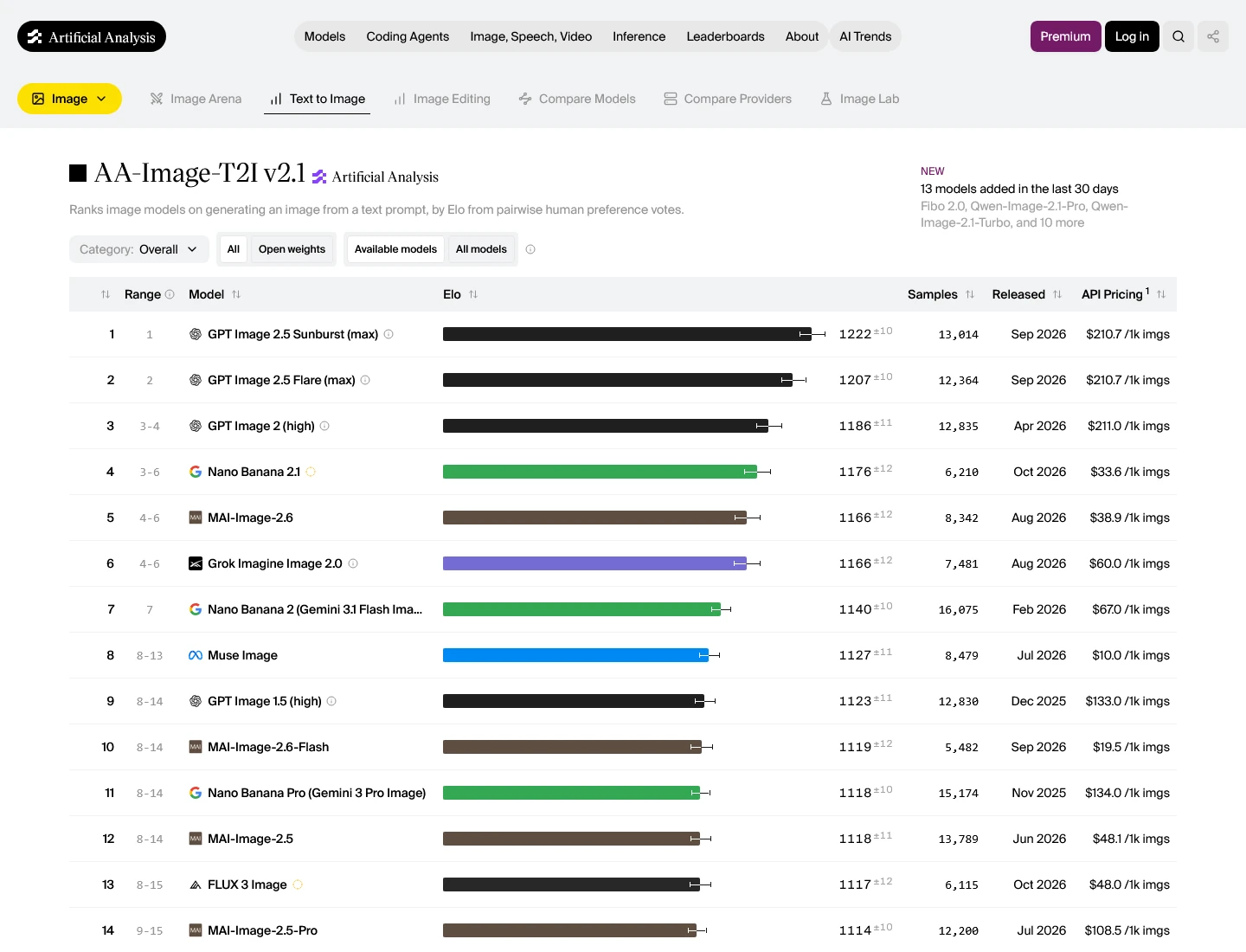
A corrente AA-Image-T2I v2.1 overall leaderboard gives MAI-Image-2.6 1166 ±12 Elo and Flash 1119 ±12. Their displayed positions are fifth and tenth. These scores come from pairwise human preference votes, so they describe aggregate image preference rather than a percentage of prompts answered correctly.
ARTIFICIAL ANALYSIS · OCTOBER 21, 2026
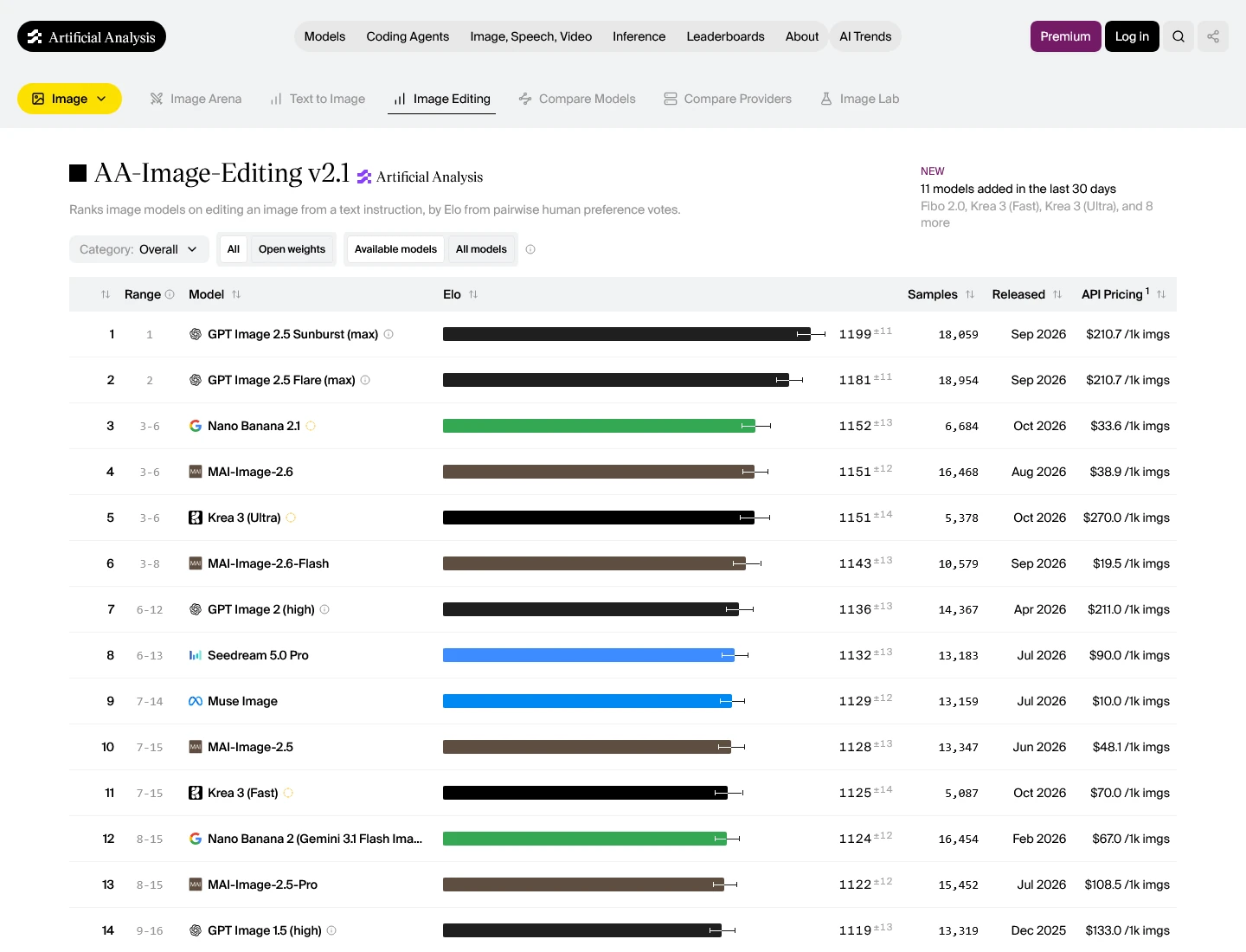
Overall scores and 95% intervals from AA-Image-T2I v2.1 e AA-Image-Editing v2.1. Each benchmark has its own scale; compare models within the same benchmark.
Editing looks much closer. The AA-Image-Editing v2.1 overall leaderboard listas 1151 ±12 for standard and 1143 ±13 for Flash. Their 95% intervals overlap. The eight-point difference is a reason to test your actual editing task, not a basis for claiming an obvious winner on every edit.
Older launch claims need their dates. In its September 4 announcement, Microsoft reported standard MAI-Image-2.6 at No. 2 for generation and No. 1 for editing on Artificial Analysis. The same announcement reports No. 2 on Arena for both tasks. Those are September 4, 2026 rankings, not the October 21 positions above. Arena and Artificial Analysis also run separate leaderboards; their Elo values should not be combined.
Microsoft’s earlier August 10 launch post reports a 79-point overall Arena gain and a 91-point text-rendering gain over MAI-Image-2.5. Those improvements compare 2.6 with 2.5, not 2.6 with Flash. They help explain the newer model’s focus, but do not quantify the quality sacrificed by choosing Flash.
The current leaderboards also include newer GPT Image 2.5 variants. Our Análise do ChatGPT Images 2.5 is a useful next comparison if you want to weigh the MAI pair against that model family. A model’s leaderboard result and the features of a consumer image app remain separate questions.
Speed: Flash is about 2.1× faster than standard in Microsoft’s test
Microsoft publishes an internal load test at 100 requests per minute and 1024 × 1024 resolution. The chart reports median response time and a band extending to the 90th percentile. Flash’s median is 12.2 seconds, standard’s is 25.6 seconds, and GPT-Image-2-Medium’s is 33.6 seconds. See the original test and its conditions.
Published response time · lower is better
Microsoft internal test · 1024 × 1024 · 100 RPM
0s ────────────────────────── 40s · solid: median; pale extension: to P90
Fonte: Microsoft’s published load-test chart. Replotted from source values; no new model timing measured. Prompt and load affect latency.
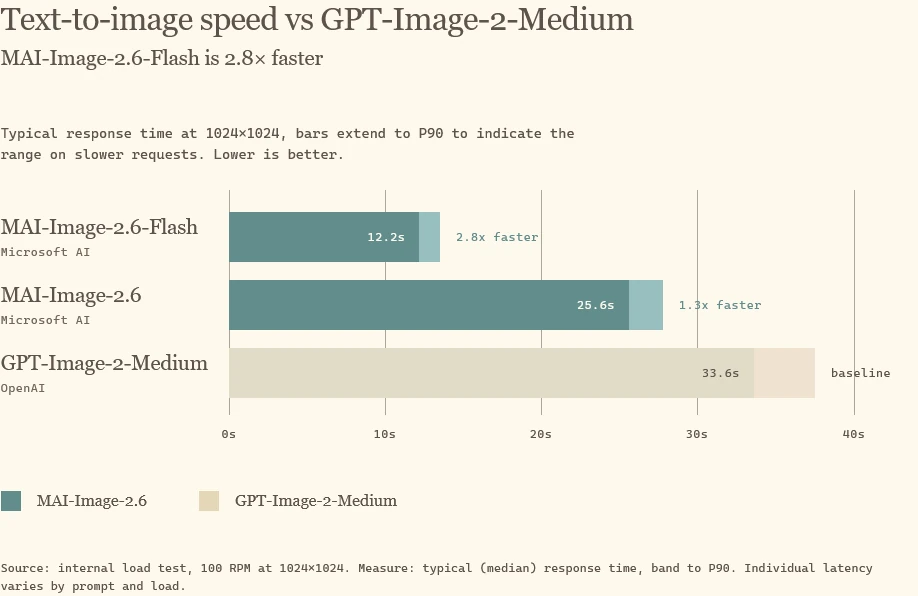
Within that test, 25.6 ÷ 12.2 is about 2.1×: Flash takes roughly 52% less median response time than standard. The headline “2.8× faster” uses GPT-Image-2-Medium as the baseline, because 33.6 ÷ 12.2 is about 2.8. It should not be presented as Flash’s advantage over MAI-Image-2.6.
The tail matters too: Flash’s P90 is 13.5 seconds versus 27.8 seconds for standard. That makes Flash appealing for an interactive workflow where users repeatedly wait for an edit. These figures are response times under the published load, not a promised Playground wait time, a per-account rate limit, or a measured maximum throughput.
What both models can do—and where the work still needs review
Ambos oferecem suporte multi-reference editing, web grounding, and dynamic aspect ratios, de acordo com Microsoft’s family announcement. A faster model does not automatically lose reference-image editing. You can compare the same kind of creative workflow across both, provided you keep the input files, dimensions, and relevant controls consistent.
Bring references
Product · person · style
Fix the brief
Text · layout · dimensions
Compare outputs
Preservation · accuracy · time
Workflow guidance. This diagram is an editorial explanation, not a model-generated result or measured performance score.
For product work, inspect the bottle shape, label spelling, material, and shadow after every change. For portraits, compare identity and small facial details. For web-grounded images, verify factual labels and depicted details independently: grounding adds context, but a generated picture is not documentary evidence.
O GlobalGPT image-editing workflow examples can help you separate a targeted edit from a complete restyle. That distinction matters when you judge whether an image model preserved the parts of the source you wanted to keep.
Two prompts for a useful side-by-side comparison
A leaderboard narrows the shortlist; your brief decides the purchase. Use identical prompts for the two models and record every attempt, including failed or rejected outputs. The prompts below are suggested evaluation inputs. They are not accompanied by new MAI-generated results in this comparison.
1. Check exact text and the overall composition
COMPARISON PROMPT · TYPOGRAPHY + COMPOSITION
Create a square studio product photograph of a matte cobalt-blue water bottle.
Place the bottle on a warm ivory pedestal, with soft light from the left and a natural shadow to the right.
Print exactly these three lines on the bottle:
NORTHLINE
750 ml
TAKE THE LONG WAY
Keep the lettering straight, legible, and spelled exactly. No extra words, logos, or watermarks.
Compare all three lines character by character, then inspect alignment, reflections, and whether the requested shadow survived. Do not award a pass just because the image looks attractive at thumbnail size. The image-generation accuracy checklist gives you a broader way to inspect instruction following.
2. Test a small edit without rebuilding the whole image
COMPARISON PROMPT · EDIT + PRESERVE THE ORIGINAL
Use the attached product image as the source.
Change only the bottle body from cobalt blue to forest green.
Preserve the cap, label text, bottle proportions, camera angle, pedestal, background, lighting, and shadow.
Do not add or remove objects. Do not rewrite any text.
Give both models the same original source file. To isolate editing ability, do not feed one model its own generated bottle and the other a different bottle. Save the original and edited images, then inspect unchanged areas as well as the requested color change. Repeat the same brief if you want to assess consistency; one result only establishes what happened on that attempt.
For prompt construction, the Guia rápido do Nano Banana shows how to describe composition and specify what must stay fixed. Treat that as prompt-writing guidance; model-specific controls do not automatically transfer to MAI.
Where to use the models: Playground, Foundry, and comparison workflows
For a quick trial: open MAI-Image-2.6-Flash in Microsoft Playground, then compare it with the standard model using the same brief. Microsoft’s announcement links both models to Playground. Access conditions and any available allowance belong to that product; the API cost examples above do not establish a free or unlimited Playground quota.
For an application: use the MAI-Image-2.6 Foundry model card or the separate Flash card, select the deployment that fits your account and supported region, and confirm billing before running a batch. Microsoft’s documentation lists the generation and edit APIs, authentication options, and deployment prerequisites. Both models are listed in preview, which deserves attention when you are choosing a production dependency.
For a broader creative workflow: GlobalGPT is another place to explore available image tools and compare creative approaches in one workspace. Use the actual catalog entry for any model you intend to run. A multi-model subscription and direct Microsoft API billing solve different needs; no MAI-specific GlobalGPT price or verified MAI entry is established here.
Nosso fluxo de trabalho com modelo de IA “tudo em um” explains how to combine tools across planning, generation, and revision. The benefit is less switching between separate products when your task needs more than a single image model.
Qual você deve escolher?
These are recommendations from the cited price, preference, and latency evidence. They are not a guarantee of a particular output.
Start with Flash when you expect to iterate. Its representative per-image cost is about half as much, and Microsoft’s published response times are substantially shorter. The current editing scores are close enough that Flash deserves a fair trial on your real assets before you pay more for every attempt.
Start with MAI-Image-2.6 when a stronger first image has more value than the time saved. Its current text-to-image score is higher. For a campaign visual, a poster with exact text, or a final product image, compare it directly with Flash and count the retouching and retry time as part of the cost.
A practical compromise is to explore briefs with Flash, then run the strongest brief through standard before choosing the final asset. Keep model choice separate from licensing: our Guia para o uso comercial de imagens geradas por IA covers the questions to ask about provider terms, reference-image rights, trademarks, and people shown in the output.
For most iterative creative work, Flash is the sensible first trial. The standard model earns its premium when its stronger generation result saves a retry or produces a final image you prefer. Compare usable outputs for your brief, rather than treating the cheapest attempt or the highest Elo as the whole decision.
Perguntas frequentes
What is MAI-Image-2.6-Flash?
MAI-Image-2.6-Flash is Microsoft’s faster, lower-cost variant of MAI-Image-2.6. Both support text-to-image generation and image editing. It is separate from Gemini Flash and the older MAI-Image-2.5-Flash.
How much does MAI-Image-2.6 cost compared with Flash?
Artificial Analysis lists representative API costs of $38.90 per 1,000 images for MAI-Image-2.6 and $19.50 for Flash, checked October 21, 2026. These equivalents are not a universal fixed rate for every Azure request.
How much faster is Flash than MAI-Image-2.6?
Microsoft’s internal 1024 × 1024 test at 100 RPM reports median response times of 12.2 seconds for Flash and 25.6 seconds for standard. That is about a 2.1× speed ratio under those test conditions.
Does the 2.8× speed claim compare Flash with standard MAI-Image-2.6?
No. Microsoft’s 2.8× claim compares Flash with GPT-Image-2-Medium. Its published median response times are 12.2 seconds for Flash and 33.6 seconds for that GPT baseline.
Which model has the better image-generation benchmark?
On October 21, 2026, AA-Image-T2I v2.1 lists MAI-Image-2.6 at 1166 ±12 Elo and Flash at 1119 ±12. These are human-preference scores, not accuracy percentages or a guarantee for every prompt.
Is Flash worse at image editing?
The October 21 AA-Image-Editing v2.1 scores are 1151 ±12 for standard and 1143 ±13 for Flash. Their 95% intervals overlap, so test your actual edit before assuming a large quality difference.
Can both models use reference images?
Yes. Microsoft documents image editing with up to five JPEG or PNG reference images for both models. The family announcement also describes web grounding and dynamic aspect ratios.
Where can I try the two MAI models?
Microsoft links both models from MAI Playground and lists them in Microsoft Foundry as preview models. Playground access and allowances are separate from API deployment, billing, and region requirements.