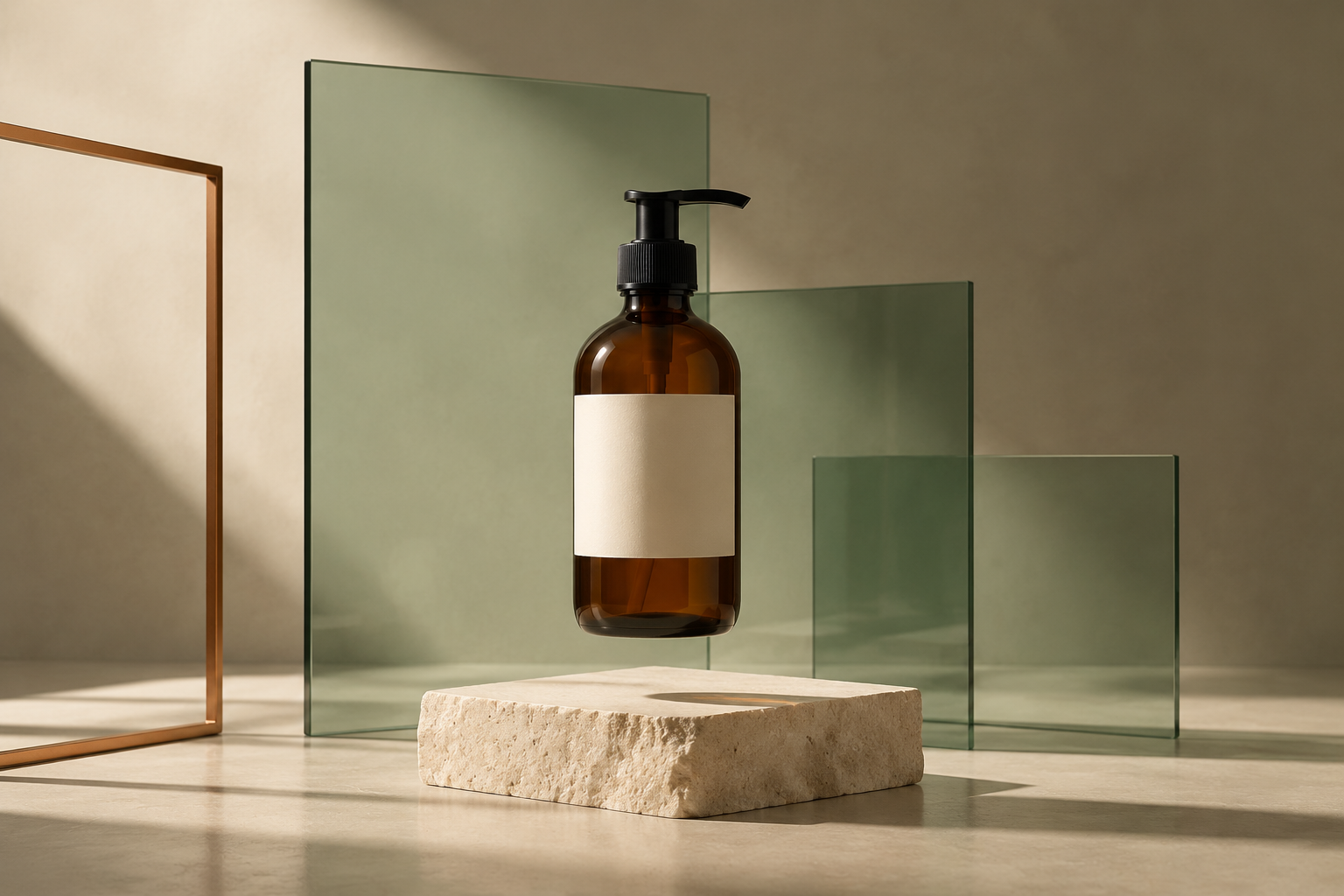
FLUX 3 Image is worth trying for product advertising and controlled image edits: it can build a layout from a prompt, render short copy, and reuse a product reference in a new scene. In our skincare workflow, a fictional skincare ad kept its requested wording, a label recolor preserved the main composition, and the bottle carried into a bathroom setting. It is a useful way to develop a campaign concept and refine a chosen image.
The name matters: FLUX 3 Image is the still-image model, not FLUX 3 Video. The review below follows a product ad from its first layout through a label change and a new setting.
If your job starts with a brief and ends with finished campaign assets, GlobalGPT brings multiple AI models into one subscription. You can develop the concept and copy, create and edit the visual, and continue with the wider image and video workflow in one dashboard. That makes it a practical place to work through the whole brief rather than buying a separate tool for every step.
Nesta página
What FLUX 3 Image can do
Black Forest Labs describes Imagem do FLUX 3 around image control: generate a new picture, change an existing one, or combine references. Its official documentation also describes bounding-box layouts, where coordinates tell the model which part of the canvas an element should occupy. Those tools are especially relevant when “a beautiful picture” is not enough and the headline, product, and empty space each have a job.
| Capacidade | O que isso significa na prática | Evidence in this review |
|---|---|---|
| Text to image | Describe a scene, visual style and layout. | Test 1: a skincare advertisement |
| Edição de imagens de referência | Name the change and the details to retain. | Test 2: one label recolor |
| Product reference reuse | Use the same source to create a different scene. | Test 3: a bathroom product photograph |
| Up to 10 references | Combine multiple images in one official API request. | Documented; not tested here |
| Bounding-box layouts | Describe regions more explicitly than “on the left.” | Documented; not tested here |
| Resolution tiers up to 4k | Choose a larger output when the final format needs it. | Documented; our examples are 1248 × 832 |
The official Image API accepts prompt, optional imagens, an aspect ratio, and a resolution tier. It does not accept older FLUX fields such as semente, width, ou input_image. Um outro negative_prompt field is also absent. Use the current Image API reference rather than copying an older FLUX request unchanged. Available controls in an app can differ from the official API.
From product ad to scene variation
We chose one ordinary marketing task and followed it through two changes. The product is fictional, so the outputs test instruction following and visible consistency without making claims about a real brand. Both reference tasks use the original advertisement—not the edited version—as their input.
Configuração do teste
Modelo: FLUX 3 Image. Local: GlobalGPT. Data: October 18, 2026. We requested landscape 3:2 in each prompt and used one reference image for each edit. We inspected wording, object count, product details and layout. No ten-reference, bounding-box or 4k tests were run.
Timings below use the request’s recorded submission-to-completion interval, including queue time. Three examples show task fit; they do not establish a general success rate.
Test 1: a product ad with exact copy
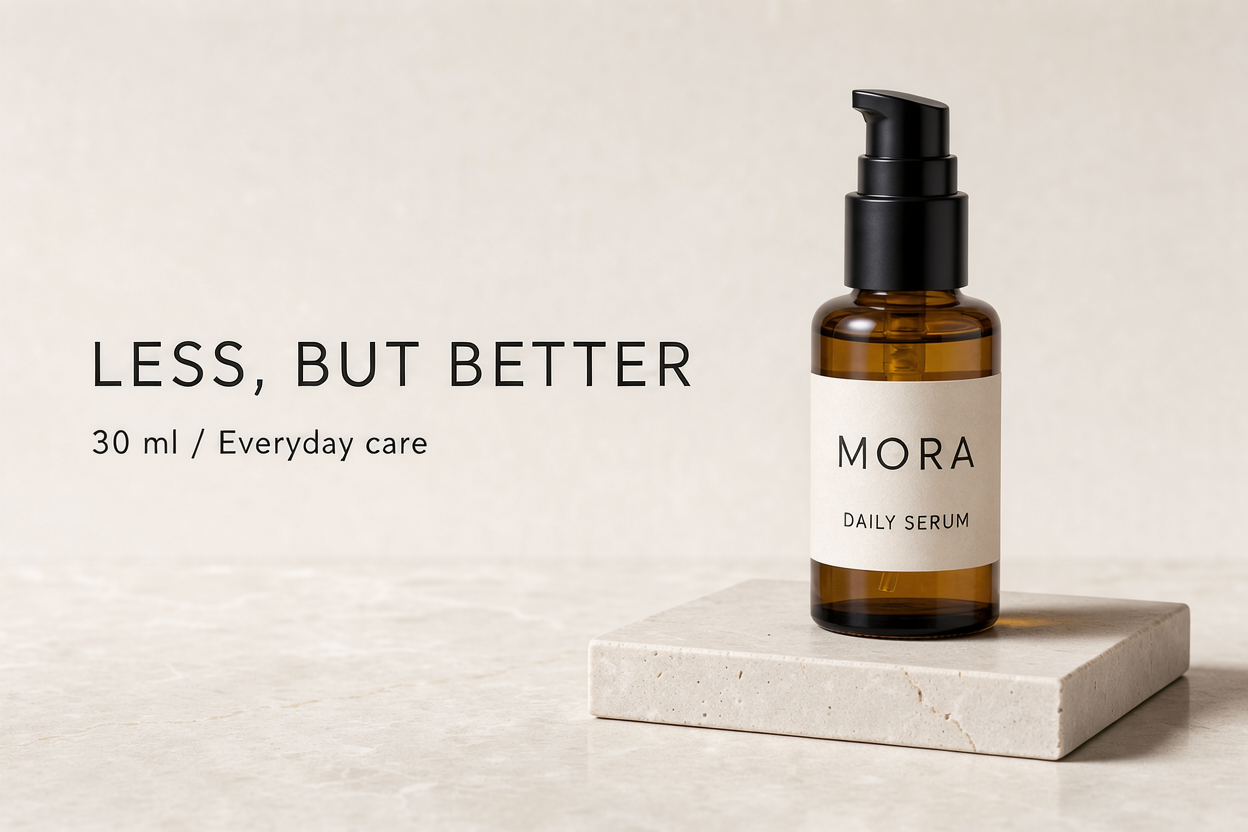
Test 1: a product ad with exact copy
Model / venue: FLUX 3 Image · GlobalGPT. Framing: 3:2 requested in the prompt; no reference.
Entrada: Text prompt only.
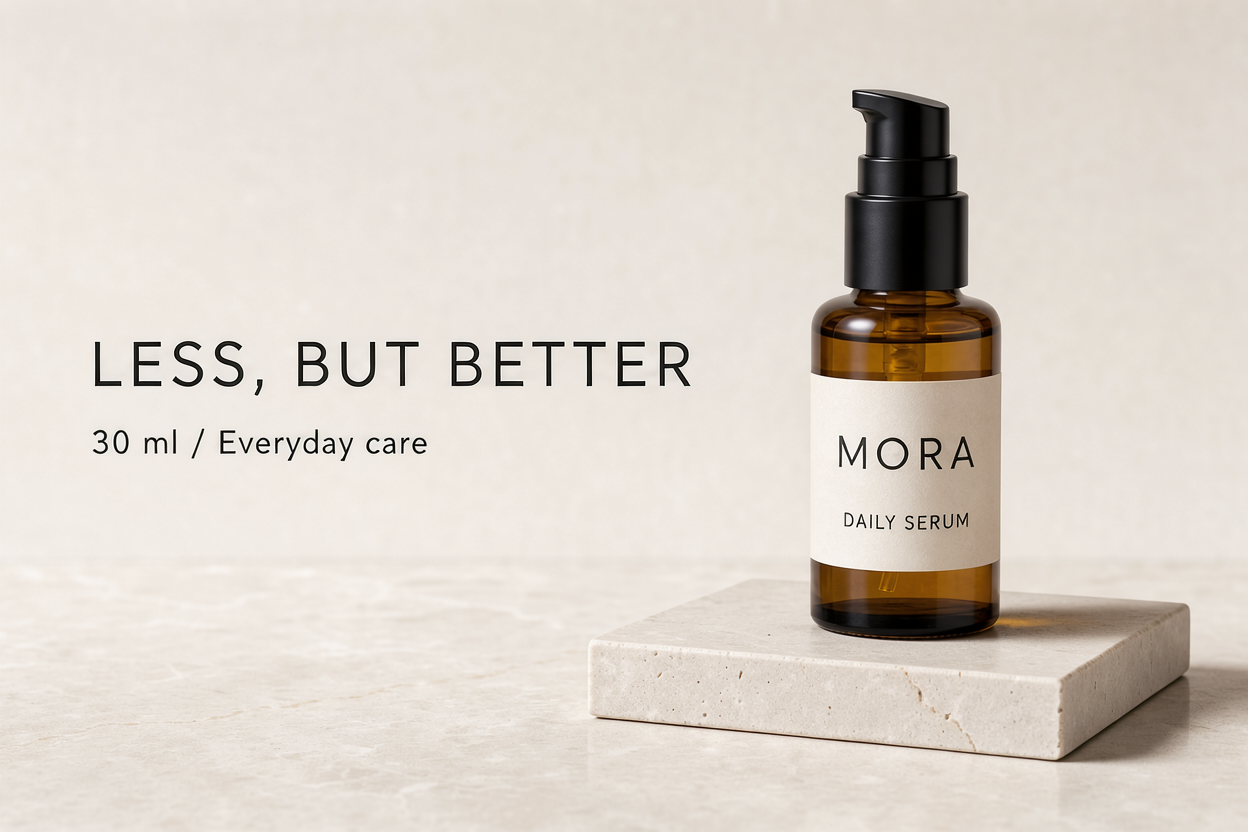
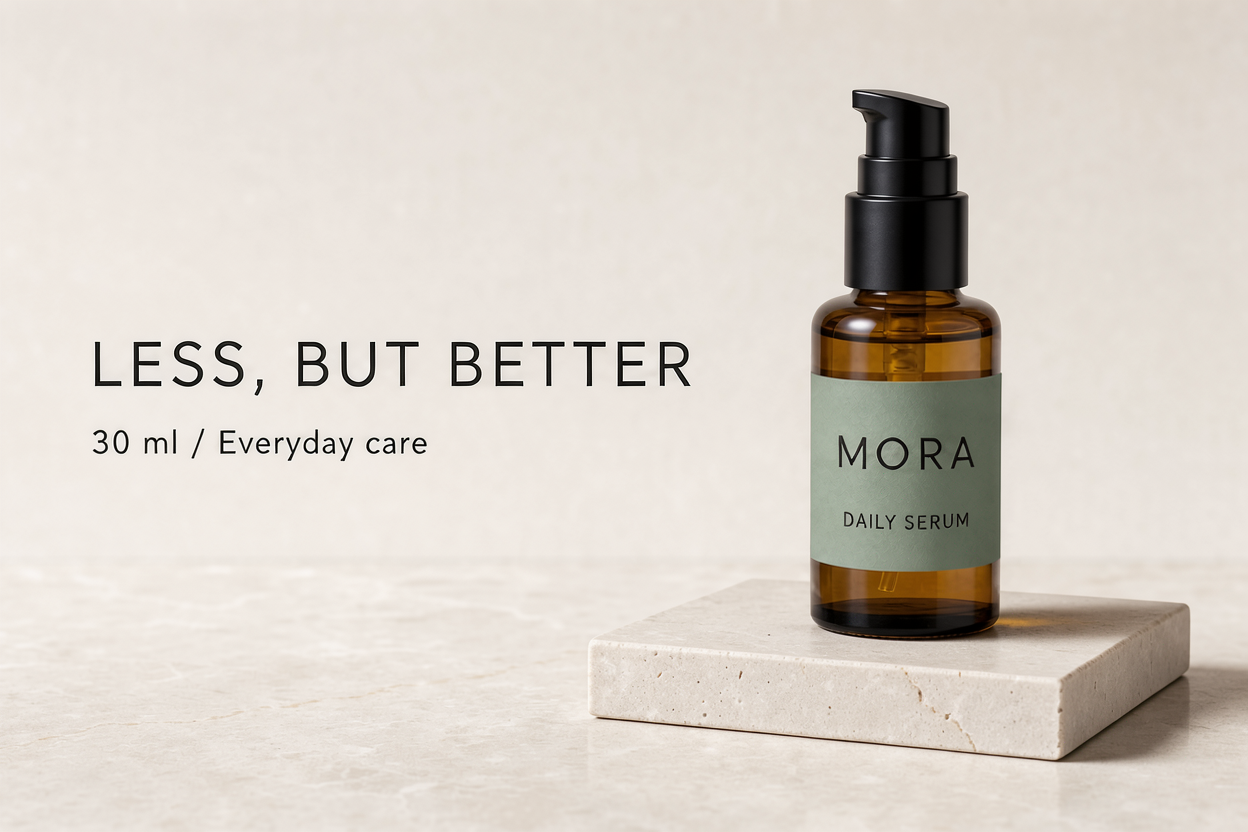
O que deu certo: The first image spelled all four requested text strings correctly: “MORA,” “DAILY SERUM,” “LESS, BUT BETTER,” and “30 ml / Everyday care.” It placed the bottle on the right and the headline on the left. The amber glass, pump and textured stone also read convincingly at this size.
Limite: A good first draft for a simple campaign concept. This checks short English copy, not dense paragraphs, multilingual text, or a real brand’s exact packaging.
Conclusão prática: Use it to explore an ad direction, then check the copy at delivery size and keep editable typography for final campaign production.
Ver o prompt exato
Create a polished landscape 3:2 studio advertisement for a fictional skincare product. A single amber glass pump bottle with a black pump and a cream rectangular label stands on a pale ivory stone plinth on the right. On the bottle label print exactly "MORA" and underneath "DAILY SERUM". On the left set the headline exactly "LESS, BUT BETTER" and below it "30 ml / Everyday care". Warm directional daylight, subtle natural shadows, refined editorial product photography, ample clean space, highly readable lettering. Only the supplied text appears in the image.
Test 2: recolor a label without rebuilding the ad
Test 2: recolor a label without rebuilding the ad
Model / venue: FLUX 3 Image · GlobalGPT. Framing: 3:2 requested in the prompt; one reference.
Entrada: The original advertisement from Test 1, one reference image.
O que deu certo: The label changed from cream to muted sage green. The four text strings remained readable and unchanged, and the bottle, pump, plinth and headline stayed in the same main arrangement. Visually, this was the most controlled result of the three.
Limite: Preservation was judged by viewing the images, not a pixel-difference audit. The green was not measured against the requested HEX value, so this is not a claim of exact brand-color accuracy.
Conclusão prática: For a small product variation, reuse the image and name the single change. List the parts that must remain rather than requesting a whole new advertisement.
Ver o prompt exato
Using Image 1, change only the cream bottle label to a muted sage green label (#8A9A86). Keep the exact bottle silhouette, black pump, amber glass, plinth, camera angle, lighting, headline, and every existing word unchanged. This is the same advertisement with only the label color changed. Preserve the landscape 3:2 framing.
Test 3: keep the product, change the setting
Test 3: keep the product, change the setting
Model / venue: FLUX 3 Image · GlobalGPT. Framing: 3:2 requested in the prompt; one reference.
Entrada: The original advertisement from Test 1, one reference image.
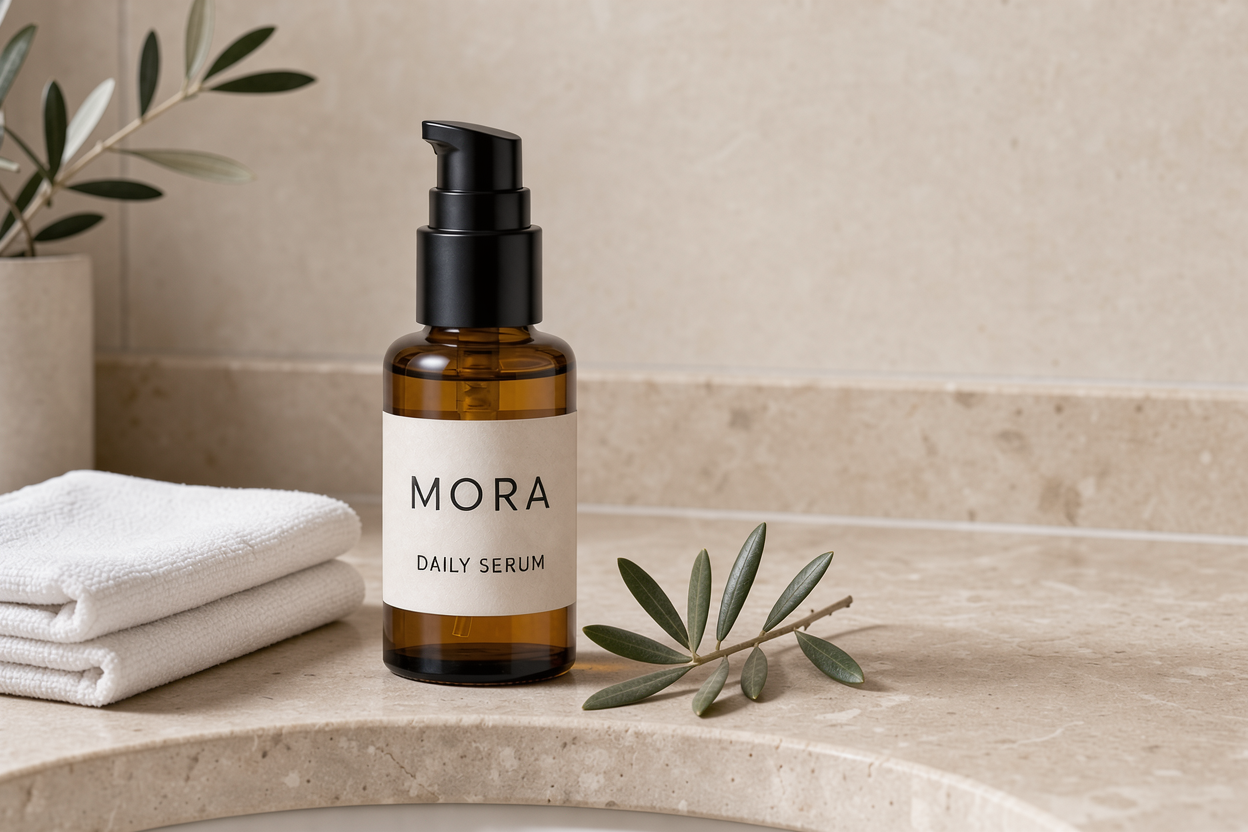
O que deu certo: The result kept a recognizable amber bottle, black pump and cream MORA / DAILY SERUM label, and moved the product to the left on a bathroom counter. It added the towel and olive foliage and removed the original headline.
Limite: The model also added olive foliage in a background vase beyond the requested one small branch. The right side has useful wall space, but the foreground branch intrudes into it. Product proportions and exact label placement still deserve a close check.
Conclusão prática: Useful for a lifestyle concept, but tighten the next edit around prop count and copy space before treating it as a finished campaign image.
Ver o prompt exato
Use the bottle from Image 1 as the exact product reference. Create a new landscape 3:2 lifestyle product photograph with that same amber glass bottle, black pump, cream label, and the exact label words "MORA" and "DAILY SERUM". Place the bottle on the left side of a warm travertine bathroom counter beside one folded white hand towel and one small olive branch. Soft morning window light. Keep the bottle shape, cap geometry, amber color, and label design faithful to Image 1. The right half is clean stone wall for future copy. A single bottle; product photography, no extra headline.
Pontos fortes e limites
The strongest result was the single-change edit. It solved a specific production problem—change a label color without throwing away an approved layout—and kept the words and main objects visibly stable. The first advertisement was also strong on short text. Those are more useful signals for a marketer than an attractive landscape with no demanding details.
- Short copy and layout: the ad followed a clear left-text/right-product brief and reproduced the supplied wording.
- Reference-led edits: the label change preserved the main composition, making an incremental workflow practical.
- Scene variations: the source bottle remained recognizable in a new setting, with the product’s key visual features carried over.
The tradeoff is precision at the edges of a request. The bathroom scene added more foliage than asked for, and “clean space for copy” did not mean an entirely empty right half. A polished image can still require a corrective edit. For real products, compare cap shape, bottle proportions, label position, color and every printed claim against the source photograph.
For final delivery, keep campaign text editable and check packaging against your real product photograph. Dense copy, exact print colors and small label details need closer inspection than a web-sized concept image.
FLUX 3 Image pricing
BFL charges the standard FLUX 3 Image API per image by resolution tier. The official prices checked on October 18, 2026 are below. Do not use FLUX 3 Video’s per-second rates or FLUX 3 Image Klein’s lower prices to estimate standard Image requests.
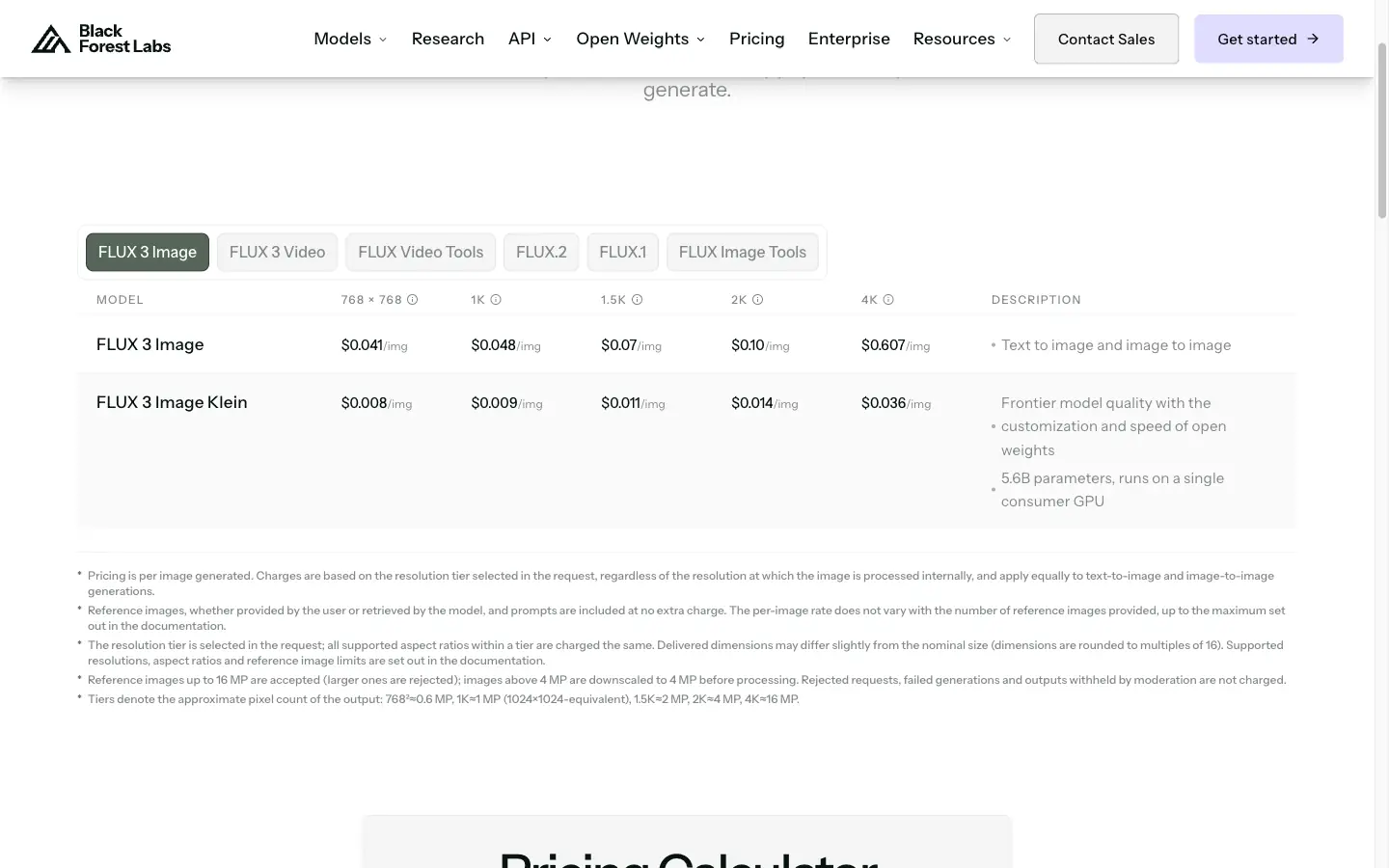
Standard FLUX 3 Image API: price per image
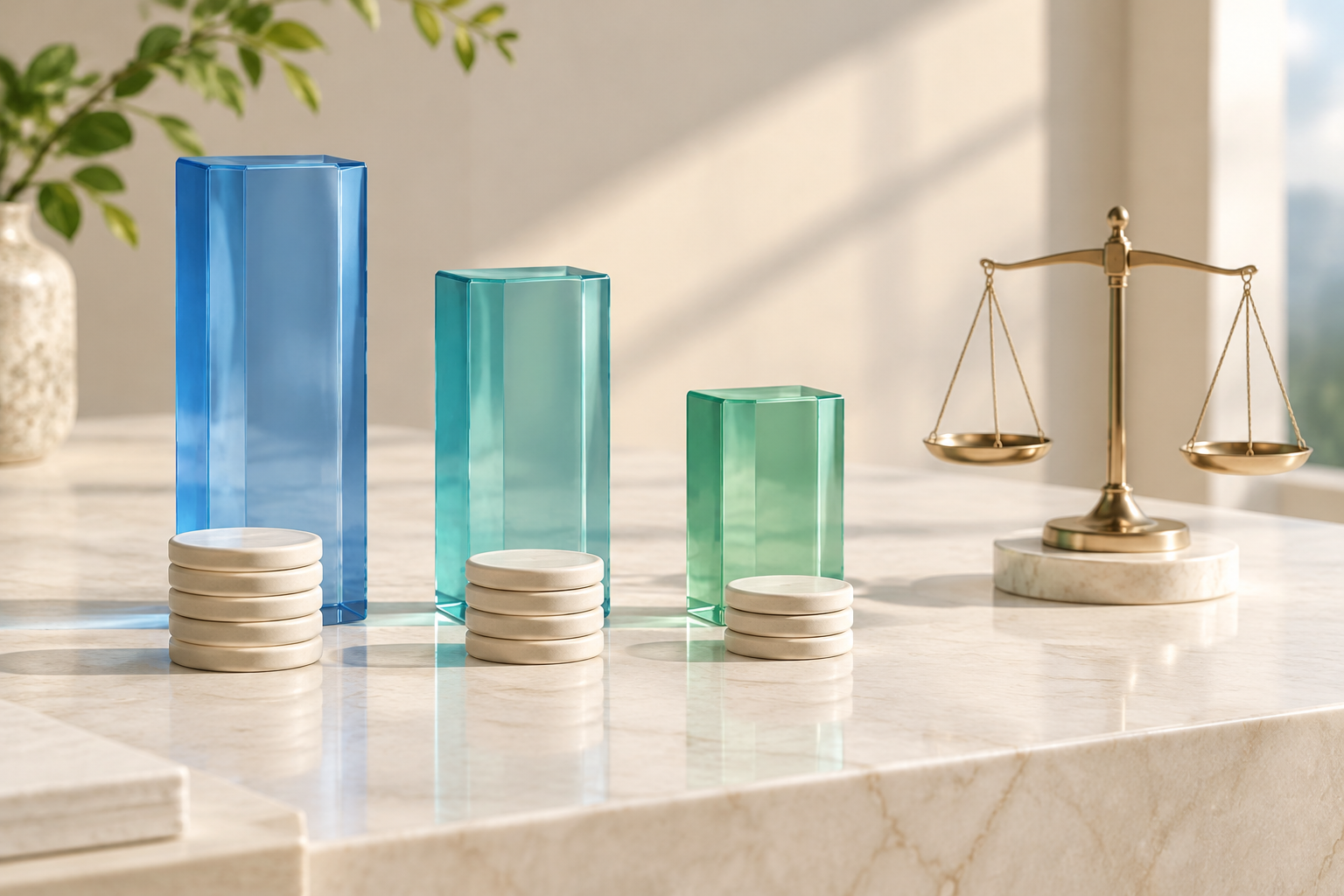
Fonte: BFL published pricing, checked October 18, 2026. Bars share one linear scale. These are standard Image rates, not Klein rates.
| Resolution tier | Tamanho da saída | Per image | 100 imagens |
|---|---|---|---|
| 768sq | 768 × 768 | $0.041 | $4.10 |
| 1k | About 1 MP | $0.048 | $4.80 |
| 1.5k | About 2 MP | $0.070 | $7.00 |
| 2k | About 4 MP | $0.100 | $10.00 |
| 4k | About 16 MP | $0.607 | $60.70 |
For web concepts, 1k is the sensible starting point: 100 images at the listed rate cost $4.80 before any other service charges. The same count at 4k costs $60.70. That is about 12.6 times the per-image cost of 1k, so reserve it for a chosen image that needs a large deliverable or a substantial crop. Higher resolution does not by itself fix an extra prop or a wrong word.
The official pricing page also states that text-to-image and image-to-image use the same tier rate, with references included at no extra charge. That applies to BFL’s direct pricing; it does not convert another platform’s credits into dollars.
BFL lists 1 credit as $0.01 and says its API and Playground use the same pricing. Its separate Klein model starts at $0.008 for a 768 × 768 image, but that is a different model and was not used in these tests. The documentação oficial de preços explains the distinction.
GlobalGPT credits and subscription value
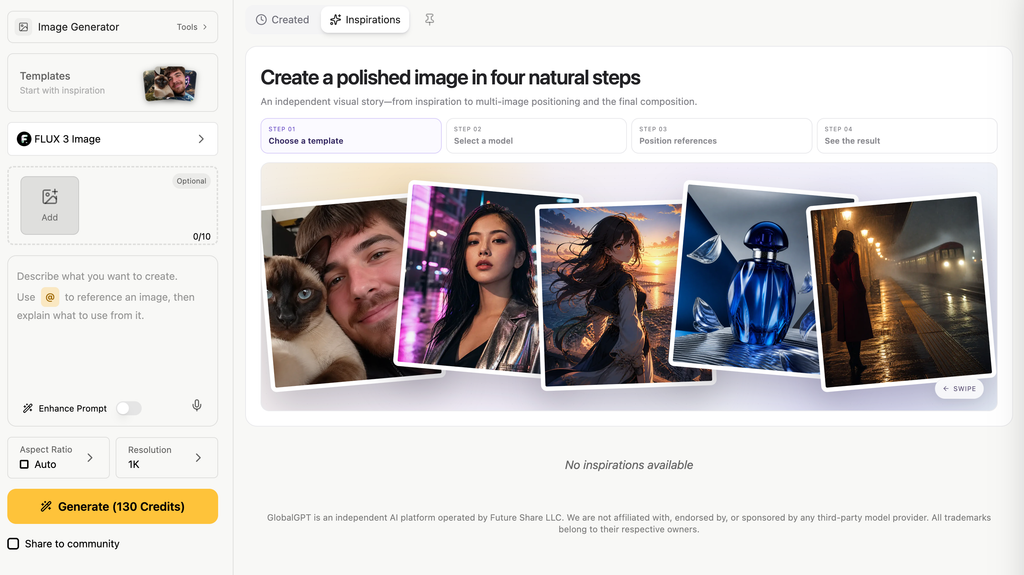
In the GlobalGPT form captured for this review, FLUX 3 Image is selected at 1 mil and the Generate button reads 130 Credits. That is the displayed charge for this selected setup, not a dollar price or a universal charge across resolutions. Check the amount shown after changing the settings; we do not convert GlobalGPT credits using BFL’s $0.01-per-credit rate.
Direct API billing suits an automated pipeline that needs to meter each request. Assinatura multimodelo da GlobalGPT suits broader creative work: turn a brief into copy, generate an image, refine the result, and continue into other AI tasks from one dashboard. Compare that workflow value with the cost of separate subscriptions, while keeping the selected model’s credit charge in view before generating. The API table above is not a GlobalGPT plan-price table.
A practical image workflow
A useful way to work with FLUX 3 Image is to separate concept creation from precise changes. The tests worked best when the instruction had one clearly defined job.
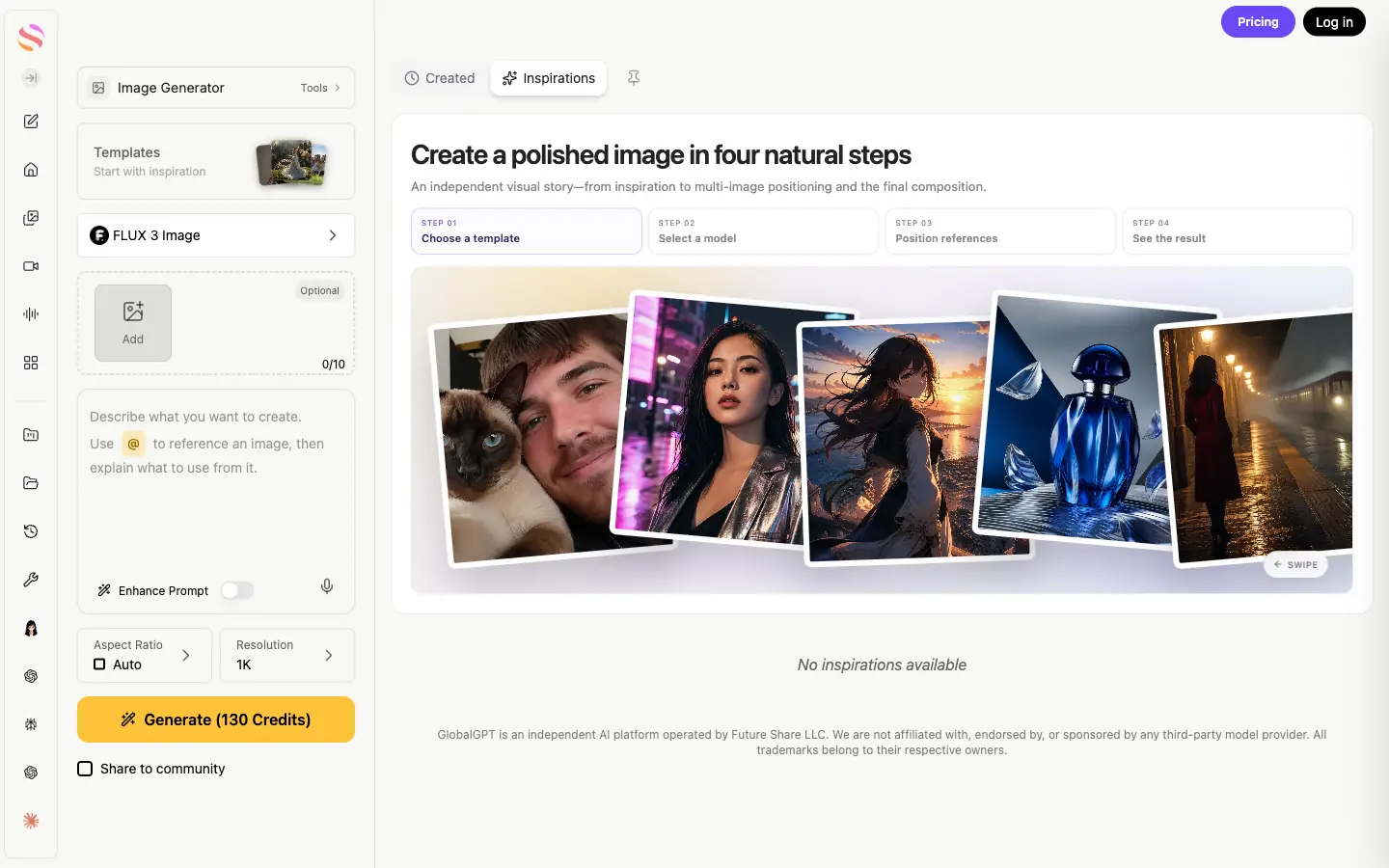
The form above shows FLUX 3 Image selected, an optional reference uploader labeled 0/10, a prompt field, Aspect Ratio set to Auto, and Resolution set to 1K. The prompt hint says to use @ to reference an image and explain what to use from it. The right-hand panel is an interface tutorial—not a result from our three tests. These visible controls help you find the workflow; the actual test images are the skincare examples above.
- Write the deliverable first. Name the channel, shape, product and intended empty space. A landscape ad needs a different composition from a square product tile.
- Select the model and add your reference. Confirm the FLUX 3 Image label. For an edit, use Add to supply a product photo you have the right to use; identify the image in the prompt and explain what it contributes.
- Describe the image and review settings. Specify subject, setting, lighting and framing. Quote exact copy and its position. Choose the shape and resolution for your deliverable and read the Generate credit charge before running.
- Keep the original first output. Inspect the words and the product at full size before moving on. Do not let pleasing light distract from a wrong label.
- Edit one thing at a time. State the target and change, then list what stays. Our cream-to-sage label edit is a concrete example.
- Finish for delivery. Compare with the real source, correct unwanted props or drift, and prepare the final crop and editable campaign text. Request more resolution only when the final use needs it.
For a real brief, start in GlobalGPT by developing the message and visual direction, then use FLUX 3 Image for the image work. Keep the approved product reference and copy together as your checklist through each edit. A multi-model workspace also gives you other approaches to try when a concept needs a different visual treatment.
A reusable reference-edit pattern
Using Image 1, change [specific element] to [new appearance]. Keep [product shape], [label wording], [camera angle], [lighting], and [composition] unchanged. Preserve the [aspect ratio] framing.
Replace each bracket with a concrete detail. For a new scene, say which product attributes must carry over and which background elements should change.
When ordinary left/right instructions are too loose, BFL’s layout documentation describes explicit bounding-box prompts. Use those region descriptions when the position of a product or headline needs tighter direction.
Quem deve usá-lo?
| User / task | Por que é a escolha certa | O que verificar |
|---|---|---|
| Marketers exploring ads | Short copy, product scenes and fast visual directions. | Exact wording, safe crop and space for campaign copy. |
| E-commerce teams building scene variants | Reference-led placement of a recognizable product. | Real packaging geometry and extra props. |
| Designers refining a selected composition | A specific change can preserve the main arrangement. | Unwanted changes beyond the target region. |
| Developers integrating image generation | An official asynchronous API with resolution tiers. | Current request schema and application-level costs. |
| Teams needing exact final artwork | Use it for visual exploration with a careful finishing stage. | Editable typography, color management and source-photo fidelity. |
If you already have a working FLUX.2 workflow, keep its prompts and costs as a baseline rather than assuming a new name makes every task better. Our Guia do FLUX 2 Pro covers that earlier model. Try both on the same product brief when deciding whether to change your established workflow.
PERGUNTAS FREQUENTES
Is FLUX 3 Image the same as FLUX 3 Video?
No. FLUX 3 Image generates and edits still images. FLUX 3 Video generates video. Select the Image model for the workflows and prices discussed here.
Can FLUX 3 Image edit an existing image?
Yes. It accepts reference images and a written edit instruction. In our single-reference test, it recolored the label while preserving the main advertisement and its wording.
How many reference images does FLUX 3 Image support?
The official API accepts up to ten reference images, and the GlobalGPT form shown here has a 0/10 reference uploader. Identify which detail each image contributes when combining references.
How much does FLUX 3 Image cost?
BFL’s standard Image API pricing checked October 18, 2026 was $0.041 at 768sq, $0.048 at 1k, $0.070 at 1.5k, $0.100 at 2k, and $0.607 at 4k per image. GlobalGPT uses a separate subscription and credit system.
Does FLUX 3 Image support negative prompts or seeds?
The official FLUX 3 Image endpoint has no negative_prompt or seed field. Describe the result you want positively, and use an existing image as the reference when you need to preserve a composition.
Is FLUX 3 Image good for product photos?
It is a useful option for product concepts and scene variations. Our fictional skincare bottle remained recognizable across a label edit and a new bathroom setting. Check the real product’s proportions, label and packaging before using generated images in a campaign.
Nosso veredicto
FLUX 3 Image earned a place in our product-creative workflow because it did the small practical jobs well: short ad copy, a controlled label change, and a recognizable product in a new scene. The reference edit was especially convincing. The extra foliage in the lifestyle image is the reminder to judge the whole brief, not just whether the picture looks polished.
Start with your own product and one deliverable. Keep the first output, change one detail, and compare the result against the original. Check that the visual still serves your message and leaves room for the copy you need.
Take one product brief from idea to image
Use GlobalGPT’s multi-model subscription to develop the concept and copy, create an image, and refine your campaign assets in one dashboard. Begin with a small, specific task and inspect the product details before expanding it.
Create your next product visual