To subscribe to ChatGPT Plus on the web, sign in at chatgpt.com, open your profile menu, choose Upgrade Plan, then select Get Plus. OpenAI lists Plus at US$20 per month, billed monthly. Review the amount and billing details presented to you before confirming a purchase.
The account you use and the place you subscribe matter afterward: they determine where you find the subscription, retrieve invoices, and stop renewal. If you have already paid, check your account status before starting another purchase.
If your work spans several AI tools, GlobalGPT brings multiple models and functions into one subscription. You can move from research and drafting to coding help, images, and video in one workspace—a practical way to keep a broader workflow together while considering the cost of separate subscriptions.
Before you subscribe: price, account, and billing
OpenAI’s Plus documentation lists a US$20 monthly subscription and says annual billing or paying several months in advance is not supported. Twelve monthly payments at that rate total US$240; that arithmetic is not an annual plan or a discount. The amount presented in your checkout is the one to review before paying.
The US$20 figure is a dollar reference price. OpenAI offers localized web pricing. If the plan or currency you want is missing, OpenAI advises checking the country selector at the bottom of its pricing page. Select your actual country and review the amount in checkout; a currency listing alone does not establish service availability in that country.
Subscriptions bought through the iOS or Android app are managed by the Apple App Store or Google Play, with charges in your local currency. An existing web subscription continues in its current billing currency. To change to a newly supported currency, OpenAI says to cancel and re-subscribe after the current billing period ends; a currency change is not an immediate conversion of an active subscription.
- Use the ChatGPT account you want to keep. Note whether you sign in with Google, Apple, Microsoft, or an email and password.
- Check whether a subscription is already active on that account or through your app store.
- Read the plan name and renewal terms. A Plus subscription, a Pro upgrade, and an API bill are different purchases.
- Keep the receipt so you can identify which service billed you and find the subscription later.
For a wider buying decision, use the ChatGPT plan breakdown and Plus pricing guide. If you are specifically looking for a yearly payment option, the annual-plan explanation covers that question separately.
How to subscribe to ChatGPT Plus on the web
The official web route is short. Check the plan name and the account you are signed into before proceeding.
- Open ChatGPT and sign in to the account you want to upgrade.
- Open your profile menu and select Upgrade Plan.
- Choose Get Plus. Do not choose a Pro button if your intention is to buy Plus.
- Review the checkout’s plan name, recurring charge, and payment information. Complete the purchase only when those details match what you want.
- Return to the same account and check the subscription status in Settings → Account.
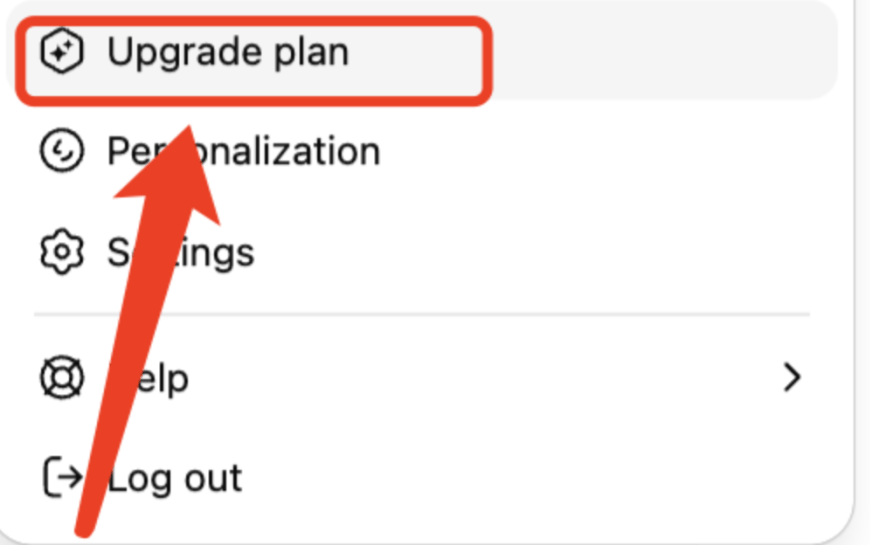
OpenAI’s published sign-up instructions name the button Get Plus. An existing subscriber can see a different offer in the upgrade menu, so check the plan itself rather than assuming that the most prominent upgrade button buys Plus.
If you need more detail at the payment stage, follow the ChatGPT Plus payment guide. The Plus buying guide and upgrade walkthrough provide related steps without changing which official plan you should select.
Subscribing on iPhone or Android
Use the ChatGPT account you intend to keep, and check whether it already has Plus before making another purchase. Your ChatGPT account and the Apple or Google account on a store receipt serve different purposes.
Subscribe to Plus on iPhone
OpenAI describes two upgrade routes in its iOS app. The quick route starts at the top of a conversation:
- Open the official ChatGPT iOS app and sign in. If you already have an account, use the same sign-in method you normally use.
- Tap Get Plus at the top of the conversation to open Apple’s subscription payment page.
- Review the Plus plan, recurring charge, and renewal terms on Apple’s payment page before confirming the purchase. Keep the receipt.
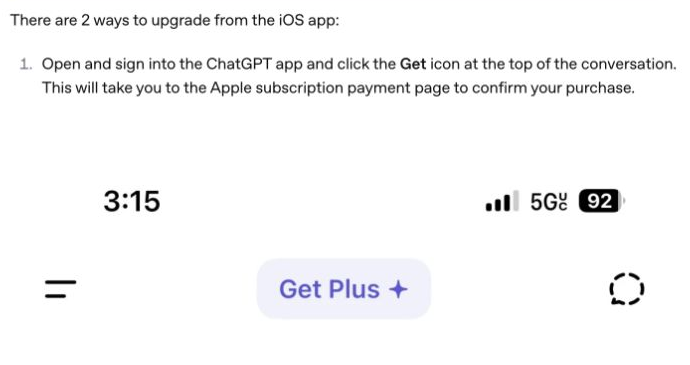
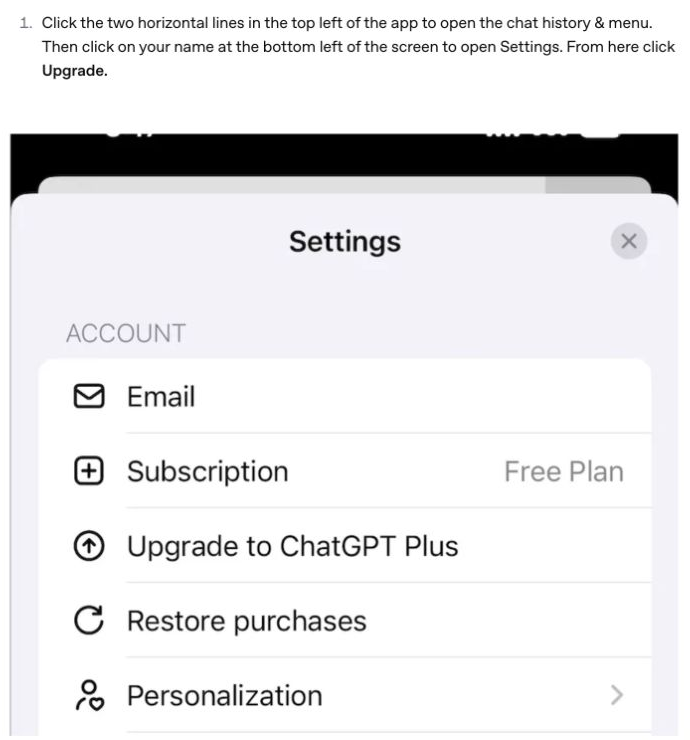
The menu route is two-line menu at the top left → your name at the bottom left → Settings → Upgrade. OpenAI’s example shows a Free Plan account with an Upgrade to ChatGPT Plus option. Restore purchases is for syncing an existing purchase; it is a different action from this upgrade.
Use Plus with the Android app
Install the official ChatGPT app published by OpenAI, as described in the Android app FAQ. You can subscribe on the web using the steps above, then use the same ChatGPT account in the Android app. OpenAI confirms that a subscription works across devices on the same account, so you do not need to buy a second subscription for your phone.
If you buy through the Android app instead, Google Play manages that subscription. Review the subscription name, local-currency charge, and renewal terms in the store confirmation. Keep the receipt to identify the Google account that owns the purchase.
Check that Plus is active—and avoid buying twice
Open Settings → Account in ChatGPT and check the plan shown. If Plus is already your current plan, seeing an offer for Pro does not mean your Plus subscription failed. It is an offer for another tier.
If you were charged but still see Free, OpenAI recommends checking the sign-in method and restoring purchases. Work through these checks before attempting another payment:
- Sign in using the same method you used when subscribing—Google, Apple, Microsoft, or email and password.
- If you used Sign in with Apple and Hide My Email, check the private relay address associated with that sign-in.
- In the iOS or Android app, open Settings → Restore purchases to sync the subscription.
- Log out and sign back in with the correct account if the status has not updated.
- If it still does not appear, contact OpenAI support with your receipt or the last four digits of the charged card.
Restoring a purchase is useful when the store has a record of your subscription but the app has not synced it. It is a different action from buying another plan. Keep the receipt and the original account details together while you work through the checks.
If checkout fails, identify the problem first
A payment failure message does not tell you the exact cause by itself. Separate a failed purchase from an account that has already been charged: the next action is different, and trying another channel immediately can make the billing history harder to untangle.
OpenAI’s card-decline checklist starts with the payment details and the bank. Work through the checks that match the error you see:
- Incorrect details or insufficient funds: check the card number, expiration date, CVC, billing address and available funds. If these are correct, contact the bank; OpenAI says it typically does not receive detailed bank decline reasons.
- Authentication required or 3D Secure failed: complete the bank’s one-time code or app approval. Allow the required pop-ups and redirects, and avoid closing or refreshing checkout during verification. OpenAI also suggests an incognito window or another browser if the prompt fails.
- Possible browser interference: try clearing cache and cookies. Check whether an ad/pop-up blocker or VPN is interfering with the verification flow; this is troubleshooting, not a route around regional availability.
- Location or card issuance: confirm that both your location and the card-issuing bank’s region are supported. The rule does not say that an IP address must exactly match a billing address.
The prepaid-card restriction in that help article is explicitly about buying API credits. It does not establish a blanket ban on prepaid or virtual cards for ChatGPT Plus, and it does not guarantee that a particular card will be accepted for Plus.
On iOS, a gray subscription button with the specific message “In-app purchases are currently unavailable. Please try again later” can mean Apple is still activating the subscription feature. OpenAI says that activation may take up to 48 hours. This explanation applies to that message, not every payment failure.
For store purchases, changing the payment method and canceling the subscription are different actions. Google Play’s subscription settings support payment-method updates; Apple directs you to the account shown on the receipt when a subscription is missing. Keep the receipt while you resolve the issue.
Where to manage or cancel your subscription
Find the original billing channel first. An app installed on your phone does not prove that your subscription was purchased through its store: you may have paid on the web and then used the app with the same ChatGPT account.
ChatGPT
Use the account that bought Plus, then check that the plan is no longer set to renew.
iPhone Settings
Open the subscription and choose Cancel Subscription to stop renewal.
Google Play subscriptions
Use the Google Account that owns the subscription and follow the confirmation instructions.
Source: OpenAI cancellation guidance, Apple cancellation steps, Google Play subscription help. Checked September 15, 2026. Use the channel listed on your purchase receipt. Cancel at least 24 hours before the next billing date. Ordinary cancellations keep paid access until the period ends; a granted refund may end access earlier.
On an iPhone, Apple’s published sequence is Settings → your name → Subscriptions → the subscription → Cancel Subscription, then confirm the cancellation. If the cancel button is absent or an expiration message is shown, Apple says the subscription is already canceled. If the receipt belongs to a different Apple Account, use that account to find it.
For Google Play, select the subscription, tap Cancel subscription, and follow the instructions. Google explicitly says uninstalling the app does not cancel the subscription. It also says you can keep using the subscription for the period already paid after cancellation.
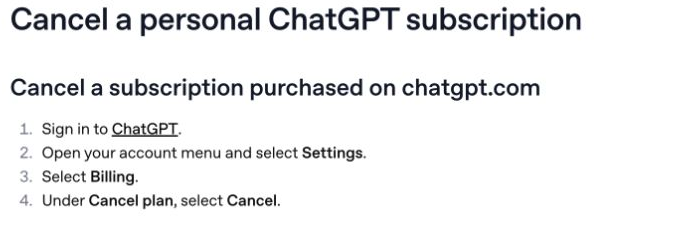
For a subscription purchased on chatgpt.com, follow OpenAI’s current web cancellation steps:
- Sign in to the ChatGPT account that purchased the plan.
- Open your account menu and select Settings.
- Select Billing.
- Under Cancel plan, select Cancel.
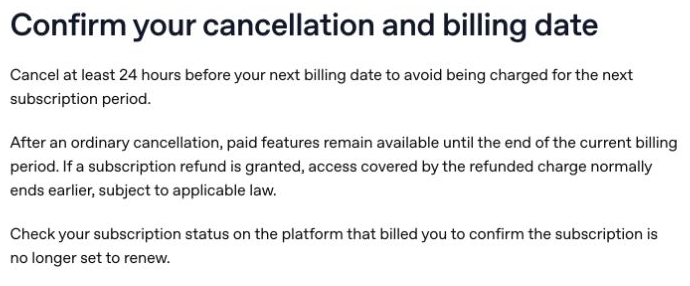
Check your subscription status afterward on the platform that billed you to confirm that it is no longer set to renew. Cancel at least 24 hours before your next billing date to avoid the next subscription charge. After an ordinary cancellation, paid features remain available until the current billing period ends. If a refund is granted, access covered by the refunded charge may end earlier.
Canceling stops future renewals; it does not automatically refund earlier charges. If you see a charge afterward, check the cancellation confirmation, the billing date, and whether another account still has an active subscription. The ChatGPT Plus cancellation guide covers this task in more detail.
What Plus gives you—and when to consider Pro
Plus adds broader model and tool access than Free. OpenAI lists higher model limits, reasoning options, voice conversations, image generation, file uploads and analysis, and Deep Research where available. Model options and limits can change, so the model picker on your account is more useful than a fixed list copied from an old plan image.
- Choose Plus when you want more access to the official ChatGPT experience for everyday writing, analysis, and other supported tasks.
- Expect usage limits to remain. OpenAI says Plus may have message caps, especially during high demand; it does not promise a fixed unlimited allowance.
- Treat API usage as a separate budget. Buying Plus does not pay for API calls.
Pro is a higher tier with additional access or limits. As of September 15, 2026, OpenAI says new subscriptions and upgrades to the US$200 Pro plan are temporarily paused; existing US$200 subscriptions and new or existing US$100 Pro subscriptions are unaffected. That notice concerns Pro, not the Plus sign-up steps above.
Use the Plus versus Pro comparison and Pro value guide for a deeper tier decision. For Plus itself, understanding the usage limits is more useful than assuming a paid account has no caps.
When a multi-model subscription fits better
If you mainly want to work inside ChatGPT, Plus is a direct purchase for that account. If your routine also involves other model families and creative tools, GlobalGPT offers a broader workflow in one subscription: research a subject, draft and revise the text, get coding help, then create supporting images or video without organizing each task in a separate workspace.
The practical value is keeping several kinds of AI work together and considering the total cost of multiple subscriptions. Choose around the tasks you repeat, rather than treating the cheapest headline number as a promise of identical features or unlimited use.
Which subscription should you choose?
- You want the official ChatGPT app and its account features: start with the Plus value review and check whether Free already handles your workload.
- You write, research, and code across model families: consider the convenience of a multi-model workspace; the coding model guide can help identify the work you want it to cover.
- You need several AI functions across a project: compare a connected research-to-creation workflow with buying tools separately. Our ChatGPT alternatives guide is a useful next read.
Before paying, name the task you need the subscription to solve and check the correct plan in its own checkout. After paying, keep the receipt and confirm the status on the same account. Those two checks avoid much of the confusion between choosing a plan and finding a purchase you already made.
Frequently asked questions
Can I subscribe to ChatGPT Plus for one month?
Plus is billed monthly. OpenAI lists US$20 per month and does not support annual billing or paying multiple months in advance. Review renewal and cancellation details when subscribing.
Does ChatGPT Plus include API credits?
No. OpenAI states that API usage is separate and billed independently from ChatGPT Plus.
Why do I see Get Pro after subscribing to Plus?
Get Pro is a separate upgrade. Check Settings → Account for your current plan. A Pro offer does not by itself mean that your Plus subscription failed.
What if I paid but ChatGPT still shows Free?
Use the same sign-in method used for the purchase. In the app, try Settings → Restore purchases. If the subscription still does not appear, contact OpenAI support with the receipt or the last four digits of the charged card.
Does deleting the Android app cancel my subscription?
No. Google says uninstalling an app does not cancel a Google Play subscription. Open the subscription in Google Play and cancel it there.
Where do I cancel an Apple-billed subscription?
On iPhone, open Settings, tap your name, choose Subscriptions, open the ChatGPT subscription, and tap Cancel Subscription, then confirm. Use the Apple Account shown on the receipt.
Does subscribing to GlobalGPT activate Plus in my ChatGPT account?
A Plus purchase is for your official ChatGPT account. Choose GlobalGPT when you want to use multiple models and AI functions together in the GlobalGPT workspace.
How do I cancel a web-billed ChatGPT Plus subscription?
Sign in to ChatGPT, open the account menu, choose Settings, then Billing. Under Cancel plan, select Cancel. Cancel at least 24 hours before your next billing date and check that renewal has stopped. Ordinary cancellations keep paid access until the current period ends; a granted refund may end it earlier.
Can I use a prepaid or virtual card for ChatGPT Plus?
OpenAI’s stated prepaid-card ban in its card-decline article applies to API credits. It does not establish a blanket rule for Plus or guarantee acceptance of a particular card. Check your payment details and contact the card issuer if checkout is declined.
Looking for an offer before paying? Check the eligibility and end date of any actual promotion. The guide to legitimate Plus offers and student-access guide cover those narrower questions; neither changes the standard monthly plan described above.