

ChatGPT Plus limits are easy to overlook until one job takes several attempts. Say you submit 20,000 tokens of source material and get a 2,000-token answer. That is 22,000 tokens of input and output. Submit that same material four times for four separate answers of that size, and the total reaches 88,000 tokens. This is an example, not a fixed Plus allowance, but it shows how a document comparison or code rewrite can involve far more text than four short questions. Reasoning and tools have their own limits too, so paying $20 a month for Plus can still leave you waiting before the work is finished.
The frustrating part is that there is more than one limit to manage. Model messages, reasoning, uploads, and research tools can have different allowances and reset windows. You may still be able to send a simple message while the feature your task depends on is unavailable. That leaves you deciding whether to wait, change how you work, or pay for another subscription. When a deadline is close, those interruptions cost more than the monthly fee.
I ran into the same problem in my own work. By the time a limit appeared, I was already partway through a task and wanted to finish it while the details were still fresh. I spent time looking for ways to work around those interruptions without taking on another expensive subscription. That search led me to GlobalGPT. What caught my attention was being able to try different models through one account. I wanted to see whether I could move a task elsewhere when ChatGPT hit a limit, instead of putting the whole job aside until it reset.
On this page:
- Quick answer
- Current message caps
- How limits work
- Message and prompt restrictions
- What happens after the cap
- Files, images, research, voice, and tools
- What to do next
- FAQ
Quick Answer: What Is the ChatGPT Plus Limit?
ChatGPT Plus is not unlimited. Plus users get higher limits than Free users, but advanced models, reasoning modes, file uploads, image generation, and tools can still hit usage caps.
As of September 15, 2026, OpenAI lists GPT-5.6 Sol for Plus Instant, Medium, and High. Its current guide does not give one fixed Plus message count. Thinking and individual tools have separate allowances; ChatGPT shows a reset time when available and may offer another model after a Thinking limit.
If you are comparing ChatGPT Go vs Plus, the biggest difference is not just price, but how quickly serious workflows hit caps.
| Plan or mode | Current limit or access | What happens next |
|---|---|---|
| Free / Go GPT-5.6 Luna | Unlimited everyday text chats, subject to safeguards | Tools still have separate limits |
| Plus GPT-5.6 Sol Instant | Current guide does not give one fixed Plus message count | Use the limit notice shown in your account |
| Plus GPT-5.6 Sol Medium / High | Separate reasoning allowance; no fixed current number published | ChatGPT may continue with another available model |
| Pro | GPT-6 Pro and GPT-5.6 Sol Pro access | Separate or shared model allowances still apply |
Current ChatGPT Plus Message Caps in 2026
- Current Plus message limits: GPT-5.6 Sol powers Instant on Plus. OpenAI does not publish one universal current Plus message count. If you are doing heavy research or coding, you can still reach a model or tool allowance.
- GPT-5.6 Sol reasoning: Plus includes Medium and High reasoning. OpenAI does not publish one fixed current Plus reasoning count; after the allowance is reached, ChatGPT may continue with another available model. The GPT-5.6 pricing and access guide explains where the model sits across plans.
- Reading the reset notice: Limits do not all reset at midnight. ChatGPT displays the reset time when that information is available, so use the time shown in your account rather than assuming a daily reset.
| Limit Type | Current Information |
|---|---|
| Free / Go | Unlimited everyday text chats with GPT-5.6 Luna; tools have separate limits |
| Plus Instant | GPT-5.6 Sol; no fixed current Plus message count in the official guide |
| Plus Thinking | Medium and High with GPT-5.6 Sol; a separate allowance |
| After a Thinking limit | Another available model may be offered; use the displayed reset time |
| GPT-6 Astra on Plus | Included in Work and Codex, with separate usage and credit rules |
How ChatGPT Plus Usage Limits Work
ChatGPT Plus can have usage limits that vary with system conditions:
- Higher restrictions during global peak hours
- More generous limits during off-peak times
- Faster consumption of limits when using advanced models
- Automatic throttling if messages are sent too rapidly

This means your experience can vary significantly throughout the day.
Message Caps and Prompt Restrictions
Message limitations are the most visible constraint for ChatGPT Plus users. You may encounter:
- Model-specific message allowances
- Blocks after long or resource-heavy conversations
- “Try again later” messages when limits are exceeded
| Type of Limitation | Description | Examples | Impact Level | How to Reduce the Impact |
|---|---|---|---|---|
| Model usage allowance | Limits depend on the model, plan, and system conditions. | A model or tool allowance is reached. | Medium–High | Combine repetitive requests and move simple work to another available model. |
| Model-specific restrictions | GPT-5.6 Sol reasoning has a separate allowance. | Another available model may continue after the Thinking limit. | High | Reserve advanced reasoning for critical steps. |
| Long conversations | Extended chats consume the available context window. | Earlier details lose influence in a very long thread. | Medium | Start a new thread and carry forward a verified summary. |
| “Try again later” messages | Appears after a rate limit, allowance, or temporary system restriction. | A request is blocked during heavy traffic. | High | Use the displayed reset time, slow request frequency, or switch modes. |
| Complex prompt consumption | Large prompts and tool calls can consume separate context or tool capacity. | Long instructions, files, and multi-step analysis. | Medium–High | Break tasks into smaller parts and remove irrelevant context. |
Complex prompts also consume more processing resources, making the limits easier to hit.
Temporary Restrictions and “Try Again Later” Messages
Temporary usage blocks are normal and typically occur when:
- System capacity is overloaded
- You exceed local rate limits
- Advanced models hit temporary resource ceilings
Some rate blocks clear within minutes, while model and tool caps follow the reset time shown in ChatGPT.
Plus is ideal for moderate usage, but not for heavy workflows.
Performance Constraints: Priority Access but Not Guaranteed Speed
ChatGPT Plus is faster than the free tier, but performance still depends on global traffic. Users may experience:
• Slower responses during peak hours, especially when users ask Why Is ChatGPT So Slow
• Temporary unavailability
• Lower priority than Pro and Business subscribers
OpenAI promises Plus users priority access during high-traffic periods, but it does not publish a fixed response-time guarantee.
Plus improves performance—but cannot guarantee consistent speeds.
What Happens When You Hit Your ChatGPT Plus Usage Limit?
- When the model changes: After a Thinking limit, ChatGPT may continue with another available model. Check the selected model before continuing a demanding task.
- Keep hard tasks on the right model: If you are writing complex computer code, a lighter model may miss dependencies or edge cases. Use a brief test before handing it the rest of the job.
- Separate Research and Tool Caps: Deep Research, files, images, Voice, and Codex use separate limits. Reaching one cap does not automatically mean every tool is exhausted, but each tool can become unavailable until its own allowance resets.
- Real-time Tracking: ChatGPT does not show one universal counter for every feature. It displays a reset time or limit banner when that information is available.
The frustrating part is that ChatGPT does not always show a clear live counter before you hit the cap. Many users only realize they are limited after a model disappears, a tool is greyed out, or a warning appears.
| Task | Flagship model | Available fallback model |
|---|---|---|
| Simple Q&A | Strong | Usually fine |
| Summaries | Strong | Usually fine |
| Long coding tasks | Better reasoning and debugging | More likely to miss edge cases |
| Complex research | Better synthesis | May lose nuance |
| Data-heavy analysis | Better with tools/context | May struggle with large context |
| Strategic writing | More consistent | Can become generic |
If another model is available after a cap, it can still help with drafts, summaries, and simple edits. For complex coding, legal-style reasoning, technical research, or long documents, it is usually better to wait for the flagship model to reset.
If this happens often, comparing the Best ChatGPT Alternatives can help you avoid waiting on one model’s reset window.
Why ChatGPT Plus Limits Change During the Day
ChatGPT limits can feel inconsistent because they are affected by model demand, server load, selected tools, and the type of task. During peak hours, OpenAI may lower some limits to keep models available for more users.
Heavy tasks usually consume capacity faster than casual chat. Examples include:
- Long reasoning tasks
- Large code rewrites
- File analysis
- Image generation
- Deep Research
- Many rapid messages in a short period
- Repeated failed uploads
Hidden Limits: File Uploads, Advanced Data Analysis, and Context Window
ChatGPT Plus limits are not only about text messages. File uploads, Advanced Data Analysis, image uploads, Projects, and long conversations can have separate limits.
- Maximum File Size and Count: The ChatGPT Plus file-upload guide covers the workflow in detail. OpenAI lists up to 80 files every 3 hours, 512MB per file, 2M tokens per text or document file, 20MB per image, and 25GB of user storage. Plus projects support up to 25 files, and peak-hour upload limits can be lower.
- Context Window Restrictions: OpenAI’s pricing table lists a 54K total context window for GPT Instant on Plus and 256K for GPT Reasoning. The space available for your input is smaller because system instructions, tools, memory, reasoning, and the answer share that window.
- API vs. Web Interface: The ChatGPT website and the developer API have separate pricing, models, and rate limits. A $20 Plus account does not include API credits.
- Image Generation: ChatGPT Images 2.5 is available on all tiers, while images with thinking is available on Plus, Pro, and Business. OpenAI’s current Plus pages do not publish one fixed numeric image-generation cap.
- Deep Research: Plus includes expanded Deep Research, but OpenAI’s current pricing page does not publish one fixed numeric Plus quota. Treat the counter and reset notice shown in your account as the active allowance.
- Voice: ChatGPT Plus includes 3 hours of GPT-Live-1 in Chat over a rolling 24-hour period. ChatGPT notifies you when you reach the limit; Voice in Desktop has separate usage rules.
- Codex and Agentic Tools: Codex, ChatGPT Work, Excel, and Workspace Agents can draw from a shared agentic pool. OpenAI says task usage varies with model, complexity, codebase size, and run location, so it does not publish one universal task count for every Plus user.
The official file-upload limits separate upload rate, file size, and total storage. A failed upload can sometimes count toward the rate limit.
Long chats can become harder to manage even before you hit a visible message cap. If a conversation contains many files, code blocks, instructions, or previous drafts, performance may decline. In that case, ask ChatGPT to summarize the current thread and continue in a fresh chat.
For folder-level work, the more relevant question is whether Can ChatGPT Read and Process an Entire Folder without breaking context or upload limits.
ChatGPT Plus improves speed and access compared to the free tier, but it is not an unlimited plan. To maintain system stability for millions of users, OpenAI applies several forms of restrictions:
- Model-specific message allowances
- Rate-limit thresholds
- Advanced model availability limits
- Temporary throttling during high-load periods
- Feature and tool usage restrictions
These controls prevent system overload, but they also create noticeable gaps for daily or professional users.
What to Do When You Hit the ChatGPT Plus Limit
If you hit the ChatGPT Plus limit, try these options:
- Wait for the reset window.
- Switch to another available model for simple tasks.
- Start a new chat with a summary.
- Compress or split large files before uploading.
- Save Thinking mode for hard problems.
- Use API, Pro, Business, or a multi-model workspace for heavy workflows.
Avoid wasting advanced-model messages on simple formatting, short rewrites, or basic brainstorming. Save them for tasks where quality really matters.
If ChatGPT Plus hits a temporary cap, you can continue lower-risk or parallel tasks with Claude, Gemini, image models, or video tools. All-in-one AI tools keep these options in one workspace. This is useful for creators, marketers, developers, and researchers who do not want their entire workflow to depend on one model’s reset window.
Is ChatGPT Plus Still Worth $20 Given the Current Restrictions?
- Value Comparison: For $20, you get a good tool, but it is limited. Pro starts at $100 per month. New $200 subscriptions and upgrades have been paused since September 10, 2026; existing $200 renewals are unaffected. The real question is whether ChatGPT Pro is worth it for your workload.
- The Cost of Fragmented Subscriptions: Many people find that ChatGPT Plus is not enough. They also pay $20 for Claude Pro and around $20 for Google’s paid AI plan. By the end of the month, they are spending $60 or more just to have enough AI “quota” to finish their work.
- When to switch: If you find yourself waiting for limits to reset more than twice a week, it is time to compare ChatGPT Plus vs ChatGPT Business or move beyond a single-model subscription.
OpenAI’s Pro plan details explain the $200 pause. Canceling that tier means you cannot buy it again while the pause remains in place.

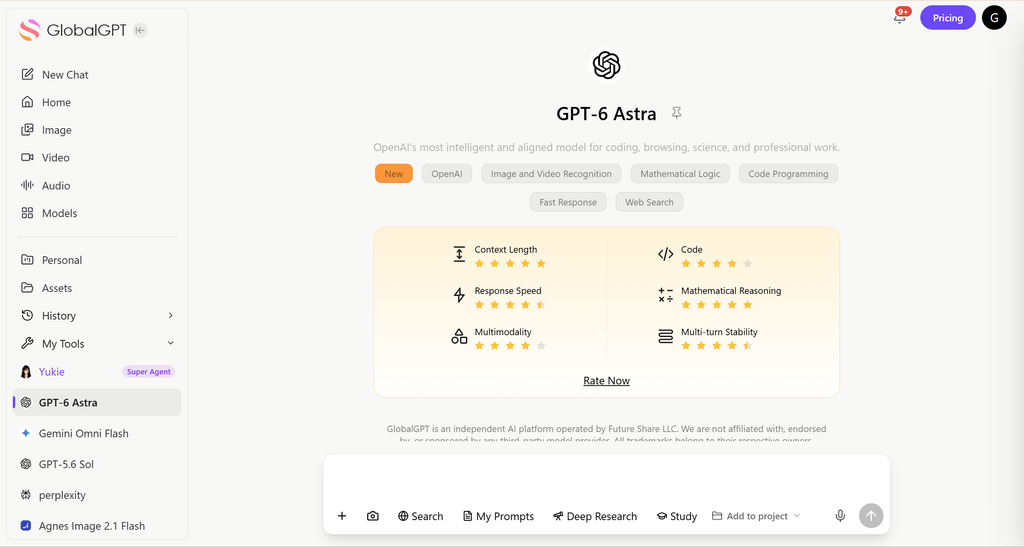
- GlobalGPT: The All-in-One Model Switcher: Instead of being stuck with one company, GlobalGPT gives you a “Master Key” to over 100 models. You can use GPT-6 Astra for hard reasoning, then switch to Claude Opus 5 in the same workspace.
- Why Switching Models Is the Best Solution: When one model is capped, another current model may be just as strong for coding, research, or creative writing. GlobalGPT makes this switch seamless so your work does not have to wait for one reset.
- Cost-Efficiency Breakdown: GlobalGPT Basic costs $8.9 month to month or $5.8 per month with annual billing. OpenAI does not offer annual billing for Plus; the ChatGPT Plus annual-plan guide explains the buying difference.
- Seamless Workflow: You are not just limited to text. On GlobalGPT, you can move from a text chat to generating images or professional videos. Everything stays in one place.
Final Summary: What Users Should Expect From ChatGPT Plus Limits
ChatGPT Plus delivers improved access over the free tier but still includes message caps, rate limits, and advanced model restrictions. These boundaries fluctuate based on system load. For heavier or professional usage, platforms with fewer restrictions—such as GlobalGPT—provide greater flexibility and better overall value.
FAQ
What is the ChatGPT Plus limit?
As of September 15, 2026, Plus has model and tool allowances rather than one universal message count. GPT-5.6 Sol powers Instant, Medium, and High; use the limit and reset notice shown in your account.
Is ChatGPT Plus unlimited?
No. ChatGPT Plus has higher limits than Free, but it still includes message caps, upload limits, tool limits, and temporary restrictions.
When does the ChatGPT Plus limit reset?
There is no single reset window for all Plus features. File uploads can use a 3-hour rolling window, Live Voice uses 24 hours, and model or tool allowances follow the notice in your account.
Why did ChatGPT switch to a mini model?
ChatGPT may offer another available model after a Thinking limit. The current guide does not promise one fixed mini fallback; check the selected model and the reset notice in your account.
Does ChatGPT Plus have file upload limits?
Yes. OpenAI lists file size, upload-rate, project, and storage limits. Plus users can upload up to 80 files every 3 hours, but limits may be lower during peak hours.
What does “You’ve hit your usage limit” mean?
It usually means you reached a model, message, upload, tool, or temporary system limit. Wait for reset, switch models, or reduce request frequency.
Which GPT models does ChatGPT Plus include?
Plus includes GPT-5.6 Sol Instant, Medium, and High in Chat. GPT-6 Astra is included in ChatGPT Work and Codex; GPT-6 Pro in regular Chat requires a higher eligible plan.
Does ChatGPT Plus include API credits or annual billing?
No. OpenAI bills ChatGPT Plus monthly at $20, does not offer annual Plus prepayment, and charges OpenAI API usage separately.
Is ChatGPT Pro better than Plus?
Pro is better for heavier individual usage. Plus is better for most everyday users, while Pro, Business, API, or GlobalGPT may fit users who frequently hit limits.
Can I use GPT-6 Astra on GlobalGPT?
Yes. GlobalGPT provides GPT-6 Astra in a workspace where you can switch among text, image, and video models. GlobalGPT access and allowances are separate from an OpenAI ChatGPT subscription.





