

Quick answer: ChatGPT Plus is $20/month, billed monthly. Choose web, iOS, or Android checkout based on your region and payment method, then confirm the final amount in the official checkout.
If you want to pay for ChatGPT Plus in 2026, the simplest path is to upgrade inside ChatGPT on the web, iOS app, or Android app. ChatGPT Plus currently costs $20/month and renews automatically unless you cancel. Your final charge may differ by country because taxes, app-store billing, local currency pricing, and payment-provider rules can apply.
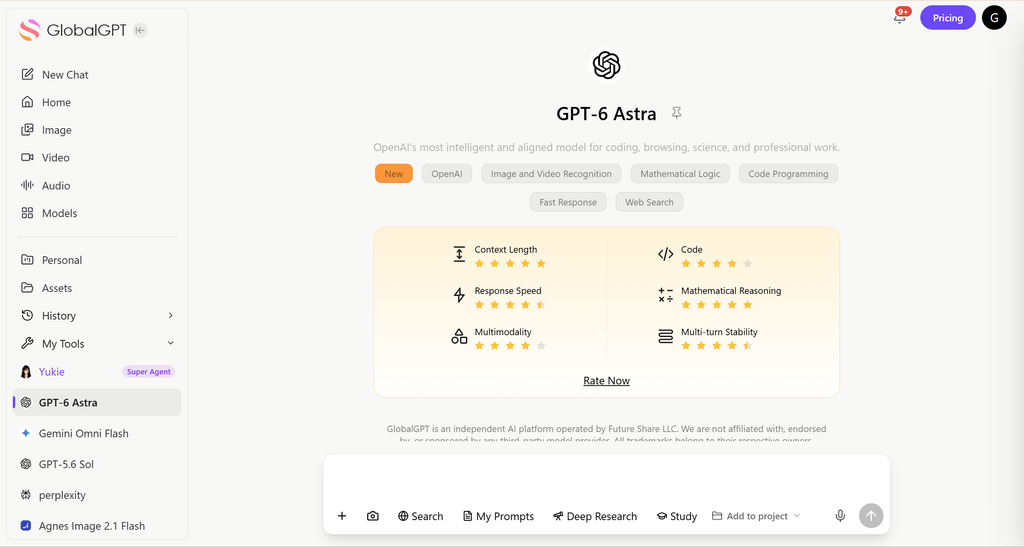
Want a multi-model AI workspace instead of paying for only one ChatGPT plan? GlobalGPT lets you use GPT-style models alongside Claude, Gemini, Perplexity, Sora, image tools, and video models from one place.
TL;DR: How to Pay for ChatGPT Plus in 2026
You can pay for ChatGPT Plus in three main ways:
- directly on chatgpt.com with a major credit or debit card
- the official ChatGPT iOS app using Apple App Store billing
- the ChatGPT Android app using Google Play billing. ChatGPT Plus costs $20/month and renews automatically unless you cancel.
OpenAI’s web billing help says web subscriptions support credit and debit cards in all countries where ChatGPT subscriptions are available. It also lists selected local payment methods, such as UPI for Go and Plus in India, GoPay in Indonesia, Pix in Brazil, and Kakao Pay, Naver Pay, and local cards in Korea.
For most users, web checkout is the cleanest option because the subscription is tied directly to the ChatGPT account. Mobile checkout can be easier if your card works better through Apple or Google billing.
See what ChatGPT Plus can do before paying.
What Is ChatGPT Plus and What Do You Get?
ChatGPT Plus is the paid subscription tier that unlocks a more powerful experience compared to the free version.
With ChatGPT Plus, users typically receive:
- Access to advanced GPT models
- Faster response times
- Priority access during peak traffic
- Early access to new features
The subscription is billed monthly and renews automatically unless canceled. Compare the full ChatGPT Plus price and current plan value.
How Much Does ChatGPT Plus Cost in 2026?
ChatGPT Plus has a fixed global base price of $20 USD per month.
The important billing details are:
- – ChatGPT Plus is billed monthly.
- – OpenAI currently does not support annual billing for ChatGPT Plus.
- – OpenAI currently does not support paying multiple months in advance for ChatGPT Plus.
- – API usage is separate from a ChatGPT Plus subscription and is billed independently.
- – Taxes, local currency pricing, and app-store billing can change the final amount shown at checkout.

If you are comparing Plus with Pro, be careful with the wording. OpenAI’s live pricing page shows one Pro plan with different usage multipliers, not two separate $100 and $200 Pro products. Plus remains the mainstream paid individual plan, while Pro is designed for substantially heavier usage.
The ChatGPT Plus buying guide covers the complete checkout decision.
Before you pay: confirm the plan name, renewal period, tax-inclusive total, billing currency, and the account that will receive the subscription. Web, Apple, and Google subscriptions are managed and refunded through different billing systems.
How to Pay for ChatGPT Plus on the Web (Step-by-Step)
Paying on the web is the most direct and recommended method.
Steps to Subscribe on chatgpt.com
- Visit chatgpt.com and log in to your account
- Click your profile icon (bottom-left corner)

- Select “Upgrade”
- Choose ChatGPT Plus
- Enter your payment details

- Confirm payment to activate your subscription
OpenAI’s web billing page lists credit and debit cards as supported payment methods across all countries. It also lists local payment methods in selected regions:
| Region | Payment methods OpenAI lists for web checkout |
|---|---|
| All countries | Credit and debit cards |
| UK and EEA | Bank debit via Link, where supported |
| India | UPI for Go and Plus, not Pro or Business |
| Indonesia | GoPay for Go, Plus, and Pro |
| Brazil | Pix for Go, Plus, and Pro |
| Korea | Kakao Pay, Naver Pay, and local cards |
Payment availability can depend on account region, local regulation, checkout currency, and provider support. If a method is not visible in your checkout, use the options shown inside ChatGPT rather than relying on older screenshots.
How to Pay for ChatGPT Plus on iPhone (iOS App)
If you subscribe through the iOS app, payment is handled entirely by Apple.
iOS Payment Process
- Open the ChatGPT app on your iPhone
- Tap your profile icon
- Select Upgrade
- Confirm via Apple Pay or App Store billing
Supported iOS Payment Methods
- Apple Pay
- Linked credit or debit cards
- App Store balance or gift cards
Apple may apply additional taxes or fees depending on your region.
How to Pay for ChatGPT Plus on Android (Google Play)
Android users subscribe through Google Play billing.
Android Payment Process
- Open the ChatGPT app
- Click the “Get Plus” button at the top of the homepage in the ChatGPT app or go to profile → Upgrade plan
- Complete payment via Google Play


Supported Android Payment Methods
- Google Pay
- Credit or debit cards
- Google Play balance or gift cards
Why Was My ChatGPT Plus Payment Declined?
A ChatGPT Plus payment can fail even when your card works elsewhere. Common causes include international payment blocks, insufficient funds, issuer fraud checks, unsupported card types, mismatched billing details, app-store account restrictions, or Strong Customer Authentication requirements in the EEA.
Try these fixes:
- – Make sure you are signed in to the correct ChatGPT account.
- – Confirm your card supports recurring online international payments.
- – Match the billing name, address, and country to your payment method.
- – Try web checkout if mobile billing fails, using the steps in the complete ChatGPT Plus buying guide.
- – Try iOS or Android checkout if web card processing fails.
- – Complete any 3D Secure, SCA, or bank verification step.
- – Contact your bank if the card issuer is blocking the transaction.
Avoid unofficial “cheap ChatGPT Plus” sellers, shared accounts, resold access, or payment tricks. OpenAI’s terms prohibit sharing account credentials, reselling access, and using ChatGPT to power third-party services without proper authorization.
What If ChatGPT Plus Is Not Available in My Country?
If ChatGPT Plus checkout is unavailable, first confirm that ChatGPT is officially supported in your country or territory. Availability can differ by location, account state, local rules, and payment provider. Do not rely on VPN workarounds or shared accounts as a payment strategy, because they can create account, security, and refund problems.
If your goal is simply to use advanced AI models, consider a multi-model workspace such as GlobalGPT. It is not an official OpenAI product and does not replace your OpenAI account, but it can be more practical if you want one subscription path for multiple AI models and tools.
Compare legitimate ways to buy ChatGPT Plus cheaper.
Is There a Cheaper or More Flexible Alternative to ChatGPT Plus?
For users who feel ChatGPT Plus is expensive or limited, multi-model AI platforms are becoming a popular alternative.
Why Many Users Choose GlobalGPT
GlobalGPT offers:
- Access to 100+ top AI models (GPT series, Claude, Gemini, Perplexity, Sora, and more)
- One subscription instead of multiple AI tools
- Plans starting at $10.8 per month, nearly half the cost of ChatGPT Plus
- Fewer regional payment issues
For creators, marketers, students, and power users, GlobalGPT can deliver more value at a lower price.
Web vs Mobile Subscription: Which Is Better?
| Subscription Method | Best For |
| Web (chatgpt.com) | Lower fees, direct billing |
| iOS App | Apple Pay convenience |
| Android App | Google Pay users |
| Global GPT | Power users & creators |

How to Cancel or Manage Your ChatGPT Plus Subscription
- Web subscribers: Cancel from account settings on chatgpt.com
- iOS subscribers: Cancel via App Store subscriptions
- Android subscribers: Cancel via Google Play subscriptions
Your access remains active until the end of the billing cycle. If plan value is the concern, review the ChatGPT Plus vs Pro comparison before renewing.
Before confirming checkout, compare the Philippines ChatGPT Plus price example to see how currency and local billing can affect the displayed total.
Final Answer: How Do You Pay for ChatGPT Plus?
To pay for ChatGPT Plus:
- Use a credit or debit card on chatgpt.com
- Or subscribe via Apple Pay (iOS) or Google Pay (Android)
- Expect a $20/month recurring charge
If you want more AI models, lower cost, and fewer payment restrictions, platforms like GlobalGPT are worth considering.
FAQ
How much is ChatGPT Plus in 2026?
ChatGPT Plus currently costs $20/month and is billed monthly. Taxes, local currency pricing, and app-store billing can affect the final amount shown at checkout, so always confirm the price inside your ChatGPT account before paying.
Can I pay for ChatGPT Plus annually?
No. OpenAI currently says annual billing and paying multiple months in advance are not supported for ChatGPT Plus. If that changes later, update this page, the FAQ schema, and any pricing screenshots before republishing.
What payment methods does ChatGPT Plus accept?
On the web, OpenAI lists credit and debit cards for all countries. It also lists selected local methods, including Link bank debit in the UK and EEA, UPI in India for Go and Plus, GoPay in Indonesia, Pix in Brazil, and Korean local payment options.
Can I use GlobalGPT instead of paying for ChatGPT Plus?
Yes, if your goal is to use GPT-style AI plus other models from one workspace. GlobalGPT is not an official OpenAI subscription and does not replace your ChatGPT account, but it can be a more flexible option for multi-model workflows.
Why was my ChatGPT Plus payment declined?
Payment failures usually come from card issuer blocks, unsupported card types, mismatched billing details, international payment restrictions, app-store account issues, or required bank verification. Try another official checkout method before using risky third-party sellers.
Is it safe to buy cheap ChatGPT Plus from sellers?
No. Avoid shared accounts, resold access, and unofficial discount sellers. They can create account security problems, failed renewals, duplicate charges, or access loss. Use OpenAI’s official checkout or a legitimate alternative platform such as GlobalGPT.
How do I cancel ChatGPT Plus?
Cancel from the same place where you subscribed. Web users cancel in ChatGPT settings or My Plan. iPhone users cancel through Apple subscriptions. Android users cancel through Google Play. Access usually continues until the paid billing period ends.
Official sources checked September 16, 2026: OpenAI Terms of Use, OpenAI Usage Policies, ChatGPT pricing, and the supported-country list. These sources cover OpenAI facts; GlobalGPT pricing and access remain platform-specific.



