《Nano Banana Pro 終極指南》

《Nano Banana Pro 終極指南》

The best Nano Banana Pro prompt is not a string of “magic” keywords. It is a structured creative brief that tells the model the image’s purpose, subject, setting, composition, lighting, style, exact text, constraints, and output format. Put the non-negotiable details first, describe the result positively, and refine one variable at a time.

截至 2026 年 7 月 20 日,, Google’s image-generation documentation identifies Nano Banana Pro as 雙子座3號專業版圖像, with the API model ID gemini-3-pro-image. Google positions it for professional asset production and complex instructions, while Nano Banana 2 is the faster general-purpose option. This distinction matters because a prompt guide should not treat every Nano Banana model as the same product.

Want to put this structure to work as you read? Open the Nano Banana Pro image workspace on GlobalGPT, paste the reusable formula below, and refine one change at a time in a browser-based workflow. As an all-in-one AI platform, Global GPT also offers image models like GPT image 2,  中途旅程, ,研究和寫作與 Perplexity、ChatGPT 5.6、Gemini 3 Pro 以及 Claude Opus 4.8.

Quick answer: the reusable Nano Banana Pro prompt formula

Goal + subject + action + environment + composition + lighting and color + visual treatment + exact text + must-keep constraints + output settings. You do not need every field for every image. Use the fields that affect the result, remove contradictions, and continue the conversation with small edits instead of rewriting the whole prompt after each generation.

What this guide covers

Nano Banana Pro in 2026: current model names, strengths, and limits

A Nano Banana Pro prompt is a natural-language instruction for Google’s Gemini 3 Pro Image model. It can request a new image, describe an edit to one or more supplied images, or continue a multi-turn visual workflow. The strongest prompts define the intended use and the relationships between elements, not just a pile of visual adjectives.

Google product nameAPI 模型 IDBest fit in Google’s current guidance
Nano Banana 2 Litegemini-3.1-flash-lite-imageFast, cost-sensitive image work at scale; 1K output and fewer advanced reference workflows
奈米香蕉 2gemini-3.1-flash-imageGeneral-purpose balance of quality, speed, latency, and cost
奈米香蕉專業版gemini-3-pro-imageProfessional assets, complex instructions, brand consistency, localization, and precise creative control
奈米香蕉gemini-2.5-flash-imageLegacy model; Google recommends moving newer workflows to the Nano Banana 2 family

For Nano Banana Pro specifically, Google documents 1K, 2K, and 4K output, text-to-image generation, text-and-image editing, multi-turn refinement, and a maximum of 14 reference images in supported API workflows. Reference fidelity still has category-specific limits, so uploading more images does not guarantee that every face, object, logo, or style will be preserved equally.

  • Exact image counts are not guaranteed. The model may not follow a request for a precise number of outputs every time.
  • Text rendering is capable but not infallible. Google recommends finalizing the wording first, then requesting the image with that exact text.
  • Editing works best conversationally. Keep the previous image in context and ask for one controlled change at a time.
  • All generated images include SynthID. This is part of Google’s documented output behavior.
  • Model-specific inputs differ. For example, video input is documented for Gemini 3.1 Flash Image, not as a general Nano Banana Pro feature.

If you are still choosing between the faster model and the professional model, this Nano Banana 2 與 Nano Banana Pro 比較 explains the practical trade-off before you spend time tuning a prompt.

披露: GlobalGPT publishes this guide and offers an independent multi-model image workspace. GlobalGPT is not Google and is not presented as an official Gemini service. Its interface, model availability, credits, limits, safety controls, and outputs can differ from Google’s apps and API.

The Nano Banana Pro prompt structure that works across use cases

Use the following structure as a checklist rather than a rigid incantation. A simple portrait may need six fields; a campaign visual with typography and brand references may need all ten.

Prompt field應指定哪些內容Example fragment
1. GoalWhere the image will be used and what it should communicate“Create a premium homepage hero for a sustainable travel company”
2. SubjectMain person, object, product, or scene“A solo hiker in a rust-red jacket”
3. ActionWhat is happening“Pausing at the edge of a high alpine lake”
4. EnvironmentLocation, time, weather, background, and atmosphere“Blue-hour mountains, thin mist over the water”
5. CompositionFraming, viewpoint, lens language, and subject placement“Wide 16:9 frame, eye-level view, subject on the left third”
6. Lighting and colorLight direction, contrast, temperature, and palette“Soft cool ambient light with a warm rim light”
7. Visual treatmentMedium, era, texture, realism, or design system“Editorial outdoor photography, natural texture, restrained color grade”
8. Exact textWords that must appear, including capitalization and placement“Headline: ‘GO FARTHER’ in condensed white sans serif”
9. ConstraintsDetails that must stay unchanged or must be visually true“Keep the jacket color and backpack design consistent”
10. Output settingsAspect ratio, resolution, and number of variants where supported“16:9, 4K, one final image”
Create [asset type] for [purpose/audience].
Subject: [who or what, defining traits].
Action: [what is happening].
Environment: [place, time, weather, background].
Composition: [shot type, angle, lens language, placement].
Lighting and color: [direction, softness, contrast, palette].
Visual treatment: [medium, style, texture, realism].
Exact text: “[copy]” in [typography and placement].
Must keep: [identity, product, logo, geometry, or other constraints].
Output: [aspect ratio, image size, variant request].

How to write a high-quality Nano Banana Pro prompt step by step

1. Start with the job, not the style

“Cinematic” means different things in a movie poster, a product ad, and a travel thumbnail. State the asset’s purpose, audience, and required message before describing the look. Context helps the model choose a useful layout instead of producing a beautiful but unusable image.

2. Make the subject and spatial relationships explicit

Name the main subject, its defining traits, its action, and where it sits in relation to other elements. “A red shoe beside a silver box” is clearer than “a stylish product scene.” When multiple objects matter, describe left, right, foreground, background, overlap, distance, and scale.

3. Add composition before decorative detail

Choose the frame, viewpoint, subject placement, and empty space before adding texture words. A wide shot, macro view, low angle, top-down layout, or centered packshot changes the result more reliably than generic phrases such as “masterpiece” or “award-winning.” Camera language is useful when it describes a visible decision.

4. Describe light, color, and material in observable terms

Replace “amazing lighting” with the direction and quality of light: soft window light from camera left, hard noon sun, warm backlight, diffused studio key, or cool ambient fill. Do the same for materials: matte ceramic, brushed aluminum, translucent glass, rough linen, or wet asphalt.

5. Separate exact text from the rest of the prompt

Write the final copy first, put it in quotation marks, preserve capitalization, and specify where it belongs. Ask for a simple text hierarchy before requesting a dense poster. If spelling is wrong, keep the design and correct only the text in a follow-up turn.

6. Refine one variable per turn

Google’s current guidance recommends conversational iteration. Instead of replacing a mostly successful prompt, say: “Keep the subject, framing, wardrobe, background, and typography unchanged. Make only the key light warmer and softer.” This creates a clear edit boundary and makes failures easier to diagnose.

7. Test the short version before adding complexity

Start with the essential scene and add detail only where the output is ambiguous. A longer prompt is not automatically better. Conflicting styles, multiple camera angles, and repeated adjectives can weaken instruction priority.

弱: “A cat, beautiful, ultra quality, cinematic, masterpiece.”

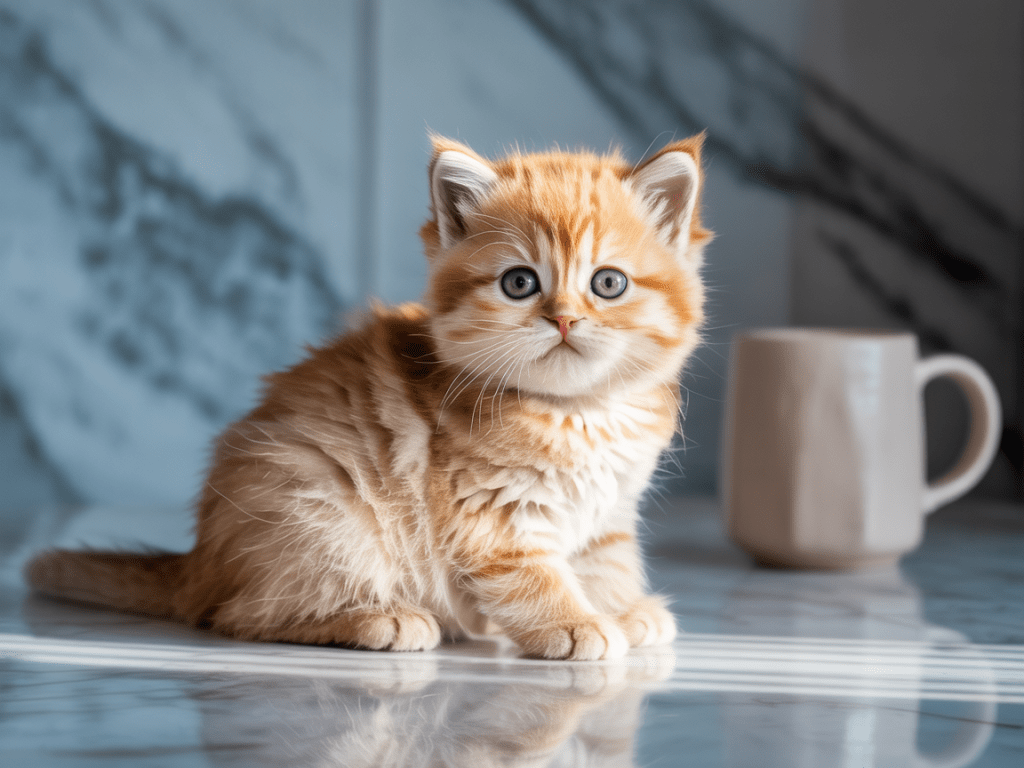
Stronger: “A photorealistic orange British Shorthair kitten sitting on a pale marble countertop beside a plain white cup, eye-level medium shot, soft morning window light from the left, shallow depth of field, natural fur texture, cool gray background.”

Photorealistic orange kitten beside a white cup in soft window light
A useful prompt specifies the subject, nearby object, surface, viewpoint, light direction, depth of field, and background instead of relying on quality buzzwords.

High-quality Nano Banana Pro prompt examples by visual goal

Cinematic editorial scene

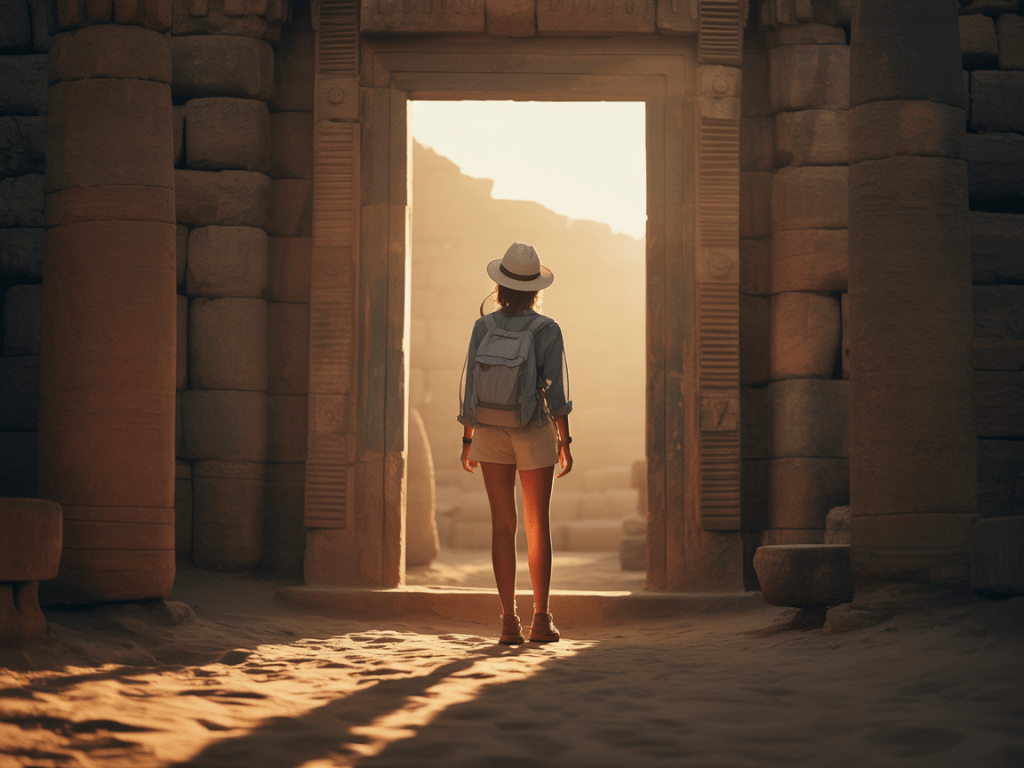
Create a cinematic editorial photograph for a premium archaeology magazine. A woman explorer stands with her back to the camera at the entrance of an ancient sandstone temple, looking into the sunlit chamber. Symmetrical doorway framing, eye-level 35mm perspective, full-body subject centered in the lower third. Warm golden light pours through the opening, soft dust in the air, deep but readable shadows, weathered stone texture, restrained earth-tone color grade. 4:3 composition, no headline or logo.
Explorer standing in a sunlit ancient temple entrance
The prompt controls story, viewpoint, framing, subject placement, light direction, atmosphere, texture, palette, and aspect ratio.

Stylized anime action

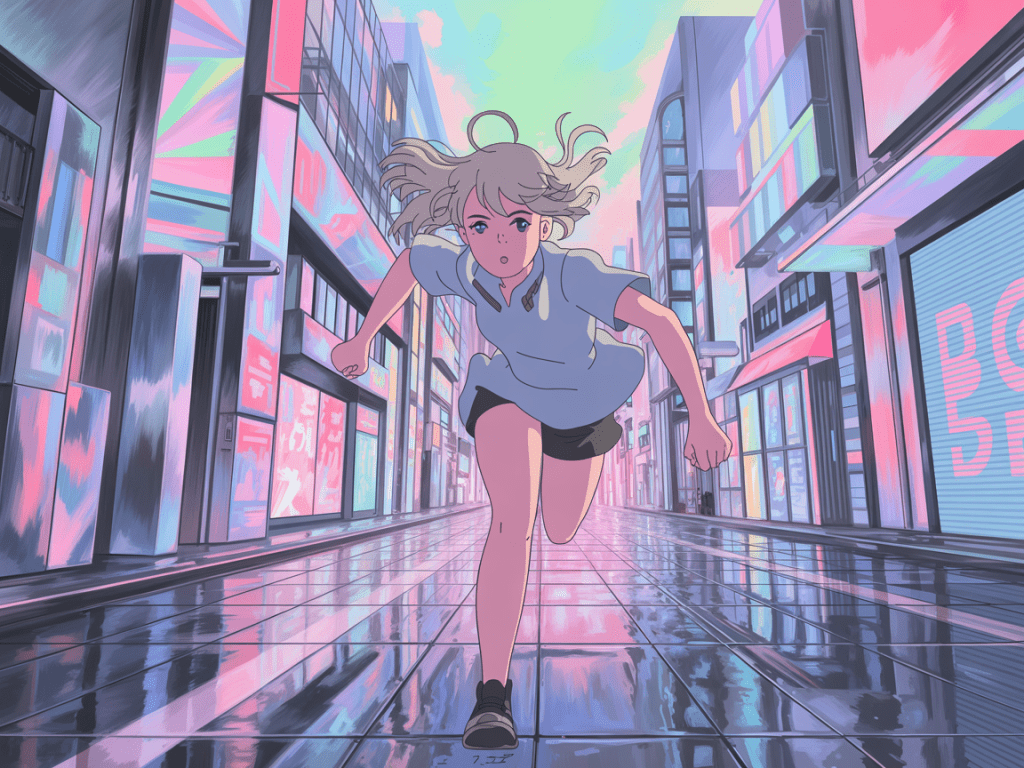
Create a hand-drawn anime action frame. A young woman with short silver hair runs directly toward the camera through a futuristic Tokyo shopping street after rain. Dynamic low-angle wide shot, strong foreshortening, hair and shirt moving with her stride. Pastel cyan and pink signs reflect across the wet pavement; clean linework, flat cel shading, selective soft glow, energetic but readable background. Keep both hands anatomically clear. 4:3 composition, no readable brand names.
Anime runner on a pastel neon city street after rain
Action becomes easier to direct when pose, camera angle, motion cues, palette, line treatment, background density, and anatomy constraints are stated separately.

Product image with exact lettering

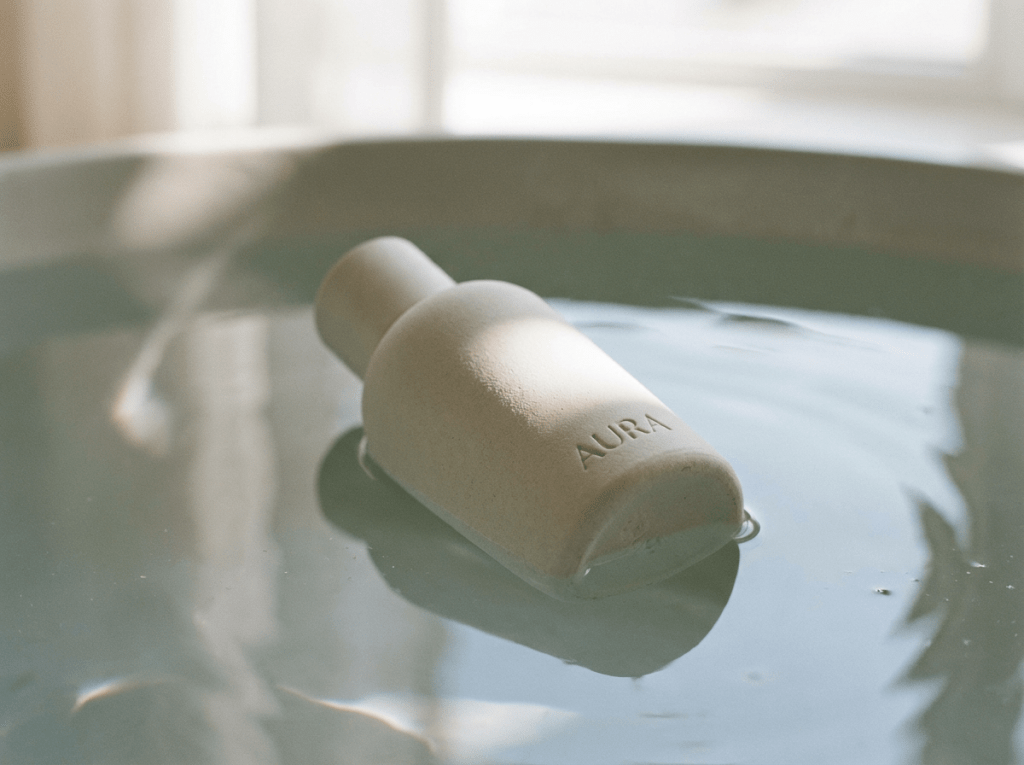
Create a quiet luxury product photograph for a skincare launch. A single rounded ivory cleansing bar rests partly in a shallow pool of clear water. Emboss the exact word “AURA” once on the front face in uppercase geometric sans serif lettering. Three-quarter close-up, product angled from upper left to lower right, soft diffused daylight from a large window behind it, delicate ripples and realistic wet reflections, matte ceramic-like surface, pale sage and warm cream palette. Square composition, no other text, no packaging, no extra products.
Ivory AURA skincare bar resting in shallow water
For product work, describe the object geometry, exact lettering, viewpoint, light source, surface behavior, palette, and exclusions.

Information graphic with controlled text

Create a clean vertical infographic for first-time houseplant owners. Title at the top: “WATER SMARTER”. Below it, show three equal illustrated sections labeled exactly “CHECK”, “WATER”, and “DRAIN”. Each section contains one simple icon and one short line of body copy: “Test the top soil”, “Soak the root ball”, and “Empty the saucer”. Warm off-white background, forest-green headings, terracotta accents, high legibility, generous spacing, flat vector illustration, 4:5 composition. Do not add any other words.

For more output-specific guidance, see the separate walkthrough for 使用 Nano Banana Pro 製作 4K 影像.

How to prompt Nano Banana Pro for image editing

Editing prompts need two boundaries: what changes and what stays fixed. Identify the target by visible traits and location, then list the composition, identity, product geometry, lighting, and background elements that must remain unchanged.

Add or replace one object

Edit the supplied living-room photo. Replace only the blue fabric sofa in the center with a vintage brown leather Chesterfield sofa of the same width and position. Match the room’s existing perspective, window light, contact shadows, and reflections. Keep the walls, rug, coffee table, plants, camera angle, crop, and every other object unchanged.

Preserve a person or product

Use the supplied portrait as the identity reference. Keep the person’s facial structure, eye color, hairstyle, skin tone, age, and neutral expression consistent. Change only the setting to a softly lit modern library and the clothing to a charcoal blazer over a plain white shirt. Preserve the original head angle and shoulder position. Natural photographic texture, 3:4 portrait.

Transfer a style without copying unwanted content

Use image 1 for the subject and composition. Use image 2 only as a reference for the muted gouache texture, limited navy-and-ochre palette, and softly uneven brush edges. Do not copy any characters, objects, text, or layout from image 2. Preserve the subject’s pose and proportions from image 1.

The full workflow is covered in how to edit images with text prompts. Developers can also follow the Nano Banana Pro API 指南 for request and integration steps.

How to use reference images and improve consistency

Reference images are most useful when each one has a declared role. Label them by purpose—identity, product, logo, pose, composition, or style—and say which features may be borrowed. Do not assume the model knows whether image 2 is a character reference or a color reference.

  1. Choose one clean primary reference with the subject clearly visible.
  2. List immutable traits in words: face shape, hairstyle, garment colors, logo geometry, material, or proportions.
  3. Assign every additional image one role.
  4. Generate the first approved view before changing angle, pose, or setting.
  5. Feed approved outputs into later turns to maintain continuity.
  6. Change one major variable per turn and restate what must remain fixed.

Google’s API documentation allows up to 14 reference images for Gemini 3 image workflows, but that is a ceiling, not a recommendation to upload 14 competing references. Fewer, cleaner references often make instruction priority easier to understand. For a practical sequence, use this guide to keep a character consistent across scenes.

Negative prompts: describe the wanted state, not a word blacklist

Google的 official prompting guidance recommends semantic negative prompting: describe the intended scene positively instead of relying on a comma-separated blacklist. “An empty, deserted street with clear pavement” gives the model a target; “no cars, no people, no clutter, no signs” mostly lists absences.

Weak exclusionStronger instruction
“No clutter”“A sparse desk containing only the laptop, notebook, and pen, with clear negative space around each object”
“No blur”“The subject and product label are in crisp focus; the background has a gentle optical falloff”
“No extra people”“One person stands alone in the frame; the background is unoccupied”
“No bad hands”“Both hands are fully visible in a relaxed natural pose, with five clearly separated fingers on each hand”
“No text errors”“Show the exact headline ‘OPEN LATE’ once, with no other words or letters”

Exclusions still have a place when they define a real boundary, such as “no other text” or “do not change the logo.” The key is to pair the boundary with a clear positive description of the required result.

Advanced controls that improve prompts without fake parameters

Use camera language only when it changes the frame

Shot type, viewpoint, and subject placement are usually more reliable than stacking lens numbers. Use “eye-level medium portrait with a compressed background” when that is the visible goal. Add a focal-length reference only if you understand the perspective it implies.

Treat aspect ratio and resolution as output settings

Put aspect ratio and resolution at the end of the prompt or configure them in the interface/API. Google documents 1K, 2K, and 4K for Gemini 3 Pro Image. In the API, image-size values use uppercase 1K2K, 或 4K; lowercase variants are rejected. The available controls in a third-party interface may differ.

Break complex scenes into ordered instructions

For a scene with many elements, state the background, primary subject, supporting objects, and final text in a clear sequence. Numeric pseudo-weight syntax is not a documented Nano Banana Pro parameter; use clear instruction order and visible constraints instead.

Separate creative direction from must-keep constraints

Creative direction can be flexible; identity, copy, product shape, and brand marks may not be. Put those requirements under a “Must keep” line. When editing, repeat the unchanged elements in every critical follow-up.

12 copy-ready Nano Banana Pro prompts

These examples are deliberately specific enough to be useful but easy to adapt. Replace the subject, copy, colors, ratio, and constraints for your project.

1. Editorial portrait

Create an editorial portrait for a design magazine. A ceramic artist in her early forties stands beside a worktable in a bright studio, clay dust on her dark linen apron, calm direct expression. Waist-up eye-level composition, 85mm portrait perspective, soft north-window light from camera left, gentle shadow detail, warm neutral palette, realistic skin and fabric texture. 4:5, no text.

2. Ecommerce packshot

Create a premium ecommerce packshot of a matte cobalt-blue insulated bottle standing upright on a pale limestone plinth. Three-quarter front view, centered composition, soft diffused key light from upper left, narrow rim light on the right edge, physically plausible contact shadow, accurate cylindrical geometry, clean light-gray studio background. Keep the bottle unbranded. Square image, 2K.

3. Food campaign

Create a summer campaign image for a neighborhood bakery. A rustic lemon tart sits on a white ceramic plate on a sunlit outdoor table, one slice removed to reveal the filling. Overhead three-quarter view, dappled leaf shadows, crisp pastry texture, natural crumbs, pale yellow and sage palette, generous empty space in the upper right for later copy. 3:2, photorealistic, no text.

4. Travel poster with exact text

Design a vertical travel poster inspired by mid-century screen printing. A simplified coastal train curves along ochre cliffs above a deep blue sea. Large headline at the top: “RIDE THE COAST”. Small line at the bottom: “SATURDAY, 18 JULY”. Use exactly those words, no other text. Flat geometric shapes, slightly imperfect ink texture, cream border, navy, coral, ochre, and sea-blue palette. 2:3.

5. App onboarding illustration

Create a friendly onboarding illustration for a budgeting app. A person sorts three large coins into labeled jars on a tidy desk. Simple rounded 3D forms, soft tactile materials, accessible color contrast, teal and warm apricot accents, subtle isometric viewpoint, clean off-white background, clear empty area at the top for interface copy. No letters or numbers inside the illustration. 4:5.

6. Fantasy environment

Create a cinematic fantasy environment for a game concept sheet. A narrow stone bridge crosses a vast cloud-filled chasm toward a weathered observatory built into a black mountain. Tiny lanterns mark the path, emphasizing scale. Wide establishing shot from slightly above, storm light breaking through clouds behind the observatory, cool slate palette with small amber lights, realistic rock and fog, no people, no text. 21:9.

7. Children’s book illustration

Illustrate a children’s story scene. A small red fox in a green scarf shares an umbrella with a nervous bluebird during gentle rain. They stand beside a puddle reflecting warm bakery windows. Soft watercolor and colored-pencil texture, rounded friendly shapes, readable facial expressions, low eye-level composition, muted blue-gray rain with warm golden highlights. Landscape 3:2, no text.

8. Architectural visualization

Create a realistic exterior visualization of a compact timber-and-glass cabin on a forested slope. Preserve believable construction: visible foundation, rain gutters, window frames, and a safe stair entry. Eye-level three-quarter view at early dusk, warm interior lights, damp ground after rain, cedar siding, dark metal roof, native ferns, natural lens perspective, no people or vehicles. 16:9, 4K.

9. Data infographic

Create a square infographic titled exactly “A WEEK OF BETTER SLEEP”. Show seven simple horizontal rows labeled MON, TUE, WED, THU, FRI, SAT, SUN. Each row contains a moon icon and a clean progress bar; no numerical claims. Dark navy background, pale blue bars, one warm yellow accent, highly legible uppercase sans serif labels, balanced spacing, flat vector design. Do not add any other text.

10. Character turnaround

Using the supplied character reference, create a clean character turnaround sheet with front, left profile, back, and three-quarter views. Preserve the same face, short curly black hair, round red glasses, mustard jacket, navy trousers, white sneakers, body proportions, and age in every view. Neutral standing pose, consistent scale, soft even studio light, light-gray background, no labels or extra accessories. Wide 16:9.

11. Product composite from references

Use image 1 as the exact shoe reference and image 2 as the location reference. Place the shoe from image 1 on the stone step in image 2, matching the step’s perspective, late-afternoon light, color temperature, contact shadow, and surface reflection. Preserve the shoe’s silhouette, materials, stitching, sole pattern, and logo geometry. Do not copy any other object from image 1. Keep the crop from image 2.

12. Controlled follow-up edit

Keep the approved image’s subject, face, pose, clothing, camera angle, crop, background, typography, and product placement unchanged. Change only the lighting: replace the cool overhead light with soft warm window light from camera left and a subtle neutral fill from the right. Maintain realistic skin tone and all existing colors. Return one revised image.

Nano Banana Pro prompt troubleshooting

問題可能原因What to write next
An important element is ignoredThe prompt has too many competing instructions or the element lacks a clear locationRemove decorative detail, state the element’s position and scale, and regenerate the simpler composition
The image text is misspelledThe copy is dense, ambiguous, or mixed into the scene descriptionKeep the design, replace only the text, quote the final wording, and prohibit additional text
A character changes between scenesIdentity traits were not restated or approved images were not reusedAttach the approved reference, list immutable traits, and change only pose or setting
The model returns the wrong number of itemsExact counting remains a documented limitationSimplify the scene, explicitly enumerate the items and their positions, then edit extras in a follow-up
An edit changes the whole imageThe change boundary is vagueName the target object and restate every major element that must remain unchanged
The result looks genericThe prompt uses broad style labels without visible art directionAdd purpose, composition, light direction, palette, material, and one distinctive visual idea
4K is not returnedThe selected model or interface does not expose that output, or the API setting is malformedConfirm Gemini 3 Pro Image, set the supported image size separately, and use uppercase 4K in the API
References fight each otherToo many images have overlapping rolesRemove weak references and label the remaining images as identity, object, pose, layout, or style

If you are new to the interface rather than prompt design, start with the Nano Banana Pro beginner guide and return to this structure once you can generate and edit a basic image.

Frequently asked questions about Nano Banana Pro prompts

What is the current official name of Nano Banana Pro?

As of July 20, 2026, Google calls Nano Banana Pro 雙子座3號專業版圖像; its API model ID is gemini-3-pro-image. Nano Banana 2 is the separate Gemini 3.1 Flash Image model, so the names and capability claims are not interchangeable.

How long should a Nano Banana Pro prompt be?

There is no magic character count. Define the job, subject, composition, light, style, exact text, and constraints, then remove repetition and conflicts. A focused short prompt can beat a long prompt with competing styles or viewpoints. Add detail only where the output is ambiguous.

Does Nano Banana Pro support negative prompts?

You can state exclusions, but Google recommends describing the wanted state positively. Write “one person alone on an empty street” instead of a blacklist. Use direct boundaries when necessary—“no other text” or “do not change the logo”—and pair them with the required visual result.

Can Nano Banana Pro render exact text inside images?

It can render legible stylized text, but spelling and layout are not guaranteed. Finalize the copy first, quote it exactly, and specify capitalization, hierarchy, and placement. If one line is wrong, keep the design and request a text-only correction. Proofread every generated word.

How do I keep a character consistent across several images?

Use one clean identity reference, list the facial, hair, clothing, and proportion traits that must not change, and reuse approved outputs in later turns. Label other references by role and change one major variable—pose, camera, or setting—at a time. Visually check every result.

Nano Banana Pro 最多可以使用多少張參考圖片?

Google documents up to 14 reference images for Gemini 3 image workflows, with lower high-fidelity limits by object, character, and style category. Fourteen is a maximum, not an ideal recipe. Use the fewest clear references needed, assign each a role, and remove competing images.

Can Nano Banana Pro generate 4K images?

Yes. Google documents 1K, 2K, and 4K output for Gemini 3 Pro Image. In the API, use uppercase image-size values such as 4K. Consumer and third-party interfaces may expose different controls or defaults, so their visible settings—not the prompt alone—determine the export.

Will the same prompt produce the same result in Google and GlobalGPT?

No. The brief transfers, but model version, interface defaults, reference handling, safety controls, and resolution options can change the result. GlobalGPT is independent, not an official Google product, so compare its controls with Google’s API documentation instead of assuming equivalence.

Final prompt checklist

  • Does the prompt state the asset’s purpose and audience?
  • Is the main subject described with defining visual traits?
  • Are action, environment, and spatial relationships unambiguous?
  • Does the composition specify shot type, viewpoint, and placement?
  • Are light, palette, material, and medium described in visible terms?
  • Is exact text quoted and separated from the scene description?
  • Are must-keep details and allowed changes clearly divided?
  • Are aspect ratio and resolution supported by the selected interface or API?
  • Can any repeated adjective, conflicting style, or fake parameter be removed?
  • Is the next refinement limited to one controlled change?

The most reliable Nano Banana Pro workflow is simple: write a clear brief, generate a strong base image, inspect what actually changed, and refine the result conversationally. Precision comes from useful constraints and disciplined iteration—not secret keywords or absolute promises.

分享文章:

相關文章