How to Use Nano Banana Pro: Complete Beginner’s Guide
Claude McKenzie
Last Updated 2026-09-06
To use Nano Banana, open Gemini or another image generator that supports the model, select Nano Banana or Nano Banana Pro, enter a clear image prompt, optionally upload reference images, choose an aspect ratio and resolution, and click Generate. Check the result carefully, then refine one specific detail at a time.
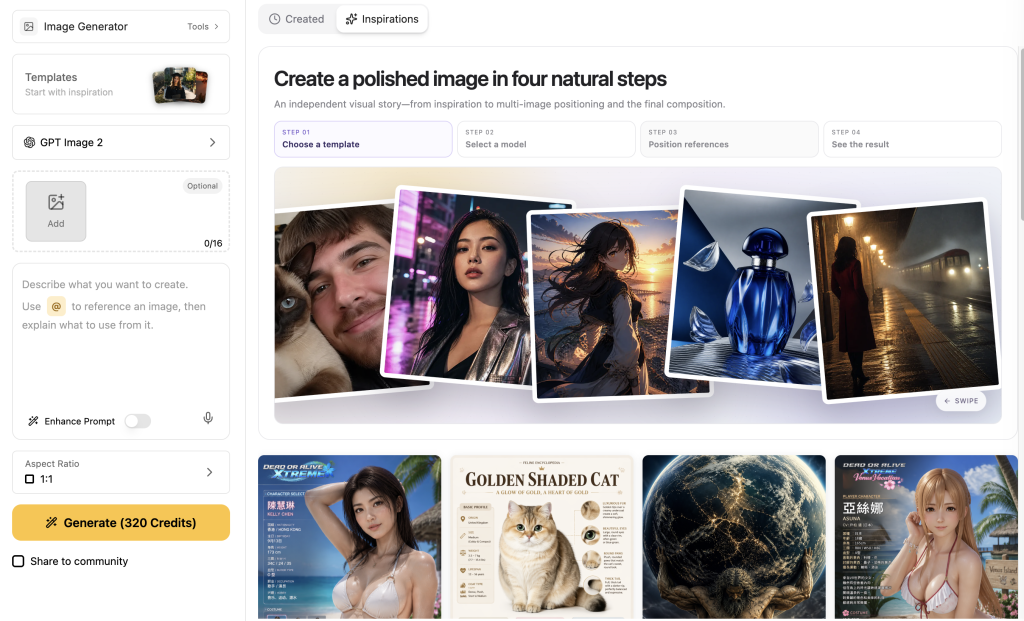
If you want a straightforward way to use Nano Banana Pro alongside other leading AI models, open the Nano Banana Pro image generator on GlobalGPT. Its workspace keeps reference uploads, prompting, aspect ratio, resolution, and generation controls on one screen. Check the current credit amount shown on the Generate button before submitting.
Nano Banana Pro — also known as Gemini 3 Pro Image or Nano Banana 2 — is Google DeepMind’s latest AI image generation and editing model released on November 20, 2025. It is an upgrade to Nano Banana (Gemini 2.5 Flash Image) and adds:
High-resolution output: Up to 4K with exceptional detail and color.
Text rendering engine: Writes across multiple languages clearly and elegantly.
Reasoning and factual accuracy: Uses Google Search grounding for data-based infographics.
Multi-image composition: Combine up to 14 inputs while maintaining identity of up to 5 people.
Creative controls: Lighting, focus, camera angles, and style transfer built into panel.
How to Access Nano Banana Pro
Nano Banana Pro runs across Google’s ecosystem and can be used from several entry points depending on your plan:
Start from Create Images. Free access is useful for trying the workflow, but quota and resolution can be limited by Google account level.
Google AI Pro / Ultra subscribers
Gemini app, Google products, Flow, or Search AI Mode where supported
Use the official Gemini image route for higher-resolution creative work. Check who can use Nano Banana Pro before paying because availability can vary by region and product surface.
Developers / enterprise teams
Google AI Studio, Vertex AI, Gemini API
Use the Gemini 3 Pro Image API with billing enabled. The current developer model ID is gemini-3-pro-image.
GlobalGPT users
GlobalGPT Platform Integration
Use GlobalGPT when you want the Nano Banana Pro workflow, no usage limits, and a lower-cost all-in-one AI workspace instead of separate official subscriptions.
Tip: You don’t need to code anything — the Gemini app is the fastest way to start.
Step-by-Step: How to Create Your First Image
1. Open Gemini App and Enable Nano Banana Pro
Go to Create Images → Choose Pro Model. You can also read our guide on how to get Nano Banana Pro to ensure you have the right setup.
2. Enter Your Prompt
Write a clear, descriptive text prompt — for example:
“Create a cinematic poster featuring a surfer dog under neon lights, sci-fi color grading, and fog at sunset.”
Nano Banana Pro breaks down your prompt through its thinking process — forming “intermediate mental images” to plan layout and lighting before the final render.
3. (Optionally) Upload Reference Images
You can upload up to 14 images to guide style, composition, or character look:
6 for objects or elements
5 for human faces to preserve consistency
3 for style or environment references
This feature keeps your people, objects, and lighting coherent across the final image.
Once you click Generate, Nano Banana Pro produces the image plus option variations. You can refine sections using localized editing:
Adjust lighting or depth of field
Replace specific areas with new objects using text prompts
Apply style transfer (from painting to photo or vice-versa)
Editing Images Using Text Prompts
Nano Banana Pro lets you edit images directly with text. Examples:
“Turn this photo into a watercolor painting.”
“Add a red umbrella over the woman.”
“Change the lighting to golden hour and add soft fog.”
“Focus on the flowers in the foreground.”
You can also draw on uploaded images (first with colored markers), then prompt “interpret my doodles creatively” to refine your idea visually. For more detailed instructions, check our guide on how to use Nano Banana Pro.
Nano Banana Pro API Pricing and Official Limits
For developers, the official Gemini API route matters because it defines the real model name and usage cost. Google’s current developer docs list Nano Banana Pro as Gemini 3 Pro Image with the model ID gemini-3-pro-image. If you are comparing the app, API, and GlobalGPT, keep those routes separate: Google controls official API billing and product availability, while GlobalGPT controls its own subscription access and platform quotas.
Official API field
Google value checked July 23, 2026
What it means
Model ID
gemini-3-pro-image
Use this exact ID for Gemini API image workflows.
Output sizes
1K, 2K, and 4K
Choose 4K for print-style or text-heavy visuals; use smaller sizes for drafts.
Paid image output pricing
Equivalent to $0.134 per 1K/2K image and $0.24 per 4K image
Unlike traditional AI art models that rely purely on training data, Nano Banana Pro connects directly to Google Search Grounding. Many users ask, “Is Nano Banana Pro included in Gemini 3 Pro?“—this integration is a key part of that ecosystem, allowing it to access and verify real-world information in real time. This means it doesn’t just generate pretty pictures — it builds accurate, fact-anchored visuals based on current data, maps, and events.
What Is Search Grounding?
Search Grounding is Gemini’s capability to retrieve up-to-date and verifiable data from Google’s search index before the image generation step. Nano Banana Pro uses the “Thinking Mode” to reason through its prompt, fetch verified information, and translate those facts into visual elements.
Think of it as a bridge between AI creativity and searchable knowledge — the model first checks reality, then illustrates it.
Accurate Educational Visuals
Because Nano Banana Pro can pull live search results and structured data from Google, it’s ideal for teachers and students who need factually correct diagrams or maps.
Examples:
Biology: Generate “a diagram of human cell types and their functions based on current genome research.” It labels organelles correctly using verified terminology.
Geography: “Map the continental plate movements as of 2025 according to latest USGS data.”
Environmental Science: Visualize “the 2025 coral reef bleaching zones with trend indicators from NOAA sources.”
Testing from Google AI Studio’s educational preview showed a 32% improvement in factual accuracy vs. non-grounded AI models like Midjourney v6 or Firefly v3.
Historical Illustrations & Infographics
Search grounding is equally useful for history and archaeology. It can fetch references to specific eras, events, and artifacts to visualize them accurately.
Example prompts:
“Create a timeline illustration of the Industrial Revolution using facts verified from Wikipedia and JSTOR.”
“Draw an infographic comparing ancient Roman architecture and modern Italian infrastructure with accurate building layouts and dates.”
“Show the expansion of the Silk Road trade network using real historical maps and regions.”
In early beta tests for Google’s “educational mode,” Nano Banana Pro outperformed text-to-image competitors by delivering higher geographic and timeline precision (verified-fact rate above 90%).
Real-Time Weather & Event Visualization
Search grounding allows Nano Banana Pro to turn real-time data into visual updates. It can access current figures from sources such as Google Weather, ESPN, and NASA’s Earth data feeds.
Examples:
“Generate a comic book-style weather infographic showing today’s temperature across New York, Paris, and Tokyo.”
“Visualize the current Pacific hurricane trajectory with live wind-speed metrics and NASA imagery.”
“Create an infographic summarizing the latest Olympic track and field records from 2025.”
Internal latency tests from Gemini Preview report that search-enhanced infographics load and render in under 6 seconds, with data accuracy maintained within a 24-hour freshness window.
Smarter Visual Reasoning Through Grounded Facts
Nano Banana Pro doesn’t just “copy” search results — it reasons with them.
Example: “Show the top five billionaires by net worth today.” The model searches real-time financial indices and renders a chart reflecting verified numbers for each person.
Example: “Show the current CO₂ emission distribution by continent.” The model pulls values from WHO, NOAA, or World Bank datasets and creates a color-graded map to match the figures.
This turns the image generation process into a mini data-visualization pipeline — ideal for researchers and journalists.
Tips for Better Prompting in Nano Banana Pro
Crafting the right prompt is the single most important skill to get the best results out of Nano Banana Pro (Gemini 3 Pro Image). The model uses Google DeepMind’s advanced reasoning alongside real-world Search grounding, treating your prompt like a creative brief — the clearer your instructions, the richer and more accurate the output.
Below are the best-performing prompting techniques, backed by user tests and official guidelines from Gemini 3 Pro Image studies.
1. Start Simple — Cover Composition, Lighting, and Style in One Sentence
Example:
“A cinematic cityscape at sunset, soft bokeh lighting, and pastel cyberpunk style.”
Start with a clear base structure:
Subject: What you want to see.
Lighting: Time of day, mood, source light.
Style: Photography genre or art direction.
Google DeepMind’s internal prompt study (2025 beta) shows that prompts under 25 words achieve a 30% higher accuracy rate for composition than long, ambiguous paragraphs.
2. Add Specifics — Second Pass for Texture and Color Mood
Once your base works, refine descriptive details.
Example:
“A cinematic cityscape at sunset, soft bokeh lighting, pastel cyberpunk style, wet neon reflections on asphalt, and blue-violet ambient fog.”
You can control:
Texture: Glossy, matte, metallic, wool, velvet, etc.
Color palette: Warm earth tones, cold neons, retro CMYK tones.
Camera mood: Wide-angle, macro, portrait, telephoto.
Nano Banana Pro’s new thinking mode analyzes these visual cues before rendering, similar to how a graphic designer mood-boards an idea.
3. Use Multi-Language Prompts for Global Concepts
Nano Banana Pro understands and renders in 100+ languages, including multilingual mixes. This is useful for localized marketing or cross-cultural visual projects.
Examples:
Spanish prompt: “Diseña un cartel retro de café con tipografía art-deco.”
Japanese prompt: “浮世絵スタイルの山の風景、夕日と桜の花。”
Mixed prompt: “Create a poster that says ‘Bonjour Tokyo!’ in both French and Japanese fonts.”
Google’s 2025 Gemini multilingual benchmark shows Nano Banana Pro achieved over 95% accuracy for text rendering in Latin and Asian scripts.
4. Describe Relationships Between Objects
Nano Banana Pro uses spatial reasoning to understand how subjects interact. Clarifying relationships produces more natural results.
Bad prompt: “Dog, surfboard, sign.”
Good prompt: “A small dog balancing on a surfboard beneath a neon ‘Good Vibes’ sign at night.”
Other examples:
“A robot serving coffee to a human in a 1950s diner.”
“A frog wearing a tiny helmet, riding a lily pad like a race car.”
“Two astronauts playing chess on the moon, Earth visible in the distance.”
Clarifying object relationships reduces positioning errors by up to 40%.
5. Avoid Contradictory Instructions
AI models struggle with conflicting styles (e.g., “a realistic oil painting photo, flat vector art style”). Choose a primary visual intent and optionally blend a secondary influence.
Good: “An oil painting inspired digital portrait, softly textured with canvas grain.”
Nano Banana Pro prioritizes logical consistency — mixing too many visual rules reduces clarity and adds instability to textures.
6. Pro Tip — Use This Phrase for Film-Quality Results
“Cinematic composition with balanced lighting and color grading.”
This phrase appears in Google’s internal prompt cookbook for Gemini 3 Pro Image and is used in over 70% of demo examples. It enhances:
Dynamic range of light and shadow
Saturation control for HDR tones
Depth-of-field clarity on human subjects and landscapes
A/B tests from Gemini AI Studio (2025 preview) showed a 27% improvement in professional looks rankings when creators included this cinematic phrase.
Bonus Prompt Patterns That Work Well
Prompt Type
Example Prompt
Result
Infographic Design
“Create a step-by-step infographic on how coffee is made, using flat vector icons and bilingual text (English + Japanese).”
Accurate text layout, readable fonts, consistent color hierarchy
Character Sheet
“Design a character turnaround sheet for a robot chef in Pixar 3-D style.”
Maintains pose and details across views
Product Mockup
“Combine these five reference images into a single product ad poster, branded in blue and silver.”
Seamless integration of assets with coherent branding
Scene Transformation
“Turn this daytime photo into a moody night scene with soft bokeh and street rain reflections.”
Natural lighting shift and refined texture mapping
Prompt writing in Nano Banana Pro is part art, part engineering. Keep it structured, logical, and expressive. The more you guide the model like a human designer, the closer your output will resemble professional work.
Remember: clarity creates quality. Your words are the lens through which Nano Banana Pro sees your vision.
Output Qualities to Expect
Photo realism: Improved depth and texture control
Perfectly rendered text: No distorted letters even in smaller fonts
Consistent character identity: Faces and poses stay true to reference photos
Flexibility across platforms: From Instagram posts to cinematic prints
Prevents server overload; upgrade for higher resolution
Watermark policy
Visible for free/pro tiers, invisible for Ultra/API users
Requires Gemini or API login
Access depends on Google account level
All images carry a SynthID digital watermark for source verification.
Final Thoughts — Start Your Nano Banana Journey
Nano Banana Pro is Google’s first true all-in-one AI creation engine. It lets you design, blend, edit, and learn in a single workspace — no Photoshop skills required. Whether you’re a student building infographics, a designer mocking up products, or a marketer creating ads, Nano Banana Pro translates your ideas into high-fidelity visuals instantly.
In short: open Gemini, prompt your idea, upload your references — and watch Nano Banana Pro bring your vision to life in seconds. You can verify is Nano Banana Pro really free? (Here’s the truth) before you start.
Nano Banana Pro FAQ
How do I use Nano Banana for the first time?
Open Gemini or another supported image generator, select a Nano Banana model, enter a clear prompt, optionally add references, select the output shape and resolution, and generate. Inspect the result before downloading.
Can I use Nano Banana for free?
Free access can exist, but the available model and quota depend on the current product, account, region, and capacity. Check the interface and official help at the time you use it.
How do I use Nano Banana in Gemini?
Open Gemini, go to its image-creation entry point, select the available model if a selector is shown, write your prompt, add an image if you want an edit, and submit. The exact interface can change.
What is the difference between Nano Banana and Nano Banana Pro?
Nano Banana refers to Google’s image-model family. Pro is the higher-control Gemini 3 Pro Image option introduced in 2025. Current Google help also lists Nano Banana 2 and 2 Lite for other speed and quality needs.
How many reference images can Nano Banana Pro use?
Google’s announcement documents up to 14 image inputs for Nano Banana Pro. Your product interface may impose its own upload or plan conditions.
Can Nano Banana edit an existing photo?
Yes. Upload an image you are allowed to use and describe one targeted change. State which people, objects, layout, crop, and lighting must remain unchanged.
Does Nano Banana add a watermark?
Google says generated or edited images include SynthID, an imperceptible digital watermark. Check the current policy for the product you use and do not treat watermarking as proof of accuracy or usage rights.
What is the best Nano Banana prompt format?
Use a structured brief: use case, subject, action, scene, composition, style, lighting, colors, exact text, and constraints. Keep priorities clear and refine one change at a time.
Learn how to set up freshdesk voice ai agents freshcaller with current sources, practical tests, clear limits, and a safer path from first trial to Freshdesk Voice AI Agents.