Perplexity is geschikter wanneer de opdracht begint met nieuwe bronnen, bronvermeldingen en onderzoek. ChatGPT is geschikter wanneer de opdracht redeneren, schrijven, programmeren, plannen of een verzorgd eindresultaat vereist. Na het testen van zowel onderzoeks-, programmeer- als schrijfopdrachten is dit in 2026 nog steeds de meest overzichtelijke manier om Perplexity en ChatGPT van elkaar te onderscheiden.
Gecontroleerd op 25 september 2026: In deze vergelijking wordt gebruikgemaakt van de huidige plannamen en de toegangspaden die op de gelinkte productpagina’s te vinden zijn. De openbare pagina van Perplexity Pro-pagina en die van OpenAI Prijspagina ChatGPT Dit zijn de officiële links met betrekking tot de reikwijdte van het plan; de limieten van de app en de regionale belastingen kunnen nog steeds verschillen.
De twee tools overlappen elkaar, maar in de praktijk voelen ze niet hetzelfde aan. Perplexity gedraagt zich als een ‘source-first’-antwoordengine: het zoekt, citeert, vat samen en helpt je na te gaan waar een antwoord vandaan komt. ChatGPT gedraagt zich meer als een werkassistent: het verwerkt rommelige invoer, redeneert erover na, schrijft, debugt, legt uit en zet ruw materiaal om in iets bruikbaars.
Als je niet steeds tussen verschillende tools wilt wisselen, GlobalGPT is de praktische middenweg. Het biedt je Perplexiteit toegang naast GPT-modellen en andere toonaangevende AI-tools in één werkruimte. Dat betekent niet dat het een vervanging is voor alle officiële app-functies, Codex, bedrijfsbeheerfuncties of de facturering via de native API, maar het werkt goed voor gebruikers die hulp willen bij onderzoek, schrijven en programmeren, en die verschillende modellen willen vergelijken zonder dat ze meerdere afzonderlijke abonnementen hoeven te beheren.
Kort antwoord: Perplexity versus ChatGPT
Kies Perplexity als je je voornamelijk bezighoudt met onderzoek op basis van bronnen, actuele feiten, bronvermeldingen, samenvattingen van webpagina’s, academische uitgangspunten, marktonderzoek of het vergelijken van de informatie op verschillende webpagina’s.
Kies ChatGPT als je je voornamelijk bezighoudt met schrijven, programmeren, redeneren, studeren, plannen, bestandsanalyse, documentverwerking of het opstellen van een definitief antwoord.
Gebruik beide als je workflow begint met bronnen en eindigt met de output. Een veelvoorkomend patroon is eerst Perplexity voor onderzoek, en vervolgens ChatGPT voor het definitieve concept, de toelichting, de code of het plan.
| Gebruiksscenario | Een betere keuze | Waarom |
|---|---|---|
| Nieuwe feiten en bronvermeldingen | Perplexiteit | Het is opgebouwd rond zoekopdrachten, bronverwijzingen en geciteerde antwoorden. |
| Schrijven en redigeren | ChatGPT | Het is beter in het omzetten van ruwe aantekeningen in een gepolijste tekst. |
| Coderen en debuggen | ChatGPT | Het biedt betere hulp bij de implementatie, uitleg en ondersteuning voor de workflow van ontwikkelaars. |
| Wetenschappelijk onderzoek of marktonderzoek | Eerst Perplexity, daarna ChatGPT | Gebruik Perplexity om bronnen te verzamelen en vervolgens ChatGPT om de uiteindelijke uitvoer samen te stellen. |
| Eén werkruimte voor diverse AI-taken | GlobalGPT | Dit is handig als je Perplexity plus GPT, Claude, Gemini en andere tools op één plek wilt hebben. |
Inhoudsopgave
- Kort antwoord
- Belangrijkste verschillen
- Praktijktests
- Zoek- en bronkwaliteit
- Benchmarks en nauwkeurigheid
- Schrijven en redigeren
- Codering en werkprocessen voor ontwikkelaars
- Agenten: ChatGPT-agent, Codex en Perplexity-agent-API
- Prijzen: Perplexity Pro versus ChatGPT Plus
- Wat Reddit-gebruikers meestal opvalt
- Privacy en gegevensbeveiliging
- Welke moet je kiezen?
- FAQ
- Eindoordeel
Perplexity versus ChatGPT: Belangrijkste verschillen
Het belangrijkste verschil zit niet alleen in de kwaliteit van de modellen. Het gaat om de werkwijze. Perplexity komt het best tot zijn recht in de beginfase van een onderzoekstaak, wanneer je nog bezig bent met het zoeken naar bronnen en het in kaart brengen van het onderzoeksveld. ChatGPT komt het best tot zijn recht zodra de taak zich richt op redeneren, produceren, herschrijven, coderen of besluitvorming.
Daarom kan een simpel antwoord als “welke is beter?” misleidend zijn. Als je Perplexity vraagt om actuele informatie met bronvermeldingen te vinden, voelt dat vaak sneller en overzichtelijker aan. Als je ChatGPT vraagt om aantekeningen om te zetten in een afgewerkt artikel, een bug uit te leggen, code te schrijven, een tabel te maken of afwegingen te maken, voelt ChatGPT meestal capabeler aan.
Voor een uitgebreidere toelichting op de rol van Perplexity, zie de handleiding over Waarvoor is Perplexity AI geschikt? is een handige gids. Als je meer wilt weten over de modelstack, lees dan wat LLM Perplexity gebruikt.
| Categorie | Perplexiteit | ChatGPT |
|---|---|---|
| Hoofdrol | Zoekmachine en onderzoeksassistent | Algemene AI-assistent en werkplatform |
| Het beste bij | Zoeken, bronvermeldingen, samenvattingen van bronnen, actuele informatie | Schrijven, programmeren, redeneren, plannen, werkprocessen voor bestanden en documenten |
| Zwakke plek | Minder geschikt voor gepolijste, uitgebreide producties of complexe programmeersessies | Er is onderzoek nodig of er moeten bronnen worden aangehaald om de meest actuele feitelijke beweringen te onderbouwen |
| Beste koper | Onderzoekers, studenten, analisten, kopers, bronverificateurs | Schrijvers, ontwikkelaars, consultants, studenten, professionals, teams |
Praktijktests: onderzoek, programmeren en schrijven
Om deze vergelijking minder abstract te maken, heb ik beide tools getest aan de hand van drie alledaagse taken: een opdracht op het gebied van onderzoek en bronvermelding, een opdracht voor het opsporen van fouten in JavaScript en een schrijfopdracht op basis van rommelige aantekeningen. Dit zijn geen laboratoriumtests. Het zijn praktische controles om te zien hoe elke tool zich gedraagt in een workflow die een echte gebruiker tijdens een normale werkdag zou kunnen doorlopen.
Toets over onderzoek en bronvermeldingen
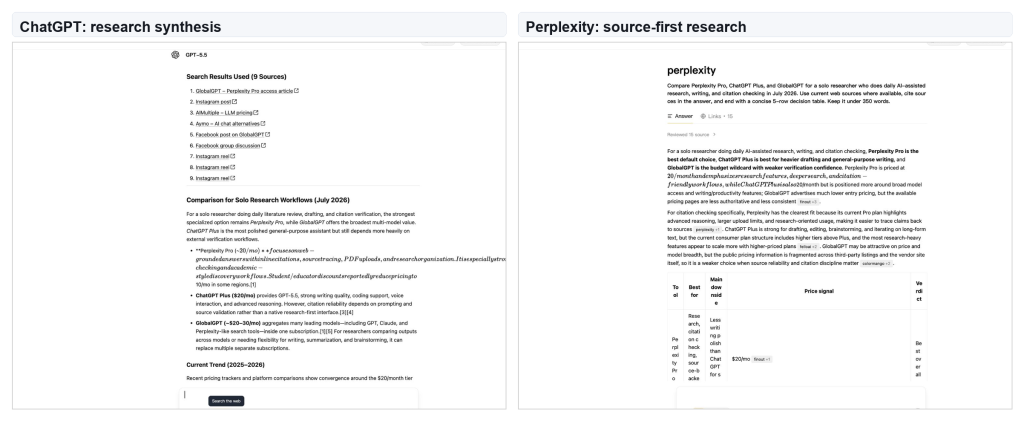
In de onderzoekstest maakte Perplexity het controleren van de bronvermeldingen eenvoudiger. Het antwoord vertoonde een brongerichte interface, inclusief een zichtbaar patroon van beoordeelde bronnen en een gebied met links. ChatGPT leverde een bredere aanbeveling op, maar de zichtbare bronnenlijst bevatte zwakkere sociale en externe items, waardoor het antwoord meer redactionele opschoning nodig had voordat het als betrouwbaar kon worden beschouwd voor prijs- of planadvies.
Test voor programmeren en foutopsporing
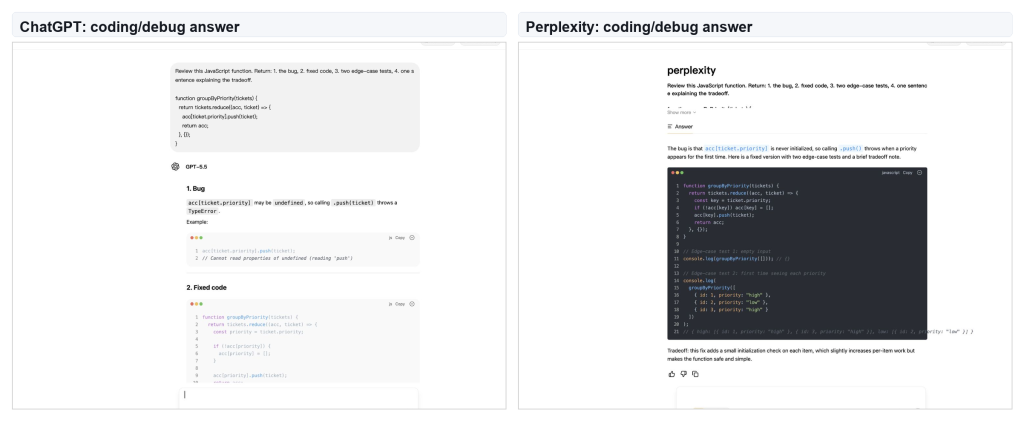
Bij de programmeertest ontdekten beide tools dezelfde fout in de reducer: de accumulator-array was niet geïnitialiseerd voordat de functie werd aangeroepen .push(). Perplexity gaf een beknopt en correct antwoord. ChatGPT gaf de betere uitleg waarom het eerste ticket voor een nieuwe prioriteit mislukt, waardoor het gemakkelijker is om erop te vertrouwen bij het opsporen van fouten en bij codereview.
Schrijf- en redactietest
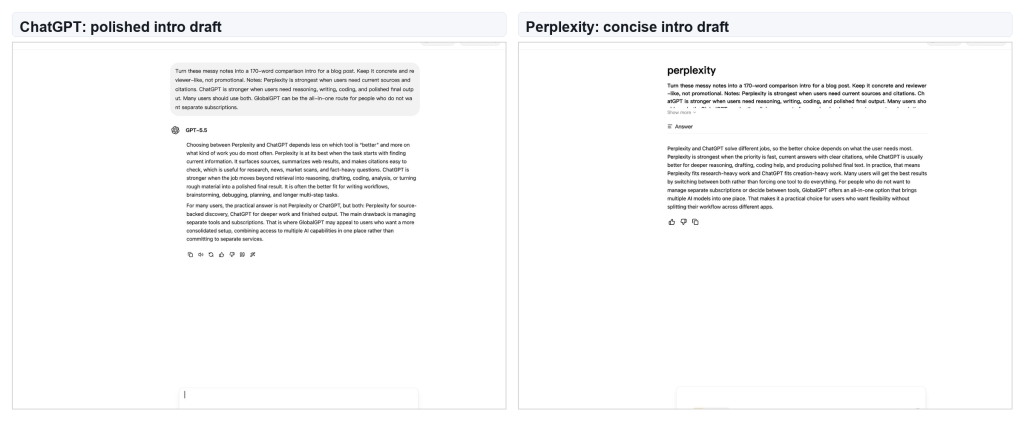
Bij de schrijfopdracht leverde ChatGPT de meest publiceerbare inleiding op. De versie van Perplexity was duidelijk en direct, maar ChatGPT slaagde er beter in om rommelige aantekeningen om te zetten in een vloeiende inleiding in de stijl van een recensent. Dit is hetzelfde patroon dat ik zie bij langere schrijfopdrachten: Perplexity is handig voor het verzamelen van bronmateriaal, terwijl ChatGPT beter is in het vormgeven van de definitieve tekst.
Zoek- en bronkwaliteit
Perplexity is de beste eerste keuze wanneer je voor je werk informatie moet vinden. Productpagina’s, release-opmerkingen, prijspagina’s, beleidswijzigingen, academische bronnen en marktvergelijkingen zijn allemaal taken waarvoor Perplexity zeer geschikt is. Het geeft je direct een antwoord, maar de echte meerwaarde zit hem in de link naar de bronnen.
ChatGPT kan ook zoeken, en het kan uitstekend werken wanneer er bladerfuncties beschikbaar zijn. Het verschil zit hem in de nadruk. ChatGPT is meestal beter wanneer de bronnen al bekend zijn: het samenvatten van een reeks links, het vergelijken van argumenten, het schrijven van een memo of het omzetten van onderzoek in een gepolijst eindproduct. Perplexity is beter aan het begin van het onderzoeksproces.
Benchmarks en nauwkeurigheid
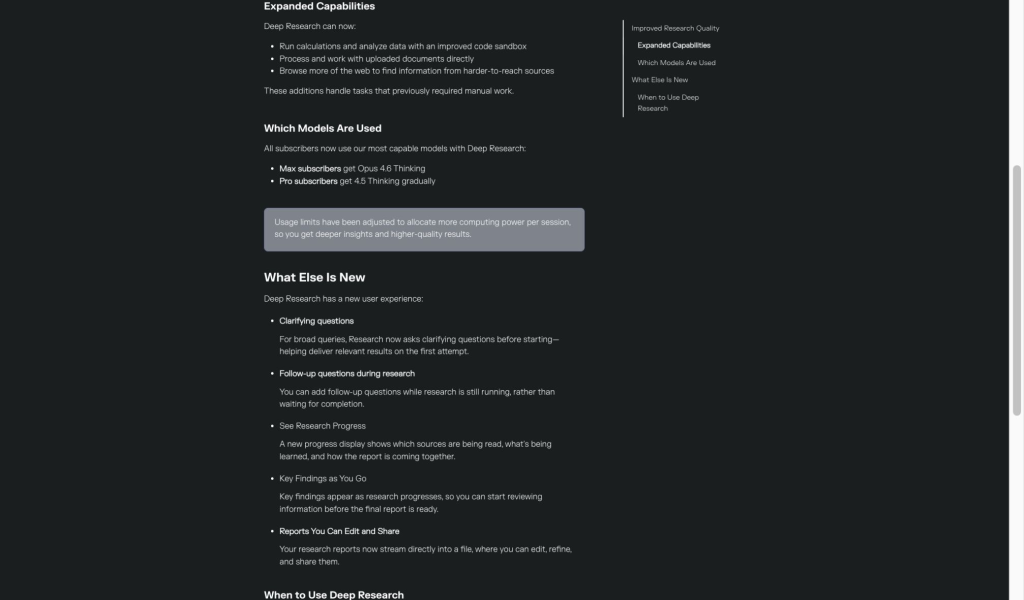
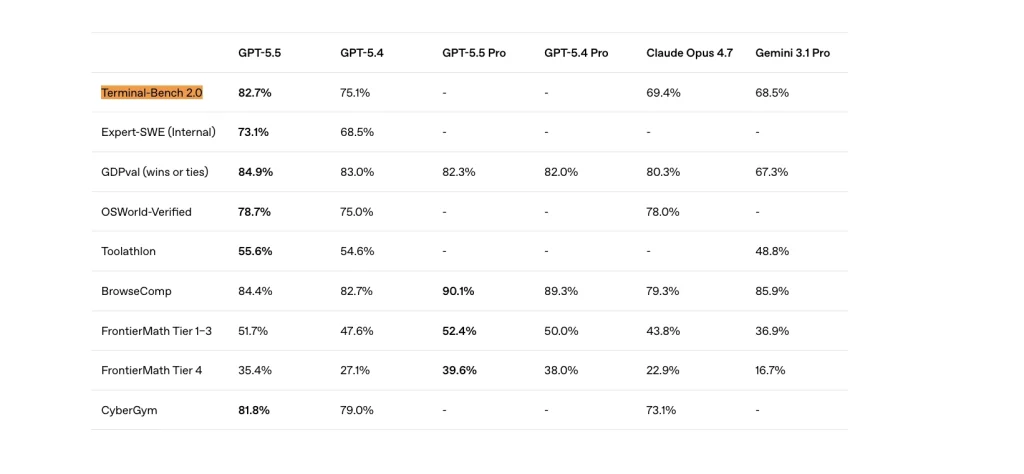
Benchmarks zijn nuttig, maar ze bieden geen definitief antwoord op de vraag of Perplexity of ChatGPT beter is. Ze laten vooral zien op welke punten ChatGPT betere ondersteuning biedt voor modellen en tools. Het voordeel van Perplexity ligt meer op het gebied van de workflow: het versnelt het opsporen van bronnen, het controleren van links en het verifiëren van citaten.
Een praktische manier om het benchmarkoverzicht te interpreteren is als volgt: gebruik ChatGPT wanneer het werk veel redeneren, veel gebruik van tools, veel coderen of veel documenten vereist. Gebruik Perplexity wanneer het werk veel bronnen vereist. Als nauwkeurigheid betekent “kan ik dit antwoord terugvoeren naar bronnen”, dan biedt Perplexity de meest natuurlijke workflow. Als nauwkeurigheid betekent “kan het model een moeilijke taak redeneren”, dan biedt ChatGPT betere ondersteuning.
| Type nauwkeurigheid | Betere pasvorm | Praktisch lezen |
|---|---|---|
| Op bronnen gebaseerd, feitelijk antwoord | Perplexiteit | Ideaal wanneer je links, bronvermeldingen en een snelle controle van bronnen nodig hebt. |
| Meerfasig redeneren | ChatGPT | Dat is beter als het antwoord afhangt van logica, planning en afwegingen. |
| Programmeren en het gebruik van hulpmiddelen | ChatGPT | Betere ondersteuning voor implementatie, foutopsporing en agentgerichte programmeerworkflows. |
| Uitgangspunt van het onderzoek | Perplexiteit | Sneller wanneer je het bronlandschap nodig hebt voordat je de uitvoer genereert. |
Schrijven en redigeren
ChatGPT is de betere keuze voor het schrijven. Het is beter in het omzetten van rommelige aantekeningen in een artikel, het opstellen van een schets, het herschrijven van een alinea in een bepaalde stijl, het opstellen van een voorstel, het maken van een vergelijkingstabel of het uitleggen van een concept op verschillende niveaus. Het is ook geschikter wanneer het eindresultaat een afgewerkte indruk moet maken.
Perplexity kan schrijven, maar komt meestal het best tot zijn recht in de voorbereidende fase: bronnen verzamelen, een onderwerp samenvatten, stellingen eruit halen en je helpen inzien wat het bewijsmateriaal zegt. Daarna is ChatGPT doorgaans het betere hulpmiddel voor stijl, structuur, ritme en de uiteindelijke formulering. Als je belang hecht aan betaalde toegang tot je schrijfwerk en werkresultaten, dan is de ChatGPT-abonnementen de gids is de beste volgende stap.
Codering en werkprocessen voor ontwikkelaars
ChatGPT zou de standaard moeten zijn voor het schrijven van code, het opsporen van fouten, het toelichten van code, het schrijven van tests, het herstructureren van code en het omzetten van vereisten in implementatiestappen. De reden hiervoor is niet alleen de kwaliteit van het model, maar ook de workflow. ChatGPT is handiger wanneer een taak planning, het genereren van code, iteratie, toelichting en beoordeling op één plek vereist.
Perplexity is nog steeds nuttig voor ontwikkelaars, maar de beste toepassing ligt elders. Gebruik het om documentatie te vinden, wijzigingen in het framework te vergelijken, release-opmerkingen samen te vatten, het gedrag van de API te controleren en context uit de broncode te verzamelen voordat je gaat programmeren. Voor de implementatie is ChatGPT de betere hoofdassistent. Voor het opzoeken van broncode kan Perplexity tijd besparen.
Als programmeren de belangrijkste reden is waarom je betaalde AI-tools met elkaar vergelijkt, lees dan de handleiding over de beste ChatGPT-model voor codering na deze vergelijking.
Agenten: ChatGPT-agent, Codex en Perplexity-agent-API
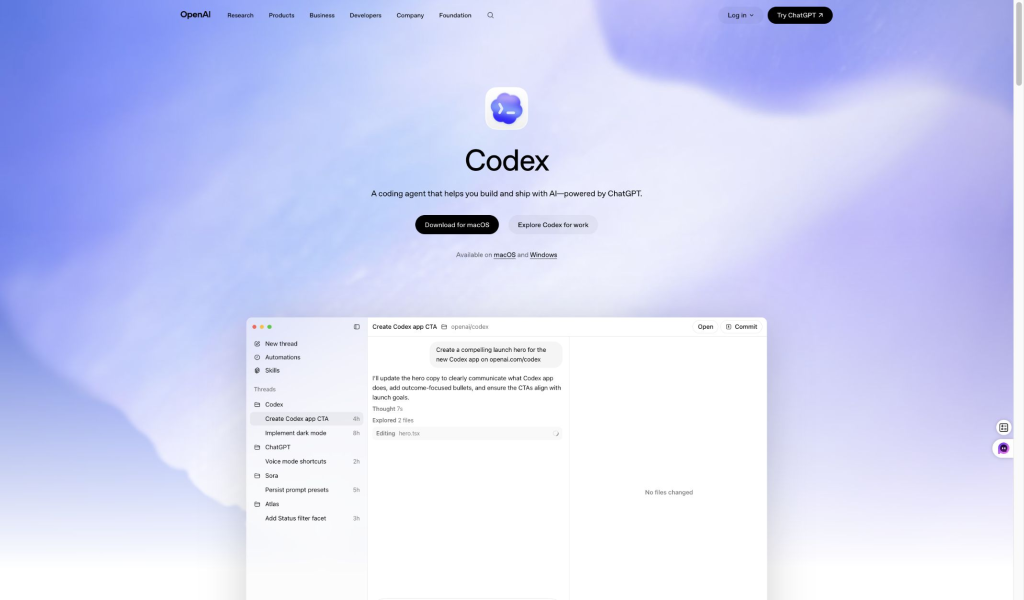
De vergelijking gaat niet langer alleen over antwoorden via de chat. ChatGPT beschikt nu over ChatGPT Agent voor taken waarbij een computer wordt gebruikt en over Codex voor programmeerwerk. Dat is belangrijk omdat sommige gebruikers niet langer alleen vragen: “Welke chatbot geeft de beste antwoorden?” Ze vragen zich af welk systeem meer werk kan verzetten.
Codex verdient een speciale vermelding in het gedeelte over programmeren. Het is niet zomaar een antwoord in een chat. Het is de ‘coding-agent’-route van OpenAI voor het bouwen, bewerken en uitbrengen van AI. Dat is een van de redenen waarom ChatGPT in deze vergelijking het sterkere ecosysteem voor ontwikkelaars heeft.
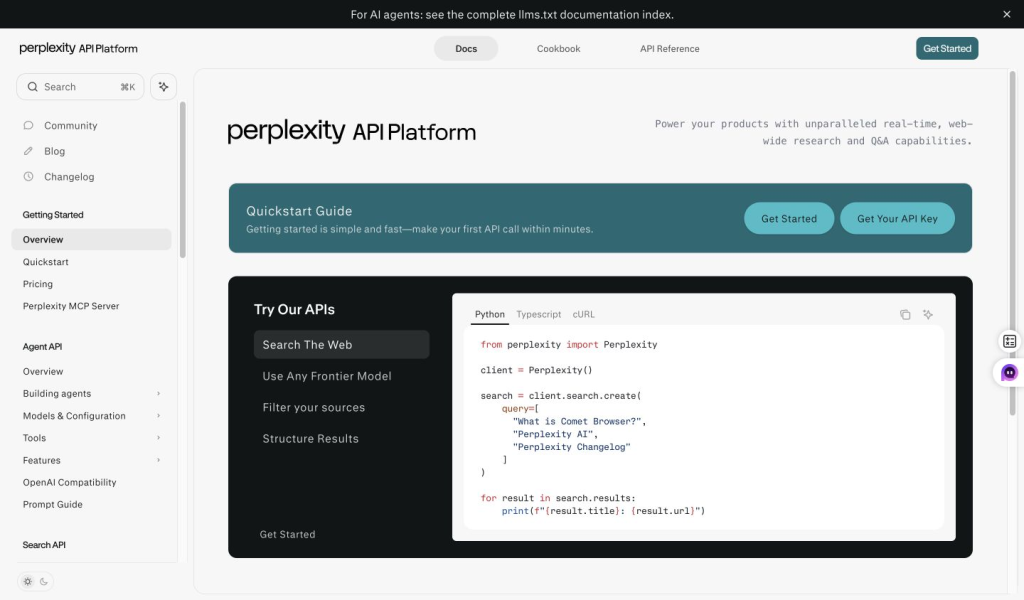
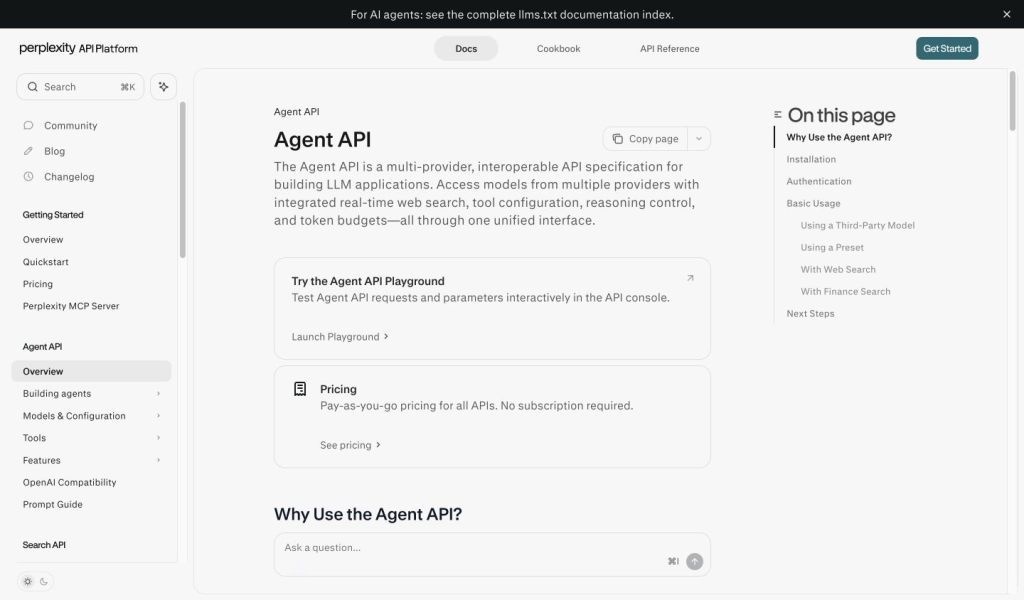
Perplexity heeft ook een agent-verhaal, maar is vooral sterk op het gebied van de API. De documentatie van de Agent API beschrijft het product in termen van toegang via een model met meerdere providers, realtime zoeken op het web, configuratie van tools, controle over redeneringen en tokenbudgetten. Dat is nuttig voor ontwikkelaars die webgebaseerde applicaties bouwen, maar het moet niet worden beschouwd als een één-op-één vervanging van Codex.
Prijzen: Perplexity Pro versus ChatGPT Plus
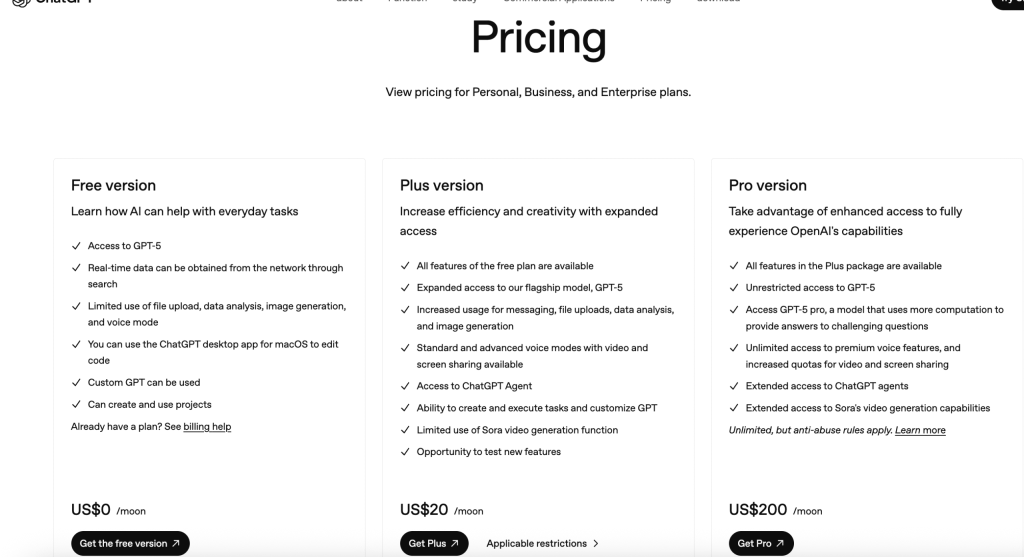
Officieel prijsoverzicht, gecontroleerd op 25 september 2026: Perplexity Pro wordt op de openbare abonnementspagina doorgaans aangeboden voor $20 per maand of $200 per jaar. De openbare prijsvermelding voor OpenAI’s ChatGPT Plus-abonnement is $20 per maand in Amerikaanse dollars. Belastingen, valuta’s, promoties en abonnementbeperkingen zijn afhankelijk van het account en de regio, dus vergelijk de huidige uitsplitsing van het Perplexity-abonnement met de Vergelijking van ChatGPT-abonnementen.
Wat de prijzen betreft, raken oude vergelijkingen tussen Perplexity en ChatGPT al snel achterhaald. Per 25 september 2026 is de belangrijkste dagelijkse vergelijking tussen betaalde abonnementen nog steeds die tussen Perplexity Pro en ChatGPT Plus, maar de daadwerkelijke aankoopbeslissing is veel breder. Perplexity biedt de varianten Free, Pro, Max, Education, Enterprise en API. ChatGPT biedt de varianten Free, Go, Plus, Pro, Business en Enterprise. GlobalGPT voegt daar een derde optie aan toe: één werkruimte voor meerdere modellen in plaats van meerdere afzonderlijke abonnementen.
Perplexity Pro is de meest logische keuze wanneer je dagelijkse werk draait om zoeken, bronvervolging, citaten, onderzoek op basis van bestanden en het vinden van antwoorden. ChatGPT Plus is een betere keuze wanneer uw dagelijkse werkzaamheden draaien om schrijven, coderen, redeneren, bestandsanalyse en algemene productiviteit. ChatGPT Pro en Perplexity Max zijn bedoeld voor intensiever gebruik en vormen geen automatische upgrades voor elke gebruiker.
| Route plannen | Geschikt voor | Beste pasvorm |
|---|---|---|
| Perplexiteit Pro | Onderzoek, bronvermeldingen, antwoorden met bronverwijzingen, dagelijkse zoekactiviteiten | Onderzoekers, studenten, analisten en schrijvers die regelmatig feiten controleren |
| ChatGPT Plus | Schrijven, programmeren, redeneren, studeren, bestandsanalyse, algemene productiviteit | Mensen die elke dag een betrouwbare algemene assistent nodig hebben |
| Perplexity Max / ChatGPT Pro | Intensiever gebruik, zwaardere werkprocessen, vroegtijdige of uitgebreide toegang | Ervaren gebruikers die bij de gewone betaalde abonnementen al tegen de limieten aanlopen |
| GlobalGPT | Perplexity plus GPT, Claude, Gemini, tools voor afbeeldingen en video’s, en vergelijking van meerdere modellen | Gebruikers die één werkruimte willen in plaats van meerdere afzonderlijke abonnementen te combineren |
Voor een gedetailleerder overzicht van de betaalde abonnementen, vergelijk Perplexiteit abonnementsplannen, Perplexity Pro versus Max, en ChatGPT Plus vs Pro voordat je iets koopt.
Wat Reddit-gebruikers meestal opvalt
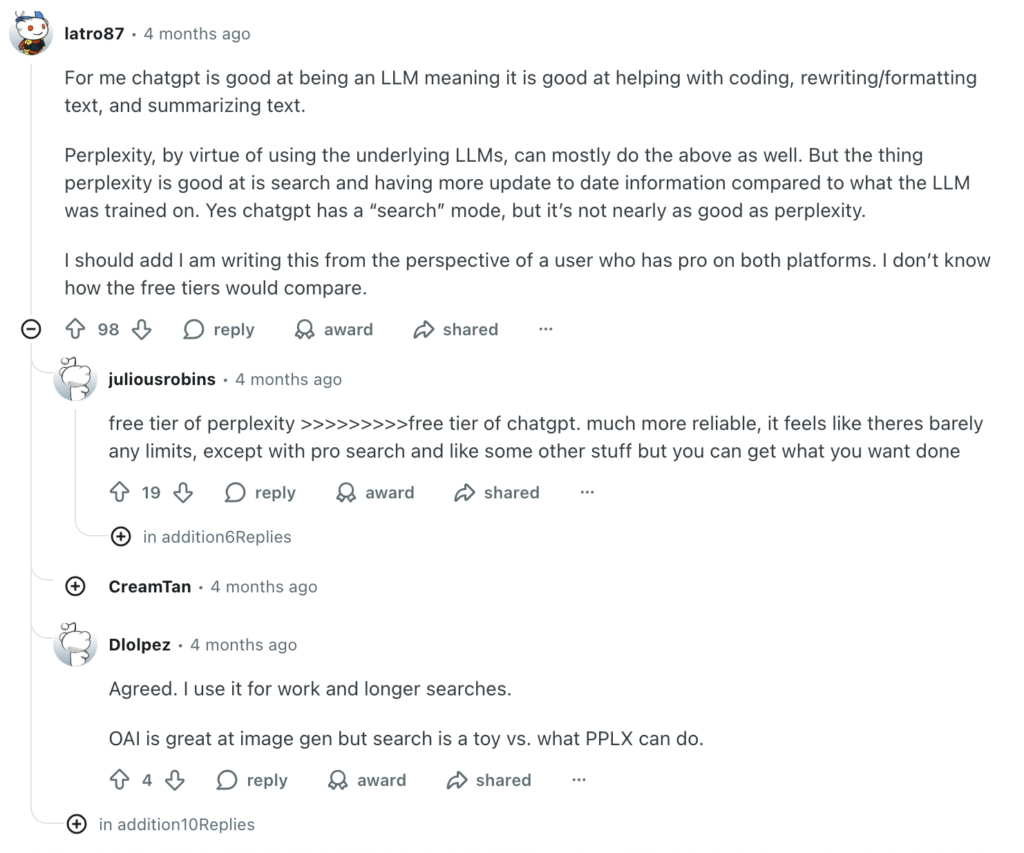
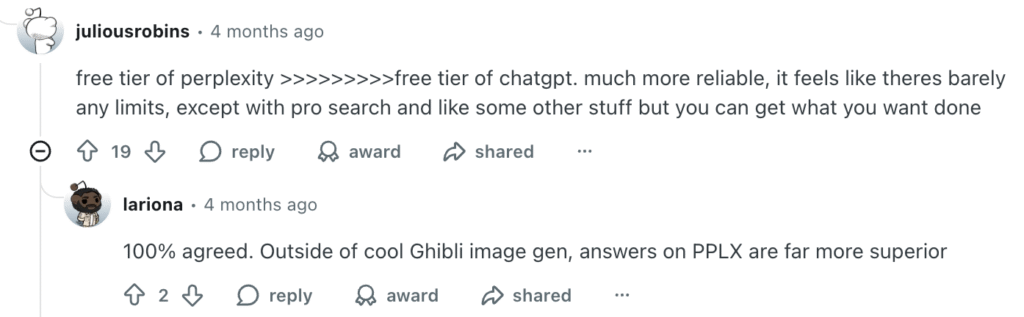
Reacties op Reddit vormen geen statistisch bewijs, maar ze zijn wel nuttig om inzicht te krijgen in hoe mensen het verschil beschrijven nadat ze beide tools hebben gebruikt. Het patroon is bekend: gebruikers prijzen Perplexity vaak om zijn onderzoeksmogelijkheden, citaten en uitgebreide zoekfuncties, terwijl ze voor het schrijven, bewerken, programmeren en algemene output nog steeds de voorkeur geven aan ChatGPT.
Privacy en gegevensbeveiliging
Privacy moet worden beoordeeld op basis van het type account, niet op basis van een merkslogan. Voor consumenteninstellingen, tijdelijke chats, zakelijke abonnementen, enterprise-abonnementen en API-gebruik kunnen verschillende gegevensregels gelden. Een gewone individuele gebruiker moet de gegevensinstellingen controleren voordat hij of zij gevoelige informatie in een van beide tools invoert.
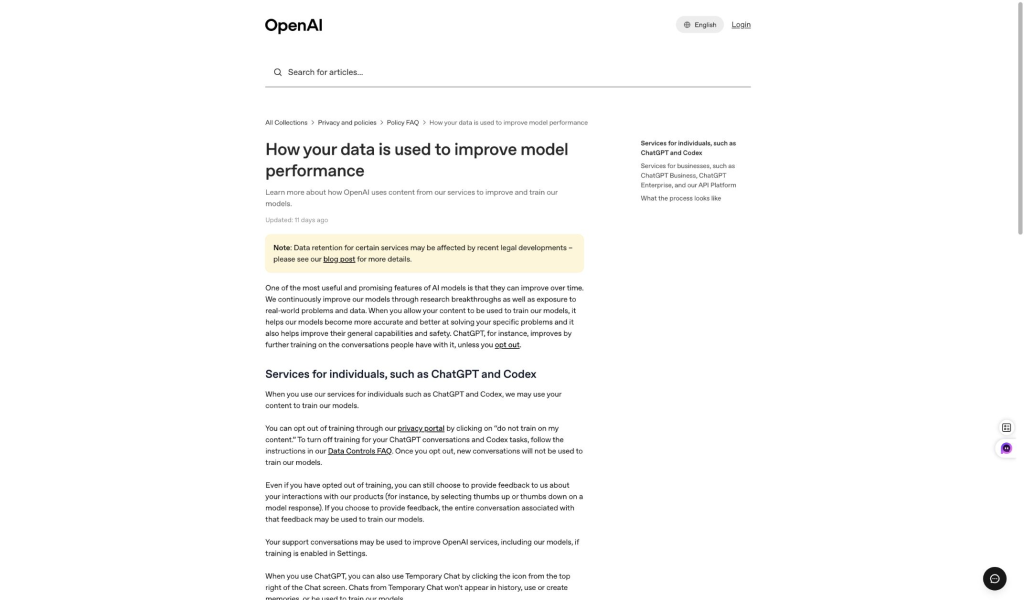
Voor ChatGPT wordt in de documentatie over gegevensbeheer van OpenAI uitgelegd welke instellingen er zijn met betrekking tot modelverbetering en chatgeschiedenis. Voor Perplexity is het belangrijkste verschil de opt-out-instellingen voor consumenten versus de afhandeling door bedrijven en via API's. Het praktische advies is voor beide hetzelfde: plak geen zeer gevoelige zakelijke, juridische, medische, financiële of persoonlijke gegevens, tenzij het account, het abonnement en het beleid van de organisatie dat gebruik ondersteunen.
| Vraag over privacy | ChatGPT | Perplexiteit |
|---|---|---|
| Kunnen particuliere gebruikers de gegevensinstellingen aanpassen? | Ja, controleer de gegevenscontroles en het gedrag in het verleden van OpenAI. | Ja, controleer de instellingen voor het bewaren van AI-gegevens en de opt-out-mogelijkheden van Perplexity. |
| Zijn bedrijfsinstellingen hetzelfde als instellingen voor consumenten? | Nee. De Business- en Enterprise-abonnementen moeten afzonderlijk worden beoordeeld. | Nee. De omgang met Enterprise en API’s moet afzonderlijk worden beoordeeld. |
| Beste praktijk | Zorg ervoor dat je het juiste abonnement en de juiste instellingen gebruikt voordat je gevoelige inhoud deelt. | Zorg ervoor dat je het juiste abonnement en de juiste instellingen gebruikt voordat je gevoelige inhoud deelt. |
Welke moet je kiezen?
- Kies Perplexity als je het grootste deel van je tijd besteedt aan zoeken, bronnen controleren, beweringen vergelijken of een onderzoekstraject opbouwen.
- Kies ChatGPT als je het grootste deel van je tijd besteedt aan schrijven, programmeren, studeren, bestanden analyseren, afbeeldingen maken of het produceren van voltooide werken.
- Gebruik beide als onderzoek stelselmatig uitmondt in een rapport, artikel, presentatie, plan of uitvoering.
- Kies GlobalGPT als u toegang wilt tot Perplexity en andere toonaangevende AI-modellen en mediatools in één geïntegreerde werkruimte.
Beste standaardconfiguratie: Perplexity voor het opsporen van bronnen, ChatGPT voor productie, en een werkruimte voor meerdere modellen wanneer hetzelfde project beide nodig heeft.
Als je nog steeds bredere AI-ecosystemen met elkaar vergelijkt, dan is de ChatGPT versus Gemini Deze vergelijking is een nuttig artikel om daarna te lezen. Als je op zoek bent naar alternatieven waarbij zoeken voorop staat, naast Perplexity, dan is de lijst met Alternatieven voor Perplexity AI kan helpen.
Deze antwoorden richten zich op de aankoopbeslissing: de diepgang van het onderzoek, de kwaliteit van het eindresultaat, de kosten van het ontwerp, de bestandsworkflows en de vraag of één werkruimte twee afzonderlijke abonnementen kan vervangen.
FAQ
Is Perplexity beter dan ChatGPT?
Perplexity is geschikter voor webonderzoek waarbij de bron voorop staat, citaten en actuele informatie. ChatGPT is geschikter voor schrijven, programmeren, redeneren, bestandsanalyse, beeldbewerking en verzorgde output.
Wat is beter voor onderzoek: Perplexity of ChatGPT?
Perplexity is doorgaans geschikter voor het opsporen en controleren van bronnen. ChatGPT is vaak geschikter om een bekende verzameling bronnen om te zetten in een gedetailleerde notitie, toelichting of een voltooid eindproduct.
Is Perplexity Pro beter dan ChatGPT Plus?
Beide kosten $20 per maand volgens de officiële prijsstelling in Amerikaanse dollars. Perplexity Pro is de betere keuze voor veelvuldig geraadpleegd onderzoek en modelkeuze, en het jaarabonnement van $200 komt neer op ongeveer $17 per maand. ChatGPT Plus is de betere keuze voor actuele OpenAI-redeneringsmodellen, schrijven, coderen, bestandsanalyse, afbeeldingen en bredere productiviteit.
Maakt ChatGPT gebruik van GPT-5.6?
Ja, met bepaalde beperkingen per abonnement. De ChatGPT Plus- en Pro-abonnementen bieden uitgebreidere toegang tot de huidige redenerings- en werkmodellen van OpenAI, terwijl lagere abonnementen beperktere toegang tot de modellen en gebruikslimieten hebben. De toegang tot de ChatGPT-app staat los van de API-toegang en de facturering.
Waarom zou je voor ChatGPT betalen in plaats van voor Perplexity?
Kies voor ChatGPT als je werk voornamelijk bestaat uit het creëren en verfijnen van resultaten: schrijven, programmeren, gegevensanalyse, beeldbewerking, begeleiding of meerstapsredeneringen. Kies voor Perplexity als het zoeken naar actuele bronnen en het controleren van bronvermeldingen de taak is die je het vaakst uitvoert.
Kunnen Perplexity en ChatGPT bestanden analyseren?
Ja. Perplexity gebruikt geüploade bestanden en foto’s als context voor onderzoek, met hogere limieten bij betaalde abonnementen. ChatGPT combineert uploads met bredere workflows voor document- en gegevensanalyse, waardoor het de betere standaardkeuze is voor spreadsheets, grafieken en iteratief werk met bestanden.
Kan de Perplexity beelden genereren zoals de ChatGPT?
Perplexity biedt beeldgeneratie aan bij betaalde abonnementen, maar bij ChatGPT staan het maken en bewerken van afbeeldingen meer centraal in het product. ChatGPT is doorgaans de betere keuze wanneer het maken van visuele content een hoofdtaak is in plaats van een incidentele extra functie.
Moet ik voor beide betalen?
Alleen als beide workflows belangrijk genoeg zijn om twee abonnementen te rechtvaardigen. Veel gebruikers kunnen beginnen met de tool die het beste bij hun belangrijkste taak past, voor de tweede taak gebruikmaken van de gratis toegang, of kiezen voor een platform dat meerdere modellen ondersteunt, in plaats van afzonderlijke abonnementen te combineren.
Eindoordeel
Perplexity wint de ontdekkingsfase; ChatGPT wint de productiefase. Als je één antwoord nodig hebt: kies dan Perplexity voor onderzoek en bronvermeldingen, of ChatGPT voor schrijven, programmeren, bestanden, afbeeldingen en voltooide werken. Als je projecten de overstap maken van onderzoek naar uitvoering, is het vaak efficiënter om beide te gebruiken.