GLM-5.2 price is worth checking because this is not a tiny casual chat model. GLM-5.2 looks genuinely strong, especially for coding, long-context reading, and agent-style work. But that also means one uncomfortable thing: if you use it like an always-on default model, it may not feel cheap for long.
My take is simple. GLM-5.2 is interesting because it gives you serious model power at a price that is lower than many premium frontier options, but it is still not “free-feeling” once your prompts get long and your outputs get verbose. If you only need quick summaries or light writing, test cheaper models first. If you need codebase-level reasoning or long task execution, GLM-5.2 starts to make more sense.
This guide focuses on GLM-5.2 price from the parts that actually affect your bill: official token pricing, cached input, output cost, the Z.AI Coding Plan subscription, access through the official channel and GLBGPT, and the token usage we saw when testing nearby models on the same tasks. If you are still deciding where GLM fits in the broader market, the GLBGPT guide to the model AI terbaik is a useful next comparison.
Daftar isi
Jawaban singkat: GLM-5.2 has two price paths to check. The API price is listed at $1.40 per 1M input tokens, $0.26 per 1M cached input tokens, and $4.40 per 1M output tokens. The Z.AI Coding Plan screenshot also shows subscription options for Lite, Pro, and Max. The model can be good value for serious coding and long-context work, but I would not use it as the default model for every small task.
GLM-5.2 Price Overview
GLM-5.2 Subscription Cost
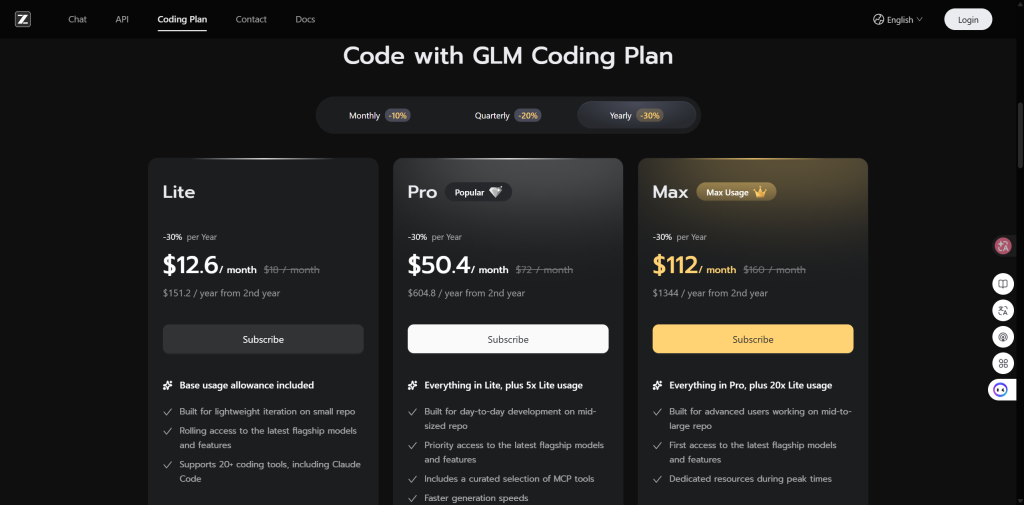
There is also a subscription angle. The Z.AI Coding Plan page shown in the screenshot below is not token billing; it is a plan-based coding subscription with Lite, Pro, and Max tiers. That matters because a developer who only wants coding access may compare a predictable monthly plan against API usage, while a builder integrating GLM-5.2 into an app still needs API-style cost control.
| Rencana | Visible billing option | Displayed monthly price | Displayed annual note | Paling cocok |
|---|---|---|---|---|
| Lite | Yearly selected, -30% | $12.6 / month | $151.2 / year from 2nd year | Light coding iteration on small repositories. |
| Pro | Yearly selected, -30% | $50.4 / month | $604.8 / year from 2nd year | Day-to-day coding on mid-sized repositories. |
| Max | Yearly selected, -30% | $112 / month | $1344 / year from 2nd year | Advanced users who need higher usage and priority resources. |
My read: the Coding Plan makes GLM feel less like a metered API product and more like a coding workspace subscription. That can be easier to budget, but it is not automatically cheaper. If your work is occasional, API or GLBGPT side-by-side testing may cost less. If you code with GLM every day, a plan can make more sense because you are buying predictable access rather than calculating every prompt.
GLM-5.2 API Cost
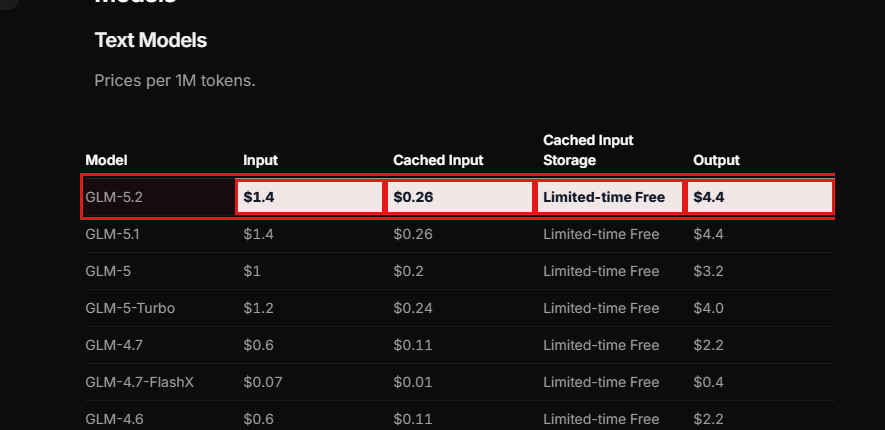
The halaman harga resmi lists GLM-5.2 at $1.40 per 1M input tokens, $0.26 per 1M cached input tokens, limited-time free cached input storage, dan $4.40 per 1M output tokens. This is token-based API billing, so your final cost depends on how much context you send, how much can be cached, and how long the answer is.
| GLM-5.2 API item | Harga resmi | Apa artinya |
|---|---|---|
| Masukkan token | $1.40 / 1M tokens | Fresh prompt and context sent to the model. |
| Token masukan yang disimpan dalam cache | $0.26 / 1M tokens | Repeated context can be cheaper when cache applies. |
| Cached input storage | Limited-time free | Check the live pricing page before budgeting around this. |
| Token keluaran | $4.40 / 1M tokens | Long generated answers are the part I would watch most closely. |
What You Actually Pay For With GLM-5.2 Price
The biggest mistake is treating GLM-5.2 price as one flat number. In practice, you are paying for three different behaviors: how much context you send, how much of that context can be cached, and how much the model writes back.
That is why GLM-5.2 can feel affordable in one task and expensive in another. A short coding question is tiny. A long agent run that repeatedly reads a large repo, writes patches, explains decisions, and retries failed steps is a very different bill.
I would not judge GLM-5.2 by the input price alone. The better question is whether this model reduces retries enough to justify the higher output cost.
GLM-5.2 API Price Examples
Using the official GLM-5.2 rate, here is what different task shapes look like before any platform markup, plan limits, or non-token fees. These are estimates, not a replacement for your live billing dashboard.
| Example task | Masukan | Output | Estimated GLM-5.2 API cost | My read |
|---|---|---|---|---|
| Short coding question | 1,000 tokens | 500 tokens | About $0.0036 | Cheap enough for testing. |
| Ringkasan dokumen panjang | 10.000 token | 2.000 token | About $0.0228 | Reasonable if the output saves real review time. |
| Cached project context | 100,000 cached tokens | 5,000 tokens | About $0.048 | Caching is where GLM-5.2 gets more attractive. |
| Huge fresh context run | 1.000.000 token | 10.000 token | About $1.44 | Powerful, but not something to fire casually. |
GLM-5.2 Price by Access Option
For access, keep the choice simple. Use the official GLM API route when you need direct integration, API keys, and production control. Use the Z.AI Coding Plan when you want a coding subscription. Use GLBGPT when you want to try GLM-5.2 beside other models before choosing a daily model.
| Access option | Terbaik untuk | Price angle | My take |
|---|---|---|---|
| Official GLM API channel | Developers and production apps | Token-based API billing | Best when you know your workload and need direct control. |
| Z.AI Coding Plan | Coding subscription users | Plan-based subscription | Better when you want predictable coding access instead of metered API billing. |
| GLBGPT | Trying and comparing models | Platform credits or plan access | Better when you are still deciding whether GLM-5.2 is worth paying for. |
GLM-5.2 Price vs GPT, DeepSeek, and Kimi
If you are comparing GLM-5.2 with GPT-5.6 Sol, DeepSeek V4 Pro, or Kimi K3, do not judge by one number. Start with official API rates, then check capability and same-task usage. A cheap token price is only useful if the model still finishes the job cleanly.
Official API Price Comparison
The table below compares the official API price points for the same models tested later in GLBGPT CLI. I kept GLM-5.1 as a reference row because it shares the same published GLM price point.
| Model | Official source / mode | Input / 1M tokens | Cached / cache-hit input | Output / 1M tokens | What the price says |
|---|---|---|---|---|---|
| GLM-5.2 | Z.AI API pricing | $1.40 | $0.26 | $4.40 | Lower official input and output price than GPT-5.6 Sol and Kimi K3, but not lower than DeepSeek V4 Pro. |
| GLM-5.1 | Z.AI API pricing | $1.40 | $0.26 | $4.40 | Same token price as GLM-5.2, so the newer model needs to win on output quality or task completion. |
| GPT-5.6 Sol | OpenAI API pricing | $10.00 | $1.00 cached input | $60.00 | Highest official output price in this set; it needs a better answer to justify the cost. |
| DeepSeek V4 Pro | DeepSeek API pricing | $0.435 cache miss | $0.003625 cache hit | $0.87 | Far cheaper than GLM-5.2 by official token price, so quality and reliability matter more than sticker price here. |
| Kimi K3 | Kimi API Platform | $3.00 | $0.30 cache hit | $15.00 | More expensive than GLM-5.2 on input and output; useful when its long-context behavior matters. |
Price-Performance Snapshot
If you stop at the official token table, GLM-5.2 can look simply cheap. I would not frame it that way. Analisis Buatan gives GLM-5.2 a 51 Intelligence Index score and lists it at $1.40 input and $4.40 output per 1M tokens, compared with its page averages of $0.43 input and $1.25 output. That makes GLM-5.2 cheaper than GPT-5.6 Sol and Kimi K3 in this set, but not a budget model.
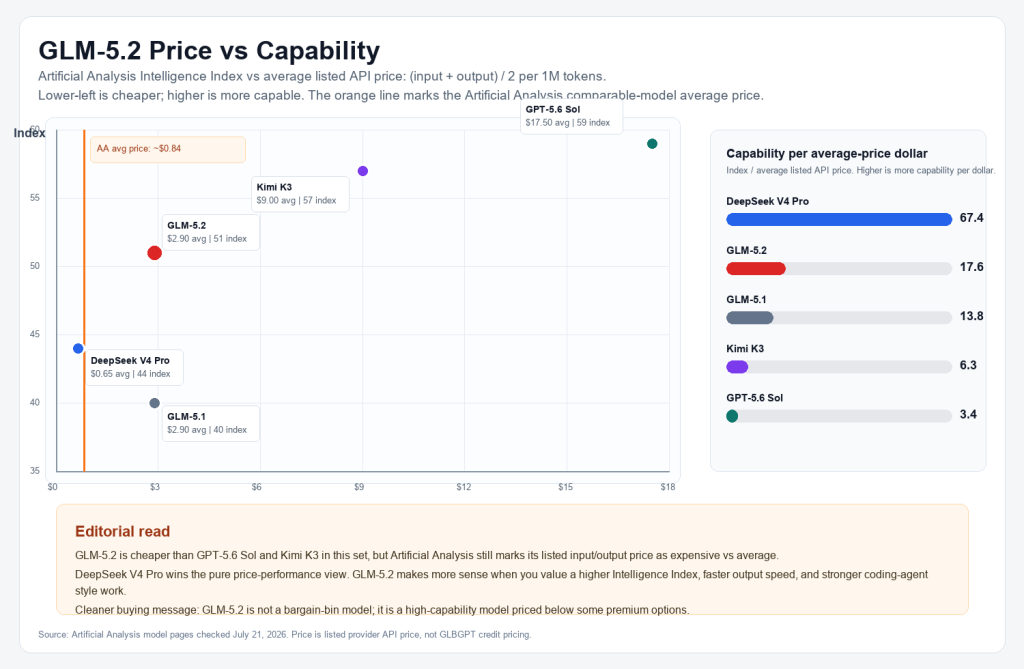
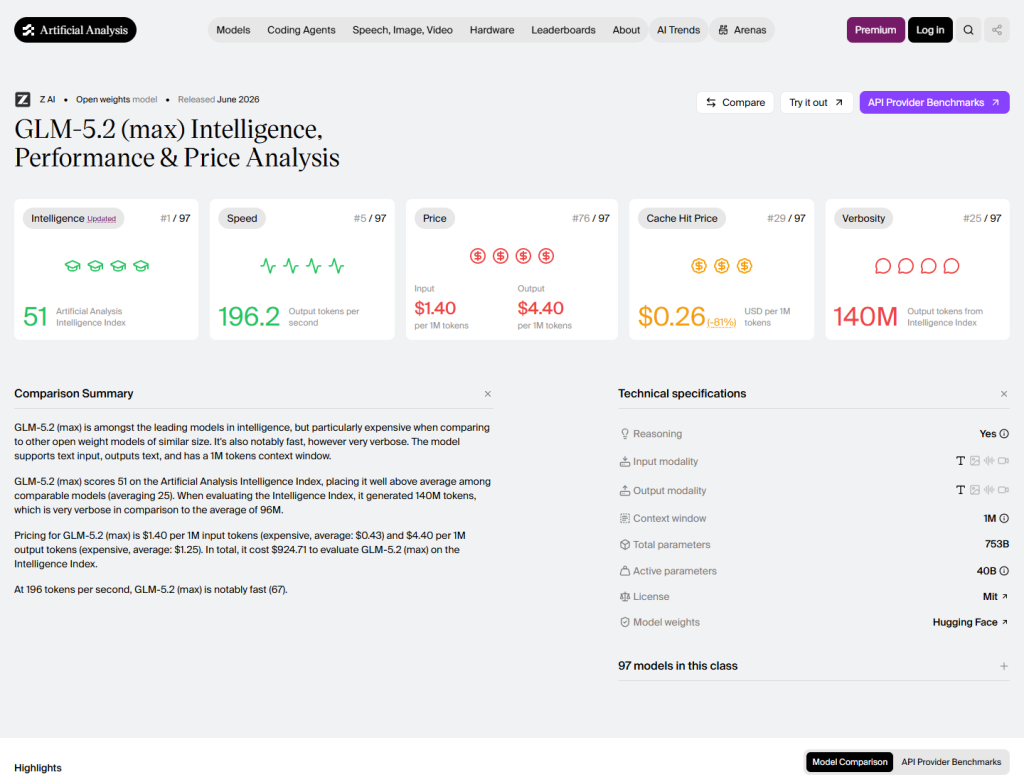
On official token price alone, GLM-5.2 is cheaper than GPT-5.6 Sol and Kimi K3, tied with GLM-5.1, and more expensive than DeepSeek V4 Pro. With capability added, the cleaner read is this: GLM-5.2 is not the cheapest model in the group, but it offers a stronger capability position than GLM-5.1 and a much lower average listed price than GPT-5.6 Sol or Kimi K3. For a coding-specific angle, compare this with GLBGPT’s guide to the model AI terbaik untuk pengkodean.
Same-Prompt GLBGPT CLI Cost Test
For the VS section, I do not want to compare marketing claims. I care about a more practical question: when you give models the same task, how many tokens do they burn, and does the result look usable enough to justify the spend? If your shortlist is mostly OpenAI models, GLBGPT’s model ChatGPT terbaik untuk pengkodean guide is a better companion read.
For this run, every model received the same debugging task through GLBGPT CLI. The CLI returned token usage in --json, sementara glbgpt account transactions showed the platform credits used after each call. It did not return a direct dollar price, so the dollar column below is an estimate using the official API input and output rates.
You are reviewing a Python function that sometimes times out in production. The function reads a large JSON file, filters records by user_id, calls an external API for each matching record, and writes a summary report. Give a concise debugging and optimization plan in exactly 6 bullet points. Focus on practical engineering steps, cost/latency tradeoffs, and what to measure first. Keep the answer under 220 words.
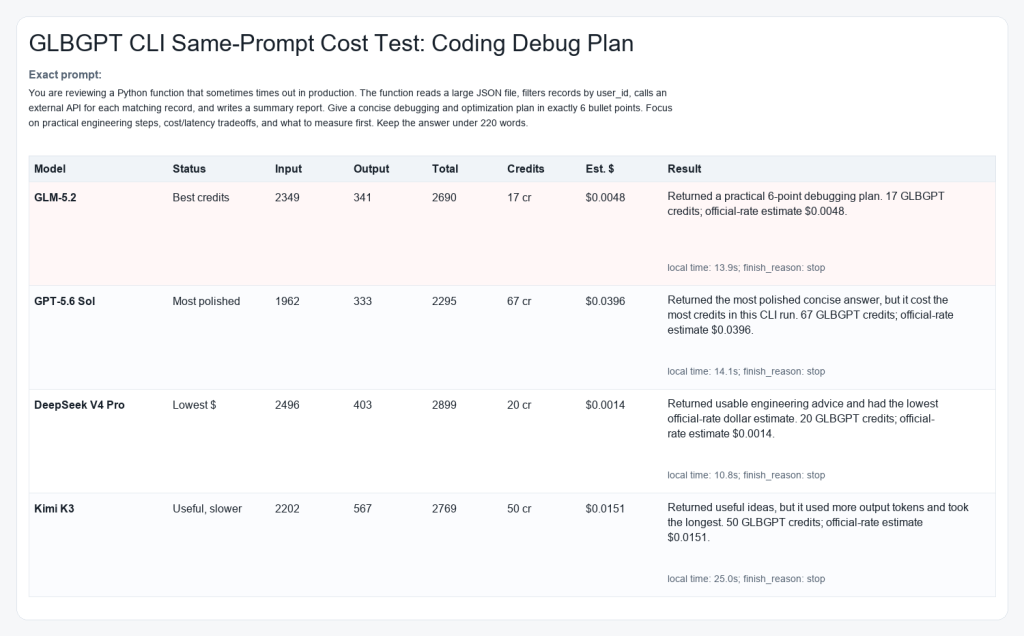
| Model | Masukan | Output | Total | GLBGPT CLI credits | Estimated official API cost | Waktu | Returned result | My read |
|---|---|---|---|---|---|---|---|---|
| GLM-5.2 | 2,349 | 341 | 2,690 | 17 cr | About $0.0048 | 13.9s | Usable 6-point debugging plan | Best GLBGPT credit result in this run. The answer was practical and direct, though not as polished as GPT. |
| GPT-5.6 Sol | 1,962 | 333 | 2,295 | 67 cr | About $0.0396 | 14.1s | Most polished 6-point plan | Best writing quality here, but it was the most expensive by both credits and official-rate estimate. |
| DeepSeek V4 Pro | 2,496 | 403 | 2,899 | 20 cr | About $0.0014 | 10.8s | Usable numbered plan | Cheapest by official API math. The answer was useful, but I would still edit it before publishing. |
| Kimi K3 | 2,202 | 567 | 2,769 | 50 cr | About $0.0151 | 25.0s | Usable 6-point plan | Good engineering instincts, but it took the longest and used the most output tokens. |
The useful signal here is not one single winner. GLM-5.2 looked strong on GLBGPT credits, DeepSeek looked cheapest by official API math, GPT gave the cleanest prose, and Kimi was the slowest in this small test. For a buyer, that means GLM-5.2 price is easier to defend when you care about practical coding help and do not want GPT-level output pricing.
GLM-5.2 Run Notes
For the GLM-5.2-specific run, GLBGPT CLI completed the same coding-debug task and used 17 credits. The response had the right engineering shape: measure first, isolate the timeout source, stream large JSON, bound API concurrency, index repeated lookups, and make the job resumable.
Should You Pay for GLM-5.2?
Pay for GLM-5.2 when the task actually needs what the model is built for: coding depth, long-context understanding, multi-step debugging, or project-level analysis. Do not pay for it just because it is new.
If your task is simple, start cheaper. If your task is expensive because it takes you hours, requires repeated model retries, or needs a large context window, GLM-5.2 has a stronger case. For a wider shopping list beyond this price article, see the GLBGPT roundup of the best AI assistants tested and ranked.
If you are not sure, run the same prompt in GLBGPT against GLM-5.2 and a few other models. The model that costs slightly more per token can still be the cheaper choice if it finishes the job with fewer retries; if you are comparing against mainstream chat tools, the Alternatif ChatGPT guide can help you frame that decision.
Related GLBGPT guides
- GLM-5.1 on GLBGPT if you want to compare the older GLM model against GLM-5.2 before paying.
- GLM-5.2 on GLBGPT if you want to open the model page directly.
- ChatGPT 5.2 price guide for readers comparing GLM-5.2 against OpenAI pricing.
- How much does ChatGPT 5.2 cost? for subscription-level price context.
- Alternatif Claude AI if your real decision is GLM-5.2 versus Claude-style writing or coding help.
- Alternatif Perplexity AI if your use case is research, answer search, or source-backed summaries.
GLM-5.2 Price FAQ
How much does GLM-5.2 cost?
The official pricing page lists GLM-5.2 at $1.40 per 1M input tokens, $0.26 per 1M cached input tokens, and $4.40 per 1M output tokens.
Is GLM-5.2 free?
GLM-5.2 is not listed as a free text model in the official pricing table. Some older or flash models may have free pricing, but GLM-5.2 is listed with paid token rates.
Why is GLM-5.2 output more expensive than input?
Output is usually where stronger models charge more because generation is the expensive part of the request. Long answers, code patches, and detailed reasoning can raise cost quickly.
What is cached input pricing?
Cached input pricing applies when repeated context can be reused instead of billed like fresh input. For long project contexts, caching can materially change the economics.
Is GLM-5.2 cheaper than GPT-5.6 Sol or Kimi K3?
By the official prices used in this comparison, yes. GLM-5.2 has lower listed input and output prices than GPT-5.6 Sol and Kimi K3.
Is GLM-5.2 good value for coding?
It can be, especially if it reduces retries on hard coding tasks. For simple snippets or short debugging questions, a cheaper model may be enough.
Can I use GLM-5.2 through GLBGPT?
GLBGPT is the simpler route when you want to try models side by side before choosing one model for heavier use.
Does GLM-5.2 have a subscription plan?
Ya. Yang Z.AI Coding Plan screenshot shows Lite, Pro, and Max subscription tiers for coding use. That is separate from API token billing, so compare the plan price against how often you actually use GLM-5.2 for coding.
Does GLBGPT CLI show the GLM-5.2 price?
It shows the practical cost in credits through account transactions and returns token usage with --json. For a dollar estimate, multiply the measured input and output tokens by the official token rates.
What is the cheapest way to test GLM-5.2?
Use a short, controlled prompt first. Then compare the same prompt against cheaper models and only move larger tasks to GLM-5.2 if the output is clearly better.
Does a 1M context window mean every request is expensive?
No. A large context window gives you room, but you only pay for the tokens you actually send and receive. The danger is casually sending huge context when the task does not need it.
Who should avoid paying for GLM-5.2 first?
Casual users who only need light chat, short writing, or simple summaries should test cheaper models before making GLM-5.2 their default.
What should I measure before using GLM-5.2 every day?
Measure input size, output length, retries, task success rate, latency, and whether caching applies. Price per token matters less than cost per completed task.
GLM-5.2 price is worth checking because this is not a tiny casual chat model. GLM-5.2 looks genuinely strong, especially for coding, long-context reading, and agent-style work. But that also means one uncomfortable thing: if you use it like an always-on default model, it may not feel cheap for long.
My take is simple. GLM-5.2 is interesting because it gives you serious model power at a price that is lower than many premium frontier options, but it is still not “free-feeling” once your prompts get long and your outputs get verbose. If you only need quick summaries or light writing, test cheaper models first. If you need codebase-level reasoning or long task execution, GLM-5.2 starts to make more sense.
This guide focuses on GLM-5.2 price from the parts that actually affect your bill: official token pricing, cached input, output cost, the Z.AI Coding Plan subscription, access through the official channel and GLBGPT, and the token usage we saw when testing nearby models on the same tasks. If you are still deciding where GLM fits in the broader market, the GLBGPT guide to the model AI terbaik is a useful next comparison.
Daftar isi
Jawaban singkat: GLM-5.2 has two price paths to check. The API price is listed at $1.40 per 1M input tokens, $0.26 per 1M cached input tokens, and $4.40 per 1M output tokens. The Z.AI Coding Plan screenshot also shows subscription options for Lite, Pro, and Max. The model can be good value for serious coding and long-context work, but I would not use it as the default model for every small task.
GLM-5.2 Price Overview
GLM-5.2 Subscription Cost
There is also a subscription angle. The Z.AI Coding Plan page shown in the screenshot below is not token billing; it is a plan-based coding subscription with Lite, Pro, and Max tiers. That matters because a developer who only wants coding access may compare a predictable monthly plan against API usage, while a builder integrating GLM-5.2 into an app still needs API-style cost control.

| Rencana | Visible billing option | Displayed monthly price | Displayed annual note | Paling cocok |
|---|---|---|---|---|
| Lite | Yearly selected, -30% | $12.6 / month | $151.2 / year from 2nd year | Light coding iteration on small repositories. |
| Pro | Yearly selected, -30% | $50.4 / month | $604.8 / year from 2nd year | Day-to-day coding on mid-sized repositories. |
| Max | Yearly selected, -30% | $112 / month | $1344 / year from 2nd year | Advanced users who need higher usage and priority resources. |
My read: the Coding Plan makes GLM feel less like a metered API product and more like a coding workspace subscription. That can be easier to budget, but it is not automatically cheaper. If your work is occasional, API or GLBGPT side-by-side testing may cost less. If you code with GLM every day, a plan can make more sense because you are buying predictable access rather than calculating every prompt.
GLM-5.2 API Cost
The halaman harga resmi lists GLM-5.2 at $1.40 per 1M input tokens, $0.26 per 1M cached input tokens, limited-time free cached input storage, dan $4.40 per 1M output tokens. This is token-based API billing, so your final cost depends on how much context you send, how much can be cached, and how long the answer is.

| GLM-5.2 API item | Harga resmi | Apa artinya |
|---|---|---|
| Masukkan token | $1.40 / 1M tokens | Fresh prompt and context sent to the model. |
| Token masukan yang disimpan dalam cache | $0.26 / 1M tokens | Repeated context can be cheaper when cache applies. |
| Cached input storage | Limited-time free | Check the live pricing page before budgeting around this. |
| Token keluaran | $4.40 / 1M tokens | Long generated answers are the part I would watch most closely. |
What You Actually Pay For With GLM-5.2 Price
The biggest mistake is treating GLM-5.2 price as one flat number. In practice, you are paying for three different behaviors: how much context you send, how much of that context can be cached, and how much the model writes back.
That is why GLM-5.2 can feel affordable in one task and expensive in another. A short coding question is tiny. A long agent run that repeatedly reads a large repo, writes patches, explains decisions, and retries failed steps is a very different bill.
I would not judge GLM-5.2 by the input price alone. The better question is whether this model reduces retries enough to justify the higher output cost.
GLM-5.2 API Price Examples
Using the official GLM-5.2 rate, here is what different task shapes look like before any platform markup, plan limits, or non-token fees. These are estimates, not a replacement for your live billing dashboard.
| Example task | Masukan | Output | Estimated GLM-5.2 API cost | My read |
|---|---|---|---|---|
| Short coding question | 1,000 tokens | 500 tokens | About $0.0036 | Cheap enough for testing. |
| Ringkasan dokumen panjang | 10.000 token | 2.000 token | About $0.0228 | Reasonable if the output saves real review time. |
| Cached project context | 100,000 cached tokens | 5,000 tokens | About $0.048 | Caching is where GLM-5.2 gets more attractive. |
| Huge fresh context run | 1.000.000 token | 10.000 token | About $1.44 | Powerful, but not something to fire casually. |
GLM-5.2 Price by Access Option
For access, keep the choice simple. Use the official GLM API route when you need direct integration, API keys, and production control. Use the Z.AI Coding Plan when you want a coding subscription. Use GLBGPT when you want to try GLM-5.2 beside other models before choosing a daily model.
| Access option | Terbaik untuk | Price angle | My take |
|---|---|---|---|
| Official GLM API channel | Developers and production apps | Token-based API billing | Best when you know your workload and need direct control. |
| Z.AI Coding Plan | Coding subscription users | Plan-based subscription | Better when you want predictable coding access instead of metered API billing. |
| GLBGPT | Trying and comparing models | Platform credits or plan access | Better when you are still deciding whether GLM-5.2 is worth paying for. |
GLM-5.2 Price vs GPT, DeepSeek, and Kimi
If you are comparing GLM-5.2 with GPT-5.6 Sol, DeepSeek V4 Pro, or Kimi K3, do not judge by one number. Start with official API rates, then check capability and same-task usage. A cheap token price is only useful if the model still finishes the job cleanly.
Official API Price Comparison
The table below compares the official API price points for the same models tested later in GLBGPT CLI. I kept GLM-5.1 as a reference row because it shares the same published GLM price point.
| Model | Official source / mode | Input / 1M tokens | Cached / cache-hit input | Output / 1M tokens | What the price says |
|---|---|---|---|---|---|
| GLM-5.2 | Z.AI API pricing | $1.40 | $0.26 | $4.40 | Lower official input and output price than GPT-5.6 Sol and Kimi K3, but not lower than DeepSeek V4 Pro. |
| GLM-5.1 | Z.AI API pricing | $1.40 | $0.26 | $4.40 | Same token price as GLM-5.2, so the newer model needs to win on output quality or task completion. |
| GPT-5.6 Sol | OpenAI API pricing | $10.00 | $1.00 cached input | $60.00 | Highest official output price in this set; it needs a better answer to justify the cost. |
| DeepSeek V4 Pro | DeepSeek API pricing | $0.435 cache miss | $0.003625 cache hit | $0.87 | Far cheaper than GLM-5.2 by official token price, so quality and reliability matter more than sticker price here. |
| Kimi K3 | Kimi API Platform | $3.00 | $0.30 cache hit | $15.00 | More expensive than GLM-5.2 on input and output; useful when its long-context behavior matters. |
Price-Performance Snapshot
If you stop at the official token table, GLM-5.2 can look simply cheap. I would not frame it that way. Analisis Buatan gives GLM-5.2 a 51 Intelligence Index score and lists it at $1.40 input and $4.40 output per 1M tokens, compared with its page averages of $0.43 input and $1.25 output. That makes GLM-5.2 cheaper than GPT-5.6 Sol and Kimi K3 in this set, but not a budget model.


On official token price alone, GLM-5.2 is cheaper than GPT-5.6 Sol and Kimi K3, tied with GLM-5.1, and more expensive than DeepSeek V4 Pro. With capability added, the cleaner read is this: GLM-5.2 is not the cheapest model in the group, but it offers a stronger capability position than GLM-5.1 and a much lower average listed price than GPT-5.6 Sol or Kimi K3. For a coding-specific angle, compare this with GLBGPT’s guide to the model AI terbaik untuk pengkodean.
Same-Prompt GLBGPT CLI Cost Test
For the VS section, I do not want to compare marketing claims. I care about a more practical question: when you give models the same task, how many tokens do they burn, and does the result look usable enough to justify the spend? If your shortlist is mostly OpenAI models, GLBGPT’s model ChatGPT terbaik untuk pengkodean guide is a better companion read.
For this run, every model received the same debugging task through GLBGPT CLI. The CLI returned token usage in --json, sementara glbgpt account transactions showed the platform credits used after each call. It did not return a direct dollar price, so the dollar column below is an estimate using the official API input and output rates.
You are reviewing a Python function that sometimes times out in production. The function reads a large JSON file, filters records by user_id, calls an external API for each matching record, and writes a summary report. Give a concise debugging and optimization plan in exactly 6 bullet points. Focus on practical engineering steps, cost/latency tradeoffs, and what to measure first. Keep the answer under 220 words.

| Model | Masukan | Output | Total | GLBGPT CLI credits | Estimated official API cost | Waktu | Returned result | My read |
|---|---|---|---|---|---|---|---|---|
| GLM-5.2 | 2,349 | 341 | 2,690 | 17 cr | About $0.0048 | 13.9s | Usable 6-point debugging plan | Best GLBGPT credit result in this run. The answer was practical and direct, though not as polished as GPT. |
| GPT-5.6 Sol | 1,962 | 333 | 2,295 | 67 cr | About $0.0396 | 14.1s | Most polished 6-point plan | Best writing quality here, but it was the most expensive by both credits and official-rate estimate. |
| DeepSeek V4 Pro | 2,496 | 403 | 2,899 | 20 cr | About $0.0014 | 10.8s | Usable numbered plan | Cheapest by official API math. The answer was useful, but I would still edit it before publishing. |
| Kimi K3 | 2,202 | 567 | 2,769 | 50 cr | About $0.0151 | 25.0s | Usable 6-point plan | Good engineering instincts, but it took the longest and used the most output tokens. |
The useful signal here is not one single winner. GLM-5.2 looked strong on GLBGPT credits, DeepSeek looked cheapest by official API math, GPT gave the cleanest prose, and Kimi was the slowest in this small test. For a buyer, that means GLM-5.2 price is easier to defend when you care about practical coding help and do not want GPT-level output pricing.
GLM-5.2 Run Notes
For the GLM-5.2-specific run, GLBGPT CLI completed the same coding-debug task and used 17 credits. The response had the right engineering shape: measure first, isolate the timeout source, stream large JSON, bound API concurrency, index repeated lookups, and make the job resumable.
Should You Pay for GLM-5.2?
Pay for GLM-5.2 when the task actually needs what the model is built for: coding depth, long-context understanding, multi-step debugging, or project-level analysis. Do not pay for it just because it is new.
If your task is simple, start cheaper. If your task is expensive because it takes you hours, requires repeated model retries, or needs a large context window, GLM-5.2 has a stronger case. For a wider shopping list beyond this price article, see the GLBGPT roundup of the best AI assistants tested and ranked.
If you are not sure, run the same prompt in GLBGPT against GLM-5.2 and a few other models. The model that costs slightly more per token can still be the cheaper choice if it finishes the job with fewer retries; if you are comparing against mainstream chat tools, the Alternatif ChatGPT guide can help you frame that decision.
Related GLBGPT guides
- GLM-5.1 on GLBGPT if you want to compare the older GLM model against GLM-5.2 before paying.
- GLM-5.2 on GLBGPT if you want to open the model page directly.
- ChatGPT 5.2 price guide for readers comparing GLM-5.2 against OpenAI pricing.
- How much does ChatGPT 5.2 cost? for subscription-level price context.
- Alternatif Claude AI if your real decision is GLM-5.2 versus Claude-style writing or coding help.
- Alternatif Perplexity AI if your use case is research, answer search, or source-backed summaries.
GLM-5.2 Price FAQ
How much does GLM-5.2 cost?
The official pricing page lists GLM-5.2 at $1.40 per 1M input tokens, $0.26 per 1M cached input tokens, and $4.40 per 1M output tokens.
Is GLM-5.2 free?
GLM-5.2 is not listed as a free text model in the official pricing table. Some older or flash models may have free pricing, but GLM-5.2 is listed with paid token rates.
Why is GLM-5.2 output more expensive than input?
Output is usually where stronger models charge more because generation is the expensive part of the request. Long answers, code patches, and detailed reasoning can raise cost quickly.
What is cached input pricing?
Cached input pricing applies when repeated context can be reused instead of billed like fresh input. For long project contexts, caching can materially change the economics.
Is GLM-5.2 cheaper than GPT-5.6 Sol or Kimi K3?
By the official prices used in this comparison, yes. GLM-5.2 has lower listed input and output prices than GPT-5.6 Sol and Kimi K3.
Is GLM-5.2 good value for coding?
It can be, especially if it reduces retries on hard coding tasks. For simple snippets or short debugging questions, a cheaper model may be enough.
Can I use GLM-5.2 through GLBGPT?
GLBGPT is the simpler route when you want to try models side by side before choosing one model for heavier use.
Does GLM-5.2 have a subscription plan?
Ya. Yang Z.AI Coding Plan screenshot shows Lite, Pro, and Max subscription tiers for coding use. That is separate from API token billing, so compare the plan price against how often you actually use GLM-5.2 for coding.
Does GLBGPT CLI show the GLM-5.2 price?
It shows the practical cost in credits through account transactions and returns token usage with --json. For a dollar estimate, multiply the measured input and output tokens by the official token rates.
What is the cheapest way to test GLM-5.2?
Use a short, controlled prompt first. Then compare the same prompt against cheaper models and only move larger tasks to GLM-5.2 if the output is clearly better.
Does a 1M context window mean every request is expensive?
No. A large context window gives you room, but you only pay for the tokens you actually send and receive. The danger is casually sending huge context when the task does not need it.
Who should avoid paying for GLM-5.2 first?
Casual users who only need light chat, short writing, or simple summaries should test cheaper models before making GLM-5.2 their default.
What should I measure before using GLM-5.2 every day?
Measure input size, output length, retries, task success rate, latency, and whether caching applies. Price per token matters less than cost per completed task.