

The best Claude alternative depends on the job. ChatGPT is a strong general-purpose assistant, Gemini fits Google-centered work, and Perplexity is built around finding sources. For writing, coding, research, or creative production, choose the product that completes your recurring task with the least friction—not the one with the longest feature list.
Start by naming what is missing from your Claude workflow: a source-finding tool, an assistant inside Google or Microsoft apps, a self-hosted model, or a different API cost structure. That gives you a shortlist without requiring you to replace a tool that already handles your core work well.
For everyday work that moves between writing, research, images, and video, GlobalGPT brings leading models and creative tools into one affordable subscription. You can work with Claude, GPT, Gemini, and Perplexity in the same workspace, then carry the project into visual production without managing a separate subscription for every step.

Claude Alternatives at a Glance
| Alternative | Best for | Why choose it over Claude | Main tradeoff |
|---|---|---|---|
| GlobalGPT | Everyday multi-model workflows | Claude, GPT, Gemini, Grok, Perplexity, image, and video tools in one workspace | Most useful when your work genuinely benefits from several models or media tools |
| ChatGPT | Broad single-assistant work | Broad productivity, coding, files, images, and a range of tools | The best model and feature access depend on plan limits |
| Google Gemini | Google users | Strong fit with Search, Gmail, Docs, Drive, and multimodal work | Its biggest advantage is ecosystem fit, not a win on every task |
| Perplexity | Research with sources | Search-first answers make source checking easier | Research findings still need synthesis and editing for a finished draft |
| Microsoft Copilot | Microsoft 365 | Works close to Word, Excel, PowerPoint, Outlook, and Teams | Value depends heavily on the Microsoft products your plan includes |
| Grok | Live X signals | Useful for fast-moving discussions and X-connected discovery | Current information still needs source verification |
| DeepSeek | Cost-conscious technical work | Usage-based API pricing for tasks you can evaluate | Availability, governance, and data-handling requirements vary |
| Mistral Vibe (formerly Le Chat) | European teams | European vendor option with consumer and enterprise routes | Confirm the work, coding, and deployment options of the specific plan |
| Meta AI / Llama | Open-weight deployment | More control for teams that can host or customize models | Self-hosting requires engineering, security, and maintenance work |
| Poe | Trying many bots | Convenient access to a broad catalog of bots and models | Point costs and available models vary by bot |
How We Chose the Best Claude Alternatives
This list treats an “alternative” as a product that can replace at least one important part of Claude’s job. The comparison focuses on six practical questions:
- Can it handle everyday writing, analysis, files, and structured reasoning?
- Does it offer a clear advantage in research, coding, multimodal work, or business integration?
- Is there a usable free or paid consumer route?
- Are its current models and limits documented by the provider?
- What does the user give up compared with Claude?
- Does the product solve a real workflow problem rather than simply posting a higher benchmark?
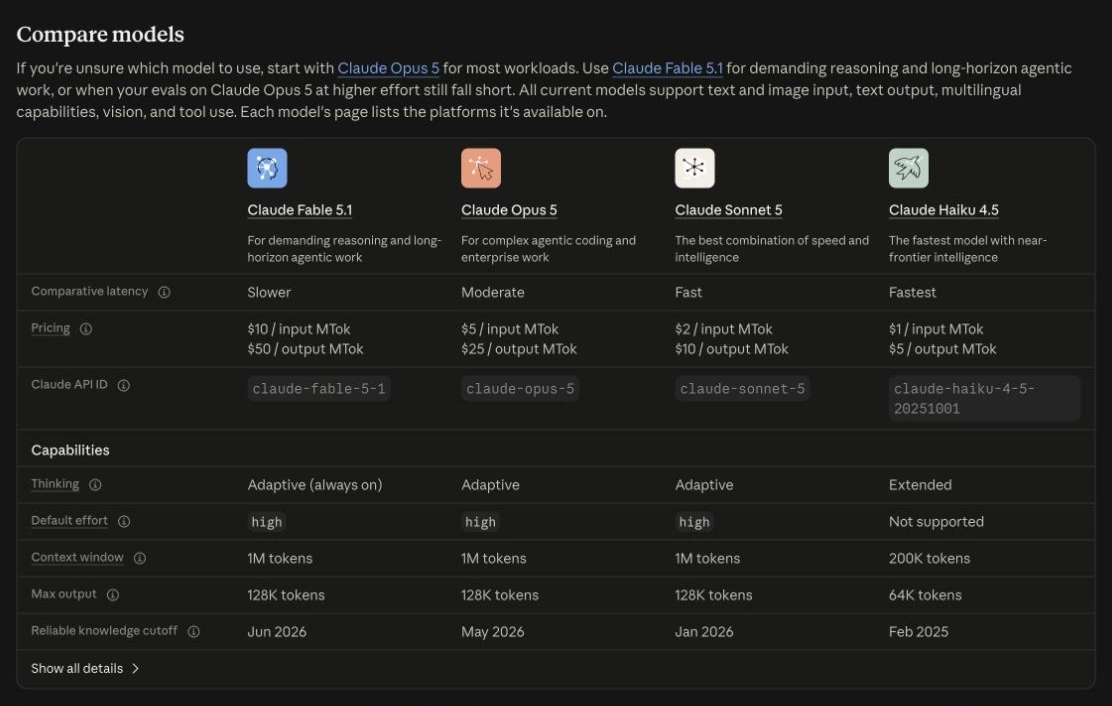
The recommendations below are based on documented product features, access options, and the task each tool serves. They are not a head-to-head test of ten native apps. Historical vendor benchmark images retain their original model scope; consumer plans, connected tools, and your own inputs can change the experience. GlobalGPT publishes this guide and is included as a commercial option.
Free Access and Paid Routes
For a no-payment starting point, Gemini and Mistral Vibe document free plans. The selected routes below show how free chat, subscriptions, API bills, and self-hosting differ. The linked official sources for these selected access routes were checked September 15, 2026.
| Route | Starting cost type | What you can use | Boundary |
|---|---|---|---|
| Gemini | Free entry | 3.6 Flash, varying 3.1 Pro access, Deep Research, image tools and Canvas | U.S. public plan; usage limits apply. |
| Perplexity | Free $0/month; Pro $20/month; Max $200/month | Free basic search with citations; 3 Pro Searches/day and 1 Research query/month | Checked September 15, 2026. Free uploads limited; no advanced models or image generation. Paid access also has limits. |
| Mistral Vibe | Free entry | Quick answers, web search and simple tasks | More extensive agent work is a separate paid-plan decision. |
| Poe | Daily points for non-paying users | Explore official and user-created bots within your points | 24-hour reset; no rollover. Rates and per-message budgets help control use. |
| ChatGPT Plus | Paid subscription | $20 per month, billed monthly | Includes listed tools with limits; API billed separately. |
| DeepSeek V4.1 Flash API | Metered developer use | Pay for input and output tokens | Cache status and peak/off-peak hours affect the bill. |
| Self-hosted Llama | Infrastructure and operation costs | Run model weights under their applicable license | Hardware, hosting, security and maintenance still cost money. |
The 10 Best Claude Alternatives in 2026
1. GlobalGPT — Best for Everyday Multi-Model Workflows
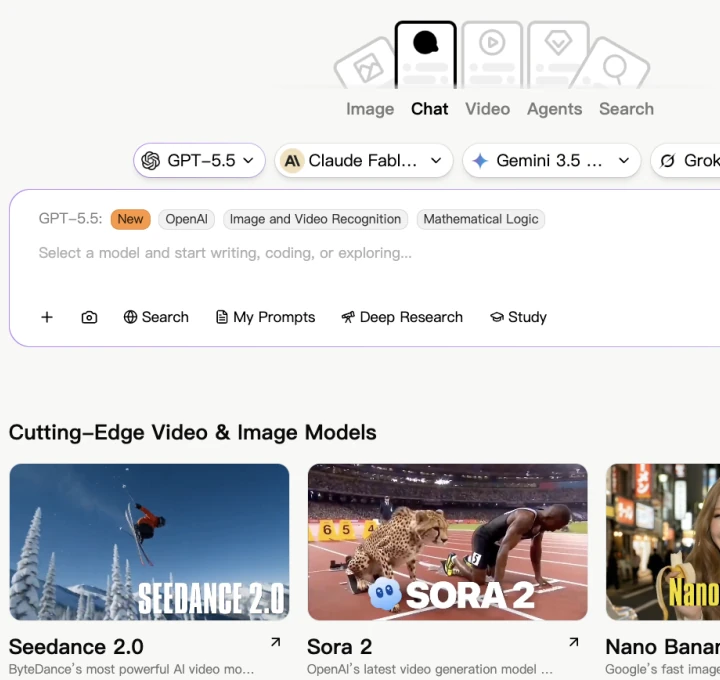
GlobalGPT is worth considering when your work does not fit neatly inside one assistant. Its public workspace brings model families from OpenAI, Anthropic, Google, xAI, Perplexity, and others into one interface. You can draft with Claude, get another perspective from GPT or Gemini, research with Perplexity, and continue into image or video creation without rebuilding the project across separate tools.
Another option: a multi-model workspace
No model is best at every task. If your day moves between drafting, research, a second opinion, images, and video, GlobalGPT lets you draw on several leading model families in one workspace. The appeal is flexibility: you can choose a tool by task instead of treating one assistant as the universal winner.
- Use Claude, GPT, Gemini, Grok, Perplexity, and other leading models from one place.
- Move from chat and research to image and video generation without rebuilding the workflow.
- Reduce separate subscriptions and repeated tab switching.
A typical workflow is more useful than a model count: research a topic, turn the findings into an outline, write and revise the draft, and create the images or video that accompany it. For developers, GlobalGPT’s CLI also connects model work with terminal and existing production workflows. Choose this route when several of those steps are part of the same week; one narrow recurring task may call for a specialist tool instead.
Make the subscription decision around your whole project: list the writing, research, and creative tools you would otherwise pay for separately. GlobalGPT is most relevant when you need several of them regularly; the next section covers the single-assistant route.
2. ChatGPT — Best Single-Assistant Claude Alternative
ChatGPT is a sensible shortlist choice when you want one assistant for writing, coding help, file analysis, images, research, and general productivity. It is particularly useful when a task moves between formats: turn notes into a plan, inspect a spreadsheet, draft a client message, then ask for code or an image without rebuilding the workflow.
OpenAI’s Plus help page, checked September 15, 2026, lists $20 per month billed monthly. It documents image generation, file uploads and analysis, voice, and Deep Research where available. Plus has usage limits; API usage is separate. Start with the task you want the upgrade to unlock rather than paying for a model name alone.
The practical decision is the product workflow, not just the model name. For a writing task, give it the intended reader, examples of your tone, and the facts it must preserve. For code, provide a small reproducible problem and check the proposed change against tests. A polished answer is useful only if the claims, calculations, or behavior survive that check.
- Good fit: a varied workload that combines drafts, files, visual content, and technical questions.
- Access: ChatGPT is a hosted assistant with free and paid access routes; the plan determines model and tool limits.
- Tradeoff: broad functionality does not guarantee the writing style or coding workflow you prefer. Compare those on your actual work before switching.
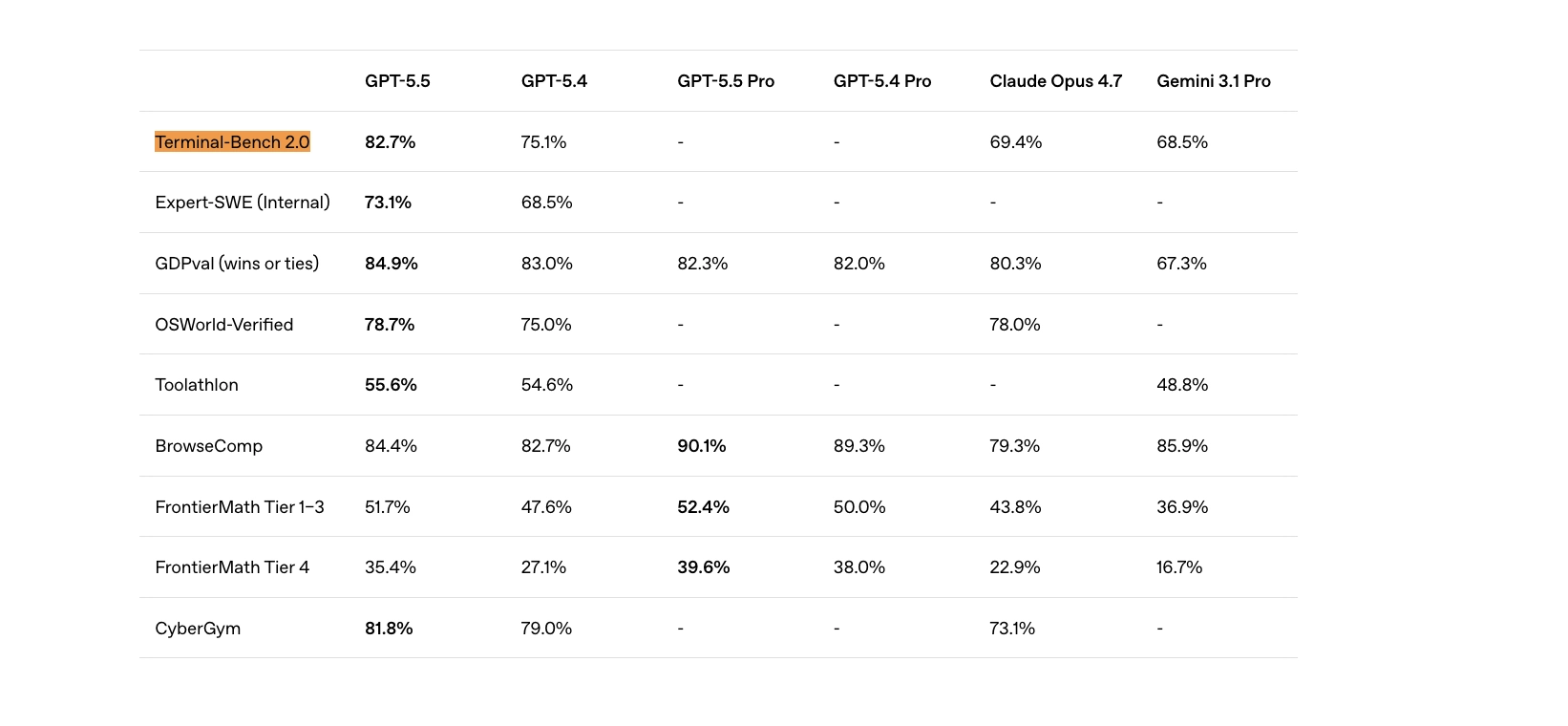
Choose ChatGPT if: you want a broad general-purpose product and value coding, polished documents, image tools, or a range of features. Stay with Claude if: you prefer Claude’s writing voice, long-document handling, or Claude Code workflow. For a focused comparison, see our Claude vs ChatGPT guide.
3. Google Gemini — Best for Google Users
Gemini makes the most sense when your work already lives in Google Search, Gmail, Docs, Drive, Sheets, Android, or Google Cloud. Its advantage is not only model quality. It is the distance between the answer and the place where the work happens.
Google’s U.S. subscription page, checked September 15, 2026, lists a free route with 3.6 Flash, varying access to 3.1 Pro, Deep Research, image tools, and Canvas. Google AI Pro is listed at $19.99 per month and includes higher access plus Gemini in Gmail, Docs, and other Google apps. That is a U.S. public plan reference; it is not a quote for every country or account.
- Good fit: start with a research report, then turn it into content inside Google apps.
- For studying: ask for questions tied to your notes and verify that explanations match the supplied material.
- Tradeoff: the app, a Workspace account, and the developer API are distinct access routes. Buy the one that contains the integration you need.
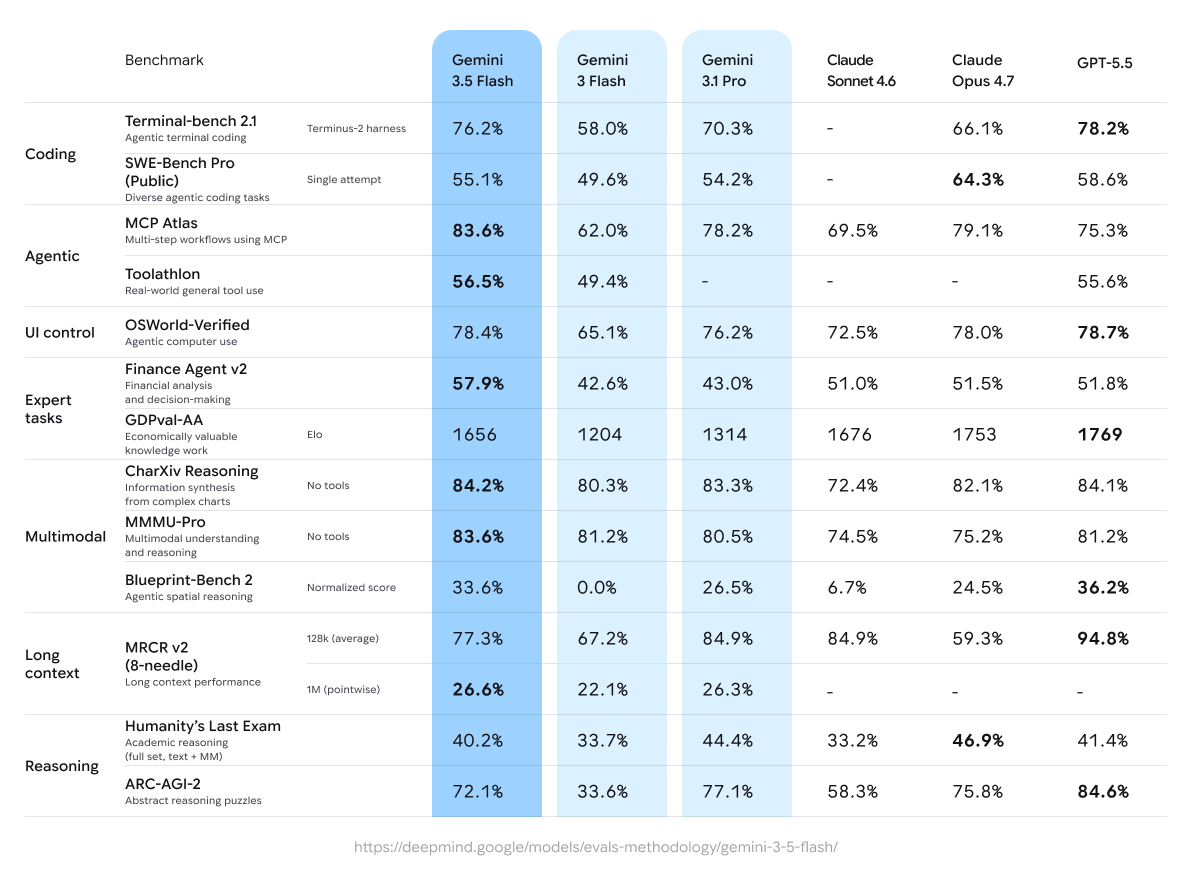
For a Google-centered team, the useful question is where the finished work will live. If the required Gmail or Docs integration is included in your account, it may remove a handoff. A standalone editing or Claude Code workflow has a different buying criterion.
4. Perplexity — Best for Source-Led Research
Perplexity is a strong Claude alternative when the real job is finding, comparing, and checking sources. It behaves more like an answer engine than a blank chat box: search is central, citations are visible, and follow-up questions remain tied to the research thread.
Perplexity’s Individual pricing page, checked September 15, 2026, lists Free at $0 per month, Pro at $20 per month and Max at $200 per month. Free search with citations suits quick source discovery; Pro adds extended search, advanced models and more tools for research. The official plan table gives Free users 3 Pro Searches per day and 1 Research query per month, alongside basic search and limited file uploads. Free does not include advanced AI models or image generation. Consumer Pro has weekly Pro Search limits and monthly Research limits, without exact counts in those table cells. These are U.S.-dollar monthly prices; annual billing, tax-inclusive checkout prices and exact paid quotas are separate questions.
For example, ask for the primary sources behind a policy change, narrow the date range, then open the cited pages and read the passages that support the answer. Citations make that checking step easier to start; a citation still needs to support the exact sentence beside it. For a finished article, budget time for synthesis and editing after the research.
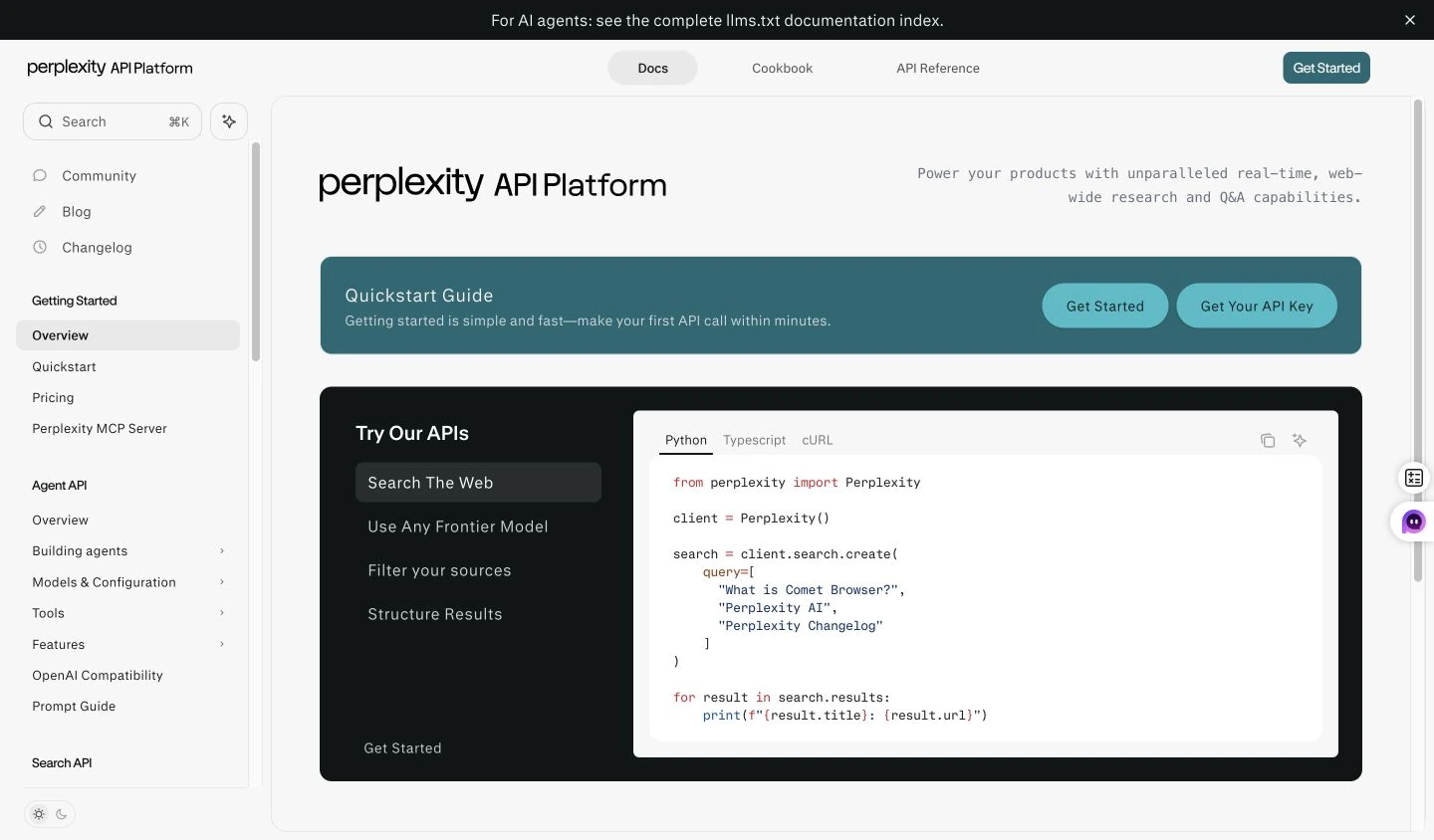
Developers have a separate route: the Perplexity API overview documents Search API for ranked search results and Agent API for web-grounded answers with citations. The documentation image below belongs to that developer workflow, not to a native consumer-app test.
Choose Perplexity if: your first question is “where did this claim come from?” Stay with Claude if: you mainly need long-form drafting, editing, or sustained collaboration on documents. You can also compare the research experience in our Perplexity vs ChatGPT review.
5. Microsoft Copilot — Best for Microsoft 365
Microsoft Copilot is the practical alternative for organizations centered on Word, Excel, PowerPoint, Outlook, Teams, and Microsoft’s identity and security stack. Its value comes from product integration and organizational context rather than from being a single standalone model.
The important detail is which Copilot experience your organization actually has. Microsoft’s overview separates web-grounded chat, standard in-app access, and a premium licensed experience with deeper work-data integration. Seeing a Copilot button does not by itself mean it can search all your company files or use every app feature.
- Writing: draft or rewrite the document where your colleagues will edit it.
- Excel: ask for a formula or an explanation of the data, then inspect the cell references and resulting values.
- Meetings: summarize discussion and extract actions when the relevant meeting features are available in your licensed setup.
- Buying decision: confirm the required app, organizational permissions, and license before treating integration as the reason to switch.
Copilot is worth shortlisting when the final output belongs in a Microsoft document, meeting, mailbox, or spreadsheet. If the needed license or organizational permission is missing, that integration benefit may be unavailable to you.
6. Grok — Best for X and Fast-Moving Signals
Grok is most distinctive when a task depends on the conversation happening on X or on rapidly changing public signals. It can be useful for launch monitoring, public reaction, news discovery, and questions where a static knowledge cutoff is an obvious disadvantage.
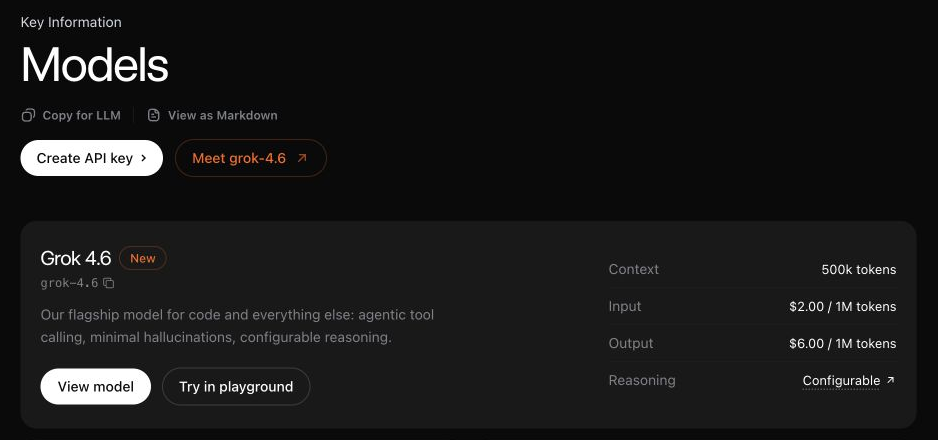
The current Grok developer documentation highlights Grok 4.6. It also makes a crucial distinction: the underlying model does not gain current-event knowledge unless Web Search or X Search tools are enabled. That matters when comparing an API integration with a consumer app. The useful capability is retrieving the right recent material, not simply producing a confident answer about it.
- Good fit: discover reactions to a launch, track terminology, and find public discussions to investigate.
- Next step: trace consequential claims back to an announcement, filing, or other primary source.
- Tradeoff: a lively conversation on X can be a useful lead without being representative evidence.
Grok belongs on the shortlist when public conversation on X is part of the assignment. For document editing, judge it on the supplied text and your revision requirements instead. See our Grok vs ChatGPT comparison for the broader tradeoff.
7. DeepSeek — Best Low-Cost Technical Option
DeepSeek is worth considering for reasoning, coding, and API workloads where cost matters. It can be attractive to developers who are comfortable evaluating model behavior, deployment constraints, data handling, and regional availability themselves.
Its official API pricing table distinguishes cache hits, cache misses, output tokens, and peak versus off-peak hours. On September 15, 2026, DeepSeek V4.1 Flash is listed at $0.30 per million uncached input tokens and $1.20 per million output tokens at peak rates; off-peak rates are half those amounts. Peak hours are Monday–Friday, 01:00–04:00 and 06:00–10:00 UTC; all other hours are off-peak. Those are usage-based developer prices, not a monthly chat subscription or a promise of equal quality on every task.
A useful first project is a repeatable extraction or code-review task with known answers. Record the entire billable request, run the result through your checks, and compare the cost of an accepted output. A cheaper response that needs extensive repair can be the more expensive workflow. Hosting location, data handling, and your organization’s approval requirements remain separate buying criteria.
DeepSeek’s documented API rates make it worth a cost check for repeatable technical tasks. Keep an existing Claude Code workflow if its integrations and permissions already meet your needs, unless a trial demonstrates a worthwhile reason to change. Compare accepted outputs and the full setup cost.
8. Mistral Vibe (formerly Le Chat) — Best European Claude Alternative
Mistral Vibe is the current name for the assistant previously called Le Chat. Mistral’s product FAQ says existing conversations, settings, and plans carry over. Vibe combines a work assistant with a coding-agent route, so this candidate now deserves more than a simple “European chatbot” label.
- Work route: research across sources, analyze files, prepare a meeting brief, or turn findings into a document.
- Coding route: use the terminal, IDE, or remote coding experience documented by Mistral.
- Free access: the free plan supports quick answers, web search, and simple tasks with limits; deeper agent work belongs to the paid-plan decision.
- Deployment: private-cloud and on-premises options are enterprise offerings, not a property of every free chat.
Shortlist Vibe when its work and coding routes, European provider, or enterprise deployment options match a concrete requirement. Confirm that the particular plan includes the feature you need; the provider’s location alone does not specify your data’s storage or processing location.
9. Meta AI and Llama — Best for Open-Weight Deployment
Meta AI is a consumer assistant, while Llama is an open-weight model family used through many different products and deployment stacks. That distinction matters. A self-hosted Llama deployment can offer more control, customization, and data isolation, but it is not a drop-in replacement for the Claude website.
The official Llama repository documents model weights, licenses, model cards, and deployment requirements. Open weights give a technical team a different kind of control, but the bill can move from a subscription to hardware, hosting, evaluation, and maintenance. “Open-weight” is therefore not the same as “free, unlimited Claude in a browser.”
- Hosted assistant: choose a consumer product when you want to start chatting immediately.
- Self-hosted model: consider Llama when you can manage infrastructure and test your own application.
- Before adopting: check the license for the exact model and confirm that your hardware and governance requirements match.
Choose Llama if: your team can host, secure, evaluate, and maintain its own model stack. Stay with Claude if: you want the provider to handle the product, safety updates, infrastructure, and user experience.
10. Poe — Best for Trying Many Bots and Models
Poe is useful for people who want to explore a large catalog of official and community bots from one account. It lowers the friction of testing different model personalities and specialized assistants without visiting every provider separately.
If the bot catalog itself is the feature you are comparing, our Poe alternatives guide covers that narrower choice.
Start at Poe Explore to browse official and user-created bots. Poe’s official FAQ, checked September 15, 2026, says non-paying users receive points daily. They reset at the end of each 24-hour period and do not roll over. The FAQ does not specify a single free-point allowance for every account.
- Before sending: open the bot’s Rates button. A response may have a fixed point cost or a variable cost based on the text it reads and writes.
- Set a message budget: use Settings for a global per-message budget, or the bot name in a chat for that chat’s budget. Poe says it asks for your agreement before a single message exceeds that budget.
- Check what you spent: open a past message’s menu and choose info, or use Settings → Points → View Points History on the web.
- Tradeoff: a bot’s instructions, underlying model, and points can make it a different experience from the provider’s own app. A per-message budget is not a daily spending cap.
Poe’s bot catalog is the reason to consider it. For a recurring workflow, check the chosen bot’s creator, underlying model, and point cost. Direct Claude access is a separate choice when you specifically need an Anthropic product feature.
Claude’s Current API Cost Baseline
Claude is not one price. The chart below compares standard API input and output rates from Anthropic’s model overview, checked September 15, 2026. The unit is U.S. dollars per one million tokens; these are developer usage prices, not Claude Pro or Max subscriptions.
Claude API cost by model
USD per 1M tokens · 15 September 2026 · input and output share a $0–$50 scale
Input $1
Output $5
Input $2
Output $10
Input $5
Output $25
Input $10
Output $50
How to Choose a Claude Alternative
When a multi-model workflow makes sense
If different parts of your work call for different strengths, the more useful question may be which model should handle each task—not which assistant wins everything.
Use Claude or GPT for drafts, analysis, and structured work.
Switch to Perplexity, Gemini, or another search-oriented model.
Continue into image and video generation in the same workspace.
A single subscription is most useful when those steps occur regularly. Explore the GlobalGPT workspace around the full project you need to complete, rather than adding separate subscriptions one tool at a time.
- Choose GlobalGPT when you want Claude, GPT, Gemini, Grok, Perplexity, image models, and video models in one workflow—and want to reduce separate subscriptions and constant tool switching.
- Choose ChatGPT when you want one general-purpose assistant rather than a multi-model workspace.
- Choose Gemini when Google apps are central to the workflow.
- Choose Perplexity when source discovery and citation checking come first.
- Choose Copilot for Microsoft 365 organizations.
- Choose Grok for X-connected, fast-moving public signals.
- Choose DeepSeek for cost-conscious technical experimentation.
- Choose Mistral when a European provider is an important requirement.
- Choose Llama when your team needs open-weight control and can operate the stack.
- Choose Poe when exploring a large bot catalog matters more than a focused workflow.
Before paying, run the same two or three representative tasks in your finalists. Compare factual discipline, output usability, edit time, source quality, limits, and the cost of the full workflow—not just the first answer.
- Writing: provide a short factual brief and ask for a 250-word draft in your usual style. Count factual edits and passages you would actually keep.
- Coding or analysis: provide a small failing example or a table with known answers. Check the result by running the test or recalculating it.
- Research: ask a dated question that needs primary sources. Open each citation and verify whether it supports the answer.
- Record the friction: include follow-up prompts, file handling, tool limits, and the subscription or API bill—not just the first answer.
When Claude Is Still the Better Choice
Claude remains worth keeping when it already performs a high-value recurring task well. Anthropic’s public pricing page lists Claude Pro at $20 billed monthly, or $200 billed upfront for a year, before applicable tax. It includes Claude Code and additional product features with usage limits. API access has separate token-based pricing; a consumer subscription does not turn those API calls into included usage.
Claude is still a strong choice when you value its writing style, careful document work, sustained coding context, or direct access to Anthropic’s newest agent features. If that sounds like your workflow, the better move may be to keep Claude and add a research or multimodal tool rather than replace it completely. Our guide to what Claude is good for can help make that decision.
Frequently Asked Questions
What is the best alternative to Claude?
There is no universal best alternative. ChatGPT is a strong general-purpose choice, Gemini fits Google-centered work, Perplexity emphasizes search and sources, and Copilot suits Microsoft 365. GlobalGPT is worth considering when you would rather access several model families and creative tools in one workspace.
Is GlobalGPT a good alternative to Claude?
It can be, especially if you do not want to depend on one model for every task. GlobalGPT brings Claude, GPT, Gemini, Grok, Perplexity, and other models into one workspace, then connects them with research, image, and video workflows. It is most useful when that flexibility saves you from switching between several separate tools or subscriptions.
Is there a free Claude alternative?
Yes. Gemini and Mistral Vibe have documented free routes for everyday questions and tasks. Perplexity Free includes basic search, 3 Pro Searches per day and 1 Research query per month, according to its official plan table checked September 15, 2026. File uploads are limited, and advanced AI models and image generation are excluded. Poe also provides daily points to non-paying users; they reset every 24 hours and do not roll over. Free access does not mean unlimited use or every premium model. Compare the task you can complete for free and the limit that affects it.
Which Claude alternative is best for coding?
For coding help, shortlist ChatGPT, Gemini, DeepSeek, or Mistral Vibe according to how you work. If you need an agent that edits files and runs tests, compare the actual coding product and its permissions, integrations, and billing—not only a chat model’s answer. Claude Code may remain a better fit for an established Anthropic workflow.
Which Claude alternative is best for research?
Perplexity is the clearest research-first alternative because search and visible citations are central to the product. ChatGPT and Gemini can also research the web, but the best choice depends on source quality, plan access, and whether the final work belongs in Google or another ecosystem.
Is Gemini better than Claude?
Gemini is usually the better fit for Google Search, Gmail, Docs, Drive, Android, multimodal work, and Google Cloud. Claude can still be better for careful prose, long-document collaboration, and Anthropic’s coding and agentic tools. Neither is universally better.
Can one subscription replace several AI tools?
GlobalGPT can reduce the need for separate subscriptions by combining everyday chat, writing, research, images, and video in one workspace. The actual savings depend on which models you use, your usage limits, and the current plan, so compare the full workflow cost rather than a single headline price.
Should I cancel Claude?
Cancel Claude only if another product covers your recurring tasks with less editing, better integration, acceptable limits, and lower total cost. If Claude remains best for one high-value workflow, keeping it and adding a complementary research or multimodal tool may be the better decision.
Is there an unlimited free alternative to Claude?
A free plan should not be assumed to be unlimited. Hosted tools can limit messages, models, files, or advanced features. Self-hosting shifts the constraint to your hardware, hosting bill, and maintenance. Choose a free route that completes your actual task reliably, and check the limit that affects that task.
Final Verdict
The right Claude alternative depends on the work. ChatGPT is a strong single-assistant default, Gemini fits Google-heavy workflows, Perplexity is a natural choice for research, and the other tools in this list each solve a more specific problem.
If your week regularly crosses writing, research, images, and video, GlobalGPT is another option to consider. Its advantage is bringing those choices into one workflow; whether that is better for you depends on how often you actually need several models and media tools.



