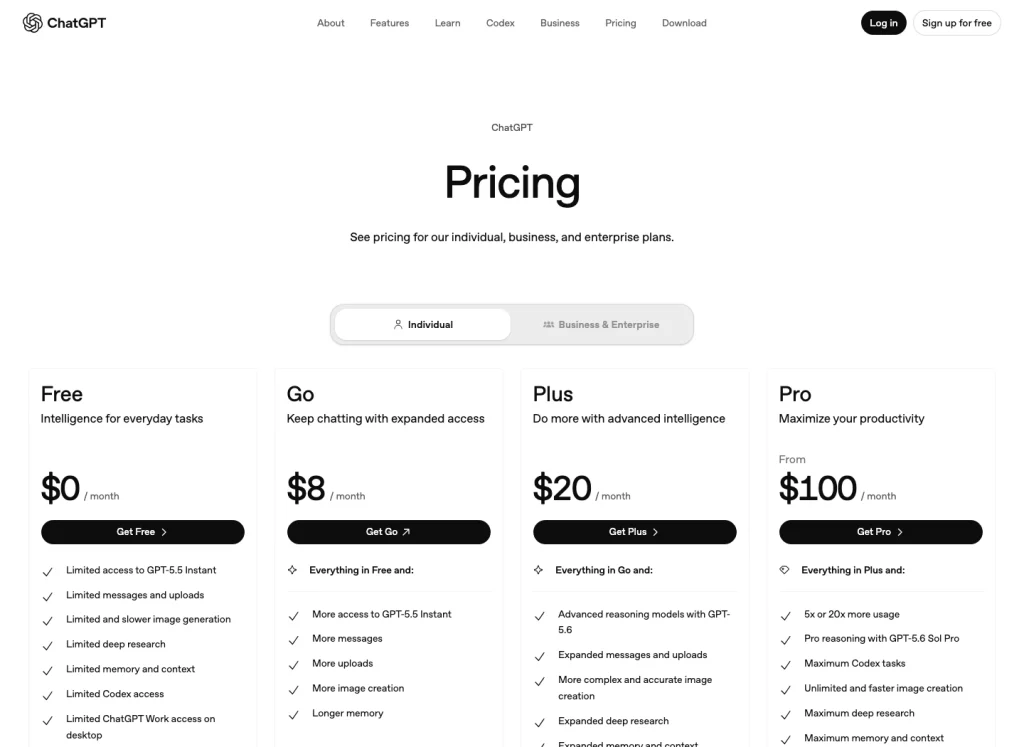
To upgrade to ChatGPT Plus, sign in to ChatGPT, open your profile menu, choose 升级计划, 选择 Get Plus, and complete checkout. As of July 13, 2026, OpenAI lists ChatGPT Plus at 每月$20,按月计费简体中文(大陆), with broader model and tool access than the Free plan.
The upgrade itself is only a few clicks; the part worth checking is whether your account, country, and payment method line up. Use chatgpt.com or the official ChatGPT app in a supported country, with a payment method issued in a supported region. Skip shared-account offers, VPN checkout workarounds, and resale access because they create billing and account-recovery problems later.
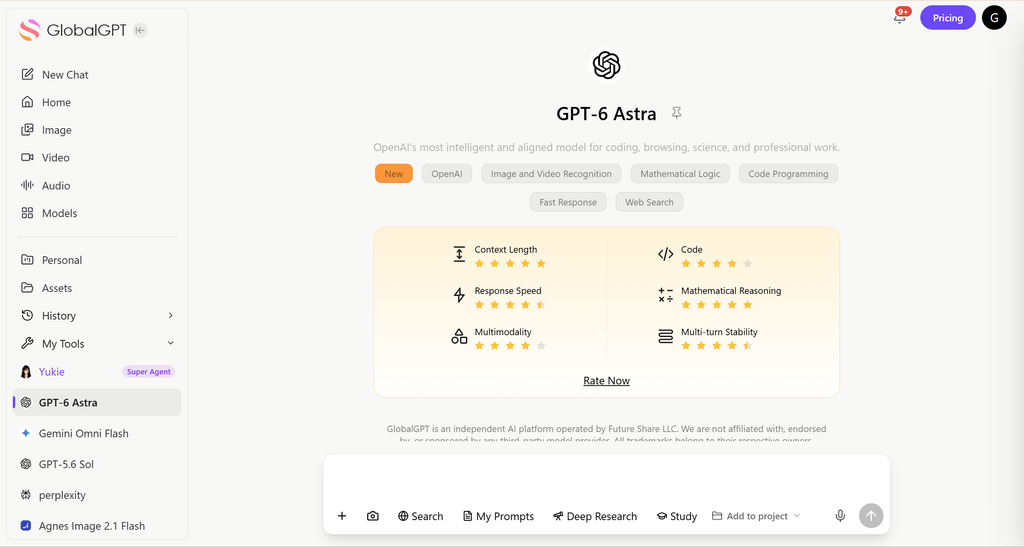
Choosing Plus is also a workflow decision. If your daily work jumps between GPT 5.6, Claude Opus 4.8, Gemini 3.5 Flash, Perplexity, and other models, GlobalGPT is the cleaner second path: one multi-model workspace, faster switching, and fewer separate AI subscriptions to manage. It is especially useful when you compare answers across models for research, writing, coding help, or search-style tasks.
快速导航
Quick answer: the official way to upgrade to ChatGPT Plus
The web upgrade path is short:
- 转到 chatgpt.com and sign in to the correct OpenAI account.
- Open your profile menu.
- 选择 升级计划.
- 选择 Get Plus.
- Complete checkout with a supported payment method.
- Return to ChatGPT and confirm your plan shows Plus.
OpenAI’s Help Center says Plus is available on the ChatGPT website and supported apps, and that API usage is separate from a ChatGPT Plus subscription. That means paying for Plus improves your ChatGPT account experience, but it does not add OpenAI API credits.

Before you upgrade: what ChatGPT Plus includes and does not include
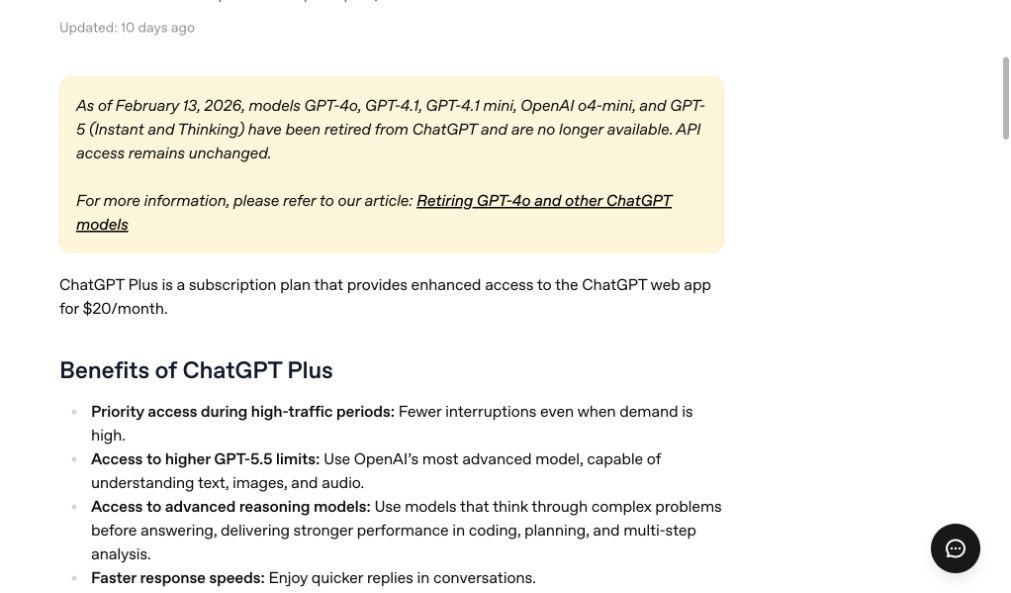
ChatGPT Plus is best understood as a consumer ChatGPT subscription. It gives broader access inside ChatGPT than the Free plan, including higher limits, faster responses, advanced reasoning options where available, voice conversations, image generation, file uploads and analysis, Deep Research tools where available, and custom GPT creation and use.
The four checks that matter before paying:
- Plus is billed monthly. OpenAI says annual billing or prepaying multiple months is not supported for ChatGPT Plus.
- Usage limits can still apply. Plus may include message caps or other limits, especially during high demand.
- API usage is separate. If you need API calls, token billing, or developer integration, use OpenAI’s API billing instead of assuming Plus covers it.
- Feature availability can change. OpenAI notes that model availability and limits change over time, so the model picker in your account is the most reliable live source.
Plus facts from OpenAI
What the $20/month upgrade covers
价格
$20
每月
账单
每月
no annual prepay
Where it works
Web + apps
where supported
应用程序接口计费
Separate
no API credits
Source: OpenAI Help Center, checked July 13, 2026.
How to upgrade to ChatGPT Plus on the web
Use the web route when you want your subscription managed directly through ChatGPT and OpenAI’s billing portal.
- 开放 chatgpt.com.
- Sign in with the same email, Google, Microsoft, or Apple login you want attached to the Plus subscription.
- Click your profile icon.
- 选择 升级计划.
- 选择 Get Plus.
- Review the plan, price, billing currency, and renewal terms.
- Enter a supported payment method and complete any bank authentication step.
- Return to ChatGPT and confirm your account shows Plus.
Pay attention to the account you are signed into before paying. If you use Apple, Google, Microsoft, or email/password interchangeably, it is easy to buy Plus on one login method and then open ChatGPT from another. OpenAI specifically recommends checking that you are signed in with the same authentication method used to subscribe if you were charged but still see Free.
How to upgrade in the ChatGPT iOS or Android app
The app route is useful if you prefer Apple or Google billing, or if your web checkout is not showing the plan or currency you expected. OpenAI’s iOS upgrade article describes two routes: upgrade on the web, or upgrade inside the iOS app through the in-app subscription screen. Android subscriptions are managed through Google Play when purchased through the Android app.
For iPhone or iPad, the official route is:
- 从 App Store 下载官方 ChatGPT 应用程序。.
- Sign in with the same OpenAI account you want to upgrade.
- Use the in-app Get Plus 或 升级 entry point when it appears.
- Confirm the Apple subscription payment.
- If the subscription does not appear, open Settings and use Restore purchases.
For Android, use the official ChatGPT app from Google Play, sign in to the right OpenAI account, open the plan or account settings screen, and complete the subscription through Google Play if that option is available in your region. If you later need to cancel an Android app subscription, OpenAI says it must be managed through Google Play when the subscription was created there.
The key rule is simple: the subscription is tied to both the app-store account and the ChatGPT account used at purchase time. Do not buy again from a different ChatGPT account just because the plan is not showing. First sign back into the original ChatGPT account, then restore purchases or contact support.
What to do if your ChatGPT Plus payment is declined
A declined payment does not always mean your card has no money. OpenAI’s billing guidance points to several common causes: incorrect card details, a mismatch in billing address, bank blocks on international or recurring online transactions, failed 3D Secure or Strong Customer Authentication, unsupported regions, or a card issued outside a supported region.
Try this checklist in order:
- Check the card number, expiration date, CVC, and billing address.
- Confirm the card has enough available balance and supports recurring online payments.
- Complete any 3D Secure, OTP, or banking-app approval step without closing the checkout page.
- Temporarily disable pop-up blockers, ad blockers, or VPNs if they are interfering with bank authentication.
- Clear browser cache and cookies, or retry in a private window, a different browser, or the official app.
- Confirm both your location and card issuing country are supported by OpenAI.
- Contact your bank if the card keeps failing even after the details are correct.
- Try another supported payment method if your region offers one.
If none of those work, contact OpenAI Support from the account you are trying to upgrade. Avoid buying “shared Plus accounts” or unofficial resale access. Shared credentials can violate OpenAI’s terms, create privacy risk, and make it harder to recover billing or account access later.
If you want a fuller payment-focused guide, keep 如何支付 ChatGPT Plus 的费用 open while you work through the checkout steps.
Countries, currency, and payment limits
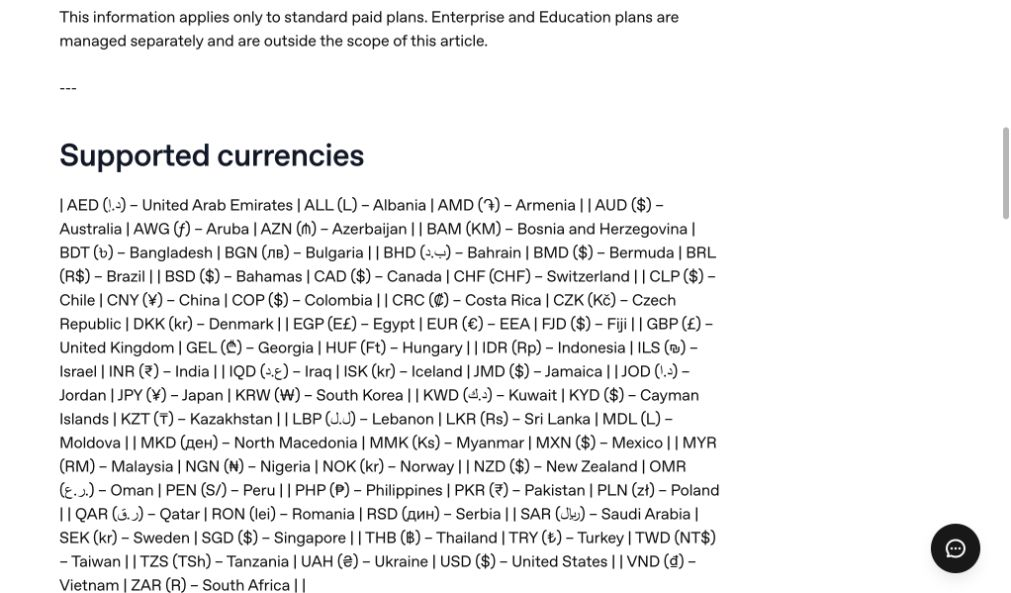
OpenAI publishes a supported-country list for ChatGPT access and warns that accessing or offering access outside listed countries and territories may result in account blocking or suspension. For payments, OpenAI also says purchases are only available in supported countries and regions, and your payment card must be issued by a bank in one of those supported regions.
OpenAI also supports localized billing for web subscriptions in many currencies. The available currency depends on the region shown at checkout, and some local payment methods are region-specific. For example, OpenAI’s multi-currency billing article lists credit and debit cards for all countries, plus local methods in certain regions, such as UPI for Go and Plus in India, GoPay in Indonesia, Pix in Brazil, and Kakao Pay, Naver Pay, and local cards in Korea.
Payment routes listed by OpenAI
Supported payment methods depend on region
Credit or debit card
Listed for all supported countries.
合众国际社
Listed for ChatGPT Go and Plus in India.
GoPay
Listed for Indonesia.
Pix
Listed for Brazil.
Kakao Pay, Naver Pay, local cards
Listed for Korea.
Source: OpenAI multi-currency support article, checked July 13, 2026.

If you cannot see your expected currency or plan, check the country selector on the ChatGPT pricing page and make sure you are not signed into the wrong account or workspace. If your country is not supported, the practical options are to wait for official support, use another available AI workspace, or choose a platform that already serves your region.
Plus vs Free, Go, Pro, API, and GlobalGPT
Upgrading to Plus is only one path. From the official plan pages and the GlobalGPT pricing page, the choice comes down to three filters: where you want to work, how much model variety you need, and whether your budget is for one official app or a broader AI workspace.
| 选项 | 最适合 | 注意事项 |
|---|---|---|
| ChatGPT 免费 | Trying ChatGPT without a monthly subscription. | Lower limits and fewer paid features. Useful before paying. |
| 聊天GPT Go | Users in regions where Go is available who want more than Free but less than Plus. | Availability and feature set vary. Compare it with 聊天GPT Go vs Plus before downgrading or switching. |
| 聊天 GPT Plus | Most individual users who want better access inside official ChatGPT. | $20/month, billed monthly. API usage is separate, and usage limits can still apply. |
| ChatGPT Pro | Heavy users who need higher allowances for high-stakes, complex work. | OpenAI says Pro tiers offer higher usage than Plus. Compare ChatGPT Plus 与 Pro before paying more. |
| OpenAI 应用程序接口 | Developers building apps, automations, or product integrations. | Billed separately from ChatGPT Plus. Buy API access for product integrations; buy Plus for the ChatGPT app experience. |
| GlobalGPT | Users who want a single workspace for multiple AI models and everyday workflows. | Best when model switching, research, writing, and subscription simplicity matter more than account-specific official ChatGPT features. Check GlobalGPT 定价 and available models before choosing it. |
Budget check
Monthly price points users compare
These products solve different jobs, but the price spread matters if you are deciding how many AI subscriptions to keep.
Sources: OpenAI Help Center for ChatGPT Plus; GlobalGPT pricing page for annual-plan monthly equivalents. Checked July 13, 2026.

The practical split is simple. Choose ChatGPT Plus when the official ChatGPT app is the place where you do most of your work. Compare GlobalGPT when the daily friction is tool-hopping: one tab for GPT, another for Claude, another for Gemini, another for Perplexity, and a separate subscription decision for each. In that situation, a single multi-model workspace can be the more usable setup even if you still keep Plus for account-specific ChatGPT features.


After checkout: confirm Plus is active
After you pay, go back to ChatGPT and confirm your account shows Plus. Then test the features you upgraded for: model picker, file uploads, image generation, voice, memory, Deep Research where available, and custom GPTs.
If you were charged but still see Free:
- Make sure you are signed into the same account and login method used to subscribe.
- If you used Sign in with Apple and hid your email, check the private relay email attached to the purchase.
- On iOS or Android, use Restore purchases if the purchase was made through the app store.
- Log out on all devices, then log back into the correct account.
- Contact OpenAI Support with the receipt or last four digits of the card if the plan still does not appear.
If you decide Plus is not right for you, follow the correct cancellation route. Web subscriptions are managed at chatgpt.com. Apple subscriptions are managed through Apple. Google Play subscriptions are managed through Google Play. For details, see this guide on how to cancel ChatGPT Plus.
ChatGPT Plus 值得购买吗?
ChatGPT Plus is worth it if ChatGPT is already part of your weekly work and the Free plan slows you down at the exact moments you need it. The clearest reasons to pay are higher limits, priority access, faster responses, advanced reasoning options, file analysis, image generation, voice, custom GPTs, and Deep Research where available.
Plus is less compelling if you only ask occasional questions, if your main need is API access, or if the feature you want is not available in your country or account yet. If the real bottleneck is comparing AI answers across tools, a multi-model workspace such as GlobalGPT may be more practical than paying separately for several official subscriptions.
Before paying, ask yourself three questions:
- Do I need official ChatGPT features, or do I need access to several AI models?
- Will I use the paid features weekly enough to justify $20/month?
- Is my country, card issuer, app-store account, and billing method supported?
If all three answers point to official ChatGPT, upgrade to Plus. If your answers point to multi-model work, compare GlobalGPT with other options first. If you are still deciding, read ChatGPT Plus 能做什么 和 limitations of ChatGPT Free before committing.
常见问题
2026年ChatGPT Plus的价格是多少?
OpenAI lists ChatGPT Plus at $20/month, billed monthly. The exact checkout currency may vary by country on the web, and app-store purchases may appear in your local Apple or Google Play billing currency.
我可以按年支付 ChatGPT Plus 的费用吗?
No. OpenAI says it does not support annual billing or paying multiple months in advance for ChatGPT Plus subscriptions.
ChatGPT Plus 是否包含 API 使用权限?
No. OpenAI says API usage is separate and billed independently. ChatGPT Plus improves your ChatGPT web or app account; it does not add API credits.
Why is my card declined when I try to upgrade?
Common causes include incorrect card details, bank blocks, failed 3D Secure or Strong Customer Authentication, unsupported country or card issuing region, browser interference, or a mismatch between your location and payment method. Start with the official payment checklist and contact your bank if the card keeps failing.
Can I use a VPN to upgrade to ChatGPT Plus from an unsupported country?
No. OpenAI says accessing or offering access outside supported countries and territories may result in account blocking or suspension. Use a supported official route or choose another AI platform that is available to you.
Can I upgrade through the iPhone app?
Yes, where the official ChatGPT iOS app and in-app subscriptions are available. OpenAI says you can upgrade on the web or through the iOS app, and app subscriptions are managed through Apple.
Can I use ChatGPT Plus on multiple devices?
Yes. Sign in on the other device with the same OpenAI account that made the purchase. If you bought through iOS or Android, manage the subscription through the relevant app-store account.
What should I do if I paid but my account still shows Free?
Check that you are signed into the exact account and login method used for the purchase. On mobile, use Restore purchases if you subscribed through the app store. If that fails, contact OpenAI Support with your receipt or card details requested by support.
Is GlobalGPT the same as ChatGPT Plus?
No. ChatGPT Plus is OpenAI’s official paid ChatGPT subscription. GlobalGPT is a separate multi-model AI workspace for users who want access to several AI models in one place. Choose by workflow: official ChatGPT features and OpenAI billing on one side, multi-model research and writing convenience on the other.
Should I choose ChatGPT Plus or ChatGPT Pro?
Choose Plus if you want a stronger individual ChatGPT plan at $20/month. Consider Pro only if you are a heavy user who needs much higher allowances and the extra Pro capabilities justify the higher monthly cost.