Reviewed September 18, 2026. OpenAI consumer Help pages could not be retrieved that day; their claims retain the source dates stated below. GlobalGPT catalog and annual prices were rechecked separately. Historical tests were not rerun.
ChatGPT Plus adds capacity for writing, files, images and other supported tools. Its value depends on the task and the access shown in your account. It does not include every OpenAI model in every product, and important outputs still need checking.
OpenAI’s September 10 Free-tier guidance says new GPT creation and publishing are unavailable on personal Free, Go, Plus and Pro accounts. Existing GPT use and editing depend on permissions; this is separate from using projects or file tools.
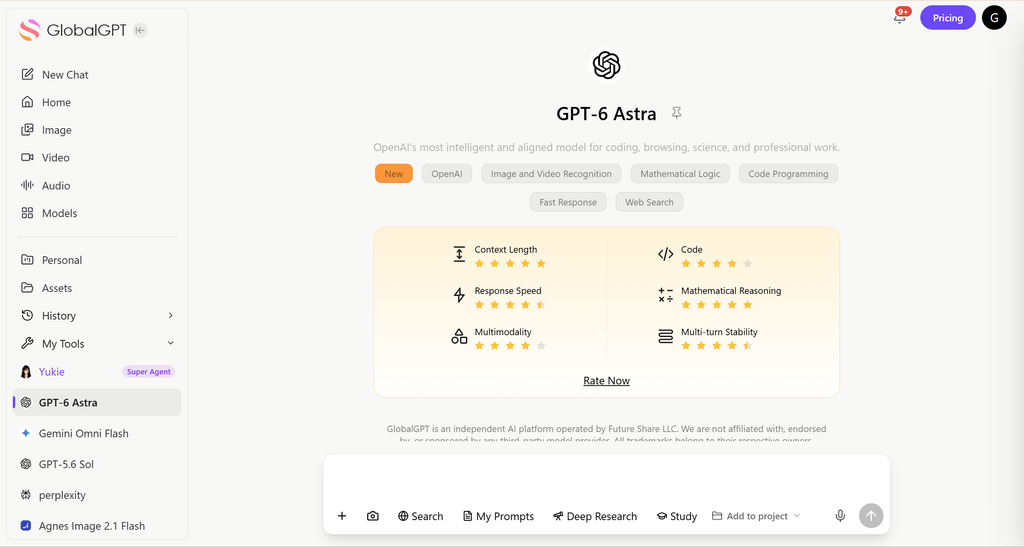
If you want similar outcomes but prefer a broader all-in-one AI workspace, GlobalGPT is also worth considering. It provides access to 100+ top models plus built-in image and video generation in one subscription—starting at $10.8 per month—which can be a higher-value option for people who use AI daily.
Contents
- What Is ChatGPT Plus and What Do You Get?
- ChatGPT Plus Core Benefits
- What Can You Do with ChatGPT Plus for Work?
- What Can You Do with ChatGPT Plus for Writing and Content Creation?
- What Can You Do with ChatGPT Plus Using Files and Data?
- What Can You Do with ChatGPT Plus for Images and Visual Tasks?
- Can ChatGPT Plus Replace Other Tools?
- Is ChatGPT Plus Worth $20 per Month?
- A Smarter Alternative: GlobalGPT
- Final Answer: What Can You Do with ChatGPT Plus?
- What the current model distinction changes
- A concrete order-analysis exercise
- Frequently asked questions
What Is ChatGPT Plus and What Do You Get?
ChatGPT Plus is the paid subscription tier of ChatGPT, offered by OpenAI for $20 per month

ChatGPT Plus Core Benefits
| Feature | ChatGPT Free | ChatGPT Plus |
| Access to latest models | Limited | Priority access |
| Speed & stability | Can slow during peak hours | Faster & more reliable |
| File uploads & analysis | Very limited | Expanded access; tool limits apply |
| Image generation | Limited | Higher quality & more uses |
| Long conversations & memory | Restricted | Much better context handling |
Key takeaway: Plus is not about “extra features only,” but about consistency, depth, and reliability.

What Can You Do with ChatGPT Plus for Work?
ChatGPT Plus is widely used as a work assistant across many roles. For prompts to adapt to those tasks, browse GlobalGPT’s ChatGPT models and practical guides.
Common Professional Use Cases
| Task | What Plus Does Better |
| Writing reports | Helps summarize long documents; verify missing details and citations |
| Email drafting | Produces clearer, more professional tone |
| Research summaries | Faster synthesis from long sources |
| Brainstorming | Maintains structured thinking across iterations |
| Strategy planning | Can use supplied constraints; verify they remain in the output |
Real-world example: Marketing and product teams use Plus to draft blog posts, landing pages, internal documents, and campaign plans in one continuous workflow—something the free version often struggles to sustain.
What Can You Do with ChatGPT Plus for Writing and Content Creation?
Writing is where most users feel the difference immediately.
| Writing Need | Why Plus Matters |
| Long-form blogs | Better structure and consistency |
| Academic writing | Maintains logic across sections |
| Script writing | Keeps tone and character consistency |
| Editing & rewriting | More precise improvements |
Plus models are better at following complex instructions, such as “write for beginners,” “keep it concise,” or “match this brand voice.”
What Can You Do with ChatGPT Plus Using Files and Data?
File upload and data analysis are useful on Plus, but they are not Plus-only. OpenAI’s Free-tier documentation also lists file uploads and analysis with lower tool limits. The upgrade decision is about available capacity and the tools you need.
Supported File-Based Tasks
| File Type | What You Can Do |
| PDFs | Summarize, extract key points |
| Excel / CSV | Analyze trends, formulas, anomalies |
| Word documents | Rewrite, shorten, or restructure |
| Code files | Debug, refactor, explain logic |
Example: Upload a sales spreadsheet → ask “Why did revenue drop in March?” → ask for calculations, assumptions, and supporting rows, then check the explanation.
This is a major upgrade over free ChatGPT.
What Can You Do with ChatGPT Plus for Images and Visual Tasks?
ChatGPT Plus includes advanced image generation and image understanding.
Visual Capabilities with Plus
| Capability | What It Enables |
| AI image generation | Posters, thumbnails, concepts |
| Image interpretation | Explain charts, screenshots |
| Design feedback | UI, layout, visual improvements |
Creators often use Plus to:
- Generate social media visuals
- Prototype product ideas
- Improve presentation slides
Can ChatGPT Plus Replace Other Tools?
ChatGPT Plus does not fully replace specialized software, but it can reduce tool overload.
Tools ChatGPT Plus Can Partially Replace
| Category | Example |
| Writing assistants | Grammarly-like edits |
| Research tools | Quick summaries |
| Brainstorming tools | Idea generators |
| Basic data analysis | Lightweight BI tasks |
For many users, this means fewer subscriptions and faster workflows.
Is ChatGPT Plus Worth $20 per Month?

Plus pays for itself only when the value of time saved after checking and corrections exceeds your actual subscription cost. There is no universal one- or two-hour break-even point.
A Smarter Alternative: GlobalGPT
While ChatGPT Plus gives you access to one ecosystem, many users now choose GlobalGPT for broader value. For a second approach to writing and document work, explore GlobalGPT’s Claude models and practical guides and compare the results on the same brief.
Why Users Choose GlobalGPT Instead of Only ChatGPT Plus
| Feature | ChatGPT Plus | GlobalGPT |
| Monthly price | $20 | $10.80/month with annual billing (GlobalGPT Pro) |
| AI models | OpenAI only | 100+ top models |
| Image & video models | Limited | Included |
| Usage flexibility | Fixed | Multi-model switching |
| Best for | Single-model users | Power users & creators |

Final Answer: What Can You Do with ChatGPT Plus?
ChatGPT Plus helps you work faster, write better, analyze data, generate visuals, and stay productive with more room for demanding work. It is best suited for users who rely on AI regularly—not occasionally.
However, if you want more models, lower cost, and broader creative tools, platforms like GlobalGPT may offer a higher ROI.
What the current model distinction changes
OpenAI’s ChatGPT model guidance, retrieved September 10, 2026, names GPT-5.6 Luna for Free and Go. Eligible paid Chat plans use GPT-5.6 Sol reasoning. GPT-6 Pro, powered by Astra, is a separate Chat entitlement for eligible Pro, Business and Enterprise accounts; Plus includes Astra in Work and Codex rather than the same Pro chat entitlement.
A model that writes Python is not necessarily executing Python. For a data task, ask for the computed result, the actual execution record and the exported file separately. If no code was executed, treat the output as a proposed calculation that still needs checking.
A concrete order-analysis exercise
Use a synthetic order file with a duplicate transaction, a refund, a pending payment and one missing amount. Ask the assistant to keep the newest record per order, exclude pending payments and leave unknown amounts unresolved. Check the net revenue by hand before using its summary.
On September 14, 2026, we attempted the same eight-row synthetic order task with Astra and Gemini 3.8 Flash through the GlobalGPT CLI. Each used the same rules and a 500-word answer limit. We did not rerun a returned answer to improve its score. The input was invented for evaluation and contained no customer data.
| Model | Observed result | End-to-end route time | Ledger credits |
|---|---|---|---|
| gpt-6-astra | CLI exited with code 1; no answer, not scored | 2.268 s | No corresponding new ledger row observed; charge unconfirmed |
| gemini-3.8-flash | Passed all 5 checks on this synthetic task | 8.806 s | 77 credits |
Gemini 3.8 Flash returned the correct $275 known total and preserved the unresolved Email order rather than treating it as zero. It passed all five checks in this single sample. Astra returned no answer through the CLI (exit code 1), so it received no quality score and no speed comparison is justified.
The answer key is $275 of known net revenue: Search $170, Email $75 and Social $30. The newer A record must replace the older one; pending order C is excluded, and order F stays unknown because its gross amount is missing. A model must not silently turn that missing value into zero.
The most useful part of Gemini’s answer was the Email subtotal: it reported “$75 + Unknown” and withheld a complete channel-performance conclusion until the missing amount was resolved. That is safer than a polished report built on an invented zero.
The five checks were latest-record deduplication, pending-payment exclusion, refund arithmetic, channel subtotals and preservation of unknown values. This one sample does not establish general model quality. It did not test native file execution, large spreadsheets, chart generation, live browsing, official ChatGPT plan limits or enterprise data connections. Time includes the CLI/provider route.
The comparison above, where available, was run through GlobalGPT. It is an example of a model task and is not evidence of an official Plus subscription’s file tools or limits.
Frequently asked questions
Are file uploads exclusive to Plus?
No. Free also supports uploads and analysis with lower tool limits. Plus is an upgrade in access and capacity, not exclusive ownership of every file feature.
Can Plus execute Python?
Use the analysis tools actually available in your account and check the execution record. An answer containing Python code does not by itself show that the code ran.
Is GPT-6 Pro included in Plus Chat?
The September 10 model guide separates GPT-6 Pro Chat entitlement from Astra access in Work and Codex. Plus includes Astra in Work and Codex, not the same Pro Chat access.
How do I judge whether Plus saves money?
Track finished work and time spent checking or correcting it. Compare the subscription with the value of that net time saving, rather than assuming every answer is ready to use.
Does the included model test prove Plus performance?
No. That small test ran through GlobalGPT, not an official Plus account. It illustrates a verifiable data task and is not a Plus plan benchmark.