Use ChatGPT Images to create and edit pictures inside ChatGPT. Choose your subscription by the image capacity you need; use the image workspace to control the result through prompts and edits.
This distinction matters because a chat or reasoning model can help you shape a brief, catch contradictions, and refine instructions, while the image system renders the visual. Treating those as the same choice is how an otherwise helpful comparison turns into a list of stale model names.
GlobalGPT brings several image styles and image-to-video workflows into one workspace.
Choose the workflow first, then the plan
Stay with ChatGPT Images if conversation and follow-up edits cover your work. Compare GlobalGPT when a project needs several image styles or a connected image-to-video workflow. A more expensive chat plan does not automatically make every image better.
Quick Answer: Which ChatGPT Option Is Best for Image Generation?
Best default for most people: ChatGPT Images.
Use the Images workspace to create and refine visuals. Choose Free, Go, Plus, or Pro according to the image access shown for that plan, not because a reasoning-model label sounds more powerful. For API automation, use the current developer documentation because API model IDs and options are a separate decision.
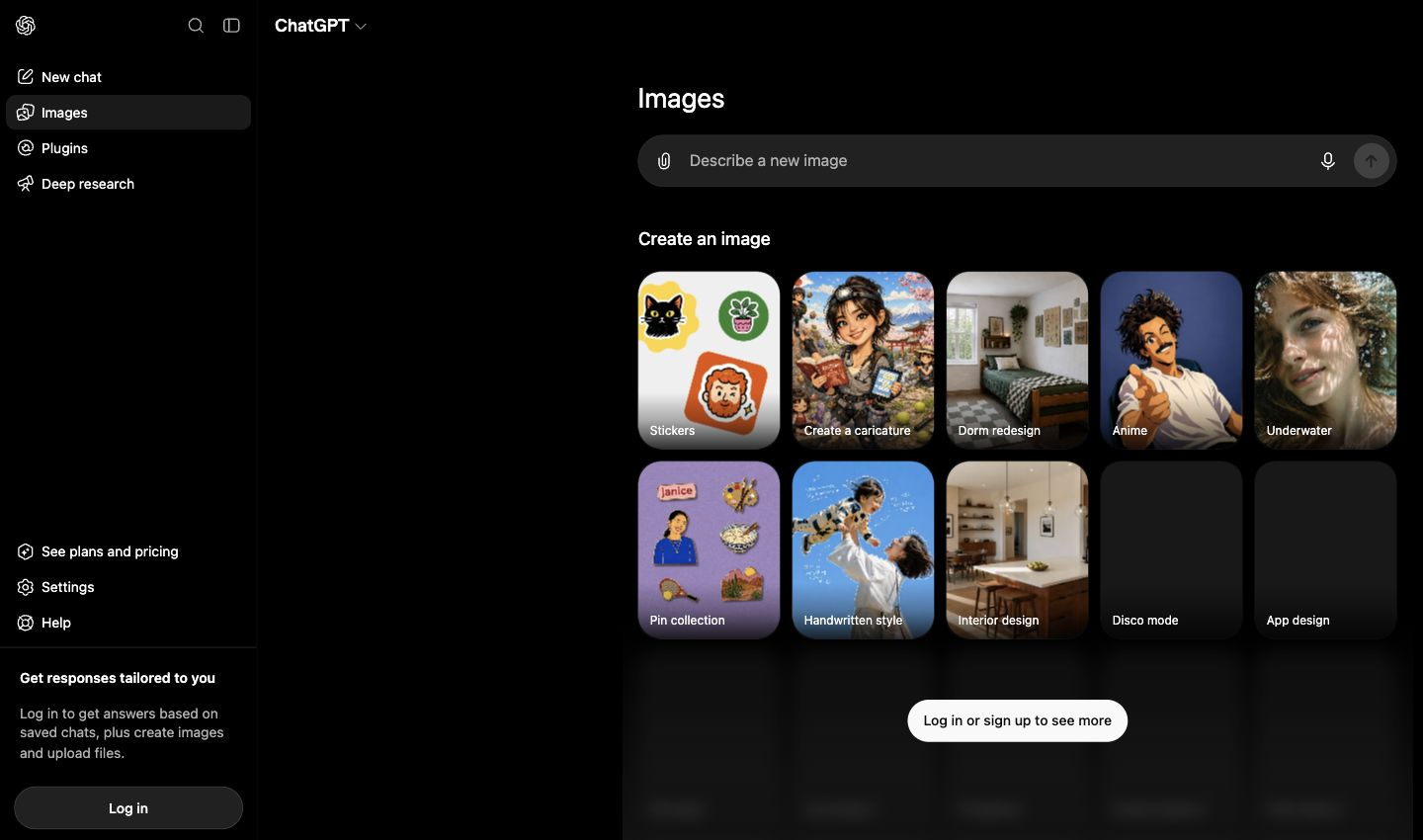
Table of contents
- ChatGPT Images vs the ChatGPT Model Selector
- How to Generate and Edit Images in ChatGPT
- How to Compare ChatGPT Image Quality
- ChatGPT Plans and Image-Generation Limits
- ChatGPT Images vs Other Image Models
- A Multi-Model Image Workflow on GlobalGPT
- Which ChatGPT Image Plan Should You Choose?
- Frequently Asked Questions
ChatGPT Images vs the ChatGPT Model Selector
The word “model” can describe three different things in this topic: the chat model that interprets your instructions, the consumer image experience that creates the visual, and the API model used by developers. For a normal ChatGPT user, the second one is the decision that matters first.
What ChatGPT Images does
ChatGPT Images gives image creation its own entry point and prompt surface. You describe the subject, composition, style, text, and constraints you want, then refine the result through the conversation. You do not need to identify an API model ID to use this consumer workflow.
What a reasoning model changes
Use a reasoning model to prepare complex briefs: organize requirements, resolve conflicting instructions and write a consistent shot list. Then generate the visuals in the image workspace.
Consumer app vs API
Developers building image generation into an app have a different choice. API model IDs, supported sizes, output formats, editing options, and billing can change independently from the ChatGPT interface. Check OpenAI’s current image-generation guide before implementation rather than copying a consumer product label into code.
| Your workflow | Start here | What to decide |
|---|---|---|
| Create in ChatGPT | ChatGPT Images | Plan access, prompt quality, and iteration needs |
| Plan a complex visual | Chat or reasoning mode, then Images | Brief clarity, constraints, and sequence |
| Build image features into software | OpenAI image API documentation | Current model ID, options, billing, and safety requirements |
How to Generate and Edit Images in ChatGPT
A useful prompt is closer to a compact creative brief than a pile of adjectives. Give the model a clear subject and purpose first, then add constraints that can be checked in the result.
- Open the Images workspace or use the image-creation entry available in your ChatGPT interface.
- Name the subject, intended use, composition, visual style, and any exact text that must appear.
- Add measurable constraints such as object count, orientation, color palette, and elements to exclude.
- Inspect the result against the brief instead of judging only whether it looks attractive.
- Refine one problem at a time. If your interface offers a selection or edit control, isolate the area you want changed; otherwise describe the local change in a follow-up.
For more workflow detail, see the related guides on whether ChatGPT can generate images and how ChatGPT image editing works.
How to Compare ChatGPT Image Quality
Choose by the image you need: a product shot, a text-heavy poster, a character sheet or a local edit. Each task calls for different strengths.
For a series, the Gemini multiple-image workflow distinguishes a contact sheet from separate downloadable assets.
Instruction following
Count the required objects, check their relationships, and verify exclusions. A polished image that ignores the brief is not a strong result.
Text rendering
Judge spelling, line breaks and layout, then check that edits preserve approved wording.
Consistency and control
For a series, look for stable characters, products, colors, and framing across iterations. For editing, check whether the requested region changes without unwanted damage elsewhere.
Usable delivery
The final choice also depends on available orientation, resolution, file behavior, speed, and the number of revisions your plan supports. Those details can differ between the consumer interface and an API workflow.
Compare the first draft and one targeted edit to judge how well the workflow fits your task.
ChatGPT Plans and Image-Generation Limits
ChatGPT Free, Go, Plus, and Pro offer different levels of image access. Compare the image-generation features in the plan cards below.
The ChatGPT Plus image-limit guide explains the account notices to use when judging whether more access is worthwhile.
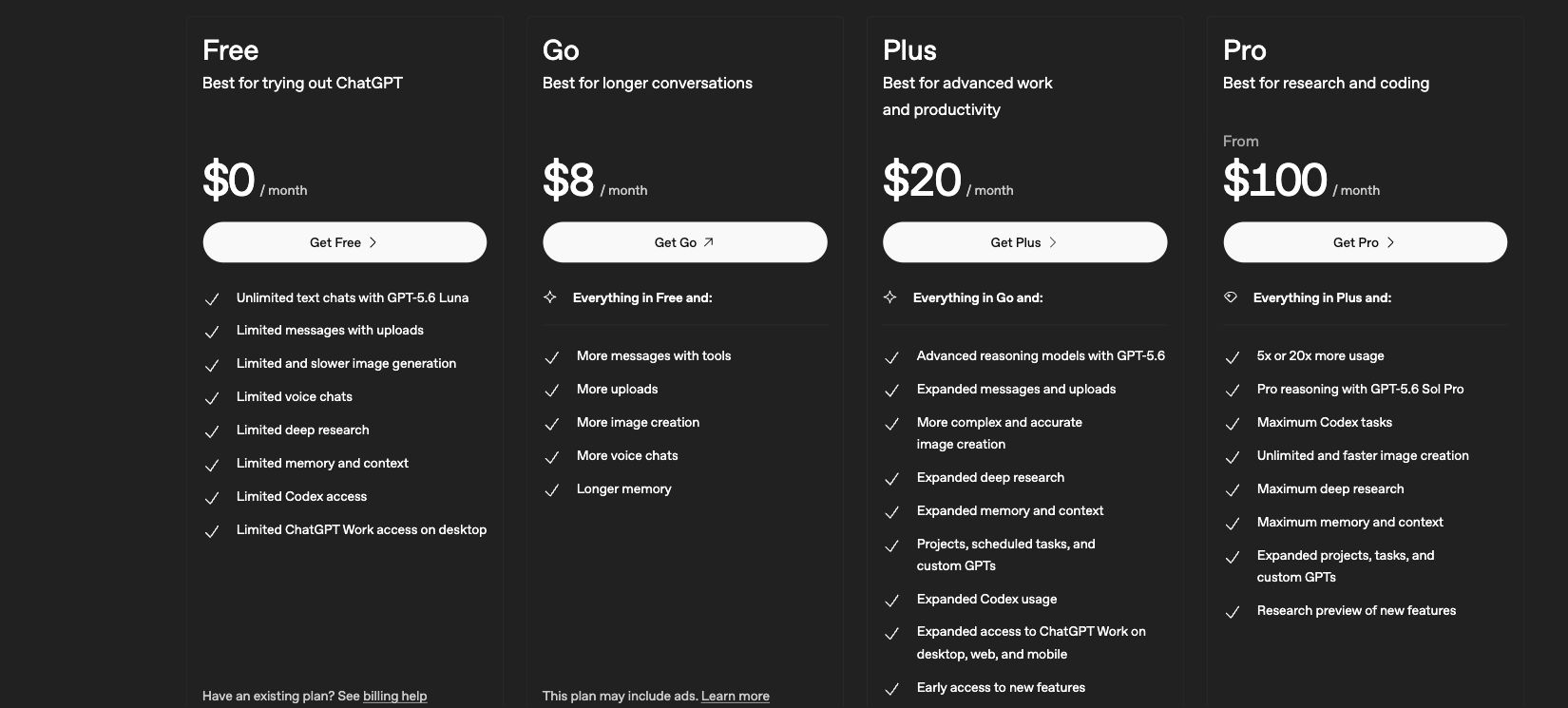
| Plan | Price shown | Image wording shown | Practical reading |
|---|---|---|---|
| Free | $0/month | Limited and slower image generation | Best for occasional trials |
| Go | $8/month | More image creation | A lower-cost step up in access |
| Plus | $20/month | More complex and accurate image creation | A balanced choice for regular creative work |
| Pro | $100/month | Unlimited and faster image creation | For heavier use where speed and capacity matter |
Plan details: ChatGPT Pricing.
The table compares subscription access and capacity. Use it to choose how much image work you need to do.
ChatGPT Images vs Other Image Models
ChatGPT Images is the simplest answer when you want a conversational workflow and iterative instructions in ChatGPT. Another model may be worth considering when your priority is a specific art direction, fast multimodal editing, or a production workflow that already lives elsewhere.
| Option visible in GlobalGPT | Image-generation strengths | When to shortlist it |
|---|---|---|
| GPT Image 2.5 | Photorealistic generation and high-fidelity editing | Realistic scenes and edit-heavy briefs |
| Nano Banana 2.1 | Fast multimodal generation and precise editing | Reference-led and fast editing workflows |
| Midjourney V7 | Polished artistic images with strong style control | Art direction and highly styled visuals |
| FLUX.2 Pro | High-fidelity generation with flexible control | Controlled, detailed generation |
Choose by your brief: photorealism, reference control, artistic style or editing. Compare the results on the same task before committing to a model.
For a broader shortlist, compare the options in our guide to ChatGPT alternatives for images. If detailed control is your main concern, the FLUX.2 Pro guide covers that workflow in more depth.
A Multi-Model Image Workflow on GlobalGPT
Start your next image project with GPT Image 2.5 and Nano Banana 2.1 on GlobalGPT. Choose a model, add your prompt and references, then refine the result.
GlobalGPT keeps your brief, references, model choice and next production step together. Its image selector includes GPT Image 2.5, Nano Banana 2.1, Midjourney V7 and FLUX.2 Pro.
After approving a still image, use an image-to-video workflow to turn it into a short clip. The video interface below shows the next stage.
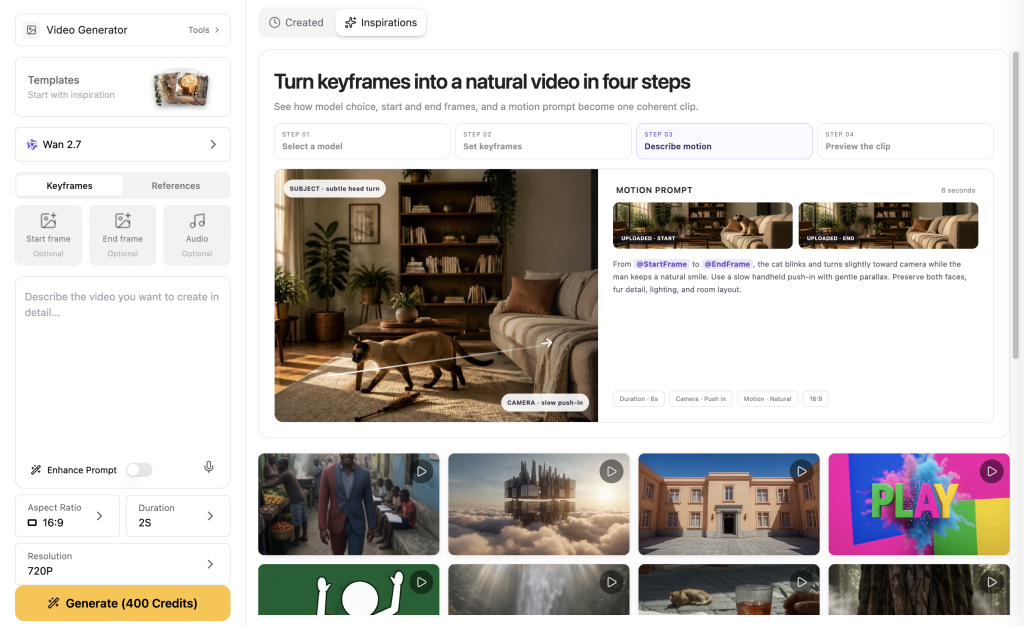
The Generate button displays the credit cost for your selected model and settings.
A practical four-stage workflow
| 1. BriefDefine audience, format, subject, text, and exclusions. | 2. ChooseMatch the model to realism, editing, style, or control. | 3. ReviewCheck instructions, text, consistency, and unwanted changes. | 4. ContinueRefine the image or move the approved asset into video work. |
Workflow: prepare the brief, generate a draft, review it, then edit or animate.
You can open GlobalGPT’s image workspace to compare the available routes for your own brief. Check the selected model and the displayed credit cost before submitting each generation.
Which image task should drive your purchase?
| Your task | Starting point | Buying decision |
|---|---|---|
| Simple illustrations and occasional edits | ChatGPT Images | Start with your current access and upgrade when real usage makes it worthwhile. |
| Product scenes with exact layout constraints | Compare image models on one brief | Count correct objects, review text and check the changes made during editing. |
| A campaign with distinct art directions | GlobalGPT’s image workspace | Model choice can be more useful than committing to one permanent “best” renderer. |
| A final asset that also needs motion | Image first, video second | Approve the still before spending on animation; video is a separate stage. |
A shortlist that leads to usable work
Write one product-ad prompt with a fixed palette, aspect ratio and product placement. Compare one draft and one targeted edit. Choose the workflow with better spelling, product identity and lower revision effort.
Which ChatGPT Image Plan Should You Choose?
| If this sounds like you | Best starting point | Why |
|---|---|---|
| I want the simplest conversational image workflow | ChatGPT Images | The image workspace and follow-up conversation stay together. |
| I create images regularly but do not need the heaviest plan | Compare Go and Plus | Both provide more image access than Free; compare the included capacity and features. |
| Speed and high usage matter more than price | Review Pro terms | Higher-capacity image creation for heavier use. |
| I need several image styles or an image-to-video pipeline | GlobalGPT multi-model workflow | One workspace can reduce switching while preserving model choice. |
| I am adding image generation to software | OpenAI image API docs | API model IDs, options, and billing need developer-specific verification. |
Start with ChatGPT Images for conversational creation and edits. Upgrade when usage limits interrupt your work, or choose another image model for a specific visual style.
Before client delivery, review the AI-image commercial-use guide alongside the visual-quality checklist.
Need several image models in one workflow?
Review the model shown in the selector, confirm the displayed credit cost, and start with one small brief in GlobalGPT’s image workspace. Keep the same evaluation checklist across models so the comparison stays fair.
Frequently Asked Questions
Which ChatGPT model can generate images?
For consumer use, open ChatGPT Images rather than choosing a text-model name as if it were the renderer. Your plan affects the image access and capacity available to you.
Is ChatGPT Images different from a reasoning model?
Yes. A reasoning model can help organize or refine a complicated brief, while ChatGPT Images is the consumer image-creation experience that renders and iterates on the visual.
Does ChatGPT Plus include image generation?
Yes. ChatGPT Plus includes image creation, editing and higher usage than Free.
Can ChatGPT edit part of an image?
ChatGPT supports iterative image changes, and some interfaces expose selection or edit controls. Use the controls visible in your account and check that the requested area changes without damaging the rest of the image.
Is the best ChatGPT image option also the best API model?
ChatGPT Images is the consumer workspace. The API uses developer model IDs, settings and separate billing.
Does every GlobalGPT image model cost 100 credits?
No. The Generate button shows the cost of your selected model and settings.