
ChatGPT Plus users report generating about 120 images per day. That is enough for a substantial batch of product shots, social posts or visual drafts. For a larger project, prepare your prompts in advance and reserve room for revisions. Read the user reports on image limits.
A limit in the middle of a project is frustrating, especially when the next image is an edit rather than a new idea. The useful distinction is between the subscription you pay for, the action you are trying to complete, and the restriction ChatGPT actually reports. A message limit, an upload problem and an image-generation limit need different responses.
If your creative work also includes research, copy, images and video, GlobalGPT brings multiple AI models and functions into one subscription. You can develop the brief, refine the copy and produce visual assets in one workspace—a practical way to simplify the work and keep separate subscriptions under control.
On this page
- ChatGPT Plus image limits and reset times
- How to check your ChatGPT image limit
- What counts as an image generation?
- Does ChatGPT Plus Include Image Generation?
- How to Get Better ChatGPT Images With Fewer Requests
- ChatGPT Free vs Plus: price and value for image users
- How to Keep Creating After Reaching a ChatGPT Image Limit
- Frequently asked questions
When Is ChatGPT Plus Worth Paying for Image Generation?
Plus is worth paying for when you create images regularly, revise client work, or need images, copy and file analysis in the same project. For occasional pictures, start with Free.
ChatGPT Plus image limits and reset times
ChatGPT Plus includes image generation. During busy periods, image capacity is reduced; a limit notice tells you when to resume. Plus usage-limit guidance
When planning a batch, separate the assets you need now from optional variations. Keep the brief, reference material and unfinished requests together. If an image notice gives a retry time, record it alongside the affected request so you can resume the right task.
Free has separate limits for images, file uploads and text chat. After reaching the image limit, wait for the retry time shown in the image notice. Free Tier FAQ
Save your prompt and references when you hit the limit. Resume at the displayed retry time; if no time is shown, return later and continue the same task.
If a reference upload fails, save the file name and upload message. If image creation stops after the reference has uploaded, save the generation notice instead. These details help you explain the problem when requesting support.
How to check your ChatGPT image limit
- Open the ChatGPT account associated with your subscription. If you paid for Plus but see Free, check that you used the same sign-in method as when you subscribed.
- Read the notice attached to the action you were attempting. Note whether it mentions image creation, messages, uploads or a temporary error.
- Read the remaining allowance or retry time displayed in the image-limit notice.
- Keep your next prompt ready so you can use the next generation on the image you need.
- After any stated wait, try the required action once. If it still fails, keep the notice and time for troubleshooting.
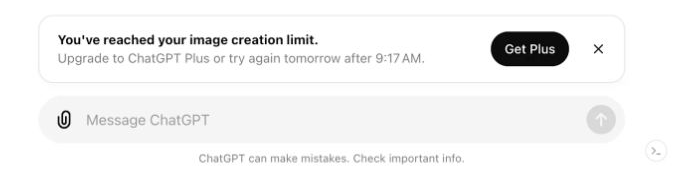
The example shows an image-creation limit notice and a suggested retry time.
If you paid for Plus but still see Free, use the official subscription troubleshooting steps to restore the subscription to the correct account.
What if the limit does not reset?
If the retry time has passed, check OpenAI’s service status. For a persistent restriction, send support the notice, the affected action and the time it occurred.
What counts as an image generation?
New pictures, edits and variations all involve image generation. Plan your batch around both the first drafts and the revisions you need.
Image tasks are not interchangeable quota units
| Action | What you are asking for | Planning implication |
|---|---|---|
| Generate from a prompt | A new visual result | Prepare the subject, format and constraints before submitting. |
| Regenerate or request variations | Another result from the same idea | Choose the changes that matter rather than making vague retries. |
| Edit an existing image | A revised visual result | State what should change and what must stay the same. |
| Upload a reference for discussion | Input for analysis or a later request | Check upload limits separately if the upload fails. |
| Download an existing result | A saved copy of work already produced | Open the result under Images and select Save to download it. |
To edit an image, select the area and describe the change, or write the instruction directly. Start from a generated image or upload your own. Review the whole result to catch changes outside the selected area. image-editing instructions
For reference-heavy work, ChatGPT Plus file-upload limits are a separate thing to check. For revisions, the image-editing walkthrough explains how to describe a targeted change.
Does ChatGPT Plus Include Image Generation?
ChatGPT Plus includes image generation. Ask ChatGPT to create or edit a picture in a conversation, or open More → Images. The ChatGPT image-generation guide covers the basic steps. Your Plus plan determines access and usage limits; choosing a different chat model does not create an extra image allowance.
If you need image generation inside an app or website, ChatGPT Plus does not include API usage. OpenAI bills the API separately. Compare that developer budget in the GPT-5.6 plans and API-cost guide before buying Plus for an API project.
OpenAI’s ChatGPT Plus plan includes image generation alongside chat and file analysis.
How to Get Better ChatGPT Images With Fewer Requests
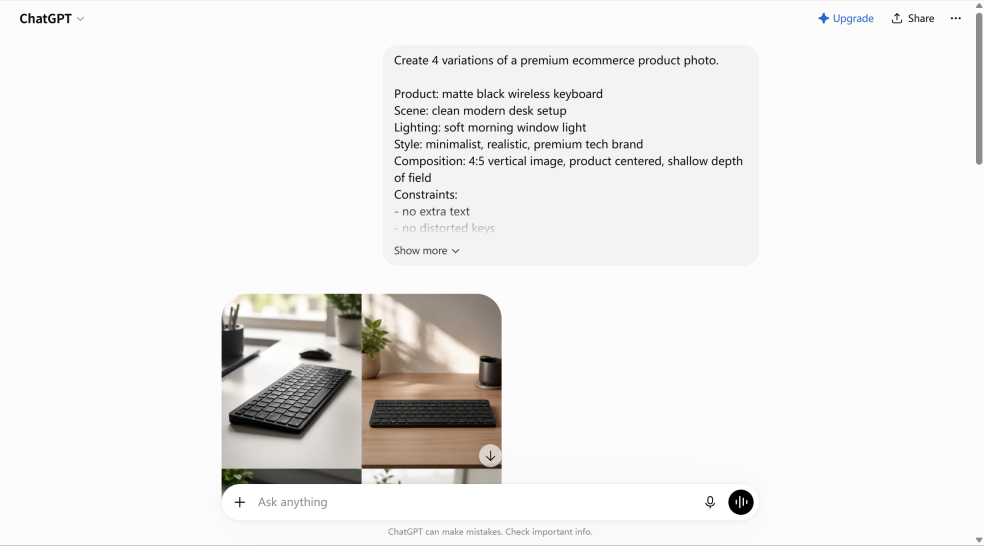
The ChatGPT example below uses a detailed product-photo prompt: a matte black keyboard, a clean desk, soft morning light, a minimalist style and explicit constraints. The visible result arranges several views in a composite. This is a useful reminder that “four variations” and “four separate downloadable files” are different output requirements.
Before generating, specify:
- Subject: the product, person or scene that must remain recognizable.
- Composition: aspect ratio, viewpoint, background and space for any later text.
- Style: lighting, realism, materials and the intended channel.
- Output: specify one image, a composite or separate files.
- Revision: the one change you want, plus the details that must stay fixed.
Try a prompt such as: “Create one landscape product photograph of a matte black wireless keyboard on a clean oak desk. Use soft morning light, leave empty space on the right for a headline, and add no text. Keep the keyboard shape realistic.”
If a campaign needs several assets, use the multiple-image workflow guide to plan the output format before generating. Review the composition first, then decide which variations are worth making. Save the strongest result and note its prompt before requesting a different angle or background.

ChatGPT Free vs Plus: price and value for image users
OpenAI lists ChatGPT Plus at US$20 per month, billed monthly. The plan includes image generation, file analysis and expanded model access.
Subscription access and API billing serve different needs
| Option | What is included | Choose by this need |
|---|---|---|
| ChatGPT Free | Includes image creation, with separate tool limits. OpenAI says Plus users have higher rate limits. | Try occasional image tasks and assess whether the limits interrupt your work. |
| ChatGPT Plus | US$20/month in the US; image generation, file analysis and expanded model access. | Choose Plus for regular image creation, editing, chat and file analysis. |
| OpenAI API | Billed independently from ChatGPT Plus. | Budget developer usage separately when you build an automated workflow. |
Plan details: OpenAI, What is ChatGPT Plus? and ChatGPT Free Tier FAQ.
Paid plans provide more usage than Free. Upgrade when image limits repeatedly interrupt your work.
For product mockups, thumbnails and frequent edits, Plus combines image creation with writing and analysis. The ChatGPT Go image-limit guide covers the lower-cost Go option.
ChatGPT Image Plans: Which Fits Your Project?
| Your task | Starting point | Buying decision |
|---|---|---|
| An occasional birthday image or personal concept | ChatGPT Free | Upgrade only if an actual limit repeatedly stops the task. |
| Regular ChatGPT images, file analysis and conversation | ChatGPT Plus | Its official app features matter as much as image access; limits still apply. |
| Product images, ad copy and several creative styles | GlobalGPT | One workspace helps when you would otherwise manage several model subscriptions. |
| A software product that generates many images | An image API | Budget developer billing and retries separately from any consumer subscription. |
Turn one product brief into a useful first image
For a product launch, prepare one landscape hero image before asking for five variations. Fix the product shape, background, lighting and empty headline space. Check the first result; then request only the changes that matter. When the project needs another model or a video next, move the approved brief and references into GlobalGPT instead of buying another subscription just for one stage.
How to Keep Creating After Reaching a ChatGPT Image Limit
An image pause does not have to stop the whole project. You can refine the brief, write product copy, choose the strongest existing result or plan the next format while waiting. The question is which workspace makes those handoffs easiest.
GlobalGPT combines multiple models and AI functions in one subscription, so you can move from an idea to copy, image variations and video work in one place. That is a practical value proposition when your work spans several tools and you want fewer separate subscriptions to manage.
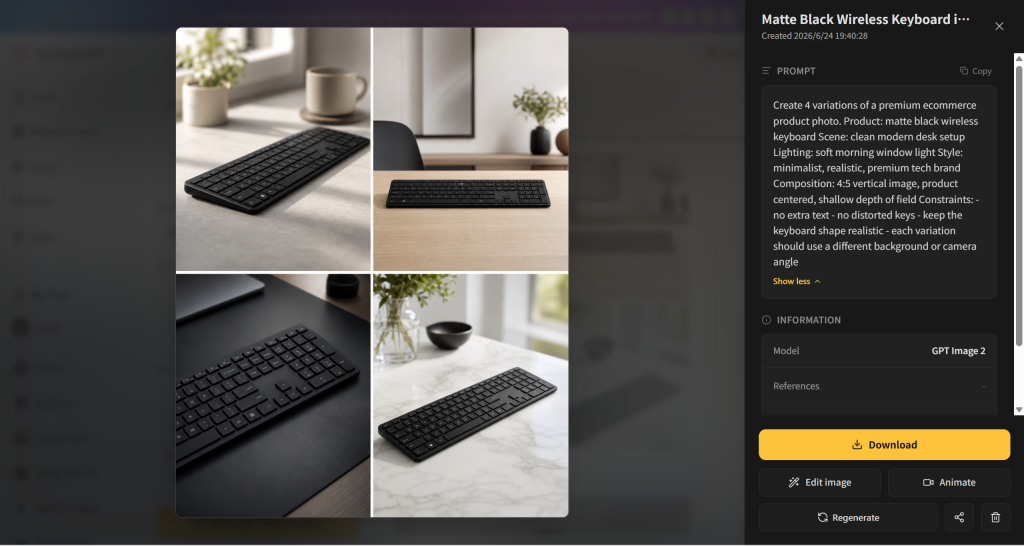
The result and its prompt sit beside the download, edit and animate controls. You can review the image, save a useful version and plan a focused revision from the same result page. For a wider creative shortlist, see the AI image-generator comparison. Before using a final asset in a campaign, review commercial-use considerations for ChatGPT images.
Frequently asked questions
How many images can I generate with ChatGPT Plus per day?
Plus users report about 120 images per day. Leave room for edits and variations when planning a batch.
Does the ChatGPT Plus image limit reset every three hours?
Use the retry time in the image-limit notice. Image and text-message limits have separate reset information.
Does ChatGPT Plus include image generation?
Yes. Plus includes image generation and Images with thinking, alongside higher usage than Free. The US price is $20 per month; API usage is billed separately.
Does image editing use the same allowance as a new image?
Treat edits as image-generation work when planning your batch. Save capacity for revisions as well as first drafts.
Where can I see my remaining image generations?
Look for remaining-use information or a retry time in the image-limit notice inside ChatGPT.
Can I use ChatGPT Plus for API image generation?
ChatGPT Plus does not include API usage. OpenAI bills API usage independently, so a Plus subscription should not be treated as API image credit.
Do I need a specific ChatGPT model to generate images with Plus?
No. ChatGPT Plus includes image generation. Use the Images tool or ask ChatGPT to create a picture; choosing a chat model does not provide a separate image allowance.
Can ChatGPT Free generate images?
Yes. Free includes image creation, with a smaller allowance than paid plans.
Does upgrading from Free reset a reached limit?
Yes. OpenAI says a Free account’s usage rates reset when it upgrades to Plus, Pro or Business.
Will GlobalGPT increase my ChatGPT image allowance?
GlobalGPT provides another image workspace with its own models and usage. Use it to continue your project after reaching ChatGPT’s limit.





