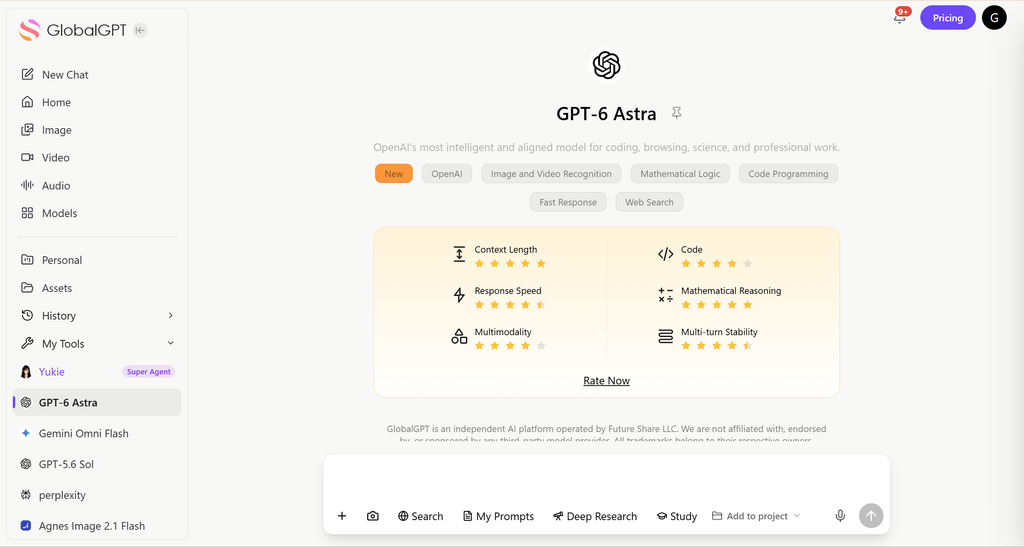
Current status checked September 22, 2026. OpenAI’s Canvas help page describes Canvas as a writing and coding workspace, while model availability and plan access can change. For a second opinion or a different model, GPT-6 Astra on GlobalGPT provides a separate multi-model route without changing the Canvas workflow.
ChatGPT Canvas is a dedicated, split-screen workspace interface designed for collaborative writing and coding, allowing you to edit specific sections of an AI-generated project without losing context. However, relying exclusively on this premium feature often forces users into expensive, single-model subscriptions that heavily restrict their overall creative flexibility.
Being locked into just one ecosystem means you inevitably hit a wall when a specific model struggles to debug your code or refine your academic text. Fortunately, GlobalGPT solves this exact problem by breaking down the barriers between isolated AI environments, giving you ultimate freedom.
As an all-in-one AI platform, it lets you seamlessly switch between industry-leading models like GPT-6 Astra
, Claude Opus 5, and Gemini 3 Pro in one place. With the Basic Plan starting around just $5.8, it is radically cheaper than paying for multiple separate subscriptions, while offering a truly seamless workflow with no region restrictions.
What is the ChatGPT Canvas Feature?
ChatGPT Canvas is essentially an AI-powered “Google Doc” built directly into the ChatGPT interface. Instead of a continuous, linear chat feed, Canvas opens a dedicated window on the right side of your screen to help you use ChatGPT effectively.
This layout allows you to work side-by-side with the AI. You can make manual, inline text modifications or highlight specific code snippets for targeted revisions without rewriting the entire prompt.
As of 2026, Canvas is available on Web, Windows, and macOS for most subscription tiers (Free, Plus, Pro, Team, Enterprise, and Edu).
How to Access and Open ChatGPT Canvas
Accessing this feature is incredibly straightforward. The system uses an auto-trigger mechanism, meaning ChatGPT automatically opens a Canvas when it generates content exceeding 10 lines or detects a complex coding/writing task.
If you want to open it manually, you can use direct commands. Simply type "open a canvas", "open a coding canvas", or use the /canvas shortcut in the prompt composer.


If your Canvas is not showing up, ensure your prompt is specific (e.g., “Write a 500-word essay”) and that you have selected a Canvas-supported model from the top-left dropdown menu.
How to edit ChatGPT Canvas
Enter a new AI suggestion. In the main chat window, enter a new suggestion to tell ChatGPT how you want to modify the canvas.
Modify a specific element. In the canvas window, select the specific element you want ChatGPT to edit. In the floating toolbar that appears, click “Ask ChatGPT,” and then enter your suggestion. You can also use the toolbar to format the selected element: bold, italic, or apply different text styles.

Writing and Coding Shortcuts on Canvas
Canvas, when used in conjunction with ChatGPT, provides a range of writing shortcuts to help you request revision suggestions, adjust article length, update your target reading level, add emojis, or perform final polishing. To find these shortcuts, hover your mouse over the shortcut menu in the bottom right corner of the page.
The 5 Core Writing Shortcuts:
- Suggest Edits: Adds inline comments with actionable improvement suggestions.
- Adjust the Length: A slider tool to effortlessly shorten or expand your document.
- Change Reading Level: Adjusts the tone from Kindergarten up to Graduate School.
- Add Final Polish: Automatically checks for grammar, clarity, and consistency.
- Add Emojis: Strategically places emojis for extra color and visual emphasis.

How to Edit Code Using ChatGPT Canvas Tools
ChatGPT Canvas also provides several preset tools to help you edit code. However, it’s important to note that it also has some limitations. For example, the sandbox environment limits you to working with only a single Python file, which can be a fatal flaw for more complex projects or those containing multiple files.
To access the code editing tools, hover your mouse over the code review icon in the canvas (this icon looks like a terminal prompt). The toolbar will expand and display the following options:

- Add logging: Insert print statements to aid in debugging and tracing execution.
- Add comments: Add comments to explain code and improve readability. However, keep the following in mind. First, since Canvas doesn’t always have full system access, you need to verify the accuracy of its comments and ensure they reflect how your code integrates into a larger project. Second, ChatGPT typically adds more comments than is common in production code. While this isn’t necessarily a bad thing, it can make files appear cluttered, so you may need to remove unnecessary comments to improve readability.
- Fix bugs: Detect and rewrite problematic code to fix bugs. However, note that its editing results are inconsistent.
- Port to other languages: Translate your code into languages such as JavaScript, Python, Java, TypeScript, C++, or PHP.
- Code review: Provide inline suggestions to optimize and improve your code. This tool analyzes your code, highlights potential errors, and suggests improvements for functionality and readability. To apply suggestions, hover over the relevant comment and click “Apply”.
While ChatGPT offers a robust coding environment, developers using GlobalGPT can instantly verify these Canvas code outputs across multiple top-tier models like Claude Opus 5 and Gemini 3 Pro without switching tabs.
Managing Your Canvas Projects: Version Control & Exporting
One of the biggest pain points with standard AI chats is losing track of previous drafts. Canvas solves this with a built-in Version History feature in the top toolbar.

You can use the arrows to navigate through previous versions and hit “Previous version” if needed. The Show Changes icon highlights deletions in red and additions in green, just like GitHub.

Once your project is complete, exporting is simple. Canvas intelligently detects your content type and allows you to download files in formats like PDF, Markdown (.md), Word (.docx), or specific code extensions like .py and .js.

The Limitation of Single-Model Platforms
While the ChatGPT Canvas is powerful, tying your entire workflow to a single ecosystem (OpenAI) presents significant limitations. If the model struggles with a specific logic flaw, you are stuck.
Many users find themselves comparing ChatGPT Canvas with Claude Opus 5 Artifacts. Both are excellent, but maintaining premium subscriptions for ChatGPT ($20/mo) and Claude ($20/mo) quickly leads to subscription fatigue.
Furthermore, text-based Canvas tools ignore the modern multimedia workflow. If you need AI-generated images or videos for your article, you have to pay for yet another service.
GlobalGPT: The Ultimate AI Workspace Alternative
Why pay over $60 a month for multiple expensive subscriptions when you can access the world’s best AI models in a single, unified workspace?
GlobalGPT eliminates the need to choose. It is an all-in-one platform featuring over 100+ industry-leading models, allowing you to seamlessly switch between GPT-6 Astra, Claude Opus 5, and Gemini 3 Pro with a single click as an amazing ChatGPT alternative.
Beyond text and code, GlobalGPT bridges the multimedia gap. You can generate stunning visuals with Midjourney or create high-fidelity videos using Sora 2 Pro, Veo 3.1, and Kling, all within the same platform.

GlobalGPT allows you to seamlessly compare and utilize the world’s most powerful AI models in one affordable platform. Stop paying for fragmented subscriptions; upgrade your workflow today and access everything from GPT-6 Astra to Sora 2 Pro in a single workspace.
FAQs
Can every student get Perplexity Pro for free?
No. A free account is available, while Pro access depends on an active education or partner offer and the eligibility shown for your account.
Do I need a university email?
No. Perplexity’s current student page says you can register or sign in with any email. Student eligibility is a separate verification step; the official guidance captured September 30, 2026 describes SheerID and says the verification email can differ from the Perplexity account email.
Why is the price different from an older article?
The current student page displays US$10/month, while an older article may describe an expired campaign, a different country, an annual-billing equivalent, or a price shown only after sign-in. Use your own checkout summary as the current decision point.
Can I cancel after receiving the student offer?
Follow the cancellation path for the channel you used: account settings for desktop subscriptions, or device subscription settings for app subscriptions. Check the current access and refund terms before cancelling.
Is GlobalGPT the same as a Perplexity student account?
No. GlobalGPT is a multi-model workspace that can include Perplexity access, but it is not the official Perplexity student subscription. Perplexity controls its own education verification, billing, and account benefits.