Yes, ChatGPT can help with multiple image ideas from one request, but it is safer to separate casual ChatGPT prompting from dependable batch generation. In the ChatGPT app, a prompt like “make four separate images, not a collage” may produce several outputs for some accounts, but it may also return one image, a grid, or a sequence of follow-up outputs. For repeatable multi-image production, the reliable route is the OpenAI Image Generation API or a batch-friendly creative workspace.
This guide explains exactly what’s officially supported, what users are actually experiencing, and how to generate multiple images efficiently today.
For non-developers, the practical advantage of GlobalGPT is that the work stays in one place. You can draft copy, research an idea, create images, and move on to video without opening a new website for every step. That makes it easier to keep a project moving, especially when you are producing several assets for the same campaign. On August 4, 2026, the GlobalGPT pricing page listed Basic at $5.8/month, Pro at $10.8/month, and Unlimited at $25.0/month under annual billing. Prices can change, so check the order page before subscribing.

Current Answer: Can ChatGPT Generate Multiple Images at Once?
Yes, but not every OpenAI interface handles “multiple images at once” the same way.
| Method | Multi-image support | Reliability | Best for |
|---|---|---|---|
| ChatGPT app | Sometimes; depends on UI behavior and limits | Medium | Fast ideas, prompt refinement, visual brainstorming |
| OpenAI Image API | Yes; supports the n parameter | High | Batch generation, repeatable workflows, developer pipelines |
| Responses API | Supports image generation in conversational workflows | Medium to high | Multi-turn editing and agent-style image flows |
| GlobalGPT | Yes, depending on the selected model and plan | High for creator workflows | No-code batches, model comparison, social and ad variations |
In short:
- Via OpenAI’s Image Generation API: fully supported, reliable batch image generation
- Inside the ChatGPT UI (Plus / Pro): capability exists, but rollout and behavior are inconsistent
- For creators who need speed and volume: platforms like GlobalGPT already offer stable multi-image workflows across multiple models
ChatGPT is useful for the first two. The OpenAI API is usually better for the third.
What Does “Generate Multiple Images at Once” Actually Mean?
When users ask whether ChatGPT can generate multiple images at once, they usually mean one of three things:
- Multiple images from a single prompt
- Multiple variations of the same idea
- Batch generation without repeating prompts manually
ChatGPT is strongest for the second use case because it is conversational. You can describe a visual direction, ask for revisions, compare alternatives, and refine the prompt.
The OpenAI Image API is strongest for the first and third use cases because the request can explicitly ask for multiple images.
GlobalGPT is useful when you want a no-code workspace for repeated image tests across different models.
Official Capability: ChatGPT Images 2.0 and GPT Image API
OpenAI’s current developer documentation lists GPT Image 2 as its state-of-the-art image generation model. The model page identifies the model ID as gpt-image-2, gives the default snapshot as gpt-image-2-2026-04-21, and lists Image generation and Image edit as supported endpoints.
Official fact check
Verified on August 4, 2026 from OpenAI Developers: gpt-image-2 is the current GPT Image 2 model ID in the official model page, with image generation and image edit endpoint support. ChatGPT app limits and API rate limits are different surfaces and should not be mixed.
That distinction matters. A ChatGPT prompt such as “make four images” is not the same as running a controlled image-generation workflow through the API. The UI may follow the request, but it should not be described as a guaranteed batch generator for every account.
Can ChatGPT Generate Multiple Images in the Chat Interface?
Sometimes — but not consistently.
What the UI Supports Today
In the ChatGPT web app (Plus / Pro):
- You can ask for “4 images” or “multiple variations”
- The model understands the request
- But many users still receive only one image per response
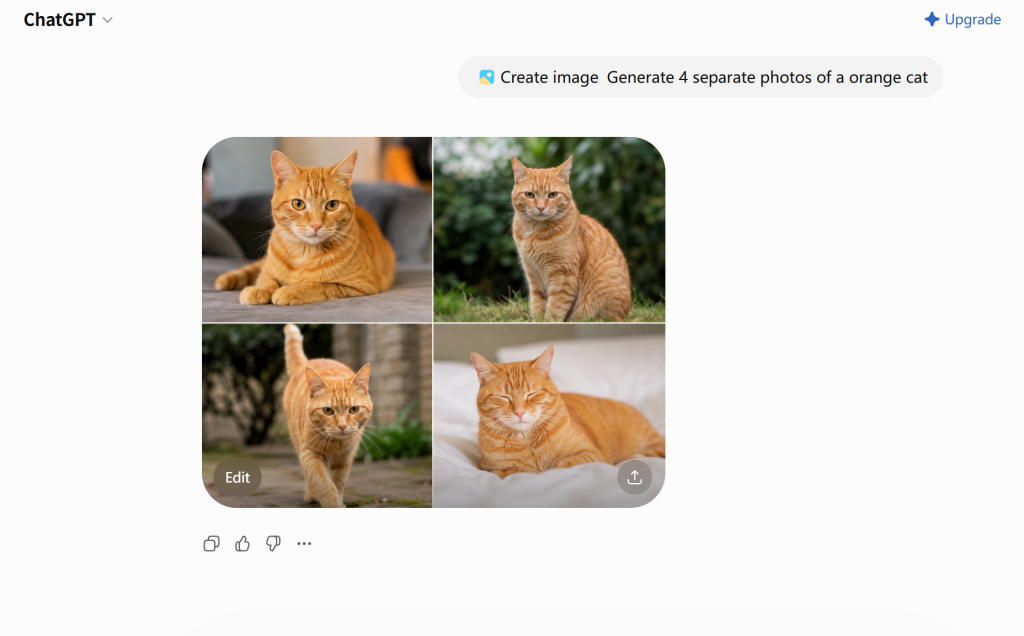
Use ChatGPT for creative iteration, but do not depend on the ChatGPT UI alone for production-scale batch generation.
What Users Report
Across Reddit and community discussions:
- Some users see pop-ups claiming ChatGPT can generate multiple images

- Others repeatedly receive only a single image even with explicit prompts
- Behavior varies by account, region, and rollout phase
Conclusion: The ChatGPT UI is not yet a reliable tool for batch image generation, even though the underlying model supports it.
Why ChatGPT May Only Generate One Image
ChatGPT may return one image because the chat interface controls how image requests are interpreted and delivered. Even if the underlying image system can support multiple outputs, the UI may choose one image, queue outputs sequentially, or convert “multiple images” into one collage.
To reduce that problem, make the output format explicit:
Create 4 separate images, not one collage.
Each image should be a standalone output.
Use a different composition, lighting style, and color palette for each image.
If ChatGPT still creates a collage, reply with:
Please separate these into individual images.
Do not use a grid, contact sheet, or collage format.
Start with image 1 and continue until all 4 versions are complete.
Reliable Method: OpenAI Image Generation API
If you need repeatable multi-image output, the Image Generation API is the official production route. It gives developers explicit request controls, while actual output still depends on the selected model, endpoint, account limits, and current API documentation.
The API allows developers to:
- Specify the number of images (
n) per request - Generate images in a single batch
- Control size, format, and output type
- Scale image generation programmatically
This confirms an important point:
The practical distinction is workflow control: the API is built for repeatable image-generation jobs, while ChatGPT app behavior can vary by account, rollout, and session.
The Real-World Problem for Creators
For most creators, marketers, and designers, the API approach has major downsides:
- Requires coding
- Requires API key management
- Pricing complexity
- No visual prompt iteration UI
- Not beginner-friendly
This is exactly where GlobalGPT becomes relevant.
Faster Alternative: Generate Multiple Images with GlobalGPT
GlobalGPT is an all-in-one AI platform that integrates multiple top image models — including GPT-4o-class image generation — into a creator-friendly interface.
Why Creators Use GlobalGPT for Multi-Image Generation
- Generate multiple images per prompt reliably
- No API setup, no coding
- Faster generation than official interfaces
- Batch-friendly workflows for creators
- Access to 100+ AI models in one place
Instead of fighting UI limitations or opening multiple ChatGPT tabs, creators use GlobalGPT to:
- Generate multiple variations instantly
- Compare styles side-by-side
- Iterate at production speed
This is especially useful for:
Designers/ Marketers/ Social media managers/ YouTubers/ AI art creators/ Anyone needing volume + speed

All-in-one AI platform for writing, image&video generation with GPT-5, Nano Banana, and more
| Method | Best for | Multi-image reliability | Coding required |
|---|---|---|---|
| ChatGPT app | Quick image ideas, visual brainstorming, variations | Medium; depends on plan and limits | No |
| OpenAI Image API | Developers, batch output, repeatable workflows | High; supports the n parameter | Yes |
| GlobalGPT | Creators, marketers, social media teams, visual testing | High for creator workflows | No |
Best Prompting Practices for Multiple Images
Use a precise number:
Create 4 separate images of a futuristic city at night.
Each image should use a different color palette and camera angle.
Do not make a collage.
Define the variation axis:
Create 3 separate product ad concepts for the same smart watch.
Variation 1: luxury studio lighting.
Variation 2: outdoor fitness lifestyle.
Variation 3: minimalist ecommerce product photo.
Name the format you do not want:
Do not create a grid, collage, contact sheet, or multi-panel image.
Return each version as its own image.
Current Limitations and Pricing Notes
Even in 2026, multi-image generation has practical limits:
- ChatGPT UI behavior can vary by account and rollout.
- Plan limits and rate limits may apply.
- Multiple requested images may be delivered sequentially.
- ChatGPT may create one collage unless the prompt says “separate images.”
- Large batch workflows are better handled through the OpenAI Image API or a batch-friendly image platform.
For subscription claims, use only official pricing information. The current ChatGPT pricing page lists Free, Go, Plus, Pro, Business, and Enterprise plans.
This is why professional creators rarely rely on the ChatGPT UI alone for image production.
Final Verdict: Can ChatGPT Generate Multiple Images at Once?
Yes, ChatGPT can generate multiple images at once — the capability exists at the model and APIlevel. However:
- The ChatGPT interface is inconsistent
- The Image Generation API is reliable
- Creator platforms like GlobalGPT already solve this problem in practice
If your goal is speed, volume, and consistency, relying on UI-only generation is no longer enough.
FAQ
Can ChatGPT generate several separate images from one prompt?
It can, but the result is not consistent across every account or session. A request for four images may return separate outputs, one image followed by more, or a single collage. If separate files matter, state the exact number and say that you do not want a grid or collage.
How many images can ChatGPT generate at once?
There is no single public limit that applies to every ChatGPT user. The result can vary with plan access, account rollout, demand, safety checks, and temporary limits. Treat exact numbers shared in forums or older guides as account-specific unless the official pricing page or your account shows the same limit.
Why did ChatGPT give me one image instead of four?
The prompt may have been interpreted as one composition, or the interface may be delivering the set one image at a time. Try: “Create four separate standalone images. Do not combine them into a grid, collage, or contact sheet.” If it stops after one, ask it to continue with versions two through four.
Should I use ChatGPT or the OpenAI Image Generation API?
Use ChatGPT when you are exploring a visual direction or revising an image through conversation. Use the OpenAI Image Generation API when you need separate outputs, repeatable jobs, retries, and production tracking. The API is the better fit when a fixed delivery process matters.
Do ChatGPT Plus or Pro include a fixed image allowance?
Paid plans can affect access, speed, and usage limits, but you should not assume one fixed image quota applies to every account. Check the official ChatGPT pricing page or your account interface for the limit available to you. ChatGPT subscription limits and OpenAI API billing are separate.
What is the easiest way to create many image variations without coding?
For a small set, give ChatGPT a structured prompt and ask it to continue until every version is complete. For a broader creative workflow, an all-in-one workspace such as GlobalGPT keeps writing, research, image creation, and video work in one place, so you do not have to open a different website for each step. For automated production at scale, use the OpenAI API.