GPT-LIVE 1 REVIEW · DOCUMENTATION CHECKED OCTOBER 1, 2026
GPT-Live 1 is OpenAI’s model for spoken conversations that can keep listening while it speaks. But is it a practical foundation for a voice agent, or just another audio model with a polished demo?
This review looks at the parts that affect a real build: full-duplex conversation, backend delegation, tool use, transport choices, pricing, rate limits, and the difference between GPT-Live and the Realtime API. It also checks where GlobalGPT offers a similar audio workflow and where the public evidence stops short of proving feature parity.
The review is documentation-based rather than a paid hands-on benchmark. The facts below come from OpenAI’s current model and GPT-Live guides, plus GlobalGPT’s public audio and API pages. That means the verdict is about architecture and fit, not a claim about latency, voice quality, or reliability on one unmeasured call.
Kurze Antwort: GPT-Live 1 is a strong choice when your application needs a natural, interruptible voice conversation and a backend agent that can search, call tools, or complete work while the conversation continues. Its model fee is $0.05 per voice-session minute, billed by the second, with backend model and tool charges added separately. GlobalGPT offers similar audio use cases through public text-to-speech, speech-to-text, recording, and transcription tools, but its public pages do not establish an OpenAI-compatible GPT-Live session or the same full-duplex delegation architecture.
Auf dieser Seite
Was ist GPT-Live 1?
GPT-Live 1 is a full-duplex voice model for real-time conversations. Full duplex means the model can receive speech and produce speech at the same time, so the interaction can include interruptions, short confirmations, and overlapping turns instead of waiting for a complete recording before answering.
OpenAI separates the live voice layer from the reasoning and execution layer. GPT-Live manages the spoken conversation and decides when to ask for help. A backend model or agent handles deeper reasoning, web search, function calls, business rules, and task state. OpenAI calls that handoff delegation.
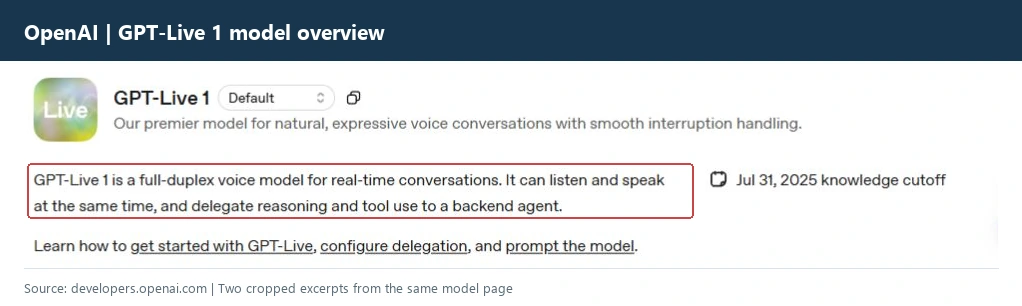
How a GPT-Live 1 request is split
The user speaks through a browser, server, or phone connection. GPT-Live listens, responds, and handles turn-taking.
The live model sends a task to a configured Responses backend or to your own client-managed agent.
Your application checks permissions, runs tools, and returns a verified result for GPT-Live to explain aloud.
That split is the reason GPT-Live 1 feels different from a speech-to-text request followed by a text completion and a text-to-speech request. A chained design can work well, but your application must manage turn detection, transcript state, interruptions, and playback sequencing. GPT-Live provides a voice conversation layer for that job.
For a useful background comparison, see our guide to the ChatGPT voice rollout and the practical differences between consumer voice features and developer APIs.
GPT-Live 1 vs. Realtime API
These names are easy to mix up because both support live audio. OpenAI’s current audio guide positions GPT-Live as the starting point for a new conversational voice application, while the Realtime API remains the more session- and event-oriented route when you need its specific control model.
Sharing WebRTC or a WebSocket transport does not make GPT-Live and Realtime handshakes, credentials, or event formats interchangeable. Treat them as separate integration choices and follow the connection guide for the API you select.
If your product already has a text agent, GPT-Live can be the conversational front end while the existing agent remains the backend. If you need to inspect every audio event or build a custom session controller, Realtime may give you the lower-level control you want.
What GPT-Live 1 does well
Based on the official specification, GPT-Live 1’s strongest value is the boundary between conversation and work. It is designed for a user who expects to talk naturally while an assistant looks something up, calls a tool, or completes a task.
The backend separation also helps with governance. Your application still owns permission checks, required confirmations, tool execution, and task state. GPT-Live does not turn an untrusted voice command into automatic authority over your systems.
For teams comparing voice output rather than agent architecture, keep the question separate. A text-to-speech workflow evaluates voices and delivery; it does not prove that a model can maintain a delegated live conversation.
What a minimal session configuration looks like
The following shape mirrors the official Python delegation example. It is a documentation example, not an executed request, and it contains no API key.
session = {
    "model": "gpt-live-1",
    "delegation": {
        "type": "responses",
        "responses": {
            "model": "gpt-6-luna",
            "instructions": "Answer briefly and delegate order lookups to the approved tool."
        }
    }
}
Where GPT-Live 1 falls short
GPT-Live 1 is not a complete voice-agent product that removes application engineering. The documented model gives you the live conversation layer, but the surrounding system still determines whether the product is safe, useful, and affordable.
- Backend costs stack up. The $0.05 voice-session rate excludes the Responses model, tools, web search, and other backend usage.
- Free tier access is not listed. The model page says free-tier concurrent sessions are not supported; paid API tiers have concurrent-session limits.
- Strukturierte Ausgaben werden nicht unterstützt. GPT-Live’s model page lists structured outputs and fine-tuning as unsupported, so use the backend for strict schemas.
- You still need an application server. Keep API keys on a trusted server, handle permissions, and preserve transcript/task state when using client delegation.
- Speech quality needs your own evaluation. The official page describes the model’s role, but it does not prove pronunciation, interruption quality, or latency for your vocabulary and network conditions.
- Realtime is not automatically a drop-in replacement. Different handshakes and event formats mean an existing Realtime app may need a migration plan.
OpenAI’s documentation also makes an important distinction about interruptions. Backend work can continue after the caller interrupts, but your application decides whether to finish or cancel it. That policy choice affects user trust, tool cost, and the chance of completing the wrong task.
If your requirement is only transcription, captions, or a one-shot voiceover, a dedicated audio endpoint may be simpler. A useful next read is our overview of video transcription routes.
GPT-Live 1 pricing and cost examples
OpenAI lists GPT-Live 1 at $0.05 per minute for voice sessions, billed by the second. Session duration is not rounded up to a whole minute. That price covers the live voice model; backend Responses calls and tool usage follow their own pricing.
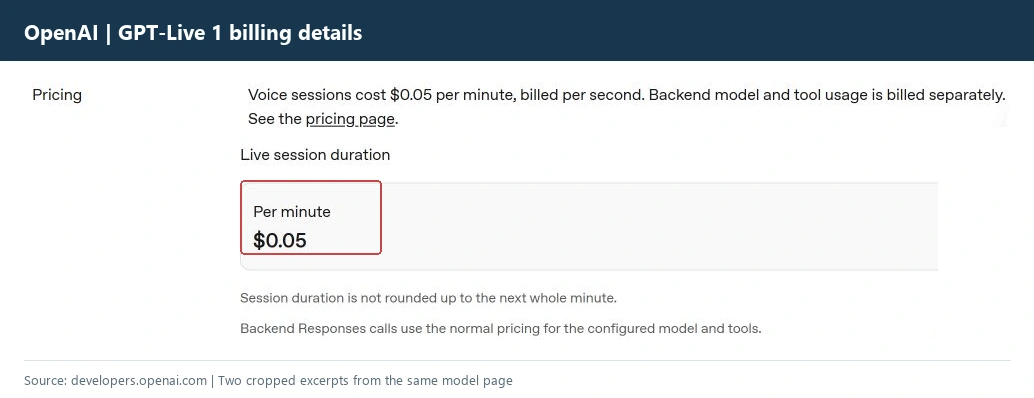
Model-fee examples at $0.05 per voice minute
For budgeting, separate three numbers: time connected to the live voice model, backend reasoning time, and tool or search usage. A short conversation can still become expensive if every turn delegates to a large backend model or repeats a costly tool call.
The model page lists concurrent-session limits by API tier: free is not supported, Tier 1 lists 25, Tier 2 lists 50, Tier 3 lists 200, Tier 4 lists 300, and Tier 5 lists 500. Treat those as account limits to verify before launch, not a promise that every organization receives the same throughput.
Does GlobalGPT offer something similar?
Yes, in the practical sense that GlobalGPT provides audio tools for speaking and transcription. Its public AI Audio interface exposes text-to-speech and speech-to-text workflows, including recording or uploading audio, transcribing it, and downloading or exporting the resulting text. Its public API overview also documents audio tasks alongside chat, image, and video tasks.
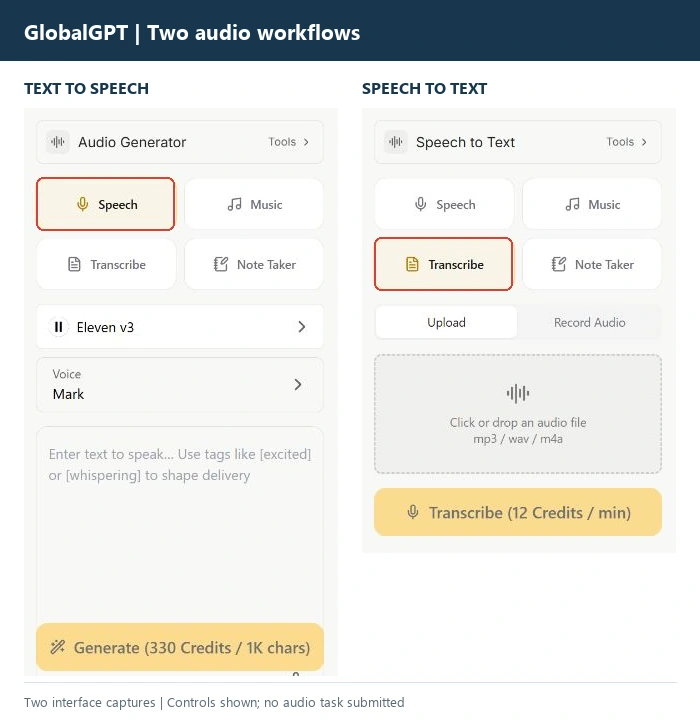
That gives a team a similar starting point when the goal is to add voice or audio work without opening a separate provider account for every model. You can explore the All-in-One-Workflow für KI-Modelle, then choose whether your current task needs conversation, transcription, narration, or generation.
This is a similar-function comparison, not a compatibility claim. GlobalGPT’s public pages do not prove that an OpenAI GPT-Live request, endpoint, event stream, or backend delegation setting can be copied unchanged. Check the model catalog and the selected task’s request fields before building an automated integration.
For voice generation, music, and sound-design comparisons, our reviews of Eleven Multilingual v2, Seed Audio 1.0, und audio model choices cover different goals. A voice agent and a voice generator should not be judged by the same test.
Who should use GPT-Live 1?
Choose GPT-Live 1 when your product needs a user to speak naturally, interrupt the assistant, and receive help from a backend while the conversation continues. Customer support triage, appointment changes, travel assistance, guided forms, and internal operations are good architectural fits when you can define tool permissions and task state clearly.
Choose Realtime when you need its session/event control model and are prepared to own more of the conversation plumbing. Choose a chained stack when transcription, reasoning, and speech generation must be swapped independently or run asynchronously.
Consider GlobalGPT when your priority is access to several audio and AI workflows in one place, or when you want to compare audio tools before choosing a provider-specific live-agent architecture. Start with a small, non-sensitive task, inspect the exact model and request route, and measure your own latency and output quality.
Before production, test interruptions, short corrections, noisy microphones, domain vocabulary, tool failures, permission prompts, and a user who changes their mind while the backend is still working. Those cases decide whether a voice agent feels trustworthy.
For more context on choosing between voice, music, and narration workflows, see our audio-model comparison. If you want to compare several model families without maintaining separate subscriptions, GlobalGPT’s API overview is the practical next step.
Häufig gestellte Fragen
Was ist GPT-Live 1?
GPT-Live 1 is OpenAI’s full-duplex voice model for real-time conversations. It can listen while speaking and delegate reasoning or tool work to a backend model or agent.
How much does GPT-Live 1 cost?
OpenAI lists voice sessions at $0.05 per minute, billed by the second. Backend model usage and tool calls are billed separately.
Ist GPT-Live 1 dasselbe wie die Realtime-API?
No. They serve related live-audio use cases but have different session, handshake, and event models. Choose the API whose documented control model fits your application.
Does GPT-Live 1 support function calling?
The model page lists function calling as supported. Your application still executes authorized functions and checks permissions, confirmations, and dependencies.
Can GPT-Live 1 work while the user interrupts?
Yes. OpenAI documents full-duplex conversation and says backend work can continue when the caller interrupts. Your application decides whether to finish or cancel that work.
Does GPT-Live 1 support structured outputs?
The model page lists structured outputs as unsupported. Put strict JSON or schema validation in the backend workflow instead.
Does GlobalGPT have a GPT-Live 1 equivalent?
GlobalGPT has similar audio tools for text-to-speech, speech-to-text, recording, upload, and transcription. Its public pages do not verify an identical GPT-Live full-duplex session or OpenAI-compatible live endpoint.
Should I choose GlobalGPT or OpenAI directly?
Choose OpenAI directly when you need GPT-Live’s documented session and delegation architecture. Consider GlobalGPT when you want to explore multiple audio and AI workflows in one platform. Verify the exact model route, parameters, and price before scaling.
Try a broader audio workflow
Explore GlobalGPT’s audio tools and model catalog when you want to compare speech, transcription, and other AI workflows before committing to one provider-specific stack.