The best affordable AI video generator is the one that reaches an acceptable clip with the fewest paid attempts. A low sticker price helps, but motion mistakes, identity drift, unusable audio and repeated generations can turn a cheap model into the expensive choice.
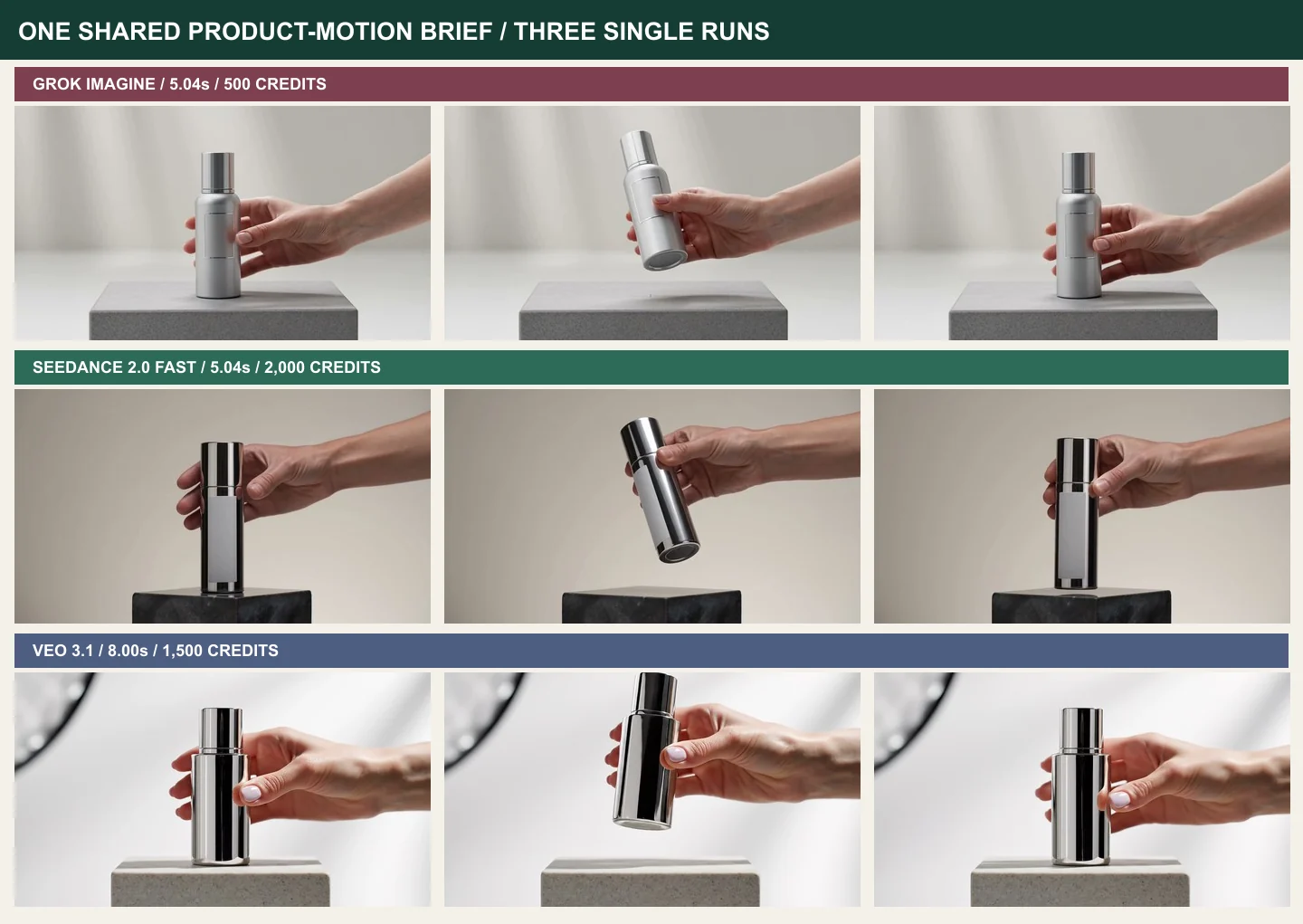
We ran the same product-motion brief through Grok Imagine, Seedance 2.0 Fast and Veo 3.1 using the GlobalGPT. Each selected output completed the central action, but they differed in object design, return position, duration, audio and run-to-run variance. The observed task charges were 500, 2,000 and 1,500 GlobalGPT credits respectively. Those are platform task costs from this batch, not provider subscription prices.
What “Affordable” Should Mean
Price per generation is only the first line of the budget. A working estimate is: attempt cost multiplied by attempts per accepted clip, plus finishing time, upscaling and unused allowance. The method in budgeting AI video credits is more useful than comparing the largest credit number on a pricing page.
Define acceptance before you generate. For our test, the bottle had to remain readable, one person had to lift and rotate it, the camera had to stay fixed, and the bottle had to return to the starting mark. Without those rules, almost any attractive motion could be called a success.
The Shared Product-Motion Test
All three routes received the same prompt: a silver skincare bottle on a stone pedestal, one hand entering from the right, one lift, a slow rotation and a return to the same mark. The brief prohibited text, logos, cuts and camera movement. Grok and Seedance produced roughly five-second 720p clips; Veo produced an eight-second 1080p clip.
This setup tests instruction following and temporal stability rather than cinematic imagination. It is closer to paid product work than a loose fantasy prompt because a client can reject the clip for one wrong object, hand or ending position.
Grok Imagine: Lowest Observed Attempt Cost
The Grok run cost 500 credits. It showed the bottle, completed the pickup and rotation, and returned close to the starting pose. The product stayed readable, though its proportions and surface details shifted during motion. The file also contained an AAC audio stream even though our request did not ask for sound.
That unexpected audio is a workflow detail: inspect streams before editing, especially when a silent deliverable is required. Grok was the lowest-cost observed attempt in this test, not automatically the best choice for every shot.
Seedance 2.0 Fast: Clear Motion, Different Object
The Seedance run cost 2,000 credits at the tested route and returned a silent 1280×720 file. The hand action was easy to follow, but the bottle looked taller, darker and more reflective than the shared brief implied. It did not return to the exact starting mark.
For social footage where the general action matters more than product fidelity, that result may be usable. For an advertisement tied to a real package design, the same deviations can force a retry. Review the current Seedance pricing and route comparison separately because route, model and price details change.
Veo 3.1: More Time, More Variance to Inspect
The selected Veo run cost 1,500 credits and delivered eight seconds at 1920×1080. The longer motion arc made the pickup feel less rushed. A second Veo request was submitted after a local task-log error suggested the first had not registered. Both later appeared and were charged.
The two runs differed in person framing, bottle material and return behavior. That does not make Veo unreliable as a whole; it demonstrates sampling variance and the danger of resubmitting before checking remote tasks. Google documents native audio and image-based direction for Veo 3.1, but our GlobalGPT-routed test is not a direct Gemini API benchmark.
Compare Cost per Usable Result
Suppose a 500-credit route needs four attempts and a 1,500-credit route needs one. The cheaper attempt becomes a 2,000-credit keeper. Reverse the success assumptions and the decision changes again. Your own acceptance log is therefore more valuable than a generic leaderboard.
Track prompt, settings, cost, output, rejection reason and whether the next revision fixed it. The broader Vergleich von KI-Videogeneratoren helps shortlist models, but a ten-shot pilot with your subject and criteria is the better purchasing test.
Match the Model to the Shot
Fast low-cost routes are useful for ideation, mood boards, cutaways and high-volume social variations. Product hero shots, recurring characters and client-approved branding justify more controlled models and more review time. AI UGC video generator shortlist is especially relevant when the format is a talking testimonial rather than a product turntable.
Image-to-video can reduce visual drift when you already have a strong keyframe. The photo-to-video workflow explains how source quality, motion scope and camera restraint affect the result. Text-to-video is better when exploration matters more than matching a fixed asset.
Build a Retry-Aware Budget
- List the required approved clips, not the number of prompts.
- Record the exact cost for each model, duration and resolution.
- Assign an expected attempts-per-keeper value from a pilot.
- Add editing, audio cleanup, upscaling and review time.
- Reserve 15 to 30 percent for difficult shots rather than spending the full budget immediately.
budget Sora alternatives can expand the shortlist, while a prompt-to-video planning workflow keeps prompt development separate from expensive video attempts.
Copy the Shared Product Test Prompt
Use the same brief across candidate models and change only supported settings. A shared prompt does not make models identical, but it gives you a consistent acceptance task. Keep the product, action, ending condition, camera and prohibited changes explicit.
Welche Route sollten Sie wählen?
Choose the lowest-cost route when you need many exploratory clips and can tolerate visual reinterpretation. Choose a stronger image-to-video route when a source frame must survive. Pay for longer duration or higher resolution only when the shot needs it; generating premium settings for a disposable draft wastes budget.
GlobalGPT is useful here because the same project can be tested across routes without opening a separate subscription for every model. Open GlobalGPT and run a small comparison batch before committing a campaign budget.
Account for the Costs That Credits Hide
Generation credits do not capture operator time. A five-minute review repeated across twenty variants can exceed the price difference between models. Downloading, renaming, transcoding, checking audio streams, cutting bad frames and documenting usage rights all belong in the production budget.
Queue time matters when a campaign is due today. So does failed-task behavior: some genuine failures are uncharged, while a successful but unusable output is still a paid attempt. Subscription allowance can also expire or become stranded if the team cannot use it before renewal. Put those costs beside credits in the same worksheet instead of treating them as invisible overhead.
Design a Pilot That Predicts Real Work
A useful pilot contains the shots you expect to struggle with: hands touching products, readable package geometry, a face turning, a camera move and a clear end position. Testing only a slow landscape pan makes every model look affordable. Use three to ten representative briefs and apply the same pass/fail rules.
Record why each output failed. “Bottle changed shape,” “hand covered label,” “camera moved” and “ending pose wrong” are actionable categories. After the pilot, calculate keeper rate by shot type rather than one average across everything. The model that wins simple atmospheric shots may lose identity-sensitive work, and your budget should reflect that split.
Budget for the Deliverable, Not the Demo
Clients usually need several aspect ratios, clean audio, captions, room for text and a license trail. A beautiful 16:9 draft may require a new generation for vertical placement if the subject is too close to the edge. Generate with composition margins early, or include reframing and extension in the finishing budget.
Archive the prompt, model route, task ID and approved master. When a provider or route changes, that record explains why a later regeneration looks different. For commercial work, verify current terms at the point of use rather than assuming the generator’s technical success automatically grants every intended right.
Build a Shortlist Before You Spend
Begin with output needs, not brand names. Write down duration, resolution, aspect ratio, source-image support, audio requirement, character continuity and delivery deadline. Remove any route that cannot accept the essential input or setting. Then compare current attempt cost and queue behavior inside the access route you will actually use.
Next, separate hard constraints from preferences. A bottle returning to a mark may be mandatory; cinematic lighting may be optional. Score the hard constraints first. Attractive outputs that fail them should not inflate a model’s keeper rate. This prevents reviewers from choosing the most dramatic clip while overlooking a wrong logo, face or product shape.
Finally, keep one backup route. A model may be temporarily unavailable, reject a reference or change its settings. The backup should have already passed a small pilot, so switching does not restart the project from zero. GlobalGPT’s multi-route setup is valuable precisely when the shortlist and acceptance criteria already exist.
Our Affordable-Video Verdict
Grok had the lowest observed attempt cost in this batch and produced a usable action study. Seedance followed the broad motion but changed the object and missed the return mark. Veo delivered a longer high-resolution clip, while its two charged runs exposed meaningful sampling variance. None of those single outcomes proves a permanent ranking.
The purchasing rule is durable: define a keeper, pilot the shot, calculate retries and inspect the actual file. Affordable video is a production outcome, not a number printed beside a Generate button.
Recheck the calculation whenever the brief changes. A talking face, two interacting people or readable product text is a different workload from a simple object turn. Duration and resolution can change the task price, but complexity changes the retry rate. Both belong in the same forecast.
For a small team, begin with the lowest setting that can answer the creative question. Use drafts to approve framing and motion, then pay for the delivery setting. Archive one rejected and one accepted example so future producers understand the standard. After several jobs, your own keeper-rate history becomes a better buying guide than any universal ranking.
Before buying a large credit pack or subscription, test three real briefs and record keeper cost, review time and finishing work. Include one difficult shot, because easy demos hide the retry risk that drives production cost. Revisit the shortlist when duration, resolution, audio or source requirements change. A model is affordable only for the workload it can finish. Keep the pilot files and acceptance notes so the next producer can repeat the decision instead of starting from marketing claims. Review the budget after delivery and replace assumptions with measured keeper rates from the completed job. Base the review on delivered files, not preview thumbnails.
Häufig gestellte Fragen
What is the most affordable AI video generator?
There is no universal winner. In our GlobalGPT test, Grok had the lowest observed attempt cost, but affordability depends on how many attempts you need before a clip passes your criteria.
Are free AI video generators really free?
Free tiers usually limit credits, queues, duration, resolution, watermarks or commercial use. Treat them as trials and verify current terms on the provider page.
Why does cost per usable clip matter?
A rejected generation still consumes time and may consume credits. Multiplying attempt cost by attempts per keeper gives a more realistic production number.
Did all three tested models follow the prompt?
All completed the pickup and rotation. They differed in bottle appearance, return position, timing, audio and framing, so none followed every constraint perfectly.
Can I compare AI video models in GlobalGPT?
Yes. GlobalGPT offers multiple video routes in one account. Available models, settings and credit costs can change, so confirm the current route before a batch.
Which AI video workflow is best for product shots?
Start from a clean product image, restrict the action and camera, define an ending mark and test a short draft. Choose the route with the lowest observed cost per accepted shot.