

الحكم السريع: Tripo H3.1 هو نموذج ذكاء اصطناعي عالي الدقة يحول صورة واحدة إلى عنصر ثلاثي الأبعاد ذو نسيج بارز. وقد صُمم هذا البرنامج لسير العمل التي تكون فيها تفاصيل الأسطح والمظهر في اللقطات المقربة أكثر أهمية من انخفاض عدد المضلعات أو سرعة الإنشاء.
في الاختبار العملي الذي أجريناه لتحويل الصور إلى صور ثلاثية الأبعاد، أرسلنا كوبًا خزفيًّا ومصباحًا مكتبيًّا وحقيبة ظهر عبر تطبيق «Broly Anywhere» باستخدام عملية التحميل tripo3d/h3.1/تحويل الصورة إلى صورة ثلاثية الأبعاد المسار المقدم من Wavespeed. أسفرت المهام الثلاث جميعها عن ملفات GLB 2.0 صالحة تحتوي على مواد PBR ونسيج مدمج. استغرق الإنشاء ما بين 139.4 و143.4 ثانية لكل نموذج، وتكلفت كل عملية $0.30.
احتوت النماذج الناتجة على ما يقارب 1.39 إلى 1.46 مليون مثلث، وأنتجت ملفات يقترب حجمها من 40 ميغابايت. وتُظهر هذه النتائج أن H3.1 يُنتج باستمرار هندسة كثيفة ومزودة بنسيج، لكن كثافة المضلعات وحدها لا تضمن توبولوجيا نظيفة، أو أسطحًا مخفية دقيقة، أو عنصرًا جاهزًا للرسوم المتحركة.
تُخصص Tripo رسميًا نسخة H3.1 لأصول الشخصيات الرئيسية، والعناصر المرئية التسويقية، وعمليات العرض المقربة، والطباعة ثلاثية الأبعاد. وبناءً على اختباراتنا، يُفضل اعتبارها نقطة انطلاق تركز على الدقة في المقام الأول لتصور المنتج، وتطوير المفاهيم، وعمليات النحت اللاحقة. يجب على مطوري الألعاب ومصممي الرسوم المتحركة توقع الحاجة إلى فحص الناتج أو تقليص عدد المضلعات فيه أو إعادة تنظيم شبكته قبل بدء الإنتاج.
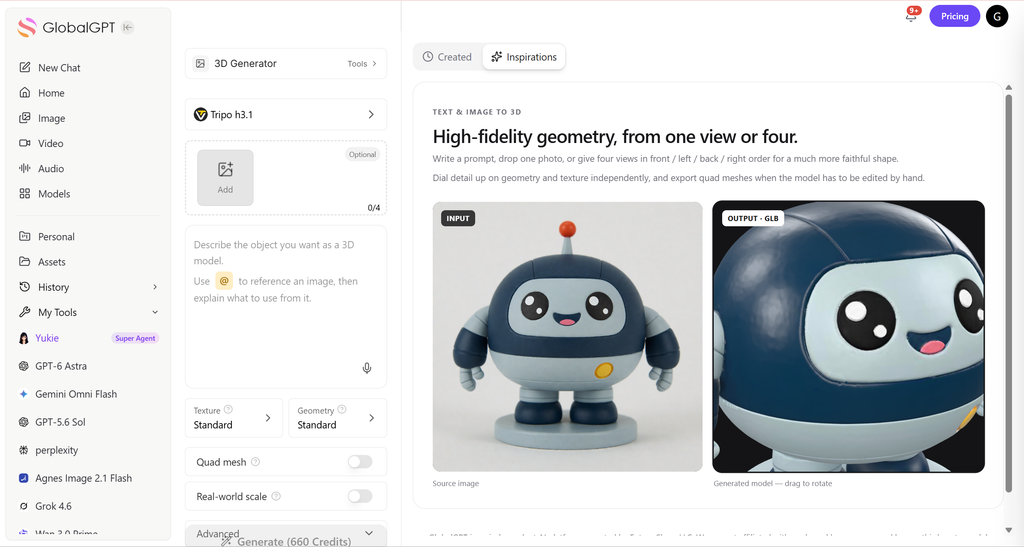
ما هو Tripo H3.1؟
Tripo H3.1 هو نموذج الجيل الثالث ثلاثي الأبعاد عالي التفاصيل من Tripo، المخصص للمدخلات النصية والصور الفردية والمناظر المتعددة. وتُخصص Tripo هذا النموذج لاستخدامه في الأصول البارزة، وعروض التسويق، والعروض التقديمية المقربة، والطباعة ثلاثية الأبعاد. النسخة التجريبية الحالية للمطورين هي الإصدار 3.1-20260211, ، وتشير المواصفات الرسمية إلى دعم إخراج «Mesh Plus PBR»، وما يصل إلى مليوني وجه، وتصدير ملفات FBX رباعية الأضلاع، وخيار «Low-Poly» الذكي.

بالنسبة للفنانين الذين يقومون بإعداد الصور الأصلية، فإن الحصول على لقطة واضحة للمنتج بزاوية ثلاثة أرباع أمر مهم. دليلنا إلى تحسين دقة توليد الصور باستخدام الذكاء الاصطناعي ويوضح ذلك لماذا تجعل الإشارات الشكلية الواضحة والخلفيات الخاضعة للسيطرة سير العمل البصري في المراحل اللاحقة أكثر قابلية للتنبؤ.
ما الذي تغير في وضع H3.1 عالي التفاصيل؟
التغيير الأساسي يكمن في التركيز: تمنح H3.1 الأولوية للهندسة الكثيفة، وتفاصيل الأسطح، والدقة الهيكلية، والمواد الملائمة لتقنية PBR. أما Tripo’s الإعلان الرسمي عن H3.1 ويصفها بأنها أسلوب مخصص للأصول التي يجب أن تصمد أمام الفحص الدقيق، وليس مجرد أداة أسرع لإنشاء المسودات.
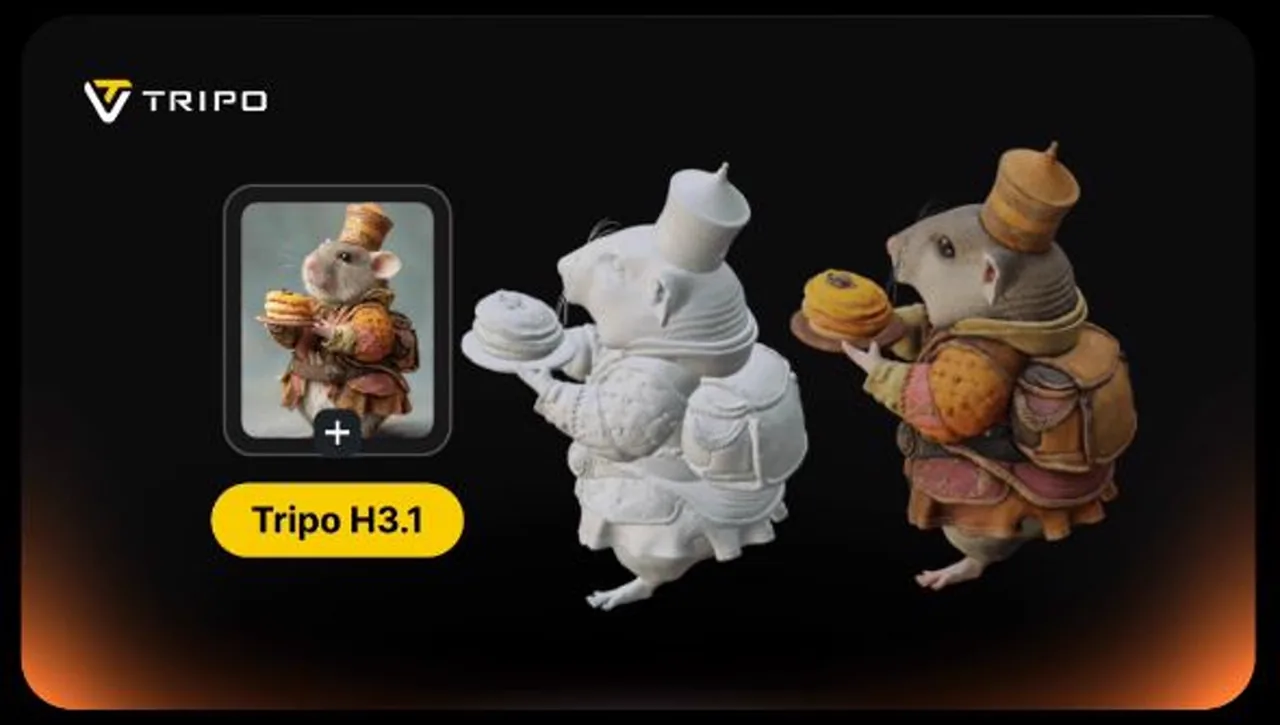
هذا التقييم موثوق به، لكن مصطلح “التفاصيل العالية” يشمل عدة خصائص مختلفة. فكثافة المضلعات، ودقة الصورة الظلية، ووضوح النسيج، وتخطيط UV، وخلو النموذج من الثغرات، وتدفق الحواف القابل للتعديل، ليست خصائص متبادلة. فقد تبدو الشبكة مفصلة عند عرضها على منصة الدوران، لكنها قد تحتاج مع ذلك إلى إعادة توبولوجيا كبيرة من أجل الرسوم المتحركة أو الاستخدام في الوقت الفعلي.
كيف قمنا باختبار تحويل الصور إلى صور ثلاثية الأبعاد باستخدام Tripo H3.1
قمنا بتنفيذ ثلاث مهام معالجة صورة واحدة عبر Broly Anywhere على https://anywhere.broly.ai/v1. كانت العناصر قنينة خزفية، ومصباح رفيع ذو سطح صلب، وحقيبة ظهر ذات طبقات. لم يستخدم كل طلب سوى اسم النموذج والصورة، لذا فإن هذا اختبار للمسار الافتراضي المُستضاف، وليس لكل الإعدادات المتقدمة في Tripo Studio.
- تشغيل واحد لكل مدخلة؛ ولا يُسمح بإعادة التشغيل الانتقائية.
- الطراز المطلوب:
tripo-h3.1. - مسار المزود الذي تم إرجاعه:
tripo3d/h3.1/تحويل الصورة إلى صورة ثلاثية الأبعادعبر Wavespeed. - الفحص: حاوية GLB، وخصائص الشبكة، والمواد، والأنسجة المدمجة، وحجم الملف، وعدد الرؤوس، وعدد المثلثات.
- لم يتم اختبار ما يلي: المقارنة الخاضعة للرقابة بين الأقراص الدوارة، وحالة المشعب، وتشوه الرسوم المتحركة، أو وقت التنظيف اليدوي.
إذا كنت بحاجة إلى وجهات نظر إضافية قبل التحويل، فإن سير العمل في إنشاء صور متعددة الزوايا من صورة واحدة يمكن أن يساعد ذلك في إنشاء مجموعة مرجعية أكثر شمولاً من الناحية المعلوماتية، على الرغم من أنه لا يزال من الضروري التحقق من اتساق العروض المركبة.
نتائج تجريبية
كوب
139.402 ثانية الاستدلال
$0.30 التكلفة
1,462,313 المثلثات
40.0 ميغابايت GLB
مصباح
142.517 ثانية الاستدلال
$0.30 التكلفة
1,405,776 المثلثات
38.3 ميغابايت GLB
حقيبة الظهر
143.399 ثانية الاستدلال
$0.30 التكلفة
1,385,140 المثلثات
38.6 ميغابايت GLB
| المدخلات | الاستدلال | التكلفة | الرؤوس | المثلثات | حجم GLB |
|---|---|---|---|---|---|
| كوب | 139.402 ثانية | $0.30 | 752,541 | 1,462,313 | 41,922,652 ب |
| مصباح | 142.517 ثانية | $0.30 | 718,820 | 1,405,776 | 40,172,224 ب |
| حقيبة الظهر | 143.399 ثانية | $0.30 | 719,819 | 1,385,140 | 40,458,040 ب |
تم إنجاز المهام الثلاث بنجاح. تجمعت أوقات التنفيذ في نطاق أربع ثوانٍ، وبلغت جميع المخرجات حوالي 40 ميغابايت. في الاختبار، أظهر H3.1 أداءً متسقًا: فقد أعاد شبكة كثيفة ذات نسيج بدلاً من عنصر معاينة خفيف الوزن. وبلغ إجمالي استهلاك واجهة برمجة التطبيقات (API) الملحوظ $0.90.
هذا الاتساق يبعث على التفاؤل فيما يتعلق بالتخطيط الدفعي، لكن ثلاث عينات لا تشكل معيارًا شاملاً. أما فيما يتعلق بإعداد الصورة المصدر، فإن التقنيات العملية الواردة في إنشاء صور واقعية للمنتجات تُعد هذه الأدوات مفيدة عندما تحتاج إلى إضاءة أنظف وانعكاسات أقل غموضًا قبل البدء في مشروع ثلاثي الأبعاد.
فحص المواد الهندسية والمواد القائمة على التمثيل الفيزيائي (PBR)
كان كل تنزيل عبارة عن ملف GLB 2.0 صالح يحتوي على مشهد واحد، وعقدة واحدة، وشبكة واحدة، وعنصر أساسي واحد، ومادة واحدة. واحتوت كل شبكة على سمات الموضع، والعمودي، وUV، بالإضافة إلى ثلاث نسيجات JPEG مدمجة. وقد تم تحديد الملفات https://tripo3d.ai كمولد.
هذه إشارات هيكلية مفيدة، لكنها لا تحدد طوبولوجيا واضحة. احتوت الشبكات التي تم اختبارها على ما يقارب 1.4 مليون مثلث، وهو عدد كبير بالنسبة لكائن واحد. بالنسبة للعديد من الألعاب أو التجارب على الأجهزة المحمولة أو العناصر المتحركة، من المتوقع إجراء عملية تقليل عدد المثلثات أو إعادة تحديد الطوبولوجيا. تُعد كثافة H3.1 أكثر ملاءمةً بشكل مباشرًّا لعمليات العرض الثابتة، أو التصور عن قرب، أو كنقطة انطلاق تشبه النحت.
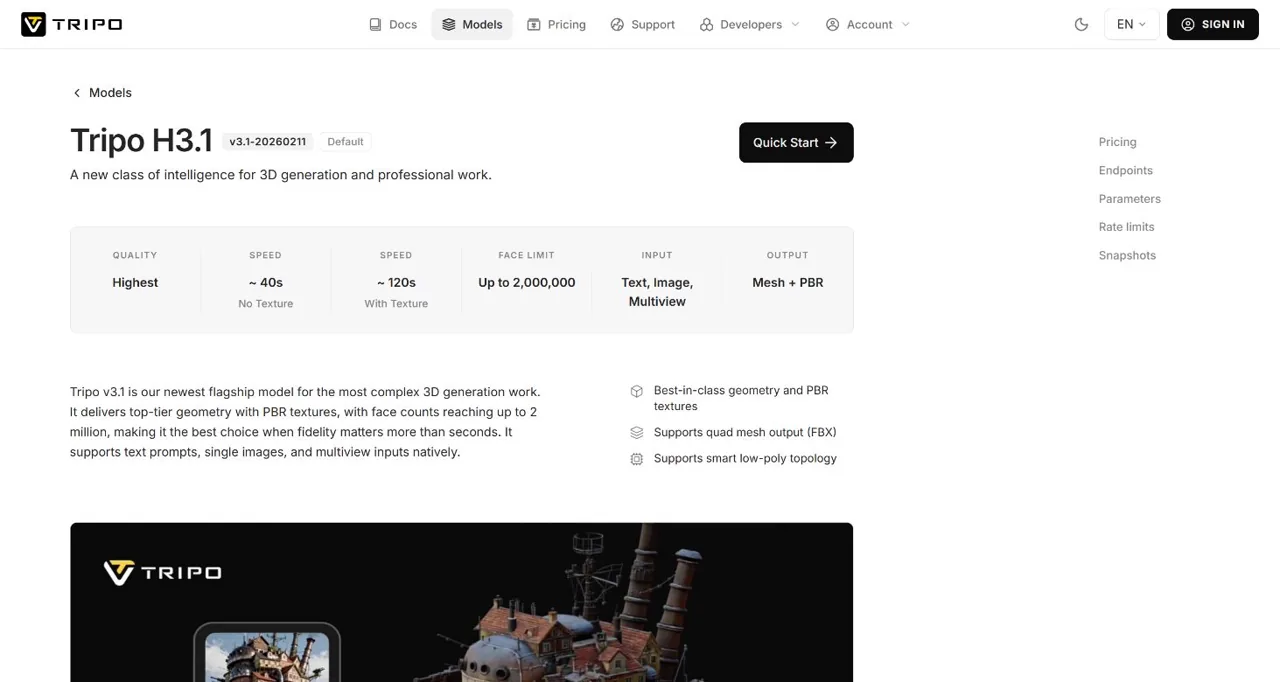
إن المواصفات الرسمية لمطور H3.1 كما تضم قائمة الميزات دعم ملفات FBX رباعية الأبعاد وملفات "سمارت لو-بولي". لم نستخدم هذه الخيارات في طلب البوابة البسيط، لذا لا تتضمن هذه المراجعة تقييمًا لتدفق الحواف أو قابلية التعديل في هذه الملفات.
سرعة توليد الكهرباء وتكلفة الائتمان
تنشر Tripo أوقات إنشاء تقريبية تبلغ 40 ثانية بدون نسيج و120 ثانية مع نسيج. أظهرت تجاربنا الثلاث التي استخدمت النسيج أن وقت الاستدلال الأولي تراوح بين 139.4 و143.4 ثانية. وهذا أبطأ من التقدير المنشور، لكنه لا يزال قريبًا بما يكفي للتخطيط لمهمة تستغرق دقيقتين إلى ثلاث دقائق بدلاً من عملية عرض طويلة دون اتصال بالإنترنت.
| المستوى الرسمي لتحويل الصور إلى صور ثلاثية الأبعاد | الاعتمادات |
|---|---|
| بدون نسيج | 20 |
| نسيج قياسي | 30 |
| نسيج مفصل | 40 |
يُدرج Tripo «الهندسة التفصيلية» بـ 20 وحدة ائتمان إضافية، و«الشبكة الرباعية» بـ 5 وحدات، و«الهندسة الذكية منخفضة البوليغونات» بـ 10 وحدات، و«التوليد على أجزاء» بـ 20 وحدة. وتفرض بوابتنا رسومًا قدرها $0.30 لكل عملية تشغيل افتراضية؛ ولا يعادل سعر واجهة برمجة التطبيقات (API) المُستضافة هذا بشكل مباشر وحدات ائتمان Tripo Studio.
سير العمل والتحكمات الخاصة بتحويل الصور إلى صور ثلاثية الأبعاد
تتمثل خطوات العمل الأساسية في ما يلي: اختر صورة مصدر واضحة، وأرسلها إلى H3.1، وانتظر حتى تكتمل عملية إعادة البناء وإضافة النسيج، وافحص النموذج من كل زاوية، ثم قم بتصديره لتنظيفه. وعادةً ما يُعد المنظر الجانبي بثلاثة أرباع عالي الجودة الذي يظهر فيه الشكل الظلي نقطة انطلاق أفضل من المنظر الأمامي المسطح أو الكائن العاكس على خلفية مزدحمة.
عندما يحتاج المصدر إلى تنقيح،, تحرير الصور باستخدام توجيهات نصية يمكن إزالة العناصر التي تشتت الانتباه أو تبسيط الخلفية. أما بالنسبة للمقتنيات ذات الطابع الفني، فإن سير عمل إنشاء صور التماثيل ثلاثية الأبعاد باستخدام الذكاء الاصطناعي يقدم نموذجًا عمليًّا للصورة المرجعية قبل عملية إعادة البناء.
الفيديو الرسمي لمنتج Tripo H3.1
عرض جون لو لنظام H3.1 وشبكة «سمارت ميش»
يتضمن وصف مقطع الفيديو الذي نشره جون لو رابطًا لحملة «Tripo»، ورمز دعوة، ورمز خصم؛ لذا يجب التعامل معه على أنه تغطية من قبل منشئ محتوى مرتبط تجاريًّا وليس تقييمًا محايدًا غير تابع لأي جهة.
القيود ومخاطر الفشل
الهندسة المعقدة: يُعد استخدام حوالي 1.4 مليون مثلث لكل كائن تم اختباره عددًا مفرطًا بالنسبة للعديد من الأهداف التي تتطلب معالجة في الوقت الفعلي.
لا تزال الأسطح المخفية غير مؤكدة: لا يمكن لصورة واحدة أن تُظهر بشكل كامل الجزء الخلفي أو الجزء السفلي أو الأجزاء المحجوبة من أي كائن.
لم يتم إثبات جودة الطوبولوجيا: الهندسة الكثيفة تختلف عن تدفق الحواف الجاهز للرسوم المتحركة.
كانت عناصر التحكم المتقدمة خارج نطاق تشغيل واجهة برمجة التطبيقات (API) الخاصة بنا: لم نقم باختبار إعدادات «الهندسة التفصيلية» أو «مستويات النسيج» أو «البذرة» أو «الرباعي» أو «المنخفضة البوليجونات الذكية».
لا يزال من الضروري إجراء فحص الجودة البصري: افحص الأجزاء الرقيقة، والثقوب، والمقابض، والمناطق العاكسة، والشعارات، وخطوط النسيج قبل إقرار الأصل.
يمكن أن تقلل المراجع الأفضل من الغموض، لكنها لا تستطيع إزالته. التقنيات الواردة في جعل الصور التي تم إنشاؤها بواسطة الذكاء الاصطناعي تبدو أكثر واقعية تُعد مفيدة للإضاءة وتماسك السطح، في حين أن إرشادات الاستخدام التجاري للصور التي تم إنشاؤها بواسطة الذكاء الاصطناعي من الجدير مراجعة ذلك عندما يتم تسليم العمل الفني الأصلي أو الأصل النهائي في إطار العمل مع العميل.
الحكم: متى يُعد استخدام Tripo H3.1 أمراً مجديًّا؟
استخدم Tripo H3.1 عندما يكون المظهر عن قرب أكثر أهمية من الاقتصاد في عدد المضلعات: مثل تصور المنتجات، ونماذج المفاهيم، والصور الثابتة للتسويق، والنماذج القابلة للطباعة، أو شبكة أساسية كثيفة لإجراء المزيد من النحت. وتدعم اختباراتنا الوصف القائل بـ“الأولوية للدقة”، حيث أسفرت كل عملية عن ملف GLB كبير مزود بنسيج، مع هندسة كثيفة بشكل متسق.
استخدمه كأصل نهائي بنقرة واحدة عندما تحتاج إلى شبكة لعبة خفيفة الوزن، أو طوبولوجيا رسوم متحركة مضمونة، أو هندسة مخفية تم التحقق منها. في هذه الحالات، من الأفضل التعامل مع H3.1 باعتباره بداية مسار إنتاج الأصول، وليس نهايته.
جرب مسار العمل في مساحة عمل واحدة
استخدم GlobalGPT لإعداد الصور المرجعية ومواصلة سير عمل أصول الذكاء الاصطناعي دون الحاجة إلى التنقل بين أدوات إبداعية منفصلة.
جرب GlobalGPT الآنالأسئلة الشائعة
هل يُعد برنامج Tripo H3.1 جيدًا لتحويل الصور إلى صور ثلاثية الأبعاد؟
نعم، خاصةً عندما تريد الحصول على هندسة كثيفة ومخرجات ذات نسيج من صورة واحدة. كانت عملياتنا الثلاث متسقة، لكن كل نتيجة لا تزال تحتاج إلى فحص من زوايا متعددة وقد تحتاج إلى تحسين.
كم من الوقت يستغرق تشغيل جهاز Tripo H3.1؟
تقدر «Tripo» أن المدة تبلغ حوالي 40 ثانية بدون نسيج و120 ثانية مع نسيج. وقد أظهرت التجارب الثلاثة التي أجريناها على الخادم باستخدام النسيج أن وقت الاستدلال في المرحلة الأولية تراوح بين 139.4 و143.4 ثانية.
كم عدد المضلعات التي يُنشئها H3.1؟
يبلغ الحد الأقصى الرسمي مليوني وجه. واحتوت ملفات الاختبار الخاصة بنا على ما يقارب 1.39 إلى 1.46 مليون مثلث و718,820 إلى 752,541 ركنًا.
هل تعني الكثافة العالية وجود طوبولوجيا نظيفة؟
لا. فعدد المضلعات يصف الكثافة، ولا يصف تدفق الحواف، أو جودة المنظومة، أو سلوك التشوه، أو سهولة التحرير. لذا، يجب أن تخطط لفحص النتيجة وإعادة تحديد طوبولوجيتها في كثير من الأحيان.
هل يتضمن برنامج Tripo H3.1 مواد PBR؟
يُدرج «Tripo» مخرجات «Mesh» و«PBR». احتوى كل من كائنات GLB الثلاثة لدينا على مادة واحدة وثلاثة نسيجات JPEG مدمجة، إلى جانب اتجاهات العمودي وإحداثيات UV.
هل يمكنني استخدام Tripo H3.1 لأصول الألعاب؟
يمكنك استخدامه كمصدر عالي التفاصيل، لكن النتائج التي تم اختبارها كانت كثيفة للغاية بالنسبة للعديد من الأهداف التي تتطلب معالجة في الوقت الفعلي. لذا، يجب تخصيص ميزانية لعمليات التخفيض، وإعادة التوبولوجيا، والتحويل إلى نسيج ثابت، والتحقق من الصحة الخاص بالمحرك.





