Want to use Trellis AI online without setting up a GPU? Firtoz’s TRELLIS deployment on Replicate gives you a hosted image-to-3D route. The setting to check before your first run is generate_model: it is off by default, so a successful prediction can return a rotating video without a downloadable GLB.
This guide covers Firtoz’s controls and includes a hands-on TRELLIS test in GlobalGPT: one blue mug image, a downloaded textured GLB, and actual rotating-preview frames. You will see what the test returned and which settings produced it.
Ready to try your own image? Open TRELLIS 3D in GlobalGPT to upload a reference and generate a downloadable model in the same account. Start with one object whose outline, opening, and small parts are easy to see.
Our GlobalGPT TRELLIS Test: One Image, a Real GLB
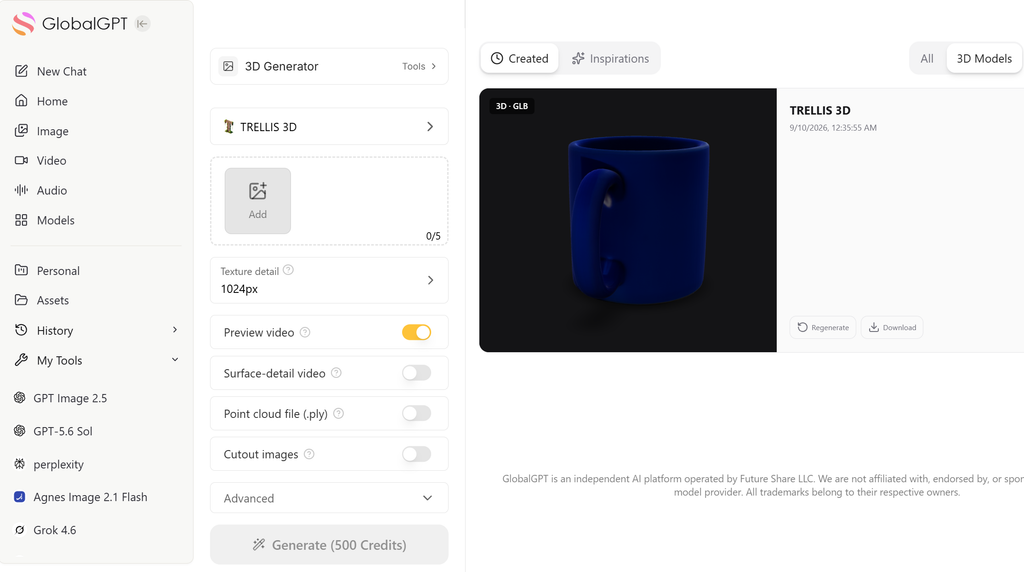
We tested the GlobalGPT TRELLIS 3D generator on September 10, 2026, using an original Seedream-generated blue ceramic mug reference. This was one attempt, with no regeneration. The settings were seed 0, 1024px texture detail, shape guidance 7.5, detail guidance 3, 12 steps for each stage, and mesh simplification 0.95. Color preview, surface-detail preview, and cutout images were enabled; point-cloud output and community sharing were off.
The job reached Pronto. We downloaded a 1.29 MB GLB with 16,686 triangles, 9,605 vertices, one material, one texture, and UV coordinates. The account transaction recorded 500 créditos. The returned combined color and normal-map preview was 8 seconds long at 1024 × 512; that is the preview’s duration, not the time taken to generate the model.
In the preview, the mug retains its deep blue color, open cavity, and handle opening. The reverse view keeps the cylindrical body coherent. The rim and handle look softer and less regular than in the reference, so this is a useful starting asset rather than an exact product reconstruction. The frames below come directly from this run’s preview video; they are not official examples or separately generated illustrations.
The GLB file inspection confirms geometry and texture data. It does not certify dimensional accuracy, printability, or animation topology. This hands-on example uses GlobalGPT’s TRELLIS interface; the Firtoz-specific field descriptions below come from its maintained Replicate deployment.


What our single test returned
How to Generate TRELLIS 3D in GlobalGPT
1. Open TRELLIS 3D and add your image
Aberto GlobalGPT TRELLIS 3D. Click Add to open Assets, then Upload. Select the uploaded image and click Confirm. The counter should show 1/5 for a single-image test.
2. Set the outputs you want
Keep Texture detail at 1024px for a first attempt. Preview video provides a rotating color view; Surface-detail video adds the normal-map view. In our run, enabling both produced one side-by-side video. The downloaded model was a GLB.
3. Check the price, then generate once
Our test showed Generate (500 Credits), and the transaction charged 500 Credits. Check the displayed cost before your own run. Under Advanced, enter a seed if you want to retain your test settings; we used 0 with the other defaults unchanged.
4. Open Created and download the result
Wait for Ready in Created > 3D Models, inspect the preview, and click Download to save the GLB. Keep your input and settings with the file. A rotating preview is useful for review, but inspect the exported mesh in your intended 3D application before using it in production.
Quick Answer: How Do You Use Firtoz Trellis Online?
Aberto firtoz/trellis on Replicate, sign in and arrange the credits required to run it, upload an image, enable generate_model, and run the prediction. When it succeeds, download the model_file GLB. Keep generate_color enabled if you also want a color-video preview.
What Is Firtoz Trellis, and Is It the Official Model?
TRELLIS is Microsoft’s 3D generation research project. Firtoz maintains a deployment that makes an image-conditioned TRELLIS pipeline available through Replicate’s hosted interface and API. The maintainer describes the fork as fan-maintained and not officially affiliated with Microsoft.
Keep three names separate: Microsoft is the original model developer, Firtoz maintains this implementation, and Replicate provides the hosted execution service. The model identifier for this guide is firtoz/trellis. Instructions for another provider or a separately named TRELLIS version may expose different inputs and export controls.
A picture that looks three-dimensional is not the same deliverable as a mesh. If you have followed a 3D figurine image tutorial, that picture can become your reference. Trellis is the additional step that generates geometry you can inspect from other angles.
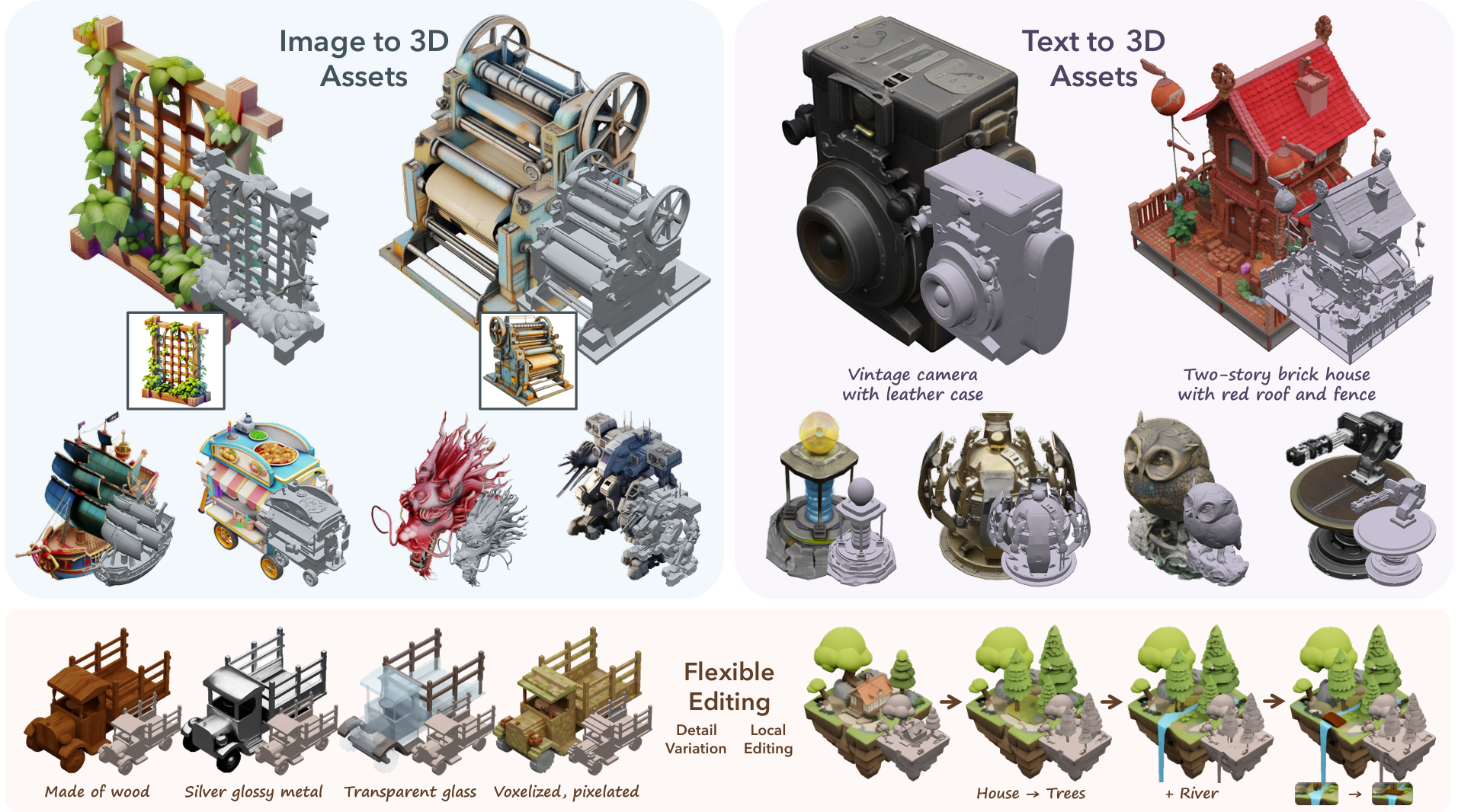
This guide covers the classic Firtoz deployment. Microsoft TRELLIS.2 is a separate project; its model specifications and material controls should not be assumed to apply here.
Prepare One Clear Reference Image
Start with one complete object, a plain background, and lighting that reveals its shape. A three-quarter view often shows more useful depth than a straight-on image. Keep handles, legs, straps, and other thin parts visible; a part hidden behind the main body gives the model less evidence to work with.
For an invented object, make the source image before opening the 3D generator. The Guia de instruções do Seedream 5.0 Pro can help you specify shape, camera angle, materials, and background. Here is a reference-image prompt you can adapt:
Reference-image prompt: A single matte teal ceramic desk planter with a wide circular opening, a thick rim, a flat base, and no handle. Full object visible in a three-quarter view, slightly above eye level so the empty interior is clear. Plain light gray background, soft even studio lighting, crisp silhouette, no text, no logo, no props, no cast shadow merging with the base.
This is a suggested image-generation prompt, not a tested Trellis preset. Firtoz’s image endpoint accepts images; paste the prompt into your image generator, then upload its result. Before using it, check that the opening and base make physical sense.
For a real product, preserve the actual design while improving presentation. Our guide to criação de imagens realistas de produtos explains the reference stage. An attractive edit that adds a handle or changes a product’s proportions makes the 3D reconstruction less faithful.
Avoid using a collage as a shortcut to multiple views. A tiled image introduces borders and several object instances into one frame. When you have genuine additional views, supply them as separate images using the endpoint’s image-list input.
Use Firtoz Trellis Online: From Upload to GLB
The field names in these steps come from the Firtoz API schema. Replicate may change the visual layout, but these names let you identify the relevant controls without guessing from a screenshot.
1. Open the exact Replicate model page
Ir para firtoz/trellis and use its hosted input interface. Sign in when prompted. Check the account’s available credit and the model’s current cost estimate before submitting; a public example on the page does not mean unlimited free generation.
2. Add your reference to images
Upload a clear reference in the imagens input. Begin with one image to establish a baseline. If background removal is important, enable return_no_background so the response includes the preprocessed images for inspection.
3. Turn on generate_model
Ativar generate_model to request the GLB. Leave generate_color on for a rotating color preview. Enable generate_normal if a surface-orientation preview would help you inspect the shape. With both video switches on, the implementation returns a combined video rather than separate color and normal files.
4. Keep a reproducible starting configuration
For controlled experiments, set randomize_seed to false and keep the same numerical seed, such as 0. Start with the published guidance and sampling defaults in the table below. Change one setting at a time; using a fixed seed makes comparisons easier, though it does not guarantee identical results across different model versions or execution environments.
5. Run and inspect the prediction
Submit the job and wait for its final status. A video preview is useful for spotting broad shape problems, but rotate the downloaded mesh in a 3D viewer as well. Check openings, the underside, narrow connections, and areas hidden from the reference image.
6. Download model_file and test it in your target app
Use the completed prediction’s model_file output to download the GLB. In Blender, import it through File > Import > glTF 2.0 (.glb/.gltf). Confirm that the object, material appearance, and dimensions suit your project before adding it to a game, viewer, animation, or print workflow. Save the file locally instead of relying on the prediction page as permanent storage.
The switch that changes your deliverable
generate_model: false
Download model_file
Firtoz Trellis Settings: A Practical Starting Point
The endpoint has two generation stages: sparse structure establishes the occupied 3D region, while the structured-latent stage develops the asset representation. For a first attempt, keep both at their published defaults. More sampling steps or stronger guidance is not a reliable one-click quality upgrade.
mesh_simplify is the removal ratio. The upstream export utility defines 0.95 as removing approximately 95% of triangles during simplification, leaving roughly 5% before any additional processing. It does not mean retaining 95% of the mesh. Reducing the value toward 0.90 requests less simplification; increasing it toward 0.98 requests more. Actual exported triangle counts depend on the generated mesh and processing.
Texture size controls the exported texture resolution, not the detail present in your source image. A 2048-pixel texture has four times the pixel area of a 1024-pixel texture, but that does not establish four times the visual quality or file size. Choose after checking the asset at its intended display size.
| Controle | Published default | Suggested first run | O que muda |
|---|---|---|---|
| generate_model | false | verdadeiro | Requests the downloadable GLB. |
| generate_color | verdadeiro | verdadeiro | Provides a rotating color preview. |
| generate_normal | false | Optional | Adds a normal preview; both video modes together return combined_video. |
| return_no_background | false | true for inspection | Returns preprocessed references to check background removal. |
| randomize_seed / seed | true / 0 | false / 0 for comparison | Keeps the chosen seed active. |
| ss_sampling_steps / slat_sampling_steps | 12 / 12 | 12 / 12 | Two generation stages; each accepts 1-50 steps. |
| ss_guidance_strength / slat_guidance_strength | 7.5 / 3 | 7.5 / 3 | Start with the defaults; both accept 0-10. |
| mesh_simplify | 0.95 | 0.95 | GLB only; accepted range 0.90-0.98. |
| texture_size | 1024 | 1024 | GLB texture dimension; accepted range 512-2048. |
Defaults and accepted ranges are from the current input schema. The suggested first-run column is a practical preset, not a measured optimum.
Mesh simplification: fraction left, not quality score
GLB, PLY, and Preview Video: Which Output Do You Need?
For most mesh-based applications, start with model_file, the GLB export. The implementation extracts a textured mesh from the generated Gaussian and mesh representations. Inspect that actual export: a color video rendered from the Gaussian representation is not proof that the extracted mesh looks identical.
The optional gaussian_ply output contains a Gaussian representation. Although PLY is also used elsewhere for meshes and point clouds, this particular output should not be treated as an interchangeable replacement for a triangle-mesh GLB. Open it in software that supports the relevant Gaussian format.
Branding deserves a separate check. Readable lettering in a reference can become smeared or distorted in a generated texture. The same attention used when adicionar texto e elementos de marca às imagens dos produtos is needed after export: inspect the actual label close up, and plan to rebuild critical typography when necessary.
| Output field | Required switch | File / representation | Use-o para |
|---|---|---|---|
| model_file | generate_model = true | GLB textured mesh | Mesh editors, game engines, glTF viewers |
| color_video | Color on; normal off | MP4 preview | Appearance review, not mesh editing |
| normal_video | Normal on; color off | MP4 preview | Inspecting shape orientation |
| combined_video | Color and normal on | Side-by-side MP4 | Comparing appearance and geometry views |
| gaussian_ply | save_gaussian_ply = true | Gaussian PLY | Compatible Gaussian software |
| no_background_images | return_no_background = true | Processed images | Checking the silhouette after preprocessing |
Is Firtoz Trellis Free? Pricing and Generation Time
Replicate’s página do modelo lists an approximate cost of $0.036 per run and says predictions typically complete within 26 seconds, checked September 9, 2026. These are provider estimates. Cost varies with inputs, and the typical time is not a promise for your queue position, output selections, or download time.
Do not confuse an open-source model license with free hosted computing. Microsoft’s repository makes the software and model available under its stated licensing terms; Replicate charges for running the hosted deployment. Account promotions, credits, local hardware, and third-party subscriptions are separate cost categories.
Budget for the number of attempts you actually expect to make. Generating reference images, rerunning failed designs, editing textures, and cleaning geometry can cost more time or money than the initial 3D prediction. The arithmetic below uses Replicate’s listed estimate, not measured charges or a GlobalGPT plan price.
A small experiment budget
Can You Use Multiple Images?
Yes. Firtoz accepts a list of images, and its prediction implementation switches to a multi-image pipeline when more than one image is supplied. Use different views of the same object with consistent proportions, materials, and accessories.
Microsoft describes the original project’s multi-image conditioning as a tuning-free method, with a warning that it may not work best for every set of inputs. More images are therefore additional evidence for the model, not an automatic accuracy guarantee.
If you use AI to change an image’s angle or perspective, inspect the new view for redesigned parts before combining it with the original. A generated rear view is an interpretation, not a measured photograph of an unseen surface. For accurate product work, real consistent views are preferable.
Common Firtoz Trellis Problems and What to Check
First separate an execution problem from an asset-quality problem. A rejected input or unsuccessful prediction cannot tell you how good the model’s geometry is. A successful job with no GLB may simply have used the default export switches.
When the shape is wrong, inspect the source and the returned background-removed image before increasing settings. A handle cut away during preprocessing cannot reliably guide the next stage. Our guide to improving AI image-generation accuracy is useful when the starting reference already contains ambiguous or inconsistent details.
| Sintoma | What may explain it | Next check |
|---|---|---|
| Successful job, no GLB | generate_model was left off | Enable it and request a new run. A preview cannot be renamed into a mesh. |
| Only a combined video appears | Both preview switches are enabled | Use combined_video, or choose only the single video mode you need. |
| Same seed, different result | randomize_seed is still on | Turn randomization off and retain the model version and settings. |
| Thin parts disappear | Input is unclear or mask cuts away foreground | Inspect no_background_images; revise the source before tuning the sampler. |
| GLB looks different from the color preview | Different output representations | Inspect the actual mesh and materials in your target viewer. |
| PLY does not behave like a mesh | Gaussian data loaded into incompatible software | Use the GLB for ordinary mesh work, or a compatible Gaussian viewer. |
| Job will not start | Credit, input, or service availability issue | Read the prediction error and account state; repeated clicks do not fix the cause. |
| Model fails a print check | Generated geometry is not manufacturing validation | Repair, scale, and inspect it in a modeling tool and slicer. |
Commercial Use and Production Readiness
Microsoft states that TRELLIS models and most of its code use the MIT license, while some dependencies have different terms. That statement does not clear third-party rights in a branded character, product design, photo, or logo you upload.
Review the hosted service’s current terms and your rights to the input. Our Guia para o uso comercial de imagens geradas por IA covers questions that also matter when an image becomes the basis of a 3D asset.
A generated GLB is not automatically print-ready, manufacturing-accurate, or animation-ready. Printing requires checks for scale, wall thickness, disconnected pieces, and watertightness. Animation requires usable topology and deformation. A web asset needs a sensible triangle count, texture budget, and loading test in the actual viewer.
Start With the Export You Actually Need
For a first Firtoz Trellis attempt, use one clear image, request the GLB explicitly, keep the generation defaults, and inspect the exported file. Save the source, seed, settings, and result together so you can tell whether the next change helped.
If your reference still needs work, prepare it in GlobalGPT before generating another 3D version. A clearer silhouette and more coherent object design give you a better basis for judging the mesh.
Perguntas frequentes
Where can I use Firtoz Trellis online?
Use the firtoz/trellis model page on Replicate. It provides hosted inputs and API access. Firtoz is the community maintainer of this deployment, not the original Microsoft research team.
Why did I get a video but no GLB?
The published defaults enable generate_color and disable generate_model. Turn on generate_model before running to request a downloadable GLB in model_file. A video alone is a preview, not the mesh export.
Is Firtoz Trellis free to use?
Replicate lists an approximate $0.036 per run as of September 9, 2026; actual cost depends on inputs. An open-source license does not make a hosted prediction free. Check available account credit before running.
Can Firtoz Trellis generate 3D from text?
The image endpoint in this guide takes an images list, not a text prompt. Generate or photograph your reference first, then upload it. Microsoft’s broader TRELLIS project also includes separate text-conditioned models.
Can I use multiple reference images?
Yes. Firtoz accepts multiple images and uses a multi-image generation path. Keep the views consistent and depict the same object. The original project’s multi-image method is not guaranteed to improve every input set.
What does mesh_simplify 0.95 mean?
It specifies the proportion of triangles to remove during simplification, approximately 95%, rather than the proportion to keep. The actual exported mesh count depends on the original geometry and later processing.
Does Firtoz export STL or FBX directly?
The published output schema lists a GLB model and optional Gaussian PLY, plus image and video outputs. It does not list direct STL or FBX export. Use suitable 3D software for conversion and verify the resulting asset.
How does GlobalGPT fit into this process?
GlobalGPT provides a TRELLIS 3D generator that accepts reference images and returns a downloadable GLB. In our September 10, 2026 test, one blue mug image produced a textured model and an 8-second combined preview, with an actual charge of 500 Credits. You can also create or refine the input image in GlobalGPT.