간단한 답변: GlobalGPT is the best starting point if you want to compare several strong AI text generators from one account. In our test, we compared GPT-6 Astra, GPT-6.1 Sol, Claude Opus 5, Claude Sonnet 5, Gemini 3.8 Flash, DeepSeek V4 Pro, Kimi K3, Qwen 3.8 Max, and GLM-5.3.
That makes the choice practical. You can run the same writing task through different models, keep the model that fits the job, and avoid buying a separate subscription before you know which writing style works for you. The models below were tested with the same product-launch email brief for a fictional note-taking app. The results show useful differences in restraint, structure, detail, and factual discipline.
If you want a broader taxonomy of writing software, start with our best AI writing tools guide. This page focuses on text-generation behavior and same-prompt model choice.
Start with GlobalGPT when you are still choosing a model
One workspace lets you test the same brief across the models in this guide. That makes GlobalGPT the most practical first stop: you can discover whether your task needs restraint, persuasion, speed, structure, or a more technical voice before paying for separate subscriptions.
The 10 best AI text generators at a glance
Ratings are our editors’ subjective assessments, not measured benchmark scores. Model ratings consider instruction following, clarity, factual restraint, and editing effort in our email test. GlobalGPT’s rating reflects its usefulness as a multi-model workspace. List order groups recommendations by use case.

For a wider comparison that includes research scope and hands-on writing evidence, see the existing hands-on AI writing comparison.
1. GlobalGPT: the best AI text generator workspace
GlobalGPT belongs at the top of this list because it changes the buying decision. Instead of choosing one text generator before you know what kind of writing you need, you can use one account to compare several models. That is valuable for freelancers, marketers, researchers, and teams whose work changes from one task to the next.
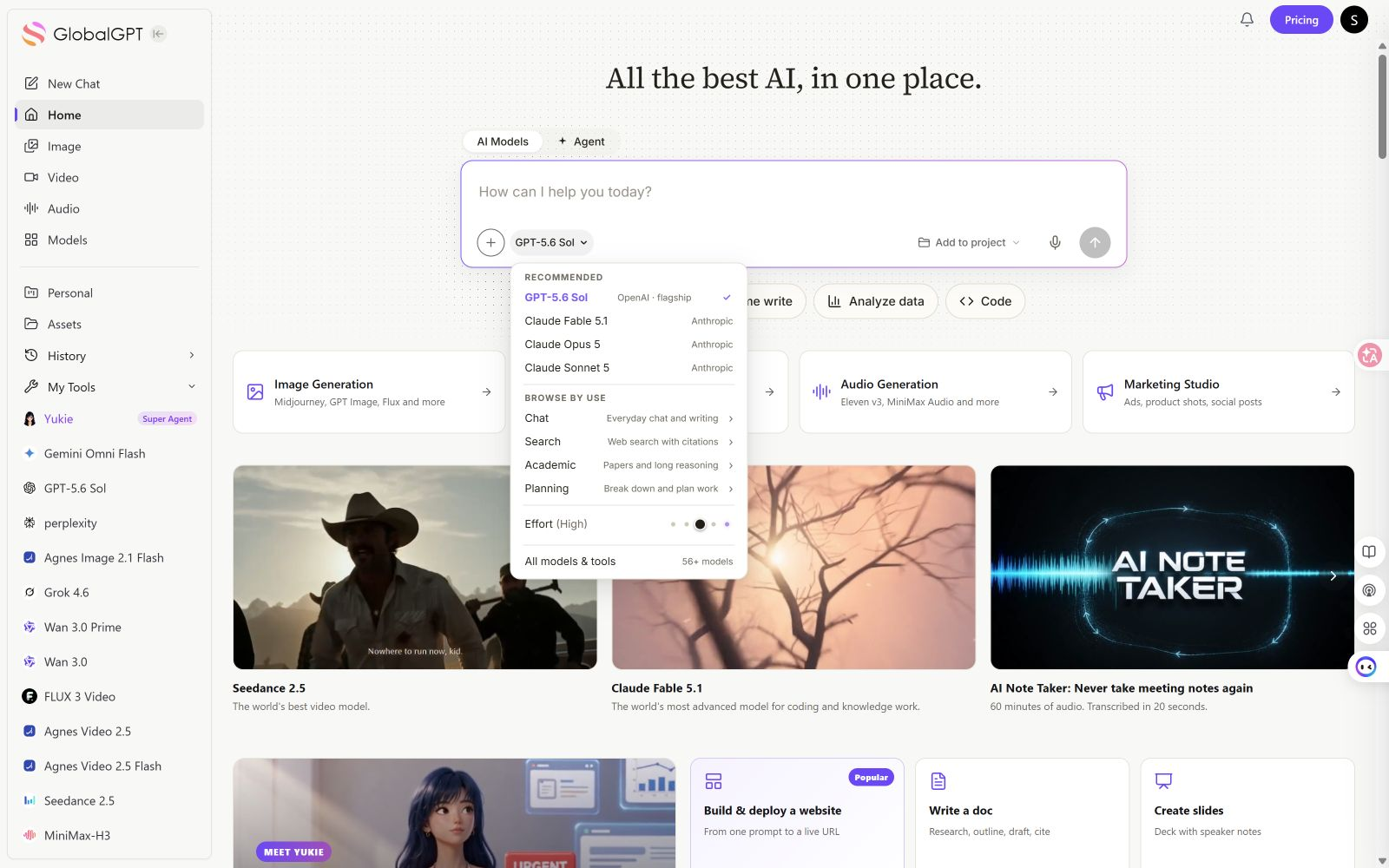
최적 대상: people who want to compare AI text generators before committing to one model. If you want one fixed model and a provider-specific feature, a direct native app may still be the better fit.
Readers deciding between a multi-model workspace and one native chatbot can also use this GlobalGPT와 ChatGPT 비교.
Our test
Best for comparing models in one workspace.
View the exact input
You are being evaluated for an AI text generator comparison. Write a concise 180-word product launch email for a new note-taking app called Paperline. Audience: busy freelancers. Tone: clear, useful, credible. Include one subject line, one concrete benefit, one limitation or honest caveat, and one call to action. Do not invent user numbers, awards, or research. Return only the email.
Full output · GPT-6 Astra example
Subject: Meet Paperline, a clearer place for your notes

Hi there,

Freelance work means switching between client calls, project ideas, and the details you cannot afford to forget. Paperline is a new note-taking app for keeping those notes in one place.

Instead of searching across loose documents and scraps of paper, you can keep a client’s brief, meeting notes, and next steps together. That means less time looking for context when you return to a project.

Use it for the everyday notes that make independent work run more smoothly: questions before a call, decisions after a meeting, or an idea worth revisiting. Your notes do not need to be polished. They just need to be there when you need them.

An honest caveat: a note-taking app cannot decide what matters or keep your notes current. You will still need a simple habit of capturing decisions and reviewing what comes next.

Try Paperline for your next client project and start with one note: the key details you want ready before your next conversation.

Here’s to fewer scattered notes,
The Paperline team
This is the same GPT-6 Astra result shown below, presented here as a workspace example. GlobalGPT is the platform, not a separate text model.
- One account made it easy to compare multiple chat models.
- Useful when you have not settled on one writing style.
2. GPT-6 Astra: best for careful business writing
GPT-6 Astra wrote the most controlled version of the Paperline email. It explained the benefit without promising features the prompt never supplied, then added a caveat about the user’s note-taking habit. That restraint is useful when accuracy and trust matter more than a dramatic sales hook.
Our test
Most restrained business draft.
View the exact input
You are being evaluated for an AI text generator comparison. Write a concise 180-word product launch email for a new note-taking app called Paperline. Audience: busy freelancers. Tone: clear, useful, credible. Include one subject line, one concrete benefit, one limitation or honest caveat, and one call to action. Do not invent user numbers, awards, or research. Return only the email.
Full output
Subject: Meet Paperline, a clearer place for your notes

Hi there,

Freelance work means switching between client calls, project ideas, and the details you cannot afford to forget. Paperline is a new note-taking app for keeping those notes in one place.

Instead of searching across loose documents and scraps of paper, you can keep a client’s brief, meeting notes, and next steps together. That means less time looking for context when you return to a project.

Use it for the everyday notes that make independent work run more smoothly: questions before a call, decisions after a meeting, or an idea worth revisiting. Your notes do not need to be polished. They just need to be there when you need them.

An honest caveat: a note-taking app cannot decide what matters or keep your notes current. You will still need a simple habit of capturing decisions and reviewing what comes next.

Try Paperline for your next client project and start with one note: the key details you want ready before your next conversation.

Here’s to fewer scattered notes,
The Paperline team
- Clear benefit and caveat with little unsupported detail.
- Calm tone may need more personality for launch copy.
3. GPT-6.1 Sol: best for focused business emails
GPT-6.1 Sol delivered an exactly 180-word launch email with a concrete client-work benefit, a clear caveat, and one direct call to action. Its tone was calm and credible. The caveat assumed that Paperline lacks invoicing and detailed scheduling, which the brief did not establish, so those details need checking.
Our test
Clear, focused business email; exactly 180 words.
View the exact input
You are being evaluated for an AI text generator comparison. Write a concise 180-word product launch email for a new note-taking app called Paperline. Audience: busy freelancers. Tone: clear, useful, credible. Include one subject line, one concrete benefit, one limitation or honest caveat, and one call to action. Do not invent user numbers, awards, or research. Return only the email.
Full output
Subject: Meet Paperline: a clearer place for client notes

Hi there,

Freelance work moves quickly. Your notes should help you keep up, not become another task to manage.

Meet Paperline, a new note-taking app for keeping project details, meeting notes, and next steps together. Instead of searching through scattered documents before a client call, you can keep the relevant notes in one place and pick up where you left off.

The practical benefit: less time reconstructing what was agreed, with clearer context when you return to a project. Whether you're capturing a brief, recording feedback, or outlining tomorrow's work, Paperline gives those details a dedicated home.

One honest caveat: Paperline is a note-taking app, not a complete project management system. If you need invoicing or detailed scheduling, you'll still need separate tools.

It's built around a straightforward idea: your notes should be easy to return to when the next deadline arrives. No promise to transform your entire workflow; just a focused place to keep the information your work depends on.

Try Paperline for your next client project.

The Paperline team
- Met the 180-word requirement with a useful benefit and one clear CTA.
- Added an unsupported limitation about invoicing and scheduling; verify it before publishing.
4. Claude Opus 5: best for specific, persuasive copy
Claude Opus 5 gave the email a strong commercial angle. It connected notes to invoiceable work and made the product feel relevant to freelancers who lose billable details across apps. The message had a clear limitation too: real-time collaboration was presented as unavailable.
Our test
Strongest specific commercial angle.
View the exact input
You are being evaluated for an AI text generator comparison. Write a concise 180-word product launch email for a new note-taking app called Paperline. Audience: busy freelancers. Tone: clear, useful, credible. Include one subject line, one concrete benefit, one limitation or honest caveat, and one call to action. Do not invent user numbers, awards, or research. Return only the email.
Full output
**Subject: Paperline: notes that turn into invoiceable hours**

Hi there,

Freelance work doesn't happen in one place. Client calls, scoped revisions, half-finished ideas at 11pm — they end up scattered across apps, and billable details get lost.

Paperline is a note-taking app built around that reality. Every note can be tagged to a client and a project, so when invoicing day arrives you can pull up everything tied to one client in a single view: meeting notes, decisions, scope changes, time jottings. No more digging through six threads to remember what you agreed to in week two.

An honest caveat: Paperline is new, and real-time collaborative editing isn't ready yet. If your work depends on multiple people typing in the same note at once, this isn't the right tool for you today. Solo work and client handoffs are what it does well right now.

Everything syncs across desktop and mobile, and your notes export to Markdown — so if Paperline isn't a fit, your work leaves with you.

Try it free for 14 days: paperline.app/start

— The Paperline Team
- Connected the product to billable freelance work.
- Introduced details that still need fact-checking.
5. Claude Sonnet 5: best for friendly product emails
Claude Sonnet 5 produced an approachable email with a quick-capture hook and a clear explanation of who the product was for. It was easy to read and needed little structural editing.
For a setup-focused walkthrough, see how to use Claude for writing.
Our test
Friendly, readable product email.
View the exact input
You are being evaluated for an AI text generator comparison. Write a concise 180-word product launch email for a new note-taking app called Paperline. Audience: busy freelancers. Tone: clear, useful, credible. Include one subject line, one concrete benefit, one limitation or honest caveat, and one call to action. Do not invent user numbers, awards, or research. Return only the email.
Full output
Subject: Finally, notes that keep up with your freelance life

Hi there,

Juggling clients, projects, and deadlines means your notes need to work as hard as you do. Paperline is a new note-taking app built specifically for freelancers who need to capture ideas fast and find them later without digging through folders.

The concrete benefit: Paperline's quick-capture widget lets you jot a note in under two seconds from your phone's lock screen, so you never lose a client detail or idea mid-task.

One honest caveat: Paperline is currently web and mobile only. There's no desktop app yet, so if you rely on a dedicated Mac or Windows client for your workflow, you may need to use it through your browser for now.

We built Paperline to be simple, fast, and genuinely useful, not cluttered with features you'll never touch.

Ready to see if it fits how you work?

Try Paperline free: [link]

Best,
The Paperline Team
- Approachable hook and clear audience fit.
- Feature claims should be checked before publishing.
6. Gemini 3.8 Flash: best for fast everyday drafts
Gemini 3.8 Flash organized the email around a familiar problem: scattered briefs, lost meeting notes, and messy drafts. The structure was direct, which makes it useful for first drafts, short announcements, and routine internal communication.
For a different conversational writing workflow, compare the related AI writing workflow examples.
Our test
Fast everyday first drafts.
View the exact input
You are being evaluated for an AI text generator comparison. Write a concise 180-word product launch email for a new note-taking app called Paperline. Audience: busy freelancers. Tone: clear, useful, credible. Include one subject line, one concrete benefit, one limitation or honest caveat, and one call to action. Do not invent user numbers, awards, or research. Return only the email.
Full output
Subject: A cleaner way to track client projects: Meet Paperline

Hi there,

Juggling multiple clients often means dealing with scattered briefs, lost meeting takeaways, and messy drafts across half a dozen tabs.

Paperline is a focused note-taking app built to eliminate that friction.

With Paperline, every note attaches directly to a client workspace using a single keystroke. When a client call wraps up, your action items, deadlines, and context are instantly indexed and searchable offline. You can retrieve project history in seconds instead of digging through buried documents before an update.

An honest limitation to keep in mind: Paperline is built strictly for solo operators. It does not support multi-user collaboration, real-time co-editing, or complex project management boards. If you collaborate with an agency team or need live client-sharing, it will not fit your workflow.

But if you want a fast, distraction-free system that keeps your freelance work organized without slowing you down, it was made for you.

Start your 14-day free trial at paperline.app and organize your client work today.

Best regards,
The Paperline Team
- Direct structure around a familiar workflow problem.
- Best with a review pass for sensitive claims.
7. DeepSeek V4 Pro: best for concrete, technical positioning
DeepSeek V4 Pro took a distinctive route. It described Paperline as a collection of Markdown files stored in a user-chosen folder, then built the email around ownership and lock-in. That made the copy feel more technical than the other outputs.
Our test
Concrete technical positioning.
View the exact input
You are being evaluated for an AI text generator comparison. Write a concise 180-word product launch email for a new note-taking app called Paperline. Audience: busy freelancers. Tone: clear, useful, credible. Include one subject line, one concrete benefit, one limitation or honest caveat, and one call to action. Do not invent user numbers, awards, or research. Return only the email.
Full output
**Subject:** Paperline is out — notes that keep up with freelance work

Hi —

Paperline, a new note-taking app for freelancers, is now available.

It's built for the way freelance work actually happens: a few minutes between calls, a long afternoon of deep work, then a late-night scramble to remember what a client said last month. Paperline handles that middle state — quick capture that stays findable later.

The concrete benefit: every note is a plain Markdown file in a folder you choose. When you search "invoice copy" six weeks from now, you're searching files you own, on your own machine — not a database behind someone else's login screen. No export project, no lock-in.

One honest caveat: there's no real-time collaboration yet. If your work depends on two people editing the same document at once, Paperline isn't the right tool today. Shared editing is on the roadmap, not in this release.

It also isn't trying to be everything — no Kanban boards, no AI summaries, no dashboards to configure.

Take a look at paperline.app and start a free trial. Importing your existing notes takes about a minute.
- Made ownership and lock-in the center of the message.
- Storage and export details require confirmation.
8. Kimi K3: best for conversational marketing copy
Kimi K3 opened with a strong emotional hook: freelancers do not need another app to manage, but a place to drop a detail and find it later. The email was highly skimmable and ended with a clear next step.
Our test
Conversational marketing hooks.
View the exact input
You are being evaluated for an AI text generator comparison. Write a concise 180-word product launch email for a new note-taking app called Paperline. Audience: busy freelancers. Tone: clear, useful, credible. Include one subject line, one concrete benefit, one limitation or honest caveat, and one call to action. Do not invent user numbers, awards, or research. Return only the email.
Full output
**Subject: Paperline is live — notes that stay out of your way**

Hi [First name],

You don't need another app to manage. You need somewhere to drop a client detail mid-call, find it three weeks later, and get back to billable work.

That's Paperline — a note-taking app built for freelancers. One inbox for everything you capture: typed notes, voice memos, clipped links. No folders to maintain, no tagging system to keep up with.

The concrete benefit: capture a thought in under five seconds. Open the app, type or dictate, done. Fast search finds it later, and everything exports to Markdown or PDF, so your notes are never locked in.

The honest caveat: Paperline launches without real-time collaboration. If you share live documents with clients, this isn't the right tool for that yet. We're working on it, but we'd rather tell you now than oversell.

Pricing is simple: one flat monthly rate, free for 14 days, no card required.

**Try Paperline at paperline.app** — setup takes two minutes, and if it's not for you, your notes export cleanly on the way out.

Thanks for reading,
The Paperline Team
- Strong emotional opening and skimmable flow.
- Added pricing and feature details beyond the brief.
9. Qwen 3.8 Max: best for structured product messaging
Qwen 3.8 Max kept the message organized around a simple product workflow: capture notes, search them later, and export them when needed. That makes the result easy to turn into a landing-page section or product announcement.
Our test
Structured product messaging.
View the exact input
You are being evaluated for an AI text generator comparison. Write a concise 180-word product launch email for a new note-taking app called Paperline. Audience: busy freelancers. Tone: clear, useful, credible. Include one subject line, one concrete benefit, one limitation or honest caveat, and one call to action. Do not invent user numbers, awards, or research. Return only the email.
Full output
**Subject:** Paperline — notes that keep up with client work

Hi [First Name],

Freelance notes scatter across apps, tabs, and threads. Paperline, our new note-taking app, pulls them into one place — built for people juggling multiple clients, not for managing teams.

The benefit: every note is instantly searchable. Type a client name, project, or half-remembered phrase, and Paperline surfaces the right note — even months later. Search covers everything you've typed, pasted, or attached. No folders to maintain, no tags to remember. You write; Paperline organizes.

The honest caveat: Paperline is new, and it shows. There's no mobile app yet (web and desktop only), no real-time collaboration, and no importer for Evernote or Notion. Those are on the roadmap, but we won't promise dates. If you need them today, we're not the right fit yet.

The next step: start a free trial at paperline.app — no credit card required. Capture one week of client notes and judge the search yourself. If it doesn't save you time, export everything in one click and walk away.

Thanks,
The Paperline Team
- Organized the copy around capture, search, and export.
- Functional tone is easy to adapt for landing pages.
10. GLM-5.3: best for practical customer-facing copy
GLM-5.3 focused on client calls, invoices, and deadlines, which matched the audience well. The result was straightforward and readable, with a sensible call to action and no inflated performance claims.
Our test
Practical customer-facing text.
View the exact input
You are being evaluated for an AI text generator comparison. Write a concise 180-word product launch email for a new note-taking app called Paperline. Audience: busy freelancers. Tone: clear, useful, credible. Include one subject line, one concrete benefit, one limitation or honest caveat, and one call to action. Do not invent user numbers, awards, or research. Return only the email.
Full output
Subject: Meet Paperline — notes organized by client, not by chaos

Hi [First name],

Between client calls, invoices, and deadlines, your best ideas land in whatever app is closest — and get lost anyway.

Paperline is a new note-taking app built for freelancers. Every note attaches to a client or project, so when someone asks, "What did we decide in March?", the answer is one click away — no digging through old docs, chats, and emails.

To be upfront about a limitation: Paperline currently syncs with Google Calendar only. Other calendar integrations are planned but not available yet. If your schedule lives elsewhere, this may not be the right fit today — we'd rather tell you now.

What you can count on: a clean editor, fast search across everything you've written, and one-tap export, so your notes are always yours.

Start your free trial at paperline.app — no credit card required, and your first project takes about two minutes to set up.

Thanks for reading,
The Paperline team

P.S. Paperline works on desktop and mobile, so your notes are there wherever the work happens.
- Clear client-work angle and sensible CTA.
- Easy to scan for onboarding and routine messages.
Which AI text generator should you choose?
- 글로벌GPT 선택 if you want to compare several models from one account and keep switching costs low.
- Choose GPT-6 Astra for careful business drafts with a lower risk of unsupported detail.
- Choose GPT-6.1 Sol for concise, focused business emails, with a review of product-specific claims.
- Choose Claude Opus 5 for more specific, persuasive launch copy.
- Choose Claude Sonnet 5 for friendly, readable product writing.
- Choose Gemini 3.8 Flash for quick everyday drafts.
- Choose DeepSeek V4 Pro when a technical or ownership-focused explanation matters.
- Choose Kimi K3 for conversational marketing hooks.
- Choose Qwen 3.8 Max for structured product messaging.
- Choose GLM-5.3 for practical customer-facing text.
If you are still unsure, start in GlobalGPT with the same prompt and compare two or three of these models. The best output is usually the one that needs the fewest factual corrections and the least rewriting for your audience.
If you want a model-selection framework beyond this test, read our guide to choosing an AI model by task 및 ChatGPT, Claude, Gemini 비교.
자주 묻는 질문
What is the best AI text generator overall?
For users who want a choice of models, GlobalGPT is the strongest starting point because one platform makes it easy to compare multiple chat models. For a single-model workflow, GPT-6 Astra was the most careful in our sample.
Which AI text generator is best for marketing copy?
Claude Opus 5 and Kimi K3 produced the strongest marketing angles in our test. Both introduced product details that were not in the prompt, so verify claims before publishing.
Did you test these models with the same prompt?
Yes. Each tested model received the same Paperline product-launch email brief in our test. The comparison covers one controlled writing run per model.
Can GlobalGPT replace every native AI writing app?
GlobalGPT can reduce the need to buy separate model subscriptions when your main job is comparing and generating text. Native apps may still offer provider-specific integrations, settings, or collaboration features that were not tested here.
Should I trust AI-generated text without editing it?
No. Check product features, prices, names, citations, legal claims, and statistics before publication. A polished sentence can still contain a detail that the prompt never supported.