目录
Nano Banana Pro 是谷歌的高端 AI 图像生成与编辑模型,已正式向开发者开放,作为 双子座 3 Pro 图像. Nano Banana 2 是独立的 Gemini 3.1 闪存镜像型号。它支持高品质 4K 图像 并集成到谷歌的人工智能生态系统中。根据用户类型和订阅情况,Nano Banana Pro 可通过多个平台访问,每个平台提供不同的功能、配额和控制。.
快速回答: Nano Banana Pro 可通过双子座应用程序、谷歌应用程序、谷歌人工智能工作室、顶点人工智能和 第三方平台,如 GlobalGPT. .免费用户的访问权限有限,而专业版、超级版和企业版用户则可享受完整的 4K 生成和创意控制功能。.
如果 Nano Banana Pro 在您所在的国家/地区尚未上线——或者您不想购买价格昂贵的官方套餐——您可以尝试 GlobalGPT 。 作为一款全能型AI平台,它全面整合了Nano Banana Pro,且无使用限制,价格仅为官方价的30%左右。除了Nano Banana Pro,您还可以使用MJ、ChatGPT Image以及其他20多个模型来生成图像。.
在视频方面,您可以将 Nano Banana Pro 的画面与 Veo 3.1、Kling 2.6、Grok Imagine 或 Wan 2.6 进行配对。对于研究、写作、编程和规划,GlobalGPT 现在还包含 GPT-5.6 Sol, Gemini 3.5 Flash、Claude Opus 4.8 以及其他当前最前沿的模型,均位于同一工作区中。.

什么是纳米香蕉专业版以及为什么访问很重要
Nano Banana Pro 是 Google 在 Gemini 生态系统中的高端图像模型,而 Nano Banana 2 和 Nano Banana Pro 是针对不同工作而设计的独立模型。它提供:
- 高分辨率 4K 图像输出(Nano Banana Pro;标准 Nano Banana 支持 高达 1K).
- 构图更巧妙,纹理更逼真。.
- 整合多个 Google AI 环境。.
普通用户如何使用
- 用户输入: 你在 Gemini 应用中输入一个请求,例如:“生成一张戴着迷你礼帽的猫的图片。”
- 系统处理: Gemini 在内部调用 Nano Banana Pro 模型生成图像。.
- 结果 您将在双子座界面中看到生成的图像。.
摘要 你只需像往常一样使用 Gemini 中的图像生成或编辑功能即可。系统会在后台自动使用 Nano Banana Pro。. 您的订阅级别(专业版或超级版)决定了您的每日配额.
谁可以使用纳米香蕉专业版?
哪些人可以使用 Nano Banana Pro 这取决于您的订阅套餐和用户类型。以下是详细说明:
| 用户类型 | 平台 | 访问方法 |
|---|---|---|
| 免费用户 | 双子座应用程序 | 创建仅限免费访问的图片;低分辨率的测试图是更稳妥的预期 |
| Google AI Plus / Pro 订阅用户 | Gemini 应用或搜索 AI 模式 | 更高的图像生成访问权限和4K工作流程,具体取决于套餐和地区 |
| Google AI Ultra 订阅用户 | 流量 + 双子座应用程序 | 在 Gemini、搜索和 Google Flow 平台上,对图像、音乐和视频生成模型的访问权限进一步提升 |
| 开发人员 / 企业 | 谷歌人工智能工作室/顶点人工智能/反重力 | 通过 Gemini API 访问 已启用计费功能 |
| GlobalGPT 用户 | GlobalGPT 平台集成 | 免费无限使用 Nano Banana Pro 功能,包括 4K |
✅ 关键点:免费用户仅限于小尺寸、低分辨率输出。对于专业或 4K 工作流程,需要付费层级或 GlobalGPT 集成。.
方法 1 - 通过双子座应用程序访问
如何在双子座中访问 Nano Banana Pro?

"(《世界人权宣言》) 双子座应用程序 是大多数用户的主要入口。.
如何访问
- 下载 Gemini 应用程序 (Android 或 iOS)。.
- 使用 Google 帐户登录。.
- 升级至 Google AI Pro 或 Ultra,即可获得更高的 Nano Banana Pro 访问权限。(可选)
- 选择思维模式。.
- 免费用户应将访问权限视为有限,而专业版/尊享版用户可根据套餐、地区和产品路径的不同,享受更高的使用限额和4K工作流程。.

获得最佳效果的小窍门
- 使用简洁的提示语,提高作文水平。.
- 免费用户应预期测试画质较低且受限,而非正式发布的4K画质。.
- 专业版和 Ultra 版用户可以利用实时接地和创意控制功能,获得专业的视觉效果。.
方法 2 - 通过谷歌应用程序访问(人工智能模式)
适用于没有双子座应用程序的用户、, 谷歌应用程序 在某些地区还提供接入服务:
- 打开 Google 应用程序。.
- 轻按 AI 图标进入 双子座模式.
- 升级到专业版功能。.
- 在以下选项中选择 Nano Banana Pro 图像生成.
- 直接在 聊天模式 或 画布模式.
这非常适合那些希望无需额外安装即可生成人工智能图像的普通用户。.
方法 3 - 通过 Google AI Studio / Vertex AI 获得开发人员和企业访问权限

对于 开发人员、设计师或企业用户, Google AI Studio 和 Vertex AI 提供程序化访问:
步骤:
- 登录 Google AI Studio 或 Vertex AI。.
- 选择 “使用双子座创建”→选择 Nano Banana Pro / Gemini 3 Pro 图片.
- 调整分辨率(最高 4K)和宽高比等设置。.
- 使用 Nano Banana Pro API 路径 将图像生成集成到工作流程或产品中。.
- 专业级和超专业级提供优先生成和更高配额。.
专业提示 批量生成和多模型工作流(例如,结合 Nano Banana Pro 搭配 Veo 3.1 用于视频) 适用于企业或开发者工作流。.
方法 4 - 通过 GlobalGPT(一体化平台)访问
GlobalGPT 将 Gemini、GPT-5、Claude 和 Nano Banana Pro 整合到一个工作区中.
好处
- 完全访问 Nano Banana Pro,包括 4K。.
- 无需切换应用;使用 Nano Banana Pro 提示词, 、图像处理工具以及后续模型,一应俱全。.
- 是机构、内容团队或多模型工作流程的理想选择。.
步骤:
- 创建 GlobalGPT 帐户。.
- 选择 双子座整合.
- 使用 Google 帐户授权(需要专业版或超级版)。.
- 使用 Nano Banana Pro 配合其他 AI 工具生成或编辑图片,然后检查 Nano Banana Pro 商业用途规则 在交付给客户之前。.
🌟 优势:与双子座官方渠道相比,GlobalGPT 通常生成速度更快,成本更低。.
不同平台上 Nano Banana Pro 的使用限制和配额
Nano Banana Pro 的限制取决于订阅等级;如需更详细的说明,请参阅 Nano Banana Pro 限额指南:
| 计划 | 每日限额 | 最大分辨率 |
|---|---|---|
| 免费/基本 | 每天 3 幅图像 | ~1K |
| 谷歌人工智能专业版 | 比Plus级别的访问权限更高 | 如有支持,请使用 4K 工作流程 |
| 谷歌超级人工智能 | 最高级别的 Google AI 计划访问权限 | 4K 工作流程,并在条件允许的情况下提供更强大的创意支持 |
| 企业通过 GlobalGPT | 定制 | 4K + 多层编辑 |
- 限额每日重置。.
- 免费用户不能生成 4K。.
- 级别越高,配额越多,访问速度越快。.

优化 Nano Banana Pro 使用的技巧
- 使用准确简洁的提示,以减少失败的尝试。.
- 在重置时间(当地时间 00:00)前后批量生成图像。.
- 对不太重要的输出降低分辨率,以节省配额。.
- 升级至 Pro/Ultra 版本以获得专业工作流程,或者当您希望为 Nano Banana Pro 及其他创意机型选择一站式解决方案时,可选用 GlobalGPT。.
- 对于开发人员,可使用 API 参数来控制分辨率和批处理。.
接入问题的故障排除
如果 Nano Banana Pro 不可见或无法生成图像:
- 检查您的订阅级别。.
- 更新双子座或 Google 应用程序。.
- 确认您所在地区支持专业版/超强版功能。.
- 确保家长或企业控制不会阻止访问。.
- 有关配额或技术问题,请联系 Gemini 帮助中心。.
纳米香蕉 2 正式发布
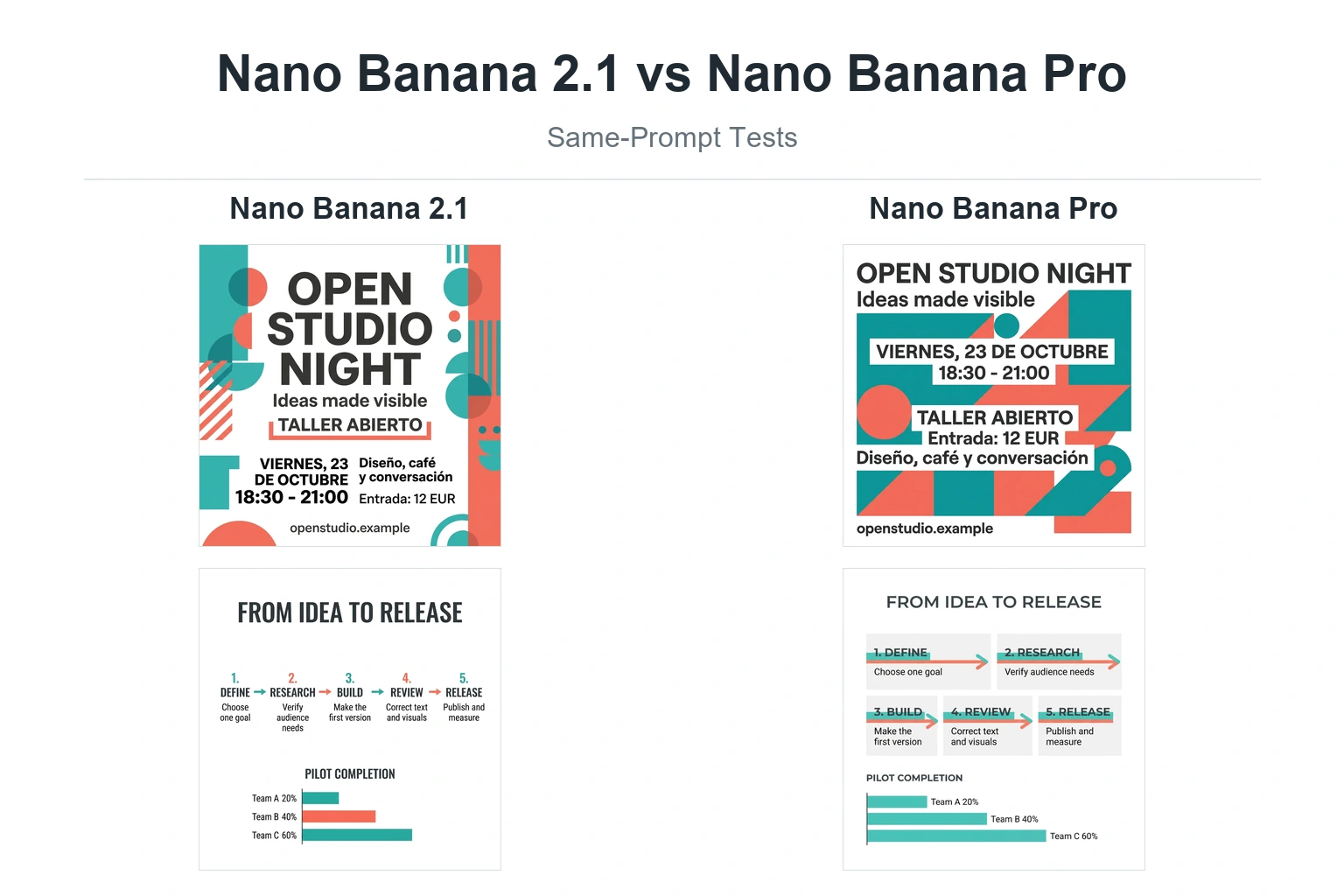
Nano Banana 2 已正式上市,它能提供更快的图像生成速度、高质量的 4K 输出和先进的跨多个对象的主体一致性。要了解它与之前型号的对比情况,请查看我们的 Nano Banana 2 与 Nano Banana Pro 对比 详细了解其功能、价格和性能。.
新用户可以探索 纳米香蕉 2 免费试用版 或审查 完整的定价、API 和订阅指南 以规划最具成本效益的工作流程。如果您已准备好订阅,请关注我们的 如何订阅《纳米香蕉 2 指导。.
有关实际使用说明,请参阅 如何使用纳米香蕉 2(双子座 3 闪光灯图像), 学习 如何访问 Nano Banana 2(双子座 3.1 闪存映像) 跨平台。.
如果您正在寻找购买选择,请查看 在哪里购买纳米香蕉 2:3 大选择. .要了解每日发电量限制,请参阅 纳米香蕉 2 每日配额和限额. .关于批量生产计划,请查看 纳米香蕉 2 一次能生成多少图像.
有了这些指南,您就可以在充分利用 Nano Banana 2 功能的同时,有效地掌握定价、订阅和使用方法。.
常见问题
访问 Nano Banana Pro 的最快方法是什么?
最快捷的方式是使用已提供 Nano Banana Pro 的平台,然后登录并在该平台的图像工具中生成。如果您的地区对 Google 的访问受到限制,本指南中多次提到的 GlobalGPT 是一个实用的替代方案。.
Nano Banana Pro 和 Nano Banana 2 是同一款产品吗?
不。谷歌的开发者文档中,Nano Banana Pro 被列为 Gemini 3 Pro 镜像,而 Nano Banana 2 则是 Gemini 3.1 闪存镜像。Nano Banana Pro 是面向更复杂的专业图像处理任务的高端选项。.
免费用户可以使用 Nano Banana Pro 吗?
免费用户生成图像的功能可能会受到限制,但专业的4K工作通常需要更高级别的Google AI套餐、API计费、企业级访问权限,或者使用GlobalGPT等第三方工作流。.
我可以通过 API 使用 Nano Banana Pro 吗?
是的。开发者可以通过 Google AI Studio 或相关的 Google 开发者渠道使用 Gemini API。在构建高吞吐量工作流之前,请查看 Google 的 Gemini API 定价信息,以便进行 API 成本规划。.
我可以在 GlobalGPT 上使用 Nano Banana Pro 吗?
是的。GlobalGPT 定位为 Nano Banana Pro、图像模型、视频模型和 GPT 风格模型的一站式解决方案,可在同一工作区中集成这些模型,特别是在官方访问成本高昂或受地域限制的情况下。.
哪些人应该选择 Google AI Ultra 而不是 Pro 版本?
如果您需要 Google 端最高的使用限额、Flow 访问权限以及更复杂的创意工作流程,请选择 Ultra 套餐;如果您主要需要常规的图像生成功能,且希望每月承诺额度较低,请选择 Pro 或 GlobalGPT 套餐。.
如果看不到 Nano Banana Pro,我该怎么办?
请检查您的套餐、所在地区、应用版本、账户设置以及所选的模型路径。如果官方路径仍无法访问,请使用 GlobalGPT 路径,或等待 Google 扩大您账户的可用范围。.
结论
纳米香蕉专业版提供 专业级 4K AI 图像生成, 但访问权限取决于您的级别:
- 免费用户:测试功能有限;请勿在免费版本上规划4K正式项目。.
- Google AI Pro 用户:Gemini 图像工作流的更高访问权限。.
- Google AI Ultra 用户:专为高强度创意工作流程设计的最高级套餐。.
- GlobalGPT 用户:便捷的一体化访问,包括 4K。.
对于日常使用,Gemini 3.5 Flash 或 Google AI Pro 权限可能已足够。对于生产工作流、4K 营销素材或批量生成任务,强烈建议使用 Google AI Ultra 或 GlobalGPT 集成方案。.