Nano Banana 2 is Gemini 3.1 Flash Image. In the Gemini app, image access depends on your plan and current usage limits; the app’s limit notice is more useful than treating an old 20/50/100/1,000 table as a permanent entitlement. API rate limits and image charges are a separate system.
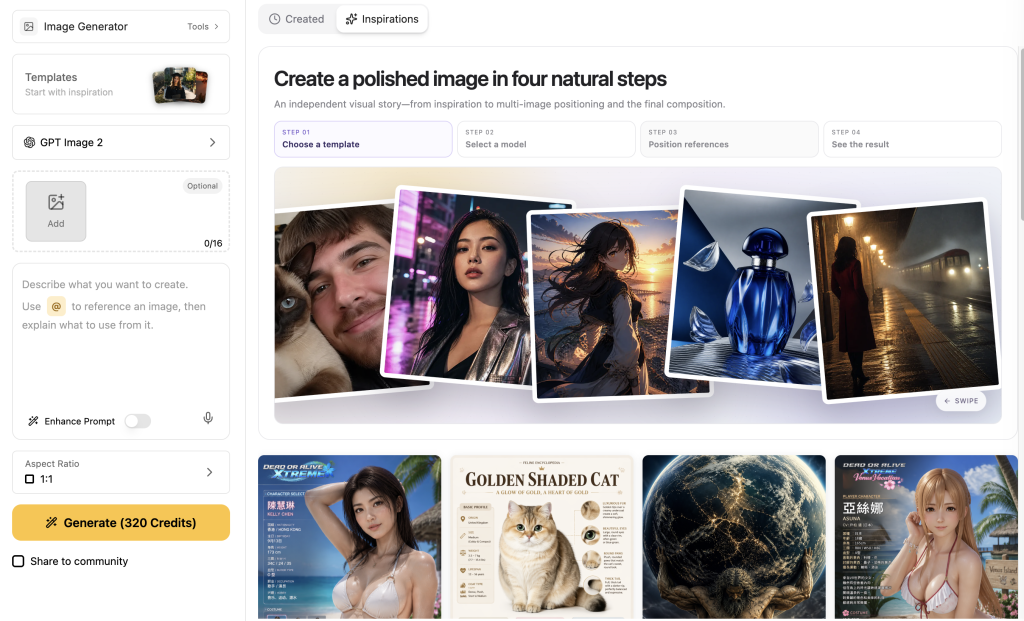
If you also need to finish the picture after generating it, Nano Banana 2 on GlobalGPT puts image creation, background removal and upscaling in one affordable workspace. It is a practical way to reduce spending on separate subscriptions while taking a useful image through to a finished asset.

Nano Banana 2 limits: How many images can you generate daily?
Nano Banana 2 has usage limits even on a paid plan. The first question is where you are generating: Gemini Apps, Google Flow, the Gemini API or a separate platform. A number quoted for one product does not establish the allowance in another.
- Free users have standard Gemini Apps limits. Image generation can encounter a feature-specific daily quota; follow the reset shown in the app.
- AI Plus, Pro and Ultra expand access, but their relative compute allowances are not guaranteed daily image counts. Paid access can still reach an image limit.
- Google’s current Apps limits page describes compute limits that refresh every five hours until a weekly limit is reached. That five-hour window is not a promise that the separate daily image quota resets at the same time.
Prompt complexity, model choice, features and chat length all affect the app’s compute usage. Open Settings → Usage Limits for the account’s usage information, then read any image-specific notice. For Google Flow, use the allowance and notice shown in Flow; do not apply the Gemini Apps or API figures below to it.
Older quota tables still circulate in community discussions. The example below helps explain why people search for a fixed daily number, but its before-and-after counts describe an earlier discussion. Use the current account notice for your own allowance.

What is Nano Banana 2, and how is it different from Pro?
Nano Banana 2 is the nickname for the Gemini 3.1 Flash Image model. It is designed for fast image generation and editing. Nano Banana Pro is a separate image model; in Gemini Apps, eligible Google AI subscribers can use it to redo an image for additional detail.
- The API supports output up to 4K. Gemini app downloads are 1K for free users and 2K for Google AI subscribers.
- The API supports different aspect ratios, including very wide 8:1 banners and tall 1:8 images. Choose a ratio around the intended placement.
- Google now also documents Nano Banana 2.1. This guide keeps Nano Banana 2’s model ID and pricing separate; check the model name when following the current image-generation documentation.
Can you use Nano Banana 2 for free without usage caps?
You can use image generation in Gemini Apps without a Google AI subscription where the feature is available, but free access has limits. Availability can also depend on your age, account type and supported country. Buying a plan expands access; it does not turn image generation into an unlimited service.
GlobalGPT is an affordable option when you need several AI tools for the same job. Generate with Nano Banana 2, keep the image you like, then use background removal or HD Upscale to prepare it for a product listing or design. That gives you a reason to consolidate separate tool subscriptions beyond simply generating more variations.
Choose a plan around the image tools you need and check its current credit allowance. Generation and subsequent edits can each use credits. Your GlobalGPT balance and Google’s native app quota are managed separately.
Nano Banana 2 API pricing and rate limits
If you are a developer or business owner using the Gemini API, budget for the model’s billable usage. Image-output price, input usage and project rate limits are different parts of that calculation. Google’s pricing table lists no free API tier for Nano Banana 2; free access in Gemini Apps is a separate offering.
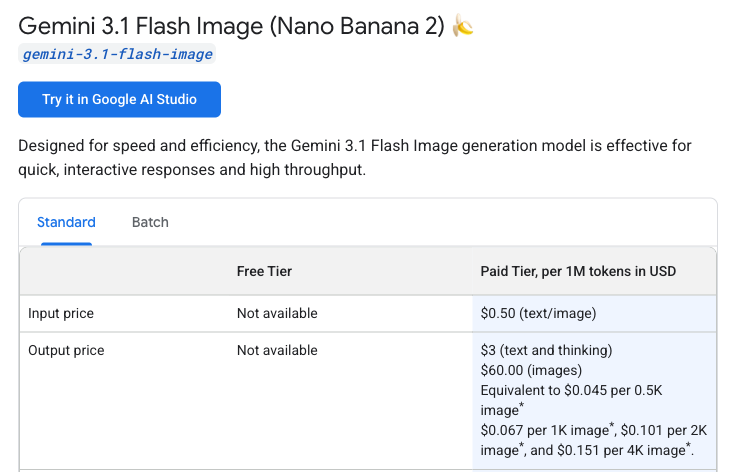
Nano Banana 2 standard API image output costs approximately $0.045 at 0.5K, $0.067 at 1K, $0.101 at 2K or $0.151 at 4K. Input charges are additional.
Cost of 100 image outputs
Gemini 3.1 Flash Image · Standard API · USD · checked October 10, 2026
0.5K · $0.045/image$4.50 for 100
1K · $0.067/image$6.70 for 100
2K · $0.101/image$10.10 for 100
4K · $0.151/image$15.10 for 100
$0$15.10
Calculated as 100 × Google’s published, rounded per-image equivalent. Image-output charges only; actual billing uses tokens. Input, text/thinking output and any billable Search grounding add to the total. Source: Google Gemini API pricing. Batch uses a separate price schedule.
For 100 standard API outputs, image-output charges alone are approximately $6.70 at 1K, $10.10 at 2K or $15.10 at 4K. Add input usage and any other billable work. These figures cover Google’s Gemini API. Gemini App subscriptions and GlobalGPT plans have their own allowances and billing.
Google lists standard input at $0.50 per million text/image tokens, text and thinking output at $3 per million tokens, and image output at $60 per million tokens. Search grounding can add charges too. Use the full pricing row for your request configuration, rather than budgeting only for the visible image.
Choose the output size your project needs before estimating a batch. Add prompt, text or thinking usage and any billable grounding to the image-output amount, then use the project’s rate limits to schedule the work.
Rate limits are separate from your budget
API rate limits can include requests per minute, tokens per minute, requests per day and image-specific limits. They apply per project, not per API key. The project’s requests-per-day quota resets at midnight Pacific time; that rule does not define a Gemini Apps image reset.
If the API returns 429, inspect the error and the project’s active limits in AI Studio. A request-rate, token, daily or applicable spending limit may be involved. Spacing requests can help with a short-window rate limit, but a daily quota needs its own reset or an eligible limit increase.
How to handle “Usage Limit Reached” errors
When the screen says you have reached your limit, first identify which limit it means. Then choose the next step for that route.
- Identify the limit: check whether the message refers to Gemini Apps usage, the daily image allowance or an API project rate limit. Each has a different reset or billing route.
- Read the reset: follow the time shown in the app or the relevant project limit. A paid plan can still reach a cap.
- Edit carefully: refine an existing image when that is the right creative task, but do not assume edits are free or exempt from image limits.
- Choose an available route: wait for the shown reset, use an eligible higher plan or use a separately billed API/platform route. In Gemini, exhausting Nano Banana 2’s daily quota also prevents further Pro redos.
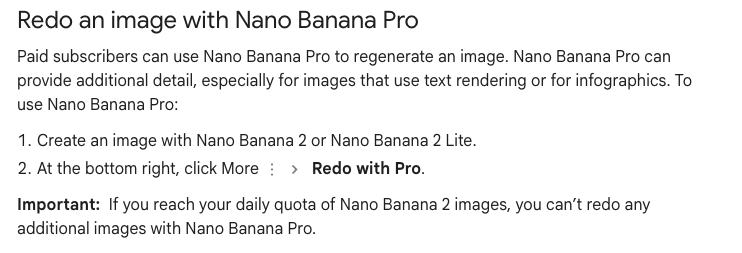
Check the daily image notice before relying on Pro redo for another pass. If that allowance is exhausted, save the image you want to keep and plan the next edit around the reset shown in your account.
Keep a useful image and finish the specific edit
If you already have the right subject and composition, save that version before generating again. For a product photo, the remaining task may be a clean background, a larger export or more room for a headline.
- Remove Background: use the image you selected to isolate the product, then inspect fine edges such as hair, glass or straps.
- HD Upscale: make a larger version for the intended layout, then check small lettering, logos and texture at full size.
- AI Expand: extend the composition when you need a wider banner or more space around the subject. Review the newly generated edges.
Start with Nano Banana 2 on GlobalGPT, save the result you want to keep and select that image in the relevant editing tool. Check the displayed cost before using an edit action: some shortcuts submit a task immediately, while others open a form for the next settings. For a more precise generation brief, see the Nano Banana 2 prompt guide.
Character consistency, reference images and 4K infographics
One of the biggest problems with AI images is that a person or product can change between generations. Nano Banana 2 supports reference images to guide resemblance and composition. Use a small, clear set of references, state what must stay the same and compare each result against the source.

Google’s February 2026 launch post described up to five characters and 14 objects. The current API guide lists up to four character references and 10 object references for Nano Banana 2. Those source descriptions should not be turned into a guarantee of flawless identity or color matching; use the current model documentation when preparing API inputs.
For infographics, prepare the facts and wording first, then check every label, number and relationship in the output. Search grounding can help supply context, but it does not make a diagram automatically correct. A 4K export gives you more pixels; print quality still depends on the artwork, the intended print size and the quality of fine detail.
Google also states that generated images include a SynthID watermark. See the image-generation guide for current output settings and reference-image support.
FAQs
What are the daily usage limits for Nano Banana 2?
Google describes Gemini Apps access with plan and compute-based limits, plus feature-specific restrictions. Use the image limit notice for your account; the API has separate project limits and billing.
Why do I get a “Usage Limit Reached” error even with a Pro subscription?
Paid plans still have limits. Check the model or feature named in the message and its reset time. A Pro redo cannot bypass an exhausted Nano Banana 2 image quota.
Can Nano Banana 2 generate NSFW or restricted content?
Google applies its Generative AI Prohibited Use Policy to image creation. It restricts sexual content and other prohibited uses; do not infer that every swimwear or non-explicit image is banned. Use a permitted brief rather than trying to bypass safeguards.
Does Google Flow have the same Nano Banana 2 limit as Gemini Apps?
Check the usage information in the product you are using. A Gemini Apps allowance or an API project limit does not establish your Google Flow allowance.
Does upscaling an existing image use credits?
On GlobalGPT, image generation and subsequent editing tasks can each use credits. Check the current charge for the selected tool before submitting the edit.
Conclusion
Nano Banana 2 combines fast image generation with up to 4K API output and useful reference controls. Plan around the actual App notice or API project limit, keep input charges separate from image-output prices, and verify text and visual details before using an image professionally.
If your next job is to finish a useful image, try Nano Banana 2 on GlobalGPT and keep the best version for a targeted edit. Background removal, upscaling and expansion make the workspace useful beyond the first generation, with an affordable alternative to stacking separate creative subscriptions.