Fact-checked against official Anthropic, OpenAI, Google, GitHub, and Aider sources on July 27, 2026. Prices and quotas can change by region, account, and billing channel.
快速回答
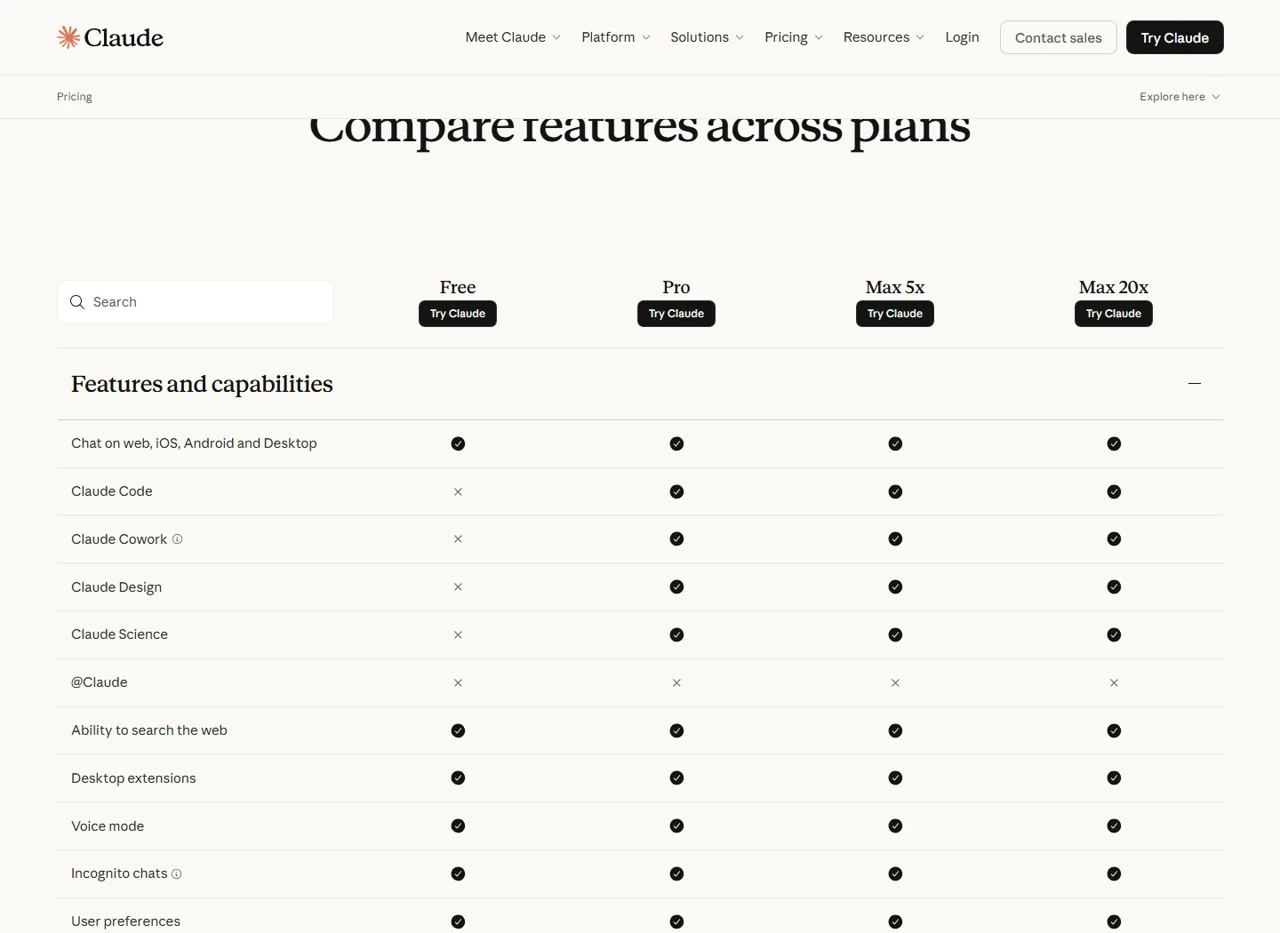
Claude Code is free to download, but it is not included in the $0 Claude Free plan. Anthropic’s current pricing table gives Free users Claude chat while marking Claude Code unavailable. Official Claude Code model usage normally requires Pro, Max, Team, Enterprise, or a separately billed Anthropic Console account.
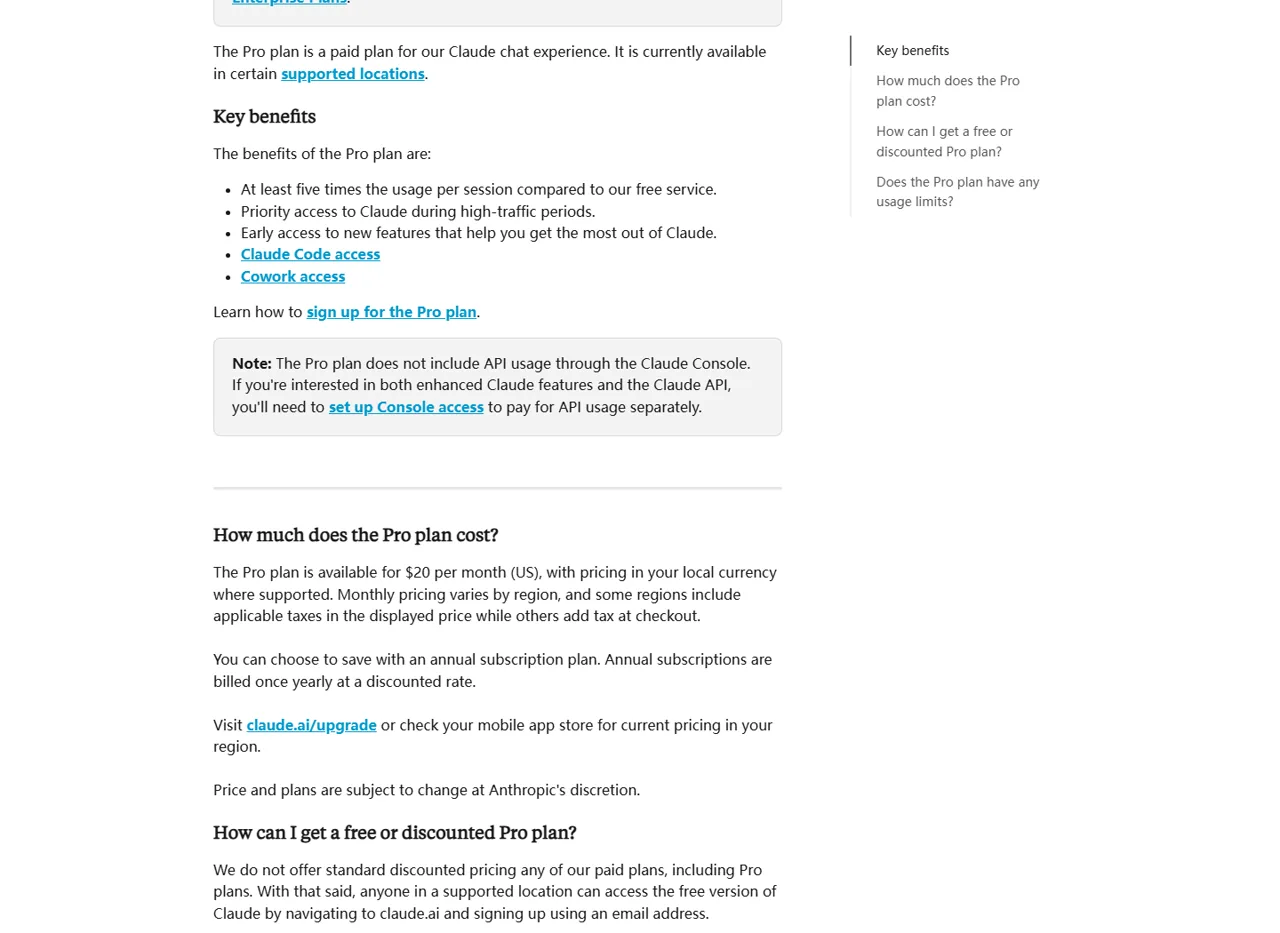
The lowest listed US consumer subscription that includes Claude Code is Pro at $20 monthly, or $17 per month with $200 billed up front annually. If you need a $0 starting point, jump to the five alternatives below: Yukie is the easiest browser-based option, while Gemini CLI and GitHub Copilot CLI have documented free entry routes.

The confusing part is that “free” can describe three different things: downloading a command-line client, using an AI model, or receiving a limited allowance through an account. Claude Code passes the first test, but the official Claude Free plan does not pass the second.
This guide separates those costs, explains Claude Code limits without inventing a universal message count, and compares five practical routes for people who do not want to start with an Anthropic subscription.
Claude Code free access at a glance
| 問題 | Verified answer | 這代表什麼 |
|---|---|---|
| Can you install Claude Code for $0? | 是 | The client can be installed without buying it. |
| Does Claude Free include Claude Code? | 沒有 | Anthropic’s live comparison marks Claude Code unavailable on Free. |
| Does Pro include Claude Code? | 是 | Pro is the lowest listed consumer subscription with access. |
| Is Anthropic Console usage included with Pro? | 沒有 | API-key usage is metered and billed separately. |
| Is there one fixed Claude Code prompt limit? | No universal number | Usage depends on context, files, tools, model, effort, and conversation length. |
Anthropic defines 克勞德·科德 as an agentic coding tool that reads a codebase, edits files, runs commands, and works across terminal, IDE, desktop, and browser surfaces. That is broader than asking coding questions in the standard Claude chat interface.
The distinction is visible in Anthropic’s official plan comparison: Free includes chat on web, mobile, and desktop, but the Claude Code row is marked unavailable. Pro, Max 5x, and Max 20x are marked as included.
How much does Claude Code cost?
There is no separate consumer “Claude Code plan.” Access is attached to eligible Claude subscriptions, organization seats, or pay-as-you-go Console billing. These are the current official routes.
| 路線 | US web price | 克勞德·科德 | Billing and limit model |
|---|---|---|---|
| 克勞德·弗里 | $0 | 不包括 | Free Claude chat allowance only. |
| 克勞德·普羅 | $20 monthly, or $200 annually | 包含 | Shared five-hour session and weekly limits across Claude and Claude Code. |
| Claude Max 5x | $100 每月 | 包含 | Five times more usage per session than Pro, plus weekly limits. |
| Claude Max 20x | $200 monthly | 包含 | Twenty times more usage per session than Pro, plus weekly limits. |
| 團隊 | Seat-based | Included with every seat | Premium seats provide more usage for heavier workloads. |
| 企業 | Contract or self-serve terms | Plan-dependent | Newer plans include Code in the unified seat; legacy structures may differ. |
| Anthropic Console / API key | 隨用隨付 | 支援 | Metered per token and separate from a Pro subscription. |

Anthropic lists Pro at $17 per month when the $200 annual subscription is paid up front. Regional currencies, taxes, and mobile-store pricing can differ, so treat the US web prices above as a baseline rather than a universal checkout total. For a broader plan breakdown, see our 克勞德計畫進行比較 和 detailed Claude pricing guide.
Claude Code limits: what “included” actually means
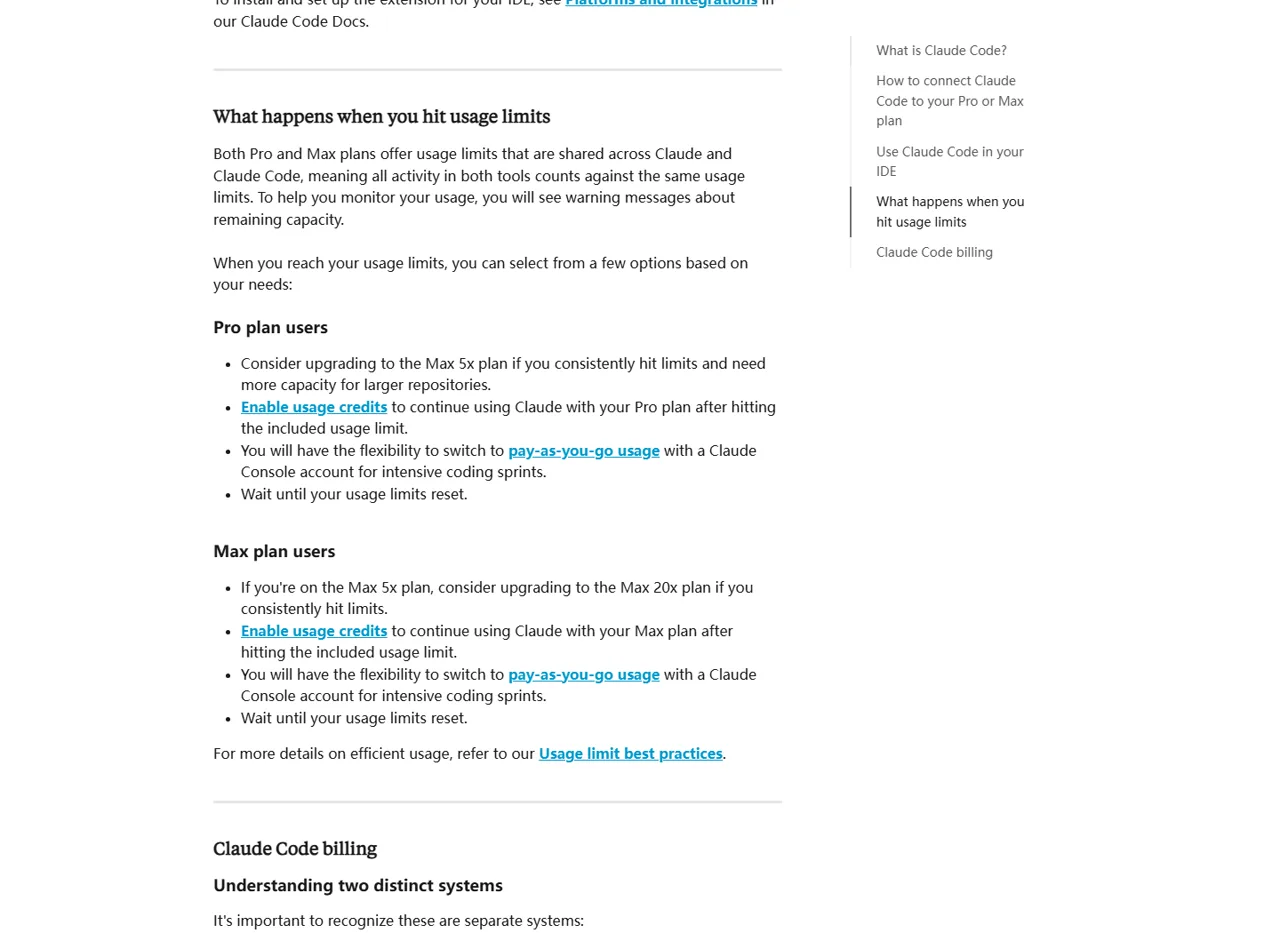
Included does not mean unlimited. Pro has a session-based limit that resets every five hours and a weekly limit across all models. Max has higher relative allowances, but it also has weekly controls. The official support pages describe Max as having one weekly limit across all models and another for Sonnet models.
重要: Claude chat and Claude Code draw from the same included Pro or Max usage pool. A long coding session can reduce the capacity available for chat, and chat usage can reduce the capacity available for Claude Code.

Anthropic does not publish one reliable “prompts per day” figure for every account. The amount of work you can complete changes with prompt length, attached files, conversation length, tool calls, model choice, effort level, and the size of the codebase context.
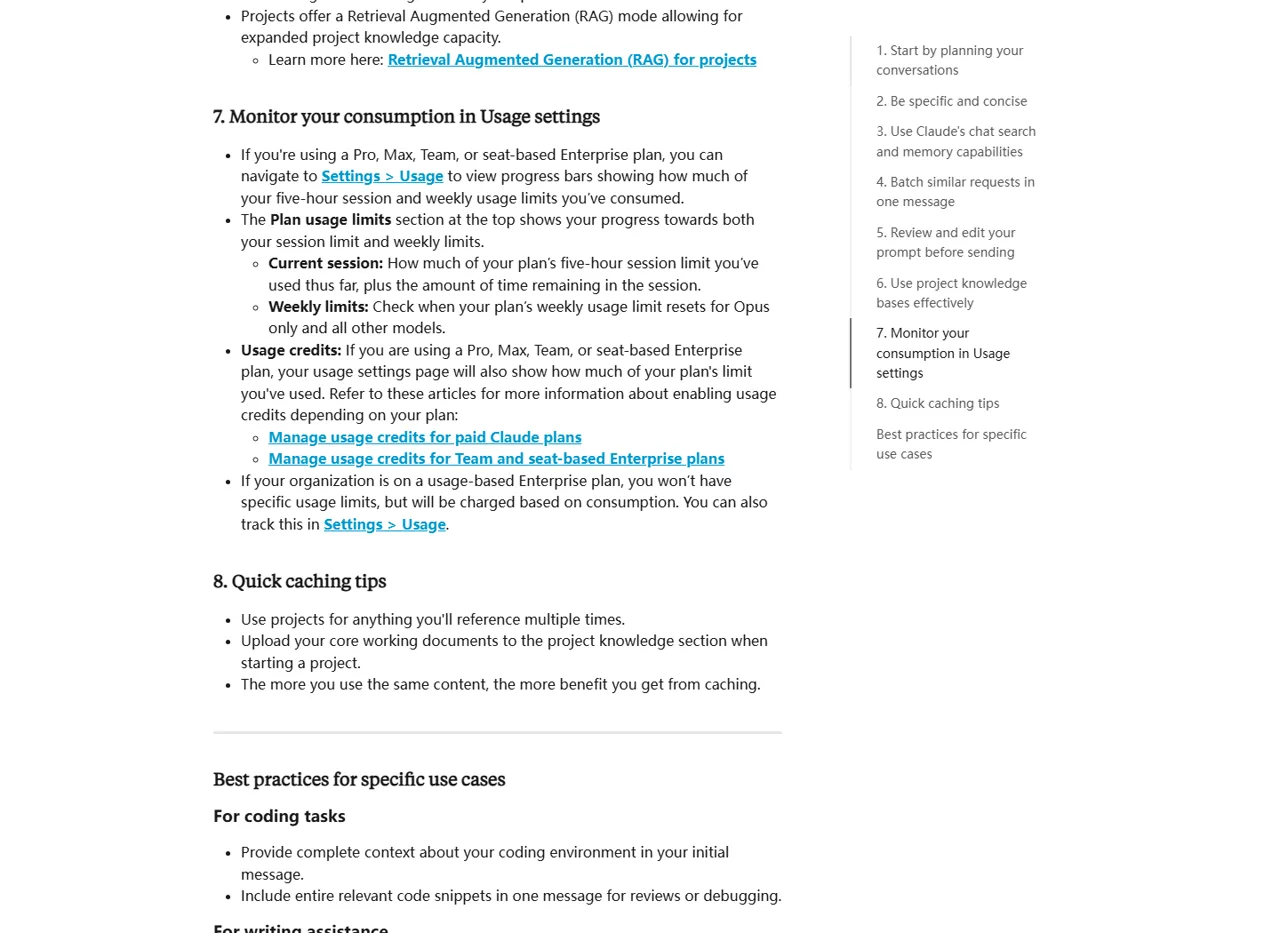
- Check the real account state: 使用
/狀態in Claude Code and review Settings → Usage for the five-hour and weekly progress bars. - Reduce avoidable context: start a focused session instead of carrying an unrelated, long conversation forward.
- Watch large files and tool calls: repository scans, long outputs, and repeated operations consume more of the shared allowance.
- Choose the model deliberately: availability and consumption differ;
/模型is the current in-product source for your account.

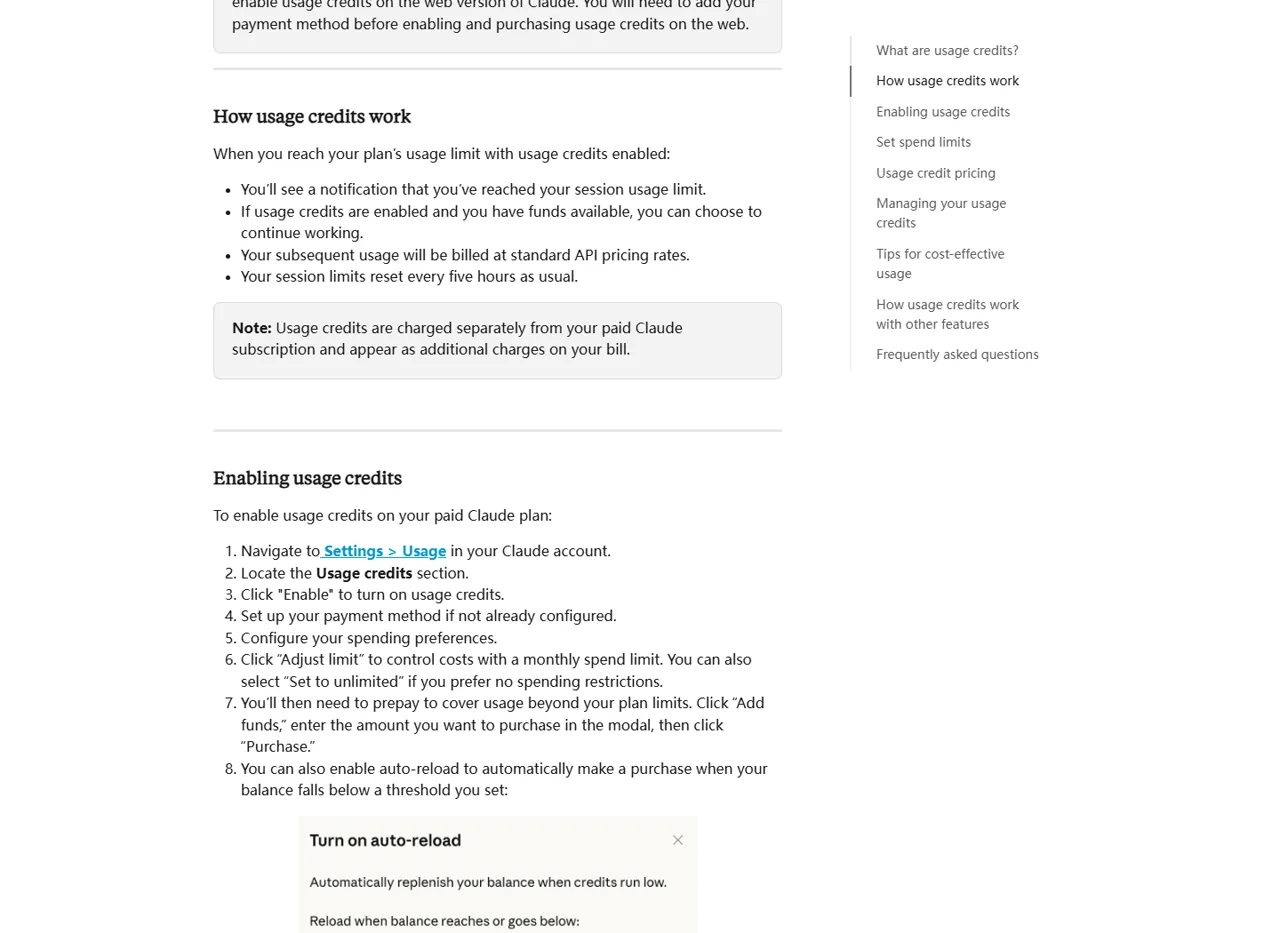
If you reach the included limit, Anthropic says you can wait for reset, upgrade, switch to separately billed Console usage, or enable usage credits where available. Usage credits continue at standard API rates and are charged separately from the subscription.

Can you use Claude Code without paying Anthropic?
Not through the official $0 Claude Free entitlement. Anthropic’s overview says most Claude Code surfaces require a Claude subscription or an Anthropic Console account. It also says the terminal CLI and VS Code can support third-party providers, but those providers have their own authentication, pricing, quotas, and model behavior.
That leaves two sensible approaches: use a different product that has a documented free entry route, or keep Claude Code as the working environment and add a separate model-access workflow. The five alternatives below cover both browser and terminal preferences.
Hands-on test: using Yukie as a browser-based alternative

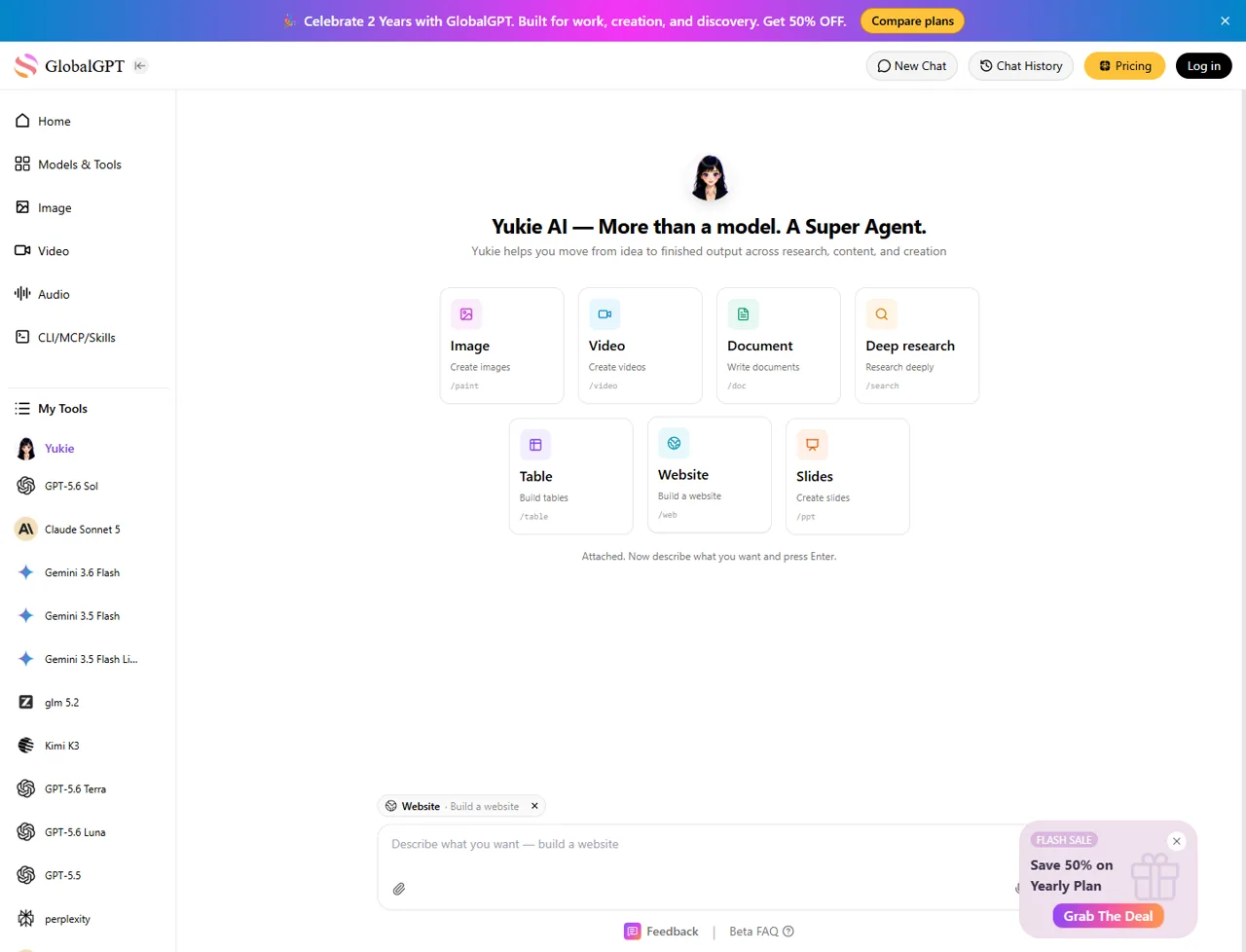
Yukie is the most accessible option in this list for people who do not want to live in a terminal. Its public workspace groups Image, Video, Document, Deep research, Table, Website, and Slides into one browser interface.
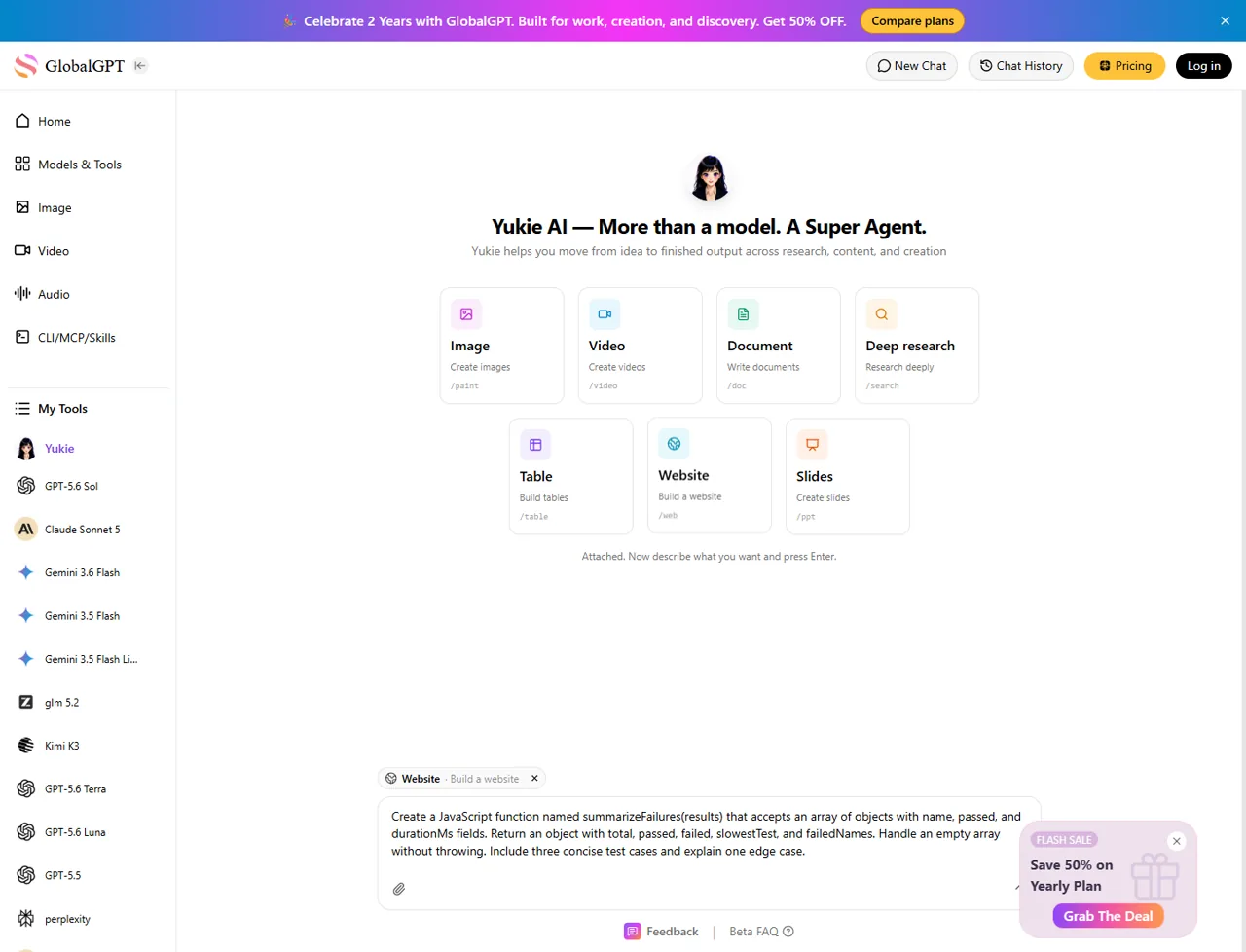
We tested the public Yukie route in a clean browser session on July 27, 2026. We selected 網站 mode and entered a small JavaScript task designed to reveal whether the product could generate code, tests, and an edge-case explanation.
Create a JavaScript function named summarizeFailures(results) that accepts an array of objects with name, passed, and durationMs fields. Return an object with total, passed, failed, slowestTest, and failedNames. Handle an empty array without throwing. Include three concise test cases and explain one edge case.

Clean browser session
網站
Sign-in dialog after submission
沒有
Pressing Enter opened a sign-in dialog after roughly five seconds. No code was generated before authentication, so we could not grade correctness, latency, or repository-editing ability. That is a limitation of the test, not evidence that the product cannot code after sign-in.
Our verdict: Yukie is a practical browser-based “Claude Code alternative” when the real job is to produce a website, research, documents, tables, slides, images, or video from one workspace. We did not verify it as a terminal replacement, and we do not claim feature parity with Claude Code’s repository editing, shell commands, or diffs.
5 Claude Code alternatives with a free or flexible entry route
“Free” is labeled conservatively here. An open-source CLI can still require paid model access, while a hosted free plan can limit requests or features. The best choice depends on whether you value a browser workspace, a terminal agent, a specific model provider, or local-model control.
| 替代方案 | 介面 | Free status | 最適合 | Key caveat |
|---|---|---|---|---|
| Yukie | 瀏覽器 | Public workspace; sign-in required before our test could generate | Multi-format creation without terminal setup | No verified Claude Code feature parity or free quota claim |
| OpenAI Codex CLI | 終端 | Open-source client; model access requires an eligible plan or API setup | OpenAI-centered local coding workflows | Current official recommended plan list does not include Free |
| 雙子座命令列介面 | 終端 | Up to 1,000 requests/day with a personal Google account | A documented, generous free terminal route | Rate limits and service availability still apply |
| GitHub Copilot CLI | 終端 | Included in the $0 Copilot Free plan with limited usage | GitHub users who want CLI agent features | Uses AI Credits; Free cannot buy more credits |
| 援助者 | 終端 | Open-source client; local and limited free-model routes exist | Provider flexibility and Git-aware editing | Cost and edit quality depend on the chosen model |
Alternative 1: Yukie — best browser-based all-in-one alternative
Choose Yukie when your desired outcome matters more than reproducing Claude Code’s terminal interface. The browser workspace keeps website building, deep research, documents, tables, slides, images, and video in one place, which is useful for creators, marketers, researchers, and no-code users.
- 最適合: people who want to move from a prompt to a finished digital asset in a visual workspace.
- Free-entry evidence: the public workspace is accessible, but our generation attempt required sign-in.
- Not proven: terminal commands, direct repository edits, patch review, Git diffs, or Claude Code-equivalent autonomy.
For a simple browser route, open Yukie and choose the mode that matches the deliverable. Sign in before judging generation quality, because that was the gate reached in our clean-session test.
Alternative 2: OpenAI Codex CLI — best for OpenAI-centered terminal work
OpenAI Codex CLI is an Apache-2.0-licensed coding agent that runs locally in the terminal. It is a close interface-level comparison with Claude Code because both are designed to inspect a local project and act from the command line.
The client being open source does not make model usage free. OpenAI’s current repository recommends signing in through ChatGPT Plus, Pro, Business, Edu, or Enterprise, or completing separate API-key setup. The recommended plan list on that page does not include ChatGPT Free, so do not select Codex solely on the assumption of ongoing $0 model access.
Codex is strongest when you already prefer OpenAI models and want a terminal-first agent. If you are deciding between ecosystems rather than clients, our Claude versus ChatGPT coding comparison 提供了更多背景資訊。.
Alternative 3: Gemini CLI — best documented free terminal allowance
雙子座命令列介面 is an Apache-2.0 open-source terminal agent with file operations, shell commands, web fetching, Google Search grounding, and MCP support. Its official quota page currently gives a personal Google account up to 1,000 requests per user per day through Gemini Code Assist Individual.
The unpaid Gemini API-key route is listed separately at 250 requests per day. Requests also have per-minute controls and are subject to service availability, so “1,000 per day” is a ceiling for the personal-account route, not a promise that every minute or model will always be available.
Gemini CLI is the clearest choice here when the requirement is both terminal access and an officially documented $0 allowance. Verify the latest numbers on the Gemini CLI quotas and pricing page before building an automated workflow around them.
Alternative 4: GitHub Copilot CLI — best for existing GitHub users
GitHub Copilot CLI brings Copilot’s agent workflow to the terminal. GitHub’s current plan page lists Copilot Free at $0, explicitly includes Copilot CLI, and describes chat and agent usage as limited.
Copilot CLI interactions consume GitHub AI Credits. Free users receive limited usage and cannot purchase additional credits, while paid tiers include larger credit amounts and can buy more. This makes Copilot CLI a genuine free starting point, but not an unlimited one.
Choose it when GitHub identity, repositories, issues, and pull-request workflows are already central to your work. Check the live Copilot plans page because the credit system and included models can change.
Alternative 5: Aider — best for model and provider flexibility
援助者 is an Apache-2.0 open-source terminal pair programmer with codebase mapping, Git integration, automatic commits, and support for many cloud and local models. Unlike a single-provider assistant, it lets you choose where inference comes from.
Aider documents limited free API-provider routes and local-model support through tools such as Ollama or an OpenAI-compatible endpoint. That can reduce direct software or inference cost, but a weak model may fail to return edits Aider can apply reliably.
Choose Aider when you want Git-aware edits and control over the model/provider tradeoff. If you use a paid API, that provider’s token charges remain your cost. Comparing the 最適合編碼的 AI 模型 can help before you commit to one backend.
Keep Claude Code and use GlobalGPT CLI inside the workflow
You may not need to abandon Claude Code’s interface. If the terminal workflow already fits, you can add GlobalGPT CLI as a separate route for working with models available through your GlobalGPT account. This can be more practical than rebuilding your habits around a completely different editor or agent.
Step-by-step GlobalGPT CLI setup for Claude Code
Follow our dedicated guide to install the CLI, authenticate, discover available models, and run it within a Claude Code-centered workflow.
This does not turn the $0 Claude Free plan into included Anthropic Claude Code usage, and it should not be described as unlimited. It is an additional CLI workflow with its own account, model availability, balance, and usage terms.
Which Claude Code alternative should you choose?
| Your priority | 最佳起點 | 為何 |
|---|---|---|
| No terminal setup; create several content formats | Yukie | Browser workspace for websites, research, documents, tables, slides, images, and video. |
| Documented free terminal allowance | 雙子座命令列介面 | Personal-account route currently lists up to 1,000 requests per day. |
| GitHub-centered development | GitHub Copilot CLI | The $0 plan includes limited CLI and agent usage. |
| OpenAI models and local terminal workflow | OpenAI Codex CLI | Native fit for the OpenAI ecosystem, with an eligible plan or API setup. |
| Choose a cloud or local model yourself | 援助者 | Provider-flexible, open-source, and Git-aware. |
| Keep a Claude Code-centered workflow | GlobalGPT 命令列介面 | Adds a separate multi-model CLI route without forcing a new editor habit. |
If you want a larger product landscape, review our broader list of Claude alternatives. Developers comparing repository context may also find the guide to whether ChatGPT can read and process an entire folder useful, while Python users can compare DeepSeek and ChatGPT for code generation.
常見問題
Is Claude Code completely free?
No. The Claude Code client is free to download, but Anthropic’s $0 Claude Free plan does not include Claude Code. Official model usage normally requires an eligible subscription or separately billed Console account.
What is the cheapest official Claude Code plan?
Claude Pro is the lowest listed consumer plan that includes Claude Code. Anthropic lists it at $20 per month in the US, or $17 per month with $200 billed up front annually. Regional and mobile pricing may differ.
How many Claude Code prompts do you get with Pro?
Anthropic does not publish one universal prompt count. Usage varies with context size, files, conversation length, tools, model, and effort. Pro has a five-hour session limit and a weekly all-model limit shared across Claude and Claude Code.
Does Claude Pro include API usage?
No. Anthropic states that Pro does not include API usage through Claude Console. API-key usage is pay as you go and billed separately from the subscription.
Can I use GlobalGPT CLI in Claude Code?
Yes. You can use GlobalGPT CLI as a separate model-access workflow within a Claude Code-centered setup. Follow the dedicated installation and authentication guide, and remember that GlobalGPT has its own account, balance, models, and usage terms.
Is Yukie a full replacement for Claude Code?
Not based on our public-page test. Yukie is a useful browser-based alternative for websites, research, documents, tables, slides, images, and video, but we did not verify terminal commands, repository editing, diffs, or feature parity with Claude Code.
歸根結柢
Claude Code is free to install, not free to use through the $0 Claude plan. Pro is the lowest listed official consumer subscription, and its included usage is shared with Claude chat across session and weekly limits.
Start with Yukie if you want a browser-based, multi-format workspace. Start with Gemini CLI or GitHub Copilot CLI if a documented free terminal allowance matters most. If you already like Claude Code, keep the workflow and follow the GlobalGPT CLI setup guide to add a separate model-access route.