
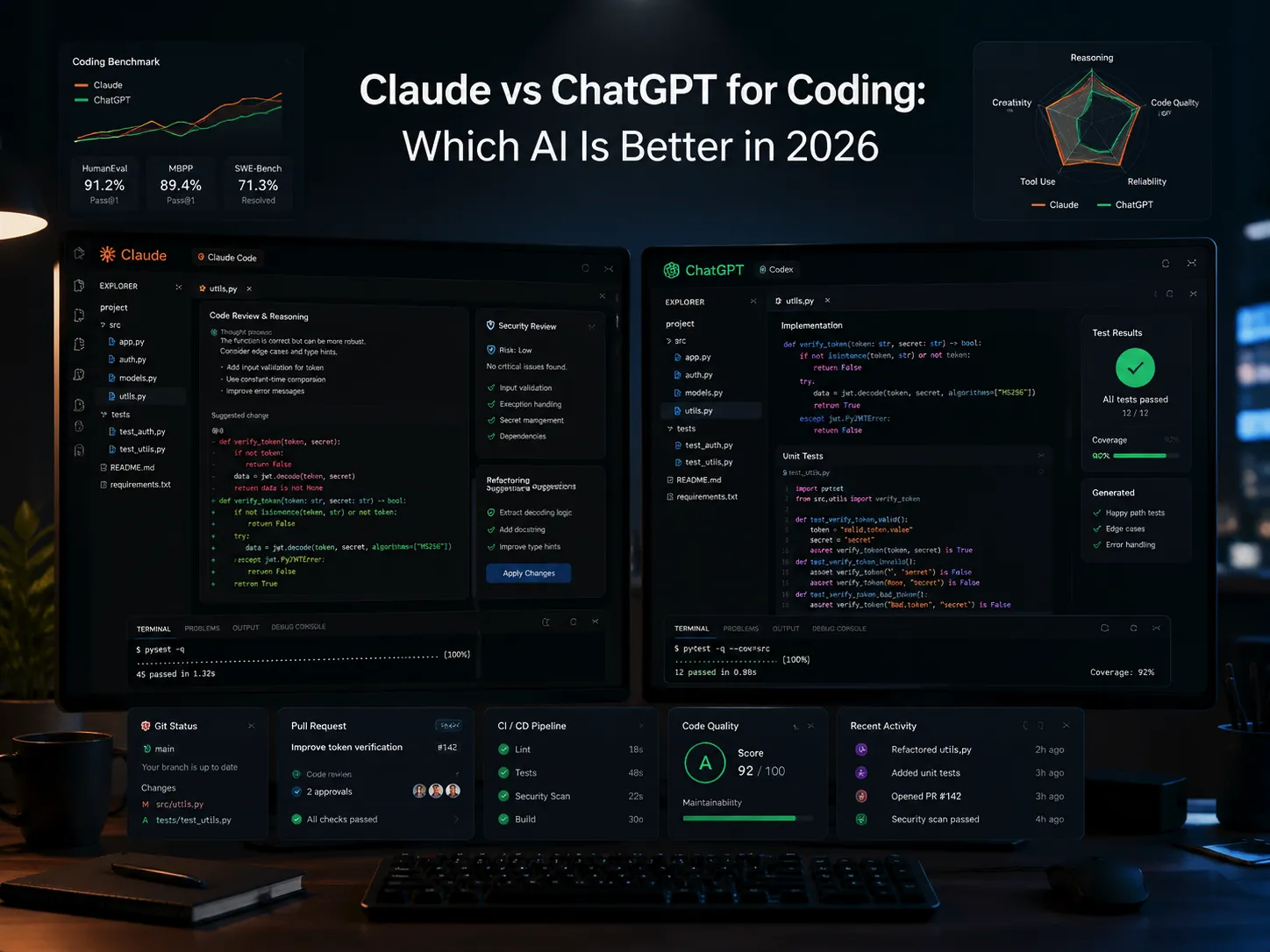
In our July 7, 2026 tests, Claude Sonnet 5 was the better first pass for code review, root-cause analysis, architecture planning, and long-context reasoning. GPT-5.5 was the better first pass when you need a complete implementation draft, runnable test scaffolding, or copy-ready examples. For repository-level work, compare Claude Code with Codex rather than judging either company by the chat window alone.
The useful split is not simply “Claude wins” or “ChatGPT wins.” As of September 27, 2026, Anthropic’s lineup includes Claude Fable 5.1, Opus 5.5, Sonnet 5, and Haiku 4.5; OpenAI’s GPT-6 family includes Astra, Sol, and Luna. Product access matters: Sol and Luna launched in ChatGPT Work, Codex, and the API, with the announcement explicitly excluding ordinary Chat. The hands-on sections below remain a dated comparison of Claude Sonnet 5 and GPT-5.5, tested with the same prompts on July 7, 2026. For a current pairing, see Claude Opus 5.5 vs GPT-6 Sol.
If you want to compare models without juggling separate subscriptions, GlobalGPT is a practical multi-model workspace with GPT-6 Astra and Claude Opus 5.5 available in its model selector. It is useful for comparing coding answers, planning, writing, and research, but it does not replace Claude Code, Codex, official APIs, an IDE, or a repo-aware development workflow.

Table of contents
- Claude vs ChatGPT for coding: quick answer
- What changed in 2026
- Current coding model lineup
- Benchmark overview: SWE-Bench, Terminal-Bench and what they mean
- How we tested Claude and ChatGPT for coding
- Test 1: debugging and root-cause analysis
- Test 2: refactoring and maintainability
- Test 3: multi-file reasoning and planning
- Test 4: unit tests and verification
- Test 5: security and reliability review
- Claude Code and Codex: when chat is not enough
- Pricing: Claude, ChatGPT, Codex and GlobalGPT
- Which coding setup should you choose?
- Why many developers still use both
- FAQ
Claude vs ChatGPT for Coding: Quick Answer
In our July 7 same-prompt chat tests, Claude Sonnet 5 was the stronger first pass when the problem was ambiguous: it prioritized likely causes, cut through noise, and explained risk clearly. GPT-5.5 was stronger when the next step was a fuller implementation draft with imports, test scaffolding, and more code detail. Those observations describe that test, not every future model release.
For day-to-day development, the best workflow is usually:
- Use Claude first for code review, bug triage, architecture decisions, and “what should I inspect first?” questions.
- Use ChatGPT first for generating a starter implementation, writing test scaffolds, producing examples, and turning a plan into code.
- Use both for migrations, security-sensitive changes, payments, authentication, file uploads, and anything that can break production data.
| Coding need | Better first pick | Why |
|---|---|---|
| Debugging a tricky bug | Claude first | In our test, Claude prioritized the likely cause and explained the failure path clearly. |
| Writing a complete implementation draft | ChatGPT first | In our test, GPT-5.5 supplied fuller code and more ready-to-use scaffolding. |
| Reviewing security or reliability risk | Claude first, then ChatGPT | Claude ranked severity cleanly; ChatGPT added concrete implementation patterns. |
| Changing files across a repository | Claude Code or Codex | Repo context, command execution, tests, and diffs matter more than a chat-only answer. |
If your main question is which model family is best for coding overall, the broader best AI model for coding comparison is a useful next read. If your main decision is inside the OpenAI ecosystem, the best ChatGPT model for coding guide gives more detail on GPT model selection.
What Changed in 2026
A useful 2026 comparison has to account for three shifts.
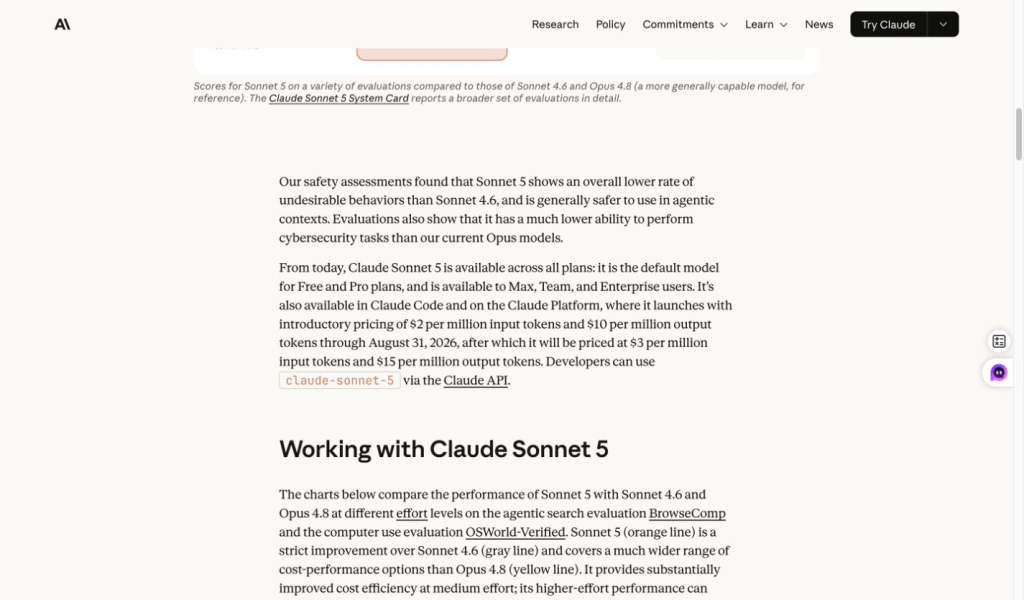
First, Claude Sonnet 5 changed the Claude side of the decision. Anthropic describes Sonnet 5 as available across plans and in Claude Code, with Claude Platform access for developers. That matters because Claude is no longer only a chat assistant for coding explanations; it is part of Anthropic’s coding-agent workflow.
Second, GPT-6 is now OpenAI’s current model family for coding work. Astra targets complex software engineering; Sol and Luna add lower-cost options. OpenAI’s September 22 release announcement lists Sol and Luna in ChatGPT Work and Codex for Plus, Pro, Business, Enterprise, and Edu, with Luna also available to Free and Go users in the desktop app. It explicitly says these models are not yet available in Chat. API access is billed separately.
Third, chat assistants and coding agents solve different parts of the job. Plain chat is useful for snippets, debugging, explanation, and planning. Claude Code and Codex are repo-aware workflows designed to inspect files, run commands, test changes, and work across larger tasks. A fair comparison separates chat output quality from the capabilities of the coding-agent product.
Current Coding Model Lineup
As of September 27, 2026, the coding comparison is a lineup decision rather than a single Claude-versus-ChatGPT matchup:
| Side | Current models to consider | Best coding use |
|---|---|---|
| Claude | Claude Fable 5.1, Claude Opus 5.5, Claude Sonnet 5, and Claude Haiku 4.5 | Long-context review, planning, debugging, agentic coding, and Claude Code workflows. |
| ChatGPT / OpenAI | GPT-6 Astra, GPT-6 Sol, and GPT-6 Luna; availability differs between ChatGPT Work, Chat, Codex, and API | Implementation, frontend work, tests, tool-using workflows, and Codex tasks. |
| GlobalGPT | GPT-6 Astra and Claude Opus 5.5, verified in GlobalGPT; this is a separate platform subscription | Side-by-side prompt comparison, everyday code questions, research, and approach evaluation. |
If you are tracking Claude access and plan details, see the separate Claude AI plans 2026 guide and the deeper Claude AI pricing guide. If you are comparing OpenAI plans, the ChatGPT subscription plans 2026 breakdown is the cleaner companion piece.
Benchmark Overview: SWE-Bench, Terminal-Bench and What They Mean
Benchmarks are useful because they show how models behave in controlled coding tasks. The key is to read each benchmark for what it actually measures. A repository issue benchmark, a terminal-agent benchmark, and an official model launch table are not the same signal, so they should be used together with the hands-on tests below.
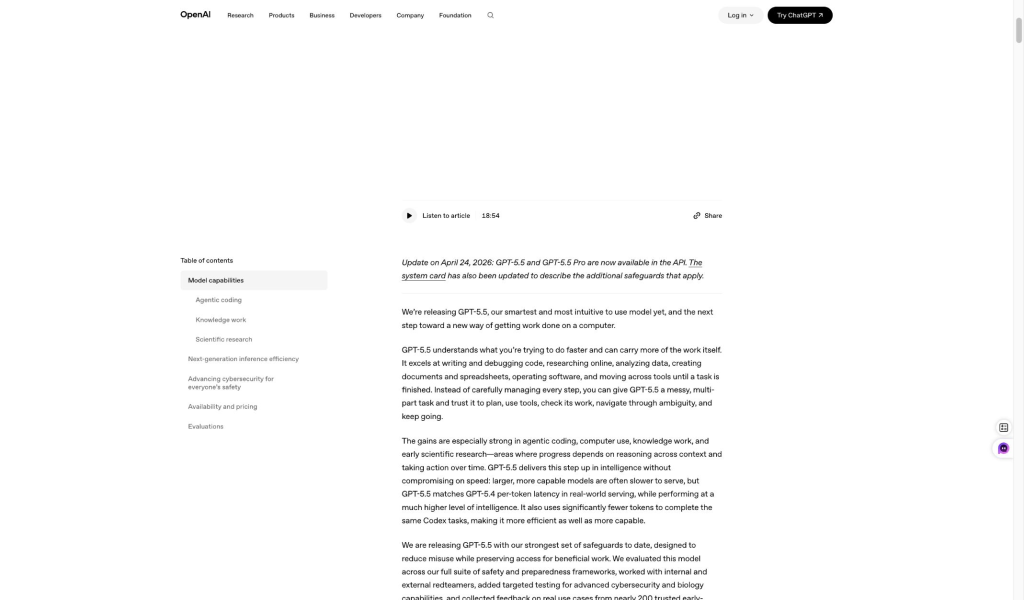
GPT-5.5 Coding Evidence From the Test Date
The GPT-5.5 material below is retained because it matches the model used in the July 7 hands-on comparison. It supports the test section’s implementation-heavy observations, but it should not be read as the current OpenAI model lineup; GPT-6 is now the active family, with access varying between ChatGPT Work, ordinary Chat, Codex, and the API.
SWE-Bench: repository issue resolution
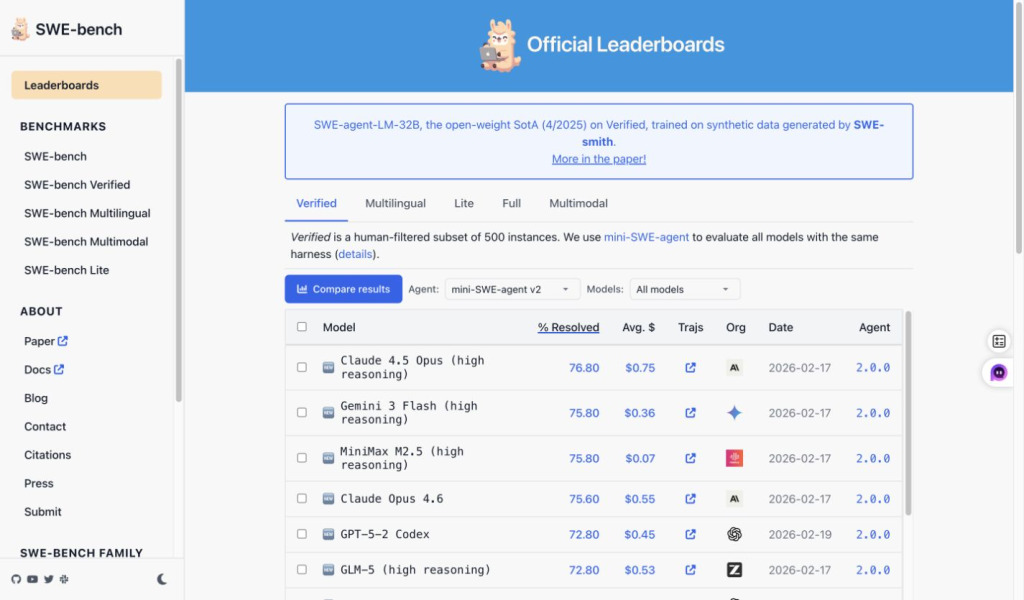
SWE-Bench is useful because it is closer to real software maintenance than a short code snippet prompt. It looks at repository issues and whether a model can produce changes that resolve the task. For Claude vs ChatGPT, this tells you something about software-engineering strength, but it still does not tell the whole story about explanation quality, review judgment, or how helpful an answer feels in a chat workflow.
SWE-Bench Pro: harder coding tasks and resolve rate
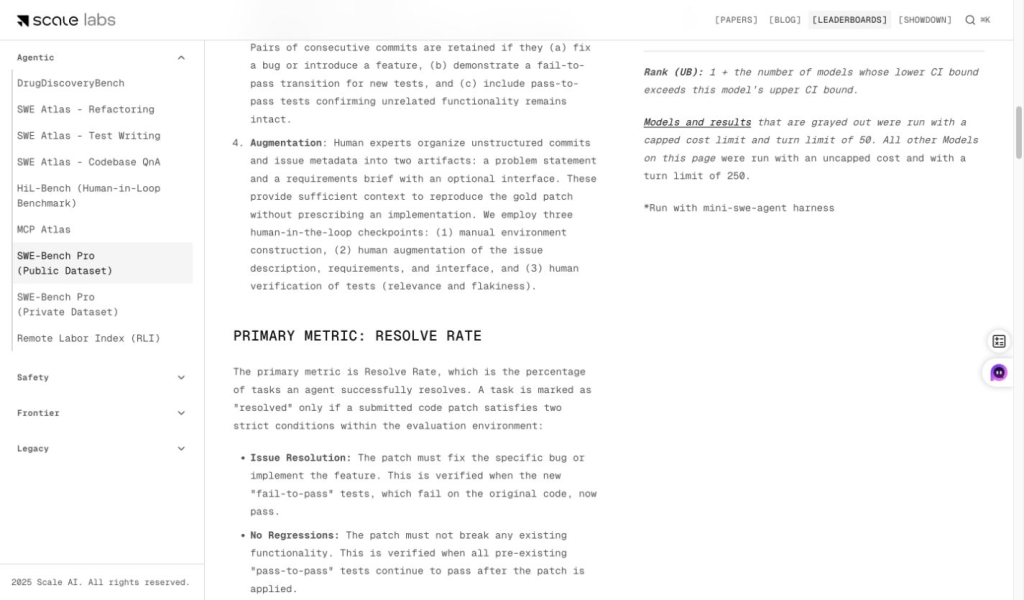
Scale’s SWE-Bench Pro public leaderboard is a harder signal because it focuses on more demanding repository tasks and uses resolve rate as the main reading. This is most helpful when you care about serious coding-agent capability: not just whether the model can explain a bug, but whether it can move a repository toward a working fix under benchmark conditions.
Terminal-Bench: command-line and agent workflow tasks
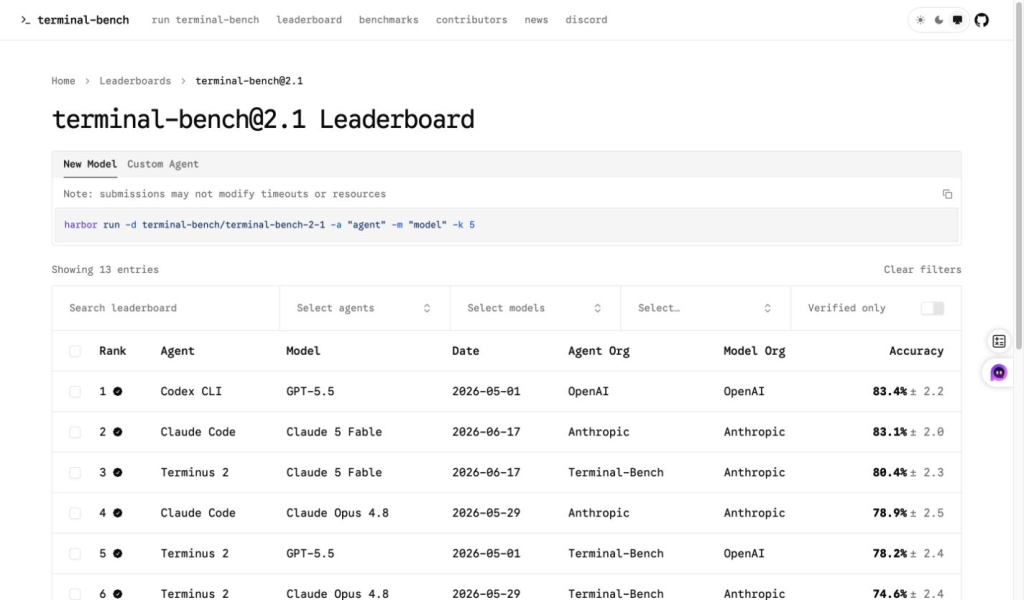
Terminal-Bench 2.1 is different from SWE-Bench because it focuses on terminal and command-line task completion by agent/model setups. That makes it more relevant to Claude Code and ChatGPT Codex style workflows than to a plain “write this function” chat prompt. If you are choosing a coding assistant for repo-level or command-line work, this benchmark belongs in the decision.
| Evidence | Best read for | Practical takeaway |
|---|---|---|
| OpenAI GPT-5.5 coding materials | GPT-5.5 coding and agentic software-engineering positioning. | Strong support for ChatGPT as an implementation-heavy coding assistant. |
| SWE-Bench | Repository issue resolution and software maintenance tasks. | Good signal for coding ability, especially when repository context matters. |
| SWE-Bench Pro | Harder repository tasks and resolve-rate comparison. | Useful for judging serious agentic coding capacity. |
| Terminal-Bench 2.1 | Terminal tasks, command execution, and agent/model setups. | More relevant to Claude Code and Codex workflows than simple chat prompts. |
Benchmarks make both model families credible coding options, but they do not settle the daily workflow choice. The sections below use the same prompts for debugging, refactoring, planning, unit tests, and security review so you can see where the answers differed in practice.
How We Tested Claude and ChatGPT for Coding
We tested GPT-5.5 and Claude Sonnet 5 on July 7, 2026 in GlobalGPT, using the same interface and the same prompts. The goal was not to recreate a full IDE agent benchmark. It was to compare everyday coding help: debugging, refactoring, multi-file reasoning, test writing, and security review.
The scoring was simple: correctness, root-cause reasoning, maintainability, edge-case coverage, verification, and instruction following. That keeps the comparison close to how developers actually use AI coding assistants.
Test 1: Debugging and Root-Cause Analysis
The first prompt asked both models to review a JavaScript function that groups tickets by priority. The bug is subtle but common: the function tries to push into acc[ticket.priority] before that array exists.
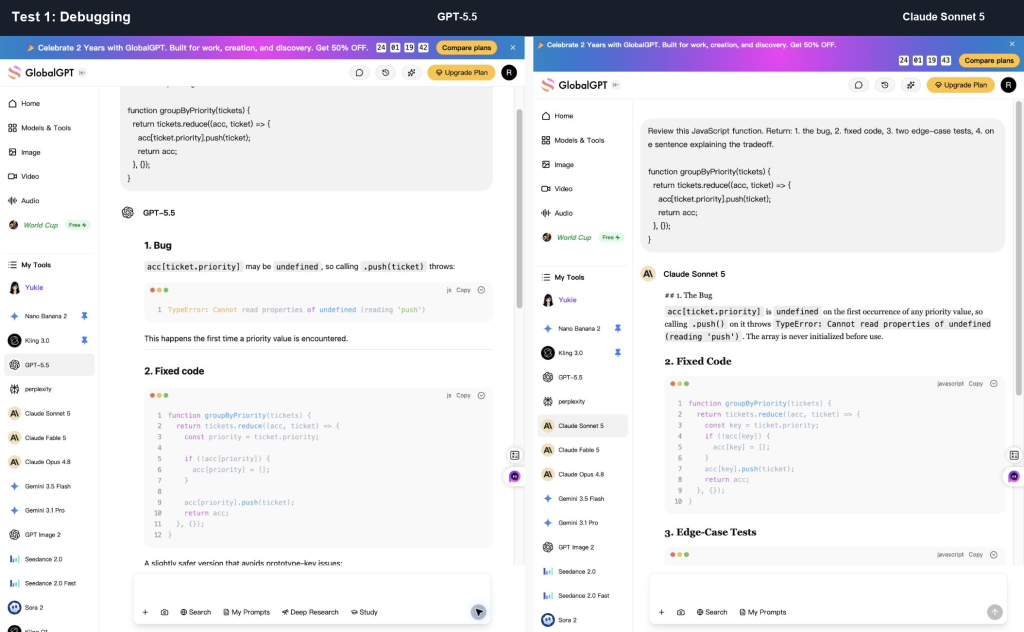
What ChatGPT did well: GPT-5.5 found the bug, gave fixed code, added edge-case tests, and included a more defensive Object.create(null) variant. That extra implementation detail is useful when object keys might collide with inherited properties.
What Claude did well: Claude Sonnet 5 found the same bug and gave a tighter answer. It also raised an undefined-priority edge case, which is the kind of practical boundary a reviewer should consider.
Winner: Tie, with a slight ChatGPT edge for implementation nuance. Claude was cleaner; GPT-5.5 was more complete.
Test 2: Refactoring and Maintainability
The second prompt asked for a readability refactor without changing behavior. This is a good test because many AI coding answers over-refactor small utilities and create more moving parts than the original code needs.
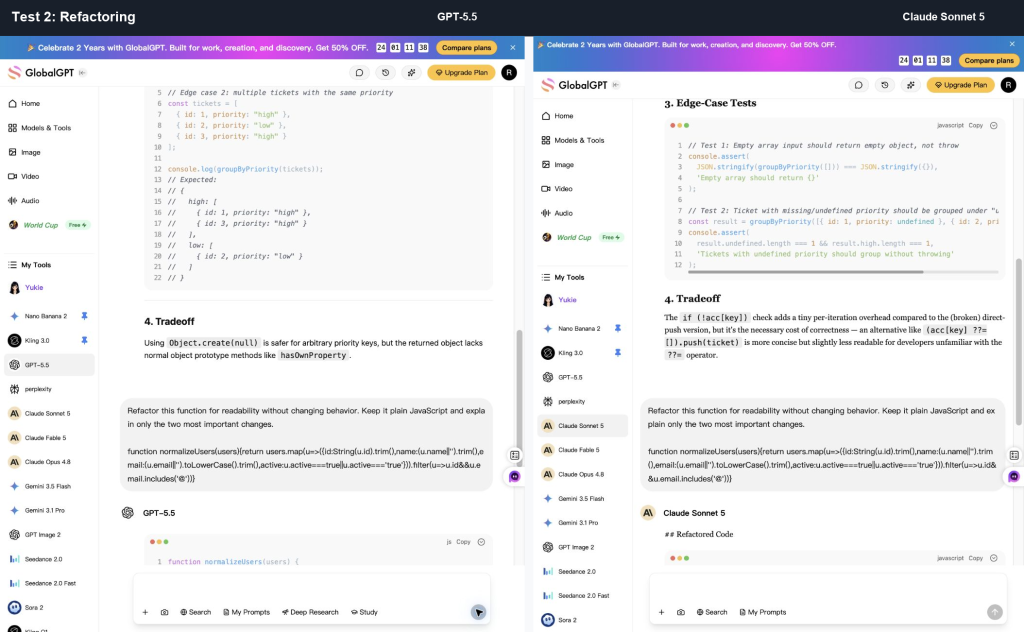
What ChatGPT did well: GPT-5.5 kept the structure close to the original, introduced named intermediate values, and followed the “only two important changes” instruction cleanly. That is valuable when the user wants a conservative refactor.
What Claude did well: Claude Sonnet 5 extracted helper functions such as a normalizer and validator. The result made intent easier to scan, but it changed the structure more than GPT-5.5 did.
Winner: ChatGPT for restraint; Claude for modular readability. If you need a safe minimal refactor, start with ChatGPT. If you want clearer domain naming, ask Claude for a second pass.
Test 3: Multi-File Reasoning and Planning
The third prompt gave a small Next.js file tree and a bug report: logged-in users can upload small files, but files over 8MB fail silently after the progress bar reaches 100%.
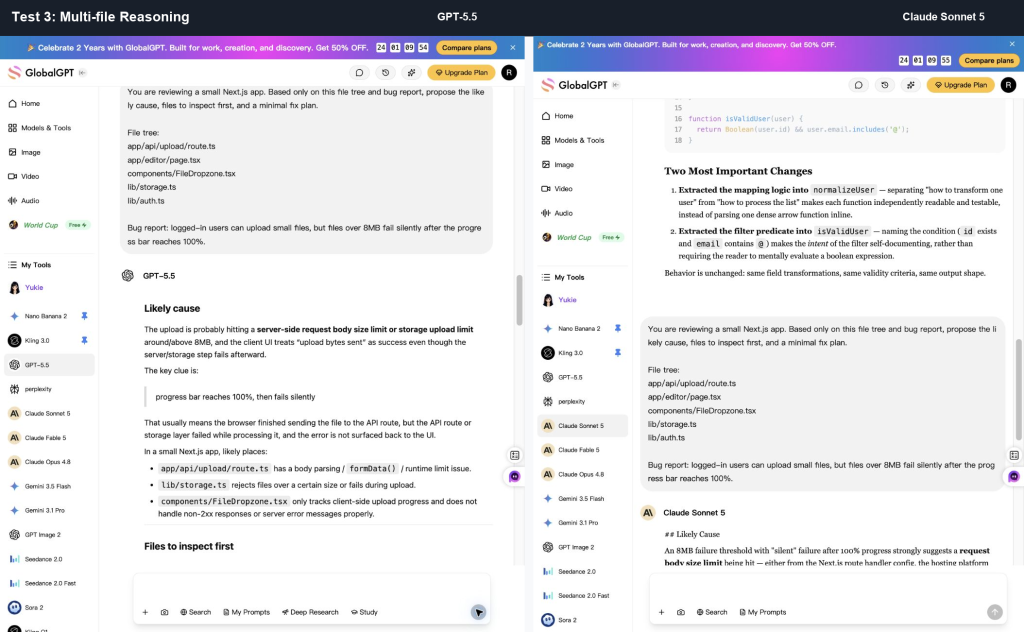
What ChatGPT did well: GPT-5.5 produced a detailed implementation-oriented plan. It mentioned server size checks, client response handling, and storage error propagation.
What Claude did well: Claude Sonnet 5 immediately centered the 8MB threshold, likely platform or body-size limits, progress-bar semantics, and a 7MB/8MB/9MB verification path. It felt more like a senior review note.
Winner: Claude. It prioritized the likely cause faster and gave a sharper minimal inspection path.
Test 4: Unit Tests and Verification
The fourth prompt asked both models to write TypeScript unit tests for a helper that returns plan limits for uploads and Codex access. This tests whether the model can protect branching logic from future regression.
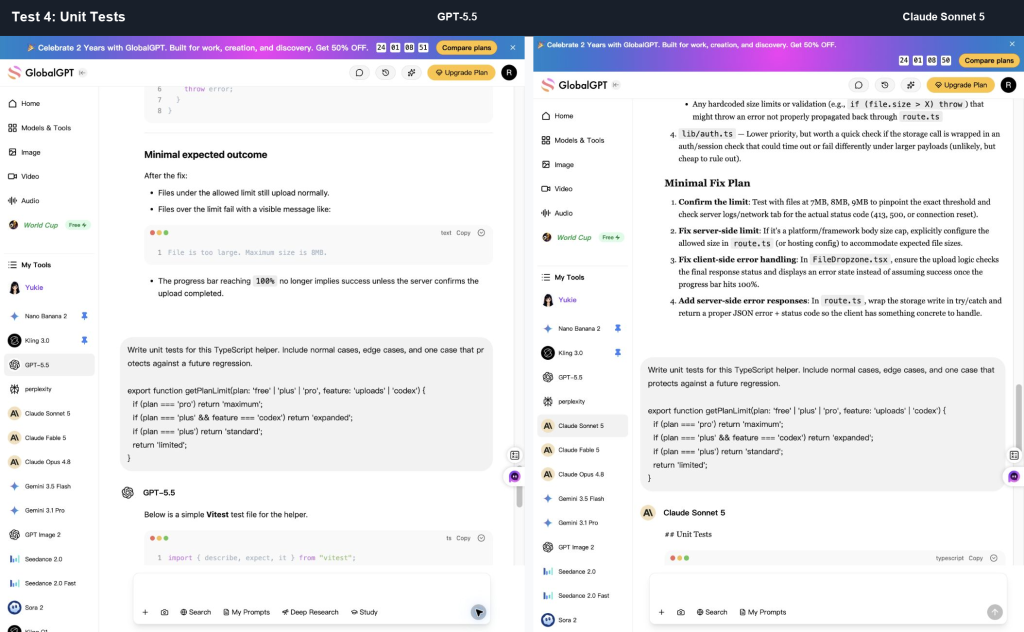
What ChatGPT did well: GPT-5.5 included test-framework imports and produced a runnable-looking Vitest file. It covered the expected combinations and made the answer easy to paste into a project.
What Claude did well: Claude Sonnet 5 explained the real regression risk better: pro + codex must short-circuit before feature-specific checks. It was a stronger reasoning answer, even though it was less drop-in as a file.
Winner: Claude for test reasoning; ChatGPT for starter file generation. In practice, use ChatGPT for the first test draft and Claude to critique whether the tests protect the right behavior.
Test 5: Security and Reliability Review
The fifth prompt asked both models to review an Express webhook endpoint. A good answer should catch signature verification, raw-body requirements, idempotency, validation, database error handling, and request-size limits.
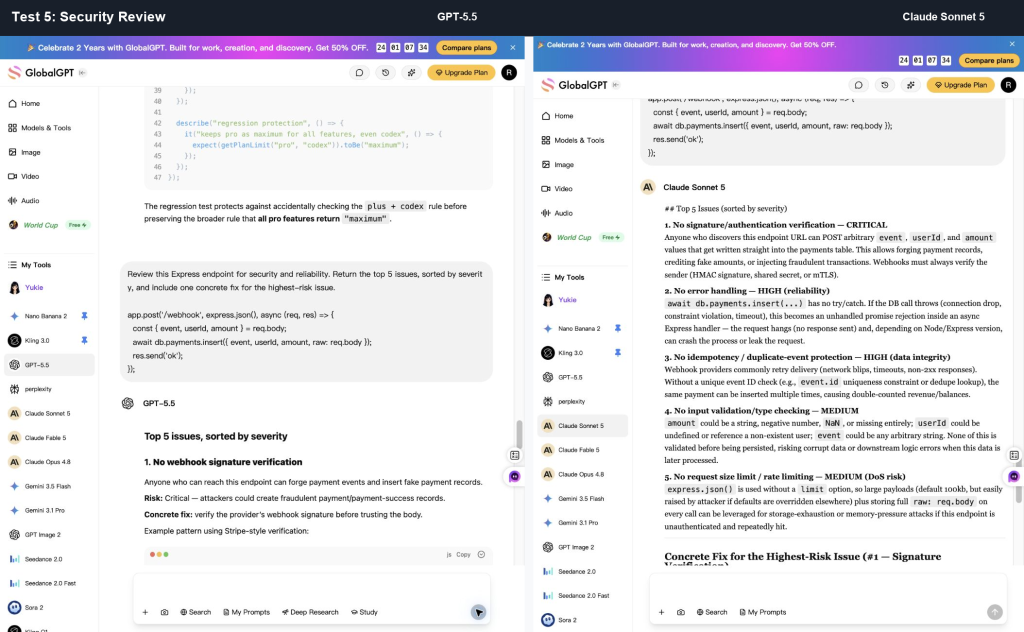
What ChatGPT did well: GPT-5.5 gave a provider-style fix, including a Stripe-like express.raw() pattern. That is useful when the next step is to implement a concrete webhook handler.
What Claude did well: Claude Sonnet 5 gave cleaner severity reasoning and included safer signature-comparison detail using constant-time comparison ideas. That made the risk ranking feel sharper.
Winner: Tie, with a slight Claude edge for security explanation. Both models were strong enough to be useful, but neither answer should replace a real security review for payment or authentication flows.
Claude Code vs ChatGPT Codex
Chat output is only one part of the coding decision. Claude Code and Codex are separate agentic development workflows for tasks that involve files, commands, tests, pull requests, or broader codebase changes.
| Workflow | Best fit | Important boundary |
|---|---|---|
| Claude chat | Reasoning, debugging, review, explanation, and planning. | It only sees the context you provide unless it is connected to tools or a broader workflow. |
| ChatGPT chat | Implementation drafts, tests, examples, and API usage questions. | Even a strong answer still needs verification in your project. |
| Claude Code | Repo-aware coding, codebase navigation, tests, and larger task planning. | Review permissions, security policy, and the proposed diff before accepting changes. |
| Codex | Repo-aware implementation, debugging, tests, review, and OpenAI-integrated coding workflows. | Plan access, usage, and model availability differ from ordinary chat and can change over time. |
The practical route: use chat models for thinking, explanation, and small tasks; use Claude Code or Codex when the work needs repository context and executable steps.
Pricing: Claude, ChatGPT, Codex and GlobalGPT
Start by asking what you are paying for. A chat plan pays for daily interactive coding help. A coding-agent workflow pays for repo-aware work such as CLI, IDE, web, cloud tasks, or integrations. API pricing pays per million tokens. A multi-model workspace pays for easier switching between Claude, GPT, Gemini, Perplexity, and other models in one place.
Prices checked on September 27, 2026 are in US dollars before applicable taxes. The table separates consumer subscriptions, standard API token rates, and GlobalGPT’s own annual plans. Claude’s pricing page rounds Pro’s annual equivalent to $17/month; $200 paid upfront works out to $16.67/month.
| Product or plan | Displayed price | What it means for coding |
|---|---|---|
| Consumer · Claude Free | $0 | Enough for light coding questions and trying Claude’s style before paying. |
| Consumer · Claude Pro | $20/month; $200/year upfront ($16.67/month equivalent) | Claude Code included; chat and Claude Code share paid-plan usage. |
| Consumer · Claude Max | From $100/month | Higher usage options; Claude Code included. API Console billing is separate. |
| Consumer · ChatGPT Free | $0/month | Lightweight chat; GPT-6 Luna desktop access is distinct from ordinary Chat. |
| Consumer · ChatGPT Go | $8/month in the original US reference; local pricing may vary | Monthly subscription; check the local pricing page for the amount in your market. |
| Consumer · ChatGPT Plus | $20/month, billed monthly | Regular coding prompts and eligible Codex/Work access; API usage billed separately. |
| Consumer · ChatGPT Pro | $100/month; existing $200/month subscriptions continue | New $200 sign-ups and upgrades paused from September 10, 2026. $100 subscriptions remain available. |
| API · Claude Sonnet 5 | $2/M input; $10/M output | Standard API rate for coding tools and large-context workflows. |
| API · Claude Opus 5.5 | $4/M input; $20/M output | Standard speed. Fast mode is $8/M input and $40/M output. |
| API · GPT-6 Astra | $10/M input; $50/M output | Standard API rate; separate from a ChatGPT plan. |
| API · GPT-6 Sol / Luna | Sol: $2/M input, $10/M output; Luna: $0.10/M input, $0.50/M output | Separate developer billing; use the exact model ID and rate. |
| Platform · GlobalGPT Basic | $5.80/month equivalent; $69.60 billed annually | A budget-friendly way to compare multiple model families for everyday coding prompts and research. |
| Platform · GlobalGPT Pro | $10.80/month equivalent; $129.60 billed annually | A better fit when you switch between several model families during normal work. |
| Platform · GlobalGPT Unlimited | $25/month equivalent; $300 billed annually | For frequent multi-model comparison in one workspace. These plans do not include official API credits or native Claude Code/Codex subscriptions. |
For most individual developers, the decision is not “which company is cheapest?” It is “which price matches the workflow?” If you mostly ask questions and paste snippets, Claude Pro or ChatGPT Plus may be enough. If you want repo-aware implementation, compare Claude Code and Codex access. If you compare several models every day, GlobalGPT can be the cleaner daily workspace because the cost is tied to one multi-model plan instead of several separate subscriptions.
For API-heavy coding tools, subscription prices are the wrong comparison. Token pricing matters more because code context is large. Claude Sonnet 5 costs $2/M input and $10/M output, while Opus 5.5 costs $4/M and $20/M at standard speed. One million input tokens plus one million output tokens therefore costs $12 on Sonnet 5 or $24 on Opus 5.5. For OpenAI, the same usage costs $60 on Astra, $12 on Sol, or $0.60 on Luna at standard rates. These are API charges, not allowances included in ChatGPT, Claude, or GlobalGPT subscriptions.
Which Coding Setup Should You Choose?
Do not choose only by the model name. Choose by the kind of coding work you actually do. The same person may use ChatGPT for a first implementation, Claude for review, Codex for executable repo work, and GlobalGPT for quick side-by-side model checks during a normal day.
Beginner learning to code: start with ChatGPT. It usually gives more examples, more scaffolding, and a friendlier path from “I do not understand this error” to “here is the working shape.”
Junior developer fixing bugs: start with Claude when the problem is unclear. Claude is strong at narrowing the likely cause, naming what to inspect first, and keeping the explanation focused. Use ChatGPT after that when you want the concrete patch, test case, or example implementation.
Senior engineer reviewing a change: start with Claude. It is better suited to tradeoffs, severity ranking, architectural concerns, and concise critique. For larger codebase tasks, move from chat into Claude Code or Codex so the model can work with files and commands instead of a pasted fragment.
Frontend or UI builder: start with ChatGPT for the first pass. It tends to produce fuller component code, state handling, and test scaffolds. Then use Claude to review accessibility, component boundaries, naming, and whether the code is too clever for the design.
Large codebase maintainer: pick Claude Code or Codex based on your stack, account access, security policy, and preferred workflow. Once a task spans multiple files, the agent workflow usually matters more than which chat answer sounds better.
Solo founder or small team: use both model families if budget allows. A practical setup is GlobalGPT for daily model comparison and idea-to-code prompting, plus Claude Code or Codex when a task needs repository access and executable steps.
| Developer type | Best first choice | Why |
|---|---|---|
| Beginner learning to code | ChatGPT | More examples, fuller explanations, and beginner-friendly scaffolds. |
| Junior developer fixing bugs | Claude first | Cleaner root-cause thinking and better “inspect this first” guidance. |
| Senior engineer reviewing a change | Claude | Stronger fit for tradeoffs, risk ranking, and concise critique. |
| Frontend/UI builder | ChatGPT first, Claude second | ChatGPT drafts the component; Claude reviews accessibility, structure, and maintainability. |
| Large codebase maintainer | Claude Code or Codex, depending on stack and access | Files, commands, tests, and permissions matter more than a single chat answer. |
| Solo founder | Both, often through one multi-model workspace | Fast drafts, careful review, and quick model switching all matter when one person owns the product. |
If you are deciding between newer Claude and GPT model families, the Claude Opus 5.5 vs GPT-6 Sol comparison gives more model-specific context. If you are weighing paid OpenAI plans, the ChatGPT Plus vs Pro comparison can help frame whether heavier usage is worth it.
Why Many Developers Still Use Both
Using both Claude and ChatGPT is not indecision. It is a better quality-control loop.
- Plan with Claude, implement with ChatGPT: useful when you want Claude to narrow the risk and ChatGPT to generate the first implementation.
- Draft with ChatGPT, review with Claude: useful when you need fast code but want a stricter second opinion.
- Ask both before touching production: useful for payments, authentication, uploads, migrations, caching, and destructive database changes.
- Use an agent when the task needs files: Claude Code or Codex can matter more than plain chat when the model needs repository context.
GlobalGPT fits the “use both” pattern when the task is prompt comparison, everyday coding help, planning, or research. It is especially useful for daily model comparison, draft iteration, quick second opinions, and choosing the model style that best fits the next piece of work.
If Claude access is the only thing you are evaluating, the best Claude AI alternatives list is a broader fallback guide.
FAQ
Is Claude or ChatGPT better for coding in 2026?
Choose Claude first for code review, ambiguous debugging, architecture planning, and long-context reasoning. Choose ChatGPT first for implementation drafts, examples, frontend work, and test scaffolding. When the task requires repository access, commands, tests, or multi-file edits, compare Claude Code with Codex rather than relying on chat alone.
Is Claude better than ChatGPT for debugging?
Claude is often better as the first debugging pass because it tends to prioritize the likely cause and explain the failure path clearly. In our JavaScript and Next.js tests, Claude Sonnet 5 was especially strong at concise diagnosis. ChatGPT was still strong when the fix needed fuller implementation detail.
Is ChatGPT Codex better than Claude Code?
Neither is automatically better for every team. ChatGPT Codex fits OpenAI-centered workflows and implementation-heavy agent tasks. Claude Code is strong when the work benefits from Claude’s planning, review, and long-context reasoning style. The better choice depends on repository access, pricing, stack, permissions, and team policy.
Which is better for a large codebase?
For a large codebase, the agent workflow matters more than the chat model alone. Use Claude Code or Codex when the assistant needs to inspect files, run commands, execute tests, or trace behavior across modules. Keep human review around permissions, risky commands, and the final diff.
Which is better for beginners learning to code?
ChatGPT is usually easier for beginners because it tends to provide more examples, fuller explanations, and ready-to-run snippets. Claude can be better when the beginner is stuck on why something fails and needs a clearer conceptual explanation.
Which is better for frontend HTML and UI code?
ChatGPT is often stronger for generating the first HTML, CSS, or component draft. Claude is useful for reviewing the structure, simplifying the layout, and catching accessibility or maintainability problems. For polished frontend work, use ChatGPT to draft and Claude to review.
Which model is better for writing tests?
ChatGPT is better when you want a full test file with imports and runnable-looking structure. Claude is better when you want to understand which behavior needs protection and why a regression test matters. A strong workflow is to generate tests with ChatGPT and then ask Claude what edge cases are missing.
Do benchmarks like SWE-Bench prove which coding assistant is better?
No. SWE-Bench, SWE-Bench Pro, and Terminal-Bench are valuable signals, especially for agentic coding workflows, but they do not fully predict daily coding help. Benchmarks measure a controlled harness; real developers also need clear reasoning, usable code, maintainable changes, and good verification steps.
Should developers use both Claude and ChatGPT?
Yes, especially for serious work. Use Claude for the plan, risk review, and diagnosis. Use ChatGPT for implementation drafts, examples, and test scaffolds. Then run the code, inspect the diff, and verify behavior in your own project.
Can I compare Claude and ChatGPT in GlobalGPT?
Yes. GlobalGPT is useful for comparing Claude and ChatGPT answers in one workspace when the needed models are available there. It works well for everyday code questions, planning, research, and second opinions. It does not replace Claude Code, Codex, an IDE, official APIs, or repository-level tools.



