

Higgsfield Upscale kan beelden die met een telefoon zijn gemaakt er merkbaar scherper en verzorgder uit laten zien, maar zorgt er niet voor dat een telefoon dezelfde informatie vastlegt als een professionele camera. Door opschaling kan de resolutie worden verbeterd, ruis worden verminderd en een aannemelijke textuur worden gereconstrueerd. Het is echter niet mogelijk om de sensor achteraf te vergroten, de lens te vervangen, afgeknipte hoge lichten te herstellen of te garanderen dat de gegenereerde fijne details een getrouwe weergave van de scène zijn.
Dat onderscheid is van belang omdat het oorspronkelijke Artikel over Higgsfield: telefoon versus camera spreekt in krachtige bewoordingen over filmische en professionele kwaliteit, zonder een gecontroleerde vergelijkingstest tussen telefoon en camera te publiceren. De pagina gaat over mobiele video, niet over foto’s, en er worden geen gegevens vermeld over de telefoon, camera, lens, belichting, modelinstellingen, bitsnelheid of beoordelingsmethode.
De relevante vraag is dus niet: “Kan AI pixels toevoegen?” Maar: “Welke zichtbare problemen kan software verhelpen, en welke opnamebeslissingen blijven voorbehouden aan de camera?” Deze vergelijking geeft antwoord op die vraag en biedt je een betrouwbare testmethode voordat je er tijd of credits aan besteedt.
Kort antwoord: Kan AI de kloof tussen telefoon en camera overbruggen?
Het korte antwoord
Higgsfield Upscale kan telefoonopnames helderder, scherper en beter geschikt maken voor weergave in een groter formaat. Het kan een kleine sensor en een vaste telefoonlens niet omzetten in de opnamemogelijkheden, de optische kwaliteiten of de betrouwbare weergave van fijne details van een professionele camera.
Een goede bronclip biedt de upscaler voldoende materiaal om mee te werken. Een scherpe focus, een goed geregelde belichting, een lage compressie en stabiele bewegingen kunnen een overtuigende verbetering opleveren. Een erg wazige, overbelichte of sterk gecomprimeerde clip dwingt het model tot gissen, en dat resultaat kan er weliswaar scherp uitzien, maar is niet nauwkeurig.
Daarom is “telefoon versus camera” voor veel makers een verkeerde tegenstelling. Een betere aanpak bestaat uit drie stappen: de telefoon legt de scène vast, AI bereidt die opname voor op publicatie, en een professionele camera blijft het betere hulpmiddel wanneer er geen concessies mogen worden gedaan aan de oorspronkelijke informatie of de optische controle.
Wat Higgsfield Upscale eigenlijk beweert
Higgsfield beschrijft zijn upscaler als een reeks AI-modellen die zijn ontworpen om veelvoorkomende zwakke punten in mobiele video aan te pakken. Op de bronpagina wordt de nadruk gelegd op reconstructie per frame, het genereren van details en texturen, het verminderen van temporele ruis en het verwijderen van compressieartefacten. Er wordt vermeld dat de tool beelden kan opschalen naar HD en hoger.
De huidige Pagina ‘Sora 2 Video-upscaling & AI-verbetering’ gaat nog een stap verder in zijn productcommunicatie en promoot 4K-schaling, bewegingsgetrouwheid, detailherstel en slimme ruisonderdrukking via een workflow van uploaden, selecteren en downloaden. Deze uitspraken beschrijven de beoogde mogelijkheden van het product. Ze vormen geen onafhankelijke meting van de uitvoerkwaliteit.
Historisch Verslaggeving van PetaPixel over de integratie van Higgsfield en Topaz Dit verklaart ook waarom “Higgsfield Upscale” naar meer dan één onderliggende optie kan verwijzen. Modelnamen, schaalfactoren, configuraties en prijzen kunnen veranderen, dus controleer het actuele product voordat je een ouder lanceringsartikel als de huidige specificatie beschouwt.
Voor een bredere definitie van verscherping, ruisonderdrukking, reconstructie en bewerking, zie het GLBGPT-overzicht van hoe AI-tools de beeldkwaliteit verbeteren is nuttige achtergrondinformatie. Het kernprincipe blijft hetzelfde: beeldverbetering kan het beeld dat je ziet weliswaar verbeteren, maar een overtuigender resultaat is niet automatisch een getrouwere weergave.
Opname via telefoon vs. AI-opschaling vs. opname via camera
Wat verandert er in elke fase?
Telefoonopname
Registreert de oorspronkelijke pixels, het dynamisch bereik, de scherpstelling, de beweging, de kleur en de compressie. Hier begint de ontbrekende opname-informatie.
AI-opschaling
Pas de afmetingen aan, verwijder ruis, verscherp en reconstrueer geloofwaardige details. Het kan de weergave verbeteren en tegelijkertijd textuur creëren.
Camera-opname
Maakt gebruik van een groter beeldvormingssysteem en regelbare optica om meer bruikbare informatie vast te leggen voordat de verwerking begint.
Een telefooncamera voert een opmerkelijke hoeveelheid bewerkingen uit voordat je een bestand exporteert. Multi-frame HDR, verscherping, lokaal contrast, ruisonderdrukking en compressie kunnen bij goed licht een strak resultaat opleveren. Het nadeel is dat kleine sensoren, compacte lenzen en agressieve beeldverwerking minder speelruimte bieden wanneer het onderwerp snel beweegt, hoge lichten uitbranden, schaduwen in detailverlies gaan of de scherpstelling niet klopt.
Na die opname komt een AI-upscaler in actie. Deze kan ruis gladstrijken, randen verscherpen, het beeld vergroten en textuur afleiden uit aangeleerde patronen. Dat kan precies zijn wat een social-media-clip, archiefbeeld of snelle productpost nodig heeft. Het kan ook halo’s, een wasachtige huid, onrustig haar, vervormde letters of een textuur produceren die er fotografisch uitziet, maar nooit is opgenomen.
Een professionele camera zorgt voor een betere uitgangsbasis. De sensorgrootte is niet de enige factor, maar een groter beeldsysteem, opnames met een hogere bitsnelheid, instelbare lenzen, voorspelbare scherpstelling en een doordachte belichtingsopstelling leveren doorgaans meer bruikbare informatie op. De de beste AI-fotobewerkingsprogramma’s voor verschillende werkprocessen werken nog steeds beter als de input sterk is.
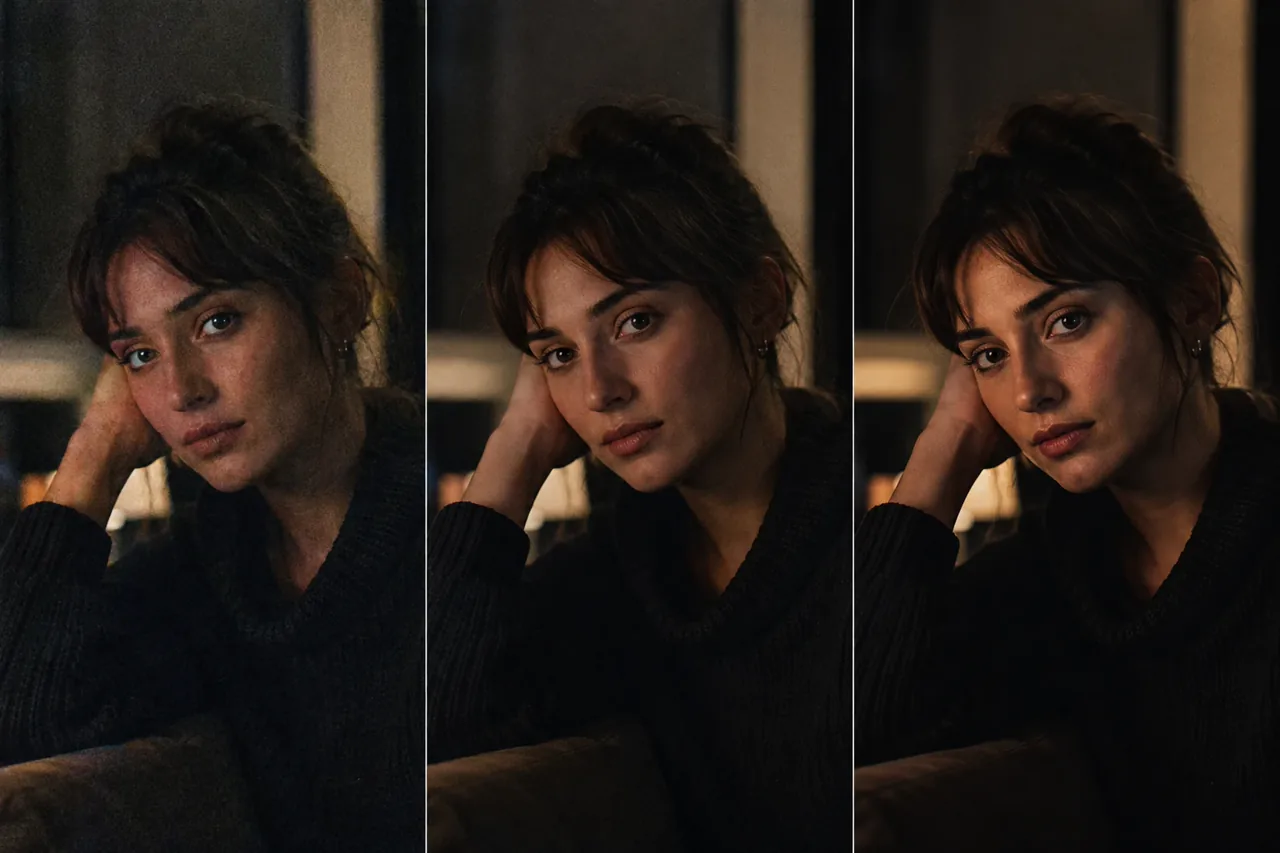
Redactionele illustratie: De drie afbeeldingen tonen een aannemelijk origineel van een telefoon, een door AI geoptimaliseerde interpretatie en een referentiefoto. Het zijn geen resultaten van Higgsfield en mogen niet worden beschouwd als benchmarkgegevens.
Waar AI-upscaling het meest helpt
1. Lichte ruis en compressie in verder bruikbaar beeldmateriaal
Als de scherpstelling goed is en de bewegingen stabiel zijn, kunnen ruisonderdrukking en het verwijderen van artefacten ervoor zorgen dat een telefoonfilmpje beter te bekijken is op een groter scherm. Dit is het sterkste toepassingsgebied, omdat het model de bestaande structuur verfijnt in plaats van het hele beeld opnieuw op te bouwen.
2. Bezorging van sociale media- en e-commerceproducten
Bij korte filmpjes voor feeds, advertenties en interne campagnes is snelheid vaak belangrijker dan een dynamisch bereik van filmkwaliteit. Een zorgvuldige opname met een smartphone, gevolgd door een voorzichtige opschaling, kan efficiënt zijn, vooral wanneer het resultaat op een smartphone wordt bekeken. Voor workflows met productfoto’s, zie de Nano Banana-workflow voor productafbeeldingen voor een aparte aanpak van de opmaak en presentatie.
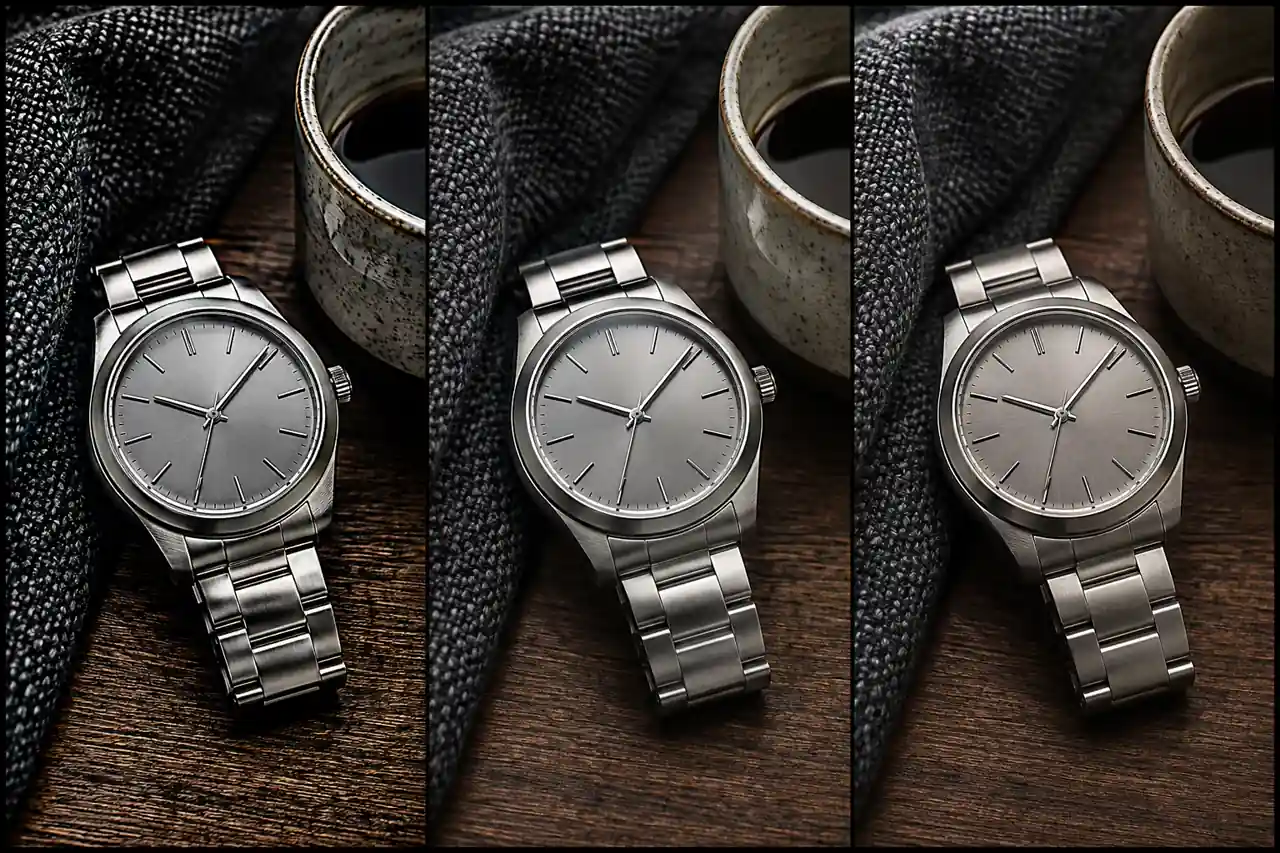
Redactionele illustratie: De randen en textuur van het materiaal worden over de panelen heen scherper, maar bij minuscule gravures en oppervlaktepatronen blijft het voor een AI-model giswerk.
3. Oude persoonlijke filmpjes en archiefmateriaal
Een familievideo hoeft niet door een professionele kleurcorrectieproces te gaan om waardevol te zijn. Minder ruis, strakkere randen en een groter weergaveformaat kunnen een oude opname aangenamer maken om naar te kijken. Bewaar het onbewerkte origineel en beschouw het verbeterde bestand als een weergaveversie. Hetzelfde principe geldt wanneer je oude foto’s herstellen en inkleuren met AI.
4. Lichte zachtheid, geen onscherpte
AI-verscherping kan de waargenomen scherpte verbeteren wanneer een afbeelding enigszins onscherp is. Deze functie is echter veel minder betrouwbaar wanneer het scherpstelvlak niet klopt of het onderwerp over meerdere pixels is verschoven. De handleiding voor hoe je foto's met AI scherper kunt maken legt uit waarom bewegingsonscherpte, onscherpte en compressie afzonderlijk moeten worden vastgesteld.
5. Een schonere ondergrond voorbereiden voor handmatige afwerking
Opschalen hoeft niet de laatste stap te zijn. In een doordachte workflow kun je eerst opschalen en vervolgens maskers, kleuren, randen en belangrijke productdetails corrigeren in een traditionele bewerkingsprogramma. A praktische workflow van AI naar Photoshop is vaak veiliger dan erop te rekenen dat één automatische doorloop voldoende is om een betaald item af te ronden.
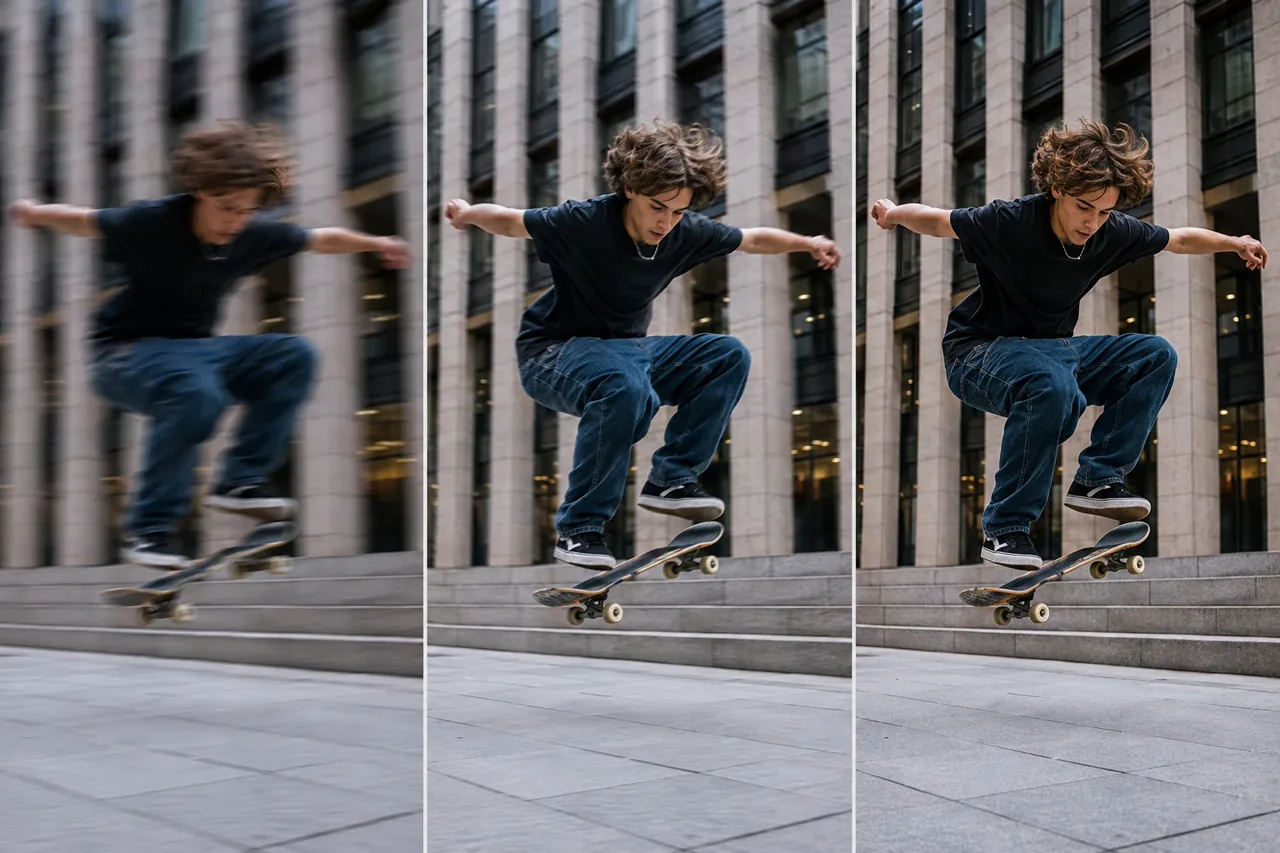
Redactionele illustratie: Beweging kan er steeds scherper uitzien, maar een scherper beeld bewijst nog niet dat de gereconstrueerde randen van het haar, de wielen of de achtergrond overeenkomen met het oorspronkelijke moment.
Wat upscaling niet op betrouwbare wijze kan herstellen
- Afgeknipte hoge lichten en verpletterde schaduwen. Als de tooninformatie ontbreekt, kan het model alleen een aannemelijke vervanging afleiden.
- Ernstige bewegingsonscherpte of een verkeerde scherpstelling. Het is mogelijk dat het exacte gelaatstrek, de rand van het logo of de textuur nooit is vastgelegd.
- Optische weergave. De scherptediepte, het gedrag van lichtvlekken, het perspectief en het karakter van de lens worden al tijdens het fotograferen bepaald.
- Nauwkeurige tekst en microdetails. Kleine labels, sporen van horloges, de weefstructuur van stoffen, haren en sieraden zijn veelvoorkomende knelpunten bij reconstructies.
- Oorspronkelijke kleur en dynamisch bereik. Een aantrekkelijke kwaliteit kan geen nauwkeurige kanaalgegevens herstellen die zijn afgekapt of weggepresst.
- Temporele consistentie. Een detail dat er in één beeld goed uitziet, kan in een bewegende reeks gaan kruipen, pulseren of van vorm veranderen.
Resolutieaanduidingen kunnen ook misleidend zijn. Een 4K-uitvoer verwijst naar de pixelafmetingen, niet naar de hoeveelheid werkelijke beeldinformatie die het bestand bevat. De Nano Banana 2: uitsplitsing van de resolutie biedt een nuttige vergelijking: de uitvoergrootte, de oorspronkelijke detailweergave en de opgeschaalde detailweergave moeten elk een eigen label krijgen.
Gezichten verdienen extra aandacht, omdat een kleine verandering in de gelaatstrekken belangrijker kan zijn dan een grote verbetering in de resolutie. Als portretfotografie je prioriteit is, vergelijk de uitslag dan met het origineel: let daarbij op de ogen, de mond, de haarlijn, huidkenmerken, sieraden en handen. Maak een onderscheid tussen creatieve portretgeneratie, zoals Nano Banana Pro: tips voor portretfotografie, gebaseerd op een getrouwe weergave van een echt persoon.
Hoe de Higgsfield Upscale op een eerlijke manier te testen
Voor een echte vergelijking tussen telefoon en camera is consistent bronmateriaal nodig. In het oorspronkelijke artikel van Higgsfield wordt die test niet gepubliceerd, dus volg de onderstaande werkwijze als je een resultaat wilt dat je kunt verdedigen.
- Zet de opname vast. Film hetzelfde onderwerp op hetzelfde tijdstip vanuit een positie die zo dicht mogelijk bij de vorige ligt. Zorg ervoor dat huid, stof, fijne randen, hoge lichten, schaduwen en beweging in beeld komen.
- Registreer elke opnamevariabele. Geef de naam op van de telefoon, de camera, de lens, de resolutie, de beeldsnelheid, de sluitertijd, de ISO-waarde, het profiel, de beeldstabilisatie, de belichting en de afstand.
- Bewaar een ongewijzigde export van de telefoon. Stuur geen bestanden die via sociale media zijn gedownload of die afkomstig zijn uit een berichtenapp naar de upscaler.
- Noteer de instellingen voor Higgsfield. Sla de modelnaam, schaalfactor, uitvoerresolutie, datum, verwerkingstijd en de kosten voor het krediet of abonnement op die in de live-interface worden weergegeven.
- Breng de vergelijking op een gelijkwaardig niveau. Vergelijk hetzelfde beeld, hetzelfde uitsnedegebied, dezelfde weergavegrootte en dezelfde kleurinstelling. Houd een weergave op volledig scherm aan, plus uitsneden met de afmetingen 100%.
- Noteer details die gevoelig zijn voor fouten. Controleer de identiteit, de tekst, de handen, terugkerende patronen, benadruk de randen, het haar, de wielen en de stabiliteit tussen de beelden.
- Neem een besluit over de levering. Beoordeel of het resultaat geschikt is voor een feed, een vermelding, interne beoordeling, betaalde advertentie, groot scherm of archiefmaster. Voeg deze toepassingen niet samen tot één score.
Bewaar zowel de beste als de slechtste beelden. Eén aantrekkelijk beeld kan een tijdelijke mislukking verdoezelen, terwijl één minder geslaagd beeld de beperkingen kan blootleggen die bij de productie van belang zijn. Als je alleen bewerkte beelden hebt gemaakt, noem ze dan illustraties en onthoud je van een oordeel over de prestaties.
Welke workflow moet je kiezen?
Een workflow waarbij een smartphone en AI worden gecombineerd, levert de beste resultaten op als je de belichting kunt regelen, het beeld stabiel kunt houden, de belichting zorgvuldig kunt instellen en de beeldbron helder kunt houden. Deze aanpak is ook praktisch wanneer de content maar kort actueel blijft, het publiek op kleine schermen kijkt en het goedkoop is om de opnames opnieuw te maken.
Een camera verdient zijn geld wanneer een over het hoofd gezien detail veel kost: een betaalde campagne, een eenmalig evenement, een productopname die nauwkeurig moet zijn, een scène met snelle bewegingen, of een kleurcorrectie waarbij ruimte nodig is voor hoge lichten en schaduwen. AI kan nog steeds helpen bij de nabewerking, maar dan is het beter om uit te gaan van een sterke masteropname dan te proberen een zwakke opname te reconstrueren.
De hybride aanpak is meestal de slimste keuze. Maak opnames met het beste apparaat dat je goed kunt bedienen, en pas AI vervolgens alleen toe waar de voordelen daarvan duidelijk zichtbaar zijn. Voer niet standaard een upscaling uit, en verwijder de originele opname niet alleen omdat het bewerkte bestand er strakker uitziet.
Gebruik voor foto’s een workflow voor stilstaande beelden
De Higgsfield-bronpagina gaat over video, terwijl de statische illustraties in dit artikel hetzelfde onderscheid tussen ‘vastleggen’ en ‘bewerken’ voor foto’s uitleggen. Als je bron een stilstaand beeld is, gebruik dan een tool die speciaal voor stilstaande beelden is ontworpen en controleer het resultaat op 100% voordat je het publiceert.
GlobalGPT's gratis AI-beeldvergroter is een aparte route voor foto’s. Dit is geen toegang tot Higgsfield. Gebruik deze route wanneer je een foto snel wilt vergroten of opschonen, en controleer vervolgens gezichten, tekst, productranden en fijne texturen aan de hand van het origineel.
Ontwerpers van telefoons die afbeeldingen voor de feed voorbereiden, kunnen ook de Nano Banana Pro: fotowerkproces in Instagram-stijl nuttig. Zorg ervoor dat de taakomschrijvingen duidelijk zijn: creatieve herontwerp, opschonen en getrouwe schaalvergroting zijn verschillende taken en mogen niet onder één proefclaim vallen.
Werk je met een foto die met een telefoon is gemaakt?
Probeer de AI Image Upscaler eens uitVeelgestelde vragen
Kan Higgsfield Upscale ervoor zorgen dat telefoonvideo’s eruitzien alsof ze met een professionele camera zijn opgenomen?
Het kan telefoonopnames er strakker, scherper en beter geschikt voor grotere formaten laten uitzien. Het kan echter het dynamisch bereik van de sensor, de weergave door de lens, een nauwkeurige scherpstelling of details die de telefoon nooit heeft vastgelegd, niet vervangen. Het resultaat hangt sterk af van de bronclip.
Is Higgsfield een luxe locatie voor video-opnames of foto’s?
Het bronartikel gaat specifiek over mobiele video. Higgsfield heeft ook opties voor het opschalen van afbeeldingen op de markt gebracht, maar een bewering over video mag niet worden beschouwd als bewijs voor stilstaande foto’s. Gebruik een workflow voor stilstaande beelden wanneer de bron een foto is.
Kan Higgsfield video's opschalen naar 4K?
Op de huidige Sora 2-productpagina van Higgsfield wordt 4K-schaalbaarheid aangeprezen, terwijl in het bronartikel sprake is van HD en hoger. Controleer het exacte model, de invoer, het plan en de uitvoerinstellingen in het daadwerkelijke product voordat u ervan uitgaat dat elke workflow dezelfde resolutie ondersteunt.
Herstelt AI-upscaling de werkelijke details van het origineel?
Soms maakt het reeds aanwezige patronen duidelijker, maar het kan ook een geloofwaardige textuur genereren. Haar, stof, huid, letters en kleine productdetails kunnen er overtuigend uitzien zonder dat ze een getrouwe weergave zijn van de oorspronkelijke scène.
Hoe kan ik een video opschalen met Higgsfield?
Gebruik de huidige Higgsfield Upscale-route, upload een schone bron, kies een beschikbaar upscalemodel en uitvoerinstelling, en controleer vervolgens de vlakken, tekst, randen en bewegingen voordat je het bestand downloadt. Bewaar de originele clip om beide versies naast elkaar te kunnen vergelijken.
Hoe kan ik een afbeelding met Higgsfield vergroten?
Open het live Higgsfield-product en controleer of er een afbeeldingsmodel beschikbaar is voor uw account. Upload het origineel in de hoogste kwaliteit, kies eerst een voorzichtige schaal en vergelijk een uitsnede van 100% op verzonnen textuur, halo’s en gewijzigde belettering.
Zal upscaling met AI problemen met weinig licht, onscherpte en compressie verhelpen?
Het kan zichtbare ruis en compressie verminderen en ervoor zorgen dat lichte onscherpte beter zichtbaar wordt. Ernstige bewegingsonscherpte, onscherpe beelden, platgedrukte schaduwen, afgeknipte hoge lichten en opvallende blokartefacten kunnen leiden tot verzonnen details of onstabiele randen.
Moet ik een telefoon met AI gebruiken of een professionele camera?
Gebruik een telefoon in combinatie met AI wanneer snelheid, draagbaarheid en het delen via sociale media het belangrijkst zijn. Kies voor een camera wanneer opnamebereik, optische controle, betrouwbare weergave van fijne details, prestaties bij weinig licht of veeleisende commerciële bewerkingen belangrijker zijn.
Kan ik Higgsfield Upscale gebruiken via GlobalGPT?
Tijdens deze controle is er op GlobalGPT geen geverifieerde Higgsfield Upscale-route gevonden. GlobalGPT biedt een aparte AI Image Upscaler voor foto’s, dus gebruik die als fotoworkflow in plaats van het te omschrijven als Higgsfield-toegang.
Het praktische oordeel
Higgsfield Upscale kan het zichtbare verschil tussen telefoonopnames en een gepolijst eindresultaat verkleinen, vooral wanneer de bron al scherp, stabiel en redelijk belicht is. Dat is handig. Het is ook iets anders dan het vervangen van de opnamekwaliteit en de bedieningsmogelijkheden van een professionele camera.
Gebruik de telefoon als snelheid en draagbaarheid voorop staan. Gebruik de camera als het moment zich niet laat herhalen of als de details nauwkeurig moeten zijn. Gebruik AI als afwerkingsmiddel, behoud het origineel en beoordeel het resultaat aan de hand van wat er daadwerkelijk toe doet.
Als je een gecontroleerde Higgsfield-test uitvoert, maak dan de telefoon, camera, lens, instellingen, bronbestanden, het model, de verwerkingsdatum, de kosten, de volledige beelden en de 100%-uitsneden openbaar. Tot die tijd moeten veelbelovende voorbeelden worden beschouwd als illustraties of demonstraties door de fabrikant zelf, en niet als bewijs dat de software de hardwarekloof heeft overbrugd.





