Heb je echt aparte abonnementen nodig voor ChatGPT, Claude, Gemini, een beeldgenerator en een AI-videotool? In veel gevallen niet. Een alles-in-één AI-abonnement kan meerdere modelfamilies en creatieve tools onder één account en één betaling samenbrengen.
Het belangrijke woord is niet “alle”, maar “inbegrepen”. Elk platform kiest zijn eigen modellen, hulpmiddelen, beperkingen en factureringseenheden. De relevante vraag is daarom: Welk abonnement biedt je de tools die je daadwerkelijk gebruikt, met zo min mogelijk extra accounts en installatiestappen?
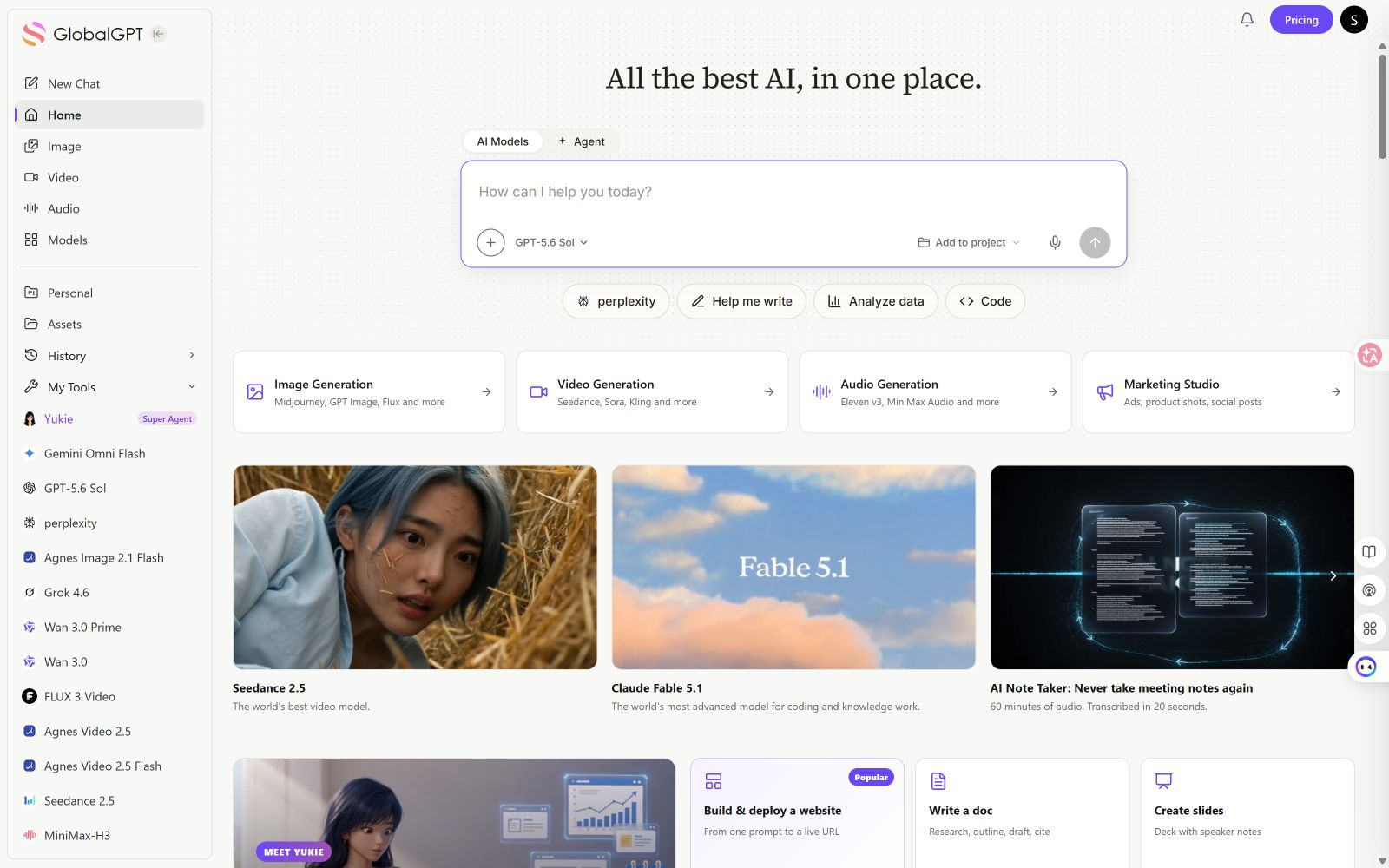
Snel antwoord: De kortste weg is een multimodaal platform voor consumenten: maak één account aan, bekijk welke tools voor chat, afbeeldingen, video’s, onderzoek en klantenservice beschikbaar zijn, en open vervolgens de tool die je nodig hebt vanuit dezelfde werkruimte. GLBGPT Dit is de eerste route in deze handleiding omdat de ingelogde werkruimte verschillende AI-categorieën toonde zonder dat er een API-sleutel of cloudproject nodig was om tussen de zichtbare tools te schakelen. De aanmelding bij het account is niet opnieuw getest; betaalmethoden, modellen en gebruikslimieten kunnen nog steeds afhankelijk zijn van het huidige account en abonnement.
Kun je echt alle AI-tools in één abonnement krijgen?
Ja, maar geen enkel legitiem abonnement omvat letterlijk elk AI-product en elke ingebouwde functie. Een alles-in-één-platform combineert doorgaans een handige selectie van tools onder één account:
- Chat en redeneren: toegang tot modellen van meer dan één aanbieder of modelfamilie.
- Onderzoek en documenten: zoeken op internet, bestandsanalyse, samenvattingen, tabellen of presentaties.
- Afbeeldingen en video: generatie- of bewerkingstools met afzonderlijke kredietkosten of limieten.
- Agenten: hulpmiddelen waarmee je een taak kunt plannen, bestanden kunt gebruiken, kunt zoeken of een resultaat in meerdere stappen kunt genereren.
Een gebundeld platform kan tijd besparen bij het beheer van accounts, maar vervangt niet automatisch elke officiële app. ChatGPT, Claude en Gemini kunnen elk eigen functies, integraties of hogere limieten reserveren voor hun eigen abonnementen. Zie voor een bredere vergelijking van categorieën de bestaande gids voor alles-in-één AI-tools en -platforms. Op deze pagina wordt uitgelegd hoe je je kunt aanmelden en hoe je ermee aan de slag kunt gaan.
De snelste manier om je op meerdere AI-tools te abonneren
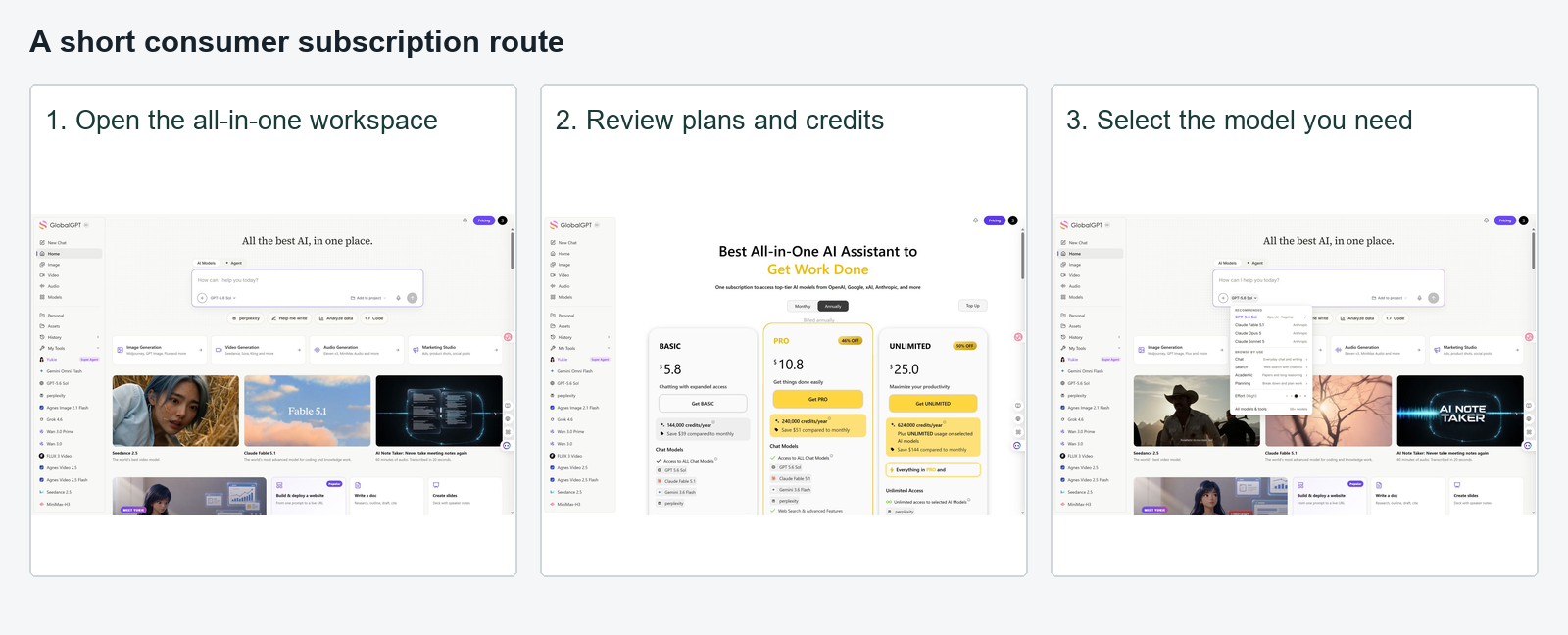
Voor een gewone gebruiker bestaat de kortste route uit drie delen:
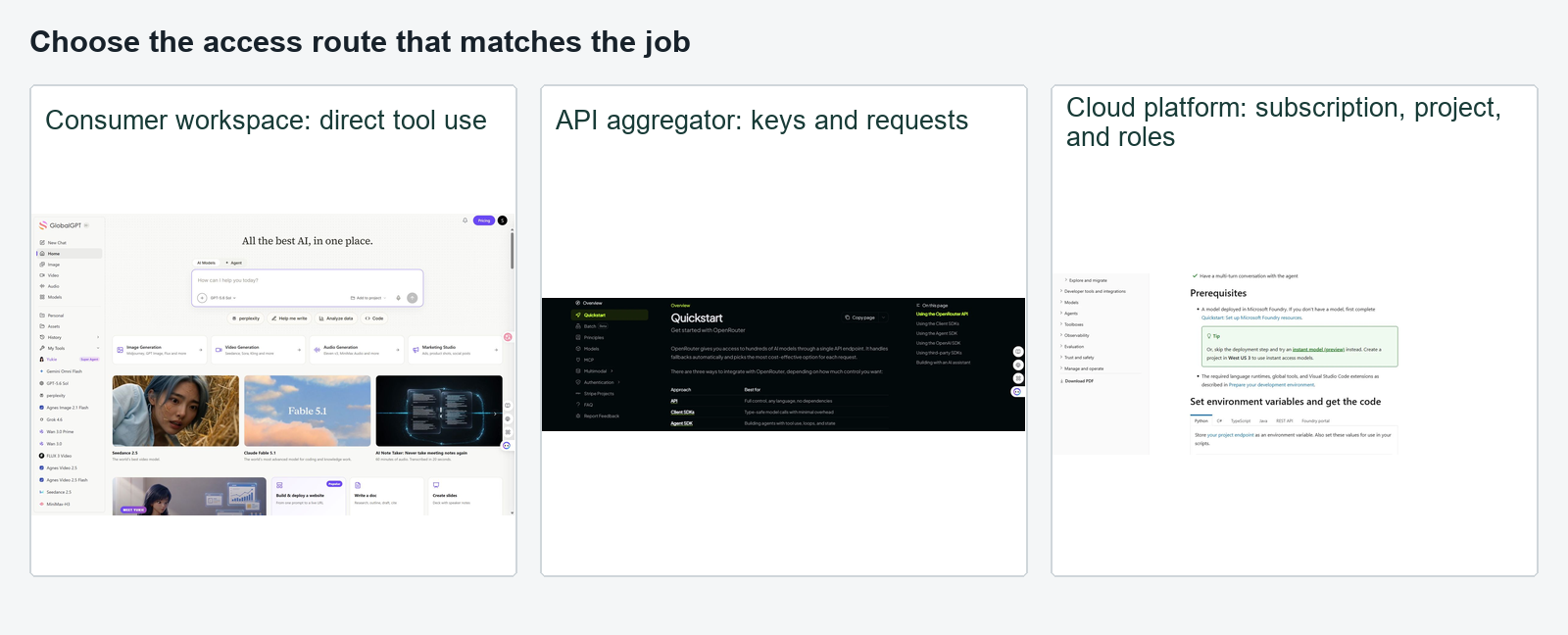
- Kies een alles-in-één-platform voor consumenten. Kies niet voor een API of cloudproduct, tenzij je specifiek behoefte hebt aan beheerfuncties voor ontwikkelaars.
- Maak één account aan en bekijk het abonnement. Volg de stappen voor het live boeken van een transactie en controleer vervolgens welke instrumenten en toewijzingseenheden precies van toepassing zijn, voordat u de betalingsgegevens invoert.
- Open de meegeleverde tools vanuit één dashboard. Test eerst één terugkerende taak voordat je besluit of je wilt upgraden.
| Route | Wat je normaal gesproken instelt | Geschikt voor | Hoofdwrijving |
|---|---|---|---|
| Consumentenabonnement | Account, abonnement, betaling | Chatten, onderzoek doen en creatief werk | Inzicht in credits en modelbeperkingen |
| API-aggregator | Account, tegoeden, API-sleutel, klant | Apps en automatiseringen | Technische configuratie |
| Cloudmodel-hub | Cloudaccount, factureringsproject, machtigingen | Teams die producten ontwikkelen | Project- en identiteitsconfiguratie |
| Afzonderlijke officiële plannen | Eén account en één factuur per aanbieder | Maximale aantal inbouwfuncties | Doorlopende abonnementen en beheer |
Hoe je je kunt abonneren op alles-in-één AI-tools met GLBGPT
GLBGPT volgt de consumentenroute: één account geeft toegang tot een werkruimte die meerdere model- en mediacategorieën omvat. Je kunt beginnen met een e-mailadres of gebruikmaken van de Google- of Apple-opties die in het huidige inlogvenster worden weergegeven. Volgens de openbare aanmeldingsinformatie van GLBGPT, gecontroleerd op 2 september 2026, Nieuwe gebruikers krijgen na aanmelding drie gratis gebruiksmogelijkheden en hoeven geen betaalmethode op te geven.
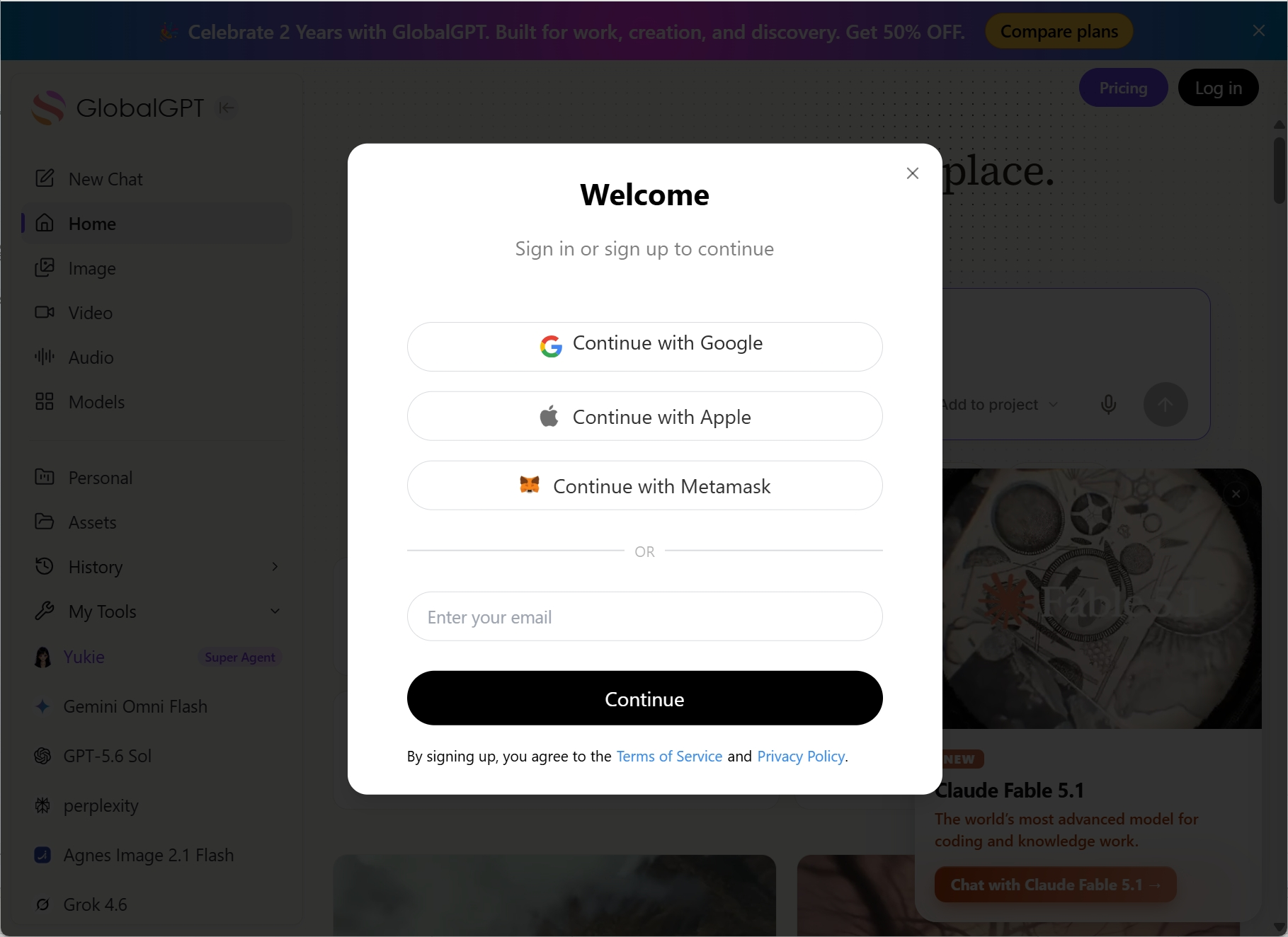
- Kies hoe je je wilt aanmelden. Ga verder met Google of Apple, of voer een e-mailadres in en voltooi de verificatiestap die op het scherm wordt weergegeven. Voor de drie gratis gebruiksmogelijkheden die op de openbare aanmeldpagina worden beschreven, is geen betaalmethode vereist.
- Bekijk het huidige plan. Controleer of de tools die je nodig hebt inbegrepen zijn en of het gebruik wordt afgeschreven van een abonnementslimiet, credits of beide.
- Open je eerste programma. Begin met een gewone chat of een documenttaak, zodat je kunt controleren of het account goed werkt voordat je betaalt voor intensiever creatief gebruik.
- Kies een ander model of een andere categorie. Open een afbeelding, video, onderzoeksfunctie of agenttool vanuit dezelfde werkruimte en controleer of deze binnen je abonnement beschikbaar is.
- Controleer het gebruik voordat u de upgrade uitvoert. Voer een taak uit die je elke week herhaalt en noteer de daadwerkelijk verbruikte eenheid of het daadwerkelijk verbruikte tegoed.
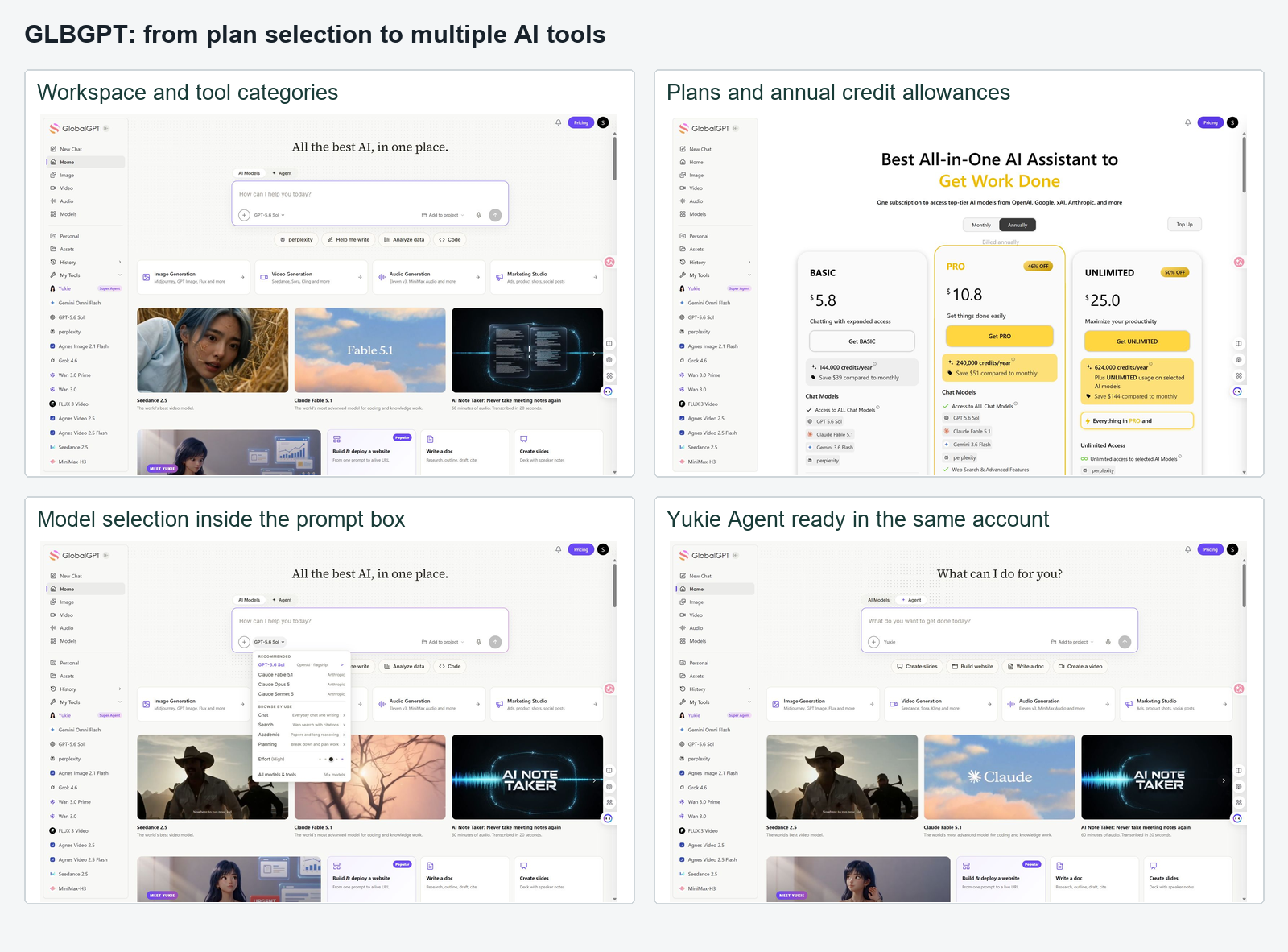
Het belangrijkste voordeel is niet dat je nooit een keuze hoeft te maken. Het is juist dat je die keuze binnen één account kunt maken. De beste AI-model Dat hangt nog steeds af van de taak; voor afbeeldingen of video’s kan een andere limiet gelden dan voor chat.
Praktijktest: Maak het account aan, open twee tools die je echt nodig hebt en voer in elk daarvan één kleine taak uit. Upgrade pas als je kunt zien welke modellen er beschikbaar zijn en hoe het verbruik wordt bijgehouden.
Hoe je je kunt abonneren op andere alles-in-één AI-platforms
Ook andere platforms maken gebruik van AI-modellen of -tools, maar “abonneren” betekent niet altijd hetzelfde. Sommige bieden een standaard maandelijks abonnement aan, andere werken met credits en weer andere zijn opgezet rond API-toegang.
| Platform | Hoe je begint | Wat je moet controleren voordat je je abonneert | Beste pasvorm |
|---|---|---|---|
| GLBGPT | Consumentenaccount en -abonnement | Inbegrepen modellen, mediatools, toegang voor agenten en gebruikseenheden | Gebruikers die meerdere AI-categorieën in één werkruimte willen hebben |
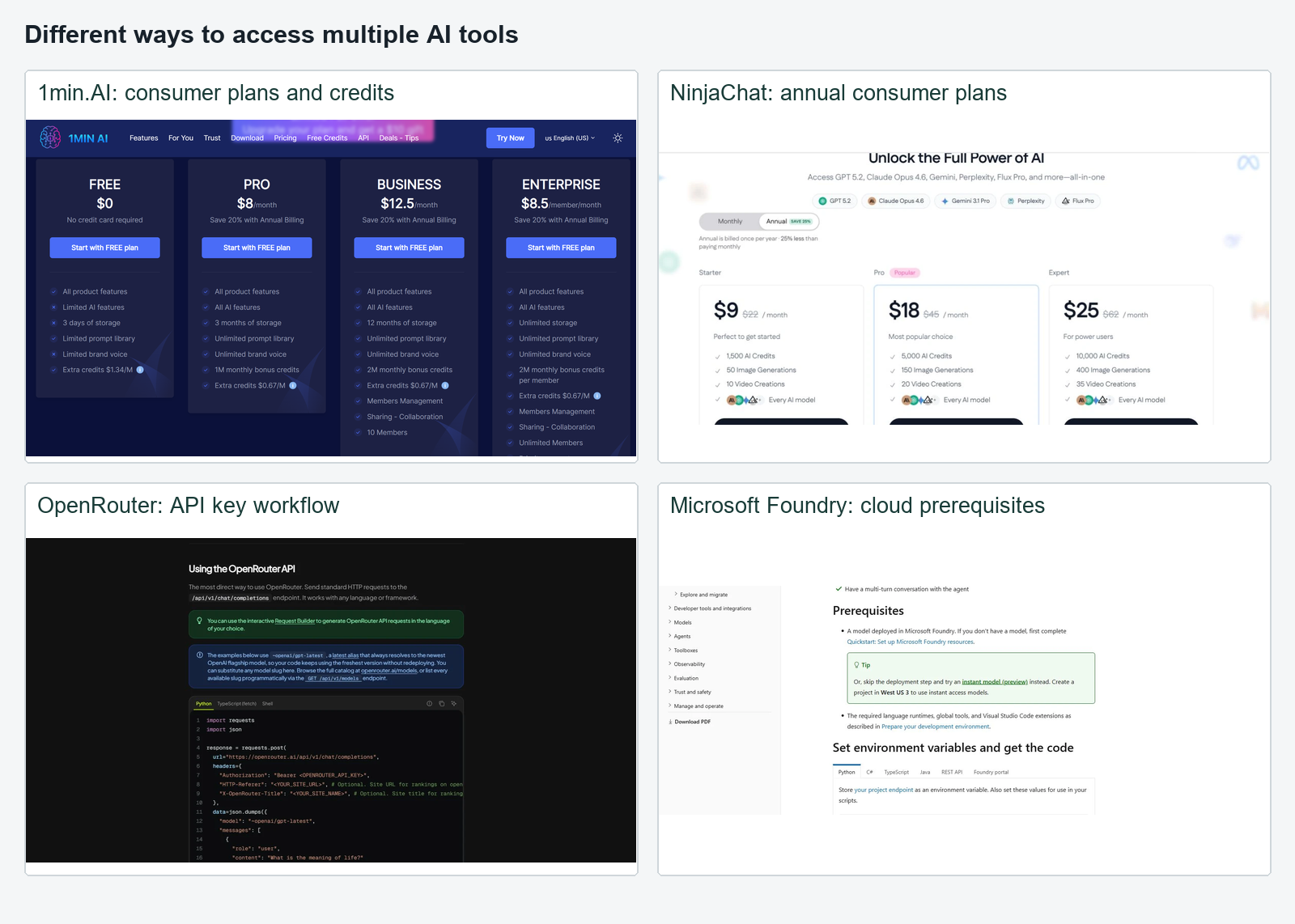
| 1min.AI | Consumentenaccount met een abonnement of op basis van verbruik | Kosten per taak en of voor een bepaalde functie aparte toegang nodig is | Gebruikers die de voorkeur geven aan taakgerichte hulpmiddelen |
| NinjaChat | Consumentenaccount en gestaffeld tariefplan | AI-credits, beeld- en videokwota’s en de beschikbaarheid van live modellen | Gebruikers die chat- en creatieve tools met elkaar vergelijken |
| OpenRouter | Account, prepaidtegoed en een API-sleutel | Prijzen per model voor de API en de client die wordt gebruikt om verzoeken te verzenden | Ontwikkelaars en technische gebruikers |
Dit onderscheid is belangrijk. In de officiële snelstartgids van OpenRouter wordt één API-eindpunt voor honderden modellen beschreven, maar voor de voorbeelden is een API-sleutel en code of een compatibele client vereist. Dat is brede toegang, niet dezelfde ervaring als het openen van een chatdashboard voor consumenten. Evenzo maakte het geteste 1min.AI Agent-scherm gebruik van een vroege-toegangsenquête en goedkeuring door een beheerder; dat bewijs heeft betrekking op de Agent-functie, niet op het volledige 1min.AI-abonnement. Zie de gedetailleerde Beoordeling van 1min.AI voor die onderscheiding.
Eén AI-abonnement versus afzonderlijke abonnementen voor ChatGPT, Claude en Gemini
Een alles-in-één-abonnement zorgt vooral voor minder administratieve rompslomp op het gebied van accountbeheer en facturering. Afzonderlijke officiële abonnementen waarborgen vooral de toegang tot de eigen functies van elke provider en de specifieke limieten van elk abonnement. Geen van beide opties is voor iedereen de beste keuze.
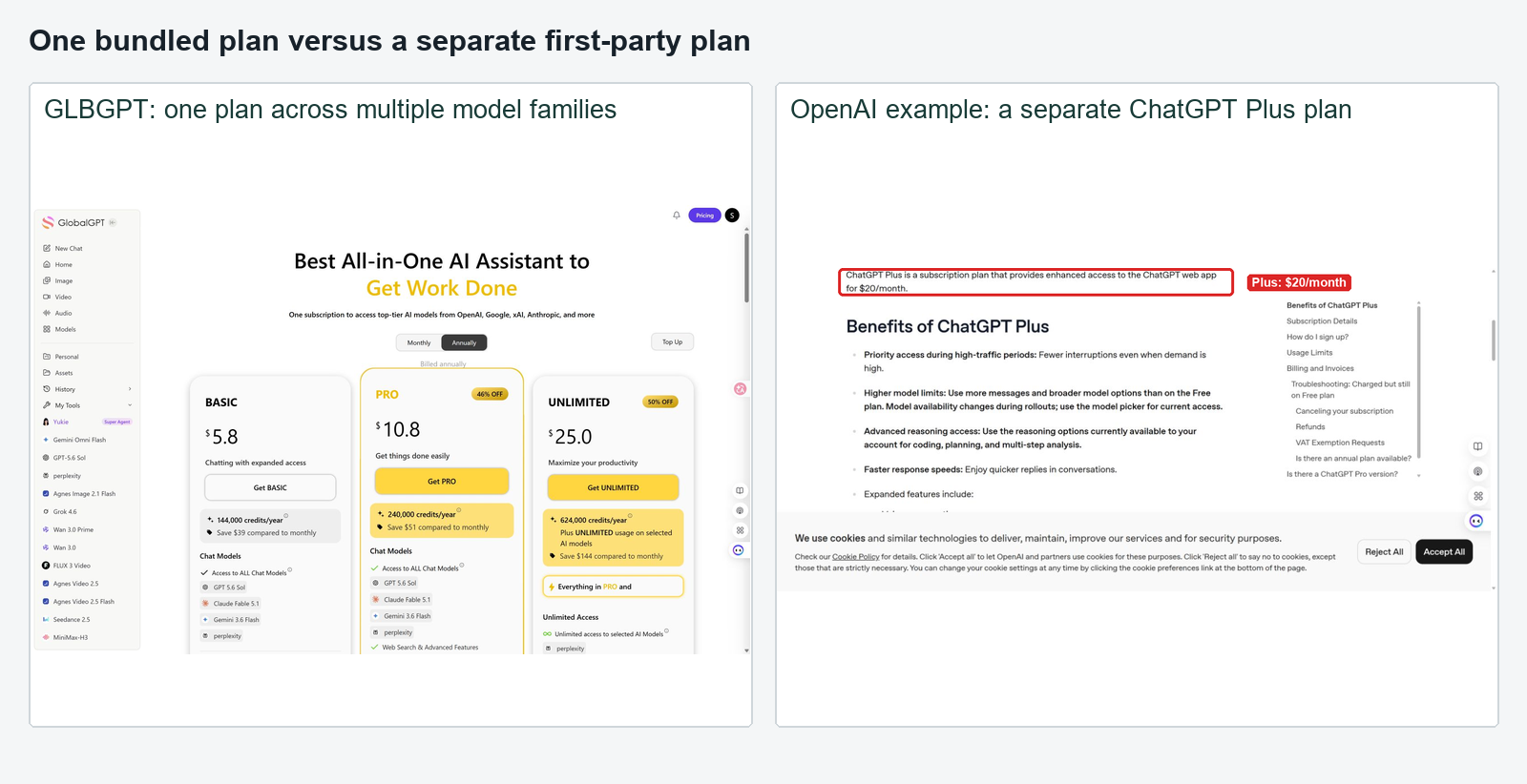
| Beslissende factor | Eén alles-in-één-abonnement | Afzonderlijke officiële abonnementen |
|---|---|---|
| Rekeningen en facturen | Meestal één | Eén per aanbieder |
| Modelkeuze | Door het platform geselecteerde centrale catalogus | Modellen die rechtstreeks door elke aanbieder worden aangeboden |
| Inbouwfuncties | Aanbiederspecifieke tools of integraties kunnen worden weggelaten | Meestal de sterkste route voor natuurlijke elementen |
| Gebruikslimieten | Gedeelde credits, berichten, tokens of regels voor redelijk gebruik | Afzonderlijke limieten per verzekering |
| Omschakelen | Meestal binnen één werkruimte | Schakelen tussen apps en accounts |
| Geschikt voor | Gebruikers die regelmatig modellen en mediatools combineren | Gebruikers die specifieke eigen functies gebruiken |
Gebruik een eenvoudig werkblad in plaats van planprijzen toe te voegen die snel achterhaald raken:
Totale praktische kosten = abonnementskosten + extra credits + betalings- of regionale hindernissen + tijd die wordt besteed aan het beheren van accounts.
Als je voornamelijk één model gebruikt, is het officiële abonnement daarvoor wellicht de meest overzichtelijke keuze. Als je regelmatig modellen vergelijkt of afwisselend chat, foto’s en video’s bekijkt, is één account voordeliger. De handleidingen voor AI afbeeldingsgeneratoren en AI-videogeneratoren kan je helpen vaststellen welke creatieve categorieën daadwerkelijk in je abonnement thuishoren.
Wat u moet controleren voordat u betaalt
Een lange lijst met modellen is niet voldoende. Open het liveplan en de modelkiezer, en controleer vervolgens de details die bepalend zijn voor het daadwerkelijke gebruik:
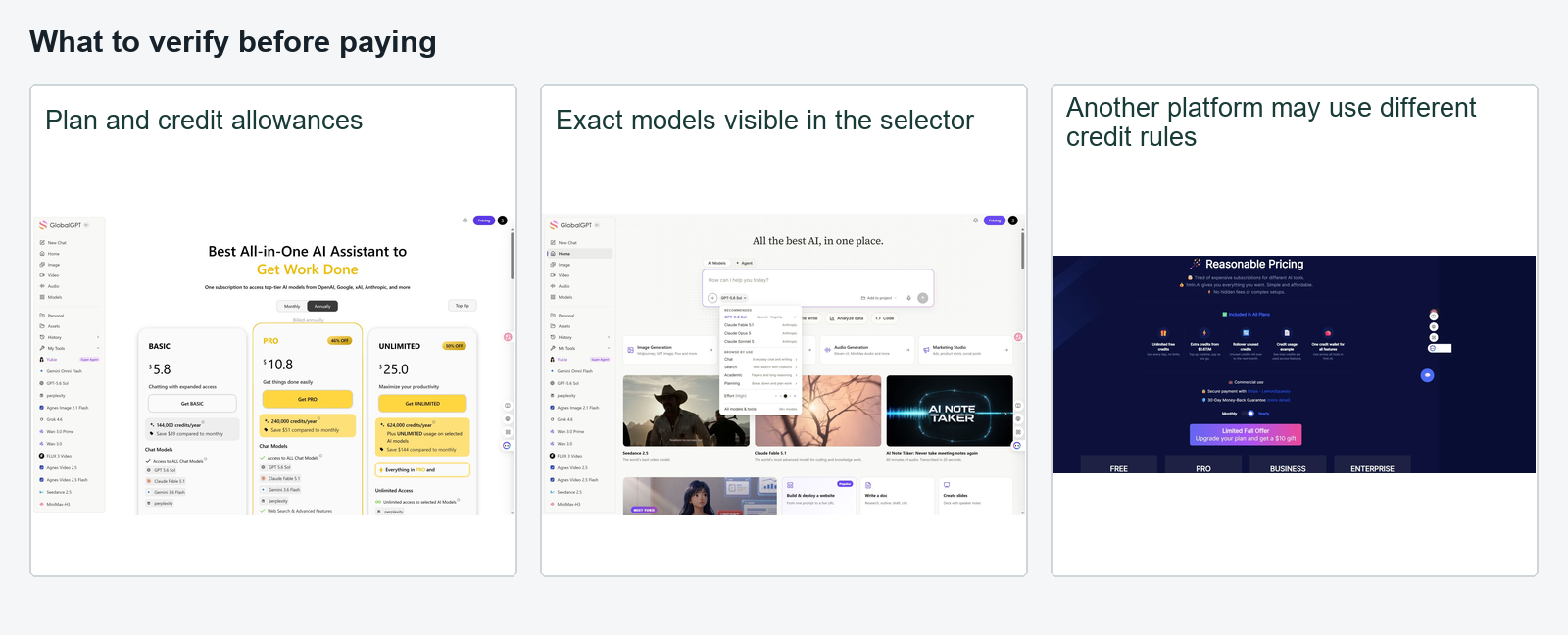
- Worden de exacte modelversies vermeld en kunnen ze worden geselecteerd?
- Bevat het pakket functies voor chat, afbeeldingen, video, onderzoek en medewerkers, of slechts een aantal daarvan?
- Wordt het gebruik gemeten in berichten, tokens, credits, generaties of op basis van redelijk gebruik?
- Wordt er voor dure foto- en videoprojecten een aparte vergoeding gebruikt?
- Wordt deze betaalmethode in uw land geaccepteerd?
- Zijn er functies die alleen toegankelijk zijn via een wachtlijst, enquête, beheerder, cloudproject of API-sleutel?
- Kun je opzeggen of naar een lager abonnement overschakelen zonder contact op te nemen met de verkoopafdeling?
- Zijn de voorwaarden met betrekking tot terugbetaling, overdracht, overschrijding, privacy en gegevensbewaring duidelijk?
- Welke functies van de ontwikkelaar zelf zijn niet beschikbaar via de bundel?
Om een beter onderbouwde beslissing te nemen over de betaling, kunt u deze checklist vergelijken met de gids voor voor welke AI is het de moeite waard om te betalen?. Het juiste abonnement is het abonnement dat herhaalde taken dekt, niet het abonnement met de langste logo-strook.
Veelgestelde vragen en slotadvies
Hoe kan ik me abonneren op alles-in-één AI-tools?
Kies een multimodaal platform voor consumenten, maak één account aan, bekijk het huidige abonnement en de gebruikslimieten en open vervolgens de meegeleverde tools via het dashboard. Test de specifieke chat-, afbeeldings-, video-, zoek- of agenttaken die u nodig hebt voordat u een upgrade uitvoert.
Kan ik ChatGPT, Claude en Gemini in één abonnement krijgen?
Sommige platforms van derden bieden via één account toegang tot modellen van OpenAI, Anthropic en Google. Controleer de exacte modelnamen en limieten in de live-selector, aangezien de beschikbaarheid kan veranderen en toegang via derden niet automatisch alle functies van de officiële apps omvat.
Is een alles-in-één AI-abonnement goedkoper?
Het kan goedkoper zijn dan meerdere volledige abonnementen aan te houden, vooral als je elk model slechts af en toe gebruikt. Bij intensief gebruik is het misschien niet goedkoper als het genereren van media of premiummodellen snel credits opgebruikt.
Heb ik een API-sleutel nodig?
Dit geldt niet voor een standaard consumentenplatform zoals de hier beschreven GLBGPT-route. API-aggregators zoals OpenRouter vereisen een API-sleutel, omdat ze zijn ontworpen om modellen te koppelen aan software of compatibele clients.
Kan één pakket chat-, afbeeldings- en videotools bevatten?
Ja, sommige platforms combineren alle drie de categorieën. Controleer of ze één gezamenlijke kredietpool hebben of aparte limieten hanteren, en vraag naar de precieze werkwijze voordat je betaalt.
Wat is de gemakkelijkste optie voor een beginner?
Een alles-in-één-platform voor consumenten is doorgaans eenvoudiger dan een API-aggregator of een cloudmodelhub, omdat er geen code, API-sleutel, factureringsproject of identiteitsmachtigingen voor nodig zijn. Het feit dat aanmelden eenvoudig is, neemt niet weg dat je de limieten van het abonnement moet controleren.
Eindaanbeveling: Als je van plan bent om verschillende AI-tools te gebruiken in plaats van zelf software te ontwikkelen, begin dan met een all-in-one-abonnement voor consumenten. Open GLBGPT, controleer de live-modellen en marges, en voer één echte taak uit in twee verschillende toolcategorieën. Kies alleen voor een API- of cloudoplossing als je de extra technische controle die deze biedt nodig hebt.
Status van het bewijsmateriaal: producttoegang, plannen, modelcatalogi en limieten zijn dynamisch. Vermeldingen in de interface in het definitieve pakket moeten gekoppeld blijven aan screenshots met een datum of officiële pagina’s. Dit concept garandeert geen gestandaardiseerde uitvoerkwaliteit op alle platforms.