

Status checked September 24, 2026: MiniMax H3 is listed in the GlobalGPT Video Generator. The official MiniMax API remains a separate route priced by output second, while the GlobalGPT workspace exposes its own plan and credit rules.
MiniMax H3 is interesting because it is trying to solve a harder problem than basic text-to-video: keeping a creative brief consistent when the brief includes a subject image, a movement reference, a camera style, an audio cue, or a fixed ending frame. The question is not simply whether H3 can make a pretty clip. It is whether those controls make the result more predictable and useful.
This MiniMax H3 review breaks down the verified specifications, official examples, API pricing, production limits, and the open questions that matter before you spend money. MiniMax has published enough detail to judge the shape of the product, but not enough independent evidence to make broad claims about reliability, speed, or superiority.

What Is MiniMax H3?
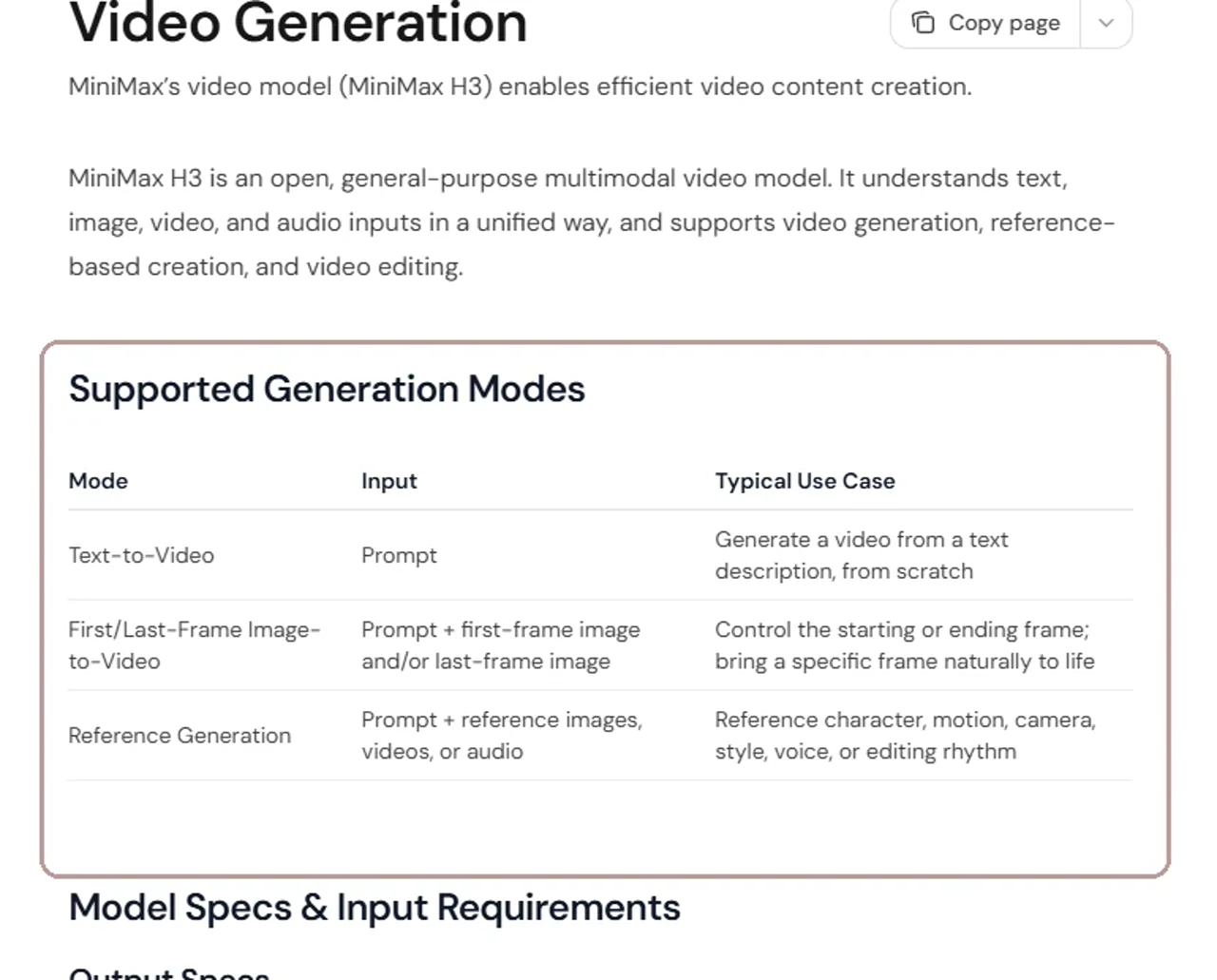
MiniMax H3 is an open, general-purpose multimodal video model from MiniMax. According to the official video-generation guide, it understands text, image, video, and audio inputs in one request and supports video generation, reference-based creation, and video editing. The public API model name is MiniMax-H3.
The practical difference is control. A simple video generator starts with a prompt and invents the rest. H3 can also use a first frame, a last frame, reference images, reference clips, or reference audio. That gives creators more ways to define who appears, how the camera moves, what style to follow, and where the shot should end.
MiniMax H3 Specs at a Glance
| Specification | MiniMax H3 |
|---|---|
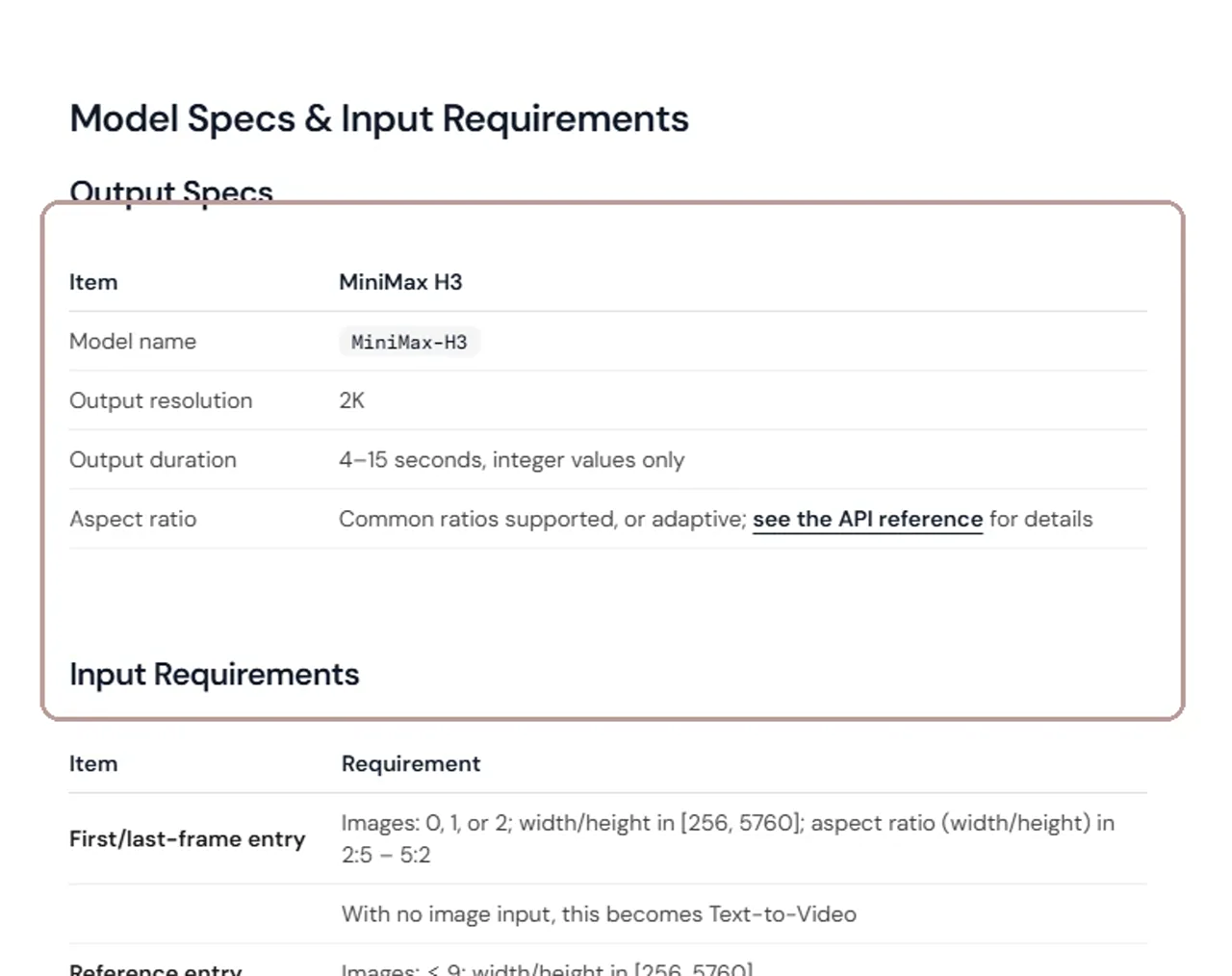
| Official model name | MiniMax-H3 |
| Input types | Text, image, video, and audio |
| Output resolution | 2K |
| Output duration | 4–15 seconds, integer values |
| Generation modes | Text-to-video, first/last-frame image-to-video, reference generation |
| Aspect ratios | 21:9, 16:9, 4:3, 1:1, 3:4, 9:16, or adaptive where supported |
| Prompt limit | Up to 7,000 characters |
| Reference limits | Up to 9 images, 3 video clips, and 3 audio clips; 12 mixed files total |
Reference capacity
One prompt can coordinate four input types
Mixed media is capped at 12 files. Audio requires at least one reference image or video.
These specifications come from MiniMax’s V2 video API reference. Text-to-video requires a fixed aspect ratio. First- or last-frame generation follows the image ratio, while reference generation can use an adaptive or selected ratio.
The 2K label is an output specification, not a guarantee that every frame will look equally detailed. Resolution, temporal consistency, prompt accuracy, and physical realism are separate quality questions. They need controlled tests rather than a spec-sheet verdict.
MiniMax H3 Features and What Stands Out
The official videos below are MiniMax-selected examples. They are useful for seeing how each feature is intended to work, but curated examples are not the same as independent stress tests.
Text-to-video with camera direction
H3 can generate a video from a text description alone. MiniMax also recommends putting camera directions such as [pan], [zoom], or [static] directly after the relevant description. That makes the prompt responsible for both scene content and shot behavior.
In this official example, the useful thing to watch is not just surface detail. Look at whether the camera follows the described motion, whether the subject remains coherent from frame to frame, and whether the composition holds together when the action becomes more complex.
Unified multimodal references
Reference generation is the clearest reason H3 feels different from a basic prompt-only tool. One request can combine a written instruction with reference images, reference video, and reference audio. MiniMax says the model can use those materials to follow a subject, motion, camera style, visual style, voice, or editing rhythm.
This approach fits character-led ads, product shots, branded clips, and motion transfer because the creator can provide evidence of what “consistent” should mean. The tradeoff is a more demanding setup: reference quality, role labels, file limits, and prompt clarity all affect the request. For a wider model decision, compare the Veo 3.1 vs Sora 2 comparison.
If video-to-video is central to your project, the broader AI video-to-video workflow explains why motion and structure references can matter as much as the text prompt.
First- and last-frame control
H3 accepts a first frame, a last frame, or both. This gives creators a way to define where a shot begins and where it must arrive, leaving the model to generate the transition between those points.
For this kind of example, judge whether the transition feels intentional and whether both endpoint images remain recognizable. This control can be useful for before-and-after sequences, product reveals, character transformations, and short clips built from two approved keyframes. The Seedance 2.0 access guide covers a different video workflow for comparison.
A similar production idea appears in this guide to creating a short film from two photos, although the model and exact controls are different.
2K output and flexible 4–15 second duration
MiniMax H3 supports 2K output and integer durations from 4 to 15 seconds. That range is long enough for a complete social shot, product moment, transition, or compact cinematic sequence without forcing every idea into a fixed six- or ten-second template.
Production-oriented input limits
The model accepts prompts up to 7,000 characters. Reference generation supports up to nine images, three videos, and three audio files, with twelve mixed files in total. Individual reference video and audio clips can run from 2 to 15 seconds, while the combined reference-video duration is capped at 15 seconds.
Those limits point toward structured production use, but more input is not automatically better. A smaller set of clear references is easier to interpret than a crowded request containing conflicting subjects, camera styles, and audio cues.
MiniMax H3 Pricing and the Real Cost per Video
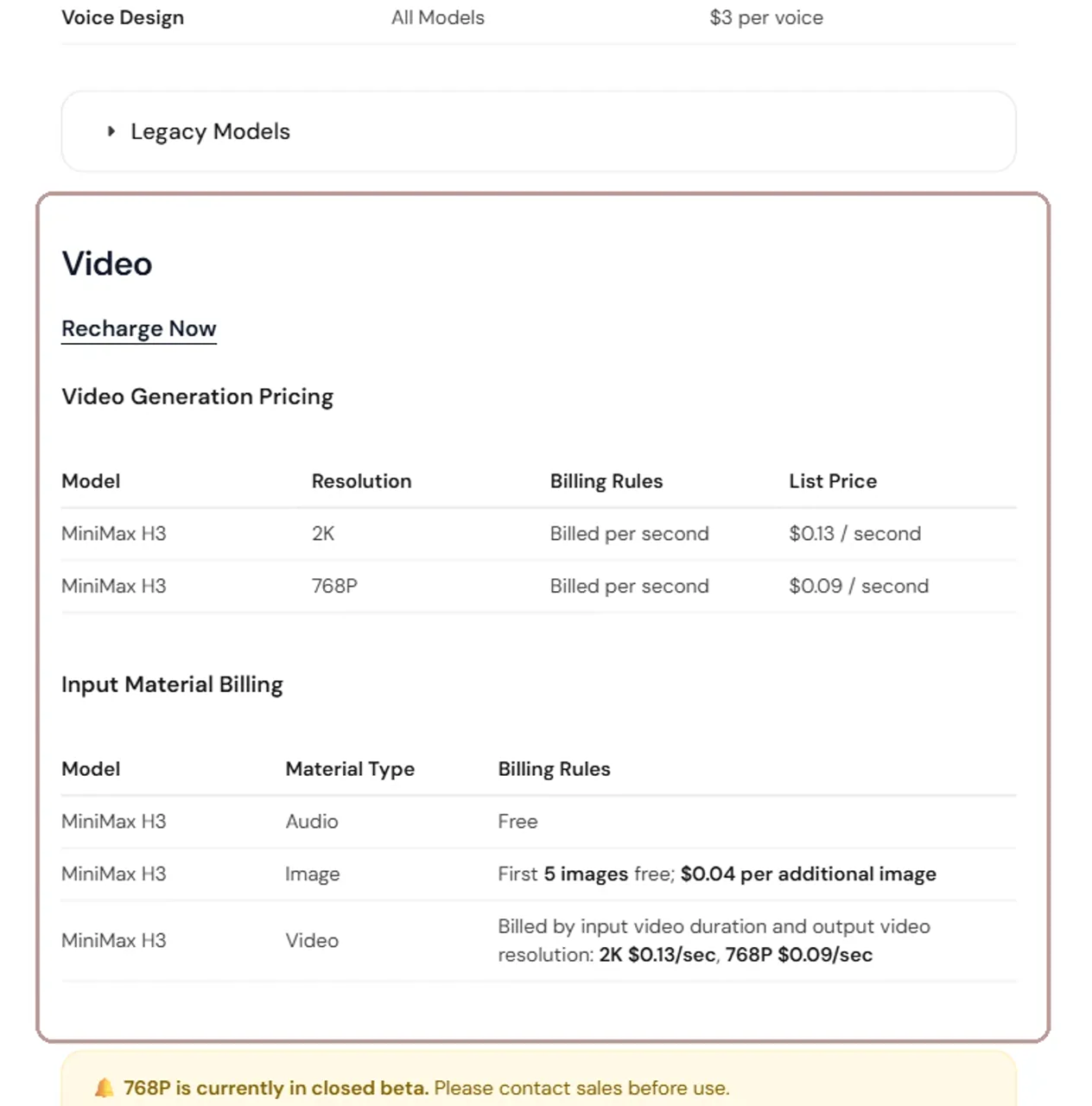
MiniMax lists H3 under pay-as-you-go API pricing. The official pricing page charges by generated second, so duration has a direct and predictable effect on output cost.
| Output | Official rate | 5 seconds | 10 seconds | 15 seconds | Availability |
|---|---|---|---|---|---|
| 2K | $0.13/sec | $0.65 | $1.30 | $1.95 | Listed as available |
| 768P | $0.09/sec | $0.45 | $0.90 | $1.35 | Closed beta; contact sales |
2K output cost
Longer clips scale linearly at $0.13 per second
Calculated from MiniMax’s official per-second API rate.
These totals cover generated output only. Extra reference-image and reference-video charges may apply.
The 5-, 10-, and 15-second totals above are calculations from MiniMax’s per-second rates, not separate package prices. At 2K, the formula is simple: duration × $0.13. A failed experiment can still affect the economics if you need several generations before reaching a usable result.
- Reference audio is listed as free.
- The first five reference images are free; each additional image costs $0.04.
- Reference video is billed by its input duration at the selected output-resolution rate.
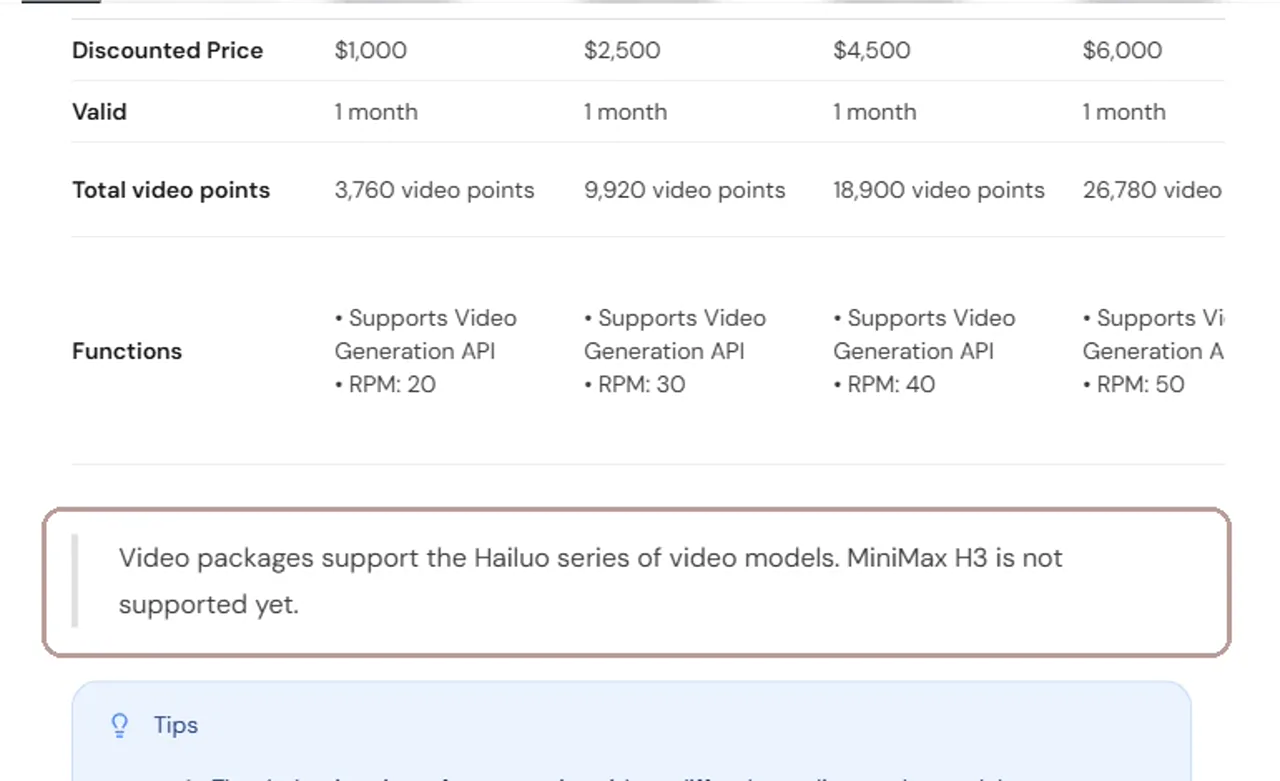
- MiniMax’s existing prepaid Hailuo video packages do not yet support H3.
The package exclusion matters. The official video-package page says H3 is not supported yet, so buyers should not assume an existing Hailuo point bundle covers the new model.
MiniMax H3 Limitations and Open Questions
- Official examples are curated. They show intended strengths, not the normal failure rate.
- There are no independent GlobalGPT results yet. Prompt adherence, speed, retries, and credit usage remain unverified.
- 2K can become expensive through iteration. One 15-second output is $1.95 before additional reference-material charges.
- 768P is still closed beta. The lower rate is not a generally available option.
- Existing video packages do not cover H3. Pay-as-you-go and prepaid-package access must remain separate.
- Quality questions remain. Hands, faces, readable text, physics, scene cuts, native audio, and character consistency need repeatable tests.
The largest missing piece is not another feature claim. It is a controlled test pack using identical prompts and inputs across H3 and nearby models. Until that exists, an honest MiniMax H3 review should treat the model as promising rather than proven.
MiniMax H3 vs Hailuo 2.3: What Changed?
| Decision point | MiniMax H3 | Hailuo 2.3 family |
|---|---|---|
| Positioning | General-purpose multimodal video model | Earlier Hailuo video-generation family |
| Reference inputs | Images, video, and audio in one content structure | Depends on the specific Hailuo model and endpoint |
| Output duration | 4–15 seconds | Common listed options include 6 or 10 seconds |
| Output resolution | 2K in the H3 V2 API | Legacy pricing lists 768P and 1080P options |
| Billing | $0.13/sec for 2K | $0.19–$0.56 per clip in listed legacy examples |
| Prepaid video packages | Not supported yet | Supported by existing Hailuo packages |
H3 appears designed around richer references, longer flexible duration, and a unified multimodal request. Hailuo 2.3 still has the advantage of established package support. That does not prove H3 produces better videos: only matched inputs and prompts can answer the quality question.
Creators comparing the wider market can also review the best AI video generator options, Kling 3.0 controls, and Seedance 2.0 access routes before choosing a long-term tool.
How to Access MiniMax H3
Hailuo AI Web
Hailuo AI Web is the simplest route for creators who want to try H3 without building an API workflow. Sign in, open the video-generation workspace, and look for MiniMax H3 in the model selector. Availability can vary by account or region, so use the model name shown in your live workspace rather than assuming every account has the same menu.
Official API route
The official route uses an asynchronous API. You submit a generation request, receive a task ID, poll the task status, and download the result from the returned URL when the task succeeds. Developers also need to prepare valid public media URLs or uploaded files for reference assets and follow the size, format, and role rules in the API documentation.
GlobalGPT route: now available
MiniMax H3 is now available in the GlobalGPT Video Generator. The live workspace exposes Keyframes and References workflows, with model controls shown in the account interface. Plan access, credits, and generation limits remain separate from MiniMax’s API billing.
If your priority is using more than one model, browse these AI video alternatives while H3 access is being prepared.
MiniMax H3 Review Verdict
MiniMax H3 has a compelling early pitch: 2K output, flexible 4–15 second clips, first- and last-frame control, and a unified way to use image, video, and audio references. The reference system is the feature most likely to matter in real production because it gives creators more ways to define what the model should preserve.
The caution is equally clear. Official demos cannot establish normal output quality, and the 2K per-second price can add up when a shot needs several attempts. H3 looks worth testing early if reference control matters to your work; it is too soon to call it the best choice for high-volume production.
MiniMax H3 can now be tested in GlobalGPT with repeatable prompts and reference inputs. Treat the workspace route and the official API as separate cost and access paths, then record output quality, retries, and credits for your own workload.
Frequently asked questions
What is MiniMax H3?
MiniMax H3 is MiniMax’s multimodal video model. The official guide lists text, image, video, and audio references, with text-to-video, first/last-frame, and reference-generation modes.
Does MiniMax H3 output 2K video?
Yes. The official output table lists MiniMax-H3 768P and 2K routes, with integer durations from 4 to 15 seconds.
How much does MiniMax H3 cost?
The official API page lists $0.08 per output second for 768P and $0.13 per output second for 2K. An 8-second clip is therefore $0.64 at 768P or $1.04 at 2K before other applicable charges.
Can H3 use audio and video references?
Yes. The V2 reference rules list text, image, video, and audio inputs. Audio requires at least one image or video reference, and mixed input files have a stated cap.
Where can I try MiniMax H3?
You can use the official API route or open the MiniMax H3 entry in GlobalGPT’s video workspace, then continue into editing and other media steps in the same project.





