

Current status (September 24, 2026): The official OpenAI consumer Sora, the OpenAI Videos API, and GlobalGPT access are three different routes. The consumer web/app is already closed; the API deprecation notice names September 24, 2026 as its removal date; GlobalGPT is a separate platform route with its own plans and limits.
GlobalGPT currently provides a stable Sora 2 entry. This is a separate GlobalGPT platform route, not the discontinued OpenAI consumer app or direct billing through OpenAI’s deprecated Videos API. The same video workspace also gives you Veo 3.1, Grok Imagine, Kling 3.0, and Wan 2.7 when another model fits the shot better.
| Route | Status checked September 24, 2026 | Current price or limit |
|---|---|---|
| OpenAI consumer web/app | Discontinued on April 26, 2026. The official consumer Sora experience is not an active invite-code route. | No active consumer Sora subscription route remains. |
| OpenAI Videos API | Deprecated and scheduled for removal on September 24, 2026, including sora-2 and sora-2-pro. | The official guide supports up to 20-second clips; this is developer billing, not consumer access. |
| OpenAI API pricing | Billed per generated second and resolution. | Standard rates: Sora 2 $0.10/sec; Sora 2 Pro $0.30, $0.50, or $0.70/sec. Batch rates are half. |
| GlobalGPT platform | Verified Sora 2 route with no invite code or regional block, up to 25-second output, and no watermark. | Pro: $19.9 monthly or $10.8/month billed annually. Unlimited: $49.9 monthly or $25/month billed annually. |
Following OpenAI’s sudden decision to permanently shut down its video service, finding a reliable Sora 2 alternative is no longer just an option—it is an absolute necessity. With the platform officially taken offline, creators are urgently scrambling to save their video workflows. Fortunately, several advanced AI video generators have immediately stepped up, offering cinematic-quality video creation that perfectly replaces—and in some cases, exceeds—Sora’s capabilities.
After extensive testing in 2026, I identified 12 of the best Sora 2 alternatives, including GlobalGPT, Veo 3.1, Runway Gen-4.5, Kling 3.0, Wan 2.7, and Seedance 2.5. These platforms allow creators to generate high-quality AI videos with fewer limitations, faster rendering, and more flexible creative control.
GlobalGPT offers a practical solution for creators who want multiple current video models in one place. Its live model menu includes Sora 2 Pro, Veo 3.1, Kling 3.0, Wan 2.7, and Grok Imagine 1.5 alongside 100+ AI models. As of September 24, 2026, Pro costs $19.9 monthly or $10.8/month billed annually, while Unlimited is $49.9 monthly or $25/month billed annually. The Sora 2 route separately advertises watermark-free clips up to 25 seconds without regional blocks or invite-only barriers.

What Are AI Video Generators?
AI video generators are powerful tools that transform text prompts, images, or audio into dynamic video content using artificial intelligence. Essentially, you provide a description—like “a golden retriever puppy playing in a field of flowers”—and the AI produces a realistic or stylized video that matches your prompt. Some generators can even animate still images or replicate human voices for narration.
Types of Sora 2 Alternatives You Should Know
Not all Sora 2 alternatives are the same. Based on real-world usage, they usually fall into two clear categories.
1. Platforms That Let You Use Sora 2 Without Official Access
This first group exists because many users can’t access Sora 2 directly due to invite-only access or country restrictions.
Some third-party platforms still provide their own Sora 2 access layer. OpenAI’s consumer app is gone and its API is in a scheduled sunset, so these are separate platform routes rather than a restored OpenAI invite path. GlobalGPT, for example, lists Sora 2 with its own plan limits and access terms.
This option is best for creators who specifically want Sora 2’s visual style and motion quality, but need faster, cheaper, and more reliable access.
2. Alternative AI Video Models (Not Sora 2)
The second group includes entirely different AI video models. These tools don’t rely on Sora 2 at all. Instead, they offer their own strengths, such as:
- Better avatar-based videos
- Stronger cinematic controls
- Faster generation times
- More creative or stylized visuals
- Fewer content restrictions
While their results may look different from Sora 2, many of these models are already good enough for marketing videos, social media, short films, and business content. For many creators, the difference in output is less important than speed, cost, and creative freedom.
Understanding this distinction helps you choose the right tool based on what you actually need: access to Sora 2 itself, or a flexible video generator that gets the job done without limits.
How I Selected the Best Sora 2 Alternatives
To identify the most suitable alternatives to Sora 2, I focused on what truly matters to content creators. My evaluation started with one key question above all others:
Can it help users who can’t access Sora 2 actually use Sora 2 — and use it better?
If a platform allows creators blocked by invite codes, regional limits, or pricing to reliably access and work with the Sora 2 engine itself, I ranked it at the top.
Beyond that core requirement, I evaluated each platform using a few straightforward criteria:
- Is it actually usable? I prioritized platforms that offer simple sign-up processes and stable performance. Many websites suffer from technical issues and API limitations, leading to unreliable products.
- Does it generate high-quality videos? I assessed whether these alternatives can match the video generation quality demonstrated by Sora 2.
- What is the pricing structure? I considered whether the pricing is transparent and reasonable.
- Does it offer a variety of video generation options? I looked for platforms that support multiple video generation models, allowing users to choose the best fit for their needs.
Comparison Table: 12 Best Sora 2 Alternatives in 2026
Below are the best AI video generators similar to Sora that I tested in 2026.
| Tool | Best For | Key Strength |
|---|---|---|
| GlobalGPT | All-in-one model access | Sora 2 Pro, Veo 3.1, Kling 3.0, Wan 2.7, Grok Imagine 1.5, and 100+ models |
| Seedance 2.5 | Longer multimodal storytelling | Official 30-second generation with reference control and editing |
| Veo 3.1 | Cinematic video | Native audio and paid Gemini API access |
| Runway Gen-4.5 | Professional creators | Current flagship model plus editing and control tools |
| Kling 3.0 | Motion-heavy clips | Strong scene coherence and prompt interpretation |
| Synthesia | Avatar videos | Personal avatars and multilingual business video |
| HeyGen | Corporate presentations | Digital twins, voice cloning, and localization |
| Pika 2.5 | Stylized animation | Expressive effects, swaps, twists, and lip-sync |
| Luma Ray3.2 | Controlled cinematic video | Multi-keyframe direction, HDR, EXR, and Modify Video V2 |
| InVideo AI | Marketing videos | Prompt-to-video workflow plus 200+ media models |
| Pictory AI | Content repurposing | Turns long-form text and recordings into social video |
| Wan 2.7 | Flexible generation | Current verified GlobalGPT route and broad creative control |
1 Global GPT – Powered by Sora 2 and Pro, Yet Beyond Its Limits
The reason I put Global GPT first is that it’s the perfect alternative to Sora 2, offering an even better and more seamless experience as an integrated platform for it.
There’s no invite required, no watermarks, and a smooth, user-friendly interface that makes professional video creation accessible to everyone.
Why Global GPT stands out:
- No invite codes – Start immediately.
- No watermarks – Clean, professional output.
- Multiple models integrated – Sora 2 and Pro, Veo 3.1, and 10+ other video-generation engines.
- Cross-model flexibility – You can experiment and combine different model strengths for cinematic, stylized, or 3D content.
During testing, I generated a 30-second cinematic clip using both Sora 2 and Veo 3.1 within the platform. By blending the models, I achieved richer motion dynamics and more nuanced lighting than using a single AI tool. For creators producing marketing videos, social clips, or short films, this flexibility is a game-changer.
GlobalGPT pricing checked September 24, 2026: current plan page
- Basic: $11.9 monthly or $5.8/month billed annually; 144,000 annual credits and core language-model access.
- Pro: $19.9 monthly or $10.8/month billed annually; 240,000 annual credits plus video generation and premium image models.
- Unlimited: $49.9 monthly or $25/month billed annually; 624,000 annual credits plus unlimited access to selected fast-tier models.
Video generation begins on Pro; Basic is not the video plan.
The Only Sora 2 Alternative Supporting Up to 25-Second Video Generation
Pros:
- All-in-one platform
- Model diversity
- Professional output
- The only alternative that supports generating videos up to 25 seconds long
Cons:
Advanced features can be overwhelming for complete beginners
It integrates more than a dozen video-generation models, including Sora 2 and Veo 3.1, giving you the ability to combine the strengths of multiple AI models in one workflow.
2 Seedance 2.5 – The Fast-Rising Challenger to Sora 2

Seedance 2.5 current model note
As of September 24, 2026, ByteDance Seed lists Seedance 2.5 as its current release, with up to 30-second generation, reference control, and stronger editing. The newest verified model-specific GlobalGPT route remains Seedance 2.0, so official Seedance 2.5 access and GlobalGPT access should not be treated as the same route.
Original Seedance 2.0 test results (historical)
Seedance 2.0 ranks 2 on this list because it has quickly become one of the most talked-about new challengers to Sora-style AI video generation since its release in early 2026.
Seedance 2.0 stands out for its director-level creative control and multi-modal generation system. During my testing, I created a short cinematic sequence using a character image, a camera-motion reference video, and background music. The model maintained consistent character identity across multiple shots while synchronizing scene movement with the rhythm of the audio, producing footage that looked surprisingly close to professional film production.
Key Highlights:
- Multi-modal reference system: Seedance 2.0 supports up to 12 input references (images, videos, and audio), allowing precise control over character appearance, camera motion, and scene pacing.
- Strong visual consistency: The model maintains stable characters and environments across multiple shots, reducing the common AI problem of character morphing between frames, which is a standout among its key features.
- Physics-aware motion: Seedance 2.0 handles movement realistically, respecting momentum, gravity, and natural body motion in complex scenes.
- Native audio-video synchronization: Dialogue, sound effects, and ambient audio are generated together with the visuals, ensuring accurate lip-sync and scene rhythm.
- Multi-shot storytelling: Instead of generating isolated clips, Seedance 2.0 can produce cohesive sequences with multiple camera angles from a single prompt.
- Pricing: Currently available primarily through ByteDance platforms such as Dreamina (Jimeng), with subscription pricing starting around ¥69/month (~$9.6 USD) depending on your access method.
Overall, Seedance 2.0 is rapidly emerging as one of the most powerful AI video generation models, with performance that many creators believe already rivals—or in some cases surpasses—Sora 2 in certain cinematic scenarios.
However,OpenAI’s public Sora page now says the Sora product is no longer available as of April 26, 2026.
3 Veo 3.1 – Google’s Next-Gen AI Video Model

Veo 3.1 current pricing and status
As of September 24, 2026, Google still calls Veo 3.1 its latest Veo video model. The paid Gemini API lists Standard at $0.40/sec for 720p or 1080p and $0.60/sec for 4K; Fast starts at $0.10/sec and Lite at $0.05/sec.
Original Veo 3.1 launch test
Veo 3.1 ranks second because, when it launched last week, it was widely recognized as the strongest challenger to Sora 2.
Veo 3.1 stands out as one of the most advanced AI video generation tools available today. While working on a short promotional clip, I tried its new First and Last Frame feature—where you can upload a starting and ending image—and was impressed by how seamlessly it transitioned between them. The resulting clip maintained consistent character appearance, lighting, and ambient sound throughout.
Key Highlights:
- Native audio generation: Veo 3.1 automatically produces ambient noise, dialogue, and sound effects that match the generated scene.
- Prompt fidelity & visual consistency: I uploaded two reference images of my character and, using the clip extension tool, generated a ~15-second sequence that stayed visually consistent.
- Scene extension: I extended a 10-second clip into roughly 35 seconds using Veo 3.1’s scene-extension feature. The continuity remained stable, though the extended portion plays at 720 p resolution.
- True Multimodal Synchronization: Veo 3.1 is the primary rival to Sora 2’s new audio-visual engine, delivering native soundscapes that match the visual movement of the scene.
- Superior Cinematic Control: It excels in “Prompt Fidelity,” meaning it follows intricate instructions for cinematic lighting and wide-angle tracking shots more accurately than earlier video models.
Pricing: Paid Gemini API pricing starts at $0.05/sec for Veo 3.1 Lite, $0.10/sec for Fast, and $0.40/sec for Standard.
Pros: Realistic visuals, synchronized sound, and strong prompt control.
Cons: Some features are still in preview and require tuning for best results.
Overall, Veo 3.1 is a compelling choice for creators and studios seeking cinematic-quality AI video generation with broader accessibility—making it a true rival to Sora 2 in 2025.
4 Synthesia – Create AI Videos with Your Own Avatar

Synthesia current pricing
As of September 24, 2026, Synthesia lists Basic at $0, Starter at $29/month, Creator at $89/month, and Enterprise with custom pricing. Current plan copy lists 180+ stock avatars on Starter and 240+ on Creator.
Original personal-avatar test
Synthesia ranks third because it offers a small feature similar to Sora 2’s Cameos.
Synthesia stands out for how effortlessly it lets you create realistic AI videos featuring your own digital avatar. I tested the tool by uploading five selfies and a short 30-second voice clip, and within under three minutes, I had a video of myself delivering a message as if I were standing in a cozy café. The facial expressions and lip-sync were surprisingly accurate — even subtle head tilts and smiles were captured naturally.
The platform’s Express-2 avatars make it even faster to get started. You simply click “Get started for free”, and Synthesia generates a ready-to-use AI presenter in seconds, without needing any editing skills. These avatars can be used for social media videos, business presentations, or even video calls, giving creators and professionals a flexible, camera-free production option.
Like Sora 2’s Cameos feature, Synthesia requires users to give consent for their image and voice usage, ensuring privacy and ethical use of likenesses.
Key Features: Custom selfie avatars, lifelike motion capture, 120+ languages, fast rendering.
Pros: Quick setup, natural facial animation, ideal for personal or professional use.
Cons: Avatar customization requires clear selfies; limited creative scene flexibility.
5 Runway – Best for Realistic, Cinematic Video

Runway Gen-4.5 current model note
Runway’s current flagship is Gen-4.5. As of September 24, 2026, Runway pricing lists Free with 125 one-time credits, Standard at $15 monthly or $12/month annually, Pro at $35 or $28 annually, and Max at $95 or $76 annually.
Current features: Gen-4.5, Gen-4 Turbo, Aleph, video editing, motion control, object removal, and 4K upscaling on paid plans.
Runway current pricing
Runway pricing checked September 24, 2026: official plan page
- Free: $0 with 125 one-time credits.
- Standard: $15 monthly or $12/month billed annually; 625 credits/month.
- Pro: $35 monthly or $28/month billed annually; 2,250 credits/month.
- Max: $95 monthly or $76/month billed annually; 9,500 credits/month.
Original Gen-4 test baseline (historical)
Runway continues to be my top pick for professional-level AI video creation. In my testing, I generated a 20-second action scene using the Gen-4 model, and the result was impressively smooth and cinematic, with realistic motion and lighting. I also experimented with object removal and motion tracking tools—these features worked seamlessly, letting me refine scenes without needing additional software.
Key Features: Full creative suite, motion tracking, object removal, Gen-4 model quality, advanced scene control.
Pros: High-quality, cinematic output; professional-grade editing tools; reliable performance for longer sequences.
Cons: Steeper learning curve for beginners; credit-based system can make cost planning a bit tricky.
In my experience, Runway is ideal if you want full control over video composition and need a tool that can handle complex, cinematic projects without compromise. The combination of Gen-4 quality and over 30 editing tools makes it one of the most versatile Sora 2 alternatives available today.
6 Kling AI – High-Fidelity, Fast Generation

Kling AI is a fast-rising video tool, and with the release of Kling 3.0, it has become one of the most advanced AI video tools currently available. The new version significantly improves motion realism, scene coherence, and prompt accuracy. In my testing, Kling 3.0 handled complex character movement and environmental physics smoothly, producing cinematic clips that looked noticeably more natural than earlier versions. This makes it particularly suitable for marketing videos, short films, and visually rich storytelling projects.
As of September 24, 2026, both GlobalGPT’s live model menu and Runway’s current plan page list Kling 3.0 as available.
Key Features: Supports longer video clips (up to ~2 minutes), improved motion physics, higher visual fidelity, and stronger prompt understanding in Kling 3.0.
Current access note: GlobalGPT includes Kling 3.0 within its current platform plans rather than listing a separate Kling-only subscription.
Original access-pricing note
Pricing: Pricing varies depending on the platform or access channel, with some regions still offering trial credits or promotional access.
Pros: High-fidelity visuals, smooth motion dynamics, strong prompt interpretation.
Cons: Feature rollout and availability may still vary by region and platform integration.
7 HeyGen – AI Avatars & Corporate Presentations

HeyGen current plans
As of September 24, 2026, HeyGen lists Free with up to three videos/month, Creator at $29/month or $24/month annually, Pro from $49/month, and Business at $149/month plus $20 per seat.
Current features: Digital twins, voice cloning, Avatar IV, Video Agent, and 175+ languages and dialects. Pricing: Free; Creator $29/month; Pro from $49/month; Business $149/month plus $20/seat.
Original HeyGen account test (historical)
HeyGen focuses on creating videos with AI avatars, making it ideal for corporate training, explainer content, or sales presentations. In my experience, I cloned my own voice and produced a polished corporate presentation in under 10 minutes, with realistic avatar movements and clear lip-syncing. The platform supports over 1,000 avatars and videos in more than 175 languages, which is perfect for global teams or multilingual content.
Key Features: AI avatars, voice cloning, pre-made templates.
Pricing: Free plan (3 videos/month); Creator $29/month; Team $39/seat/month; Enterprise custom pricing.
Pros: Professional results, multi-language support, quick production.
Cons: Free plan is limited, not designed for open-ended creative video projects.
8 Pika – Best for Stylized Animation

Pika shines for creators who want animated or stylized videos without the complexity of professional editing. I experimented with a 4-second music clip, using its automatic lip-sync and sound effect generation, and found the characters’ expressions and timing surprisingly accurate and engaging. This makes it perfect for social media content, short stories, or fun promotional clips.
Current features: Pika 2.5, Pikascenes, Pikadditions, Pikaswaps, Pikatwists, and Pikaffects. Pricing checked September 24, 2026: Free; Standard $8/month annually; Pro $28/month annually; Fancy $76/month annually.
Original Pika plan snapshot (historical)
Key Features: Automatic lip-sync, sound effects, stylized character animation.
Pricing: Basic Free Plan (250 credits); Standard $10/month; Unlimited $35/month; Pro $70/month.
Pros: Extremely beginner-friendly, quick setup, fun and expressive results.
Cons: Clips are short, and photorealistic quality isn’t as consistent as more advanced tools like Runway.
9. Luma Ray3.2 – Controlled Cinematic Video

Luma Ray3.2 current model note
As of September 24, 2026, Luma’s current model is Ray3.2, with multi-keyframe control, Modify Video V2, 1080p output, HDR, and EXR export. Individual plans are Plus $30/month, Pro $90/month, and Ultra $300/month.
Original Dream Machine and NeRF test (historical)
Luma AI excels at generating high-quality, imaginative 3D and immersive videos. I experimented with a text-to-video prompt to create a 3D landscape, and the results were visually stunning with smooth motion and clear depth. The platform also supports NeRF 3D capture, making it ideal for creators exploring immersive scenes. However, I found the lack of transparent pricing and the branding confusion with Luma Labs a bit frustrating.
Key Features: NeRF 3D capture, immersive 3D video generation.
Pricing: Custom (not publicly available).
Pros: High creative flexibility, excellent 3D content.
Cons: Pricing not transparent, minor branding confusion.
10. InVideo AI – Marketing & Social Media Content

InVideo AI is tailored for marketers and social media creators who need to produce content quickly. I tested it by creating a 1-minute promotional video, and the platform generated a complete package—including script, relevant stock footage, automated voiceover, and editing—within minutes. The workflow is intuitive, and the massive library of over 6,000 templates makes it easy to adapt for different campaigns.
Current plan fact checked September 24, 2026: InVideo says paid plans include access to 200+ image, video, audio, and music models; generative-model use is charged in credits at the underlying API price.
Pros: Extremely time-efficient, beginner-friendly, minimal manual effort.
Cons: Depends on stock footage, does not generate entirely new scenes like Sora 2.
Cons: Relies on stock footage, not fully original scene generation.
11 Pictory AI – Turn Text Into Video
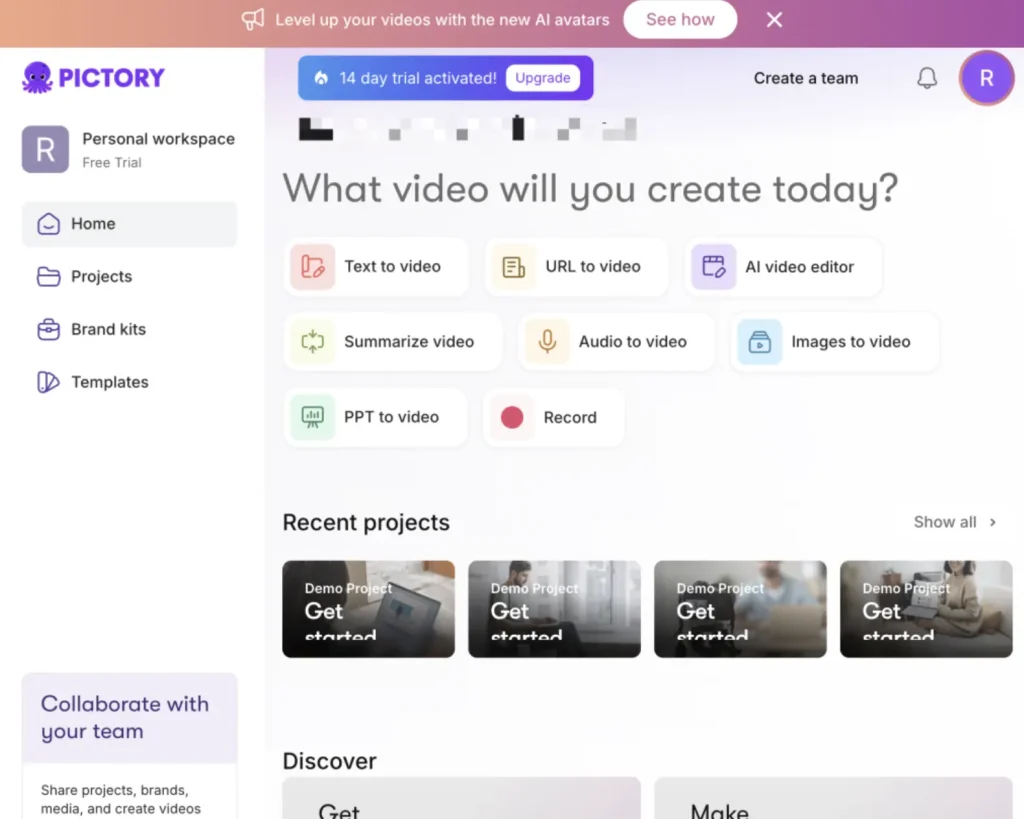
Pictory AI is one of my go-to tools when I need to turn long-form written content into bite-sized videos for social media. I once used it to convert a 1,500-word blog post into a 3-minute video — complete with captions, AI voiceover, and relevant stock footage — all in under 10 minutes. The platform’s AI automatically summarizes your text, selects matching visuals, and syncs everything smoothly, making it perfect for repurposing blogs, scripts, or articles into social-ready videos.
While it’s incredibly beginner-friendly (you really don’t need any video editing skills), the AI-generated voices on the Starter plan can sound slightly robotic. Also, since it relies on stock footage rather than generating custom scenes, it’s best suited for marketing teams, creators, or educators who prioritize speed over originality.
Pricing checked September 24, 2026: Pictory annual plans list Starter at $25/month with 2,400 video minutes/year, Professional at $35/month with 7,200 minutes/year, and Team at $119/month with 21,600 minutes/year.
Original Pictory plan snapshot (historical)
Key Features: Automated text-to-video creation, AI summarization, captions and voiceover generation.
Pricing: Starter $25/month (200 video minutes/month); Professional $49/month (600 video minutes/month); Teams $119/month (1800 video minutes/month).
Pros: Extremely easy to use, efficient for content repurposing, fast turnaround.
Cons: AI voices sound less natural on lower-tier plans, limited to stock visuals.
12 Wan 2.7 – The Most Flexible AI Video Generator

Wan 2.7 current model note
As of September 24, 2026, GlobalGPT’s verified Wan route is Wan 2.7, and its current model menu no longer treats Wan 2.6 as the newest version. The original Wan 2.6 test below remains useful as an earlier-generation baseline.
Original Wan 2.6 test results (historical)
Wan 2.6 ranks eleventh on this list because it offers something many creators are actively looking for: a powerful video generation model with far fewer prompt restrictions than most Western AI tools.
Wan 2.6, developed by Alibaba’s Tongyi Lab, has quickly gained traction among creators experimenting with cinematic storytelling and complex scene generation. During my testing, I used Wan 2.6 to generate a dramatic fantasy scene involving multiple characters and environmental effects. The model handled motion, lighting transitions, and character interaction surprisingly well, producing smooth results without triggering the kinds of content filters that often appear in other video models.
Key Highlights:
- High prompt flexibility: Wan 2.6 is known for interpreting longer and more complex prompts with fewer moderation interruptions.
- Strong visual consistency: When I generated a sequence involving multiple characters interacting in a storm environment, the model maintained stable character proportions and lighting across frames.
- Balanced performance: Wan 2.6 produces high-quality visuals while maintaining relatively fast generation speeds compared with other cinematic video models.
- Image-to-video capability: The model can animate reference images and extend scenes with consistent motion dynamics.
- Pricing: Wan 2.6 is currently available through several AI platforms and research APIs, with pricing varying depending on the platform.
- Pros: Flexible prompt interpretation, strong visual consistency, fewer content limitations.
Cons: Interface and access methods can vary depending on the platform providing the model.
Overall, Wan 2.6 is an excellent choice for creators who want more creative freedom when generating cinematic scenes while still maintaining strong visual quality comparable to leading AI video tools.
Invite Code and Discord Link Status
| Item | Status checked September 24, 2026 |
|---|---|
| OpenAI consumer invite code | Not an active route: the consumer web/app ended April 26, 2026. |
| OpenAI API | No invite code, but deprecated and scheduled for removal on September 24, 2026. |
| GlobalGPT Sora route | Live platform route with no invite code or regional block; separate plan limits apply. |
| Active alternative models | Use normal account or API access for the selected provider; each platform keeps its own safety rules. |
Understanding Sora 2 Restrictions: Why You Need Alternatives
- Real people and faces: The OpenAI Videos API guide says real people, including public figures, cannot be generated; input images with human faces are rejected.
- Copyrighted characters and music: The same guide says copyrighted characters and copyrighted music are rejected.
- Audience safety: API output is limited to content suitable for audiences under 18.
- Alternatives still have rules: GlobalGPT, Veo, Runway, Kling, Pika, and every serious platform enforce their own safety and rights policies. “Fewer restrictions” never means no restrictions.
How to Rephrase Prompts to Avoid Content Filters
- Use Neutral Descriptions: Instead of using “violent combat,” describe the scene as a “dynamic action sequence with fast-paced movement.”
- Focus on Cinematography: Use film-industry terms like “low-key lighting,” “shallow depth of field,” or “anamorphic lens” instead of describing sensitive body details.
- Linguistic Reframing: Replace “romantic couple” with “two characters sharing a quiet, intimate moment” to stay within safety guardrails while preserving your narrative.
FAQ
Is Sora 2 still available?
OpenAI’s public Sora page says the Sora product is no longer available as of April 26, 2026. API docs still reference Sora models, but describe the Sora 2 video models and Videos API as deprecated with a September 24, 2026 shutdown date.
How do OpenAI consumer, API, and GlobalGPT Sora routes differ?
OpenAI’s consumer web/app ended April 26, 2026. Its Videos API is deprecated and scheduled to end September 24, 2026. GlobalGPT is a separate platform route with its own plan pricing, clip limits, and access terms.
Do I still need a Sora invite code?
Do not rely on Sora invite codes in 2026. The official product is discontinued, and stale invite or Discord links can waste users’ time. Use active alternatives with normal account access instead.
Can I still use Sora 2 through GlobalGPT?
Yes. As of September 24, 2026, GlobalGPT’s verified Sora 2 page offers no-invite platform access, up to 25-second output, and no watermark. This is separate from OpenAI’s discontinued consumer app and deprecated API.
What is the best Sora 2 alternative in 2026?
For most creators, the best Sora 2 alternative is Veo 3.1 for cinematic AI video or GlobalGPT for testing several models from one place. Pick based on whether you need the best single model or the easiest access.
Which Sora alternative has the least content restrictions?
No serious AI video tool is restriction-free. Pika, Kling, Luma, and some third-party hubs may feel more flexible for creative prompts, but every tool still has policies for copyrighted characters, explicit content, real people, and harmful use.
Is Veo 3.1 better than Sora 2?
Veo 3.1 is the stronger choice for many 2026 workflows because it is actively maintained and built for high-quality video generation. Sora 2 may still matter historically, but its product and API future is limited.
Is Grok Imagine 1.5 a real Sora alternative?
Yes, but mostly for fast social-style experiments, image-to-video tests, and playful creative output. It is not the safest choice for long-form production unless current access, pricing, and usage rights are confirmed.
Final Thoughts: Why Global GPT Leads
Global GPT combines accessibility, flexibility, and professional-grade video output in one platform. By integrating Sora 2, Veo 3.1, and other models, it lets creators experiment, combine, and optimize outputs like no other platform. For marketers, social creators, and filmmakers in 2026, Global GPT represents the most practical and powerful Sora 2 alternative.
Updates
March 10, 2026 — Major Update
This guide has been expanded with new tools and video models that creators are increasingly using alongside Sora-style workflows.
New additions:
- Seedance 2.5 – ByteDance Seed’s current 30-second audio-video model.
- Wan 2.7 – The current verified Wan version in GlobalGPT’s model menu.
- Runway Gen-4.5 – Runway’s current flagship video model.
- Luma Ray3.2 – Luma’s current controlled cinematic model.
- Grok Imagine 1.5 – A fast image-to-video and social-clip option.
Late March 2026 Emergency Update: The Permanent Shutdown of OpenAI’s Sora
The AI video generation landscape experienced a seismic shift in late March 2026 when OpenAI announced the end of its consumer Sora experience and a dated shutdown path for the Videos API. Creators could no longer treat invite codes or a waitlist as the main access problem.
Key details of the shutdown and how it impacts this guide:
- Total Service Deactivation: OpenAI has confirmed the permanent closure of Sora, including the cancellation of its API access and removal from ChatGPT Plus. It is no longer just a “waitlist” or “server downtime” issue—the tool is gone.
- Strategic Pivot: Following the collapse of major Hollywood partnerships, OpenAI is pivoting its compute resources entirely toward enterprise AI and coding models.
- Why This List Matters More Than Ever: Finding a Sora alternative is no longer optional for creators; it is a necessity to save production workflows.
- The Immediate Successors: As of August 2026, Google Veo 3.1, ByteDance Seedance 2.5, Runway Gen-4.5, Kling 3.0, Luma Ray3.2, Wan 2.7, and Grok Imagine 1.5 are the current alternatives highlighted in this guide.
- The Safety Net Solution: Relying on one provider is still risky. A multi-model platform such as GlobalGPT keeps current routes including Veo 3.1, Kling 3.0, and Wan 2.7 in one workspace.
June 2026 Update: OpenAI’s Sora Shutdown Changes the AI Video Market
By June 2026, the practical choice was no longer whether to wait for official consumer access. It was which active video model, avatar tool, or multi-model platform could carry a real production workflow beyond Sora’s shutdown dates.
Key details of the shutdown and how they affect this guide:
Total service deactivation: OpenAI’s Help Center now states that the Sora web and app experiences were discontinued on April 26, 2026. The Sora API is scheduled to be discontinued on September 24, 2026. This is no longer just a waitlist, invite-code, or server-capacity issue; creators should treat Sora as a sunset product.
Strategic workflow pivot: The practical question is no longer “How do I get a Sora invite code?” but “Which active video model can replace Sora in my workflow today?”
Why this list matters more than ever: Finding a Sora alternative is now a workflow requirement, not a nice-to-have. Teams that built scripts, ads, storyboards, thumbnails, or social clips around Sora need replacement tools before the API shutdown date.
The immediate successors: Active options now include Google Veo 3.1 for cinematic quality, ByteDance Seedance 2.5 for 30-second multimodal storytelling, Grok Imagine 1.5 for fast social experiments, Runway Gen-4.5 for controlled production, Kling 3.0 for motion-heavy clips, Luma Ray3.2 for cinematic direction, and Wan 2.7 for flexible generation.
The safety-net solution: The shutdown shows why relying on one AI provider is risky. An aggregator such as GlobalGPT can act as a practical safety net by giving creators access to multiple video and image models from one workflow. If one model becomes unavailable, expensive, restricted, or slow, creators can switch to another model without rebuilding the entire production process.
Current access checkpoint: As of September 24, 2026, consumer Sora remains discontinued, while the Videos API is scheduled to end September 24, 2026.





