Kling 4.0 Flash Review: Real Video Tests and Prompt Examples
Five first-output video tests reveal where Kling 4.0 Flash works, where timing slips, and why reference delivery matters. Includes exact prompts and current pricing.

Kling 4.0 Flash is a practical option for short, 720p video drafts with one clear action. Our first outputs kept a tea-pouring scene coherent, carried a terrier through a left-to-right jump, and completed a courier’s pickup-and-placement sequence. The courier missed the requested timing, however, and a reference-image test exposed a picture-delivery problem that needed a separate diagnostic.
The main tradeoff is control and delivery format. Kling’s Flash-specific documentation lists 3–20-second clips, 720p and 8-bit SDR; it also says Flash does not support first-and-last-frame or multiple-keyframe generation. Choose around those limits rather than assuming the full Kling 4.0 feature list applies. We did not run a matched Flash-versus-full-4.0 speed comparison or verify exact spoken-word accuracy.
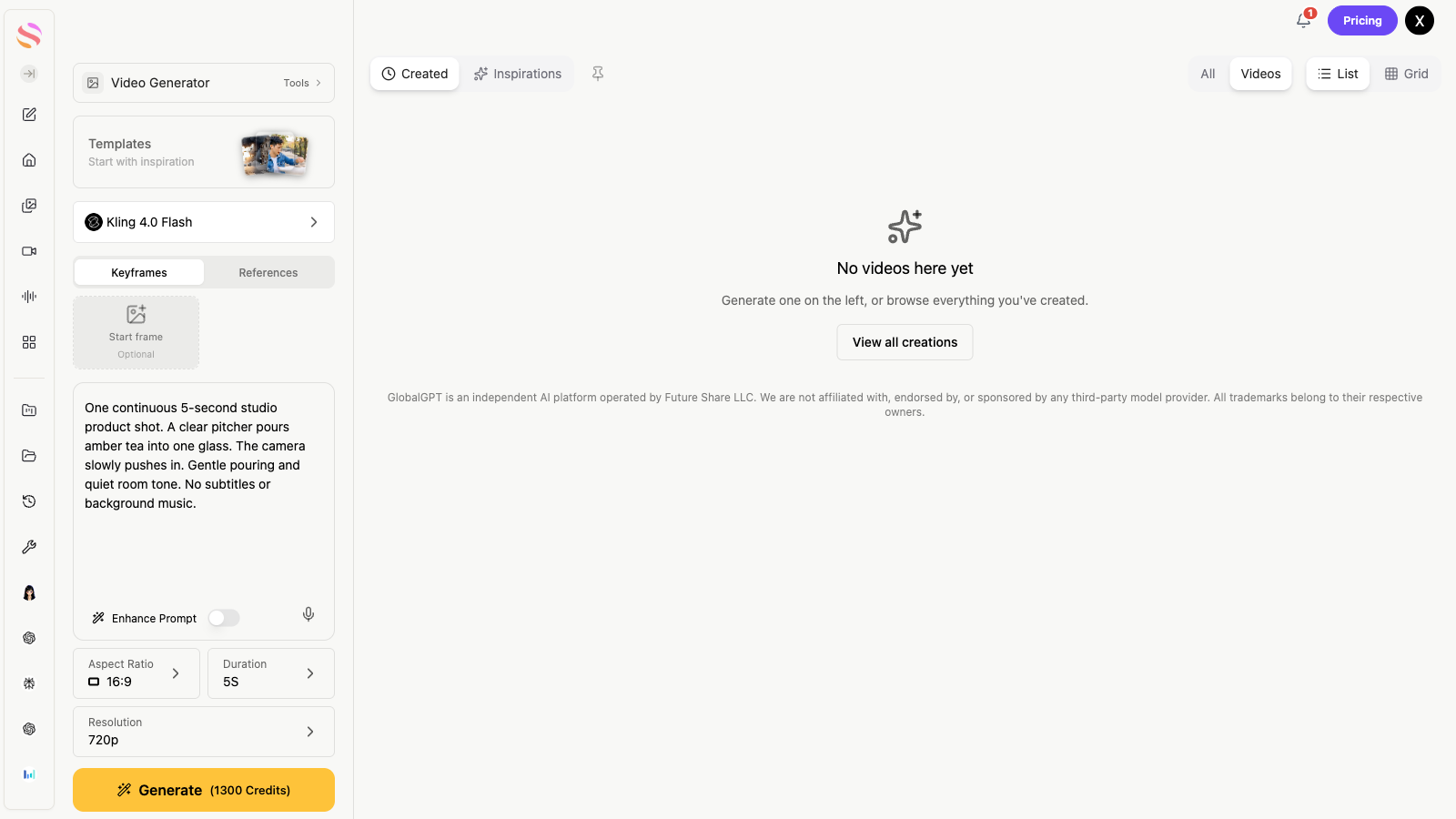
On Kling 4.0 Flash in GlobalGPT, you can prepare a prompt, select the clip settings, and use a reference image for a product-video workflow. Start with one five-second shot, inspect its motion and ending, then develop the next shot. The English workspace below shows Flash selected with 720p, five-second settings.
Reviewed November 20, 2026. Official specifications, third-party coverage and our original outputs are identified separately below.
Quick answer: is Kling 4.0 Flash worth trying?
Yes, for a short product shot, a simple physical action, or a draft you intend to inspect and edit. Our small test set supports that use; it does not establish a universal quality ranking or a guaranteed turnaround time. For precise choreography, exact dialogue, high-resolution delivery or multiple fixed frames, check the requirements individually before spending on a longer clip.
What is Kling 4.0 Flash, and what changed?
Flash is the lighter video-generation option in the Kling 4.0 family. It accepts text-to-video, image-to-video and Omni Reference inputs according to the official model guide’s Flash section. Its useful role is turning a small, concrete shot description or reference into a short moving scene.
Kuaishou’s Kling 4.0 launch announcement describes the wider generation’s improvements. Those family-level claims need to be separated from the smaller Flash feature set. We did not find a standalone Flash model card or an independently confirmed Flash API launch date, so this review does not assign one.
The clearest documented distinction is the combination of short 720p output and a lower official per-second API Unit rate. That can make experimenting with a shot cheaper than using full 4.0 at the same resolution. It is not evidence of identical picture quality, nor proof that every request finishes faster.
| Requirement | Kling 4.0 Flash | Decision |
|---|---|---|
| Inputs | Text-to-video, image-to-video, Omni Reference | Use the input mode the actual service exposes; reference support is not keyframe support. |
| Duration | 3–20 seconds | Fit one action into a short clip before adding complexity. |
| Output | 720p; 8-bit SDR | Plan separately for higher-resolution or HDR delivery. |
| First + last frame | Not supported in the Flash FAQ | A fixed ending image needs another supported workflow. |
| Multiple keyframes | Not supported in the Flash FAQ | Do not buy Flash expecting full-model keyframe control. |
| Official API, no input video | 0.6 Units/output second; full 4.0 at 720p: 1.0 | 40% fewer Units at this matched resolution; no quality-equivalence claim. |
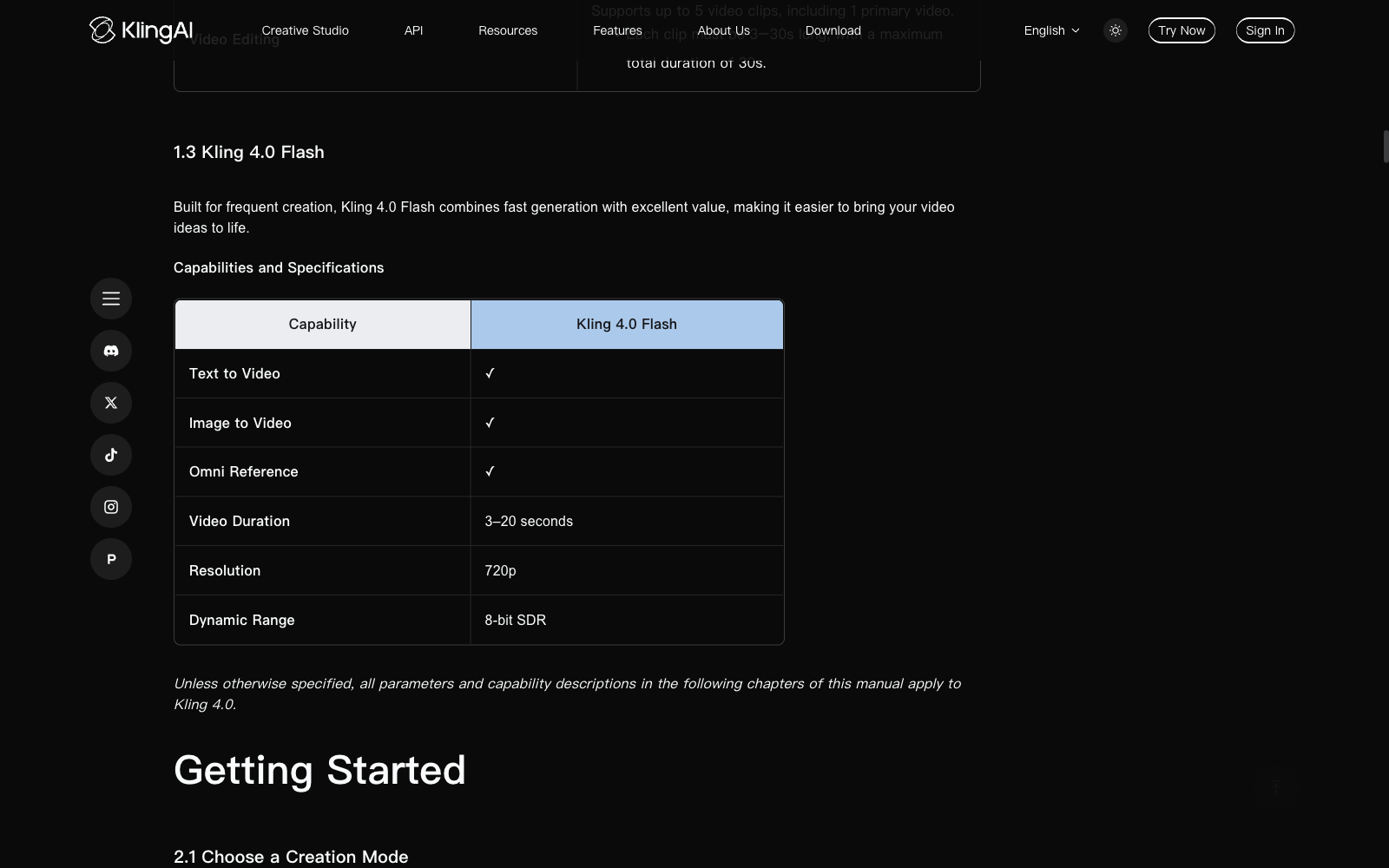
Keep the model version visible when following a tutorial. The full 4.0 guide includes capabilities beyond this Flash table. A headline about 4K, long multi-shot sequences or extensive keyframes should not silently become a Flash promise. Our own generated files were all 1280 × 720 at 24 fps.
How to try it: official Kling and GlobalGPT
What we checked on the official site
We opened Kling’s English model guide, developer pricing, membership page and native text-to-video entry. The generation entry required sign-in, so we did not generate a clip inside the official Kling app. The official-site experience in this review is documentation, pricing and access verification; the original videos below came from our configured model API route.
For an official-app trial, select the exact Flash version after signing in, check the available input mode and output settings, and inspect the credit estimate before submitting. An account’s promotions, queue or plan can change that experience. We cannot report an official-app queue time from an unauthenticated visit.
A concrete GlobalGPT workflow
Open the Flash video workspace and confirm the selected model says Kling 4.0 Flash.
Choose five seconds and 720p for a first draft. Use a landscape ratio for a product scene, or a supported portrait ratio when the intended placement needs it.
Describe one subject, one action and one camera movement. If using an image, verify the selected input is actually attached.
Read the displayed credit estimate, generate, then check the first frame, action order, final state and audio before extending the idea.
In our workspace check, a five-second 720p setup displayed an estimate of 1,300 GlobalGPT Credits. That is a UI estimate for that setup, not an independently reconciled API invoice. The value of the workspace is keeping prompt development, image preparation and video generation together: write the shot, prepare a clean product reference, and carry that input into the video task.
If you prefer a conversational production setup, the related guide to making videos through a ChatGPT MCP workflow explains the connection pattern. For the broader distinction between a chat interface and an actual video-generation tool, see how ChatGPT video workflows work.
What do independent benchmarks tell us?
As of November 20, 2026, we did not find corresponding Artificial Analysis data for the exact Kling 4.0 Flash version in its text-to-video or image-to-video leaderboard checks. Older Kling 3.0 rows are different models and cannot supply Flash’s score or latency.
Artificial Analysis is a third-party testing source. Its video methodology separates input and audio categories, uses preference-based comparisons, and defines latency differently from the request-to-completion observations in this review. Its v2.1 leaderboard context should not be mixed with a one-shot task pass rate. Without the exact entry, there is no defensible Flash Elo score, rank or third-party speed multiplier to quote here.
That leaves official capability documents and a small, inspectable set of original tasks. The videos are useful evidence of what these prompts produced on this route, not a replacement for a broad independent benchmark.
Our real video tests: results first
The strongest results were the simple continuous shots. Tea pouring stayed coherent, the terrier moved in the requested direction and jumped once, and the courier completed the right action order. Timing was less dependable: pickup happened later than requested. The first teapot output did not match the reference; a separately recorded image-delivery correction restored the starting design.
| First output | Setup | Observed completion | Finding |
|---|---|---|---|
| T1 · product physics | 5s / 720p / 16:9 | 85.8s | Coherent pour and rising fill; useful short product draft. |
| T2 · dialogue scene | 5s / 720p / 16:9 | 66.1s | Stable visual scene; exact words and lip-sync remain unverified. |
| T3 · direction and jump | 5s / 720p / 16:9 | 82.3s | Left-to-right action, one jump and visible landing. |
| T4 · first-frame reference | 5s / 720p / image input | 66.0s | Reference mismatch; image handoff could not be established. |
| T5 · ordered actions | 10s / 720p / 16:9 | 97.4s | Correct sequence and ending; requested timing only partial. |
Method: we froze five prompts and kept each first completed output. There were no quality-driven replacements and no repeated stability trials. A separate three-second readiness check was excluded. One later five-second diagnostic changed the way the same reference image was supplied; it is shown separately from the original five.
These were exact kling-v4-flash tasks through our configured API route, with at most two concurrent requests. Completion times run from submission to the first successful completion observation and include polling delay. The five first outputs span 66.0–97.4 seconds; they do not isolate model inference time, predict another account’s queue or compare speed with full 4.0.
Every file completed a full decode. The five-second requests returned approximately 5.04 seconds; the ten-second request returned 10.04 seconds. All had 720p, 24 fps video and an AAC stereo audio track. Visual review used half-second samples, with denser 0.1-second checks around the jump. Audio-track presence does not verify speech, music compliance or synchronization: no reliable transcript was obtained, so those checks remain unresolved.
Cost disclosure: the formal requests total 30 output seconds, plus five diagnostic seconds and a separate three-second readiness check. We could not independently reconcile the route’s returned cost fields to a GlobalGPT retail invoice. The pricing section therefore gives official Unit calculations and the observed UI estimate separately; neither is presented as our settled bill.
T1: a continuous tea-pouring product shot
Result: visually successful for this short draft. The pitcher and tumbler stayed recognizable, the tea stream connected them, and the fill rose while the glass remained on the table. The view moved closer without a sampled cut. The stream looked rather polished and thick; this is a coherent generated product shot, not a measurement of fluid simulation.
Exact prompt used
One continuous cinematic product shot, 5 seconds. A clear glass tumbler stands on a dark walnut tabletop against a soft neutral studio background. A small clear glass pitcher enters from the upper right and pours amber tea into the tumbler in a single unbroken stream. The liquid level rises smoothly from empty to halfway while the tumbler stays on the table. The camera slowly pushes in; soft side lighting reveals realistic refraction, glass edges and a grounded shadow. Audio: gentle pouring and quiet room tone. No dialogue, no subtitles, no background music.
Prompt lesson: For a first product draft, limit the scene to one container, one receiving object and a restrained camera move. Check the liquid level and contact with the table before adding a logo, several products or a second action.
T2: a short spoken line in a stable café scene
Result: visual continuity passed; dialogue accuracy unresolved. The woman’s face, navy jacket and café setting stayed consistent in the samples. Mouth movement appeared before the ending smile and the camera framing stayed steady. We have not independently verified the exact sentence or lip-sync. Play the original with sound before using it for spoken marketing copy.
Exact prompt used
One continuous eye-level medium close-up, 5 seconds, at a quiet outdoor cafe in soft morning light. One adult woman wearing a plain navy jacket looks into the camera and says exactly once in clear natural English: "The blue cup is ready." Her lips move naturally with the sentence, then she smiles and remains still. Keep her face and jacket consistent, with a softly blurred cafe background. Locked camera. Audio: her voice and faint outdoor ambience. No subtitles, no background music, no other speakers.
Prompt lesson: Keep a first dialogue test to one speaker and one short sentence. Stable pictures are only half the job: listen to every word, check the mouth through the utterance, and inspect the end of the clip for added speech or unwanted music.
T3: direction, a jump and visible landing
Result: the main action constraints were met. The terrier moved left to right, cleared one rail, visibly landed and continued. Denser samples around roughly 2.4–3.3 seconds made the takeoff and landing easier to inspect. The harness remained red. The evidence supports a recognizable jump, not a claim of perfect four-paw biomechanics or physically exact contact.
Exact prompt used
One continuous side-on tracking shot, 5 seconds, in a sunny park. One small golden-brown terrier wearing a red harness runs from the left edge toward the right, jumps once over one low wooden rail, lands on all four paws, then continues to the right. Track parallel to the dog at its eye level. Keep the same dog, red harness and wooden rail throughout. Natural daylight and realistic paw contact with grass. Audio: light pawsteps and outdoor ambience. No subtitles, no background music.
Prompt lesson: State the screen direction and ending explicitly. A side-on view makes a jump easier to judge than an overhead montage, and gives the model fewer camera changes to reconcile.
T4: a reference mismatch, followed by a separate diagnostic
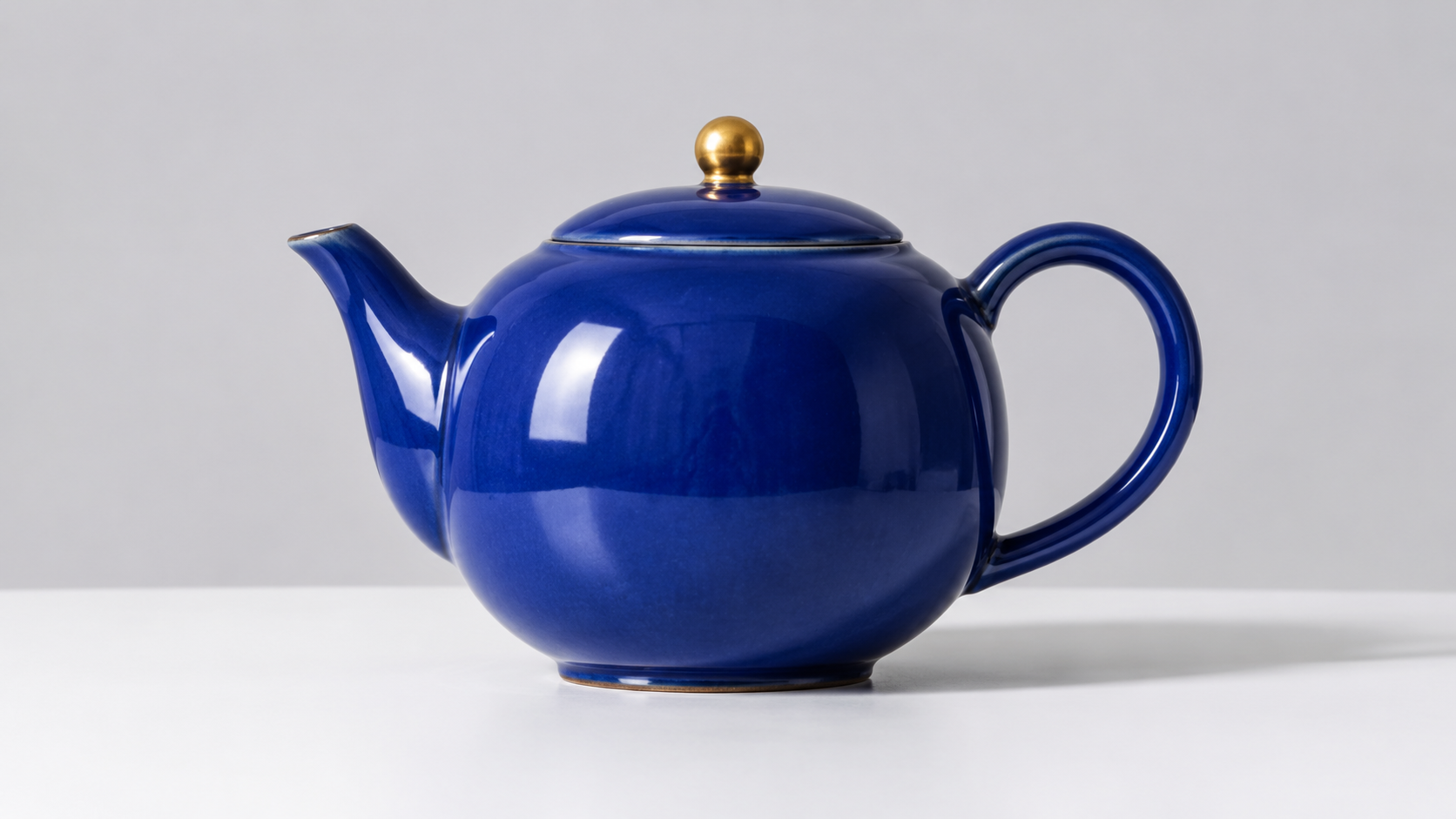
Result: the original output did not preserve the supplied product. It produced a dark blue teapot with a different handle, spout, lid trim and table composition. Blue ceramic and a gold knob alone are not reference fidelity. The initial request did not return evidence that the picture had reached the model, so this failure cannot be cleanly attributed to the model’s intrinsic image-to-video ability.
Exact prompt used
Use the supplied image as the first frame. One continuous 5-second studio product shot. Preserve the cobalt-blue ceramic teapot, its brass lid knob, curved handle and short spout, the white tabletop, and the pale gray background. The camera makes a slow, small clockwise arc of about 15 degrees around the stationary teapot. A thin curl of steam rises from the spout. Keep the entire teapot in frame, its proportions stable and its base grounded on the tabletop. Audio: quiet room tone. No speech, no subtitles, no background music.
Prompt lesson: Check image delivery before rewriting a reference prompt. Compare frame zero with the actual input: silhouette, handle, spout, knob and background. A plausible blue teapot can still be the wrong blue teapot.
Separate diagnostic, same image and prompt: changing the picture-delivery fields produced a starting frame that visibly corresponded to the original cobalt teapot. Its handle, left spout, rounded body and gold knob remained recognizable through the sampled ending, with steam developing. This was a connector correction, not a better-prompt retry or a repeated stability score. We retained the failed first output above. A precise 15-degree clockwise camera orbit remains unverified in the plain studio background.
T5: correct action order, loose timing
Result: sequence and ending passed; schedule only partially followed. The courier picked up the red parcel, turned toward the blue shelf, placed it, released it and stepped back. Pickup completed around 3.5–4 seconds rather than within the requested first three seconds; release was around eight seconds. The ending state was useful, but the time ranges behaved more like direction than an edit decision list.
Exact prompt used
One continuous locked-off wide shot, 10 seconds, inside a tidy workshop. One adult courier in a plain green jacket stands between a waist-high table on the left and a blue shelf on the right. A single red cardboard parcel sits on the table. From 0 to 3 seconds the courier reaches down and picks up the red parcel with both hands. From 3 to 7 seconds the courier turns right and places the parcel onto the middle level of the blue shelf. From 7 to 10 seconds the courier releases the parcel, steps back, and looks at it. Keep the parcel red, the shelf blue, and the scene layout unchanged throughout. Audio: soft footsteps and one gentle cardboard contact sound. No dialogue, no subtitles, no background music.
Prompt lesson: Use a longer clip for multiple actions, but leave timing margin. If an edit needs an exact pickup at three seconds, trim or split the sequence instead of assuming prose timestamps will be frame-accurate.
How to write useful Kling 4.0 Flash prompts
The official prompt guidance favors concrete subjects, actions, environment, camera and audio direction. Our tasks show why that structure helps: a single scene with an observable beginning and ending is easier to judge than a paragraph of mood words. “Premium cinematic quality” does not tell the model which hand lifts the parcel or where the camera should stand.
A reusable structure is: shot and duration → subject and setting → one action → camera → details to preserve → audio → ending. Keep the most important constraint near the action. For example, “the dog runs left to right, jumps once, lands and continues right” is testable. Adding several lenses, transitions and competing camera moves makes the request harder to interpret.
Product videos: start with one product and one small movement. Use the actual reference image for shape and color. In a revision, name the feature that drifted rather than adding general quality adjectives.
Dialogue: isolate one speaker and quote a short line. Review actual words and timing separately from face consistency; a normal-looking mouth is not a transcript.
Physical action: specify screen direction, obstacle and final state. Make the action visible in a continuous shot before asking for dramatic cutting.
Several actions: state their order and budget enough duration. Treat timestamp ranges as instructions to inspect, not guaranteed event boundaries.
Audio: describe the intended voice or ambience directly. Check unwanted music or subtitles in the returned clip; merely including “no background music” is not proof of compliance.
The five exact prompts above are working examples, including their imperfections. The teapot prompt described a short spout even though the authored reference has a visibly extended one. That wording stayed fixed in the diagnostic; the result is a reason to align future descriptions with the actual image, not to quietly rewrite the recorded input.
For a new social clip, an untested adaptation could be: “One continuous five-second close-up. A hand rotates a matte white skincare jar a quarter turn on a stone counter. Keep the label facing the camera at the end. Slow push-in, soft window light, quiet room tone.” This is a starting prompt, not an additional test result. Exact label text would need its own fidelity check.
Pricing: official API Units, subscriptions and GlobalGPT
Prices below were checked on November 20, 2026. Kling API Units, native-app Credits and GlobalGPT Credits are separate billing systems. A large credit number in one system cannot be divided by a rate from another. Read the model, mode, duration and billing cadence together.
Official API pricing and task estimates
The official developer pricing table lists Flash at 0.6 Units per output second without an input video. With an input video, it lists 0.4 Units per billed second, but the billable duration includes a formula: twice the output duration when total input duration is no longer than the output; otherwise total input duration plus output duration.
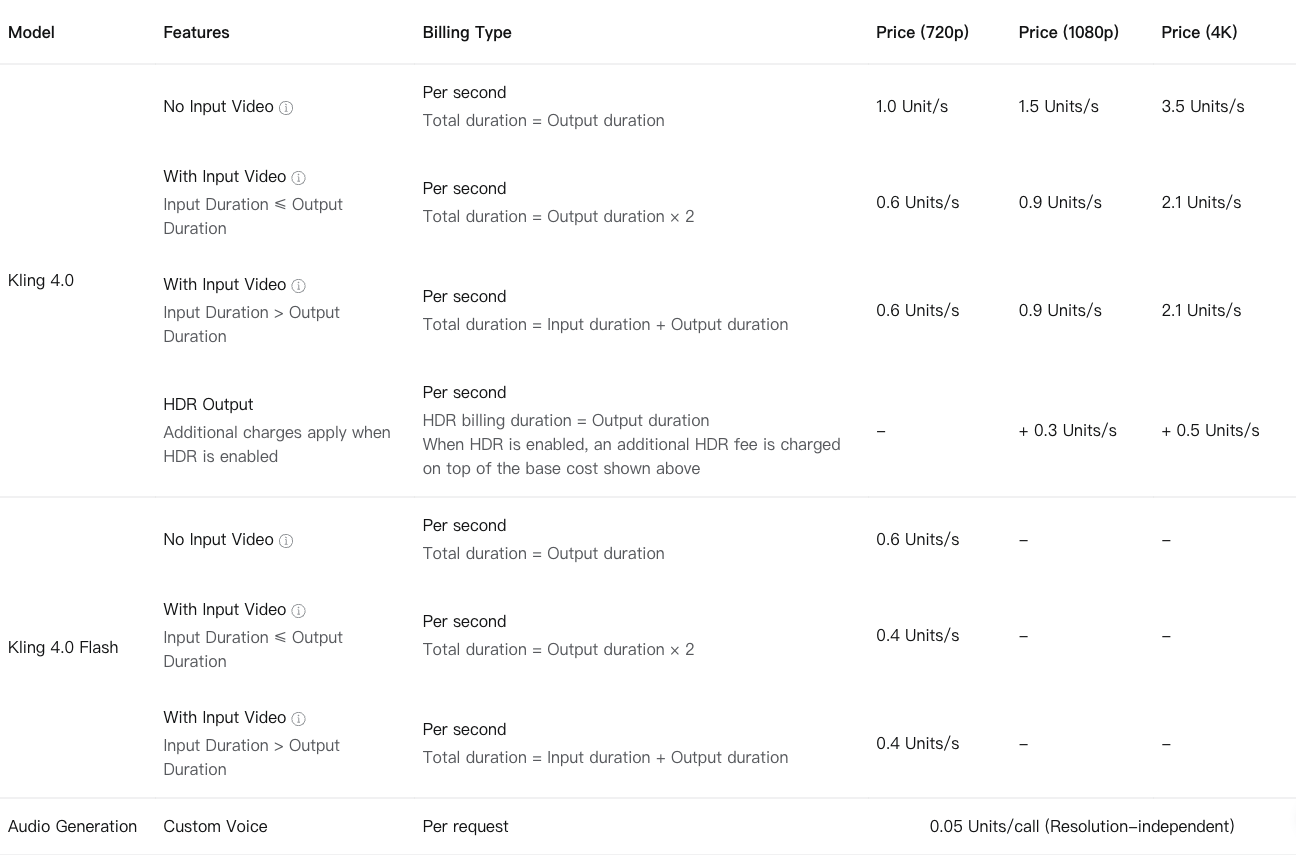
| Example | Calculation | Official Units |
|---|---|---|
| 5-second Flash; no input video | 5 × 0.6 | 3 |
| 10-second Flash; no input video | 10 × 0.6 | 6 |
| 20-second Flash; no input video | 20 × 0.6 | 12 |
| 5-second input video + 5-second output | (2 × 5) × 0.4 | 4 |
| 5-second full 4.0 at 720p; no input video | 5 × 1.0 | 5 |
The input-video example is deliberately included: a lower per-second rate can still yield a higher task cost because more seconds are billable. An image reference is not an input video; do not automatically apply that video-duration formula to an image-only task.
One displayed 180-day Flagship package offered 3,250 Units for $500. Using that package’s average acquisition cost, 3 Units is about $0.46, 6 Units about $0.92 and 12 Units about $1.85. These are allocated estimates, not a pay-as-you-go checkout price or our settled test bill. Buying the pack requires the upfront amount, and unused Units, expiry and any extra options affect its actual value.
Independent provider Replicate’s Flash page lists its own rates—$0.094 per output second without input video and $0.063 per billed second with video. Those are Replicate prices, not Kling’s first-party API tariff or GlobalGPT pricing. Compare the complete task calculation and service conditions before choosing a route.
Official Kling subscriptions
The native membership page displayed a monthly promotion with different introductory and renewal amounts. The Premier row below is the selected 18,000-Credit option, not every possible Premier configuration.
| Monthly selection | First 3 months, per month | Then, per month | Included Credits/month |
|---|---|---|---|
| Standard | $6.50 | $8.80 | 660 |
| Pro | $24 | $32.56 | 3,000 |
| Premier · selected 18K option | $135 | $181.99 | 18,000 |
| Ultra+ | $402 | $544.99 | 57,000 |
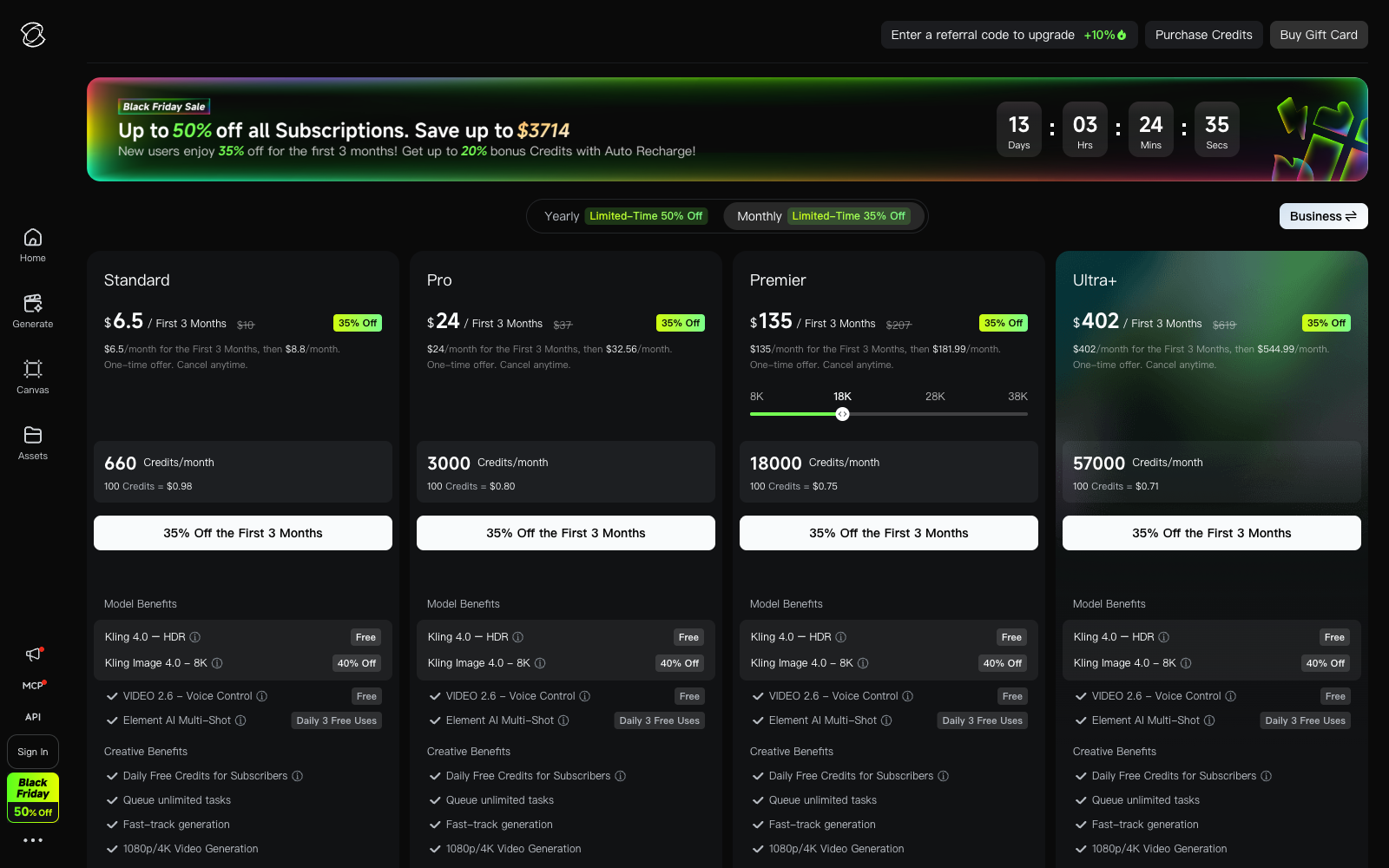
These are date-specific displayed offers. Verify renewal terms, available models and actual generation credit estimates in the account you will use. The official-app subscription is suitable when that app’s interface and included services fit the workflow; it should not be described as buying developer API Units.
GlobalGPT plans and the clip estimate
With annual billing selected, GlobalGPT displayed Basic at $5.80/month with 144,000 Credits/year, Pro at $10.80/month with 240,000 Credits/year, and Unlimited at $25/month with 624,000 Credits/year plus selected unlimited models. These are monthly equivalents under annual billing, not a promise of monthly checkout at those amounts. “Unlimited” should not be read as every Flash video being free of credit use.
Use the estimate beside the actual Flash task to budget. Our prepared five-second 720p setup displayed 1,300 Credits; changing duration, mode or account conditions can change what you see. For a workflow that includes writing a prompt and creating a reference before making video, GlobalGPT’s Flash workspace gives you one place to carry those steps forward.
Who should use Flash, and what are its limits?
Good candidates: creators testing a visual idea, product teams drafting a short motion concept, and editors who need a single clear action they can inspect before cutting it into a sequence. Our product pour and dog jump are the strongest examples of that fit. The courier is useful when the correct ending matters more than an exact second-by-second performance.
Check another workflow when the brief requires: native higher-resolution or HDR delivery, fixed first-and-last frames, multiple keyframes, tightly scheduled action beats, or a spoken line that must be correct on the first take. Flash’s documented format limits are firm selection criteria; speech and timing reliability also need direct review rather than assumption.
Reference fidelity deserves a separate check. Our diagnostic restored the supplied teapot after the original picture delivery failed, but one successful diagnostic does not establish character consistency across scenes, precise camera control or success with every product. If reference identity is essential, inspect frame zero and the ending before generating the rest of a campaign.
Finally, this is a small first-output study, not a reliability percentage. We did not test every ratio, duration, language, reference-video mode or commercial delivery requirement. The original videos let you judge the observed results without turning five varied tasks into a misleading overall score.
FAQ
What is Kling 4.0 Flash best for?
Short, inspectable video drafts with one clear action. In our small test set, a product pour and a left-to-right dog jump worked well visually; this does not predict every prompt.
Does Kling 4.0 Flash generate 4K video?
The official Flash-specific table checked November 20, 2026 lists 720p and 8-bit SDR. Do not transfer the full Kling 4.0 resolution options to Flash.
How long can a Flash clip be?
The official Flash guide lists 3–20 seconds. Our original tests requested five or ten seconds; we did not test the full duration range.
Does it support first-and-last frames or multiple keyframes?
The official Flash FAQ says those modes are not supported. Image-to-video and Omni Reference support do not mean multiple fixed keyframes are available.
How fast was it in these tests?
Our five first outputs completed in approximately 66.0–97.4 seconds from submission to first successful completion observation, including polling delay. We did not run a matched comparison against full Kling 4.0.
Did the dialogue test say the exact requested words?
Exact speech and lip-sync remain unverified. The file contains an audio track and stable visual framing, but those facts alone do not prove the sentence was correct.
Why are there two teapot videos?
The first output did not match the input and its image handoff was unconfirmed. A separate diagnostic changed picture-delivery fields while keeping the image, prompt and settings, producing a matching starting design. The failed first output was retained.
How much does a five-second Flash clip cost?
The official no-input-video API rate implies 3 Units for five seconds. Dollar cost depends on Unit acquisition and service route. Our GlobalGPT UI setup displayed a separate 1,300-Credit estimate; these are different billing systems.
Final verdict
Kling 4.0 Flash earned a place in our short-shot workflow: it handled a coherent pour, a clear directional jump and an ordered placement scene. The useful boundary is equally clear. Budget for review, keep actions simple, verify reference delivery, and treat precise timing or dialogue as checks to perform on the actual clip.
Start with the five-second product prompt, inspect the first result, and move to a longer scene only when the important constraints survive. That is a more useful test of fit than assuming the Flash name guarantees speed, fidelity or every feature of the full model.