Si vous cherchez “Sora 2 télécharger,Voici la principale mise à jour : OpenAI a annoncé l'arrêt de Sora, mais le calendrier complet de l'application, de l'API et des créations des utilisateurs n'a pas encore été détaillé. Ainsi, bien que certains utilisateurs puissent encore accéder à Sora ou le télécharger dans les régions prises en charge, le fait de le télécharger ou de le payer maintenant comporte des risques évidents en ce qui concerne l'accès à long terme, l'assistance future et la stabilité du flux de travail.
Pour les créateurs qui ont besoin de plus qu'un court test, cette incertitude est le véritable problème. GlobalGPT Pro offre une option plus stable en vous donnant accès à des modèles vidéo de premier plan tels que Sora 2 Flash, Veo 3.1, Kling, et Wan en un seul endroit pour $10.8. Au lieu de dépendre d'une plateforme à l'avenir incertain, vous pouvez continuer à créer avec une configuration plus flexible.
Avec GlobalGPT, vous pouvez gérer l'ensemble du flux de travail dans un seul tableau de bord - de la recherche et de l'écriture du scénario à création d'image et la production vidéo. Et si votre projet a également besoin de LLM solides, vous pouvez également utiliser les services de ChatGPT 5.4, Gemini 3.1, Claude 4.6, et Perplexité sur la même plateforme.

Qu'est-il arrivé à Sora 2 ?
Sora 2 a pris le monde d'assaut, mais son application autonome a été de courte durée. Dans une annonce soudaine, OpenAI a confirmé qu'ils “disaient au revoir à l'application Sora 2". Application Sora“. Dans la foulée, Disney s'est également retiré de l'accord de licence très médiatisé de $1 milliard de dollars conclu avec la société d'IA.

Pourquoi cette fermeture soudaine ?
- Des coûts informatiques insoutenables : L'exécution à grande échelle d'un modèle de génération vidéo tel que Sora 2 nécessitait une infrastructure GPU massive et coûteuse.
- Changement stratégique : OpenAI serait en train de recentrer ses ressources informatiques sur des modèles de raisonnement et de codage destinés aux entreprises, en prévision d'une éventuelle introduction en bourse.
- Droits d'auteur et responsabilités de Deepfake : La plateforme a dû faire face à des les risques juridiques et éthiques liés à l'utilisation non autorisée de la propriété intellectuelle et de l'image publique.
Pour les créateurs, dépendre d'une application officielle unique, coûteuse et restrictive s'est avéré être un risque majeur. C'est pourquoi des milliers d'anciens utilisateurs de Sora sont désormais migrer vers une solution plus stable et plus polyvalente.
Que faire après l'annonce de l'arrêt de Sora ?
Si vous souhaitez essayer Sora par curiosité, vous pouvez toujours suivre le guide de téléchargement plus loin dans cet article. Mais si vous avez besoin de vidéos d'IA pour un travail réel, considérez Sora comme une option à court terme, Il ne s'agit donc pas d'un outil stable à long terme. OpenAI a annoncé l'arrêt de Sora., L'entreprise précise que de plus amples informations sur l'application, l'API et les créations des utilisateurs seront communiquées ultérieurement.
Avant d'aller plus loin, concentrez-vous sur trois points : protéger votre travail existant, éviter de construire de nouveaux projets critiques autour d'un produit arrêté, et comparer des alternatives plus sûres. La documentation d'aide d'OpenAI indique que l'exportation de données peut inclure Sora 1, Sora 2, et ChatGPT et les règles d'accès aux régions prises en charge s'appliquent toujours, tandis que les détails du service continuent de changer.
Si vous avez besoin d'un chemin plus fiable, c'est ici qu'il faut se rendre.GlobalGPT Prodevient la meilleure solution. Au lieu de dépendre d'une plateforme incertaine, vous pouvez continuer à travailler avec plusieurs outils d'IA de premier plan en un seul endroit et passer d'une plateforme à l'autre. recherche et écriture à images et vidéo sans avoir à reconstruire votre flux de travail chaque fois qu'un seul produit change de direction.
Comment sauvegarder les données de Sora avant qu'elles ne changent ?
Si vous avez déjà des vidéos, des images ou des fichiers de projet dans Sora, les soutenir maintenant. La documentation d'aide d'OpenAI indique que votre exportation peut inclure Sora 1, Sora 2, et ChatGPT données. Si Sora change encore dans votre région, l'accès à l'exportation peut n'être disponible que pendant un certain temps. durée limitée.
Le plus simple est d'ouvrir Paramètres, se rendre sur le site Contrôles des données, et choisir Exporter des données. OpenAI indique que le fichier d'exportation sera envoyé à votre adresse électronique enregistrée dès qu'il sera prêt. Vous pouvez également télécharger des images et des vidéos individuelles à partir de votre site Web. Bibliothèque.

Si les téléchargements normaux ne fonctionnent pas, OpenAI renvoie également les utilisateurs à son site Web. Portail de la protection de la vie privée. Vous pouvez y choisir Télécharger mes données, Vérifiez votre compte et demandez vos fichiers de cette manière.
Il est judicieux de commencer par sauvegarder. Elle protège votre ancien travail, réduit les risques de migration et vous donne plus de liberté pour tester d'autres outils tels que GlobalGPT Pro sans craindre de perdre les projets que vous avez déjà réalisés.
Les meilleures alternatives à Sora après l'annonce de l'arrêt de la production
Vous n'avez plus besoin d'un code d'invitation, a liste d'attente, ou un abonnement officiel onéreux pour générer des vidéos d'IA à couper le souffle. Avec la disparition de l'application officielle de Sora, GlobalGPT devient votre centre de création ultime et sans risque.
Au lieu de vous lier à une entreprise volatile, GlobalGPT regroupe les moteurs d'IA les plus puissants du monde dans un tableau de bord unique et transparent.

Pourquoi les créateurs passent-ils à GlobalGPT ?
- Plus de 100 modèles à la pointe de l'industrie : Pourquoi se limiter ? GlobalGPT vous donne un accès direct aux modèles de génération vidéo les plus avancés actuellement disponibles, y compris Veo 3.1, Kling 3.0 et Wan 2.6. Il propose également des modèles de texte et de raisonnement de premier plan tels que ChatGPT 5.4, Claude 4.6 et Gemini 3.1.
- Couverture de l'ensemble du cycle de travail : Générez des idées à l'aide de LLM de pointe, rédigez vos scripts, puis donnez-leur vie grâce à l'IA vidéo, le tout sans jamais changer d'onglet. Que vous optimisiez du contenu pour le référencement mondial, que vous rédigiez une proposition commerciale internationale ou que vous produisiez des visuels haute fidélité pour une thèse de design, l'ensemble de votre flux de travail est couvert en un seul endroit.
- Génération d'images de nouvelle génération: En plus de la vidéo, vous avez accès à des modèles d'image de premier plan tels que Nano Banana 2, FLUX 1.1 Pro et Ideogram 3.0.
- Zéro obstacle à l'accès : Dites adieu aux verrouillages régionaux, aux configurations de paiement complexes et aux limites d'utilisation agressives. GlobalGPT offre un environnement créatif véritablement ouvert.

Tarification conçue pour les professionnels de la création
Ne laissez pas l'arrêt de Sora 2 bloquer vos projets. GlobalGPT propose une tarification innovante conçue pour les vrais créateurs :
- Plan de base ($5,8/mois) : Parfait pour les textes lourds et les travaux de recherche. Ce plan vous donne un accès illimité aux meilleurs LLM du marché pour une fraction du coût d'un abonnement officiel unique.
- Plan Pro ($10.8/mois) : Le choix obligatoire pour les professionnels de la création. La mise à niveau vers la version Pro vous permet d'accéder à la véritable puissance de GlobalGPT. Vous obtenez un accès complet à notre suite d'IA vidéo d'élite (y compris Veo 3.1, Kling 3.0, et Wan 2.6) et aux outils de génération d'images avancées (comme Nano Banana 2 et FLUX).
| Caractéristique / avantage | Plan officiel Sora 2 Pro | GlobalGPT Pro Plan |
| Coût de l'abonnement mensuel | $200 / mois | $10.8 / mois (Economisez 95%) |
| Modèle Redondance | Modèle unique (risque élevé) | Plus de 100 modèles (faible risque) |
| Moteurs vidéo de base | Sora 2 (Discontinué) | Veo 3.1, Kling 3.0, Wan, Sora 2 Flash |
| Restrictions régionales | Très restreint (VPN requis) | Accès mondial (sans VPN) |
| Obstacle au paiement | Exigences en matière de cartes complexes | Paiement facile en un clic |
| Couverture du flux de travail | Vidéo uniquement | Cycle complet : LLM + Image + Vidéo |
| Statut du service | 410 Disparu / Fermé | Actif et maintenu |

Quelle option est la plus judicieuse pour les utilisateurs occasionnels et les créateurs ?
Si vous êtes un utilisateur occasionnel, vous voudrez peut-être quand même essayer Sora Dans ce cas, la meilleure approche est simple : ne pas s'y fier pour une utilisation à long terme, ne pas construire de projets importants autour d'elle, et sauvegardez d'abord vos données. OpenAI a déjà annoncé l'arrêt de Sora, et sa documentation d'aide indique que les exportations peuvent inclure Sora 1, Sora 2, et ChatGPT données.
Si vous êtes un créateur, marketeur, ou utilisateur de l'équipe, Il est donc préférable d'opter dès maintenant pour un flux de travail plus stable. Un produit à l'arrêt peut encore fonctionner pendant un certain temps, mais il ne constitue pas une base solide pour le travail avec les clients, les pipelines de contenu ou la production répétée. Ce dont les créateurs ont généralement besoin, c'est continuité, plusieurs choix de modèles, et un seul endroit pour gérer l'ensemble du processus.
C'est là que GlobalGPT Pro prend tout son sens. Il vous donne accès aux principaux outils vidéo tels que Sora 2, Google Veo 3.1, Kling, Défilé, et Luma en une seule plateforme, avec Pro à partir de $10.8. Ainsi, au lieu de courir après une application incertaine, vous pouvez continuer à travailler avec un groupe d'utilisateurs. flux de travail multi-modèle construit pour des projets en cours.
Une façon simple de décider est la suivante : si vous voulez juste explorer, continuez à lire le guide de téléchargement ci-dessous. Si vous voulez continuer à produire des vidéos avec moins de risques, choisissez une plateforme conçue pour sauvegarde, flexibilité, et utilisation à long terme. Pour cela, GlobalGPT Pro est le mieux adapté.
Le compte à rebours final : Comment télécharger et utiliser Sora 2 avant qu'il ne disparaisse à jamais)
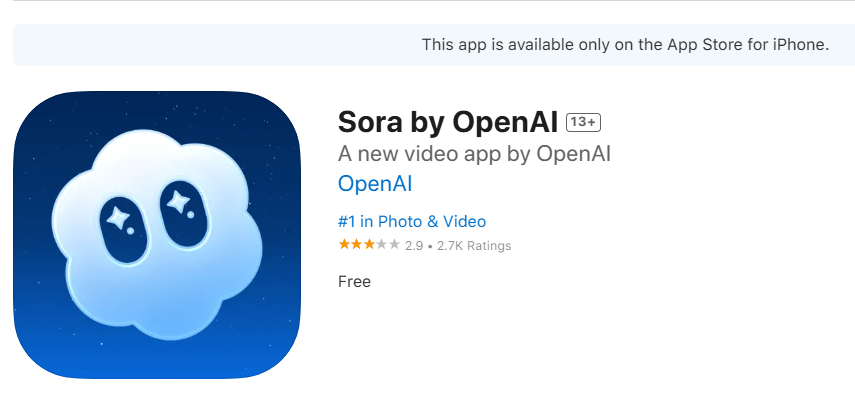
- Ouvrir le App Store sur votre iPhone ou iPad.
- Rechercher “Sora par OpenAI” et tapez sur Installer.
- Ouvrez l'application et se connecter avec ses identifiants OpenAI (le même compte que celui utilisé pour ChatGPT).
- Lors de l'accueil, entrez votre anniversaire pour permettre des protections adaptées à l'âge.
- Si nécessaire, saisissez votre code d'invitation pour accéder à l'application.
- Choisir un Nom d'utilisateur, ajouter un photo de profil (facultatif), et trouver des amis à suivre.
Conseil : Si vous n'avez pas encore de code d'invitation, vous pouvez demander à être informé lorsque votre compte sera éligible.
Accéder à Sora 2 sur le Web
Sora 2 est également disponible sur le web à l'adresse suivante sora.com. Vous ne pouvez pas créer de nouveaux caméos sur la version web, mais vous pouvez le faire :
- Utiliser des camées déjà créés
- Générer des vidéos à partir de textes ou d'images
- Remixer et partager des vidéos existantes
- Gérer vos brouillons et le contenu publié
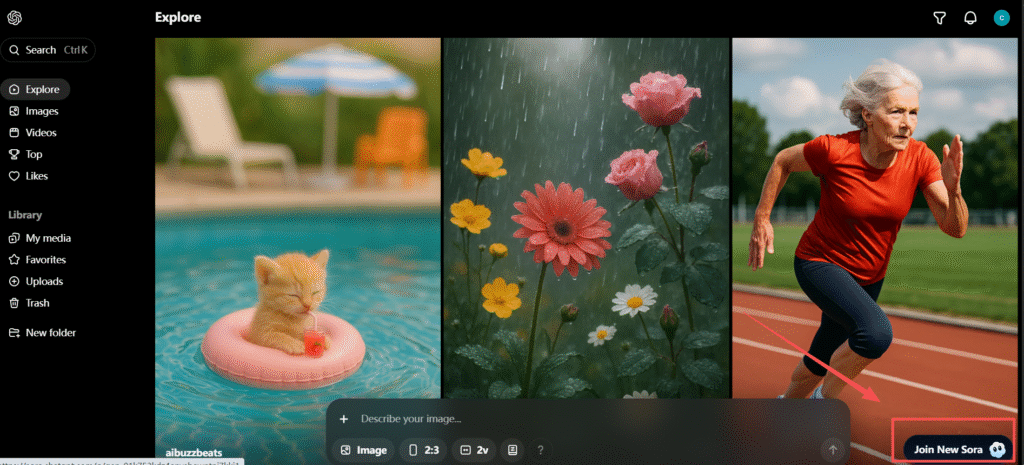
C'est utile si vous n'avez pas d'appareil iOS ou si vous voulez des contrôles plus détaillés par rapport à la téléphonie mobile.
Cependant, vous avez toujours besoin d'un code d'invitation pour accéder à Sora 2 ; sinon, vous ne pouvez utiliser que l'ancienne version de Sora.
Conditions d'utilisation de Sora 2
Pour utiliser pleinement Sora 2 pour la création de vidéos d'IA, vous aurez besoin de :
- Un Compte OpenAI
- Abonnement ChatGPT Plus ou Pro
- Code d'invitation (lors d'un déploiement limité)
Remarque : Au lancement, la génération de vidéos à partir d'images contenant des personnes réelles est non pris en charge, La prise en charge d'Android est prévue ultérieurement.
Création de vidéos AI après téléchargement
J'ai rédigé un guide détaillé sur comment utiliser Sora 2 pour créer des vidéos amusantes.
Une fois installé, Sora 2 vous permet de :
- Générer courtes vidéos sur l'IA à partir d'invites textuelles (format vertical 9:16 par défaut)
- Partir d'images pour animer des images fixes
- Remixer des messages existants en les étiquetant correctement
- Ajouter des caméos pour se présenter ou présenter des amis approuvés dans des vidéos
- Guide audio et mouvement, y compris le dialogue, l'ambiance et les effets sonores
Exemple : Vous pouvez créer une vidéo de 10 secondes décrivant une scène, comme flotter dans une cuisine spatiale futuriste, et Sora 2 générera des mouvements réalistes et un son synchronisé.
Gestion des caméos et de la vie privée
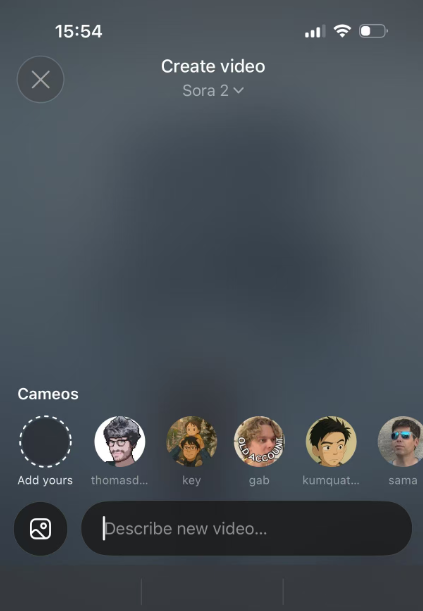
Les caméos sont facultatifs et autorisés :
- Autoriser qui peut utiliser votre camée
- Révoquer l'accès à tout moment
- Supprimer les vidéos comportant votre caméo, y compris les projets créés par d'autres personnes
- La vérification permet de s'assurer que votre image est fidèlement représentée.
Cette fonction est essentielle pour la création de vidéos d'IA éthiques et la protection de l'identité personnelle.
Questions courantes sur le téléchargement de Sora 2
Qui peut utiliser Sora aujourd'hui ? L'accès commence par les utilisateurs iOS sur invitation uniquement et s'étendra à un plus grand nombre d'utilisateurs au fil du temps.
Existe-t-il un Version Android? Pas encore. Initialement disponible pour iOS et le web, la prise en charge d'Android est prévue.
Qu'est-ce que la différence entre Sora 2 et Sora 2 Pro?
- Sora 2 : Optimisé pour la vitesse et la création quotidienne
- Sora 2 Pro : plus grande fidélité et scènes complexes ; peut prendre plus de temps à générer
Les vidéos sont-elles filigranées ?
Oui, toutes les vidéos de Sora 2 comportent un filigrane visible et des images intégrées. Métadonnées C2PA pour l'authenticité.
Conseils pour une expérience fluide de Sora 2
- Fournir des messages concis et spécifiques pour obtenir les meilleurs résultats vidéo
- Utilisation des messages plus courts et mouvement plus simple si les vidéos contiennent des erreurs
- Expérimenter avec Remix créer des variations sans perdre l'original
- Explorer le Pour vous nourrir pour découvrir des vidéos tendance et des sources d'inspiration
Conclusion :
Télécharger et démarrer avec Sora 2 est simple pour les utilisateurs d'iOS et accessible via le web. Avec votre compte OpenAI, un abonnement et un code d'invitation, vous pouvez immédiatement commencer à créer des objets de recherche. Vidéos d'IA avec des mouvements, des sons et des caméos réalistes, Les utilisateurs peuvent ainsi créer des contenus, les remixer et les partager avec leurs amis. La plateforme continue de se développer, promettant davantage de fonctionnalités, la prise en charge d'Android et des capacités d'IA améliorées.
Mises à jour
25 mars 2026 - Mise à jour majeure
Ce guide a été mis à jour pour refléter les dernières Annonce de la fermeture de Sora et les nouveaux risques liés au téléchargement, au paiement ou à la construction de projets à long terme autour de Sora. Selon Reuters, OpenAI a annoncé l'arrêt de Sora, alors que le calendrier public de l'application, de l'API et des créations des utilisateurs est encore en cours de clarification.
Nouveaux ajouts :
- Ajout d'une nouvelle section sur la conversion de l'ouverture - Nous avons réécrit l'introduction pour expliquer que Sora est entré en mode d'arrêt, La Commission européenne estime que le fait de continuer à le télécharger ou à le payer comporte désormais plus de risques, et que les utilisateurs devraient réfléchir à la possibilité de le télécharger ou de le payer. sauvegarde, migration, et stabilité du flux de travail avant de s'engager plus avant.
- Ajouté “Que faire après l'annonce de l'arrêt de Sora”.” - Cette nouvelle section aide les lecteurs à décider de la marche à suivre après l'annonce de la fermeture, et notamment à déterminer si Sora a encore un sens en tant qu'outil de test à court terme ou s'il est temps de passer à un flux de travail plus stable.
- Ajouté “Comment sauvegarder vos données Sora avant qu'elles ne changent”.” - Nous avons complété le guide avec des conseils de sauvegarde officiels basés sur la documentation du centre d'aide de l'OpenAI. L'OpenAI indique que les exportations peuvent inclure Sora 1, Sora 2, et ChatGPT et les utilisateurs peuvent également demander leurs données par l'intermédiaire de la base de données de la Portail de la protection de la vie privée si nécessaire.
- Ajout de nouvelles sections sur les alternatives et la migration - Nous avons inséré de nouveaux contenus pour aider les lecteurs à comparer des options à long terme plus sûres après l'annonce de Sora, en mettant davantage l'accent sur les points suivants flux de travail multimodèles, continuité du projet, et choisir des outils moins dépendants d'une plate-forme incertaine.
- Le guide de téléchargement original a été conservé, mais repositionné. - Au lieu de supprimer l'ancien contenu du téléchargement, nous l'avons déplacé dans une partie ultérieure de l'article pour les lecteurs qui souhaitent encore essayer Sora tant que l'accès reste disponible, tout en faisant en sorte que le thème principal de l'article soit plus en phase avec le contexte actuel de l'arrêt des activités.
- Mise à jour de l'intention du guide - Cet article n'est plus un simple tutoriel de téléchargement. Il fonctionne désormais comme un guide de transition qui couvre risque de fermeture, protection des données, options de remplacement, et ce qu'il faut faire ensuite avant de passer aux étapes de téléchargement de Sora.