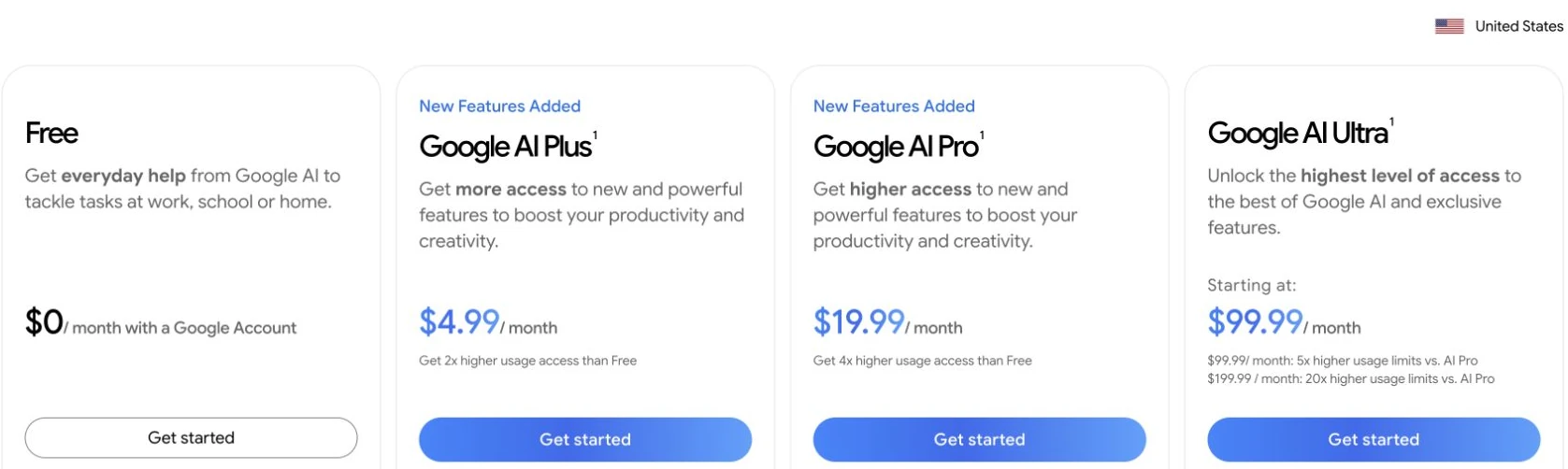
Veo 3.1 has no single standalone monthly price. In the United States, Google AI Plus costs $4.99/month, Pro costs $19.99/month, and Ultra starts at $99.99/month, with a higher $199.99/month tier. These subscriptions include different Flow credit allowances. Developer API access is billed separately, from $0.05 per generated second.
The useful comparison is what your budget buys: a monthly bundle, a number of Flow generations, or a specific API output. Flow also provides 50 daily credits, including to non-subscribers. The figures below use Google’s US personal-plan prices and Flow’s credit rules, checked September 15, 2026; regional pricing and checkout terms can differ.
For a workflow that runs from a script to reference images and video, GlobalGPT brings multiple leading AI models and creative tools into one subscription. It is a budget-friendly way to manage the whole project in one workspace, especially when you also need writing, research and image generation alongside video.
Google subscription prices for Veo 3.1
Google sells access through its broader AI plans, rather than a Veo-only subscription. Flow is the relevant place to check a named Veo model and its credit cost. A plan’s general “video generation” benefit does not, by itself, identify the model that every Google app will use.
Google AI plans: US monthly prices
| Plan | US price per month | Extra monthly Flow credits |
|---|---|---|
| AI Plus | $4.99 | 200 |
| AI Pro | $19.99 | 1,000 |
| AI Ultra — 5x tier | $99.99 | 10,000 |
| AI Ultra — 20x tier | $199.99 | 25,000 |
Personal plans, United States, checked September 15, 2026. These are monthly subscription prices, not per-video rates. The “5x” and “20x” labels refer to Google’s stated Gemini usage limits relative to Pro. Sources: Google AI subscriptions and Flow credit allowances.
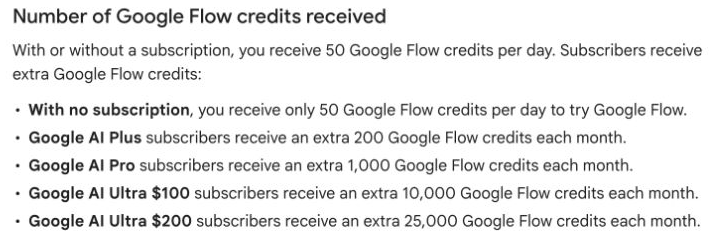
Those monthly credits are in addition to Flow’s 50 daily credits. Google also lists a Free plan at $0/month, with no extra monthly Flow allowance. Your first generation triggers the daily credit refresh; unused daily credits do not accumulate. The monthly allowance refreshes at the start of your billing cycle and unused monthly credits do not roll into the next month.
Start with the amount of video work you expect to do this month. A small monthly plan can be enough for occasional drafts, while a large allowance only helps if you will use it before it resets. Storage and other Google benefits may also matter to you, but they do not turn the plan into unlimited Veo generation.
- Check the price and currency for your country before paying.
- Confirm Flow is supported where you are; Google AI plan availability and Flow availability are not identical.
- Open the model settings and check the selected Veo version, generation type and credit cost.
- If you are following an older tutorial, use the current Veo 3.1 access routes to orient yourself.
How many Veo videos do Flow credits buy?
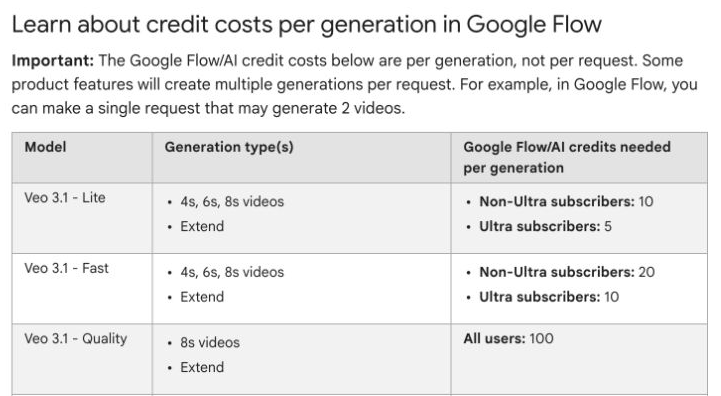
Flow charges per generation, not per request and not per second. A single request can produce more than one video. If it produces two chargeable generations, budget for both. The selected model also matters: Lite and Fast cost fewer credits for Ultra subscribers, while Quality costs the same number across plans.
Veo 3.1 credit costs in Flow
| Flow model | Non-Ultra subscribers | Ultra subscribers | Generation types in the credit table |
|---|---|---|---|
| Veo 3.1 Lite | 10 credits | 5 credits | 4-, 6-, or 8-second videos; extend |
| Veo 3.1 Fast | 20 credits | 10 credits | 4-, 6-, or 8-second videos; extend |
| Veo 3.1 Quality | 100 credits | 100 credits | 8-second videos; extend |
Credits per generation; checked September 15, 2026. The listed costs do not guarantee that every account can select every mode. Resolution and feature availability depend on the selected Flow workflow. Source: Google Flow credit-cost table.
For example, Pro’s 1,000 monthly credits cover 50 Fast generations or 10 Quality generations if you spend that entire monthly allowance on one model. They do not cover 50 of each. Using other tools or making several outputs from one request reduces the balance available for your next shot.
Monthly allowance: how many generations?
| Plan | Lite only | Fast only | Quality only |
|---|---|---|---|
| Plus · 200 credits | 20 | 10 | 2 |
| Pro · 1,000 credits | 100 | 50 | 10 |
| Ultra 5x · 10,000 credits | 2,000 | 1,000 | 100 |
| Ultra 20x · 25,000 credits | 5,000 | 2,500 | 250 |
Theoretical count of base 8-second generations, calculated by dividing the monthly allowance by the applicable per-generation charge and rounding down. Each column is a separate scenario, not an allowance you can add together. Excludes daily credits, purchased credits, other tool use and any capacity limits. These are generation counts, not guaranteed usable finished shots. Source: Google Flow, checked September 15, 2026.
This is where Ultra can make a measurable difference: it combines a larger monthly balance with a lower Lite/Fast credit charge. Quality does not get the same per-generation discount. Choose according to the mode you actually use, not just the size of the credit number on the plan card.
In Flow, the balance appears under your profile. Model settings show the cost before you generate; features can also switch your selection to a compatible model. Check that selection again after changing a feature. For the creation steps, see using Veo 3.1 in Flow.
Veo 3.1 API pricing: cost per second and per video
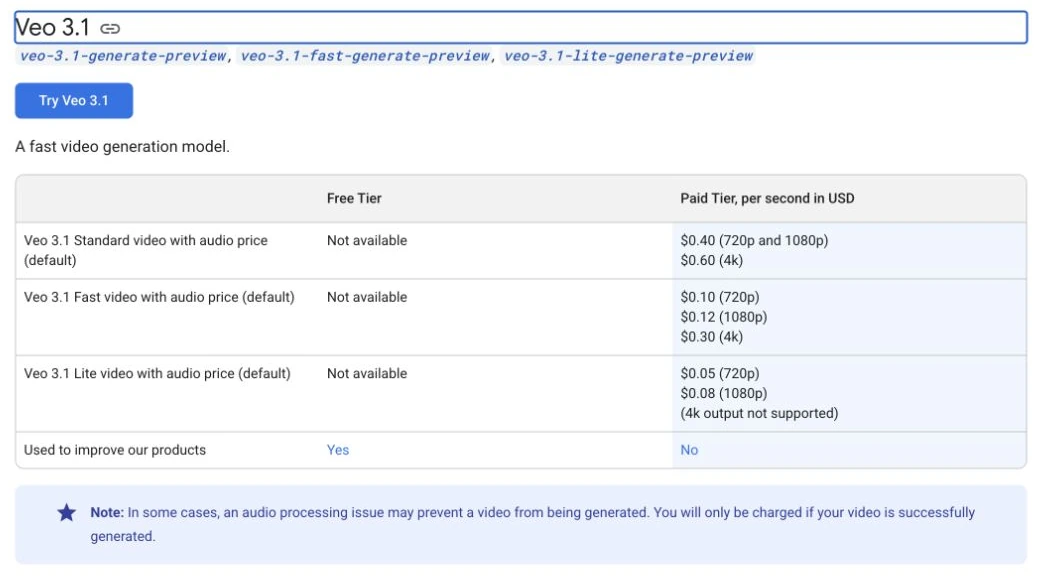
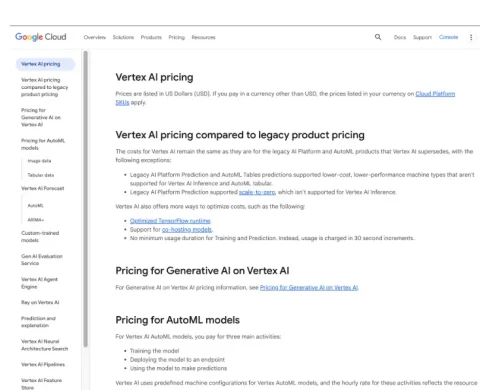
The Gemini Developer API has a separate bill. It charges for successfully generated seconds, and its Veo 3.1 rows include audio. The free API tier does not include Standard, Fast or Lite. Google Cloud’s Vertex AI is another developer route with its own pricing page; the figures here are specifically the Gemini API rates.
Gemini API rates with audio
| Veo 3.1 model | Resolution | Per second | One 8-second video | Ten 8-second videos |
|---|---|---|---|---|
| Lite | 720p | $0.05 | $0.40 | $4.00 |
| Lite | 1080p | $0.08 | $0.64 | $6.40 |
| Fast | 720p | $0.10 | $0.80 | $8.00 |
| Fast | 1080p | $0.12 | $0.96 | $9.60 |
| Fast | 4K | $0.30 | $2.40 | $24.00 |
| Standard | 720p / 1080p | $0.40 | $3.20 | $32.00 |
| Standard | 4K | $0.60 | $4.80 | $48.00 |
USD, paid Gemini API tier, checked September 15, 2026. Ten videos means ten successful generations; voluntary reruns add more generated seconds. Editing, storage or other service costs are excluded. Sources: API pricing and supported video settings.
If your Google plan also includes a separate developer or Cloud-credit benefit, check its activation requirements and eligible services. That benefit is different from the Flow credit balance; it does not make API usage unlimited.
The duration constraint matters: the API supports 4-, 6- and 8-second generation at 720p, but 1080p and 4K require 8 seconds. Lite does not support 4K. A four-second 4K row might be easy to calculate, but it would not describe a supported request.
The price of one 8-second API video
At 720p, a four-second Lite output costs $0.20 and a six-second output costs $0.30. Fast costs $0.40 or $0.60 for those durations; Standard costs $1.60 or $2.40. Use shorter supported outputs when they fit the shot, rather than budgeting every draft as an eight-second final.
A longer edited sequence is a separate budgeting exercise: count the clips you need, then allow for alternate takes. For continuity and assembly, see making longer videos from Veo 3.1 clips. The API’s base clip duration is not a promise of an unlimited single render.
Are failed generations and retries charged?
Google says you are charged by the Gemini API only when a video is successfully generated. Flow likewise says failed generations do not consume credits, although a refund can take time to reappear. An audio-processing failure that prevents output is different from receiving a complete video whose dialogue or movement you dislike.
- The service fails to produce a video: the official API success-only rule applies; Flow restores credits for a failed generation.
- A video is produced, but you reject the take: it is still a successful generation for budgeting purposes. Creating another version uses another generation.
- You ask for multiple versions: count the outputs, rather than assuming one prompt equals one billable video.
Suppose you generate ten eight-second Fast 1080p API clips and keep two. The generation cost is $9.60, not $1.92: ten outputs at $0.96 each. Dividing by two usable clips gives $4.80 per keeper in this example. That is a planning scenario, not a measured success rate or a guarantee about how many takes Veo needs.
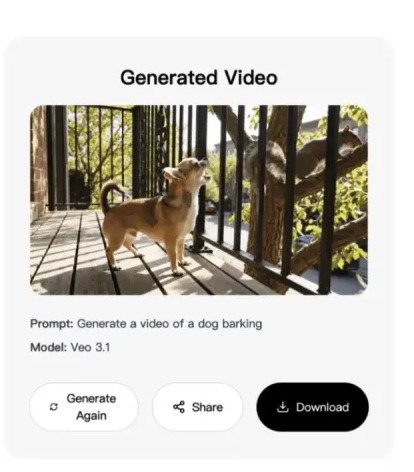
There is no separate audio surcharge in the Veo 3.1 Gemini API rates listed above: the pricing rows are for video with audio. For dialogue and sound planning, see Veo 3.1 audio generation. Billing sources: Gemini API’s generation note and Google One’s credit handling.
Where should you access Veo 3.1?
Use the route that matches the job. Flow gives you a creative interface and a visible credit balance. The Gemini API suits a script, app or repeatable production process that needs named model IDs and explicit output settings. A multi-model workspace is useful when video is one part of a broader creative project.
- Flow: choose the named Veo model, check its cost and confirm the output settings. The credit table distinguishes Lite, Fast and Quality.
- Gemini app: check the actual model and available video controls in your account. Its subscription and usage limits are separate from developer API billing.
- Gemini Developer API: select the Standard, Fast or Lite model ID and budget for generated seconds. These Veo 3.1 endpoints are listed as preview models.
- Vertex AI: review Google Cloud’s own rate card and project requirements before estimating a Cloud workflow. Do not transfer another API’s prices without checking.
- GlobalGPT: use one workspace for developing the idea, writing the script, creating references and generating video.
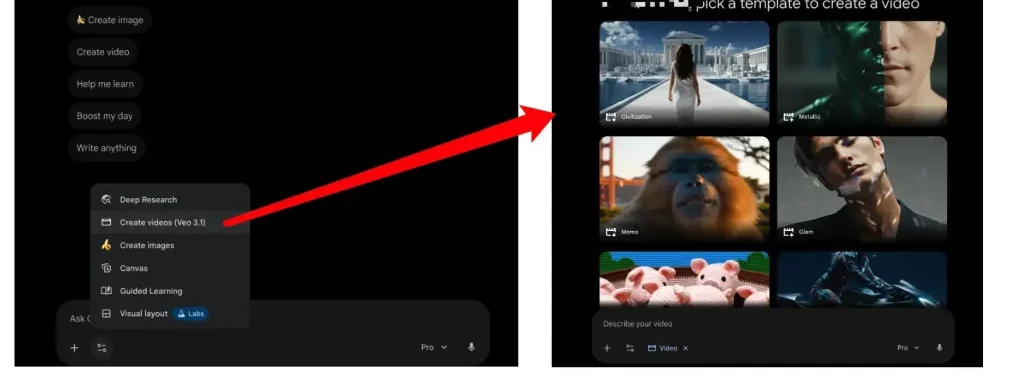
Before building a client project around a route, check the permitted content, regional availability and output settings there. Google Flow’s current help page explains its access and watermark rules. A monthly price alone does not establish commercial-use permission or a watermark exception; consult the service’s terms for the project. For the distinction between a visible logo and SynthID, see Veo 3.1 watermark types.
Lite, Fast or Standard: which should you pay for?
Start from the output requirement. For a draft that only needs 720p, compare the three 720p rates. If the final delivery needs 4K, narrow the API choice to Fast or Standard, then budget for eight-second outputs.
- Lite: the lowest API price at 720p and 1080p. It fits a budget-first test when those resolutions are enough. It does not offer 4K output.
- Fast: a lower-cost option than Standard at every resolution both support, including 4K. At 1080p, an eight-second clip costs $0.96 rather than $3.20.
- Standard: budget for it when you deliberately want that model route. An eight-second 4K generation costs $4.80 through the Gemini API. Compare a representative shot before committing a large production budget.
Keep the product labels straight: Flow calls its high-credit mode “Quality,” while the API price table calls its model “Standard.” Those labels do not establish identical resolution, audio or feature support across services. Flow costs are credits per generation; API costs are dollars per second. Use the settings and rate shown by the service where you will generate the video.
Google’s Veo model documentation lists 24fps output for these API models. It also gives different constraints for extension and reference-image workflows, so choose the generation settings before multiplying out a budget.
When is Ultra worth it, and where does GlobalGPT fit?
Ultra is worth considering when the work you will finish within the billing month needs its larger Flow allowance or broader Google benefits. Moving from Pro to Ultra changes both your monthly balance and the Lite/Fast credit cost. For Quality generations, the decision is mainly about how much of the larger balance you will actually use.
For a few isolated API clips, calculate the per-video bill first. Ten successful Fast 1080p outputs cost $9.60 in the example above. Add any editing, storage or other service costs to estimate the project budget.
If your work also involves research, copy and imagery, GlobalGPT’s multi-model workspace offers a different kind of value: one subscription connects the surrounding creative work. Draft a storyboard, refine dialogue, make reference images and generate video without managing a separate account for each part of the project.

- Write the scene and decide which detail must stay consistent.
- Choose the video model and check the plan’s displayed generation allowance.
- Create a draft, review the result and revise the next prompt from what changed.
- Move to the final resolution once the composition and action fit the project.
Compare the billing period as well as the headline amount. An annual plan’s monthly equivalent is not a month-to-month price, and a subscription price alone does not tell you how many video generations it includes. Choose based on the work and allowance you need, rather than treating every AI plan as interchangeable.
Veo 3.1 pricing FAQ
How much is Veo 3.1 per month?
There is no standalone Veo 3.1 monthly price. As checked September 15, 2026, US Google AI plans cost $4.99 for Plus, $19.99 for Pro, and $99.99 or $199.99 for Ultra, with different Flow credit allowances. Gemini API use is billed separately per generated second.
How much does an eight-second Veo 3.1 API video cost?
At 720p, an eight-second video costs $0.40 with Lite, $0.80 with Fast or $3.20 with Standard. At 1080p, it costs $0.64, $0.96 or $3.20 respectively. At 4K, Fast costs $2.40 and Standard costs $4.80; Lite does not support 4K. These are Gemini API rates with audio, checked September 15, 2026.
Can I use Veo 3.1 for free?
The Gemini API free tier does not include Veo 3.1. Flow separately provides 50 daily credits to users with or without a subscription. Whether a particular generation is available depends on its model cost, supported settings, region and capacity; free Flow access is not a free API allowance.
How many Veo 3.1 videos can Google AI Pro generate?
Using only Pro’s 1,000 monthly Flow credits, the listed costs allow 100 Lite generations, 50 Fast generations or 10 Quality generations. Each is a separate scenario spending the whole monthly allowance on one mode. This excludes daily credits, purchased credits and other usage, and does not guarantee that every generated video is a usable final shot.
Does a Google AI subscription give me unlimited Veo API use?
No. Flow credits are separate from the Gemini Developer API’s per-second billing. Any developer or Cloud-credit benefit included with a plan has its own activation and eligibility terms. Budget and manage API usage separately from the Flow balance.
Does Veo charge for failed video generation?
Google’s Gemini API charges only for successfully generated videos. Flow does not charge credits for a failed generation, although credits may take time to reappear. A completed video you choose not to use still counts as generated output; making another take adds another generation.
Is Veo 3.1 Fast cheaper than Standard?
Yes, in the Gemini API price table Fast costs less at every shared resolution. At 1080p, Fast costs $0.12 per second and Standard costs $0.40.
Can I pay for a four-second 4K Veo 3.1 API video?
No. The documented API settings require eight-second output for 1080p and 4K. Four- and six-second base generations are supported at 720p. Choose a supported combination before calculating the price.
Sources and pricing scope
Prices and allowances were checked against Google’s public documentation on September 15, 2026. Subscription figures are for personal plans in the United States; API figures are USD Gemini Developer API rates. The examples calculate costs from published rates; no new video-generation test was run. Interface images show earlier product versions.
- Google AI subscription prices and plan benefits
- Google Flow credits: allowances, refresh rules and model costs
- Gemini API pricing: Veo 3.1 Standard, Fast and Lite
- Veo 3.1 API settings and supported output combinations
- Google Flow access, model selection, failure and watermark help
- Google One AI credit management