
تم التحقق من صحة المعلومات مقارنةً بالمصادر الرسمية لـ Anthropic وOpenAI وGoogle وGitHub وAider في 27 يوليو 2026. قد تختلف الأسعار والحصص حسب المنطقة والحساب وقناة الفوترة.
إجابة سريعة
يمكن تنزيل Claude Code مجانًا، لكنه غير مشمول في باقة $0 Claude المجانية. يمنح جدول الأسعار الحالي لـ Anthropic المستخدمين المجانيين إمكانية الدردشة عبر Claude، مع الإشارة إلى أن رمز Claude غير متاح. يتطلب الاستخدام الرسمي لنموذج رمز Claude عادةً حسابًا من فئة Pro أو Max أو Team أو Enterprise، أو حساب Anthropic Console يتم احتساب تكاليفه بشكل منفصل.
أقل اشتراك مستهلك معلن عنه في الولايات المتحدة يتضمن رمز Claude هو باقة «Pro» بسعر $20 شهريًّا، أو $17 شهريًّا مع دفع مبلغ $200 مقدمًا سنويًّا. إذا كنت بحاجة إلى نقطة انطلاق بقيمة $0، فانتقل إلى الخيارات الخمسة التالية: يُعد Yukie الخيار الأسهل القائم على المتصفح، في حين أن Gemini CLI و GitHub Copilot CLI يوفران طرقًا موثقة للبدء مجانًا.
الجزء المربك هو أن كلمة “مجاني” يمكن أن تشير إلى ثلاثة أمور مختلفة: تنزيل عميل يعمل عبر سطر الأوامر، أو استخدام نموذج ذكاء اصطناعي، أو الحصول على رصيد محدود عبر حساب ما. ويستوفي رمز Claude الشرط الأول، لكن خطة Claude المجانية الرسمية لا تستوفي الشرط الثاني.
يُفصّل هذا الدليل تلك التكاليف، ويشرح حدود رمز Claude دون تحديد عدد رسائل عام، ويقارن بين خمس طرق عملية لمن لا يرغبون في البدء باشتراك Anthropic.
نظرة عامة على الوصول المجاني برمز Claude
| سؤال | إجابة تم التحقق منها | ماذا يعني ذلك |
|---|---|---|
| هل يمكن تثبيت رمز Claude على جهاز $0؟ | نعم | يمكن تثبيت البرنامج دون شرائه. |
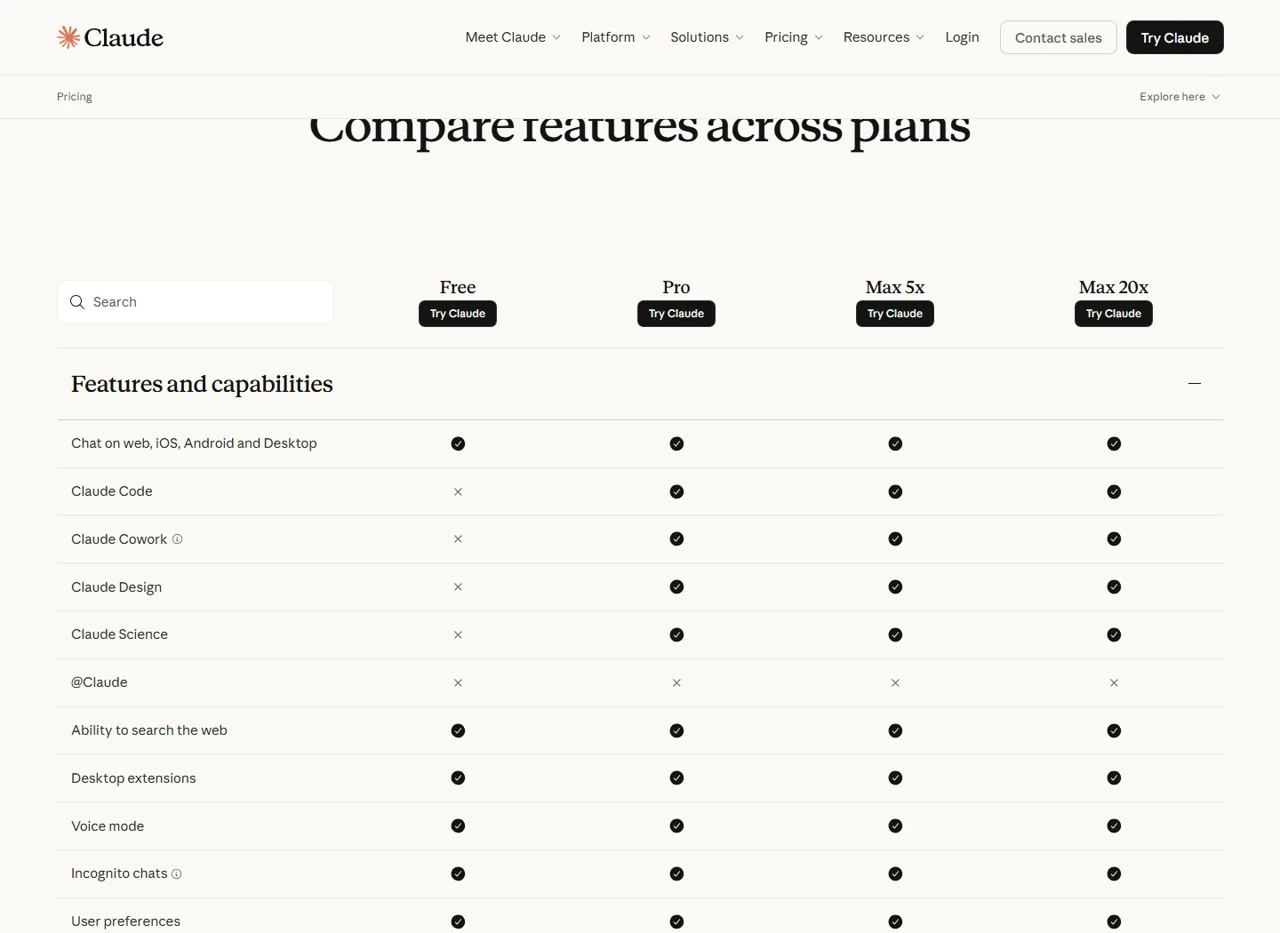
| هل تتضمن نسخة «Claude Free» رمز «Claude»؟ | لا يوجد | تشير المقارنة المباشرة لـ Anthropic إلى أن رمز Claude غير متوفر في الإصدار المجاني. |
| هل تتضمن النسخة «Pro» رمز Claude؟ | نعم | تُعد «Pro» أقل باقة اشتراك للمستهلكين متاحة في القائمة تتيح الوصول إلى الخدمة. |
| هل يتضمن الإصدار «Pro» إمكانية استخدام وحدة التحكم Anthropic؟ | لا يوجد | يتم احتساب استخدام مفتاح واجهة برمجة التطبيقات (API) بشكل منفصل، وتُفرض رسومه بشكل منفصل. |
| هل هناك حد محدد لعدد المطالبات برمز Claude؟ | لا يوجد رقم عالمي | يعتمد الاستخدام على السياق والملفات والأدوات والنموذج والجهد المبذول ومدة المحادثة. |
يُعرّف Anthropic كلود كود كأداة برمجة ذات قدرات تنفيذية قادرة على قراءة قاعدة الكود، وتحرير الملفات، وتشغيل الأوامر، والعمل عبر واجهات المحطة الطرفية، وبيئة التطوير المتكاملة (IDE)، وسطح المكتب، والمتصفح. وهذا نطاق أوسع من مجرد طرح أسئلة متعلقة بالبرمجة في واجهة الدردشة القياسية Claude.
يظهر هذا الفرق في مقارنة الخطط الرسمية لـ Anthropic: تتضمن النسخة المجانية ميزة الدردشة عبر الويب والجوال والكمبيوتر المكتبي، لكن صف «رمز Claude» يظهر على أنه غير متاح. أما باقات «Pro» و«Max 5x» و«Max 20x» فهي مدرجة ضمن الميزات المتوفرة.
كم تبلغ تكلفة رمز Claude؟
لا توجد “خطة رمز Claude” منفصلة للمستهلكين. ويكون الوصول مرتبطًا باشتراكات Claude المؤهلة، أو التراخيص المؤسسية، أو نظام الدفع الفوري عبر وحدة التحكم (Console). وهذه هي الطرق الرسمية الحالية.
| المسار | سعر الموقع الإلكتروني في الولايات المتحدة | كلود كود | نموذج الفوترة والحد الأقصى |
|---|---|---|---|
| كلود فري | $0 | غير مدرج | مخصصات الدردشة المجانية لـ Claude فقط. |
| كلود برو | $20 شهريًّا، أو $200 سنويًّا | مشمول | جلسة مشتركة مدتها خمس ساعات وحدود أسبوعية مشتركة بين Claude وClaude Code. |
| كلود ماكس 5 أضعاف | $100 شهرياً | مشمول | استخدام يزيد خمس مرات عن إصدار Pro في كل جلسة، بالإضافة إلى حدود أسبوعية. |
| كلود ماكس 20x | $200 شهريًا | مشمول | استخدام يزيد بمقدار عشرين ضعفًا في كل جلسة مقارنةً بالإصدار «Pro»، بالإضافة إلى حدود أسبوعية. |
| الفريق | حسب المقعد | يأتي مع كل مقعد | توفر المقاعد المتميزة سعة أكبر لاستيعاب أحمال العمل الأثقل. |
| المؤسسة | شروط العقد أو الخدمة الذاتية | يعتمد على الخطة | تتضمن الخطط الأحدث إدراج «Code» في المقعد الموحد؛ وقد تختلف الهياكل القديمة عن ذلك. |
| وحدة التحكم Anthropic / مفتاح واجهة برمجة التطبيقات (API) | الدفع الفوري | مدعوم | يتم احتساب التكلفة لكل توكن، وهو نظام منفصل عن اشتراك Pro. |
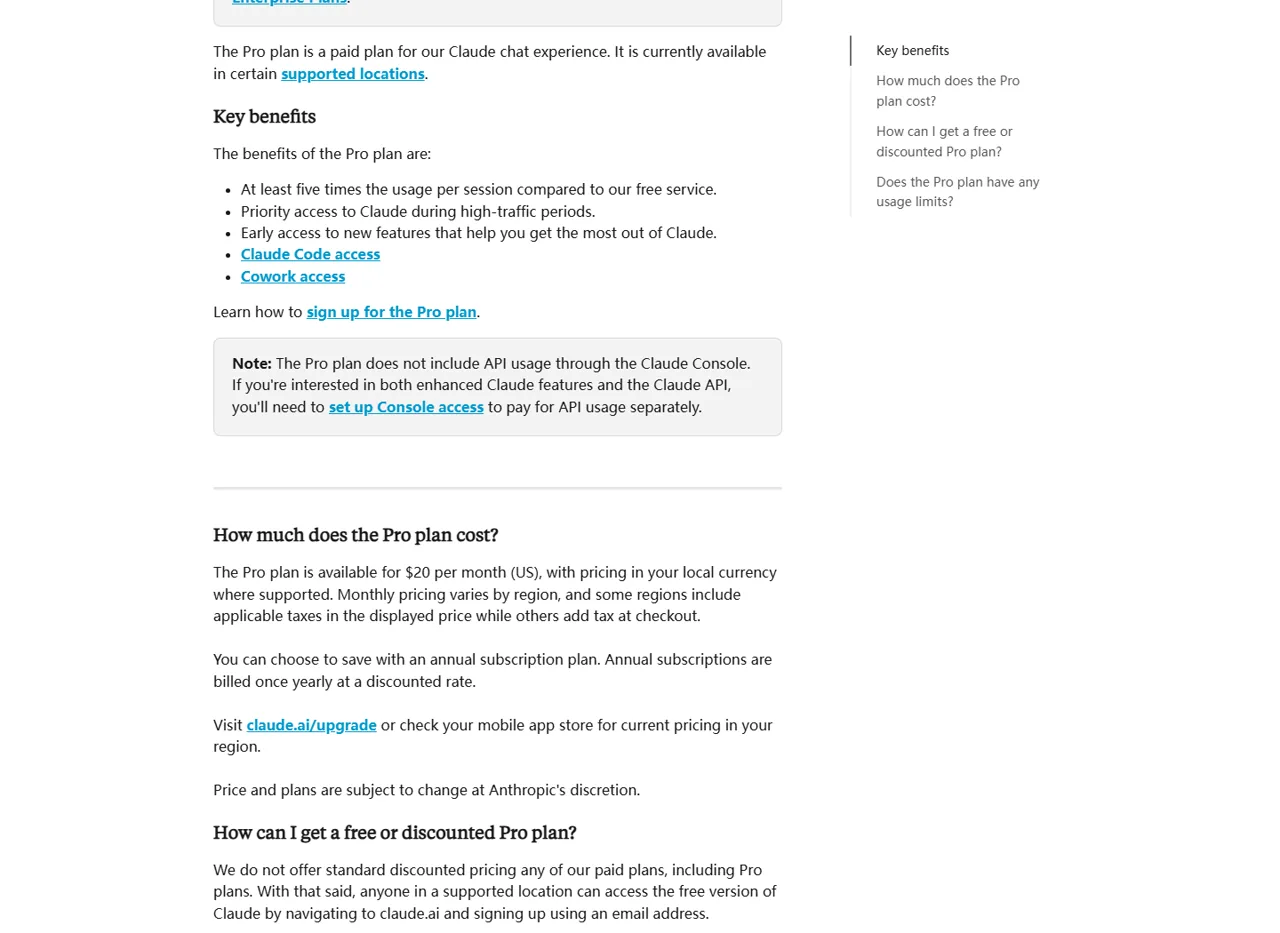
يُقدَّر سعر باقة «Anthropic» في الإصدار «Pro» بـ $17 شهريًّا عند دفع الاشتراك السنوي «$200» مقدمًا. قد تختلف العملات المحلية والضرائب وأسعار متاجر الأجهزة المحمولة، لذا يُرجى اعتبار الأسعار المذكورة أعلاه على الموقع الإلكتروني الأمريكي كأساس مرجعي وليس كمجموع نهائي موحد عند الدفع. للاطلاع على تفاصيل أكثر شمولية عن الباقات، يرجى الرجوع إلى كلود يخطط لإجراء مقارنة و دليل أسعار Claude المفصل.
حدود رمز Claude: ما الذي تعنيه كلمة “مشمول” فعليًّا
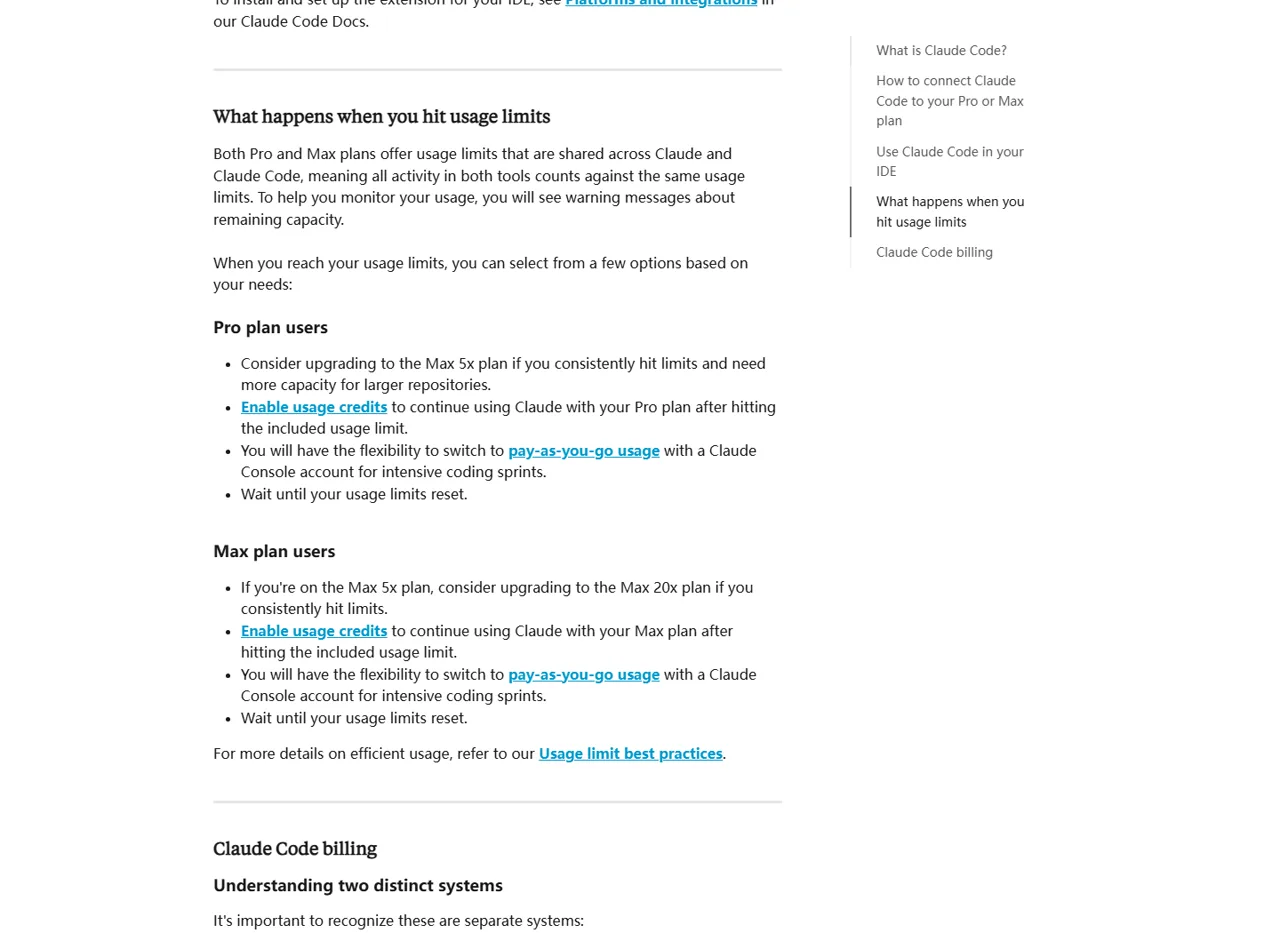
«مشمول» لا يعني «غير محدود». تشتمل باقة «Pro» على حد قائم على الجلسات يتم إعادة تعيينه كل خمس ساعات، بالإضافة إلى حد أسبوعي يشمل جميع الطرز. أما باقة «Max» فتتمتع بحصص أعلى نسبيًا، لكنها تخضع أيضًا لضوابط أسبوعية. تصف صفحات الدعم الرسمية باقة «Max» بأنها تشتمل على حد أسبوعي واحد يشمل جميع الطرز، وحد آخر خاص بطرز «Sonnet».
مهم: تستهلك ميزة الدردشة في Claude وميزة Claude Code من نفس رصيد الاستخدام المضمن في باقة Pro أو Max. وقد تؤدي جلسة البرمجة الطويلة إلى تقليل السعة المتاحة للدردشة، كما أن استخدام الدردشة قد يؤدي إلى تقليل السعة المتاحة لميزة Claude Code.
لا تنشر Anthropic رقماً موثوقاً واحداً لـ“عدد المطالبات اليومية” لكل حساب. يتغير حجم العمل الذي يمكنك إنجازه تبعاً لطول المطالبة، والملفات المرفقة، وطول المحادثة، واستدعاءات الأدوات، واختيار النموذج، ومستوى الجهد، وحجم سياق قاعدة الكود.
- تحقق من حالة الحساب الحقيقي: استخدام
/الحالةفي «Claude»: الرمز والمراجعة الإعدادات → الاستخدام بالنسبة لأشرطة التقدم التي تمتد لخمس ساعات والأشرطة الأسبوعية. - تقليل السياق الذي يمكن تجنبه: ابدأ جلسة مركزة بدلاً من الاستمرار في محادثة طويلة لا علاقة لها بالموضوع.
- راقب الملفات الكبيرة وعمليات استدعاء الأدوات: تستهلك عمليات فحص المستودعات، والمخرجات الطويلة، والعمليات المتكررة حصة أكبر من الحصة المشتركة.
- اختر الطراز بعناية: يختلف التوافر والاستهلاك؛;
/النموذجهو المصدر الحالي داخل المنتج لحسابك.
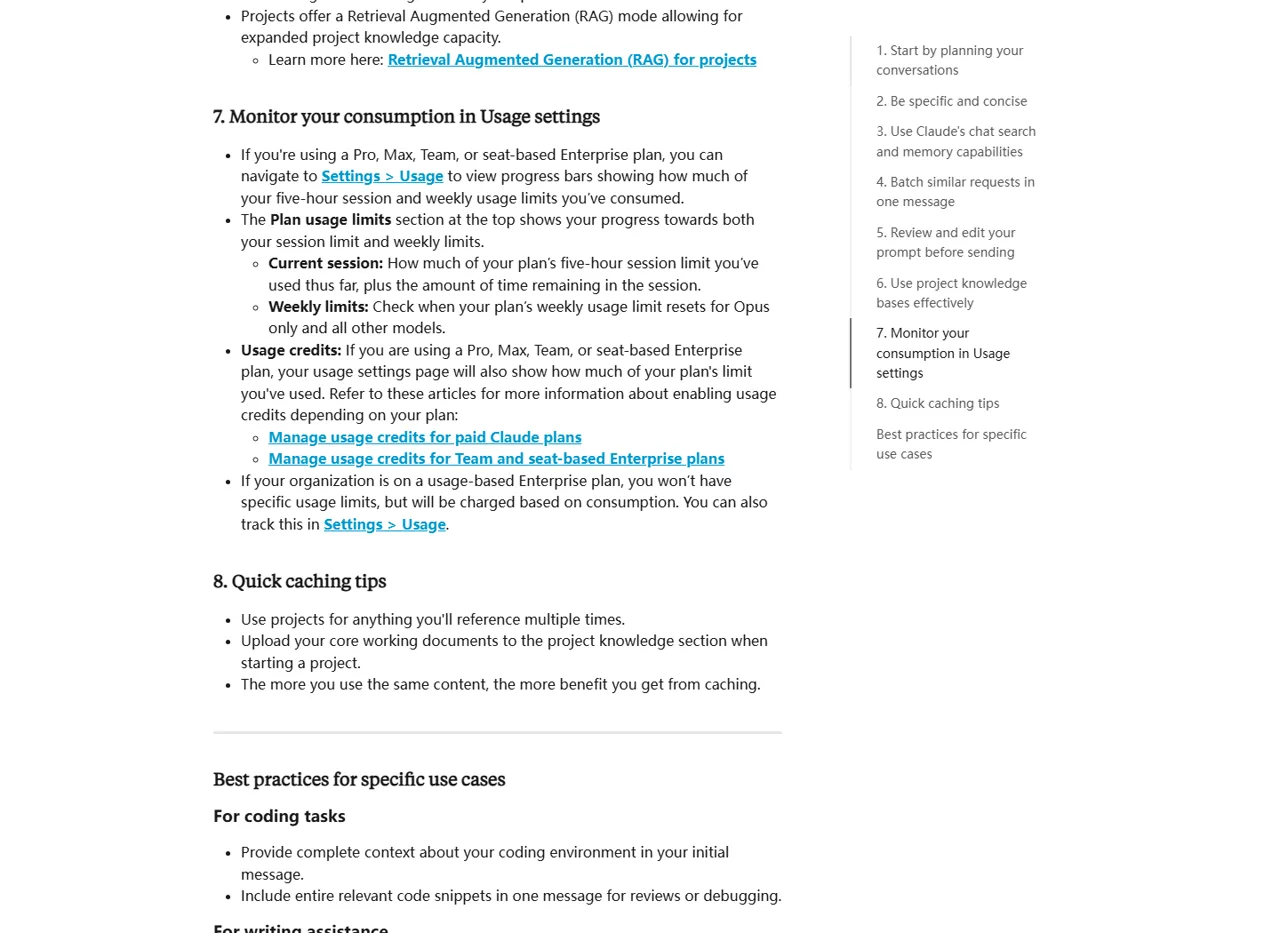
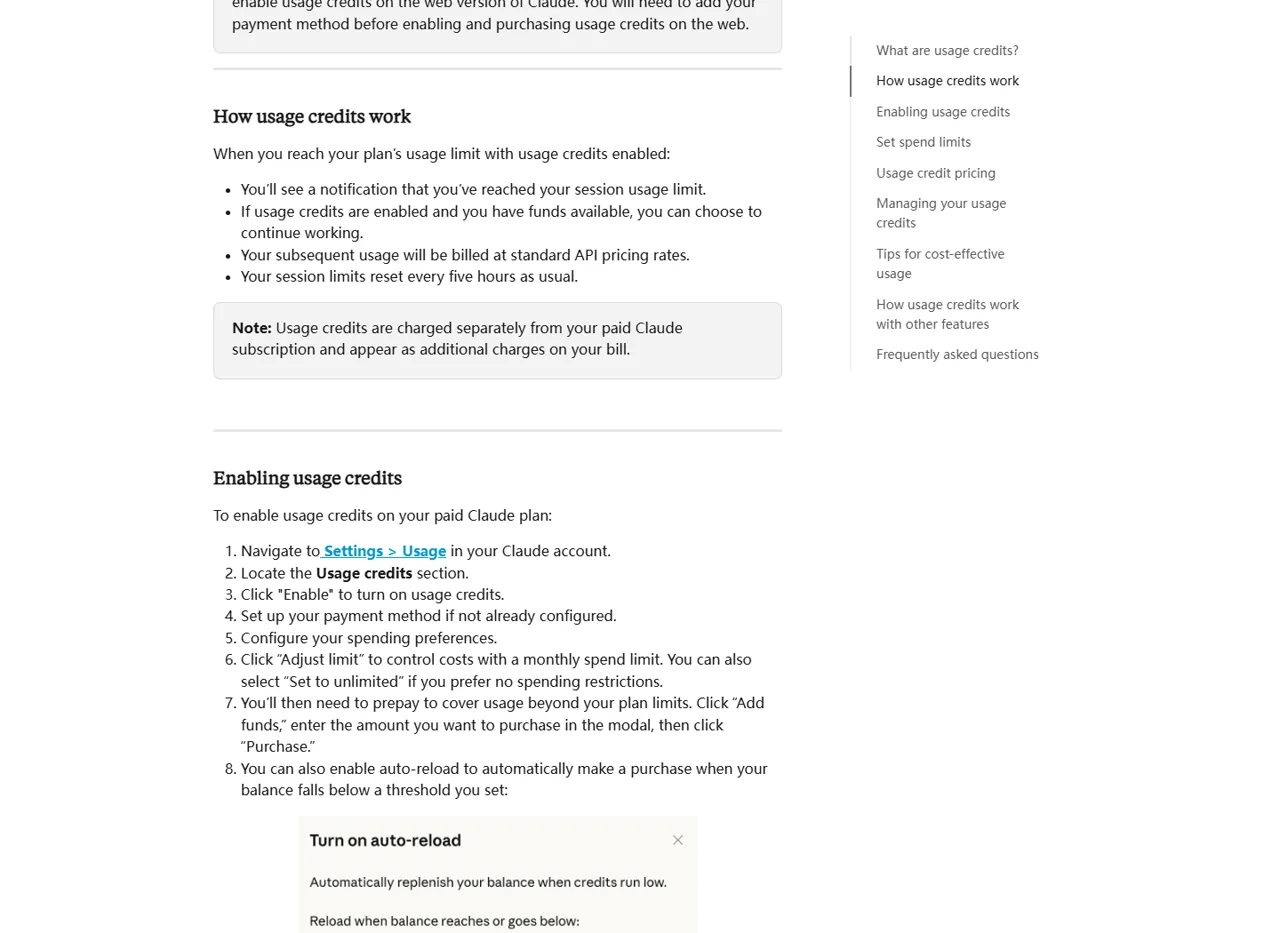
إذا وصلت إلى الحد المحدد، تنصح Anthropic بالانتظار حتى تتم إعادة الضبط، أو الترقية، أو التبديل إلى استخدام وحدة التحكم (Console) الذي يتم احتسابه بشكل منفصل، أو تفعيل أرصدة الاستخدام حيثما كانت متاحة. تستمر أرصدة الاستخدام وفقًا لأسعار واجهة برمجة التطبيقات (API) القياسية، ويتم احتساب تكلفتها بشكل منفصل عن الاشتراك.
هل يمكن استخدام الرمز Claude دون دفع Anthropic؟
ليس من خلال الاستحقاق المجاني الرسمي لـ $0 وClaude. تشير النبذة العامة عن Anthropic إلى أن معظم واجهات كود Claude تتطلب اشتراكًا في Claude أو حسابًا على Anthropic Console. كما تشير إلى أن واجهة سطر الأوامر (CLI) في Terminal و VS Code يمكنهما دعم مزودي خدمات من أطراف ثالثة، لكن هؤلاء المزودين لديهم أنظمة المصادقة والأسعار والحصص وسلوك النماذج الخاصة بهم.
وبذلك يتبقى نهجان معقولان: إما استخدام منتج آخر يتوفر له مسار دخول مجاني موثق، أو الإبقاء على «Claude Code» كبيئة عمل وإضافة سير عمل منفصل للوصول إلى النماذج. وتغطي البدائل الخمسة الواردة أدناه تفضيلات كل من المتصفح والجهاز الطرفي.
اختبار عملي: استخدام «يوكي» كبديل يعتمد على المتصفح
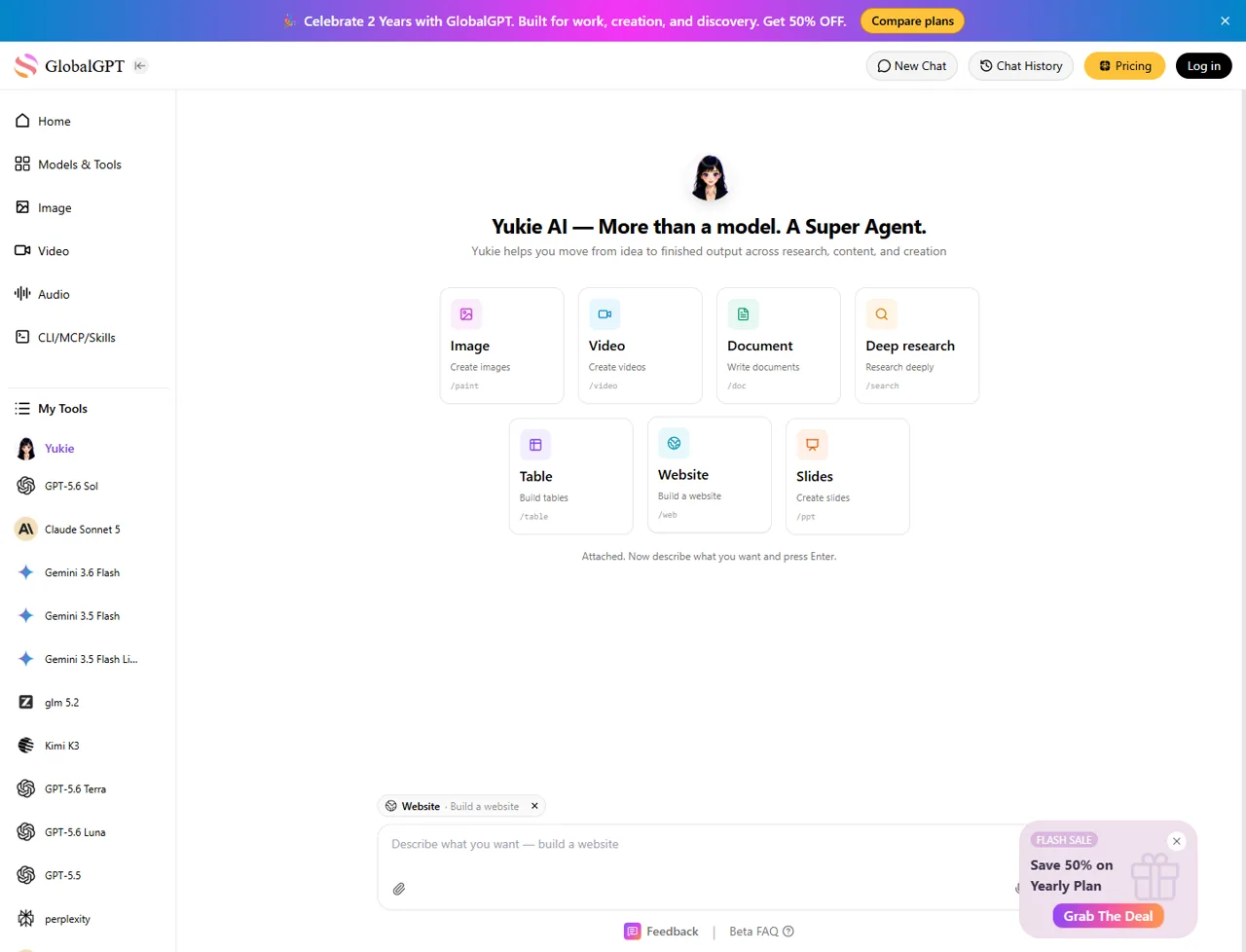
يوكي وهو الخيار الأكثر سهولة في هذه القائمة للأشخاص الذين لا يرغبون في قضاء وقتهم في بيئة عمل مغلقة. حيث تجمع مساحة العمل العامة الخاصة به بين «الصور» و«الفيديو» و«المستندات» و«البحث المتعمق» و«الجداول» و«مواقع الويب» و«الشرائح» في واجهة متصفح واحدة.
قمنا باختبار مسار «يوكي» العام في جلسة تصفح جديدة في 27 يوليو 2026. وقد اخترنا موقع الويب الوضع، وأدخلت مهمة صغيرة بلغة جافا سكريبت مصممة لاختبار ما إذا كان المنتج قادرًا على إنشاء كود واختبارات وتفسير للحالات الاستثنائية.
أنشئ دالة JavaScript باسم summarizeFailures(results) تقبل مصفوفة من الكائنات تحتوي على الحقول name و passed و durationMs. قم بإرجاع كائن يحتوي على الحقول total و passed و failed و slowestTest و failedNames. تعامل مع المصفوفة الفارغة دون إلقاء استثناء. أدرج ثلاث حالات اختبار موجزة وشرح حالة حدية واحدة.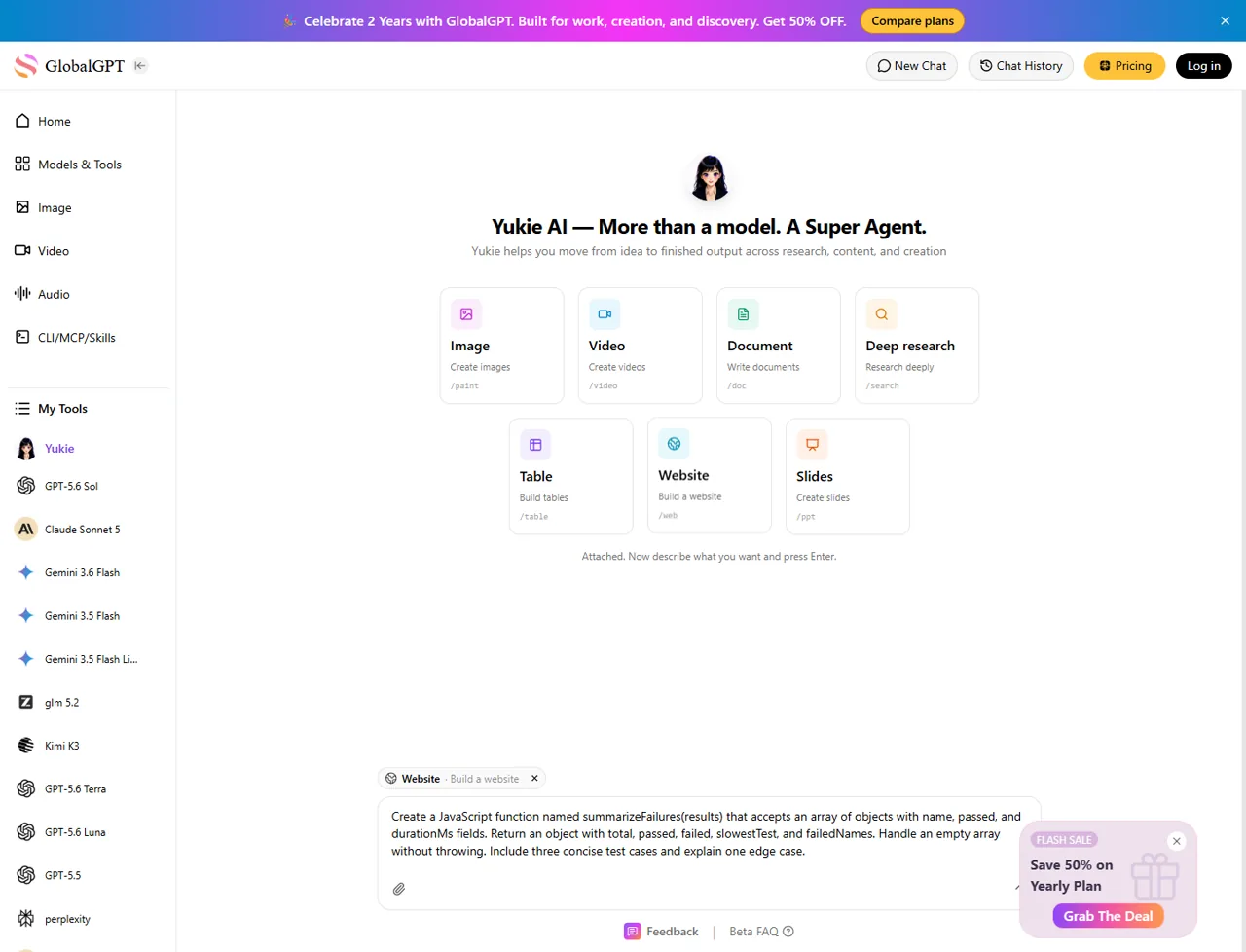
مسح جلسة المتصفح
موقع الويب
نافذة حوار تسجيل الدخول بعد الإرسال
لا يوجد
أدى الضغط على مفتاح «Enter» إلى فتح نافذة حوار لتسجيل الدخول بعد حوالي خمس ثوانٍ. لم يتم إنشاء أي كود قبل المصادقة، لذا لم نتمكن من تقييم دقة الأداء أو زمن الاستجابة أو القدرة على تعديل المستودع. وهذا يمثل أحد قيود الاختبار، وليس دليلاً على أن المنتج لا يستطيع كتابة الكود بعد تسجيل الدخول.
رأينا: يُعد “Yukie” بديلاً عمليًّا لـ «Claude Code» يعمل عبر المتصفح، عندما تكون المهمة الفعلية هي إنشاء موقع ويب، أو إجراء أبحاث، أو إعداد مستندات، أو جداول، أو شرائح عرض، أو صور، أو مقاطع فيديو من مساحة عمل واحدة. لم نقم بالتحقق من صلاحيته كبديل لـ Terminal، ولا ندعي أنه يضاهي ميزات Claude Code في تحرير المستودعات، أو أوامر shell، أو مقارنات التغييرات.
5 بدائل لرمز Claude مع مسار دخول مجاني أو مرن
“يُستخدم مصطلح ”مجاني» هنا بمعنى متحفظ. فقد تتطلب واجهة سطر الأوامر مفتوحة المصدر (CLI) الوصول إلى نماذج مدفوعة، في حين أن الباقة المجانية المُستضافة قد تفرض قيودًا على عدد الطلبات أو الميزات. ويعتمد الخيار الأفضل على ما إذا كنت تفضل مساحة عمل عبر المتصفح، أو وكيل طرفي، أو مزود نماذج معين، أو التحكم في النماذج المحلية.
| بديل | الواجهة | الحالة "مجاني" | الأفضل لـ | تحذير هام |
|---|---|---|---|---|
| يوكي | المتصفح | مساحة عمل عامة؛ يلزم تسجيل الدخول قبل أن يتمكن الاختبار من إنشاء النتائج | إنشاء ملفات بتنسيقات متعددة دون الحاجة إلى إعداد جهاز طرفي | لا توجد ميزات متطابقة مع رمز Claude تم التحقق منها، ولا يمكن المطالبة بحصة مجانية |
| OpenAI Codex CLI | المحطة الطرفية | عميل مفتوح المصدر؛ يتطلب الوصول إلى النموذج اشتراكًا مؤهلاً أو إعداد واجهة برمجة التطبيقات (API) | سير عمل الترميز المحلي الذي يركز على OpenAI | لا تتضمن قائمة الخطط الموصى بها رسميًا حاليًا خطة «Free» |
| Gemini CLI | المحطة الطرفية | ما يصل إلى 1,000 طلب يوميًا باستخدام حساب Google شخصي | مسار محطة نهائية موثق وسخي ومجاني | لا تزال حدود الاستخدام وتوافر الخدمة سارية |
| واجهة سطر الأوامر لـ GitHub Copilot | المحطة الطرفية | مشمول في باقة «Copilot Free» $0 ذات الاستخدام المحدود | مستخدمو GitHub الراغبون في الحصول على ميزات وكيل واجهة سطر الأوامر (CLI) | يستخدم رصيد الذكاء الاصطناعي؛ الإصدار المجاني لا يسمح بشراء المزيد من الرصيد |
| مساعد | المحطة الطرفية | عميل مفتوح المصدر؛ تتوفر مسارات محلية ومسارات محدودة بنموذج مجاني | مرونة المزود والتحرير المتوافق مع Git | تعتمد التكلفة وجودة التحرير على النموذج المختار |
الخيار 1: Yukie — أفضل بديل متكامل يعمل عبر المتصفح
اختر «يوكي» عندما تكون النتيجة التي تريد تحقيقها أكثر أهمية من مجرد محاكاة واجهة برنامج «Claude Code». تتيح مساحة عمل المتصفح تجميع عمليات إنشاء المواقع الإلكترونية، والبحوث المتعمقة، والوثائق، والجداول، والشرائح، والصور، ومقاطع الفيديو في مكان واحد، وهو ما يُعد مفيدًا للمبدعين والمسوقين والباحثين ومستخدمي التطبيقات التي لا تتطلب كتابة أكواد برمجية.
- الخيار الأنسب: الأشخاص الذين يرغبون في الانتقال من مرحلة التصميم الأولي إلى إنتاج أصل رقمي نهائي ضمن بيئة عمل بصرية.
- أدلة الدخول المجاني: يمكن الوصول إلى مساحة العمل العامة، لكن محاولتنا لإنشاء حساب تطلبت تسجيل الدخول.
- لم يثبت: أوامر سطر الأوامر، والتعديلات المباشرة على المستودع، ومراجعة التصحيحات، ومقارنات Git، أو الاستقلالية المكافئة لـ Claude Code.
بالنسبة لمسار متصفح بسيط،, افتح «Yukie» واختر الوضع الذي يتناسب مع الناتج المطلوب. قم بتسجيل الدخول قبل تقييم جودة التوليد، لأن تلك كانت المرحلة التي تم الوصول إليها في اختبار «الجلسة النظيفة» الذي أجريناه.
الخيار 2: واجهة سطر الأوامر لـ OpenAI Codex — الأفضل للعمل عبر المحطات الطرفية التي تعتمد على OpenAI
OpenAI Codex CLI هو أداة برمجة مرخصة بموجب رخصة Apache-2.0 وتُشغَّل محليًّا في محطة الأوامر. وهي تشبه إلى حد كبير أداة Claude Code من حيث واجهة المستخدم، حيث صُمم كلاهما لفحص مشروع محلي والعمل من خلال سطر الأوامر.
كون العميل مفتوح المصدر لا يعني أن استخدام النموذج مجاني. يوصي المستودع الحالي لـ OpenAI بتسجيل الدخول عبر ChatGPT Plus أو Pro أو Business أو Edu أو Enterprise، أو بإتمام إعداد مفتاح API منفصل. لا تتضمن قائمة الخطط الموصى بها في تلك الصفحة خطة ChatGPT Free، لذا لا تختر Codex بناءً على افتراض استمرار الوصول إلى نموذج $0 فقط.
يكون «كوديكس» هو الخيار الأفضل عندما تكون تفضل بالفعل نماذج OpenAI وترغب في وكيل يعتمد على المحطة الطرفية في المقام الأول. إذا كنت تختار بين الأنظمة البيئية بدلاً من العملاء، فإن مقارنة بين ترميزي Claude وChatGPT يقدم مزيدًا من السياق.
الخيار 3: Gemini CLI — أفضل حد مسموح به للمحطة الطرفية المجانية من حيث التوثيق
Gemini CLI هو وكيل محطة طرفية مفتوح المصدر يعمل بموجب ترخيص Apache-2.0، ويوفر عمليات الملفات وأوامر شل واسترجاع محتوى الويب والبحث المباشر عبر Google ودعم MCP. وتتيح صفحة الحصص الرسمية الخاصة به حاليًا لحساب Google الشخصي ما يصل إلى 1,000 طلب لكل مستخدم يوميًا من خلال خدمة «Gemini Code Assist Individual».
يتم إدراج مسار مفتاح واجهة برمجة التطبيقات (API) المجاني Gemini بشكل منفصل بحد أقصى 250 طلبًا في اليوم. كما تخضع الطلبات لضوابط على أساس الدقيقة، وتكون رهنًا بتوافر الخدمة؛ لذا فإن عبارة “1,000 طلب في اليوم” تمثل الحد الأقصى لمسار الحساب الشخصي، وليست وعدًا بأن تكون كل دقيقة أو كل نموذج متاحًا دائمًا.
يُعد Gemini CLI الخيار الأفضل هنا عندما تكون المتطلبات هي الوصول إلى المحطة الطرفية بالإضافة إلى تخصيص $0 موثق رسميًا. تحقق من أحدث الأرقام على صفحة الحصص والأسعار لـ Gemini CLI قبل إنشاء مسار عمل آلي يعتمد عليها.
الخيار 4: GitHub Copilot CLI — الخيار الأمثل لمستخدمي GitHub الحاليين
واجهة سطر الأوامر لـ GitHub Copilot يجلب سير عمل وكيل «Copilot» إلى المحطة الطرفية. تدرج صفحة الخطط الحالية لـ GitHub إصدار «Copilot Free» تحت الرمز $0، وتشمل صراحةً واجهة سطر الأوامر (CLI) لـ «Copilot»، وتصف استخدام كل من الدردشة والوكيل بأنه محدود.
تستهلك عمليات التفاعل مع Copilot CLI رصيد GitHub AI. يحصل المستخدمون المجانيون على رصيد محدود ولا يمكنهم شراء رصيد إضافي، في حين تتضمن المستويات المدفوعة مبالغ أكبر من الرصيد وتتيح شراء المزيد. وهذا يجعل Copilot CLI نقطة انطلاق مجانية حقيقية، ولكنها ليست غير محدودة.
اختر هذه الخيار عندما تكون هوية GitHub والمستودعات والمشكلات وسير عمل طلبات السحب جزءًا أساسيًا من عملك بالفعل. تحقق من النسخة الحية صفحة خطط «كوبيلوت» لأن نظام الاعتماد والنماذج المضمنة قد تتغير.
الخيار 5: Aider — الأفضل من حيث مرونة اختيار النموذج ومقدم الخدمة
مساعد هو برنامج برمجة ثنائي عبر المحطة الطرفية مفتوح المصدر يخضع لرخصة Apache-2.0، ويتميز بخرائط قاعدة الكود، والتكامل مع Git، وعمليات الإرسال التلقائية، ودعم العديد من النماذج السحابية والمحلية. وعلى عكس المساعد الذي يعتمد على مزود واحد، فإنه يتيح لك اختيار مصدر الاستدلال.
تدعم Aider مسارات محدودة لمزودي واجهات برمجة التطبيقات (API) المجانية، بالإضافة إلى دعم النماذج المحلية من خلال أدوات مثل Ollama أو نقطة نهاية متوافقة مع OpenAI. وقد يؤدي ذلك إلى خفض التكاليف المباشرة للبرمجيات أو الاستدلال، لكن النموذج الضعيف قد يفشل في إرجاع تعديلات يمكن لـ Aider تطبيقها بشكل موثوق.
اختر Aider عندما ترغب في إجراء تعديلات متوافقة مع Git والتحكم في التوازن بين النموذج والمزود. إذا كنت تستخدم واجهة برمجة تطبيقات مدفوعة، فستظل رسوم الرمز المميز الخاص بذلك المزود من مسؤوليتك. مقارنةً بـ أفضل نماذج الذكاء الاصطناعي للبرمجة يمكن أن يساعدك ذلك قبل أن تقرر استخدام نظام خلفي معين.
احتفظ برمز Claude واستخدم واجهة CLI GlobalGPT داخل سير العمل
قد لا تحتاج إلى التخلي عن واجهة Claude Code. فإذا كان سير العمل في الجهاز الطرفي مناسبًا بالفعل، يمكنك إضافة واجهة سطر الأوامر GlobalGPT كمسار منفصل للتعامل مع النماذج المتاحة عبر حسابك في GlobalGPT. وقد يكون هذا أكثر عملية من إعادة تكوين عاداتك للتعامل مع محرر أو وكيل مختلف تمامًا.
إعداد واجهة سطر الأوامر (CLI) لـ GlobalGPT خطوة بخطوة من أجل كود Claude
اتبع دليلنا المخصص لتثبيت واجهة سطر الأوامر (CLI)، وإجراء المصادقة، واكتشاف النماذج المتاحة، وتشغيلها ضمن سير عمل Claude الذي يركز على الكود.
لا يؤدي هذا إلى تحويل الباقة المجانية $0 Claude إلى استخدام مشمول في كود Anthropic Claude، ولا ينبغي وصفها بأنها غير محدودة. إنها عملية عمل إضافية عبر واجهة CLI (CLI) لها حسابها الخاص، وتوافر النماذج، والرصيد، وشروط الاستخدام الخاصة بها.
ما هو البديل المناسب لرمز Claude الذي ينبغي عليك اختياره؟
| أولويتك | أفضل نقطة انطلاق | لماذا |
|---|---|---|
| لا حاجة إلى إعدادات طرفية؛ إنشاء عدة تنسيقات للمحتوى | يوكي | مساحة عمل في المتصفح مخصصة للمواقع الإلكترونية، والأبحاث، والمستندات، والجداول، والشرائح، والصور، ومقاطع الفيديو. |
| البدل الموثق للمحطة الطرفية المجانية | Gemini CLI | يحدد مسار الحساب الشخصي حالياً عدداً أقصاه 1,000 طلب يومياً. |
| التطوير الذي يركز على GitHub | واجهة سطر الأوامر لـ GitHub Copilot | تتضمن خطة $0 استخدامًا محدودًا لواجهة CLI والوكلاء. |
| طرازات OpenAI وسير العمل في المحطة الطرفية المحلية | OpenAI Codex CLI | متوافق أصلاً مع نظام OpenAI، شريطة وجود خطة مؤهلة أو إعداد واجهة برمجة التطبيقات (API). |
| اختر بنفسك بين النموذج السحابي أو النموذج المحلي | مساعد | متوافق مع مختلف مزودي الخدمة، ومفتوح المصدر، ويدعم Git. |
| الحفاظ على سير عمل يركز على كود Claude | GlobalGPT CLI | يضيف مسارًا منفصلاً متعدد النماذج عبر واجهة سطر الأوامر (CLI) دون فرض عادة جديدة على المحررين. |
إذا كنت ترغب في الاطلاع على مجموعة أكبر من المنتجات، فراجع قائمة أوسع ببدائل Claude. قد يجد المطورون الذين يقارنون سياق المستودعات أن الدليل يقدم إرشادات حول ما إذا كان يمكن لـ ChatGPT قراءة مجلد بأكمله ومعالجته مفيد، بينما يمكن لمستخدمي لغة بايثون المقارنة DeepSeek وChatGPT لتوليد الكود.
الأسئلة الشائعة
هل رمز Claude مجاني تمامًا؟
لا. يمكن تنزيل تطبيق «Claude Code» مجانًا، لكن الباقة المجانية «$0 Claude» من Anthropic لا تشمل تطبيق «Claude Code». يتطلب استخدام النموذج الرسمي عادةً اشتراكًا مؤهلاً أو حساب «Console» يتم احتساب تكاليفه بشكل منفصل.
ما هي أرخص باقة رسمية لرمز Claude؟
Claude Pro هي أرخص باقة مستهلكين معروضة تتضمن رمز Claude. وتُقدَّر تكلفتها في باقة Anthropic بمبلغ $20 شهريًّا في الولايات المتحدة، أو $17 شهريًّا مع دفع مبلغ $200 مقدمًا سنويًّا. قد تختلف الأسعار حسب المنطقة وشبكة الهاتف المحمول.
كم عدد المطالبات التي تظهر برمز Claude في الإصدار «Pro»؟
لا تنشر Anthropic عددًا موحدًا للمطالبات. فعدد المطالبات يختلف باختلاف حجم السياق، والملفات، وطول المحادثة، والأدوات، والنموذج، والجهد المبذول. ويبلغ الحد الأقصى لمدة الجلسة في الإصدار Pro خمس ساعات، بالإضافة إلى حد أسبوعي مشترك لجميع النماذج بين Claude وClaude Code.
هل يشمل باقة Claude Pro استخدام واجهة برمجة التطبيقات (API)؟
ينص البند رقم Anthropic على أن باقة Pro لا تشمل استخدام واجهة برمجة التطبيقات (API) عبر وحدة التحكم Claude. ويخضع استخدام مفتاح API لنظام الدفع الفوري، ويتم احتساب تكلفته بشكل منفصل عن الاشتراك.
هل يمكنني استخدام واجهة سطر الأوامر (CLI) الخاصة بـ GlobalGPT في كود Claude؟
نعم. يمكنك استخدام واجهة سطر الأوامر (CLI) الخاصة بـ GlobalGPT كسير عمل منفصل للوصول إلى النماذج ضمن إعداد Claude الذي يركز على الكود. اتبع دليل التثبيت والمصادقة المخصص لهذا الغرض، وتذكر أن GlobalGPT له حسابه الخاص ورصيده ونماذجه وشروط الاستخدام الخاصة به.
هل تُعد «يوكي» بديلاً كاملاً لـ«Claude Code»؟
هذا الاستنتاج لا يستند إلى الاختبار الذي أجريناه على الصفحة العامة. يُعد «يوكي» بديلاً مفيداً يعتمد على المتصفح لتصفح المواقع الإلكترونية، وإجراء الأبحاث، والاطلاع على المستندات، والجداول، والشرائح التقديمية، والصور، ومقاطع الفيديو؛ لكننا لم نتحقق من دعم أوامر سطر الأوامر، أو تحرير المستودعات، أو مقارنة التغييرات، أو توافق الميزات مع «Claude Code».
خلاصة القول
يمكن تثبيت تطبيق Claude مجانًا، لكن استخدامه غير مجاني من خلال باقة $0 Claude. وتُعد باقة «Pro» أقل باقة اشتراك رسمية متاحة للمستهلكين، ويتم تقاسم حصة الاستخدام المضمنة فيها مع دردشة Claude ضمن حدود الجلسة والحدود الأسبوعية.
ابدأ باستخدام «Yukie» إذا كنت تريد مساحة عمل متعددة التنسيقات تعمل عبر المتصفح. ابدأ باستخدام «Gemini CLI» أو «GitHub Copilot CLI» إذا كان الحد الأقصى الموثق لاستخدام المحطة الطرفية المجانية هو أولويتك القصوى. إذا كنت تحب «Claude Code» بالفعل، فاستمر في استخدام سير العمل واتبع دليل إعداد واجهة المستخدم النصية لـ GlobalGPT لإضافة مسار منفصل للوصول إلى النموذج.





