

No single winner fits every task. The useful question is whether you need help finding and checking information, turning supplied material into a finished draft, or fixing something that has an objectively correct result. Citations, fluent writing and a paid subscription are different signals; none guarantees that an answer is right.
The earlier examples below show real outputs from GlobalGPT sessions, including GPT-5.5 and its Perplexity interface. They show claim checking, rewriting and a small code fix; their scope is narrower than a current native-product benchmark.
When your work moves from research to reasoning, writing and visuals, GlobalGPT brings multiple leading models and AI tools into one subscription and one workspace. You can work with GPT, Claude, Gemini and Perplexity across that sequence, with a more convenient, affordable approach to a workflow that would otherwise span separate subscriptions.
How the comparison was checked
The original comparison used four practical jobs: checking claims about AI products, rewriting an introduction, debugging a JavaScript settings function, and making a subscription recommendation under a $25 monthly budget. The preserved pictures come from earlier GlobalGPT sessions. The GPT side visibly names GPT-5.5; the Perplexity side does not expose an exact underlying model. The pictures do not establish a precise capture date.
A native product can add search, research, file and account features beyond the model itself. Compare the complete route you will use, and give these historical outputs only the weight their visible evidence supports.
| Task | Evidence that remains useful | What it does not establish |
|---|---|---|
| Claim checking | Two answers, their source labels and treatment of uncertainty | A measured accuracy rate for either native product |
| Writing | Two rewrites of the supplied notes | A general writing winner across topics and models |
| JavaScript debugging | A visible bug diagnosis and one complete captured fix | Repository-scale coding or agent performance |
| Subscription choice | The prompt and an example decision table | Current checkout terms or an independent product ranking |
The captured Perplexity code fix was also transcribed and executed locally during this review. This checks an existing output; it is not a new model run.
Research: check the citation, not just the answer
The source-audit prompt asked each tool to examine four claims: that both products have paid plans, that Perplexity is stronger for sourced research, and that ChatGPT is stronger for writing and coding. It requested a table showing the best source to check, what the source proves, what it does not prove and the editorial risk. That is a better starting point than asking which brand is “more accurate,” because it makes the evidence gap visible.
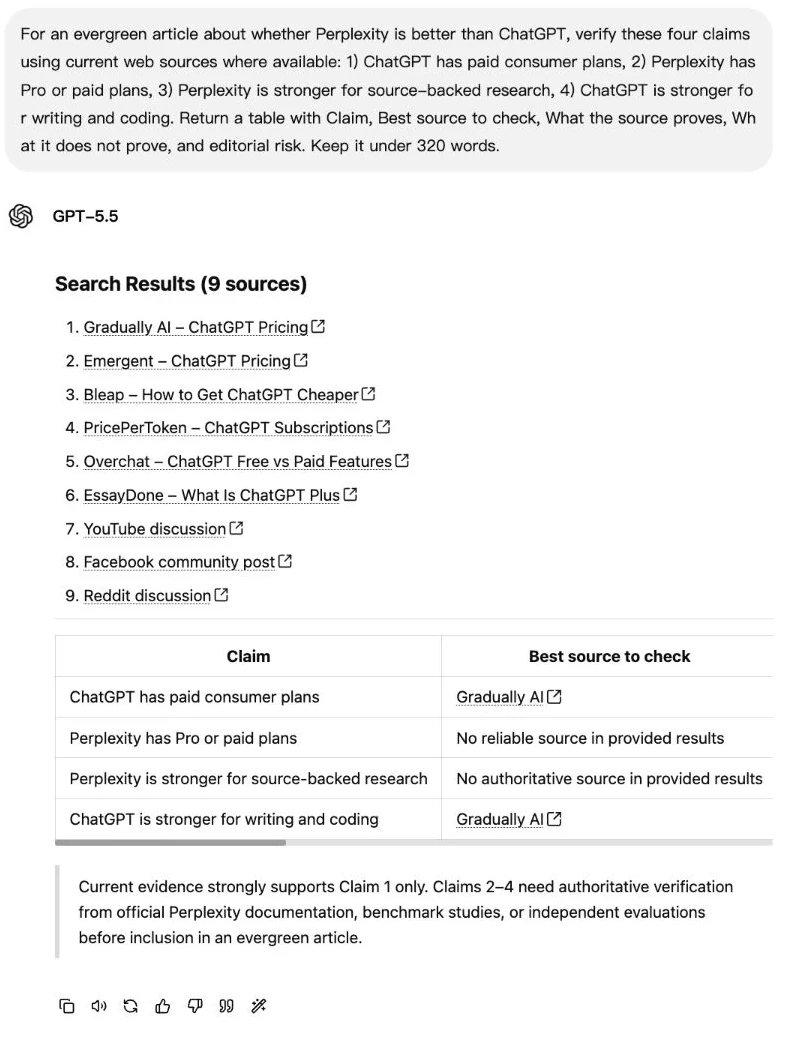
The GPT-5.5 answer listed third-party articles, a video and community results. It also said the broader comparison claims still needed authoritative verification. That caution is useful. But a plausible source title is not a replacement for the provider’s actual pricing or feature documentation; the research task is unfinished until the link has been opened and checked.
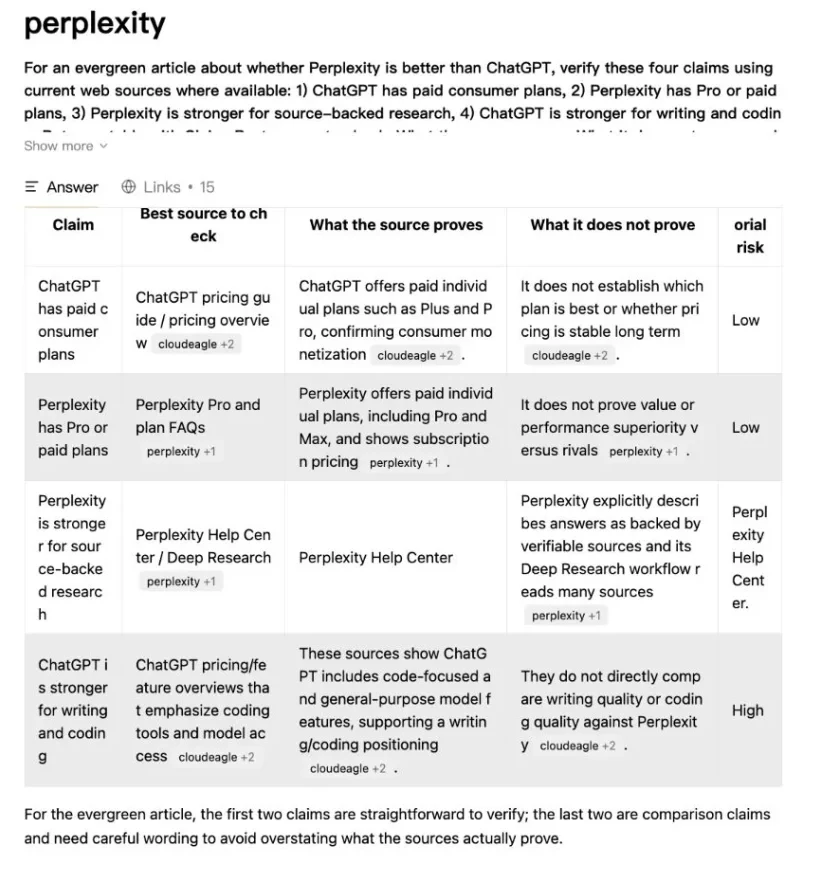
The Perplexity answer used the requested table and made the distinction between plan existence and comparative performance explicit. Its visible references also include a third-party label. The table’s phrase “ChatGPT pricing guide” therefore cannot be treated as proof that it linked directly to OpenAI. Use this output as a verification checklist.
- Open the cited page, rather than relying on the source label beside the answer.
- Match the exact claim to a passage. A page showing that a feature exists does not prove it works better than a rival.
- Check the date, product, country and billing period when the claim involves access or price.
- Keep “not established by this source” distinct from “false.” Missing evidence is a reason to investigate, not a reason to guess.
For a research memo, ask for a supporting quotation beside each important claim. Keep the original source available when drafting so that a rewrite preserves its qualifications.
Writing: what the earlier rewrite task shows
The writing prompt supplied rough notes and asked for a calm, concrete, reviewer-like introduction of about 150 words. Those notes already described Perplexity as a research tool and ChatGPT as a route to finished output. Both answers were therefore rewriting a supplied position. Their agreement with that position is not independent evidence that the position is true.
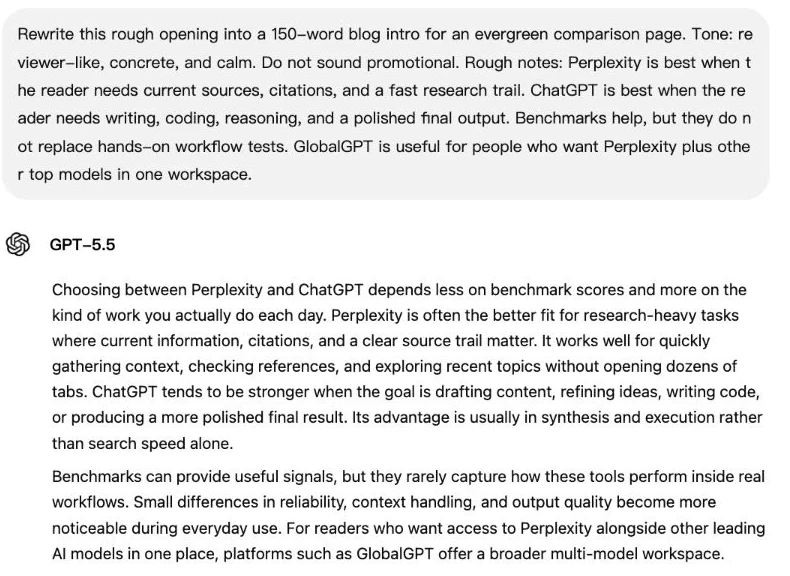
The GPT answer used a broader opening about daily work, followed by a second paragraph about benchmarks and workflow differences. Its connective prose gives an editor material to work with; the recommendation still needs factual review.
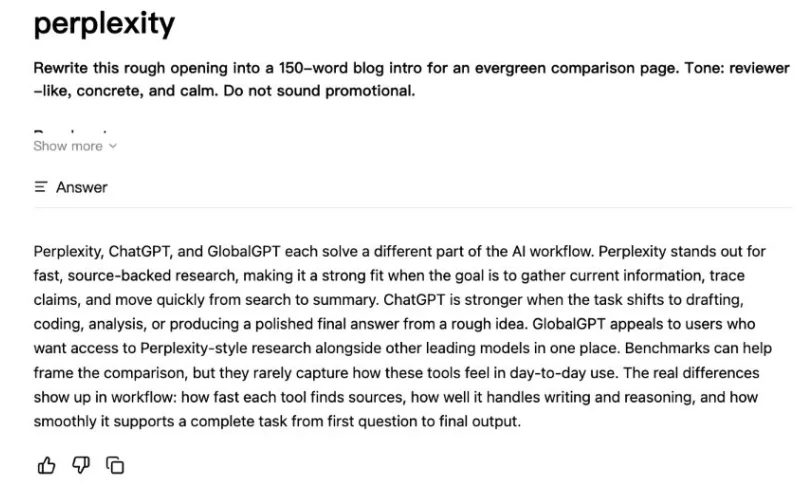
The Perplexity version was more compact, naming research, drafting and model access in a single paragraph. A compact opening may suit a quick buying guide; a longer explanation may fit a review. Judge the editing required for your audience.
- Factual fidelity: names, numbers and qualifications survive the rewrite.
- Instruction following: the requested length, tone and format are respected.
- Editing effort: count concrete repairs—unsupported claims, repeated points and unclear transitions.
- Audience fit: a student explanation, client memo and landing page need different writing choices.
For a fair comparison of your own, supply the same notes and ask both tools to flag missing facts rather than fill them in. Do not put the desired winner into the prompt. Read the drafts against the notes before deciding which one saves you more editing time.
Coding: a small bug is not a coding benchmark
The original JavaScript task was concrete: a function merged saved settings with defaults, then accessed merged.notifications.email. If notifications was missing, that access could throw an error. A second problem was treating an explicit false email preference as if the user had not supplied a value.
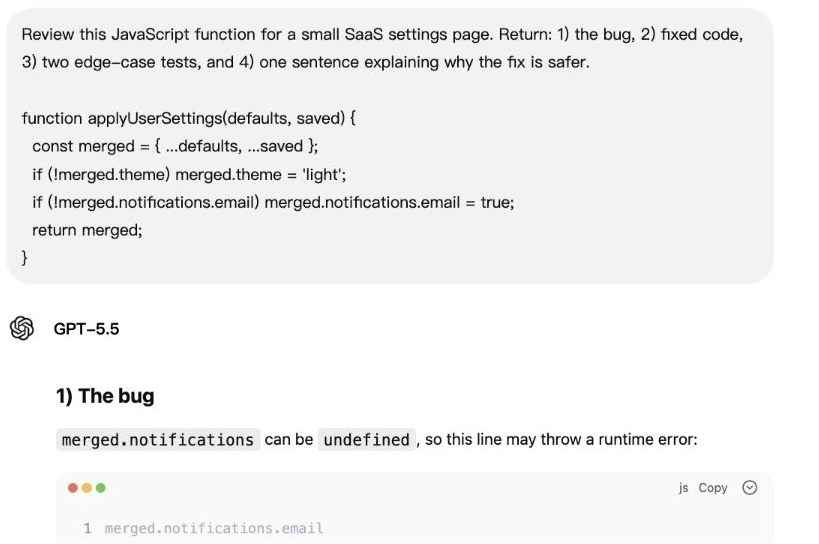
The visible GPT-5.5 response identifies the missing nested object. A later portion of that answer also supplies an undefined-input example and explains why initializing the nested object matters.
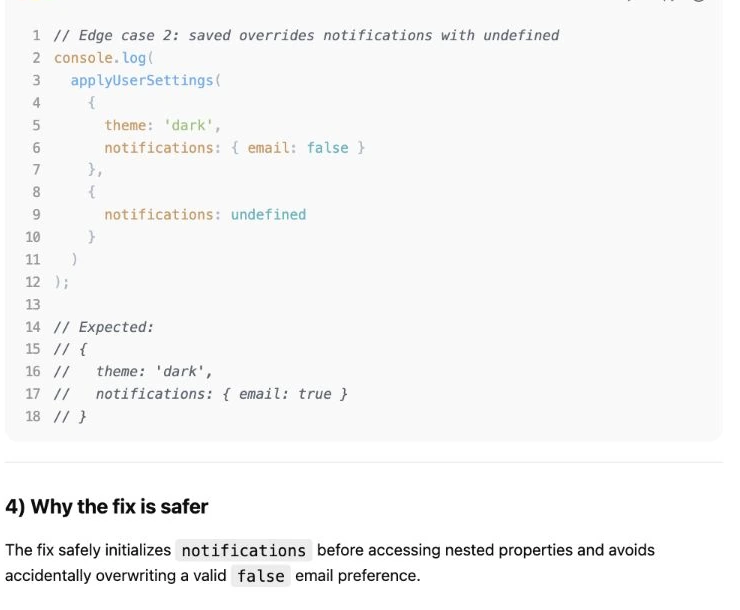
This continuation is useful evidence of the GPT answer’s edge-case reasoning. It is not a test log: the displayed result is labelled “Expected,” and the complete implementation is not present in the retained pictures. The answer can therefore be assessed for its diagnosis and proposed examples, but this review cannot confirm that its whole fix passed execution.
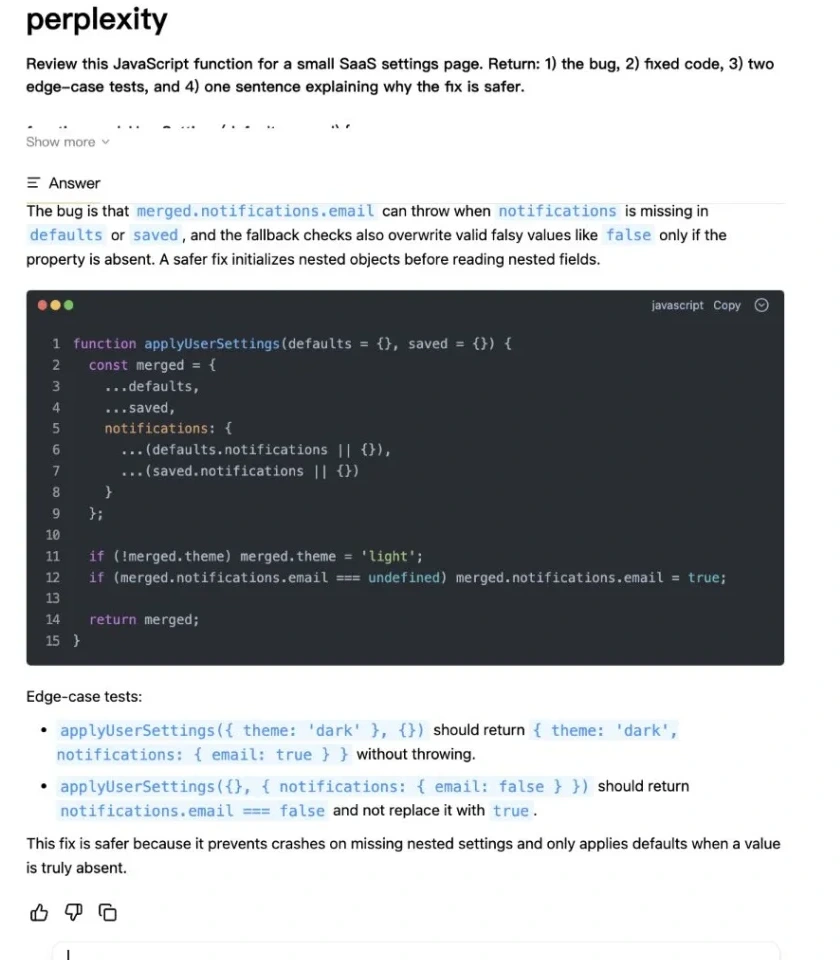
The Perplexity picture contains the full fix. It merges the nested settings separately and preserves an explicit false. In a local check of that captured code, five cases passed: a missing nested object, an explicit false preference, omitted arguments, retaining another notification field, and leaving the original input object unchanged. Passing those checks supports the small fix—it does not establish how today’s native product handles a large codebase.
| Local check | Observed result |
|---|---|
| Missing notifications object | Completed without throwing |
| Saved email setting is false | Kept false |
| Arguments omitted | Created the documented defaults |
| Unrelated nested default exists | Preserved the field |
| Original input object | Not mutated |
| Top-level argument is null | Throws; this extra robustness case was outside the original object-input examples |
Include the null check if your application can send that value. Define accepted inputs before judging a solution. For longer development work, also compare repository context, executable tests, change review and permissions; a short chat answer cannot stand in for that workflow. The Claude vs ChatGPT coding comparison covers a more development-focused decision.
A $25 budget: decide from actual work
The fourth historical prompt described a reader with a $25 monthly budget and four weekly tasks: checking AI news, writing client-ready summaries, debugging small JavaScript problems and comparing tools before purchase. Treat the model’s subscription recommendation as advice to investigate, rather than independent evidence of product quality.
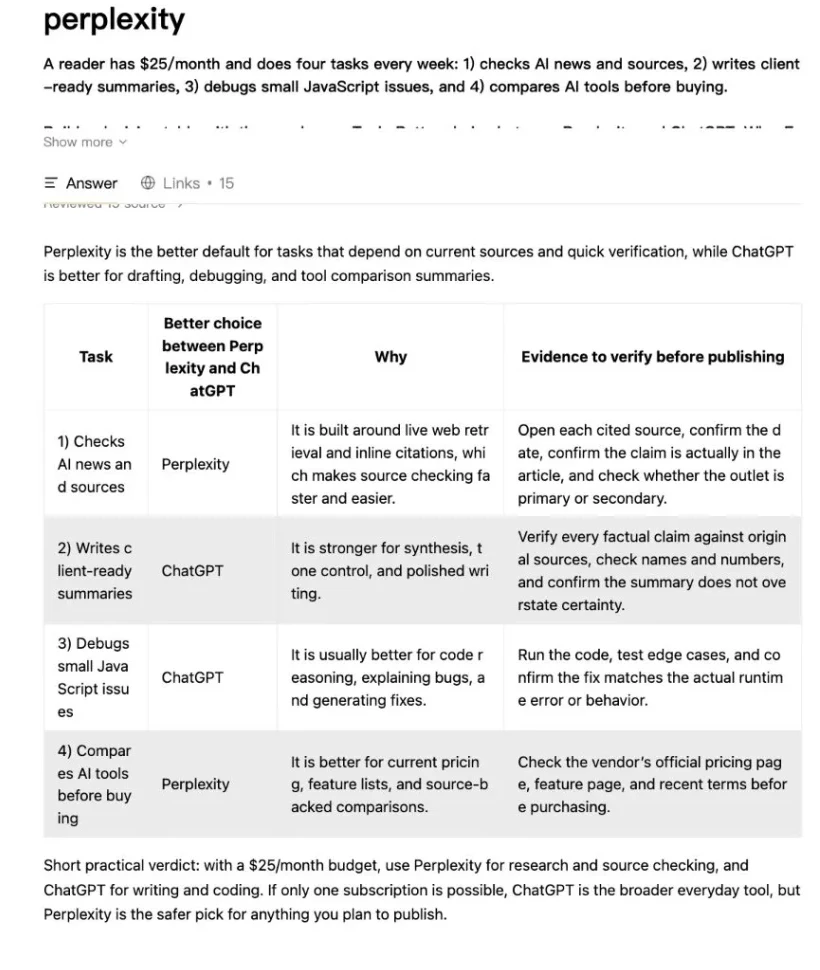
The retained Perplexity answer recommends checking original provider pages, opening cited sources and running code tests. Those are useful buyer habits. Its preference for one product in a particular category should still be tested against your actual work. The preserved GPT budget picture stops before the full answer, so it cannot support the original claim that its recommendation was better.
- Write down the two tasks that consume the most time in a normal week.
- Run one representative task on each available free product before choosing a paid tier.
- Check whether the paid feature you need is available to your account, rather than assuming every advertised feature is included.
- Compare the amount due today, renewal terms and cancellation commitment. Annual equivalents are not monthly payments.
- Choose the plan that removes a recurring bottleneck; reassess when your workload changes.
If your work repeatedly moves between several models and functions, Perplexity access in GlobalGPT can sit alongside drafting, reasoning and creative tools in the same workspace. Evaluate the time saved across that complete workflow.
What benchmark scores can tell you
The original article included two benchmark figures. One is a Perplexity research chart about Deep Search QA; the other is an OpenAI system-card chart about internal research debugging. They do not measure the same task. Putting their percentages next to each other would create a comparison the underlying evaluations never made.
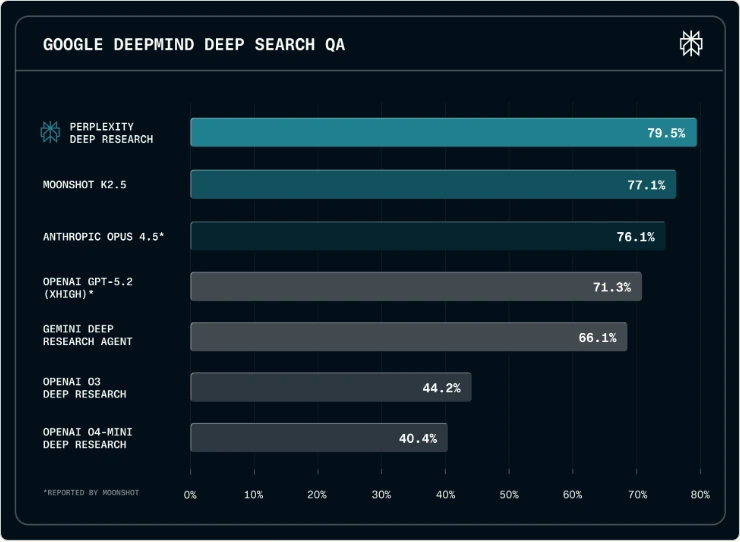
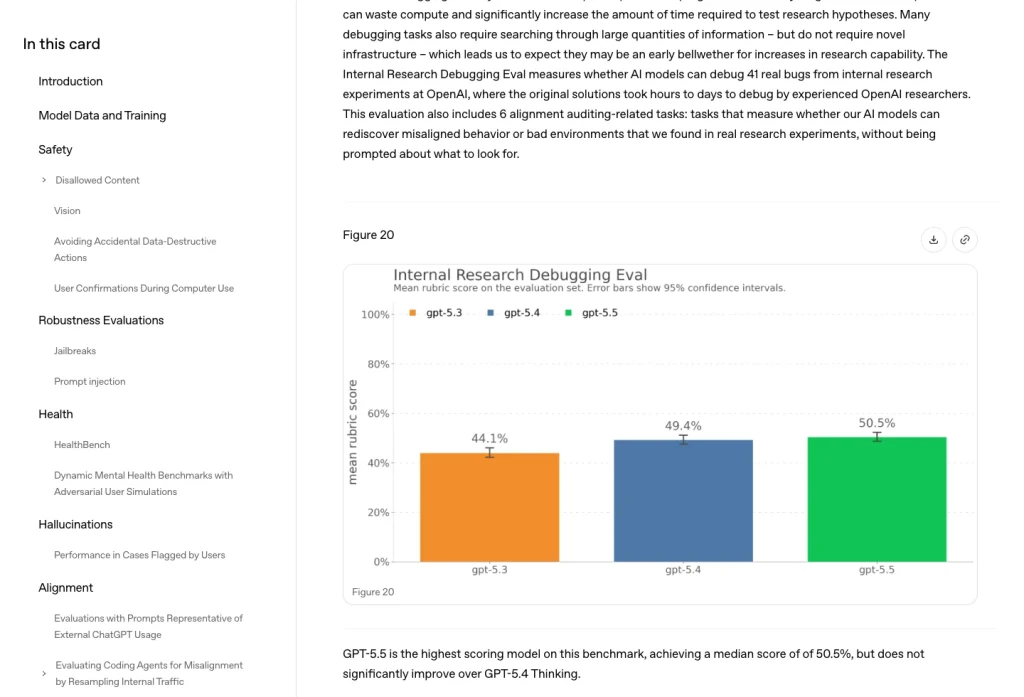
Research and debugging scores describe performance on their own evaluation tasks. Neither directly predicts your editing time or source-checking effort. Compare named versions on the same evaluation, then test a representative job from your own work.
Pricing and access
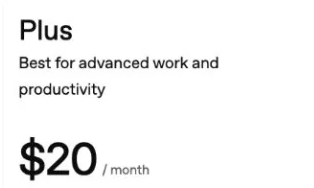
As checked on September 15, 2026, OpenAI lists ChatGPT Plus at US$20 per month, billed monthly. Its Plus documentation says annual billing and advance payment for multiple months are not supported. API use is separate and billed independently. The listed subscription also includes expanded access to tools such as file analysis, image generation, voice and deep research where available, with usage limits.
Listed individual monthly prices in USD. Dashed marker: US$25 budget.
ChatGPT Plus · US$20/month
Perplexity Pro · US$20/month
Both separate subscriptions · US$40/month
Each plan’s US$20 monthly rate leaves US$5 of the US$25 budget. Paying for both separately totals US$40 (US$20 + US$20), exceeding the budget by US$15. This is arithmetic, not a bundle offer.
Buying implication: start with one month of a paid subscription to the product that fits your most frequent task. Equal listed prices do not establish equal tools or results.
Sources: OpenAI Plus, verified September 15, 2026; Perplexity individual pricing, verified September 15, 2026. Taxes, currency conversion and annual offers are excluded. Recheck checkout before paying.
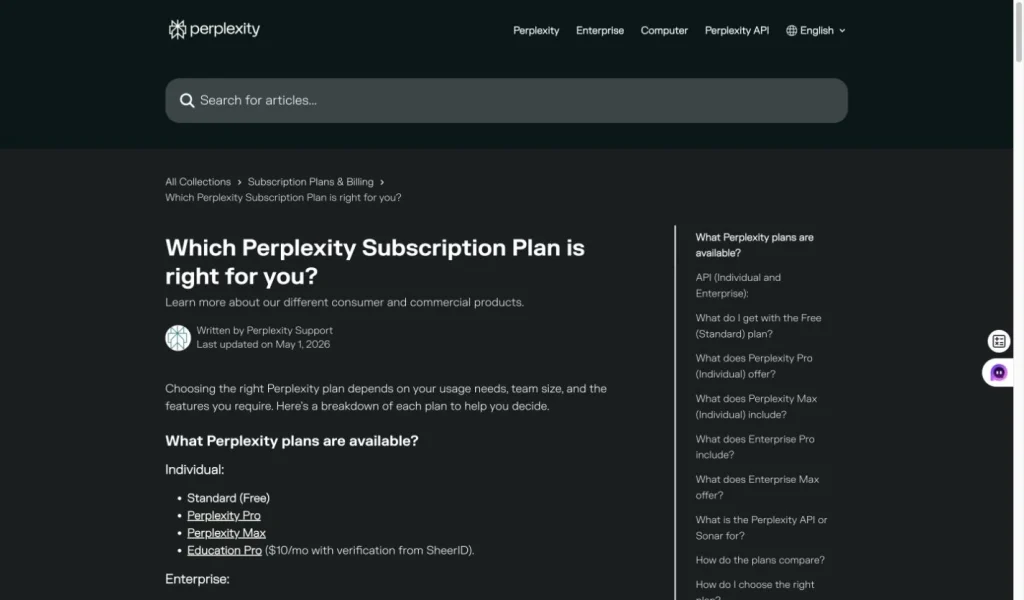
As checked on September 15, 2026, the Perplexity individual pricing page lists Free at US$0, Pro at US$20 and Max at US$200 per month. Pro’s monthly price matches the Plus monthly rate above. Price alone therefore does not choose a winner: compare the research, file, writing and creative tools you will actually use. Compare the amount due and renewal terms for your selected billing period and currency before paying.
Perplexity’s plan guide, checked September 15, 2026 lists three Pro Searches per day and one Research request per month for Free. Pro adds advanced model access, image and video generation, and higher research and upload limits. Its Pro Search and upload-session limits are weekly, while Research limits are monthly; the guide does not give a numeric consumer Pro quota. The separate allowance of up to 50 file uploads per project is not a weekly upload-session allowance.
| Individual web plan | Monthly USD price | Billing and API scope | Source check |
|---|---|---|---|
| ChatGPT Plus | US$20 | Billed monthly; no annual or multi-month prepayment. API billed independently. | OpenAI Help, September 15, 2026 |
| Perplexity Pro | US$20 | The monthly price does not establish an annual amount or any consumer API entitlement. Check the applicable terms. | Perplexity pricing, September 15, 2026 |
The Perplexity subscription plans guide can help with the plan-specific choice. Keep consumer subscriptions separate from developer API budgets: the Agent API documentation describes a separate pay-as-you-go service. A monthly-looking number on an annual offer is not the amount charged each month; compare the actual charge and renewal period before committing.
Privacy: compare the plan and the data controls
A source-checking question and an unpublished client file are different kinds of input. Before uploading private material, decide what information the tool actually needs and which account terms apply. A paid consumer subscription is not, by itself, a business data-handling agreement.
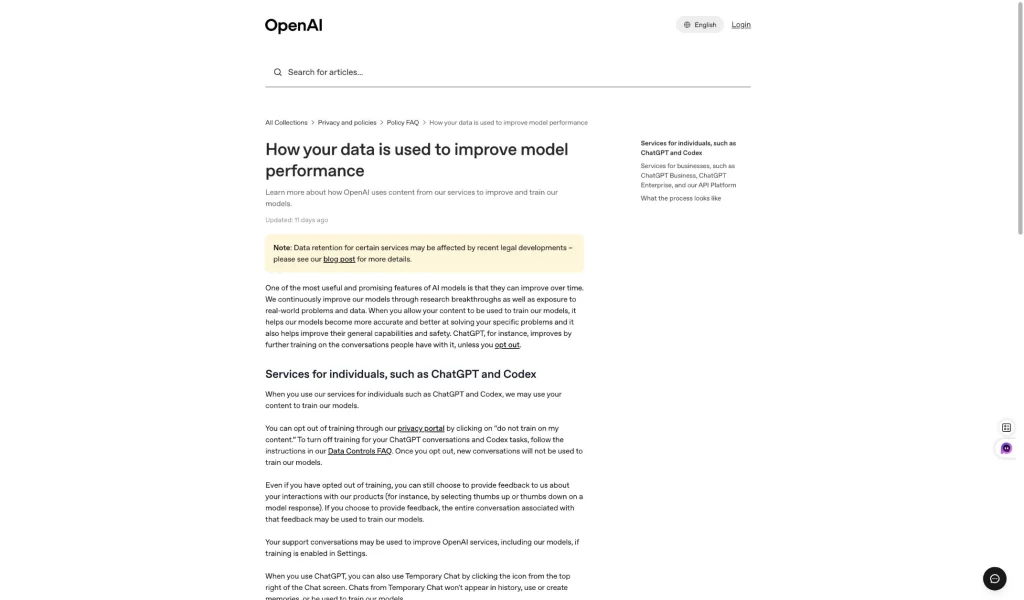
OpenAI’s current Plus documentation says conversations may be used to improve model performance and safety, and that you can opt out of training use. That supports a practical first step: review the data controls before sharing material you cannot publish. It does not mean every retention or enterprise-policy question is answered by one setting.
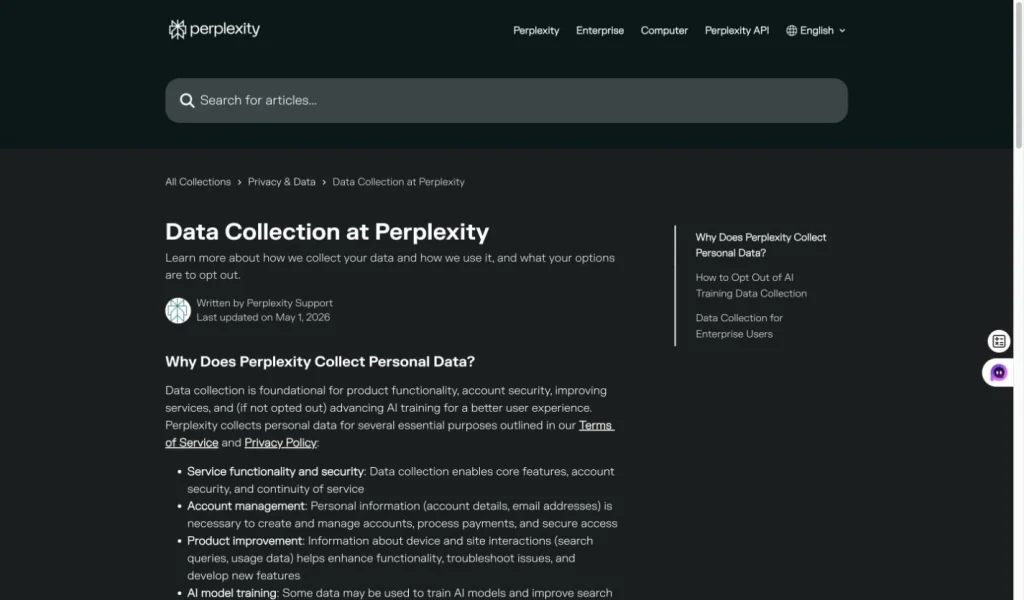
Perplexity’s Data Collection help page, checked September 15, 2026 says AI Data Retention is enabled by default for Free, Pro and Max users. The documented opt-out path is Account settings → Preferences → AI data retention off. Opting out applies only to data collected afterward; previously collected training data cannot be deleted or removed. Data may still be processed for service operation, legal compliance and product improvement, so review the controls before sharing private material.
The file-upload privacy guide, checked September 15, 2026 distinguishes temporary session attachments from files kept in Projects:
- Consumer session attachments are retained for 30 days. Afterward, their original contents are unavailable for follow-up questions, but the context of previous questions and answers can persist.
- Files in Projects and personal repositories remain until deleted, under their respective access and retention policies.
- Deleting a session also deletes its file and image attachments. That does not undo earlier use of training data.
- Anyone with a public session link can see the attached files or images. Keep the session private if those attachments should not be shared.
- Remove information that is not needed for the task.
- Check training use, retention and deletion as separate questions.
- For employer or client work, follow the applicable company policy and account agreement.
- Avoid treating source citations as a privacy guarantee; citation quality and data handling solve different problems.
Chat, coding agents and APIs are different purchases
A chat tool can suggest a code change, a coding agent can operate on a project, and a developer API can become part of another application. Compare the actions and controls each workflow provides.
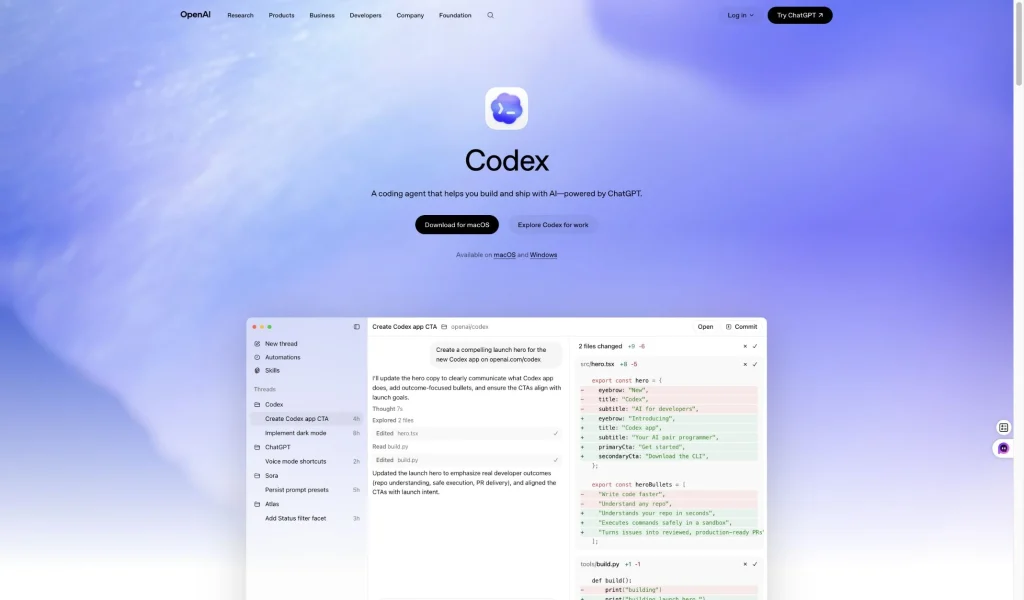
For software development, compare file access, proposed changes, executable tests and change review. Those requirements go beyond the small settings-function example above.
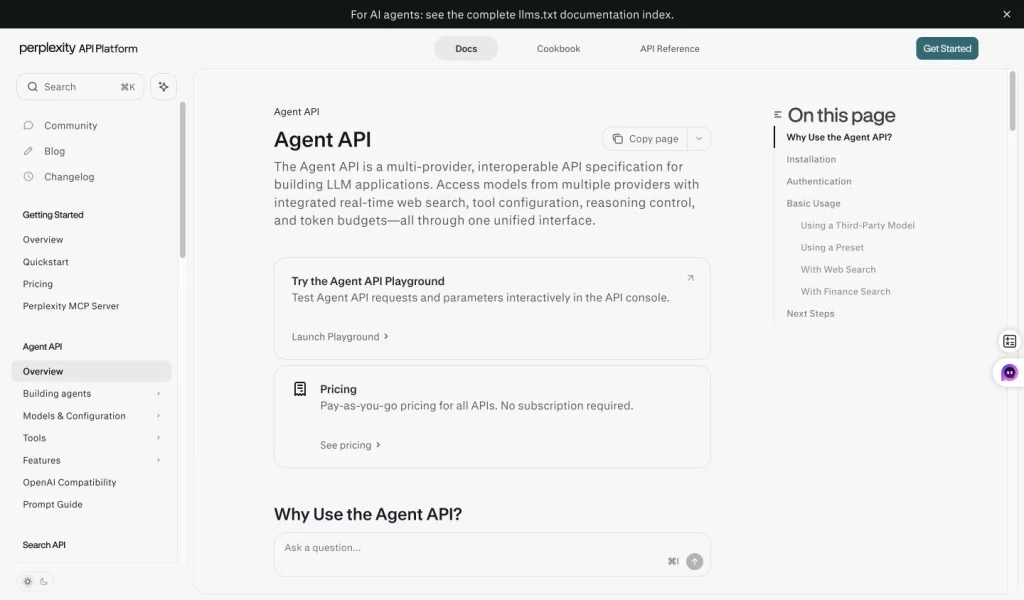
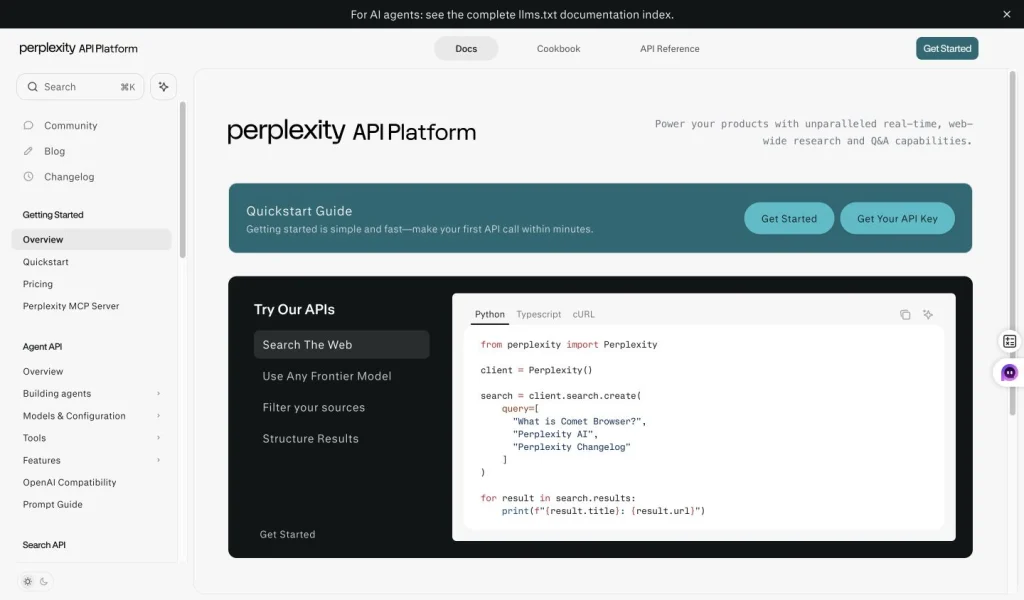
Perplexity’s official API documentation describes access to models from multiple providers, with web search tools and configuration controls. Its Search API and Agent API have distinct roles: retrieving search results and building model-powered applications are related, but not interchangeable. That is a developer choice, not proof that one native consumer chatbot is better at every research question.
Does Perplexity use ChatGPT?
An OpenAI model and the ChatGPT product are not the same thing. Perplexity’s individual pricing page and plan guide, checked September 15, 2026, describe model selection and advanced model access for Pro. Its Agent API supports models from several providers, including OpenAI. Accessing a model through another service does not give that service every ChatGPT interface feature or the same subscription terms. The distinction is especially useful when a model name appears in two different products.
For the broader product question, how Perplexity uses different AI models explains why the engine, search tools and interface should be considered separately. In the historical examples here, the GPT model label is visible, while the exact model behind the Perplexity interface is not; it would be misleading to fill in that missing label.
Which should you choose for your week?
| Your main job | What to compare first | A useful acceptance check |
|---|---|---|
| Researcher, student or analyst | Search and source verification in each product | Every important statement is supported by a source you can open |
| Writer, marketer or consultant | Rewriting the same factual notes | The draft is accurate and needs fewer concrete edits |
| Developer | Code explanation versus a project-capable workflow | The fix passes relevant tests without unwanted changes |
| Buyer with a limited budget | Actual monthly use and payment commitment | The paid feature removes a repeated bottleneck |
If research is the biggest part of your day, start by trying Perplexity’s approach and evaluate it against the checklist above. If your day is mostly drafting, file analysis and mixed creative tasks, compare that workload with the tools listed in ChatGPT Plus. These are starting points for a trial, not promises that a product wins every task. A dedicated Perplexity review can help with the deeper product choice.
When a multi-model workflow makes sense
Many real tasks do not stop at an answer. A research note becomes a client summary; the summary becomes a presentation or visual; a follow-up question needs a second reasoning approach. GlobalGPT connects multiple models and AI functions in one dashboard, so you can carry the material through those stages without treating every model as another separate subscription.

For example, use Perplexity access to develop research questions, work with GPT on a draft, ask Claude for an editorial pass, and use another model or creative tool when the output needs a different form. Choose this route when broader model access and the complete sequence matter to your work.
FAQ
Is Perplexity more accurate than ChatGPT?
There is no universal accuracy result in the evidence reviewed here. Check whether each answer’s sources support the claim, and separate retrieval, reasoning and writing tasks. A visible citation alone does not make an answer correct.
Is ChatGPT better than Perplexity for writing?
The earlier examples show different rewrites of supplied notes: GPT-5.5 produced two connected paragraphs and Perplexity a more compact paragraph. That supports an editing comparison for that task, not a general winner across models, topics or native products.
Which one is better for coding?
Use the coding workflow and executable checks to decide. The captured Perplexity fix passed five local object-input checks, while the retained GPT pictures show a diagnosis, an undefined-input example and an expected result, without the complete implementation or a verified execution log. Neither result establishes repository-scale performance.
Should I pay for Perplexity Pro or ChatGPT Plus?
Start with the task you repeat most often, test it on the available free product, and check the paid feature and billing commitment you need. ChatGPT Plus was verified at US$20 per month on September 15, 2026; Perplexity Pro was also verified at US$20 per month on September 15, 2026. Check current billing and feature terms before buying; a matching monthly rate does not establish equal tools or results.
Can Perplexity replace Google Search?
An answer-oriented workflow may reduce the number of searches you do, but it does not remove the need to visit original sources. Open the pages behind important claims, especially when a summary omits qualifications or context.
Can ChatGPT replace Perplexity?
Some workflows overlap, but the right choice depends on the search, file, writing and other tools available in the account you use. Test the complete task, including source checking and revision, rather than assuming one model label provides the same product experience.
The practical verdict
Choose by the result you can verify: supported sources, an accurate draft with fewer repairs, or a code change that passes relevant tests. The historical examples help you recognize those results without assigning a permanent winner.
Try both on one representative job before committing. If your work regularly crosses research, drafting, reasoning and creative output, a multi-model workspace gives you a practical third route: use the strengths you need across the full task.



