To make your first Claude API request, create a Claude Console key, keep it in an environment variable, call the Messages endpoint, read the returned uso fields, and calculate the token cost. This guide walks through that path with current model IDs and prices verified on September 8, 2026.
Once you understand the API path, the next question is how much of your day-to-day work actually needs custom integration. For research, writing, coding, and creative production, GlobalGPT offers a more economical way to use Claude alongside GPT-5.6 Sol, Gemini 3 Pro, Kimi K3, and other leading models. One subscription brings the models and a broad set of AI tools into one dashboard, so the work can move from idea to output without being split across separate services. When you do need to bring AI into your development setup, the GlobalGPT CLI connects that same workspace to your terminal and existing production tools.
What Is the Claude API?
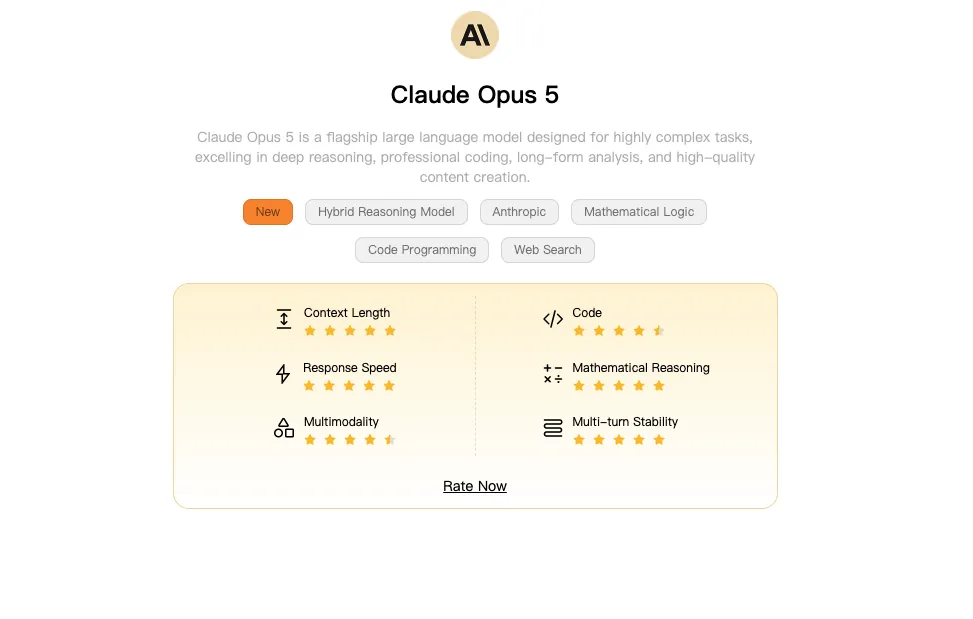
The Claude API is Anthropic’s developer interface for sending structured requests to Claude models from an application, script, or backend service. You send messages to an HTTPS endpoint and receive a structured response containing generated content plus metadata such as the model, stop reason, and token usage.
Claude API vs. Claude.ai subscriptions
API access and Claude.ai subscriptions solve different jobs. A Claude.ai plan gives a person access to Anthropic’s chat product. The API is metered developer access through Claude Console, with separate billing based on usage. Anthropic’s Help Center states that Claude Pro does not include Console API usage.
If you need the wider distinction between consumer plans, Claude Code, and token billing, see our complete Guía de precios de Claude. For this tutorial, the important point is simple: create and fund the API account separately from any Claude.ai subscription.
The five-step path to a first request
- Create an API key in Claude Console.
- Store it in the
ANTHROPIC_API_KEYenvironment variable. - Send a request to
https://api.anthropic.com/v1/messages. - Read the returned content and
usoobject. - Multiply each token category by its applicable per-million-token rate.
Claude API Pricing and Current Model IDs
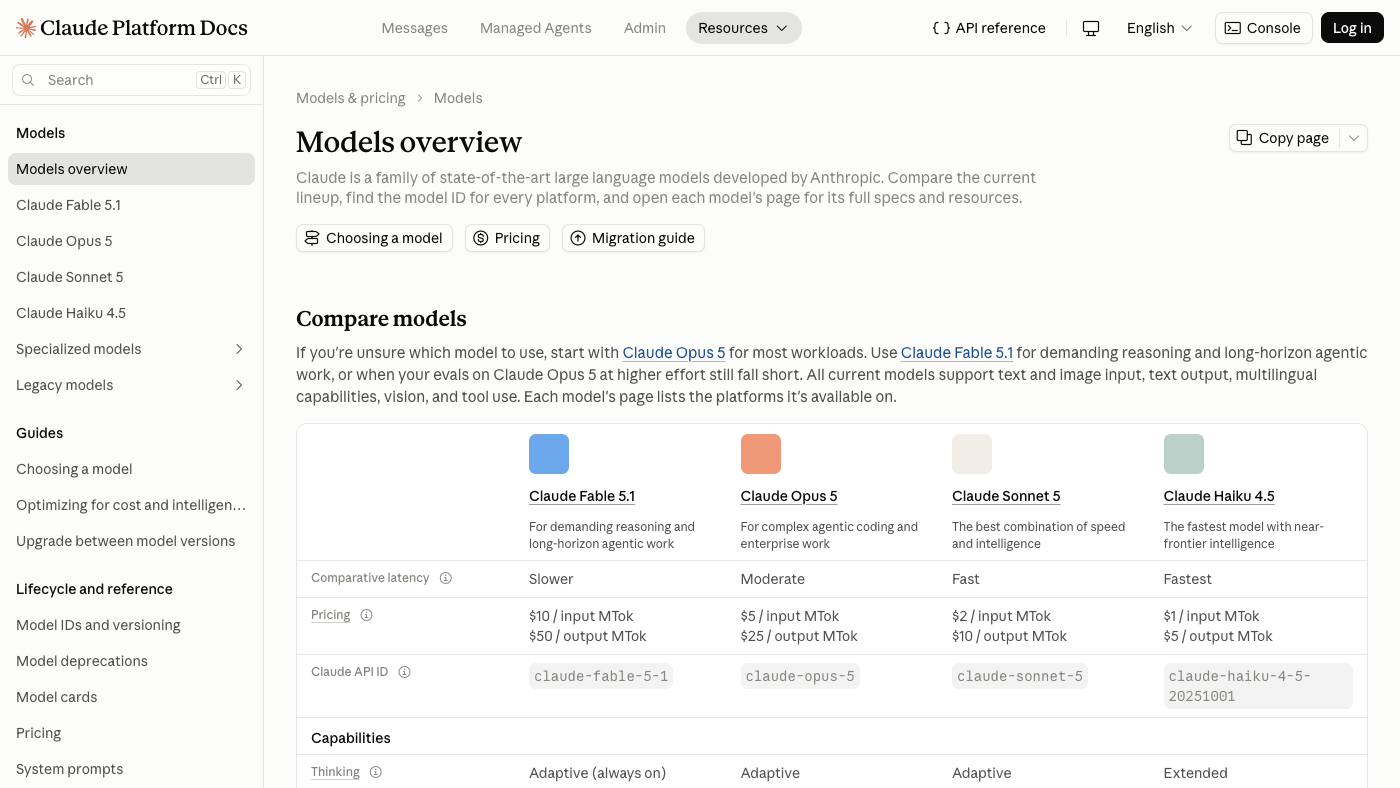
Anthropic lists API prices in US dollars per million tokens, often abbreviated as MTok. Input and output are billed separately. Prompt caching adds distinct rates for five-minute writes, one-hour writes, and cache reads, so a reliable estimate keeps those categories separate.
Current models and exact API IDs
| Modelo | ID de API | Entrada / MTok | Salida / MTok |
|---|---|---|---|
| Claude Fable 5.1 | claude-fábula-5-1 | $10 | $50 |
| Claude Opus 5 | claude-opus-5 | $5 | $25 |
| Claude Soneto 5 | claude-soneto-5 | $2 | $10 |
| Claude Haiku 4.5 | claude-haiku-4-5-20251001 | $1 | $5 |
Which model should you use for this tutorial?
The official Quickstart used claude-opus-5 when this guide was verified, so the cURL and Python examples below use the same ID. Treat Opus as a starting point for the tutorial, then choose the production model by workload, quality needs, latency, and budget. Model IDs and lifecycle status can change, so recheck the Models and deprecations pages before shipping long-lived code.
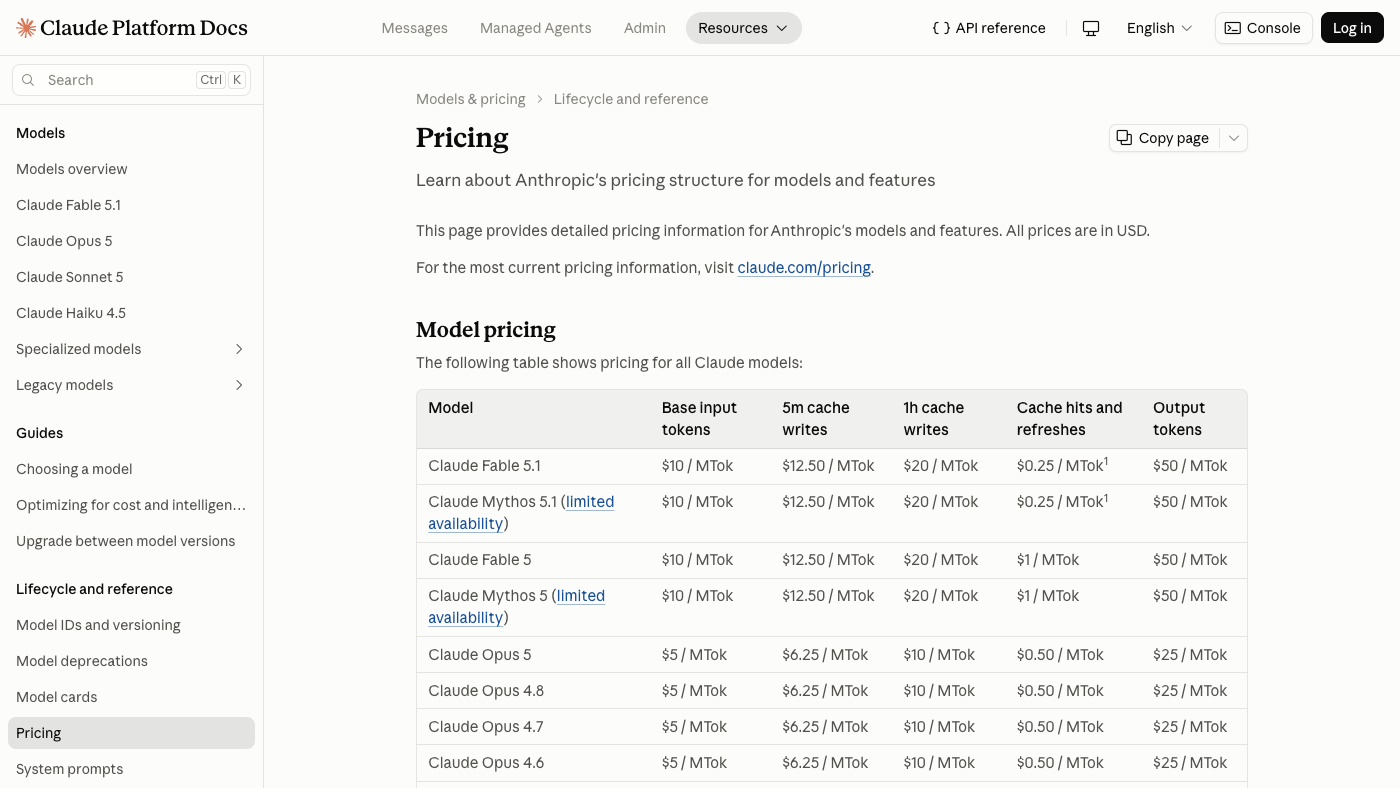
USD per million tokens. Bar length is normalized to the $50 output maximum.
claude-fábula-5-1claude-opus-5claude-soneto-5claude-haiku-4-5-20251001What You Need Before Your First Request
Create a Claude Console account and API key
Open Claude Console, create or select the appropriate organization, and create an API key. Anthropic warns that a new key is displayed only once, so store it in an approved secret manager or another secure location when it appears. Do not put the key into a screenshot, shared document, public repository, or browser-side JavaScript.
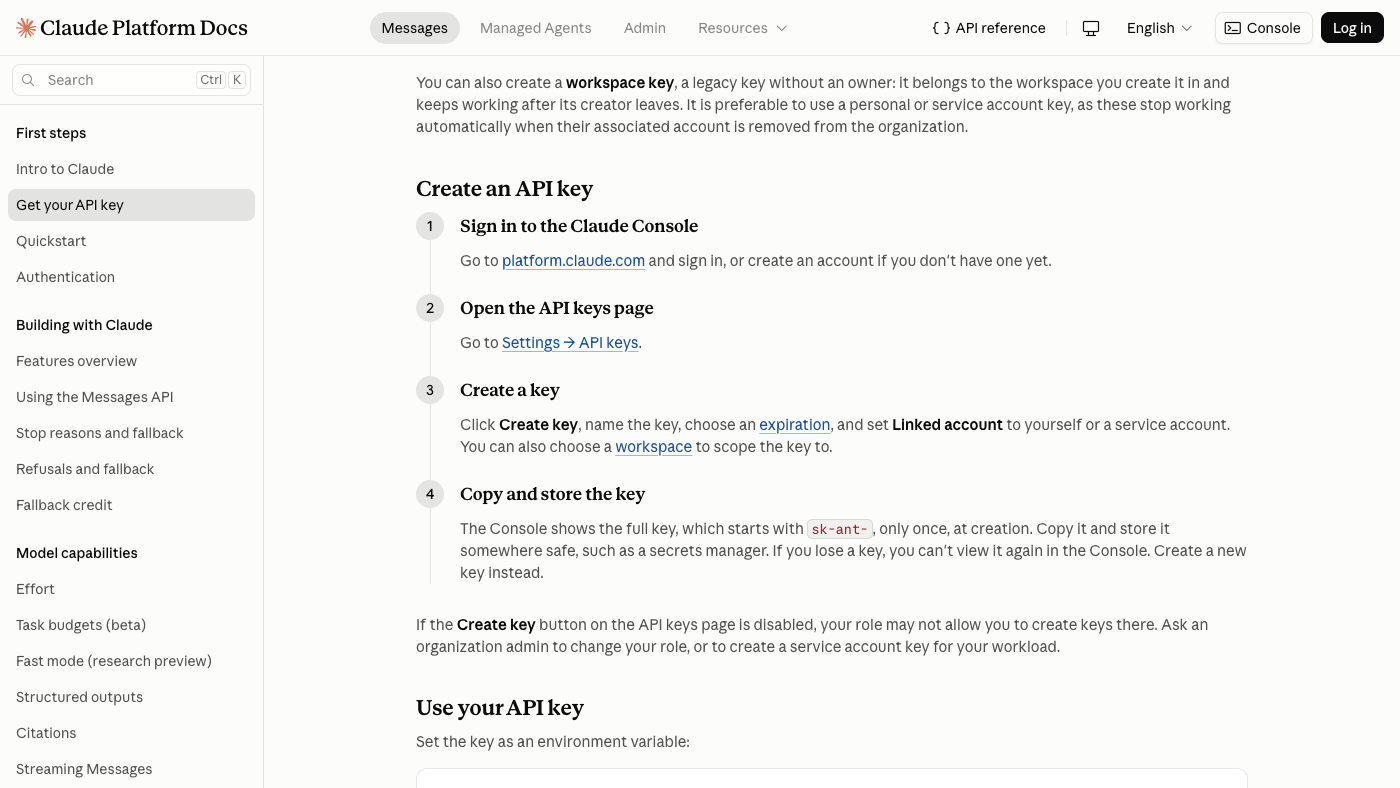
Store the key in an environment variable
The examples expect the variable ANTHROPIC_API_KEY. Enter the real value only in your private terminal or secret-management system. The command below reads the value without echoing it to the screen, then exports it for the current shell session:
read -s ANTHROPIC_API_KEY
export ANTHROPIC_API_KEY
Environment variables reduce accidental exposure, but they are not a complete secret-management strategy. Production applications should follow the hosting platform’s secret-storage and access-control practices.
Check billing and choose a safe test limit
API billing is separate from Claude.ai subscriptions. Anthropic says most organizations prepay usage credits, while organizations with monthly invoicing are an exception. Confirm that your Console account can make API requests, then keep the first request small with max_tokens: 128. That field limits generated output; it does not reserve or guarantee 128 billed output tokens.
Send Your First Claude API Request with cURL
cURL is useful for seeing the request contract directly. The example below uses the Messages endpoint, JSON content type, the API key header, Anthropic’s version header, the verified Quickstart model ID, and one user message.
Before you run either example, add your own API key and confirm that API billing is enabled for the organization. The code follows Anthropic’s documented request format and passed local syntax checks, but no live account response is included here.
What each header and JSON field does
| Part | Propósito |
|---|---|
content-type | Tells the endpoint that the request body is JSON. |
x-api-key | Authenticates the request with the value stored in the environment variable. |
anthropic-version | Selects the documented API contract used by the request. |
modelo | Chooses the exact Claude API model ID. |
max_tokens | Sets the maximum number of tokens Claude may generate for this response. |
mensajes | Provides the ordered conversation input, including each role and content value. |
If the command returns an error, read the HTTP status and error type before changing the request. Authentication and billing errors need an account fix, while malformed JSON or an invalid model ID needs a request change.
Send the Same Request with the Python SDK
Install the official Anthropic SDK
python -m pip install anthropicUse a virtual environment when that is part of your normal Python workflow. The SDK reads ANTHROPIC_API_KEY from the environment when anthropic.Anthropic() is created without an explicit key.
Run the equivalent Python request
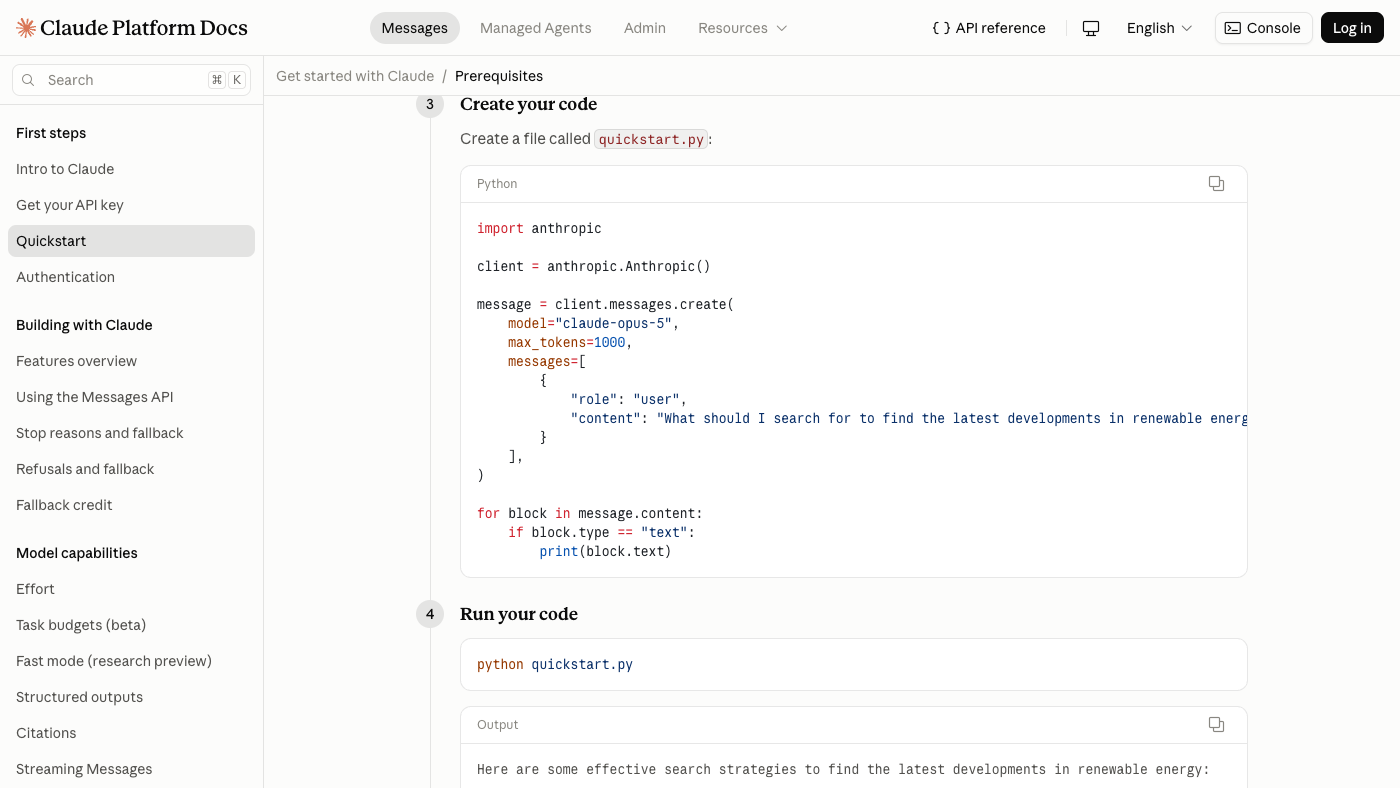
Read the returned text safely
A Message response can contain more than one content block, so the example checks each block’s type before printing text. Real applications should also keep the request ID available for support and logging without exposing it publicly, record the returned model and stop reason, and handle API errors explicitly.
Keep the content-block check even when you expect a short text answer. It makes the example easier to extend when a response contains multiple blocks, and printing message.usage gives you the numbers needed for the cost calculation below.
How to Read Usage and Calculate Cost
Find the response text, model, stop reason, and request ID
The Messages API response contract includes generated content, the model that handled the request, and a stop reason. The HTTP response also carries a request identifier that can help Anthropic support trace a problem. Log identifiers carefully; do not publish them with customer content or credentials.
Find input, output, and cache token usage
En uso object reports the token categories needed for cost analysis. At minimum, look for input and output tokens. When prompt caching is used, keep five-minute cache writes, one-hour cache writes, and cache reads separate because they have different rates. Anthropic’s Token Counting endpoint can estimate input tokens before a request, but the estimate can differ slightly from final input usage and has its own rate limits.
Convert token usage into an estimated cost
Calculate each category independently, then add the results. For a planning example using Claude Opus 5 at standard global rates, 1,000 uncached input tokens cost 1,000 x $5 / 1,000,000 = $0.005, while 300 output tokens cost 300 x $25 / 1,000,000 = $0.0075. The estimated total is $0.0125. Replace these illustrative token counts with the uso values from your own response.
Claude API Pricing Calculator
Use the calculator to vary the model, request count, token categories, billing mode, and inference geography. Batch processing prices eligible usage at 50% of standard rates. US-only inference applies a 1.1x factor to all token categories for eligible Claude 4.6+ models; Claude Haiku 4.5 is not eligible, so that combination returns an unsupported state.
Base token estimate in USD. Account-specific charges are excluded.
The estimate is a planning aid, not an invoice. It excludes taxes, currency conversion, negotiated terms, Fast Mode, server-tool charges, and account-specific conditions. Prices and eligibility can change, so recheck the official pricing page before making a purchasing or architecture decision.
The calculator above shows the cost shape of programmable, metered Claude API calls. For everyday work that spans several models and AI capabilities, GlobalGPT offers a different kind of value: one subscription brings multiple mainstream models and tools into one dashboard, making costs easier to anticipate while keeping research, writing, coding, and creative work out of separate subscriptions and scattered interfaces. Its CLI carries the same platform into terminal-based development and the production tools you already use. Our guide to working with multiple AI models in one place shows how the wider platform fits together.
Common Claude API Errors and Fixes
Start with the HTTP status and Anthropic error type, then inspect the request without exposing the key. The official meaning narrows the search; the likely cause still depends on your account, selected model, request shape, and traffic.
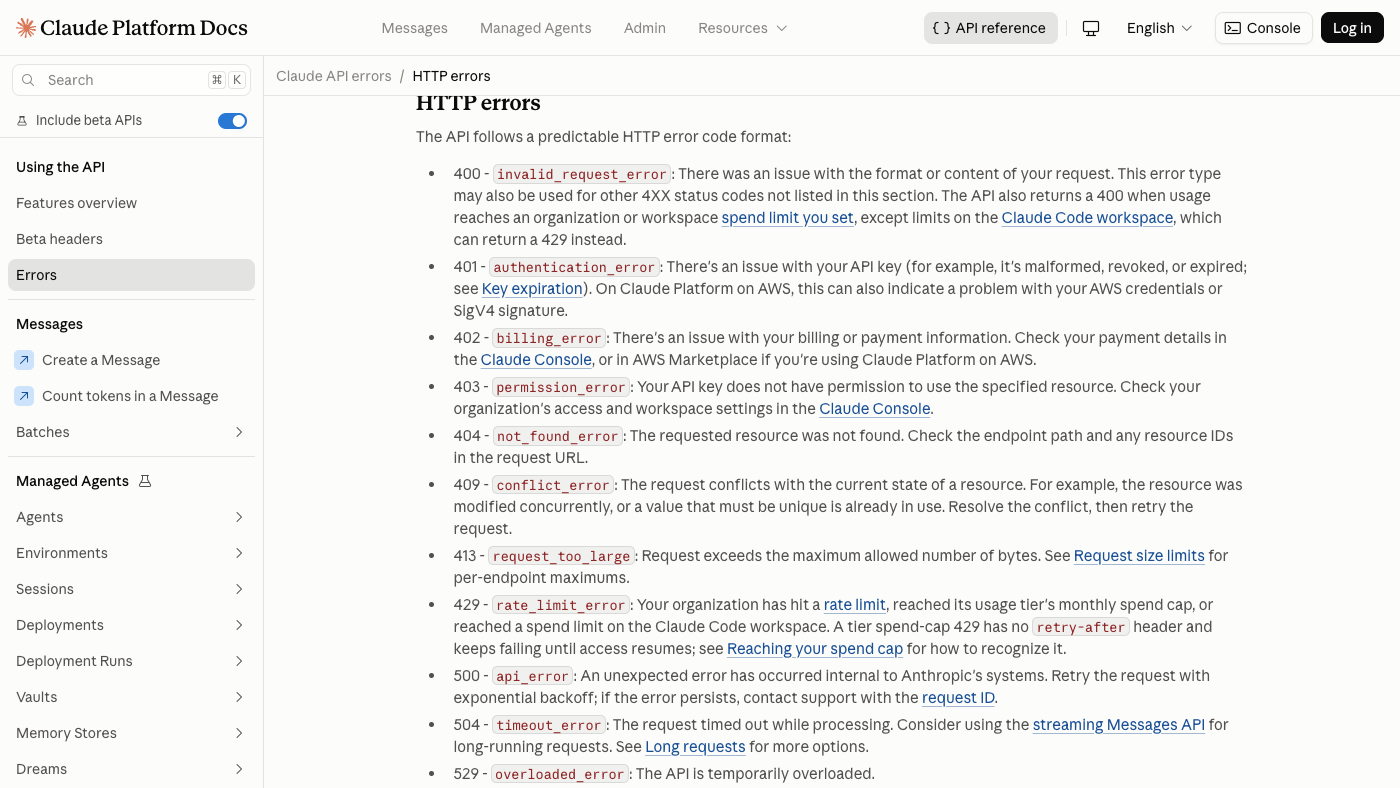
| Estado | Official boundary | What to check next | Retry? |
|---|---|---|---|
| 400 | Invalid request | Validate JSON, field names, roles, model ID, and parameter combinations. | Only after correcting the request. |
| 401 | Authentication error | Confirm the key exists, is active, and reaches the server through x-api-key. Never print it. | No blind retry; fix authentication first. |
| 402 | Billing or credit requirement | Check the organization’s API billing and available usage credits in Console. | After the billing condition is resolved. |
| 403 | Permission error | Check whether the key and organization can use the requested resource or model. | No blind retry; correct access first. |
| 404 | Resource not found | Check the endpoint, resource identifier, model lifecycle, and spelling. | Only after correcting the target. |
| 413 | Request too large | Reduce request size or split the input; do not merely increase max_tokens. | After reducing the request. |
| 429 | Límite de velocidad superado | Inspect rate-limit headers and your Console tier, reduce concurrency, and back off. | Yes, with controlled backoff. |
| 500 | Internal API error | Record the request ID, preserve idempotency, and check Anthropic status information. | Usually, with bounded backoff. |
| 504 | Gateway timeout | Check whether the request was unusually long and whether retrying could duplicate work. | Often, if the operation is safe to retry. |
| 529 | API temporarily overloaded | Reduce bursts and retry after backoff; do not treat overload as an authentication failure. | Yes, with bounded backoff. |
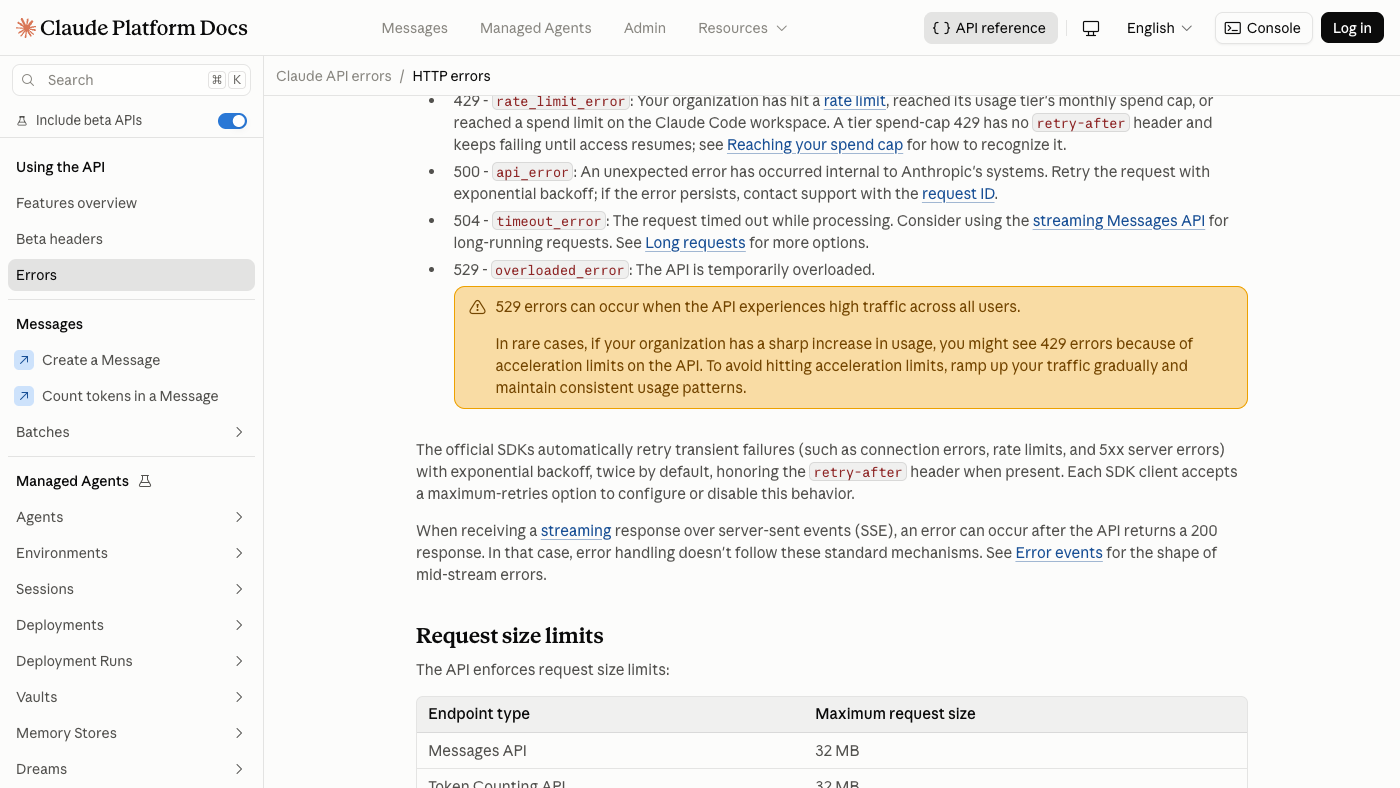
A safe debugging order
- Record the status, error type, timestamp, and request ID without recording the API key.
- Check the endpoint, headers, JSON syntax, model ID, and request-size boundary.
- Check organization billing, permissions, rate-limit headers, and current model lifecycle.
- Retry only errors that can reasonably be temporary, using bounded exponential backoff and jitter.
- If the error persists, reduce the request to the smallest reproducible case before contacting support.
Anthropic’s official SDKs retry connection errors, 429 responses, and 5xx responses twice by default. Application-level retry logic still needs limits and idempotency awareness, especially when a request can trigger tools or another external action.
How to Control Claude API Costs
Set conservative output limits
Start with the smallest max_tokens value that can still produce a useful answer. Measure actual output usage before increasing it. Shorter prompts can help, but removing instructions that prevent retries, errors, or unusable output can cost more overall.
Use prompt caching and Batch only when they fit
- Use prompt caching when a substantial prompt prefix repeats and the cache lifetime matches the workflow.
- Use Batch for work that can complete asynchronously; eligible Batch usage is priced at 50% of standard rates.
- Keep cache writes and reads separate in reporting so the saving is visible rather than assumed.
- Use US-only inference only when the residency requirement justifies its 1.1x token-price factor and the selected model is eligible.
Monitor usage, rate limits, and spend limits
Track request count, model ID, input and output usage, cache categories, retries, and errors. Set alerts or spend controls available to your organization, but do not assume that another account’s tier or limit applies to yours. Our deeper guide to Claude plans, API costs, and limits covers the wider billing routes.
Next Steps After Your First Request
Choose the right path for your next project
For an application, continue with Anthropic’s official Messages API reference, streaming guidance, tool-use documentation, model lifecycle pages, and your own logging and evaluation plan. Pin a model strategy deliberately, handle errors before adding traffic, and calculate costs from observed usage rather than prompt length alone.
If coding is your main use case, our guide to utilizar Claude AI para codificar covers practical ways to move from an interactive coding task to a repeatable developer workflow.
When a multi-model workspace is the better tool
Direct API access is the right route when you need code-level integration, developer billing, request metadata, or official platform controls. If your goal is interactive writing, research, planning, or comparing outputs across providers without building an application, a multi-model workspace may be more practical.
Preguntas frecuentes
Is the Claude API free?
No universal free API allowance is promised here. Claude API usage is billed separately through Claude Console, and Anthropic says most organizations fund usage with prepaid credits, while monthly-invoiced organizations are an exception. Check the current Console and official pricing information for your organization before sending requests.
How do I get a Claude API key?
Create a key in Claude Console for the appropriate organization. Anthropic warns that the new key is displayed only once, so store it securely when it appears. Load it through a server-side environment variable or secret manager, and never expose it in browser code, screenshots, or a public repository.
Which Claude model ID should I use?
This tutorial uses claude-opus-5 because that was the model in Anthropic’s official Quickstart when verified on September 8, 2026. Choose the model that fits your workload and budget, and recheck Anthropic’s Models and deprecations pages because model IDs, aliases, and lifecycle status can change.
What endpoint does the Claude API use?
The first request in this guide uses the Messages endpoint at https://api.anthropic.com/v1/messages. It sends JSON with content-type, x-api-key, and anthropic-version headers. Anthropic provides other API capabilities too, so use the reference page for the operation you are implementing.
Does Claude Pro include API credits?
No. Anthropic’s Help Center states that Claude Pro does not include usage through Claude Console. A Claude.ai subscription and API billing are separate products. Set up API billing in Console for developer requests, and use our Guía de precios de Claude for the wider plan comparison.
How much does one Claude API request cost?
Cost depends on the selected model, input tokens, output tokens, cache writes, cache reads, Batch mode, and eligible inference geography. Calculate each category as requests multiplied by tokens multiplied by its effective per-million-token rate, divided by one million, then add the categories. Use the calculator above for an estimate.
Why am I getting a 401 error?
A 401 is an authentication error. Confirm that the API key exists, remains active, belongs to the intended organization, and reaches the server in the x-api-key header. Do not print or share the key while debugging. Repeated retries will not repair a missing or invalid credential.
Why am I getting a 429 error?
A 429 means the request exceeded a rate limit. Limits can vary by organization and usage tier, so inspect the returned rate-limit headers and current Console or documentation. Reduce concurrency, respect retry timing, and use bounded exponential backoff with jitter instead of immediately repeating the same burst.
Source and freshness note: Model IDs, prices, API behavior, and support policies were checked against Anthropic’s official documentation on September 8, 2026. Review the current model and pricing pages before production use, then run the examples with your own Claude Console key, billing setup, and account access.