Большинству людей не нужно ещё одно специализированное приложение с ИИ. Им нужно меньше вкладок, меньше подписок и более быстрый способ превратить вопрос в черновик, изображение, идею для видео, резюме в формате PDF или рабочий процесс на основе API.
Универсальные инструменты на базе ИИ обещают упростить эту задачу, но под одним и тем же названием скрываются совершенно разные продукты. Некоторые из них представляют собой простые рабочие пространства для общения в чате и творческой работы. Некоторые — помощники в браузере. Некоторые — наборы инструментов для создания контента. Другие — платформы для разработчиков или корпоративная инфраструктура ИИ.
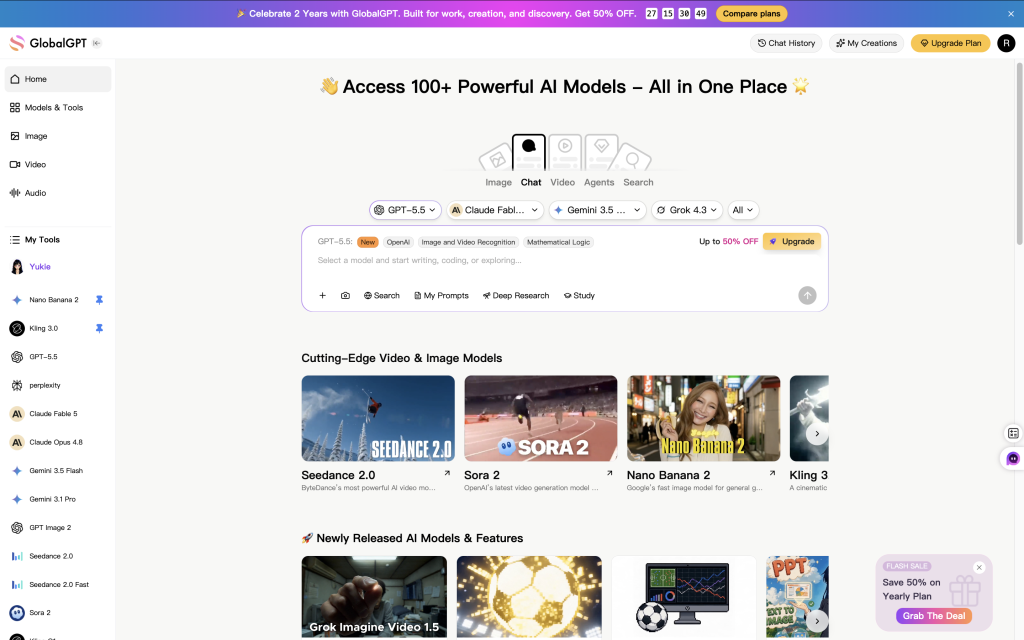
Если вам нужна практическая отправная точка, GlobalGPT — это самая простая общая рекомендация для многих пользователей, поскольку в его рабочей среде теперь все актуальные модели собраны в одном месте: GPT-6 Astra, GPT-5.6 Sol, Claude Opus 5, Gemini 3,7 Flash, Grok 4,6, DeepSeek V4.1 Flash, а также творческие модели, такие как GPT Image 2.5, Seedance 2.5, Sora 2, Veo 3.1 и Nano Banana 2. Такое сочетание полезно, если вам нужны исследования в стиле Perplexity, сравнение моделей, генерация изображений и видео без необходимости управления несколькими отдельными подписками. Для технических команд, разрабатывающих API или производственную инфраструктуру, шлюз или облачная платформа по-прежнему могут оказаться более подходящим решением.
Текущее состояние (11 сентября 2026 г.): the Страница с ценами на GlobalGPT В тарифе «Basic» стоимость составляет $11,9 при помесячной оплате или $5,8 в месяц при годовой оплате, а в тарифе «Pro» — $19,9 при помесячной оплате или $10,8 в месяц при годовой оплате.
Содержание
- Краткое сравнение
- 1. GlobalGPT
- 2. По
- 3. Моника
- 4. 1min.AI
- 5. Easy-Peasy.AI
- 6. EaseMate AI
- 7. OpenRouter
- 8. Eden AI
- 9. Together AI
- 10. ZenMux
- 11. AWS Bedrock
- Как выбрать
- ЧАСТО ЗАДАВАЕМЫЕ ВОПРОСЫ
Краткое сравнение лучших универсальных инструментов на базе искусственного интеллекта
Используйте эту таблицу в качестве краткого справочника. Цель заключается не в том, чтобы выбрать платформу с самым обширным набором функций. Лучше задаться вопросом: какая платформа максимально упрощает ваш реальный рабочий процесс.
| Платформа | Лучшая посадка | Наиболее интенсивное использование | Стоимость или способ использования | Основной компромисс |
|---|---|---|---|---|
| GlobalGPT | Обычные пользователи, авторы контента, опытные пользователи ИИ | Многомодельный чат, доступ к Perplexity, генерация изображений и видео | Бесплатная пробная версия и платные тарифные планы с использованием кредитов | Это не консоль API для разработчиков и не уровень корпоративной инфраструктуры |
| По | Пользователи, которым нужны много моделей для чата и настраиваемые боты | Мультимодельные диалоги, создание ботов, поиск ботов | Бесплатные и платные тарифные планы с системой баллов | Система баллов может быть менее понятной, чем простая подписка |
| Моника | Пользователи, ориентированные на работу в браузере | Помощник в боковой панели, краткие описания страниц, краткие описания видео на YouTube, библиотека подсказок | Бесплатное ежедневное использование и платные тарифные планы | Менее подходит для углубленного сравнения моделей или рабочих процессов разработчиков |
| 1min.AI | Любители и небольшие команды | Текст, изображения, аудио, видео, PDF-файлы, речь и модули заданий | Тарифные планы с бесплатными ежемесячными кредитами | Интенсивное использование моделей или медиаресурсов может привести к быстрому израсходованию кредитов |
| Easy-Peasy.AI | Маркетологи, блогеры, малые предприятия, преподаватели | Шаблоны, стиль бренда, написание текстов, транскрипция, боты, рабочие процессы по созданию контента | Ограничения плана на количество слов, медиа-кредиты, транскрипцию и ботов | Широкий набор инструментов, но не каждый модуль обладает такой же глубиной, как специализированный инструмент |
| EaseMate AI | Студенты, офисные работники, пользователи приложений для повышения личной продуктивности | PDF-файлы, презентации в формате PPT, резюме, OCR, аннотации, справка по браузеру, документы | Бесплатный доступ, платные тарифные планы и наборы кредитов | Доступ к расширенным функциям и возможность использования в больших объемах зависят от установленных ограничений |
| OpenRouter | Опытные пользователи и разработчики | Обширный каталог моделей, фиксированные цены, унифицированный API, BYOK | Тарифы, зависящие от объема использования, и комиссии платформы | Более технически ориентированная, чем рабочая среда для начинающих в области ИИ |
| Eden AI | Команды SaaS и разработчики продуктов | Единый API для больших языковых моделей (LLM), OCR, распознавания речи, обработки изображений, перевода и работы с документами | Стоимость услуг поставщика плюс комиссия платформы | Требуется знание API и опыт интеграции продуктов |
| «Together AI» | Стартапы в сфере ИИ, разработчики, команды по машинному обучению | Бессерверное вычисление, пакетное вычисление, точная настройка, конечные точки, кластеры графических процессоров | Тарифы на использование инфраструктуры | Слишком технический язык для повседневного общения, письма или работы с документами |
| ZenMux | Пользователи, заинтересованные в сравнении моделей и концепциях контроля затрат | Единая модель доступа, параллельное сравнение, концепция компенсации кредитов | Уровни подписки и доступ по модели «оплата по факту» | Прежде чем руководствоваться правилами выплаты компенсации, следует ознакомиться с подробностями соответствующей политики |
| AWS Bedrock | Команды предприятий, работающие в среде AWS | Корпоративные приложения на основе генеративного ИИ, безопасность, агенты, настройка, развертывание | Ценообразование AWS: по модели, уровню и объему использования | Слишком мощная для обычного повседневного использования ИИ |
1. GlobalGPT — лучшее универсальное рабочее пространство для работы с моделями, исследований, изображений и видео
GlobalGPT — это наиболее универсальная рекомендация, если вам нужна единая рабочая среда на базе ИИ для повседневного общения, поиска информации, написания текстов, сравнения моделей, генерация изображений, а также создание видео. Это не просто чат-бот и не просто инструмент для творчества. Его ценность заключается в том, что несколько распространенных рабочих процессов с использованием ИИ стали более тесно интегрированы друг с другом.
Это важно, когда ваша работа не ограничивается одним форматом. Тема может начинаться с вопроса, превращаться в сравнение, перерастать в черновик, а позже для неё могут понадобиться изображения или концепция короткого видео. Вместо того чтобы на каждом этапе открывать новый инструмент, GlobalGPT предлагает вам единое место, где можно пройти весь этот процесс.
Лучшая посадка
Выберите GlobalGPT, если вам нужна удобная и не требующая технических знаний платформа для повседневной работы с ИИ: исследования, написание текстов, составление резюме, переключение между моделями, создание изображений и видео. Этот сервис также подойдет вам, если вы уже оплачиваете несколько подписок на ИИ-сервисы и ищете более простой способ сравнивать результаты работы разных моделей.
Что предлагает
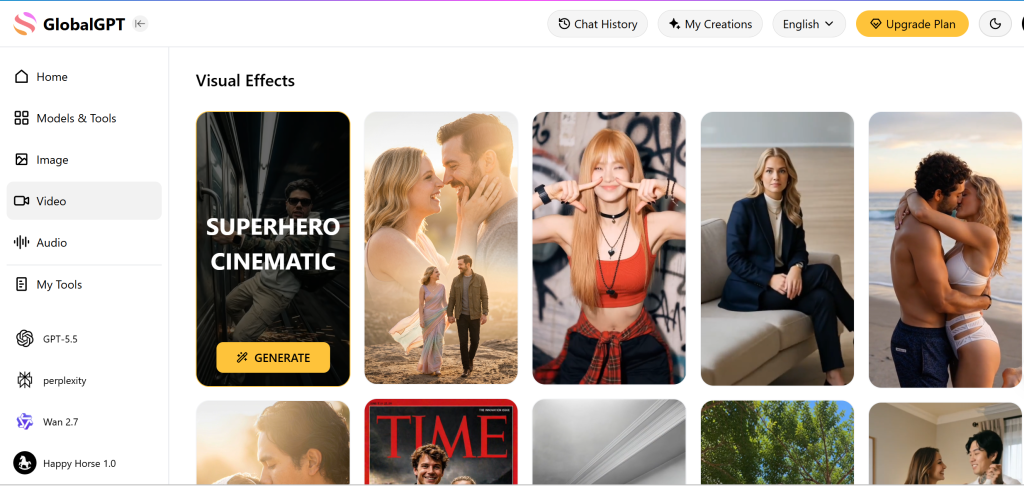
GlobalGPT построена на основе единой учетной записи, объединяющей несколько моделей искусственного интеллекта и инструментов для творчества. Платформа объединяет в едином рабочем пространстве чат с ИИ, рабочие процессы в стиле поиска с использованием ИИ, помощь в написании текстов, генерацию изображений, генерацию видео и шаблоны. Именно поэтому она лучше работает в качестве универсального рабочего пространства с ИИ, чем в качестве узконаправленного одноцелевого приложения.
- Мультимодельный доступ полезен в тех случаях, когда необходимо протестировать различные варианты ответов, не запуская при этом несколько платформ.
- Рабочая среда достаточно проста для пользователей, не обладающих техническими знаниями, поэтому она больше напоминает обычное приложение с ИИ, чем консоль разработчика.
- Благодаря творческим инструментам этот сервис будет полезен авторам, маркетологам и командам, которым в рамках одного рабочего процесса требуются текст, изображения и видео.
- Благодаря доступу к функции «Perplexity» и ведущей модели этот инструмент становится более универсальным решением для повседневного использования, чем инструменты, предназначенные исключительно для написания текстов или работы с изображениями.
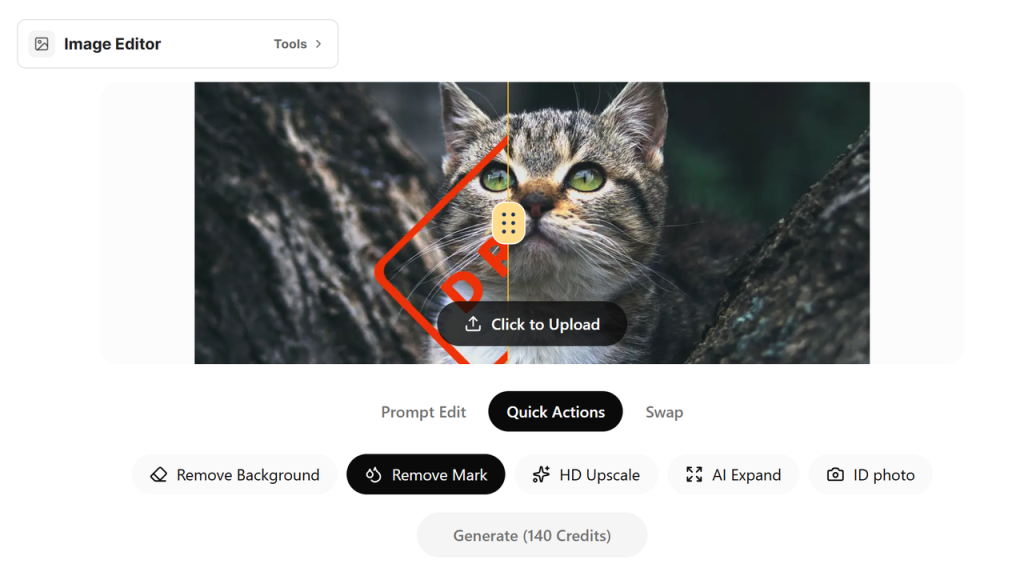
GlobalGPT также является одним из лучших вариантов, если для вас важно создание визуального контента. Платформа объединяет текстовые модели с механизмами обработки изображений и видео, благодаря чему авторы могут воплощать свои идеи в визуальный контент в рамках одной среды. Если вы сравниваете варианты создания видео с помощью ИИ, то Альтернативное руководство по Соре и Клингу — это полезная статья для дальнейшего чтения.
Доступ, цены и условия использования
GlobalGPT предлагает небольшая бесплатная пробная версия для новых пользователей, а затем платные тарифные планы на основе кредитов. В приведенной ниже таблице представлена структура тарифного плана начального уровня, использованного для данного сравнения.
| План | Месячная цена | Эквивалент годового счета | Ежемесячные начисления | Лучше всего подходит для |
|---|---|---|---|---|
| Бесплатная пробная версия | $0 | – | 3 бесплатных кредита для чата для новых пользователей | Ознакомление с основными функциями чата перед выбором платного тарифа |
| Базовый | $11,9 в месяц | $5,8 в месяц при годовом выставлении счетов | 12 тыс. кредитов в месяц | Несложные и умеренно сложные задачи: общение в чате, поиск информации, написание текстов и тестирование моделей |
| Про | $19,9 в месяц | $10,8 в месяц при годовом выставлении счетов | 20 тыс. кредитов в месяц | Более частое использование мультимодельных подходов, генерация изображений и творческие рабочие процессы |
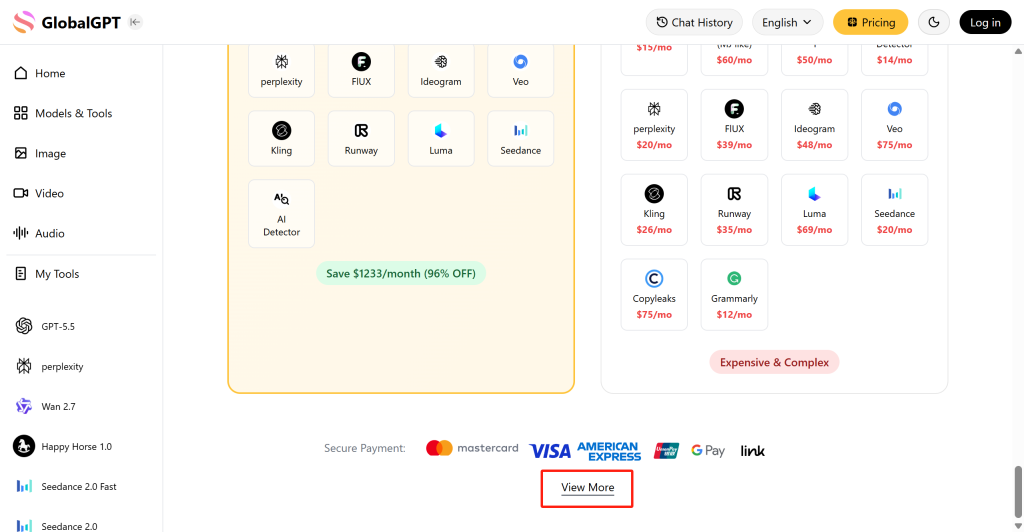
С практической точки зрения важно отметить, что стоимость кредитов не одинакова для всех моделей и инструментов. Несложные задачи, связанные с чатом и написанием текстов, могут занимать больше времени, в то время как премиум-модели, генерация изображений или видео могут расходовать кредиты быстрее. В разделе «Цены» пользователи могут ознакомиться с подробной информацией о стоимости токенов для конкретных моделей, прежде чем выбирать один тарифный план для выполнения ресурсоемких задач.
Компромиссы
- Это не лучший выбор, если вам в первую очередь нужны маршрутизация API, точная настройка, развертывание моделей или бэкенд-инфраструктура искусственного интеллекта.
- Если вам нужна только одна узкоспециализированная функция, например, инструмент для создания шаблонов текстов или профессиональный видеоредактор, специализированный продукт, возможно, всё же окажется более эффективным.
- Создание файлов с большим объемом данных может расходовать кредиты быстрее, чем обычный чат, поэтому пользователям следует ознакомиться с текущими тарифами и стоимостью медиафайлов перед выбором тарифного плана.
Рекомендация
Выберите Рабочая область GlobalGPT если вам нужен один универсальный ресурс для общения, поиска информации, написания текстов, сравнения моделей, просмотра изображений и видео. Не стоит использовать его в качестве замены консоли API для разработчиков, платформы для тонкой настройки или полноценного продукта для корпоративной инфраструктуры.
2. Poe — лучший вариант для чатов с несколькими моделями и настраиваемых ботов
Poe, разработанный компанией Quora, является одним из самых известных хабов моделей искусственного интеллекта. Он объединяет популярные модели от ведущих поставщиков ИИ и дополняет их обширной экосистемой ботов. Если ваша главная цель — общаться с различными моделями, тестировать ботов из сообщества или создать собственного бота без программирования, Poe станет одним из лучших вариантов.
Лучшая посадка
Выберите Poe, если ваш рабочий процесс в основном построен на диалогах. Этот сервис особенно подходит тем пользователям, которые хотят опробовать различные модели чата, сохранять разные образы ботов, знакомиться с ботами, созданными сообществом, или создавать простые собственные боты без написания кода.
Что предлагает
Poe построен на основе быстрого доступа к множеству ботов и моделей. В исходной статье о платформе она описывается как пространство, объединяющее OpenAI, Anthropic, Google и другие семейства моделей, на которое накладываются боты, созданные сообществом. Именно эта экосистема ботов делает Poe отличным от обычного интерфейса чат-бота.
- Пользователи могут переключаться между множеством моделей искусственного интеллекта и ботами сообщества через единый интерфейс.
- Создание пользовательских ботов делает их полезными для разработчиков подсказок, ролевых игр, помощников по программированию, помощников по написанию текстов и нишевых рабочих процессов.
- Разработчики ботов могут публиковать ботов и монетизировать их с помощью системы для авторов Poe.
- Poe также предоставляет доступ к API для разработчиков, предназначенный для тех пользователей, которые хотят работать с моделями через единый интерфейс.
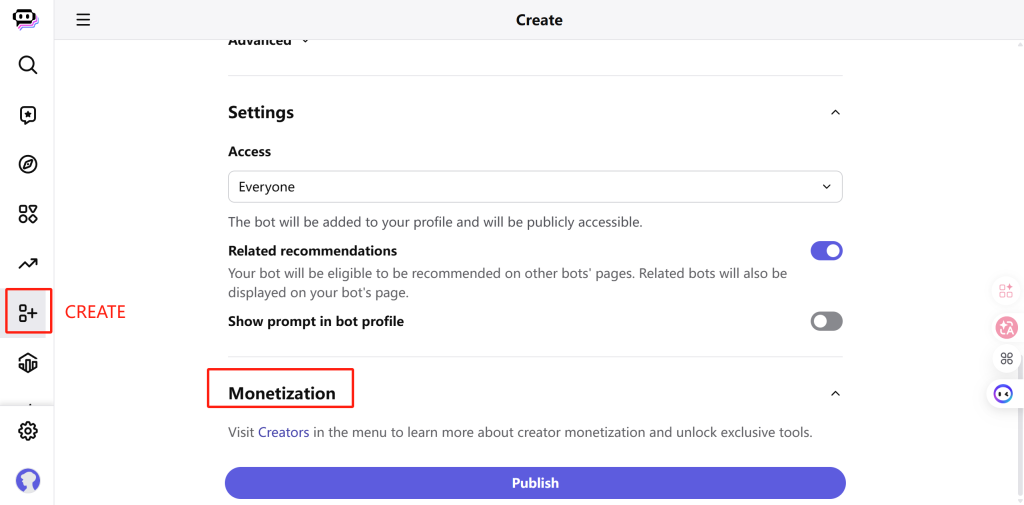
Доступ, цены и условия использования
Poe доступен в веб-версии, в мобильных приложениях для iOS и Android, а также в настольных приложениях для macOS и Windows. Некоторые пользователи также используют расширения, созданные сообществом, для доступа к Poe через браузер.
По использует систему баллов. В описании бесплатной версии указано, что она предоставляет 300 баллов в день. Стоимость тарифного плана «Basic» составляет $4,99 в месяц или $4,17 в месяц при годовой оплате, с 10 тыс. баллов в день. Стоимость тарифного плана «Plus» составляет $19,99 в месяц или $16,67 в месяц при годовой оплате, с 660 тыс. баллов в месяц.
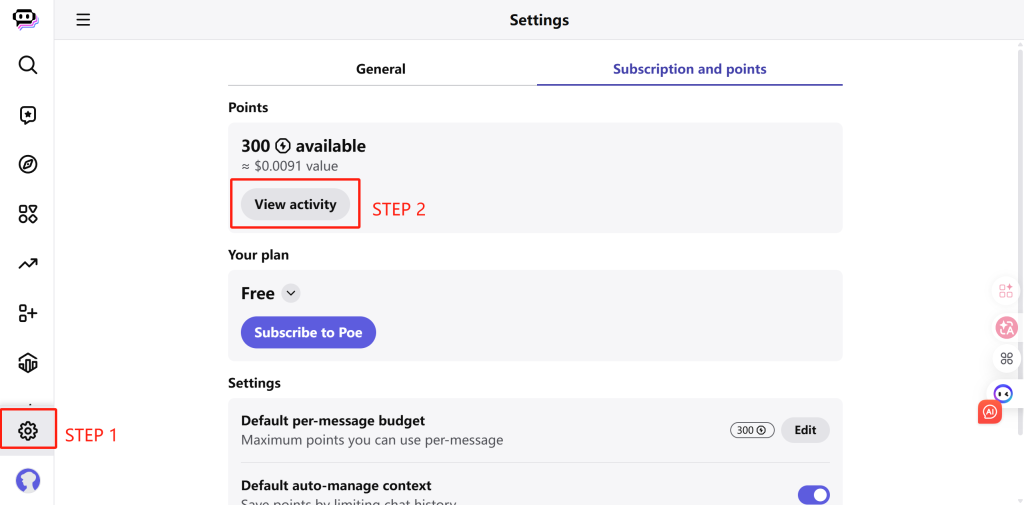
Компромиссы
- Система баллов может быть гибкой, но при этом она делает порядок использования менее понятным, чем в случае простой ежемесячной подписки.
- Poe лучше всего подходит для работы с чатами и ботами, а не для работы с пакетами документов, повышения продуктивности в браузере или творческой обработки изображений и видео.
- Если вам нужна предсказуемая стоимость при интенсивном использовании моделей, вам необходимо понять, как различные боты и модели расходуют баллы.
Рекомендация
Выберите Poe, если вам нужен полнофункциональный мультимодальный чат-хаб и вам нравится идея создания собственных ботов. Выберите другой инструмент, если ваша основная задача — генерация изображений, создание видео, управление документооборотом или корпоративная ИИ-инфраструктура.
Если проблема заключается в системе начисления баллов, сравните Лучшие альтернативы Poe AI прежде чем перейти на платный тарифный план.
3. Monica — лучший помощник в браузере для повседневной работы в Интернете
Monica — отличный выбор, если вы хотите, чтобы ИИ сопровождал вас во время просмотра веб-страниц, чтения и написания текстов. Вместо того чтобы заставлять вас копировать текст в отдельное приложение для чата, Monica работает как помощник в браузере и инструмент для повышения продуктивности.
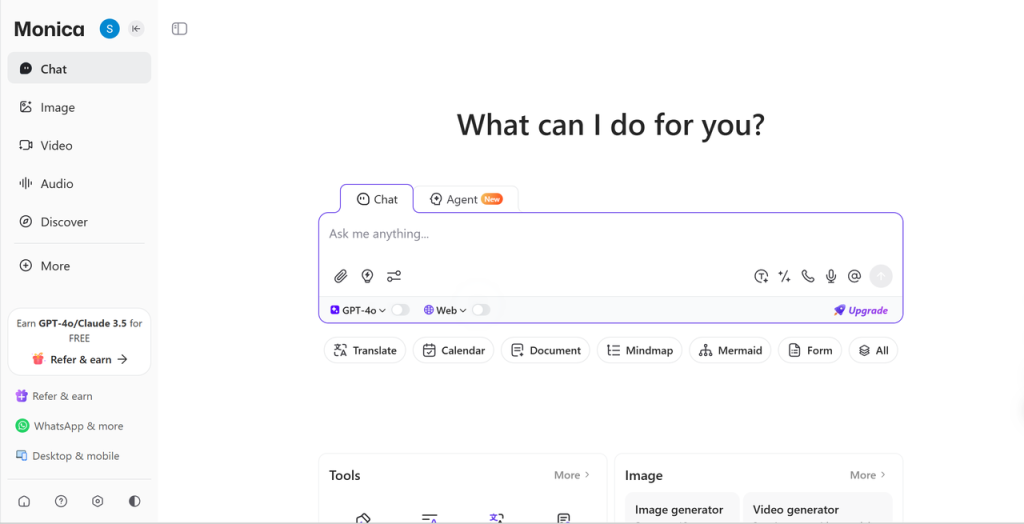
Лучшая посадка
Выберите «Монику», если большая часть вашей работы с ИИ приходится на время просмотра веб-страниц: составление резюме страниц, перевод контента, чтение PDF-файлов, работа с видео на YouTube, составление черновиков писем или доработка коротких текстов на других сайтах.
Что предлагает
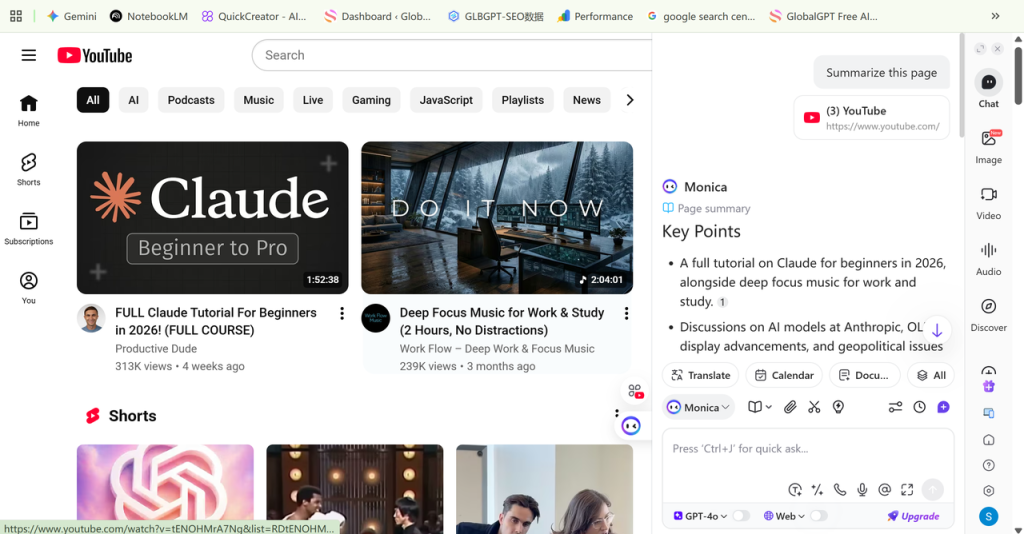
В статье на платформе Моника представлена как ИИ-помощник, работающий в браузере и предлагающий множество шаблонов. Её главное преимущество — удобство. Вы можете обратиться к ИИ, не отрываясь от просмотра веб-страницы, документа, видео или электронного письма, вместо того чтобы переключаться между вкладками и вставлять текст туда и обратно.
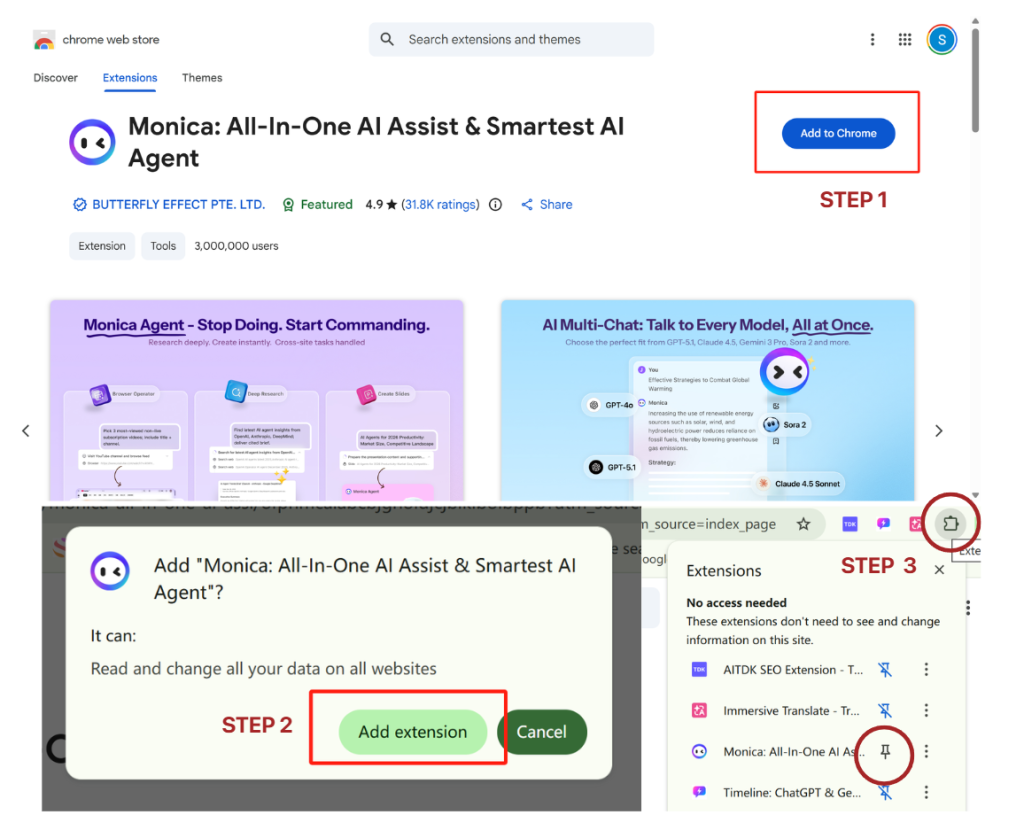
- Он может создавать краткие резюме длинных статей, веб-страниц, файлов PDF и видео на YouTube.
- Он может помочь в составлении писем, редактировании документов, переводе текста и ответить на вопросы о просматриваемой вами странице.
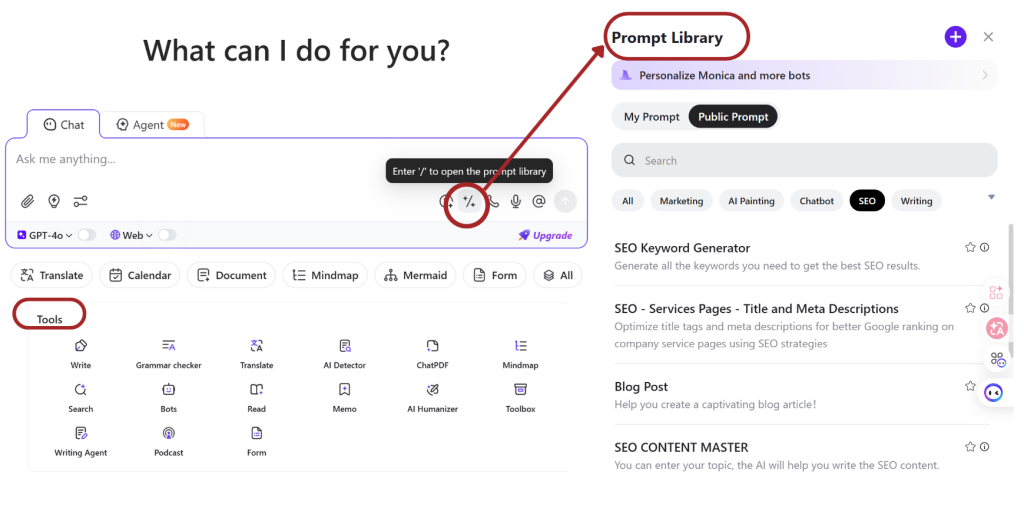
- Его библиотека подсказок предлагает пользователям готовые варианты подсказок для ChatGPT, Claude, Gemini и других моделей.
- Доступ через веб-интерфейс, мобильные устройства, настольные компьютеры и расширения для браузеров позволяет легко использовать ИИ при выполнении обычных задач просмотра веб-страниц.
Доступ, цены и условия использования
Monica поддерживает рабочие процессы в веб-среде, на мобильных устройствах, на настольных компьютерах и в виде расширений для браузеров. Бесплатная версия предоставляет 40 ежедневных запросов к базовым моделям, а также ограниченные пробные версии для более продвинутых функций, таких как генерация изображений и видео, ChatPDF и ИИ-агенты.
У Моники текущие планы и цены Предлагаются тарифные планы «Pro», «Pro+» и «Unlimited». Доступ к моделям и лимиты на использование функций зависят от тарифного плана, поэтому перед покупкой рекомендуем сравнить действующие лимиты.
Компромиссы
- Monica — это не в первую очередь продукт, предназначенный для разработчиков или для инфраструктуры.
- Это не так актуально, если вам не нужна боковая панель браузера или если большая часть вашей работы с ИИ происходит в специальном рабочем пространстве для моделей.
- Для интенсивной творческой работы может потребоваться платформа с более расширенными инструментами для работы с изображениями и видео.
Рекомендация
Выберите Monica, если вам нужен ИИ-помощник для повседневного просмотра веб-страниц, чтения, просмотра видео, перевода и написания текстов. Выберите GlobalGPT, Poe или OpenRouter, если ваша главная цель — сравнение моделей, а не повышение продуктивности в браузере.
4. 1min.AI — лучший набор инструментов на основе кредитной системы для повседневных творческих задач
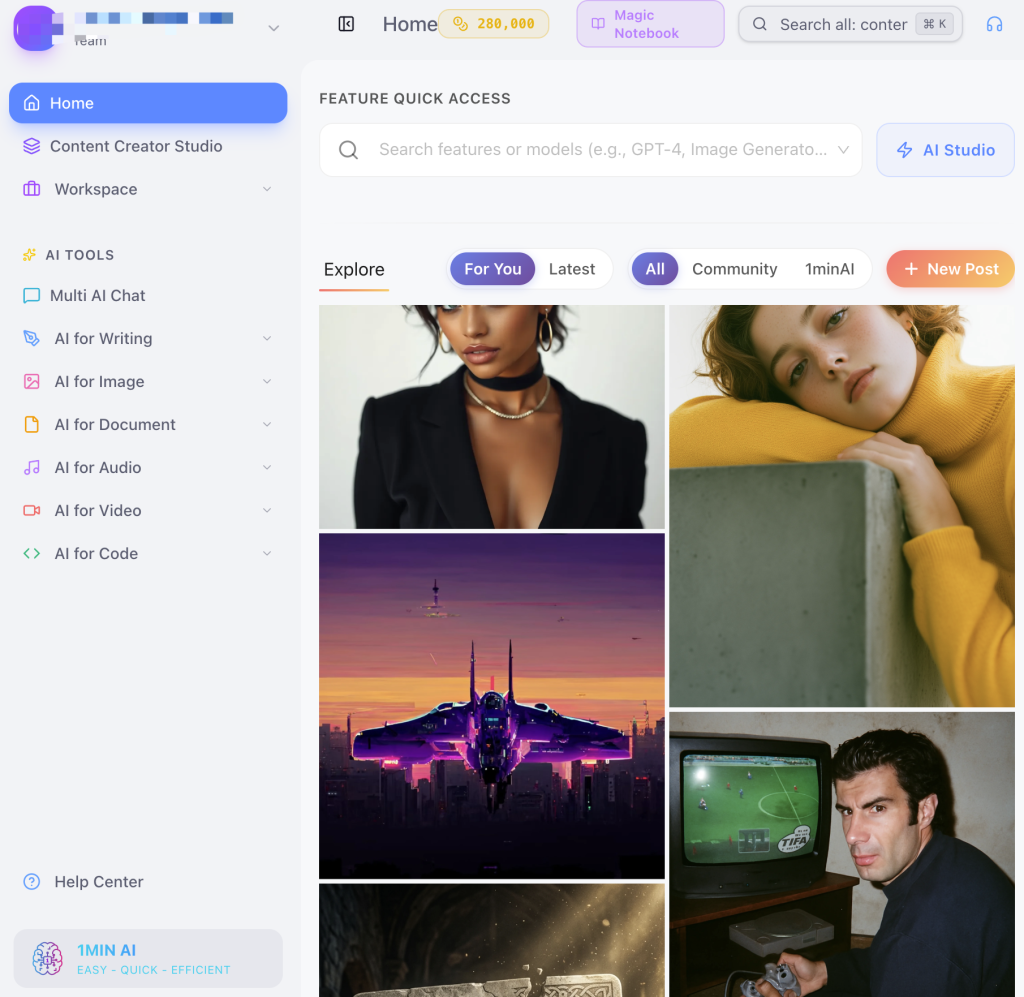
1min.AI — это практичный универсальный набор инструментов на базе искусственного интеллекта для пользователей, которым нужен целый ряд небольших инструментов ИИ, объединенных в одной панели управления. Он охватывает такие функции, как написание и переработка текстов, генерация и редактирование изображений, обработка аудио- и видеоматериалов, работа с PDF-файлами, преобразование речи в текст и преобразование текста в речь.
Лучшая посадка
Выберите 1min.AI, если вы знаете, какую задачу хотите выполнить, но не хотите подбирать отдельный сервис ИИ для каждой задачи. Этот сервис отлично подходит для любителей-креативщиков, небольших команд и пользователей, которые хотят опробовать множество функций ИИ с помощью одной панели управления.
Что предлагает
1min.AI скорее напоминает набор инструментов ИИ для решения конкретных задач, чем чисто чат-интерфейс. Вы начинаете с выбора модуля — например, написания текста, переработки текста, анализа PDF-файлов, инструментов для работы с изображениями, аудио или видео, преобразования речи в текст или текста в речь — а затем тратите кредиты в зависимости от задачи и используемой модели.
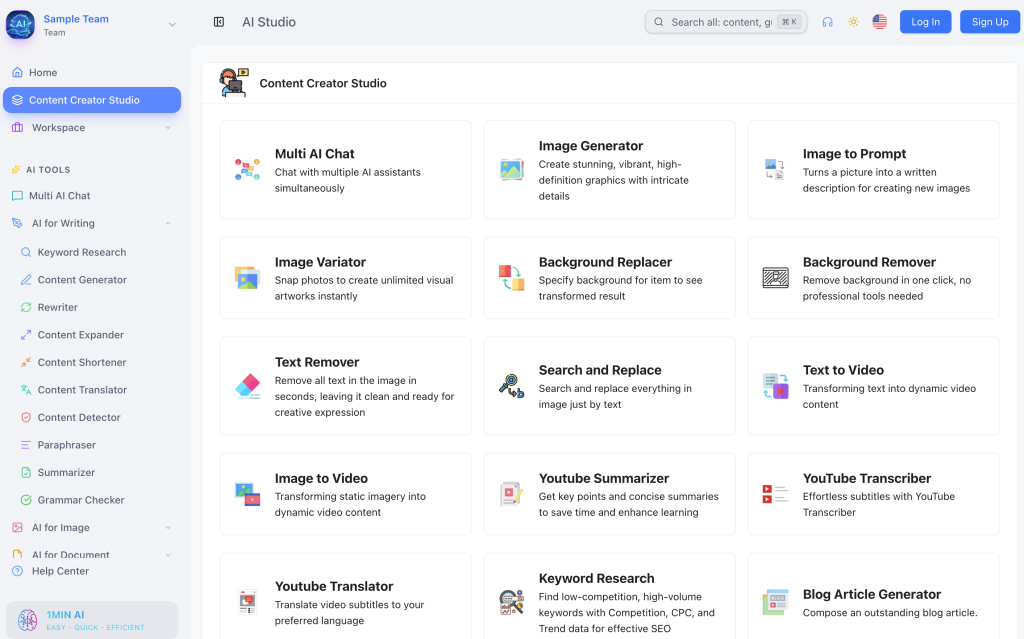
- Четко структурированные модули задач упрощают начало работы пользователям, не обладающим техническими знаниями.
- Многие инструменты могут запускать различные модели, в том числе модели для чата, обработки изображений, аудио и видео.
- Ежедневные и ежемесячные бесплатные кредиты позволяют легко опробовать платформу, прежде чем вносить оплату.
- Функции для команд помогут небольшим командам обмениваться созданным контентом и управлять участниками на тарифных планах более высокого уровня.
Доступ, цены и условия использования
Как и многие универсальные инструменты на базе искусственного интеллекта, 1min.AI использует систему ценообразования на основе кредитов. Система Бесплатный тарифный план представлен под кодом $0 со всеми функциональными возможностями продукта, ограниченными возможностями искусственного интеллекта, 3 днями хранения данных, ограниченным доступом к библиотеке подсказок, ограниченным брендовым голосом и неограниченным количеством бесплатных кредитов.
Сайт Профессиональный план Стоимость тарифного плана составляет $6.5 в месяц при годовой оплате; он включает все функции искусственного интеллекта, 3 месяца хранения данных, неограниченный доступ к библиотеке подсказок, неограниченное использование фирменного голоса и 1 миллион бонусных кредитов в месяц. Тарифный план «Business» стоит $10 в месяц при годовой оплате и включает 12 месяцев хранения данных, 2 миллиона бонусных кредитов в месяц и функции для работы в команде с участием до 10 членов. Тарифный план «Enterprise» стоит $7 за каждого участника в месяц при годовой оплате и включает неограниченное хранение данных, 2 миллиона бонусных кредитов в месяц на каждого участника и неограниченное количество участников.
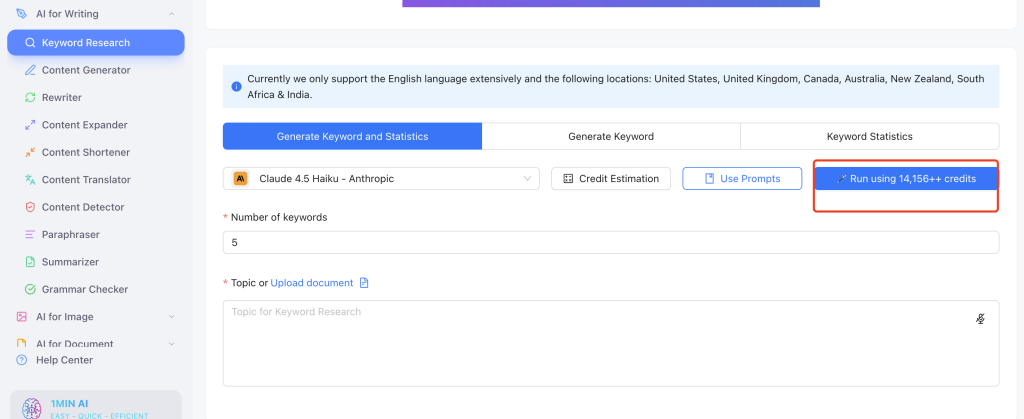
Важное предупреждение касается скорости расходования кредитов. В приведенном примере при регистрации был предоставлен бонус в размере 265 000 кредитов, однако одно использование модели «Claude 4.5» обошлось в 14 156 кредитов. Это не означает, что платформа плохая, но указывает на то, что более сложные модели и повторяющиеся медиа-задачи могут расходовать кредиты быстрее, чем ожидалось.
Компромиссы
- Кредиты могут быстро иссякнуть, если пользователи выбирают более мощные модели, функции генерации изображений или видео, либо выполняют повторные запросы.
- Качество инструментов может варьироваться, поскольку наличие широкого набора инструментов не гарантирует, что каждый модуль будет лучшим в своём классе.
- Некоторые модули в значительной степени зависят от структуры командной строки, поэтому даже готовый инструмент может потребовать доработки или повторной попытки.
Рекомендация
Выбирайте 1min.AI, если вам нужен широкий набор инструментов на базе ИИ для повседневных творческих задач. Выбирайте другую платформу, если вам требуется углубленное сравнение моделей, масштабное создание видео, расширенная автоматизация или инфраструктура для разработчиков.
Если ваша главная цель — оптимизировать текущие расходы, сравните Как получить доступ ко всем инструментам искусственного интеллекта в рамках одной подписки прежде чем выбрать рабочий процесс с интенсивным использованием кредитов.
5. Easy-Peasy.AI — лучший вариант для маркетинга и шаблонов текстов
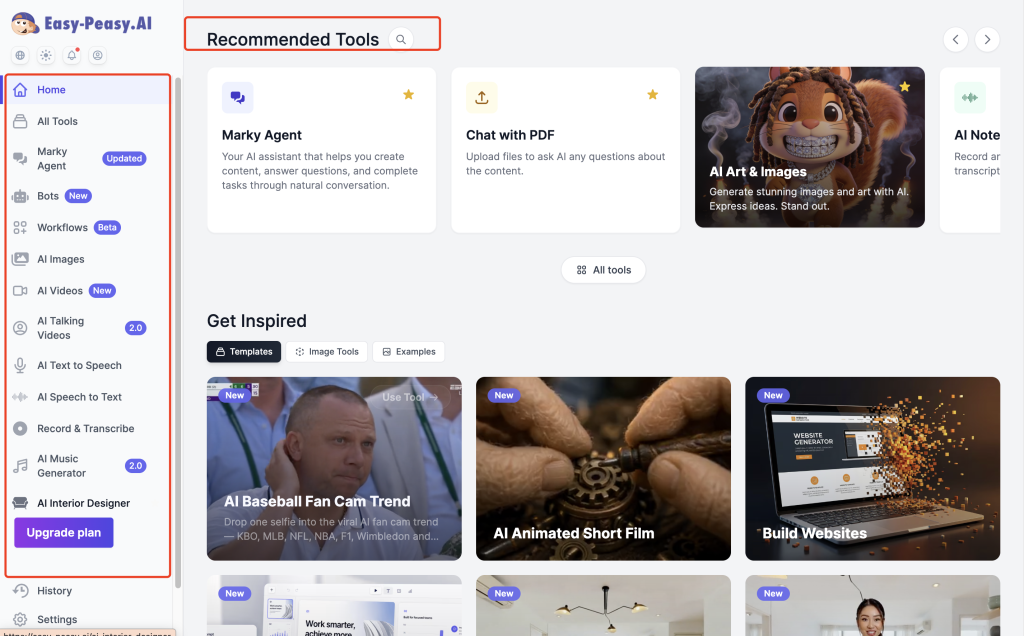
Easy-Peasy.AI лучше подходит для пользователей, которым нужна помощь ИИ в маркетинге, ведении блогов, образовании, написании писем, составлении описаний товаров и создании делового контента. Эта платформа скорее напоминает инструмент для организации рабочего процесса по созданию контента, чем универсальный шлюз к моделям ИИ.
Лучшая посадка
Выберите Easy-Peasy.AI, если ваша основная работа с ИИ заключается в создании типового контента: постов для блогов, текстов для социальных сетей, писем, рекламных объявлений, описаний товаров, фирменного стиля, образовательного контента и деловой переписки.
Что предлагает
Easy-Peasy.AI представляет собой универсальную платформу, ориентированную на контент, которая включает в себя функции написания текстов, чата, генерации изображений и видео, транскрипции, преобразования текста в речь, шаблонов, формирования фирменного стиля и создания ботов. Практическое отличие заключается в том, что пользователи обычно начинают с задачи или шаблона, а не с выбора модели.
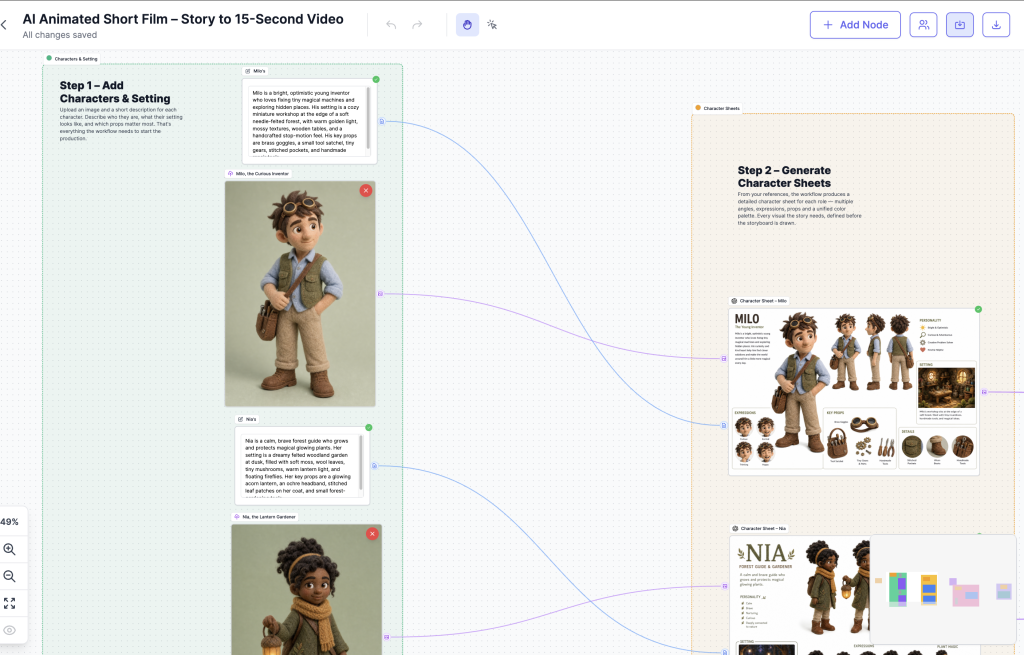
- Более 300 шаблонов и более 35 языков делают его полезным инструментом для выполнения повторяющихся задач по написанию текстов и маркетингу.
- Шаблоны помогают пользователям быстрее создавать посты, рекламные объявления, электронные письма, резюме, образовательные материалы, описания товаров и деловые тексты.
- Голос бренда, боты, транскрипция и преобразование текста в речь позволяют значительно усовершенствовать рабочие процессы небольших команд.
- Этот интерфейс более удобен для пользователей, работающих с контентом, чем панели мониторинга технических моделей.
Доступ, цены и условия использования
Easy-Peasy.AI использует лимиты тарифных планов вместо традиционной системы кредитов. Эти лимиты в основном зависят от количества слов в моделях, кредитов на изображения и видео, аудиотранскрипций, символов при преобразовании текста в речь, а также ботов.
Сайт Страница с ценами на Easy-Peasy.AI План «Unlimited 50» по цене $12 в месяц при годовой оплате, включающий неограниченное использование стандартной модели, 50 000 слов в модели Opus или 100 000 слов в моделях Sonnet, GPT-5 или Gemini Pro, 300 кредитов на изображения/видео, 30 аудиотранскрипций, 50 000 символов преобразования текста в речь и 3 бота. Тарифный план «Unlimited» стоит $16,5 в месяц при годовой оплате и включает более высокие лимиты по количеству слов, 500 кредитов на изображения/видео, неограниченную транскрипцию, 75 000 символов преобразования текста в речь, 4 бота, доступ к API, приоритетную поддержку и доступ к новым функциям.
Компромиссы
- Без редактирования текст, сгенерированный шаблоном, может звучать слишком общим.
- Некоторые инструменты скорее напоминают быстрые способы выполнения задач, чем полноценные рабочие процессы.
- Он не подходит для сложного сравнения моделей, прокладки маршрутов по моделям или работ по инфраструктуре.
- Указание источников изображений и видео по-прежнему имеет значение, если у вас большой объем визуального материала.
Рекомендация
Выбирайте Easy-Peasy.AI, если ваша основная работа с ИИ заключается в написании и продвижении контента. Выбирайте другую платформу, если вам нужен широкий доступ к моделям, глубокие возможности генерации визуального контента или управление на уровне API.
6. EaseMate AI — лучший вариант для студентов, офисной работы и работы с документами
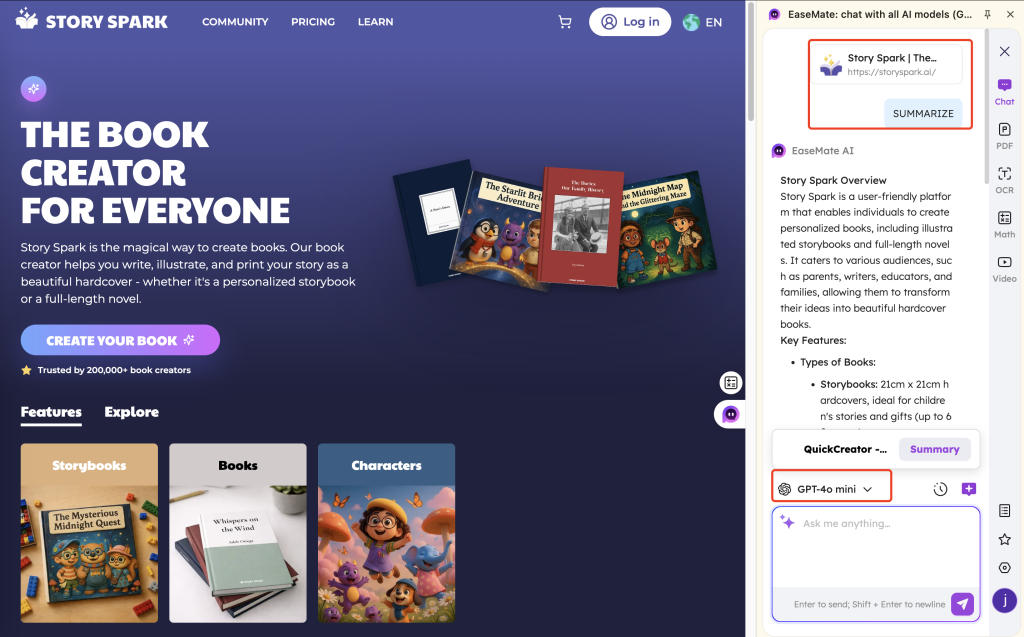
EaseMate AI пригодится в тех случаях, когда речь идет не столько о разработке продуктов на базе искусственного интеллекта, сколько о решении задач, связанных с учебой, работой и личной продуктивностью. Сервис охватывает такие области, как чаты, документы, PDF-файлы, презентации в формате PPT, резюме, краткие изложения, диаграммы, инструменты браузера и творческое редактирование.
Лучшая посадка
Выберите EaseMate AI, если вам нужна простая ИИ-поддержка для учебы, офисной работы, личных документов, составления резюме, создания слайдов, написания резюме, распознавания текста (OCR) или повышения продуктивности при работе в Интернете. Это помощник для повседневной жизни, а не платформа для разработчиков.
Что предлагает
По сравнению с Easy-Peasy.AI, EaseMate AI уделяет меньше внимания маркетинговым шаблонам и больше — учебе, офисной работе и работе с документами. Это именно тот инструмент, который пользователи могут запустить, чтобы подготовить резюме по PDF-файлу, отредактировать документ, просканировать файл, задать ИИ быстрый вопрос, создать диаграмму или воспользоваться ИИ во время просмотра веб-страниц.
- Он поддерживает работу в веб-интерфейсе и рабочие процессы в стиле расширений для браузера, что удобно, когда пользователям требуется помощь ИИ без необходимости постоянно переключаться между вкладками.
- Среди доступных категорий инструментов — инструменты для работы с моделями искусственного интеллекта, инструменты для работы с PDF-файлами, инструменты для работы с презентациями PPT, OCR, инструменты для создания резюме, программы для составления кратких изложений и многое другое.
- Это подходит студентам и офисным работникам, которым нужна помощь в написании текстов, составлении резюме, подготовке документов и слайдов, проведении исследований, а также в повышении общей продуктивности.
- Доступ в мобильном формате может помочь пользователям, которым нужны чат, голосовая связь, генерация изображений, сканирование документов и творческое редактирование в пути.
Доступ, цены и условия использования
EaseMate AI использует сочетание бесплатного доступа, подписок и разовых наборов кредитов. В рамках бесплатного тарифа предоставляется до 200 тыс. токенов для чата с ИИ в день, а также бесплатные кредиты на загрузку изображений для новых пользователей после регистрации.
Тарифный план «Basic» указан как бесплатный, с ограниченным доступом к чату, изображениям, видео и другим инструментам искусственного интеллекта. Тарифный план «Lite» стоит $8,9 в месяц в первый год, а затем — $9,9 в месяц, с 1 200 кредитами в месяц, до примерно 120 изображений, до примерно 60 видеороликов и до примерно 12 000 токенов на запросы ИИ. Тарифный план «Pro» стоит $19,9 в месяц в первый год, а затем $24,9 в месяц, с 3 000 кредитов в месяц, до примерно 300 изображений, до примерно 150 видеороликов и до примерно 30 000 токенов в запросах к ИИ.
В статье также перечислены пакеты одноразовых кредитов: 500 кредитов за $4.9, 1 000 кредитов за $8.9, 2 000 кредитов за $16.9, 5 000 кредитов за $39.9, 10 000 кредитов за $74.9 и 15 000 кредитов за $104.9. В нём отмечается, что отдельно приобретённые кредиты не имеют срока действия, тогда как кредиты по подписке действительны только в течение срока действия подписки.
Компромиссы
- Бесплатные инструменты и простые тарифные планы могут иметь ограничения в отношении расширенных моделей, генерации изображений, генерации видео или использования в больших объемах.
- Глубина резания инструмента может варьироваться в зависимости от множества мелких элементов.
- Однако он не так хорошо подходит для опытных пользователей моделей, которым требуются функции углубленного сравнения, прокладки маршрутов, доступа к API или развертывания.
- Даже при наличии большого количества небольших инструментов интерфейс может создавать ощущение разрозненности, если он не помогает пользователю найти нужную функцию.
Рекомендация
Выберите EaseMate AI, если вам нужна помощь ИИ в учебе, на работе, при работе с документами и для повышения личной продуктивности. Выберите другой вариант, если вам требуется маршрутизация моделей, их тонкая настройка, развертывание или создание высококачественного творческого контента.
Для совместных исследований, публикаций и творческой деятельности — универсальный инструмент на базе искусственного интеллекта для команд может оказаться более подходящим, чем отдельный пакет программ для повышения производительности.
7. OpenRouter — лучший модельный шлюз для опытных пользователей и разработчиков
OpenRouter — это мощная универсальная платформа на базе искусственного интеллекта для пользователей, которым важны выбор модели, стоимость токенов, маршрутизация и доступ к API. Она не создана как помощник по написанию текстов для начинающих. Скорее, это шлюз к языковым моделям, который позволяет пользователям и разработчикам получать доступ к множеству языковых моделей через единый интерфейс или API.
Лучшая посадка
Выберите OpenRouter, если вы хорошо разбираетесь в названиях моделей, ценообразовании на основе токенов, API-ключах, маршрутизации и тарификации по объему использования. Этот сервис будет полезен разработчикам, создателям, опытным пользователям ИИ, а также командам, которые хотят тестировать множество передовых моделей и моделей с открытым исходным кодом, не привязываясь к одному поставщику.
Что предлагает
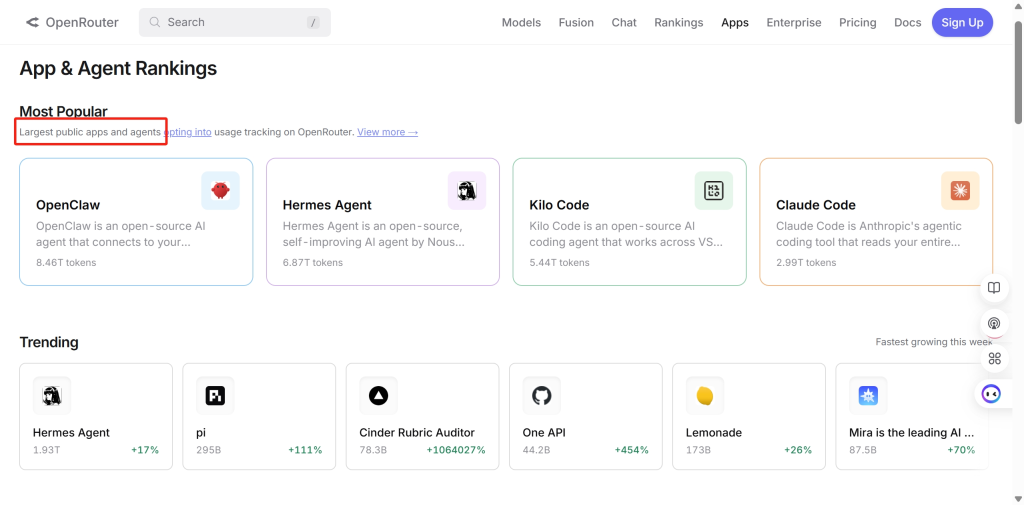
OpenRouter поддерживает веб-поиск в режиме реального времени, мультимодальный ввод, вызов инструментов и другие расширенные функции. Кроме того, в нём особое внимание уделяется параметрам, связанным с конфиденциальностью, таким как режим «без журналов» и политика открытости данных.
- Каталог моделей значительно обширнее, чем у многих пользовательских приложений на базе ИИ: через единый шлюз доступны сотни моделей.
- Ценообразование на уровне токенов упрощает сравнение стоимости моделей перед отправкой рабочих нагрузок большого объема.
- Рабочие процессы OpenRouter поддерживаются сторонними инструментами и проектами с открытым исходным кодом, такими как LobeChat и OpenClaw.
- Поддержка BYOK может помочь командам, у которых уже есть ключи API провайдеров и которые хотят использовать единый уровень маршрутизации.
Доступ, цены и условия использования
Информация о ценах на OpenRouter объясняет, что при бесплатном использовании цены официальных поставщиков применяются без дополнительной наценки, однако пользователи получают доступ лишь к ограниченному числу моделей и поставщиков. В случае использования по модели «оплата по факту» в таблице цен указана плата за использование платформы в размере 5,51 TP40T.
Также отмечается поддержка BYOK, что означает, что пользователи могут использовать собственные API-ключи провайдеров. Первый миллион запросов в рамках этого варианта предоставляется бесплатно, после чего OpenRouter взимает комиссию в размере 5%. Это удобно для команд, которые уже управляют несколькими учетными записями провайдеров.
Компромиссы
- OpenRouter — это более технически сложный инструмент, чем обычный чат с ИИ или инструмент для написания текстов.
- Он не заменяет пакет приложений для работы с документами, слайдами, отчетами браузера или маркетинговыми шаблонами.
- Пользователи должны понимать стоимость токенов, различия между провайдерами, ограничения моделей и особенности работы API.
- Если вам требуется сохранять данные в долгосрочной памяти между чатами, возможно, вам понадобится интегрировать эту функцию с другим интерфейсом, например с OpenWebUI или собственным приложением.
Рекомендация
Выберите OpenRouter, если вам нужен широкий доступ к моделям и вы хорошо разбираетесь в технических деталях. Выберите GlobalGPT, Poe или Monica, если вам в первую очередь нужна более простая пользовательская среда работы с ИИ.
Если вы сравниваете затраты по модели «оплата по факту» с затратами на пакетное рабочее пространство, то Разбивка цен на GPT-5.6 позволяет легче увидеть разницу в счетах.
8. Eden AI — лучший унифицированный API-слой для нескольких сервисов искусственного интеллекта
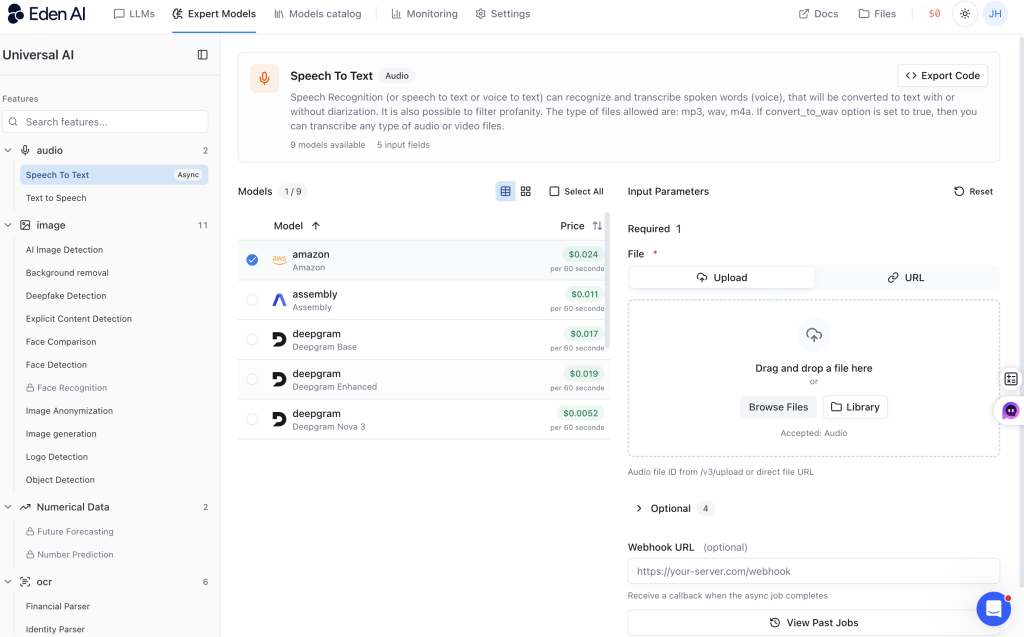
Eden AI — это универсальная платформа искусственного интеллекта, ориентированная в первую очередь на разработчиков. Ее главная ценность заключается не в простом чат-интерфейсе, а в едином API-слое, объединяющем множество сервисов искусственного интеллекта: большие языковые модели (LLM), оптическое распознавание символов (OCR), преобразование речи в текст, преобразование текста в речь, обработку изображений, перевод, разбор документов, модерацию и многое другое.
Лучшая посадка
Выберите Eden AI, если вы разрабатываете приложение или продукт, для которого требуется сразу несколько функций искусственного интеллекта. Этот сервис будет более полезен для продуктовых команд, разработчиков SaaS и программистов, чем для пользователей, которым нужен лишь чат, обработка изображений или помощь в написании текстов.
Что предлагает
Реальному продукту могут потребоваться технологии OCR для распознавания счетов, преобразования речи в текст для обработки звонков, перевода для пользователей из разных стран, а также LLM для составления резюме результатов. Подключение каждого поставщика по отдельности может быстро стать сложной задачей. Eden AI стремится облегчить эту работу, предоставляя разработчикам единый API-слой.
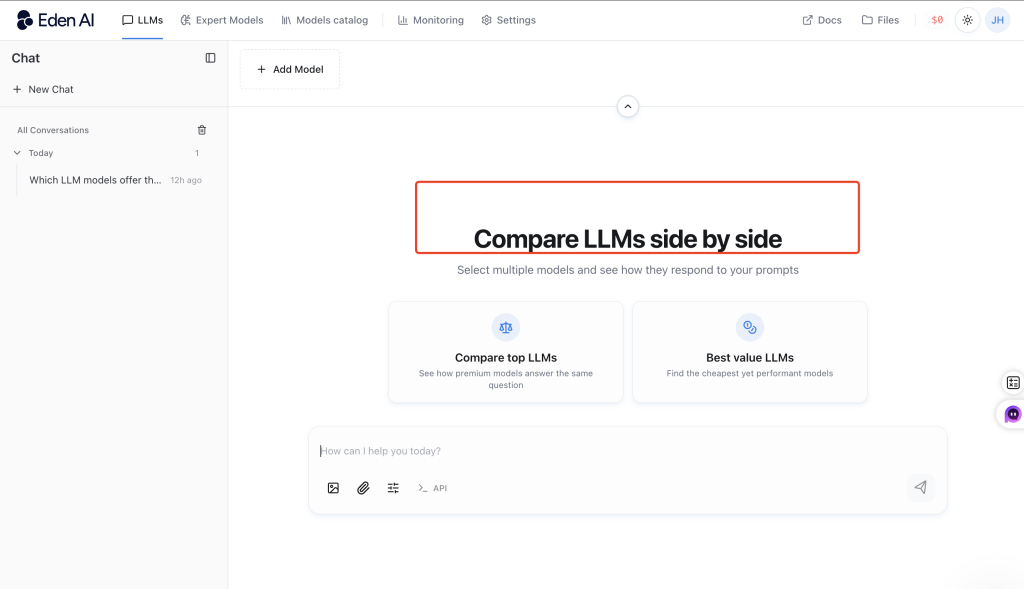
- Широкий спектр услуг включает в себя большие языковые модели (LLM), оптическое распознавание символов (OCR), распознавание речи, компьютерное зрение, перевод, синтаксический анализ документов, модерацию и многое другое.
- Благодаря единому уровню API команды могут подключиться один раз и получить доступ к множеству поставщиков через единый интерфейс.
- Маршрутизация и резервирование могут помочь командам переключаться между провайдерами в зависимости от стоимости, производительности, региона или доступности.
- Ответы API могут содержать точную стоимость в долларах США, что упрощает отслеживание расходов.
Доступ, цены и условия использования
Eden AI использует модель ценообразования с оплатой по факту использования. Компания Eden AI заявляет, что он не начисляет наценку на цены поставщиков. При покупке кредитов пользователи оплачивают стоимость, установленную поставщиком, плюс комиссию платформы в размере 5,51 TP40T, а в ответах API может указываться точная стоимость в долларах США.
Компромиссы
- Для этого требуются знания API и умение интегрировать продукт.
- Он становится полезным после настройки, а не сразу после открытия веб-сайта.
- Стоимость всё ещё требует тщательного планирования, поскольку окончательная цена зависит от поставщика, модели, типа задачи и объёма использования.
- Это не лучший выбор, если вам нужен простой инструмент для написания текстов, работы с изображениями или общения в чате.
Рекомендация
Выберите Eden AI, если вы разрабатываете продукт с поддержкой искусственного интеллекта и вам требуется доступ к нескольким сервисам ИИ через один API. Не выбирайте его, если вам нужен лишь простой инструмент для написания текстов, работы с изображениями или чата.
9. Together AI — лучший вариант для инфраструктуры моделей с открытым исходным кодом
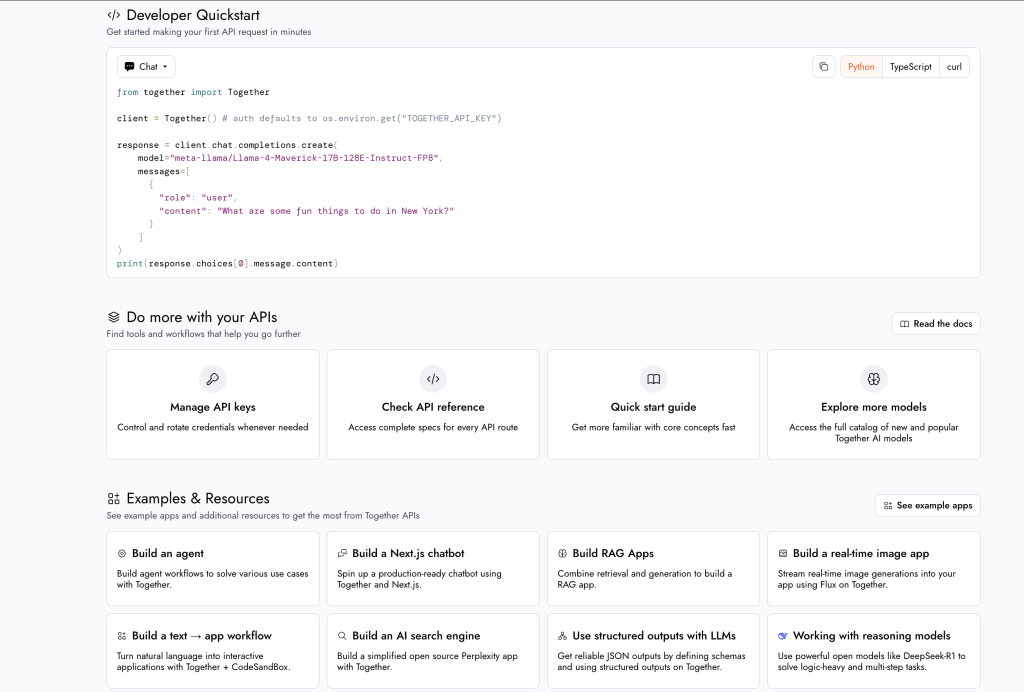
Together AI — одна из самых технически сложных платформ в этом списке. Это не обычный инструмент для написания текстов с помощью ИИ и не простой универсальный сайт с ИИ-функциями для начинающих. Это скорее облачная ИИ-инфраструктура для разработчиков, стартапов и команд, занимающихся созданием моделей.
Лучшая посадка
Выберите Together AI, если вы занимаетесь разработкой, масштабированием или настройкой продуктов на базе искусственного интеллекта и уделяете внимание таким аспектам, как инференция, пропускная способность, задержка, стоимость, развертывание, а также модели с открытым исходным кодом или открытыми весами.
Что предлагает
Основная ценность заключается в инфраструктуре: бессерверное вычисление, пакетное вычисление, тонкая настройка, выделенные конечные точки и кластеры графических процессоров. Это предоставляет инженерным командам возможность пройти путь от прототипа до запуска в производственную среду, особенно когда им требуется больший контроль над моделями с открытым исходным кодом или выделенными вычислительными ресурсами.
- Бессерверное выполнение вычислений полезно для тестирования или при переменной нагрузке.
- Пакетное вычисление результатов может быть полезно при выполнении задач, не требующих мгновенного ответа.
- Выделенные конечные точки более целесообразны для стабильного производственного трафика.
- Функции тонкой настройки и поддержка кластеров графических процессоров предназначены для опытных команд, которым требуется индивидуальная настройка или выделенные вычислительные ресурсы.
Доступ, цены и условия использования
Цены на Together AI это более сложная с точки зрения технических аспектов услуга, чем простая подписка. Стоимость рассчитывается отдельно для каждой области продуктов: бессерверное вычисление, пакетное вычисление, выделенные конечные точки, тонкая настройка и кластеры GPU. Каждый вариант имеет свою логику расчета стоимости, поэтому командам необходимо проводить оценку с учетом трафика, задержки, выбора модели и способа развертывания.
Компромиссы
- Это слишком технически сложная платформа для обычных пользователей, которые ожидают от нее возможностей чата, написания текстов, генерации изображений или инструментов для работы с документами.
- Стоимость предсказать сложнее, чем в случае обычной ежемесячной подписки на ИИ.
- Специализированное оборудование может обойтись дорого, если нагрузка на него недостаточно высока.
- Если вам в первую очередь нужны GPT, Claude или Gemini в простом рабочем пространстве, вам, возможно, больше подойдет другая платформа.
Рекомендация
Выберите Together AI, если вам нужна инфраструктура искусственного интеллекта и возможности развертывания моделей. Выберите другую платформу, если вам в первую очередь нужны функции чата, написания текстов, работы с изображениями, видео или офисные приложения.
10. ZenMux — лучший инструмент для сравнения различных моделей и разработки концепций контроля затрат
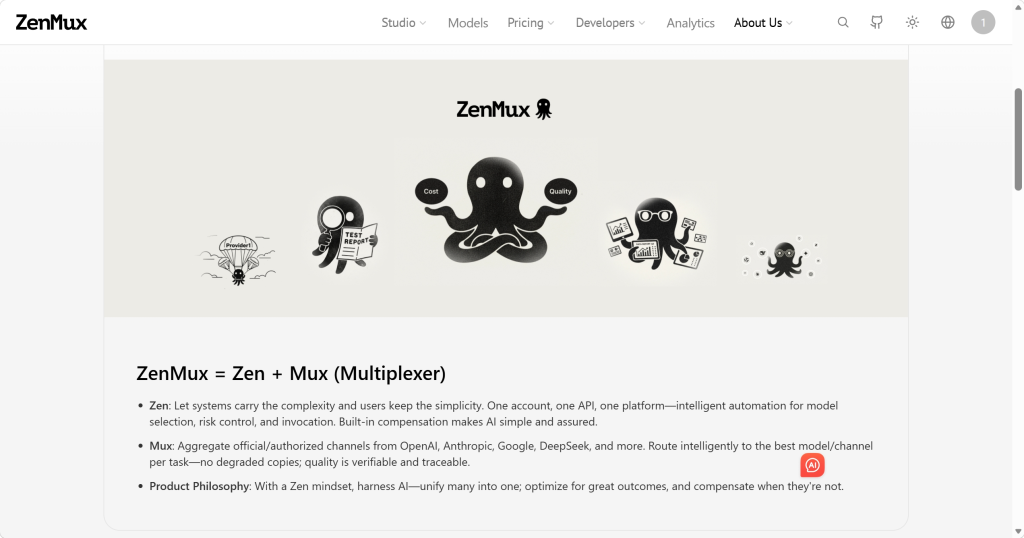
ZenMux ориентирован на обеспечение единого доступа к передовым моделям и реализацию уникальной концепции кредитной компенсации. Его стоит рассмотреть, если вы хотите сравнивать результаты нескольких моделей и заботитесь об экономической эффективности.
Лучшая посадка
Выберите ZenMux, если вам нравится идея единой платформы для моделей, возможности параллельного сравнения моделей и политики контроля затрат. Этот сервис особенно актуален для пользователей, которые хотят получить доступ к моделям от нескольких крупных поставщиков, не занимаясь управлением множеством отдельных учетных записей.
Что предлагает
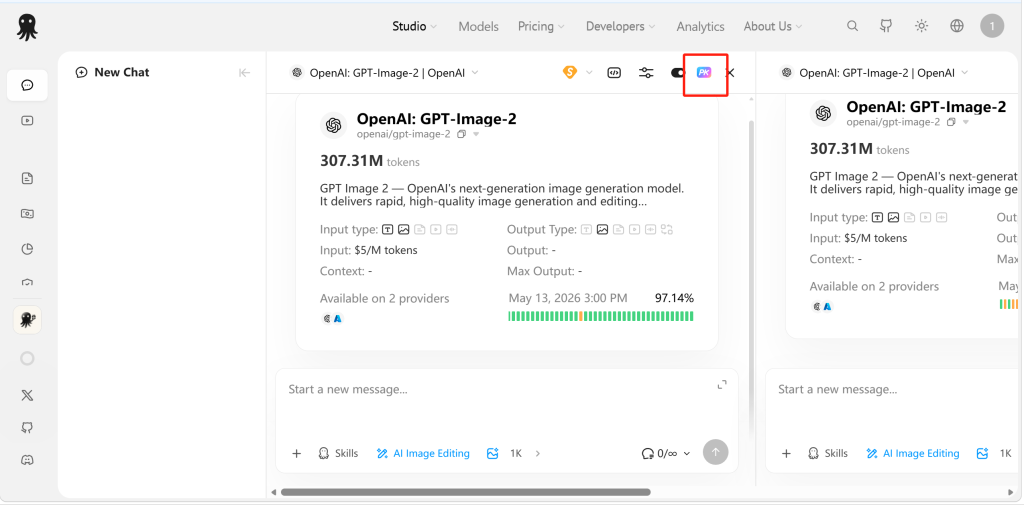
ZenMux позиционирует себя как агрегатор моделей большого языкового обучения (LLM) корпоративного уровня, предоставляющий единый API-доступ к моделям таких поставщиков, как OpenAI, Anthropic, Google и DeepSeek. Самой заметной для пользователя функцией является возможность параллельного сравнения ответов в одном окне чата.
- Единый доступ к моделям позволяет сократить необходимость ведения нескольких учетных записей для моделей.
- Сравнение ответов в виде таблицы помогает пользователям определить, какая модель лучше реагирует на один и тот же запрос.
- Различные уровни подписки и тарифы с оплатой по факту использования предоставляют пользователям несколько способов оплаты.
- Концепция вознаграждения построена с учетом скорости реагирования и качества ответов.
Доступ, цены и условия использования
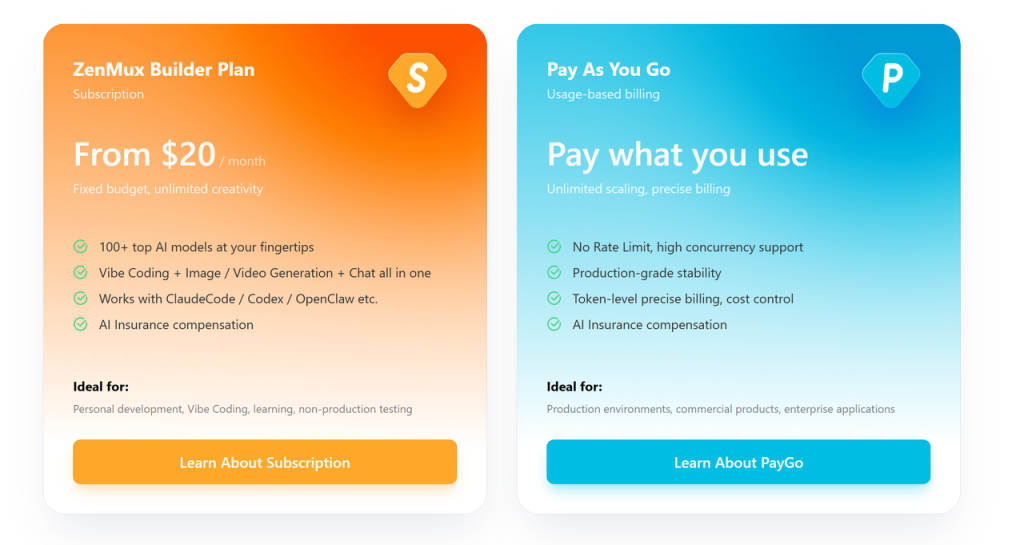
ZenMux перечисляет уровни подписки от $0 до $200 в месяц, а также доступ по системе «оплата по факту» с надбавкой 0%. Там также указано, что цены привязаны к официальным тарифам в соотношении 1:1, при этом время от времени проводятся акции, такие как начисление бонусных средств при пополнении счета.
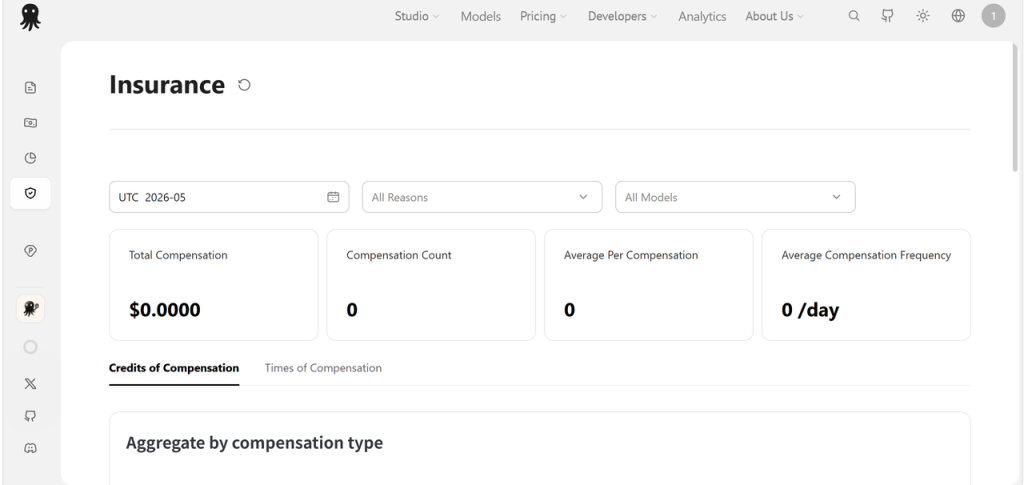
Необычным моментом является механизм компенсации кредитов в ZenMux. ZenMux описывает систему, которая отслеживает скорость и качество ответов, а затем возвращает использованные кредиты в случаях некачественного обслуживания. Поскольку такая политика может зависеть от конкретных правил платформы, пользователям следует ознакомиться с действующими условиями, прежде чем полагаться на неё при выполнении серьёзной работы.
Компромиссы
- Политика компенсаций выглядит интересной, но прежде чем полагаться на неё, следует уточнить конкретные правила.
- Он более технически сложен, чем обычный повседневный ИИ-помощник.
- Возможно, это не самый подходящий вариант для повышения продуктивности при работе в браузере, использования шаблонов контента, работы с документами или создания творческих изображений и видео.
Рекомендация
Выберите ZenMux, если вам нужно сравнивать различные модели и вам нравится идея механизмов контроля затрат. Выберите другую платформу, если вам нужна более простая рабочая среда для ИИ, браузерный помощник или корпоративная облачная инфраструктура.
11. AWS Bedrock — лучшая корпоративная платформа искусственного интеллекта для команд AWS
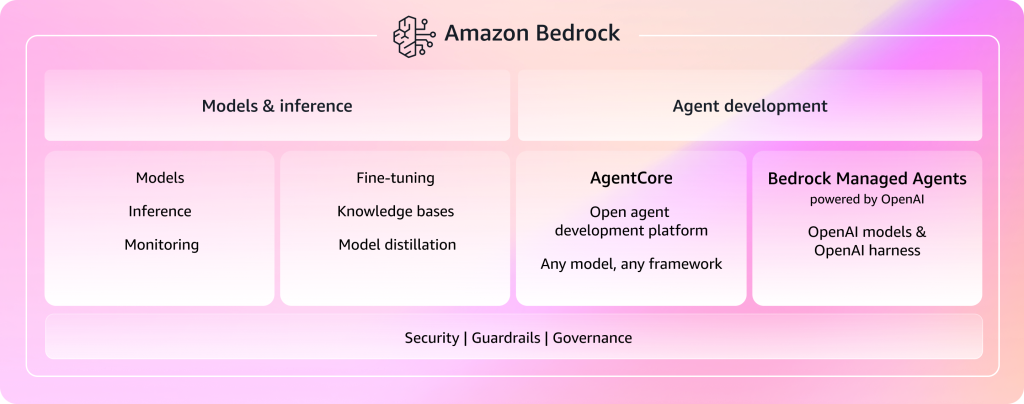
Amazon Bedrock — это не простой универсальный веб-сайт, посвящённый искусственному интеллекту. Это платформа искусственного интеллекта корпоративного уровня для команд, которые хотят создавать приложения на основе генеративного ИИ в экосистеме AWS. Если вам нужны средства безопасности, механизмы контроля над конфиденциальными данными, возможность настройки моделей, агенты и варианты развертывания в корпоративной среде, то Bedrock обязательно должен войти в ваш короткий список.
Лучшая посадка
Выберите AWS Bedrock, если ваша компания уже работает в среде AWS и нуждается в инфраструктуре генеративного ИИ корпоративного уровня, механизмах управления, средствах обеспечения безопасности, рабочих процессах агентов, возможностях настройки моделей и вариантах развертывания.
Что предлагает
Bedrock позиционируется как платформа для создания производственных приложений на основе генеративного ИИ. Она разработана для предприятий, которым требуются защита данных, развертывание с учетом нормативных требований, настройка моделей, агенты и доступ к базовым моделям в рамках экосистемы AWS.
- К средствам обеспечения безопасности относятся шифрование с помощью AWS KMS для хранящихся данных и протокол TLS для данных при передаче.
- Такие решения для создания частных сетей, как VPC и PrivateLink, позволяют не направлять трафик через общедоступный Интернет.
- При настройке модели можно использовать частные данные из Amazon S3, при этом доступны такие варианты, как обучение с учителем, обучение с подкреплением и дистилляция.
- Агенты Amazon Bedrock могут поддерживать состояние сеанса и рабочие процессы, основанные на использовании памяти, для многоэтапных приложений.
Доступ, цены и условия использования
Базовая цена зависит от модели, уровня обслуживания, объема использования и параметров развертывания. В информации о ценах, использованной для данного сравнения, указаны уровни «Standard», «Flex», «Priority» и «Reserved». Уровень «Flex» позволяет снизить затраты при гибких рабочих нагрузках, тогда как уровень «Priority» обходится дороже, но обеспечивает более высокую производительность и приоритетное использование вычислительных ресурсов.
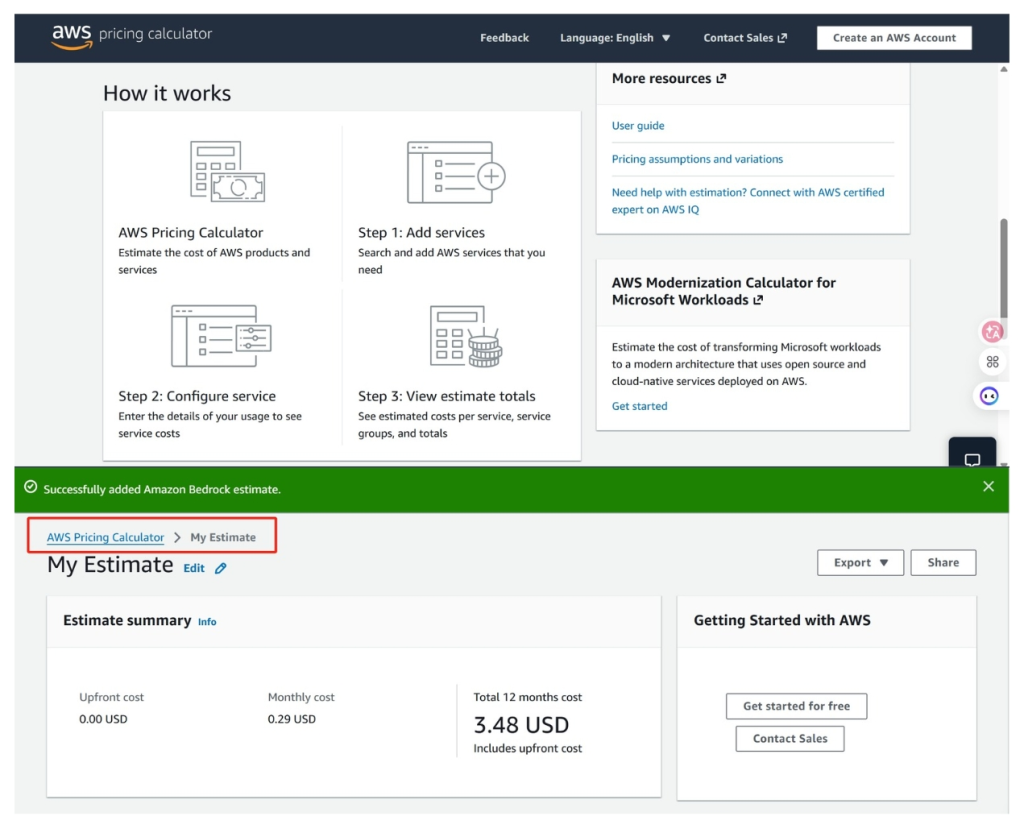
Прежде чем приступить к полноценному использованию Bedrock, командам следует оценить ежемесячные расходы с помощью Калькулятор цен AWS и соотнести цены с конкретными моделями, регионами, пропускной способностью и уровнями обслуживания, которые они планируют использовать.
Компромиссы
- Bedrock слишком сложен для пользователей, которым нужны лишь чат, возможность писать тексты, создавать краткие обзоры, работать с изображениями или использовать простые инструменты для творчества.
- Кривая освоения здесь намного круче, чем в обычном приложении с ИИ.
- Расходы зависят от решений, принятых предприятием при внедрении, поэтому обычным пользователям может быть сложно их оценить.
Рекомендация
Выберите AWS Bedrock, если вашей компании требуется корпоративная инфраструктура искусственного интеллекта, механизмы управления и развертывание с полной интеграцией с AWS. Не выбирайте эту платформу, если вам просто нужен удобный инструмент для общения, написания текстов, составления резюме или создания изображений.
Как выбрать подходящий универсальный инструмент на базе искусственного интеллекта
Начните с реальной задачи, а не с самого длинного списка функций. Простое рабочее пространство для повседневной работы, помощник в браузере, набор инструментов для работы с контентом, шлюз для моделей и корпоративная облачная платформа — все они решают разные задачи.
| Если вам нужно | Начните с | Почему |
|---|---|---|
| Единое удобное рабочее пространство для общения, поиска информации, сравнения моделей, работы с изображениями и видео | GlobalGPT | Он охватывает самый широкий спектр повседневных рабочих процессов, не требуя от пользователей настройки API. |
| Мультимодельные диалоги и настраиваемые боты | По | Его экосистема ботов превосходит возможности обычного интерфейса чат-бота. |
| ИИ для браузера, PDF-файлов, YouTube и написания текстов в Интернете | Моника | Благодаря боковой панели и библиотеке подсказок повседневная работа в Интернете становится быстрее. |
| Множество небольших модулей для творчества и повышения продуктивности | 1min.AI | Он предоставляет пользователям обширную панель управления задачами с доступом на основе кредитов. |
| Шаблоны для маркетинга и контента | Easy-Peasy.AI | В его основе лежат написание текстов, стиль бренда, шаблоны и типовые задачи по созданию контента. |
| Учебные материалы, офисные документы, PDF-файлы, презентации в формате PPT, резюме и повседневные документы | EaseMate AI | Это лучше подходит для простых рабочих задач, чем для прокладки маршрутов по техническим моделям. |
| Крупная модельная платформа с токенизированной ценовой политикой и доступом к API | OpenRouter | Он лучше подходит для опытных пользователей, которые разбираются в моделях, затратах и рабочих процессах API. |
| Один API для множества категорий сервисов искусственного интеллекта | Eden AI | Он охватывает большие языковые модели (LLM), оптическое распознавание символов (OCR), распознавание речи, компьютерное зрение, перевод и услуги по работе с документами. |
| Вывод, точная настройка, конечные точки и инфраструктура графических процессоров | «Together AI» | Он создан для команд, занимающихся разработкой технических продуктов в области искусственного интеллекта. |
| Сравнение моделей с концепциями управления затратами | ZenMux | Основное внимание уделяется унифицированному доступу к моделям, их сравнению и правилам, основанным на принципе компенсации. |
| Генеративный ИИ для предприятий на AWS | AWS Bedrock | Это решение подходит для компаний, которым требуются средства управления, безопасность, агенты, возможности настройки и развертывание с использованием нативных средств AWS. |
Если ваше решение касается в основном подписок на научные издания, то Руководство по тарифным планам Perplexity поможет вам сравнить специализированный инструмент для исследований с универсальной платформой. Если ваш выбор касается семейств моделей, а не платформ, то Сравнение моделей Claude Opus 5 и GPT-5.6 — это ещё один полезный следующий шаг.
Часто задаваемые вопросы об универсальных инструментах и платформах на базе искусственного интеллекта
Что такое универсальный инструмент на базе искусственного интеллекта?
Универсальный инструмент на базе искусственного интеллекта объединяет несколько функций ИИ в одной учетной записи или рабочей среде. В зависимости от платформы это могут быть такие функции, как чат, написание текстов, поиск, генерация изображений, генерация видео, инструменты для работы с документами, помощь в работе с браузером или доступ к API.
В чём заключается разница между инструментом на базе ИИ и платформой на базе ИИ?
Веб-сайты с инструментами на базе ИИ, как правило, создаются для непосредственного использования, например, в чатах, для написания текстов, работы с изображениями, видео, PDF-файлами и повышения эффективности работы в браузере. Платформы на базе ИИ часто имеют более широкий охват или носят более технический характер, особенно если они включают в себя маршрутизацию моделей, унифицированные API, управление поставщиками, развертывание или средства корпоративного контроля.
Может ли одна универсальная платформа на базе ИИ заменить несколько подписок?
Иногда. Если вы в основном используете ИИ для общения в чатах, поиска информации, написания текстов, генерации изображений и видео, а также для несложных рабочих задач, универсальная платформа может избавить вас от необходимости оформлять несколько отдельных подписок. Если же вам требуется специализированный редактор, официальная консоль API, уровень управления для предприятий или расширенные возможности тонкой настройки, вам, возможно, по-прежнему понадобится специализированный инструмент.
Какой универсальный инструмент на базе ИИ лучше всего подходит для начинающих?
GlobalGPT, Poe, Monica, 1min.AI, Easy-Peasy.AI и EaseMate AI — более простые варианты для начинающих пользователей без технической подготовки. OpenRouter, Eden AI, Together AI, ZenMux и AWS Bedrock лучше подходят для опытных пользователей, разработчиков или команд.
Какая платформа лучше всего подходит для создания изображений и видео с помощью ИИ?
GlobalGPT — это лучший вариант из этого списка, если вам нужна простая универсальная рабочая среда, включающая чат, доступ к моделям, генерацию изображений и видео. 1min.AI также может пригодиться для несложных творческих задач. Если создание видео является вашим приоритетом, то Учебное руководство по Kling AI — полезное продолжение чтения.
Какая универсальная платформа на базе искусственного интеллекта лучше всего подходит для разработчиков?
OpenRouter — отличный выбор для доступа к моделям и маршрутизации. Eden AI пригодится, если вам требуется широкий спектр категорий ИИ-сервисов через единый API. Together AI подходит для команд, занимающихся инференсом, тонкой настройкой, конечными точками и инфраструктурой. AWS Bedrock — лучший вариант для корпоративных команд, работающих в среде AWS.
Достаточно ли хороши бесплатные универсальные инструменты на базе ИИ?
Бесплатные тарифные планы удобны для тестирования, но, как правило, имеют ограничения. Для работы с расширенными моделями, генерации изображений и видео, работы с файлами большого размера, использования API и выполнения задач с большим объемом данных часто требуются кредиты или платные тарифные планы. Прежде чем использовать бесплатный тарифный план для повседневной работы, ознакомьтесь со страницей с ценами и правилами использования.
Как мне выбрать между GlobalGPT, Poe и Monica?
Выберите GlobalGPT, если вам нужна более обширная рабочая среда для моделей, доступ к Perplexity, а также к изображениям и видео. Выберите Poe, если вам в первую очередь нужен чат с поддержкой нескольких моделей и настраиваемые боты. Выберите Monica, если вам нужна помощь ИИ прямо в браузере при чтении, просмотре видео, переводе и написании текстов.