GlobalGPT

What Are the Different Focus Modes in Perplexity AI? (Full Guide 2026)

What Are the Different Focus Modes in Perplexity AI? (Full Guide 2026)

If you’re wondering what the different Focus Modes in Perplexity AI are, here’s the short answer: Perplexity AI offers several specialized Focus Modes—such as Web, Academic, Social, Pro Search, Labs, and Finance—that help you refine how the AI retrieves, analyzes, and presents information. Each mode acts like a “context filter,” customizing the search results and writing style to match your intent, whether you’re researching, learning, or creating content.

Focus Modes help tailor how Perplexity searches and presents information, but they are designed mainly for research-focused tasks. Users who also need conversational AI, image generation, or video creation often rely on additional tools.

For a more all-in-one experience, GlobalGPT combines 困惑ChatGPT 5.2, Nano Banana Pro, Sora 2 Pro, Gemini 3 Pro, 和 100 多个人工智能模型, making it easier to handle different AI tasks in one place at a lower overall cost.

Understanding Focus Modes in 困惑人工智能

What Are Focus Modes and Why They Matter

Focus Modes are 困惑人工智能’s smart 滤波器—they guide how the AI interprets your prompt and where it pulls information from. Instead of giving one-size-fits-all results, Perplexity tailors its output to your context. For example:

  • Web Mode gives real-time web data with citations.
  • Academic Mode focuses on peer-reviewed research.
  • Writing Mode enhances creative and editorial writing.

These modes make Perplexity more than just an AI chatbot—it becomes a personalized research and writing assistant tuned to your specific task.

How Focus Modes Improve Accuracy and Context

Each Focus Mode fine-tunes how Perplexity gathers and processes data. By selecting the right mode, you:

  • Get more relevant, source-based answers.
  • Reduce hallucinations or irrelevant details.
  • Optimize results for specific goals like academic citations or trend insights.

All 困惑人工智能Focus Modes Explained (2026 Overview)

1.Web Mode – 实时人工智能 Search for the Internet

  • "(《世界人权宣言》) Web Focus Mode retrieves live information from the internet. It’s ideal for fact-checking, news research, and finding up-to-date data.
  • 最适合 General research, product comparisons, latest events
  • Example use: “What will be the most popular book in 2026?”
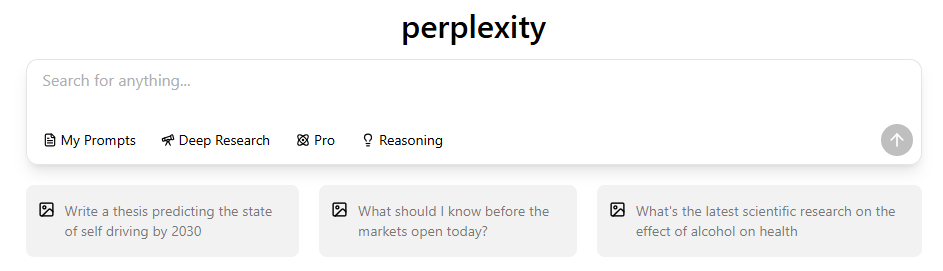
How to set the search mode in Perplexity.
How to use the search mode in Perplexity.

2.Academic Mode – For Research and Scholarly Work

  • Academic Mode connects to academic databases and scholarly sources. It provides structured answers with citations.
  • 最适合 Students, researchers, educators
  • Pro tip: Use this mode to get APA or MLA-style sources.
  • Example use: “I need some of the latest literature on social capital.”
How to use the academic mode in Perplexity.

3.Writing Mode – For Content Creation and Editing

  • Writing Mode is built for generating, improving, or polishing text. It adapts tone and style for essays, blogs, and reports.
  • 最适合 Writers, marketers, and content creators
  • Example use: “Write a literature review on the socio-economic impact assessment of health hotlines.”
How to use the writing mode in Perplexity.

4.Social Mode – For Trends and Public Opinions

  • Social Mode searches social networks and discussions (like Reddit, X, and forums).
  • 最适合 Market research, sentiment analysis, social trend discovery
  • Example use: “How do people evaluate Perplexity on Reddit? ”
How to use the social mode in Perplexity.

5.专业 Search Mode – For Deep, Multi-Step Reasoning

How to use the Pro mode in Perplexity.

6.Labs Mode – Experimental and Beta Features

  • Labs Mode is where Perplexity tests upcoming tools and creative features.
  • 最适合 Early adopters, developers, and AI enthusiasts
How to use the Labs mode in Perplexity.

7.Finance Mode — For Financial Data and SEC Filings

  • "(《世界人权宣言》) Finance Focus Mode is designed for retrieving and analyzing financial data, including SEC filings, annual reports, and corporate disclosures..
  • 最适合 Investors, analysts, financial reporters
  • Example use: “Search for the latest SEC filing for Tesla ”
How to use the Finance mode in Perplexity.

How to Use and Switch Between Focus Modes in 困惑人工智能

On Desktop and Web

  • 打开 困惑 homepage or app.
Open the Perplexity homepage or app.
  • Click the dropdown beside the search bar labeled “Set search source.”
Click the dropdown beside the search bar labeled “Set search source.”
  • Choose your preferred mode (e.g., Web, Academic, Social, Finance).
Choose your preferred mode (e.g., Web, Academic, Social, Finance).
  • Type your query and press Enter.
Type your query and press Enter.

On Mobile (iPhone and Android)

If you’re new to Perplexity, start by learning how to use Perplexity on iPhone to understand its interface and mobile functionality

  • Tap the second icon below the input bar.
Tap the second icon below the input bar.
  • Select the mode that fits your goal (e.g., Writing for drafts, Academic for research).
Select the mode that fits your goal (e.g., Writing for drafts, Academic for research).

💡 小贴士 You can switch modes mid-conversation without losing context.

Choosing the Best Focus Mode for Your Needs

Students and Researchers

使用 Academic + Writing Modes to write reports or summarize research papers.

Content Creators and Marketers

使用 Web + Social + Writing to generate SEO articles and analyze audience trends.

Professionals and Analysts

使用 专业 Search + Web to synthesize data or summarize business insights.

困惑 Focus Modes vs ChatGPT Modes: Which Is Better?

ChatGPT offers custom GPTs and browsing, but Perplexity Focus Modes give more control over data sources and factual accuracy. See our detailed comparison of Perplexity vs ChatGPT for more on this.

特点Perplexity Focus ModesChatGPT Modes
Web Search✅ Real-time with citations✅ Limited browsing
Academic✅ Scholarly databases❌ No direct access
写作✅ Integrated editor✅ Creative generation
数学✅ Step-by-step logic✅ Basic math only
透明度✅ Shows citations⚠️ Often no sources

简而言之Perplexity wins for research and accuracy, 而 ChatGPT excels in creativity and conversation.

To see how each excels, revisit Is Perplexity Really Better Than ChatGPT? for a hands-on comparison.

Advanced Tips for Maximizing 困惑’s Focus Modes

  • Combine modes for multi-layer workflows (e.g., Academic → Writing → Web).
  • 使用 Pro Search for deep contextual analysis.
  • Enable Labs Mode to test the latest AI enhancements.
  • Always check sources for credibility—especially when switching between modes.

Privacy, Performance, and Accuracy in Focus Modes

Each mode may pull data from different sources, but 困惑 maintains strong data protection and transparency standards. It always cites sources and avoids storing private queries.

Future of 困惑人工智能Focus Modes (2026 and Beyond)

In 2026, Perplexity is expected to expand Focus Modes with:

  • 团队 合作 Mode for shared research.
Team Collaboration Mode for shared research.
  • Coding Mode for developers.

常见问题 (常见问题)

Q1: What is the best Focus Mode in 困惑人工智能? It depends on your task. For research—use Academic; for writing—use Writing; for general questions—use Web.

Q2: Can I combine multiple Focus Modes? Yes, Perplexity supports the option to select multiple modes, and you can switch between modes mid-conversation to refine context.

Perplexity supports the option to select multiple modes.

Q3: Is Focus Mode free? All users get access to most modes; some advanced ones (like Pro Search) may require Perplexity Pro. Students can even get these benefits for free — read our guide on Perplexity Student Discount: How to Get Perplexity Pro Free in 2026Perplexity Free for Students: How to Get Pro Access in 2026 to learn how.

Conclusion: Use Focus Modes to Unlock 困惑’s Full Power

Perplexity AI’s Focus Modes let you control how the AI thinks, searches, and writes. By mastering them—especially Web, Academic, Writing, and 专业 搜索—you’ll turn Perplexity into a 精确度 research companion that saves time and improves accuracy.

👉 Try experimenting with different Focus Modes today—and see how 困惑 adapts to your every query.

Want to learn more about Perplexity? Here are more helpful reads from our Perplexity series:

分享帖子:

相关帖子