据称,Seedance 2.0 支持最长 15 秒的视频输出, 字节跳动官方发布公告. 该模型还支持视频扩展功能。无论是30秒的广告还是1分钟的短片,都要区分生成的单个片段、扩展镜头以及你在编辑器中最终剪辑出的片段。它们各自的时长限制和工作流程都不同。.
对于希望将这些短视频片段剪辑成完整作品的创作者来说,, Seedance 2.0 基于 GlobalGPT 这是一个经济实惠的入门选择。拍摄素材、保存有用的镜头,然后将它们导入 GlobalGPT 的视频编辑器中进行剪辑、添加字幕和音频。将这些任务集中在一个平台上,可以减少对单独 AI 订阅的需求。.
Seedance 2.0 的视频时长限制是多少?
“15秒”这一数字指的是该模型的音视频输出。字节跳动将其描述为 连拍 输出,因此一个生成的片段可能包含多个镜头。这并不意味着该输出中的每个镜头都会额外增加15秒。.
| 您正在测量的是什么 | 是什么意思 | 如何针对此情况进行规划 |
|---|---|---|
| 一个生成的片段 | 字节跳动表示,Seedance 2.0 的输出时长最长可达 15 秒。. | 让片段具有一个突出的动作,或者一段顺序清晰、节奏分明的短序列。. |
| 一个长镜头 | 新画面通过扩展操作,延续了现有视频的内容。. | 提交前,请检查该应用的扩展控件、支持的源片段以及可用时长。. |
| 最终剪辑好的片段 | 时间轴上排列的片段及其他素材的时长。. | 首先选择目标时长,然后剪辑并调整镜头,使其符合要求。. |
模型来源: 字节跳动发布“Seedance 2.0”公告, ,查阅于2026年10月10日。编辑建议属于制作工作流程的一部分,而非额外增加的模型持续时间。.
为什么我的应用显示的时长更短?
型号名称、生成模式和应用程序控制都至关重要。屏幕上显示的“5秒”或“10秒”选项并不代表所有 Seedance 2.0 服务的最大时长。请核对确切的型号标签(包括任何“Fast”版本),并查看您所使用界面中可选的时长菜单。.
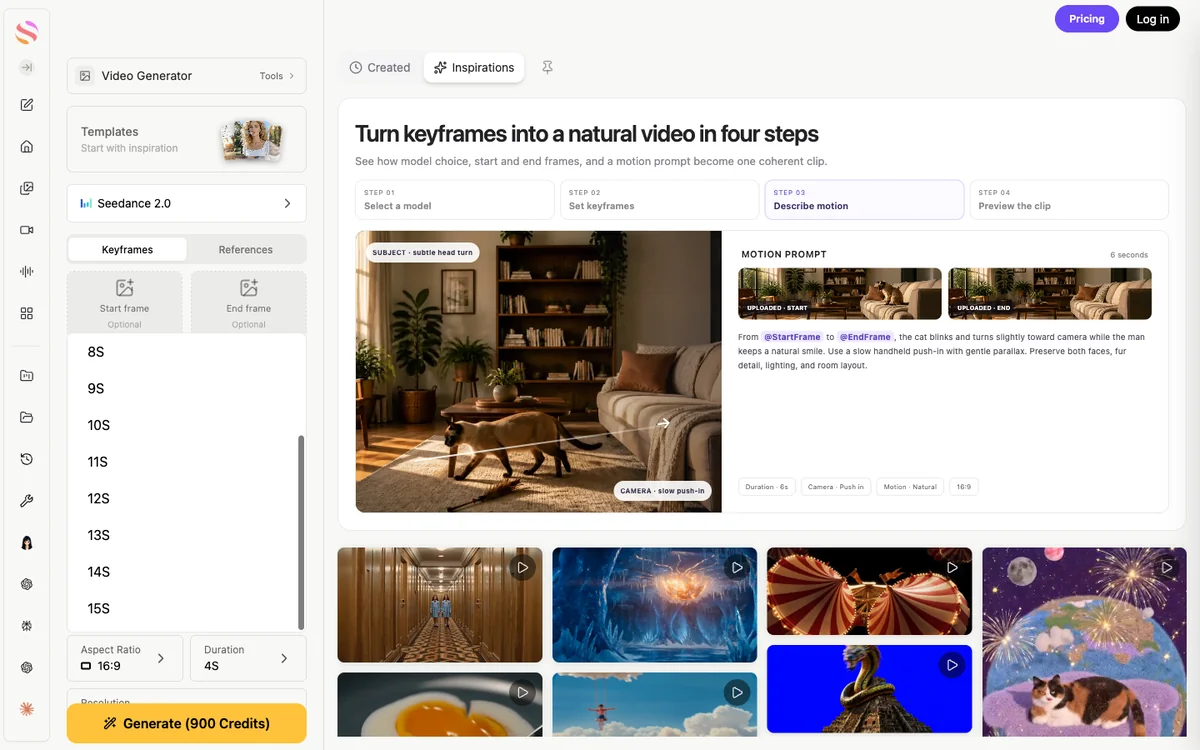
选择单个镜头的时长,然后在提交前确认更新后的片酬费用。将30秒的片段规划为一系列精选镜头,并预留空间以便对每个片段的开头和结尾进行剪辑。.
下文中的早期界面展示了应用程序提供此选项的两种方式:时长下拉菜单和秒数控件。它们说明了应查看的位置;在提交新请求时,请使用您当前应用程序中的相应选项。.


如果你遇到的第一个问题是找不到合适的切入点,请使用 Seedance 2.0 使用指南. 对于程序化请求,请查看该端点自身的时长规则;该 Seedance 2.0 API 指南 解释了这条单独的路线。.
Seedance 2.0 能否制作超过 15 秒的视频?
通过延长素材时长或拼接多个片段,可以制作出更长的成品视频。. 这些是不同的操作。. 字节跳动确认具备视频扩展功能 它能根据用户提示生成连续的镜头,但一段经过剪辑的较长片段并不等同于一次更长的初始生成。.
当需要继续执行同一操作时,请使用扩展功能
当下一帧仍属于同一镜头时,镜头延长是合理的:例如摄像机在房间内持续移动、人物完成一个动作,或是车辆沿道路继续前行。应保持镜头的延续性,而非要求其在同一帧内同时改变场景、主体和摄像机方向。.
- 选择一个清晰的源片段。. 检查最后几帧,确保拍摄对象稳定、物体清晰可辨,且动作具有延续性。.
- 打开受支持的扩展工作流。. 选择源视频,并查看时长、输入要求以及显示的生成费用。.
- 请描述下一步行动。. 请指出哪些元素应保持不变、哪些元素接下来会移动,以及镜头应结束在何处。.
- 继续之前请先复习一下。. 检查剪辑、角色细节、摄像机运动和音效。在再次尝试之前,先保留一个可用的版本。.

当故事需要一个新镜头时,请进行剪辑
当需要特写、新场景、人物反应或产品细节时,切入镜头往往是更好的选择。围绕一个目的拍摄每个镜头,然后在剪辑室中将选定的镜头剪辑在一起。这样既能掌控节奏,又可以在无需重拍整个片段的情况下替换掉表现欠佳的镜头。.
避免围绕“无限”延长来规划。每次延续都会增加一个需要审查的结果,连续性可能会因此偏离。对于包含多个明显分段的视频,镜头清单能为你提供一条更清晰的路径,以达到预期的时长。.
一个实用的30秒拍摄方案
从信息内容入手,并以最终时长为基准倒推。以下是一个由六个5秒时序片段组成的30秒产品故事示例。下文所列时间均为剪辑目标,并不意味着每个片段都能剪出5秒可用素材。.
30秒 · 6个计划分段
带硬切的示意性时间轴:6 × 5 秒 = 30 秒。.
00–05 秒
建立
展示产品在实际使用场景中的效果。.
05–10 秒
详细信息
将视图放大到某个特征上。.
10–15 秒
行动
展示该功能的使用情况。.
15–20 秒
背景
说明这项任务为何重要。.
20–25 秒
回报
展示结果或效益。.
25–30 秒
关闭
保留最终图像,并添加一条清晰的信息。.
将每段素材剪辑至其精彩片段。对于一段60秒的视频,应通过有针对性的镜头来丰富故事内容;重复使用平淡无奇的画面并不会提升视频质量。.
请预留生成素材与可用素材之间的差异。某个镜头可能需要剪掉开头的停顿,或者最后1秒可能存在画面错误。如果您需要精确的30秒素材,请在剪辑后检查拼接好的时间线,而不是简单地将要求的生成时长相加。.
当旁白是推动故事发展的关键时,应尽早录制旁白。然后根据旁白的节奏来调整镜头。在分镜脚本中看起来很合适的5秒钟时长,对于详细的解释来说可能太短了。.
保持角色、动作和声音的一致性
在每个连接处都需要检查连续性。. 字节跳动指出了仍面临的挑战 在细节稳定性、多对象一致性和复杂编辑方面。参考图像可以为模型提供指导,但并不能保证每张脸、每个徽标或每个手部姿势都会完全一致。.
在中景双人镜头中,随着短暂动作的展开,画面既能同时呈现两人及其相互交织的双臂。在将此类片段用于较长的剪辑时,请先检查首帧和末帧中可用的手部位置及画面方向,再决定在哪里剪切或继续。.
- 保留一个较小的参考集。. 在所选模式支持的情况下,请重复使用相同的主题和产品引用。.
- 重申视觉设计要点。. 在各个提示中,对服装、关键物品、光线和场景的描述应保持一致。.
- 保留屏幕方向。. 一个从左向右移动的拍摄对象,在下一帧中不应突然改变方向。.
- 确保行动在可控范围内。. 每个短镜头应包含一个主要动作和一个明确的结束点。.
- 在开启声音的情况下检查切口。. 在检查画面时,请留意环境音、音乐、对话或音量是否出现突变。.
对于新镜头,在保留主体细节的同时,应明确描述新的构图。该 Seedance 2.0 提示指南 提供了更多整理这些说明的方法。.
音频如何符合时长限制?
字节跳动将Seedance 2.0描述为一种音视频模型,具备双声道立体声功能,并支持音乐、环境音效和人声。该声音属于生成的片段。对于较长的剪辑,可选择保留每个片段的原声,或使用贯穿整个序列的连续旁白或音乐轨道。.
请仔细聆听每个剪辑点。如果片段之间音乐重新开始或环境音突变,请使用编辑器的音量和静音控制功能,并导入合适的音频轨道。请使用您有权使用的音频,并确保对话在背景音中依然清晰可辨。.
在 GlobalGPT 中制作较长的视频
GlobalGPT 的 Seedance 2.0 工作区 视频编辑和视频剪辑师负责同一份工作的两个部分:拍摄画面和剪辑成最终作品。正因如此,低成本的多模型平台不仅能用于选择生成器,还能发挥更多作用——您可以在一个工作区中同时进行剧本创作、内容生成和剪辑,同时减少单独订阅带来的开销。.
1. 设定目标片长和镜头清单
针对每个镜头写一句说明:观众看到什么、发生了什么变化,以及这如何支撑主题。拍摄前请先确定目标画面比例。除非采用不同构图有明确目的,否则请保持统一的格式。.
2. 生成并选择 Seedance 镜头
打开 Seedance 2.0,确认模型名称,选择可用的片段时长,并根据需要添加参考素材。提交前请核对显示的费用。观看完整的结果,然后保存符合故事需求的镜头。为文件命名时请使用有意义的名称,例如“01-开场”和“02-产品详情”。”
3. 将已保存的片段导入视频编辑器
开放 GlobalGPT 的视频编辑器 并导入您保存的视频文件。将它们按顺序放置在时间轴上。剪掉不需要的开头和结尾,当只有部分内容有用时将片段拆分,并调整序列顺序,直到其符合预定的故事线。将本次导出所需的素材集中放在当前场景中。.
4. 添加旁白、音频和字幕
导入您要使用的音频,并将其与画面对齐。根据需要调整音量或静音单个片段。在“字幕”功能中,对时间轴上的音频进行转录,或导入 SRT/ASS 字幕文件,然后校对文本和时间点。交付前请核对人名、数字和产品术语。.
5. 导出并检查文件
使用“导出”功能创建 MP4 文件,必要时包含音频。从头到尾播放导出的文件:检查时长、宽高比、字幕是否清晰、声音以及最后一帧。如果导出失败,请检查媒体加载状态,并在重新生成素材之前尝试处理一个规模较小的项目。.
可用镜头和修改的预算
一部较长的影片通常需要多次拍摄请求和一些剪辑工作。预算时应考虑镜头数量、备用镜头以及任何额外处理——而不仅仅是期望的最终片长。请简单记录下你采纳了哪些镜头以及各自的成本,以免重复拍摄的费用被混入总成本中。.
- 先试一下那个难的球。. 一种复杂的交互方式或产品关键细节,可能决定该概念能否成功。.
- 保留好的镜头。. 应修改表现欠佳的部分,而不是替换那些已经很合适的内容。.
- 请核对所选方案及发电量预估。. 视频的功能和制作人员名单取决于套餐和具体要求;请预留修改空间。.
- 使用编辑器来控制时间。. 通过裁剪、修剪或添加文字叠加,可能无需重新生成即可解决问题。.
当您需要在同一个项目中处理多项AI任务时,GlobalGPT的价格优势便能发挥最大作用:例如剧本起草、视觉效果和视频制作,以及镜头剪辑。请选择一个包含您所需视频模型和创意工具的套餐,并确保其积分额度足以满足您计划拍摄的镜头及备用镜头的制作需求。.
解决常见的时长和扩展问题
| 您所看到的 | 需要检查的内容 | 切实可行的下一步措施 |
|---|---|---|
| 缺少您所需的时长 | 该应用中的具体型号、模式及可用控制功能。. | 请选择支持的时长,或将该场景拆分为更短的镜头。. |
| 不存在“扩展”控件,或者该控件已被禁用 | 该界面是否支持扩展;源视频的要求;是否显示任何账户、信用或错误信息。. | 请按照具体提示操作。如果此处无法使用扩展功能,请生成一个匹配的下一个镜头并编辑该序列。. |
| 每个镜头中的拍摄对象都不一样 | 参考一致性、最终帧的质量以及下一个提示词的变化程度。. | 简化后续画面,或通过有意切入特写镜头来展现。. |
| 完成的片段太短了 | 剪辑后实际可用的片段,包括填补空隙以及文字或旁白的时间安排。. | 添加一个有针对性的镜头或调整剪辑;不要以为要求的时长就等于最终保留的时长。. |
| 在剪辑处,配乐突然一跳 | 原始片段的音频、音量以及每个音乐片段的起始点。. | 将冲突的片段音频静音,并对齐连续导入的音轨。. |
生成时间与视频时长是两个不同的问题。15 秒的视频片段指的是播放时长,并不意味着生成过程会在 15 秒内完成。当请求耗时超过预期时,请查看该服务的当前队列和任务状态。.
Seedance 2.0 视频时长常见问题解答
Seedance 2.0 视频的最长时长是多少?
字节跳动表示,Seedance 2.0 支持最长 15 秒的多帧音视频输出。特定应用中显示的时长选项取决于该应用的型号和生成模式。.
Seedance 2.0 能否通过一次请求生成一段 30 秒的视频?
引用的 Seedance 2.0 发布规范中描述的输出时长为 15 秒。请将 30 秒的成品视频规划为多个片段,或使用受支持的扩展工作流,然后检查拼接后的运行时长。.
我可以无限期地延长 Seedance 2.0 视频的播放时间吗?
请勿计划无限期延长。该模型支持延长,但每个服务都会设定自己的控制机制和请求要求。请检查每次延长的视频和音频是否保持一致。.
为什么我只能选择五秒或十秒?
这些选项与您选择的应用程序、型号和模式相关。请检查这些设置以及持续时间菜单。较短的预设值并不代表每个 Seedance 2.0 接口的最大值。.
Seedance 2.0 是否会随视频一起输出音频?
字节跳动将音视频生成描述为双声道立体声,包括音乐、环境音效和人声。对于较长的剪辑作品,请检查各剪辑点之间的音频,并根据需要添加或调整音频轨道。.
如何使用 Seedance 2.0 制作一段一分钟的视频?
将故事规划为短镜头,拍摄并筛选出可用的镜头,然后在视频编辑软件中进行剪辑。剪辑至目标时长,添加所需的音频和字幕,并检查导出的文件。.
我可以在GlobalGPT中组装Seedance夹子吗?
是的。保存选中的片段,并将它们导入 GlobalGPT 的视频编辑器。对片段进行排列和剪辑,添加音频和可编辑的字幕,然后导出完成的视频。.