

Claude Opus 5 評測:Anthropic 的新機型值得入手嗎?
事實查核日期:2026年7月28日。.
簡評: 這篇關於 Claude Opus 5 的評測指出,這是一款極具吸引力的高階機型,適用於編碼代理、複雜的商業工作流程,以及希望獲得接近前沿水準的效能,卻無需總是為 Fable 5 付費的買家。 Anthropic 的收費標準為每百萬輸入標記 $5,每百萬輸出標記 $25;該模型支援 100 萬標記的上下文視窗,並可在同步 Messages API 中產生多達 128,000 個輸出標記。 對於簡單的聊天、簡短摘要,或是大量低價值的請求而言,這並非自動的最佳選擇。.
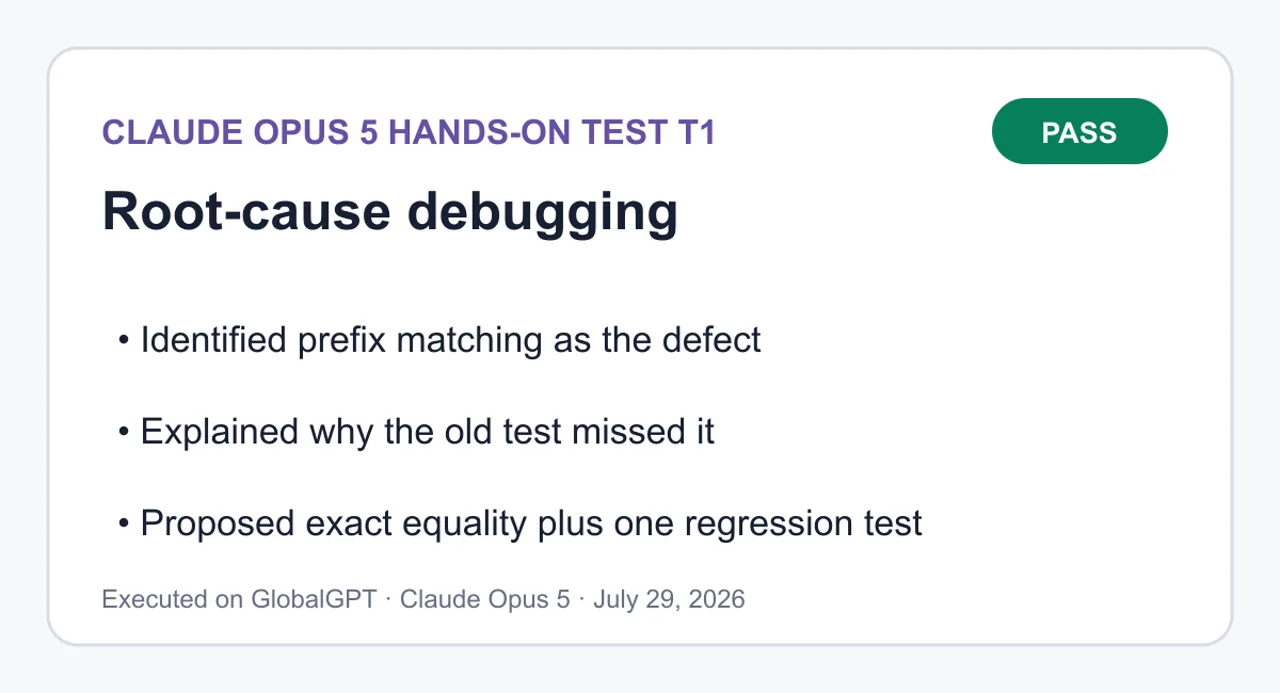
最具說服力的論點在於其實用性,而非浮誇的噱頭:Opus 5 兼具嚴謹的推理餘裕,且成本效益比 Anthropic 的前沿級別更易於掌控。 在我們進行的一次除錯測試中,該模型精準定位了前綴匹配的錯誤,提出了最精簡的修補程式,新增了一項針對性的回歸測試,並提供了一條在本地環境中通過驗證的指令。這對於此任務而言是實用的證據——但並非證明該模型能在每項程式設計工作中勝出。.
最適合 編碼代理、長上下文分析、企業自動化,以及那些因代價高昂的失敗而足以支持溢價模式的團隊。. 在以下情況下請跳過: 速度與單位成本比推理品質的最後階段更為重要。.
本頁內容:
什麼是 Claude Opus 5?
Claude Opus 5 是 Anthropic 專為複雜的代理編碼及企業級工作所設計的高階日常使用機型。. Anthropic 於 2026 年 7 月 24 日宣布此事, ,並形容其設計周到、主動積極,且比其他模型更為高效。它取代了 Claude Opus 4.8,成為 Claude Max 的預設模型,並成為 Claude Pro 上最強大的模型。.

這款產品的宣傳方式對於 Opus 的產品而言頗為罕見:它並非僅被定位為一款極致智慧型模型。Anthropic 希望使用者能將其作為日常工具,並具備可調整的運算強度與適中的延遲表現。 這使得該模型更適合用於長時間運行的代理程式和複雜的生產工作,而較簡單的工作負載則仍可轉由更快、更經濟的模型處理。.
存取方式取決於途徑。一般用戶可透過符合資格的 Claude 方案使用 Opus 5;開發人員則可透過 Claude API 及受支援的雲端平台呼叫該服務。GlobalGPT 亦設有專屬產品頁面。若讀者欲比較 Anthropic 的訂閱方案,可使用 Claude 免費版、Pro 版與 Max 版方案比較 在選擇計費方式之前。.
Claude Opus 5 價格、API 及主要規格
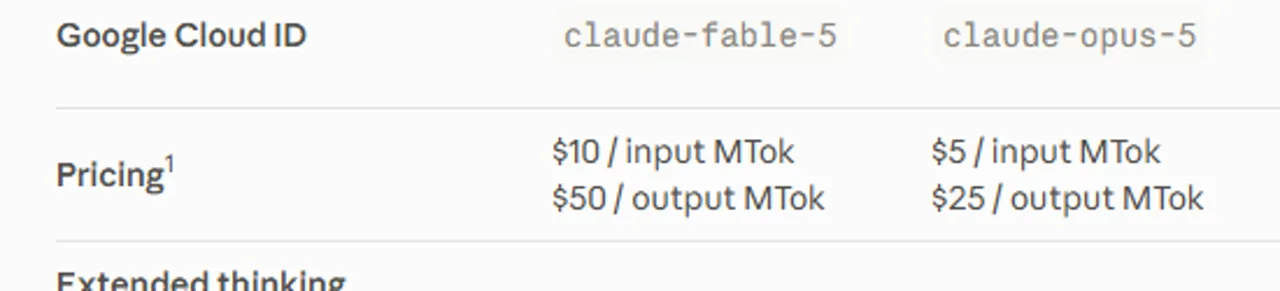
官方 Claude API 價格 是 每百萬個輸入代幣為 $5 和 每百萬枚發行代幣為 $25. 這些是基礎 API 費率,並非 Claude 消費者訂閱方案或第三方平台方案的價格。提示緩存與批次處理各有獨立的費率,因此應比較完整的請求模式,而非僅將標示的輸入價格乘以相應倍數。.
| 領域 | Claude Opus 5 | 這代表什麼 |
|---|---|---|
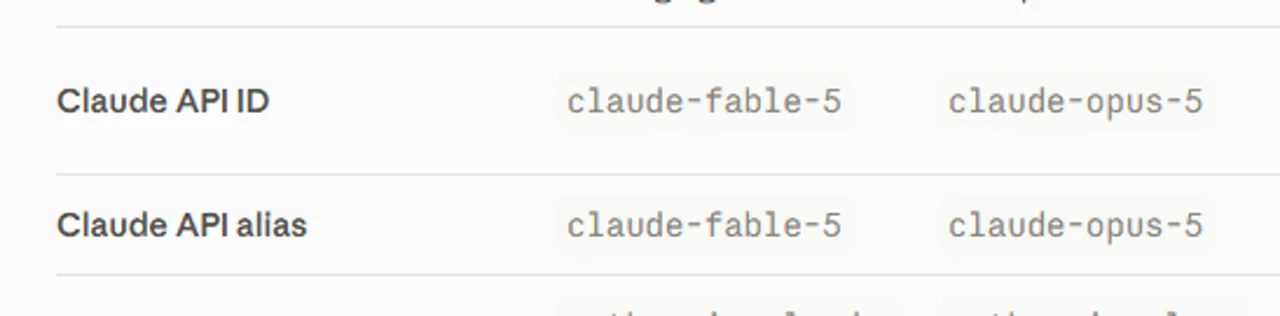
| Claude API 識別碼 | 克勞德-作品第5號 | 請在官方 Claude API 請求中使用此確切的模型值。. |
| 基準輸入價格 | $5 / MTok | 在進行快取或批次折扣前的標準輸入標記速率。. |
| 基準出廠價格 | $25 / MTok | 輸出量大的代理程式可能會迅速變得成本高昂。. |
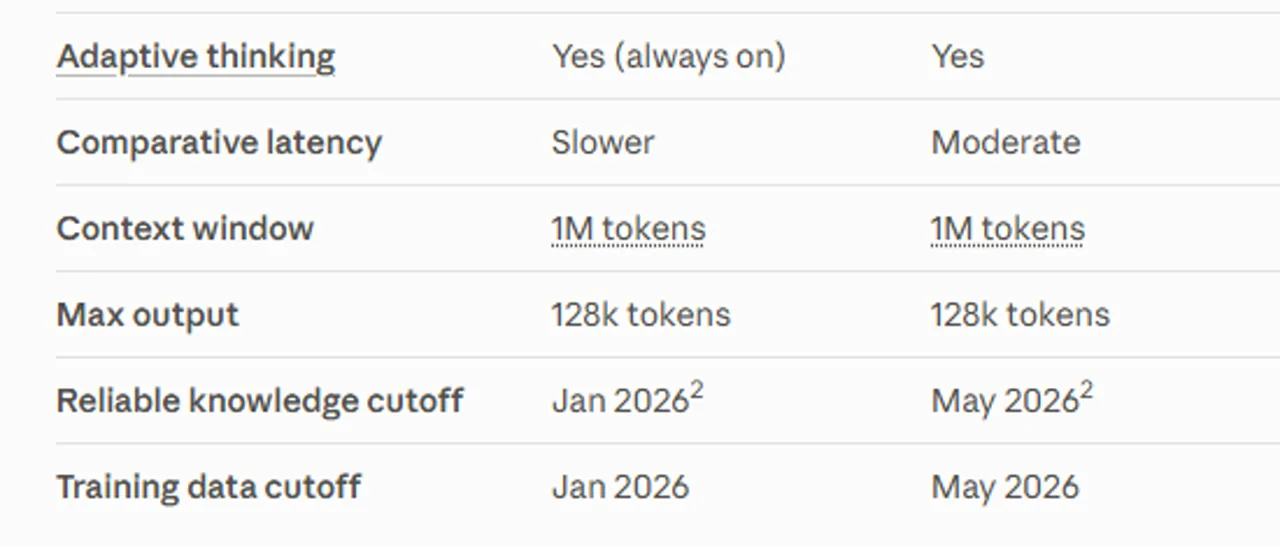
| 上下文視窗 | 100萬枚代幣 | 適用於大型資料庫及文件彙編,但須視請求品質及檢索策略而定。. |
| 最大輸出 | 128K 代幣 | 此說明適用於同步式訊息 API;至於「訊息批次」功能,則有獨立的測試版路徑,上限為 300K。. |
| 可靠的知識截斷點 | 2026年5月 | 以模型標準而言是最近的,但無法取代即時檢索。. |
| 延遲比較 | 適度 | 這並非 Anthropic 最快的機型;延遲仍會因操作方式、工具及工作負載而有所不同。. |
關於消費者使用方面,, Anthropic 列出 Claude Pro 當 $200 採年度計費時,每月費用為 $20;若採月費制,則為 $17;Claude Max 的起始月費為 $100。 Anthropic 指出,Opus 5 是 Pro 版本中最強大的模型,也是 Max 版本的預設選項,但方案配額與產品功能與計量 API 使用量是分開計算的。.
若您需要更詳盡的費用明細,請參閱 Claude AI 方案與 API 定價指南 將使用者訂閱、API 計費及使用限制區分開來。這項區別至關重要:「包含在方案中」並不代表 API 呼叫次數無限制,而 API 費率也無法告訴您能獲得多少使用者聊天功能的使用權限。.
Claude Opus 5 基準測試結果
重要界線: 下圖所示的數據是 由 Anthropic 發布的基準測試結果, ,這些並非為本次評測而進行的獨立測試。它們有助於理解 Anthropic 預期的效能與成本定位,但無法保證在您的提示字串、工具、儲存庫或延遲預算下能獲得相同結果。.
| 評估 | Anthropic 所發表的主張 | 如何閱讀 |
|---|---|---|
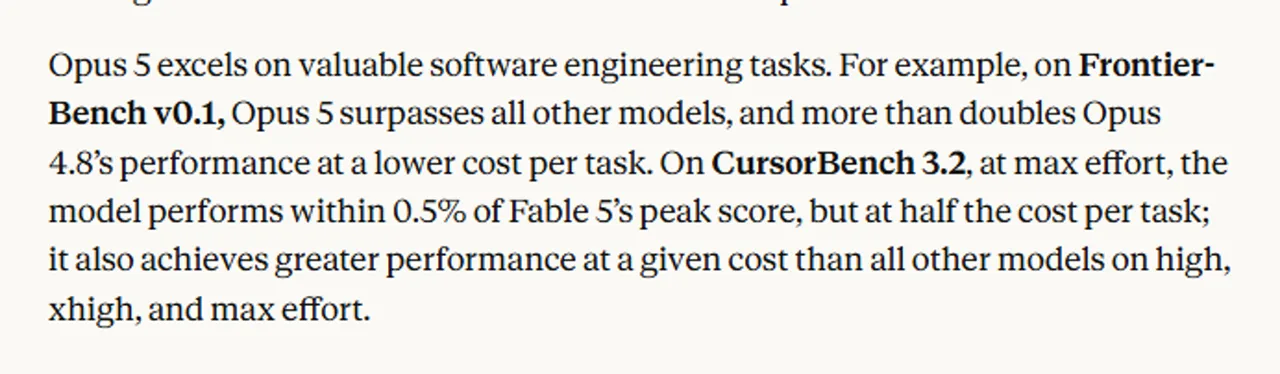
| Frontier-Bench v0.1 | Opus 5 的效能比 Opus 4.8 高出兩倍以上,且每項任務的成本更低。. | 這是一個廣泛的代理程式效能訊號,而非普遍性的兩倍提升。. |
| CursorBench 3.2 | 在全力運算下,Opus 5 的表現僅比 Fable 5 的最高分低 0.5%,且每項任務的成本僅為其一半。. | 在 Anthropic 經過驗證的努力設定下,展現出強勁的編碼代理經濟學。. |
| Zapier AutomationBench | 在每項任務成本相同的情況下,其通過率約為次佳成績的 1.5 倍。. | 對於端到端的業務自動化而言前景可期;但工作流程設計仍至關重要。. |
| OSWorld 2.0 | 以僅略高於 Fable 5 成本三分之一的價格,便超越了 Fable 5 的最佳成績。. | 此項基準測試顯示其電腦使用效率相當出色。. |
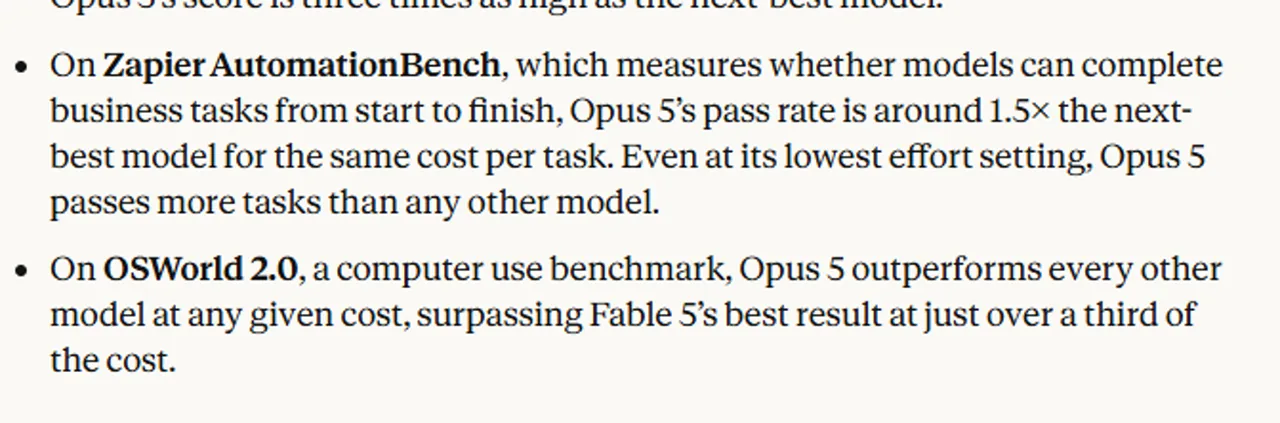
投入的努力是結果的一部分。Anthropic 指出,Opus 5 在 Claude API 和 Claude Code 中預設採用「高」努力程度,而其比較測試亦採用「高」、「x高」或「最大」等設定。 更高的運算強度雖能提升困難任務的成功率,但同時也會增加代幣消耗、延遲,或兩者兼有。因此,每項任務的基準測試成本比單純的每代幣價格更具參考價值——但這兩項指標都無法取代您針對自身工作負載進行的實際測試。.
我們如何測試 Claude Opus 5
我們針對一個由三個檔案組成的 CommonJS 測試環境,執行了一項精簡的根本原因除錯任務。該任務要求模型在進行編輯前先找出根本原因、提出最簡潔的修補程式、新增針對性的回歸測試、避免進行無關的變更,並提供確切的驗證指令。.
隨後,我們並未僅因該答案聽起來很篤定就直接採納,而是獨立地驗證了該修補程式。該 local 指令為 node --test test/account-summary.test.cjs. 在修正之前,這套測試套件產生了一項通過和一項失敗。在套用精確相等性修補程式後,則產生了兩項通過和零項失敗。.
此方法為我們提供了關於某種除錯工作流程的實用資訊:診斷、修補紀律、回歸測試品質以及可驗證性。它並未衡量廣泛的程式碼領導力、長期可靠性、速度,或跨語言的表現。.
Claude Opus 5 實機評測
根本原因除錯:正確、簡潔且可驗證
在我們的測試中,Claude Opus 5 正確地將缺陷定位至 normalizedQuery.startsWith(account.id.toLowerCase()). 透過以下查詢 ACCT-10, 前綴檢查匹配成功 acct-1 首先,所以 Array.prototype.find 在尚未找到確切的 ID 之前,便回傳了錯誤的帳戶。.
該修正提案將前綴比對方式改為精確相等,並針對帶有填充字元且大小寫混用的情況新增了一個回歸案例 ACCT-10 輸入。它並未重寫無關的程式碼。這種克制在實際的程式碼儲存庫中至關重要,因為過於廣泛的「清理」可能會產生比原始錯誤更多的審查工作量。.
最精彩的部分在於完整的循環流程:找出根本原因、解釋現有測試為何未能偵測到該問題、進行最小的變更、新增正確的回歸測試,並說明用以驗證的指令。這個結果與 Opus 5 作為「程式碼代理」的定位相符,但目前仍僅限於單一測試套件。若要了解更廣泛的工作流程入門指南,請參閱 如何使用 Claude AI 進行編碼.
完整的 T1–T4 題目提示、解答及可複製的程式碼
T1:根本原因除錯
通過 — 發現了前綴匹配的缺陷,提出了最小的修補程式,並新增了針對性的回歸測試。.
查看完整的 T1 題目與答案
您正在除錯一個刻意設計得非常簡短的 CommonJS 測試套件。請僅依據以下三個檔案及所述的重現步驟進行除錯。

要求:
1. 在提出任何修改建議之前,請先說明根本原因。
2. 提出能修復此錯誤的最簡潔修補程式。
3. 新增一個針對性強的回歸測試,該測試在修補前會失敗,修補後則會通過。
4. 提供需從測試環境根目錄執行的精確驗證指令。
5. 請勿重寫無關的程式碼。請勿重新命名檔案、新增依賴項,或變更公開 API。
6. 請依序精確回報以下區段:`根本原因`、`修補程式`、`驗證`、`限制事項`。
7. 在 `修補程式` 區段中,請於帶有 `diff` 標籤的區塊內提供一個統一的 diff 檔。在 `驗證` 區段中,請於帶有 `text` 標籤的區塊內提供一個指令。

重現步驟:`summarizeAccount(accounts, ' ACCT-10 ')` 應返回 `{ id: 'acct-10', name: 'Nimbus', seats: 24 }`,但實際卻返回了 `acct-1` 帳戶。

檔案:`src/find-account.cjs`
```js
function findAccount(accounts, query) {
  const normalizedQuery = query.trim().toLowerCase();
  return accounts.find((account) =>
    normalizedQuery.startsWith(account.id.toLowerCase()),
  );
}

module.exports = { findAccount };
```

檔案:`src/account-summary.cjs`
```js
const { findAccount } = require('./find-account.cjs');

function summarizeAccount(accounts, requestedId) {
  const account = findAccount(accounts, requestedId);
  if (!account) return null;
  return { id: account.id, name: account.name, seats: account.seats };
}

module.exports = { summarizeAccount };
```

檔案:`test/account-summary.test.cjs`
```js
const test = require('node:test');
const assert = require('node:assert/strict');
const { summarizeAccount } = require('../src/account-summary.cjs');

const accounts = [
  { id: 'acct-1', name: 'Atlas', seats: 5 },
  { id: 'acct-10', name: 'Nimbus', seats: 24 },
];

test('彙總精確的帳戶 ID'),() => {
  assert.deepEqual(summarizeAccount(accounts, 'acct-1'), {
    id: 'acct-1',
    name: 'Atlas',
    seats: 5,
  });
});
```根本原因
findAccount 根據前綴進行比對,而非根據完全相等性:
1normalizedQuery.startsWith(account.id.toLowerCase())normalizedQuery.startsWith(account.id.toLowerCase())
Array.prototype.find 會傳回第一個符合判斷條件的元素。 對於「ACCT-10」,其正規化查詢為「acct-10」,而第一個帳戶的 ID「acct-1」是其前綴,因此 startsWith 為 true,且在測試「acct-10」之前,「acct-1」便已使搜尋提前終止。.
使用 trim().toLowerCase() 進行標準化是正確的——空格和大小寫並非問題所在。summarizeAccount 僅是中繼函式,並非問題根源。.
現有的測試無法偵測到此情況:「acct-1」既是其自身的字首,又是第一個元素,因此對於該輸入而言,字首比對與精確比對無法區分。.
修補程式
1--- a/src/find-account.cjs2+++ b/src/find-account.cjs3@@ -1,8 +1,8 @@4 function findAccount(accounts, query) {5 const normalizedQuery = query.trim().toLowerCase();6- return accounts.find((account) =>7- normalizedQuery.startsWith(account.id.toLowerCase()),8- );9+ return accounts.find(10+ (account) => account.id.toLowerCase() === normalizedQuery,11+ );12 }13 14 module.exports = { findAccount };15--- a/test/account-summary.test.cjs16+++ b/test/account-summary.test.cjs17@@ -14,3 +14,11 @@18 test('summarizes an exact account ID', () => {19 seats: 5,20 });21 });22+23+test('matches the full ID rather than a prefix, with padding and mixed case', () => {24+ assert.deepEqual(summarizeAccount(accounts, ' ACCT-10 '), {25+ id: 'acct-10',26+ name: 'Nimbus',27+ seats: 24,28+ });29+});--- a/src/find-account.cjs
+++ b/src/find-account.cjs
@@ -1,8 +1,8 @@
function findAccount(accounts, query) {
const normalizedQuery = query.trim().toLowerCase();
- return accounts.find((account) =>
- normalizedQuery.startsWith(account.id.toLowerCase()),
- );
+ return accounts.find(
+ (account) => account.id.toLowerCase() === normalizedQuery,
+ );
}
module.exports = { findAccount };
--- a/test/account-summary.test.cjs
+++ b/test/account-summary.test.cjs
@@ -14,3 +14,11 @@
test('彙總精確的帳戶 ID'),() => {
seats: 5,
});
});
+
+test('匹配完整的 ID 而非前綴,包含填充字元且大小寫混合',() => {
+ assert.deepEqual(summarizeAccount(accounts, ' ACCT-10 '), {
+ id: 'acct-10',
+ name: 'Nimbus',
+ seats: 24,
+ });
+});在修正之前,新測試在 acct-1 / Atlas / 5 物件上會失敗;修正後則能通過。.
驗證
1node --test test/account-summary.test.cjsnode --test test/account-summary.test.cjs
限制事項
• 範圍:僅變更了一個運算子。未進行任何重新命名,亦無新增依賴項,且 findAccount / summarizeAccount 的簽名與回傳型態均維持不變。.
• 既有的行為若不予處理(不屬於此錯誤的範圍):
• 若 requestedId 不是字串(null 或數字),在呼叫 .trim() 時仍會拋出異常。.
• 帳戶 ID 本身並不會被截斷,因此儲存的「acct-10」仍無法匹配——僅查詢部分會被正規化。.
• 字母大小寫處理採用純粹的 toLowerCase() 函式;不進行 Unicode 正規化,也不進行基於地區設定的折疊處理。.
• 重複的 ID 仍會解析為第一個匹配結果,且查詢時間複雜度仍為 O(n)。.
• 測試覆蓋率:這項單一回歸測試僅針對已回報的再現案例進行測試。未找到(空)的路徑以及格式錯誤的輸入仍未經過測試。.
ROOT CAUSE
findAccount matches by prefix, not by equality:

```js
normalizedQuery.startsWith(account.id.toLowerCase())
```

Array.prototype.find returns the first element satisfying the predicate. For ' ACCT-10 ' the normalized query is 'acct-10', and the first account's ID 'acct-1' is a prefix of it, so startsWith is true and acct-1 short-circuits the search before acct-10 is ever tested.
The trim().toLowerCase() normalization is correct — whitespace and casing are not the problem. summarizeAccount is a pass-through and is not at fault.
The existing test cannot catch this: 'acct-1' is a prefix of itself and is the first element, so prefix matching and exact matching are indistinguishable for that input.
PATCH

```diff
--- a/src/find-account.cjs
+++ b/src/find-account.cjs
@@ -1,8 +1,8 @@
 function findAccount(accounts, query) {
   const normalizedQuery = query.trim().toLowerCase();
-  return accounts.find((account) =>
-    normalizedQuery.startsWith(account.id.toLowerCase()),
-  );
+  return accounts.find(
+    (account) => account.id.toLowerCase() === normalizedQuery,
+  );
 }

 module.exports = { findAccount };
--- a/test/account-summary.test.cjs
+++ b/test/account-summary.test.cjs
@@ -14,3 +14,11 @@
 test('summarizes an exact account ID', () => {
     seats: 5,
   });
 });
+
+test('matches the full ID rather than a prefix, with padding and mixed case', () => {
+  assert.deepEqual(summarizeAccount(accounts, ' ACCT-10 '), {
+    id: 'acct-10',
+    name: 'Nimbus',
+    seats: 24,
+  });
+});
```

Before the fix the new test fails with the acct-1 / Atlas / 5 object; after the fix it passes.
VERIFICATION

```text
node --test test/account-summary.test.cjs
```

LIMITATIONS
• Scope: one operator changed. No renames, no new dependencies, and findAccount / summarizeAccount signatures and return shapes are unchanged.
• Pre-existing behavior left alone (out of scope for this bug):
• A non-string requestedId (null, a number) still throws on .trim().
• Account IDs themselves are not trimmed, so a stored ' acct-10' still will not match — only the query is normalized.
• Casing uses plain toLowerCase(); no Unicode normalization or locale-aware folding.
• Duplicate IDs still resolve to the first match, and lookup remains O(n).
• Test coverage: the single regression test targets exactly the reported reproduction. The not-found (null) path and malformed input remain untested.
T2:帳戶健康狀況分析
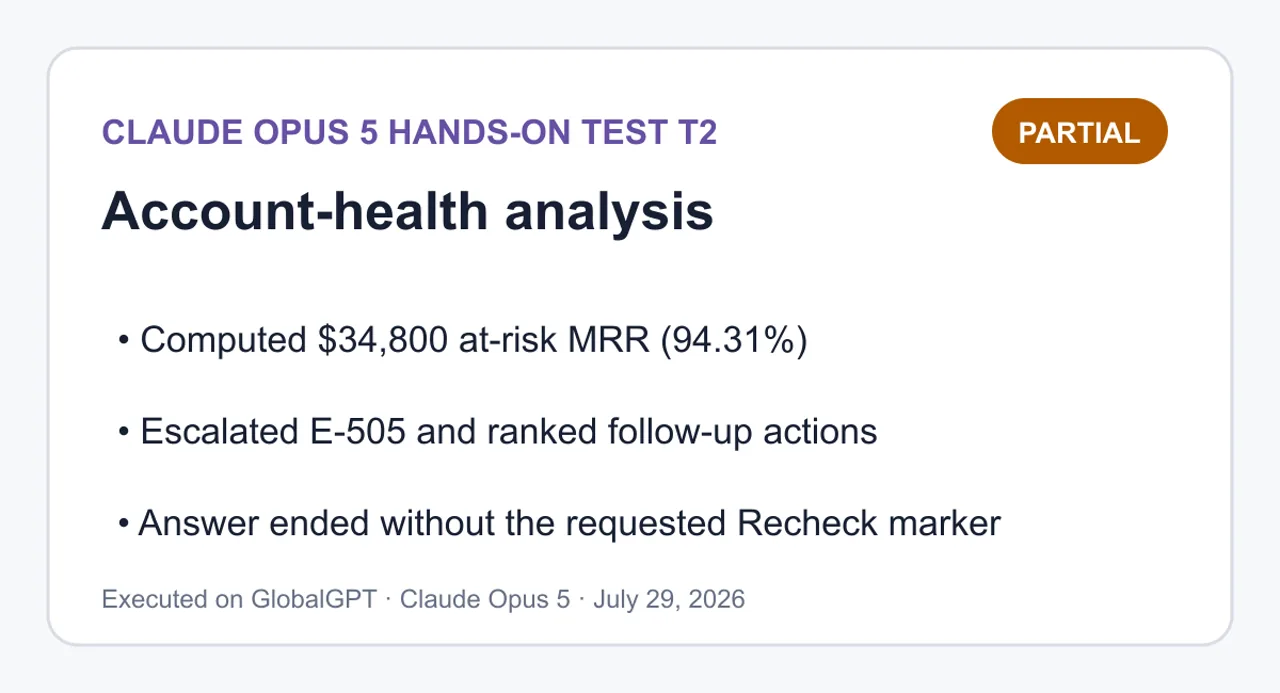
部分完成 — 已計算核心指標並排定行動優先順序,但記錄的答案末尾未包含要求的「重新檢查」標記。.
查看完整的 T2 題目與答案
請將提供的 `account-health.csv` 視為封閉資料集進行分析。請勿使用外部事實,亦請勿自行填補缺失值。

風險規則(請分別獨立評估):
- `inactivity`:`days_since_login >= 30`
- `payment`:`failed_payments >= 2`
- `low_utilization`:`seats_used / seats_purchased = 80`。
- `weak_health_without_risk`:帳戶未處於「高風險」狀態,但 `health_score = 9` 且 `open_tickets >= 3`。

需求:
1. 計算每個帳戶觸發的風險標記與矛盾標記。
2. 彙整資料集的總計數,包含帳戶數、MRR、處於風險狀態的帳戶數、處於風險狀態的 MRR、需升級處理的帳戶數、矛盾記錄數、已購買席位數及已使用席位數。
3. 生成一張精確包含五個欄位的行動表:`帳戶 | 風險觸發條件 | 矛盾項 | 優先級 | 建議行動`。
4. 將直接計算出的數值置於 `測量事實` 標題下,將判斷性決策置於 `推論` 標題下。
5. 在 `重新檢查` 欄位下,展示足夠的算式,以便獨立重新檢查每個總計和每個閾值邊界,包括 0.50 的等於情況。
6. 切勿在未說明的情況下修正或重新詮釋規則。若某個訊號感覺違反直覺,應將其記錄為矛盾,而非更改其分類。

`account-health.csv`:
```csv
account_id,account_name,plan,mrr_usd,days_since_login,failed_payments,seats_purchased,seats_used,health_score,nps,open_tickets
A-101,Aster,Enterprise,12000,45,0,100,82,92,9,1
B-202,Beacon,Pro,4200,4,2,20,18,70,7,0
C-303,Cinder,Pro,3600,12,0,20,8,65,10,4
D-404,Dahlia,Starter,900,5,0,5,4,42,6,0
E-505,Ember,Enterprise,15000,65,3,200,70,35,3,6
F-606,Fjord,Starter,1200,29,1,4,2,85,9,3
```
經測量的事實
來源:account-health.csv,共 6 行,視為已關閉。未進行任何值補全。.
按帳戶評估規則
帳戶
天數≥30
失敗≥2
util <0.50
風險計數
狀態
A-101 紫菀
✅ 45
❌ 0
❌ 0.82
1
高風險
B-202 信標
❌ 4
✅ 2
❌ 0.90
1
高風險
C-303 灰燼
❌ 12
❌ 0
✅ 0.40
1
高風險
D-404 大麗花
❌ 5
❌ 0
❌ 0.80
0
非高風險
E-505 Ember
✅ 65
✅ 3
✅ 0.35
3
高風險 + 升級處理
F-606 峽灣
❌ 29
❌ 1
❌ 0.50
0
非高風險
每個帳戶的矛盾標記
帳戶
強健體魄與風險
健康狀況不佳且無風險
手持門票的宣傳員
A-101 紫菀
✅ (92 ≥ 80,高風險)
❌
❌(NPS 9 ✓,票務 1 ✗)
B-202 信標
❌ (70 < 80)
❌ (70 ≥ 50)
❌ (NPS 7)
C-303 灰燼
❌ (65 < 80)
❌ (65 ≥ 50)
✅ (NPS 10,票數 4)
D-404 大麗花
❌
✅ (42 < 50,不屬於高風險群)
❌ (NPS 6)
E-505 Ember
❌ (35 < 80)
❌ (35 < 50,但屬於高風險群)
❌ (NPS 3)
F-606 峽灣
❌ (85 ≥ 80,但不屬於高風險群)
❌ (85 ≥ 50)
✅ (NPS 9,票數 3)
資料集總數
公制
價值
帳戶
6
每月經常性收入總額
$36,900
高風險帳戶
4(A-101、B-202、C-303、E-505)
面臨風險的每月經常性收入(MRR)
$34,800(佔總數的 94.31%)
將帳戶升級
1 (E-505)
矛盾行
4(A-101、C-303、D-404、F-606)
矛盾標記
4(1 健康良好且有風險、1 健康欠佳且無風險、2 持票推廣者)
已購買的座位
349
已使用的座位
184
推論
以下的優先順序排序及建議措施均屬判斷性決策,而非規則產出的結果。我的排序權重優先考量狀態升級,其次是面臨風險的月經常性收入(MRR),最後是矛盾訊號。.
帳戶
風險觸發因素
矛盾
優先順序
建議採取的行動
E-505 Ember
閒置、付款、低利用率
-
P0
這三條規則均針對最大帳戶($15,000 MRR)觸發。請視為「活躍流失」案例:先恢復付款方式,然後針對 130 個未使用席位進行高階審查。.
A-101 紫菀
不活動
強健體魄與風險
P1
$12,000 MRR,儘管評分為 92 且 82% 的使用率健康,但仍有 45 天的閒置期。在根據該評分採取行動之前,請先確認登入間隔是真正的流失,還是追蹤上的誤差(單一登入、僅透過 API 使用)。.
C-303 灰燼
低利用率
手持門票的宣傳員
P1
推廣員(NPS 10)目前持有 4 張未結票券,利用率為 40%。票券積壓可能是採用率的阻礙因素;請先清理隊列,再推動座位啟用。.
B-202 信標
付款
-
P2
單一原因的明確案例:2 筆付款失敗,最近一次登入時間為 4 天前,且 90% 使用率為 90%。僅需進行帳單追蹤,無需啟動客戶服務程序。.
F-606 峽灣
-
手持門票的宣傳員
P3
各項指標均剛好符合標準(29 天、1 次付款失敗、信用利用率精確為 0.50)。根據現行規則雖不屬高風險狀態,但若再多一天閒置或再發生一次付款失敗,情況便會逆轉。請密切監控並處理這 3 筆待辦事項。.
D-404 大麗花
-
健康狀況不佳且無風險
P3
在 $900 MRR 上,得分 42,未觸發任何規則,且 80% 利用率為 80%。兩者皆可
測量事實
來源:account-health.csv,6 行,視為已關閉。未進行任何值推估。
按帳戶進行規則評估
帳戶
天數≥30
失敗次數≥2
利用率 <0.50
風險計數
狀態
A-101 Aster
✅ 45
❌ 0
❌ 0.82
1
高風險
B-202 Beacon
❌ 4
✅ 2
❌ 0.90
1
高風險
C-303 Cinder
❌ 12
❌ 0
✅ 0.40
1
高風險
D-404 Dahlia
❌ 5
❌ 0
❌ 0.80
0
非高風險
E-505 Ember
✅ 65
✅ 3
✅ 0.35
3
高風險 + 升級
F-606 峽灣
❌ 29
❌ 1
❌ 0.50
0
無風險
各帳戶之矛盾標記
帳戶
健康狀況良好但有風險
健康狀況欠佳但無風險
促進者且有票證負荷
A-101 紫菀
✅ (92 ≥ 80,有風險)
❌
❌ (NPS 9 ✓,票證 1 ✗)
B-202 Beacon
❌ (70 < 80)
❌ (70 ≥ 50)
❌ (NPS 7)
C-303 辛德
❌ (65 < 80)
❌ (65 ≥ 50)
✅ (NPS 10, 票券 4)
D-404 大麗花
❌
✅ (42 < 50,無風險)
❌ (NPS 6)
E-505 餘燼
❌ (35 < 80)
❌ (35 < 50 但屬高風險)
❌ (NPS 3)
F-606 Fjord
❌ (85 ≥ 80 但非高風險)
❌ (85 ≥ 50)
✅ (NPS 9,服務單 3)
資料集總計
指標
數值
帳戶數
6
總 MRR
$36,900
面臨風險的帳戶
4 (A-101、B-202、C-303、E-505)
面臨風險的 MRR
$34,800(佔總額的 94.31%)
需升級處理的帳戶
1(E-505)
矛盾資料列
4(A-101、C-303、D-404、F-606)
矛盾標記
4 筆(1 筆「健康狀況良好但有風險」、1 筆「健康狀況欠佳但無風險」、2 筆「推廣者且票務負荷過高」)
已購買座位
349 個
已使用座位
184 個
推論
以下優先順序及建議行動均屬判斷性決策,而非規則輸出結果。 我的排序權重優先考量狀態升級,其次為高風險 MRR,最後為矛盾訊號。
帳戶
風險觸發條件
矛盾狀況
優先級
建議行動
E-505 Ember
閒置、付款、低利用率
—
P0
最大帳戶($15,000 MRR)觸發了所有三條規則。視為活躍流失:先恢復付款方式,再針對 130 個未使用席位進行高階審查。
A-101 Aster
閒置
健康狀況良好但存在風險
P1
$12,000 MRR,儘管評分為 92 且健康狀況良好(82% 利用率),但已停用 45 天。在根據評分採取行動前,請先確認登入間隔是真實的流失,還是追蹤系統造成的誤差(單一登入 SSO、僅透過 API 使用)。
C-303 Cinder
低利用率
擁有工單負荷的推廣者
P1
推廣者(NPS 10)有 4 筆未結工單,利用率為 40%。工單負荷可能是採用阻礙;先清理待辦清單,再推動座位啟用。
B-202 Beacon
付款
—
P2
單一原因的明確案例:2 次付款失敗,最近登入時間為 4 天,利用率為 90%。僅需進行帳單追蹤,無需客戶服務介入。
F-606 Fjord
—
promoter_with_ticket_load
P3
各項指標均剛好處於界限內(29 天、1 次付款失敗、利用率精確為 0.50)。根據規則目前不屬高風險,但若再多閒置 1 天或再發生 1 次付款失敗,情況便會逆轉。 請監控並清除這 3 張票證。
D-404 Dahlia
—
weak_health_without_risk
P3
評分為 42,未觸發任何規則,在 $900 MRR 下的 80% 利用率。無論是
T3:響應式使用者介面生成
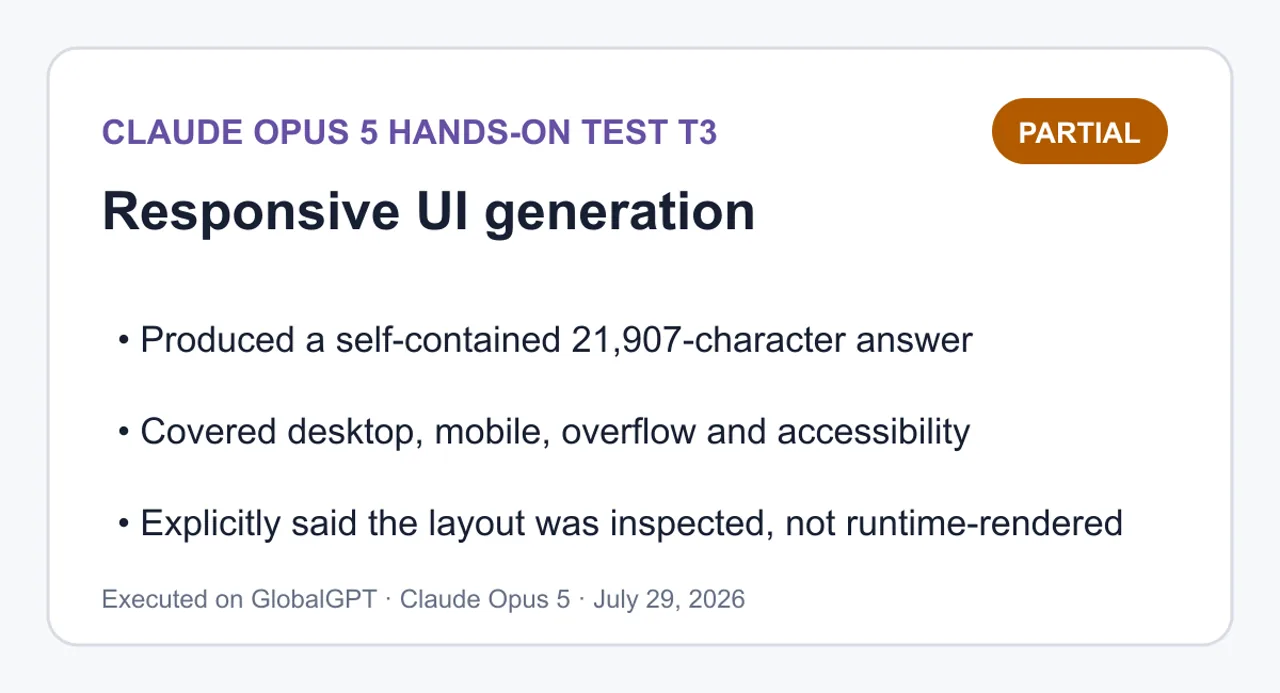
部分完成 — 產出了一個完整的獨立實作與自我檢查程式,同時明確指出該程式是對頁面進行檢查,而非在執行時進行渲染。.
查看完整的 T3 提示與答案
請僅使用下方的產品資料,建置一個精緻的產品比較介面,並將其整合為單一可執行的 HTML 檔案。

要求:
1. 請精確回傳一個以 `html` 標籤包圍的程式碼區塊,其後緊接一個 `SELF-CHECK` 區段。請勿將 HTML、CSS 或 JavaScript 拆分為獨立檔案。
2. 僅使用語義化 HTML、內嵌 CSS 及內嵌原生 JavaScript:不得使用任何外部框架、套件、字型、圖片、網路請求或建置步驟。
3. 提供三個可透過鍵盤操作的標籤頁(`Overview`、`Pricing`、`Limits`),並確保其具備正確的 `tablist`、`tab` 及 `tabpanel` 語義。 左箭頭/右箭頭鍵必須能移動並啟用分頁;Home/End 鍵必須能跳轉至並啟用第一個/最後一個分頁。焦點必須始終可見。
4. 已選中的分頁必須透過 `aria-selected`、`tabindex` 以及可見的面板來反映;非活動面板必須隱藏。
5. 桌面版目標:寬度 1440px。行動版目標:寬度 390px,頁面不得發生水平溢出,控制項不得被裁切,點擊目標高度至少 44px,且比較卡片須以單欄方式堆疊。
6. 包含簡潔的頁首、明確的推薦內容、三張產品卡片以及一張精簡的比較表格。 保持易讀的對比度,並避免裝飾性動畫。
7. 請精確使用以下產品資訊,且不得添加任何額外聲明:
   - Atlas:`$19/mo`、`20 個專案`、`10 GB`、`電子郵件支援`,最適合個人工作。
   - Beacon:`$49/mo`、`無限專案`、`100 GB`、`優先支援`、最適合成長中的團隊。
   - Cove:`$99/mo`、`無限專案`、`1 TB`、`專屬支援`、最適合受監管的營運。
8. 為 Beacon 標示醒目的 `整體最佳` 標籤,同時避免讓其他卡片看起來處於停用狀態。
9. 在 `SELF-CHECK` 中,請明確報告您針對語義標籤、鍵盤行為、1440px 佈局、390px 佈局、水平溢出以及外部依賴項所進行的檢查。除非您確實渲染了視口,否則請勿聲稱已渲染;請區分程式碼檢查與執行時驗證。

產品固定資料(亦儲存於 `fixtures/T3-responsive-ui/product-data.json`):
```json
{
  "products": [
    {"name":"Atlas","price":"$19/mo","projects":"20 projects","storage":"10 GB","support":"電子郵件支援","bestFor":"個人工作"},
    {"name":"Beacon","price":"$49/mo","projects":"無限制專案","storage":"100 GB","support":"優先支援","bestFor":"成長中的團隊","badge":"整體最佳"},
    {"name":"Cove","price":"$99/mo","projects":"無限專案","storage":"1 TB","support":"專屬支援","bestFor":"受監管的營運"}
  ]
}
```1<!DOCTYPE html>2<html lang="en">3<head>4<meta charset="utf-8">5<meta name="viewport" content="width=device-width, initial-scale=1">6<title>Compare plans — Atlas, Beacon, Cove</title>7<style>8 :root9 {10 --bg: #f6f7f911;12 --surface: #ffffff13;14 --ink: #16191f15;16 --ink-soft: #4a515c17;18 --line: #d3d8df19;20 --line-strong: #b6bdc721;22 --accent: #10457e23;24 --accent-soft: #e8f0f925;26 --focus: #0b2f5627;28 --radius: 10px29;30 }31 32 * {33box-sizing34: border-box; }35 36 html { -webkit-text-size-adjust: 100%37; }38 39 body40 {41 margin: 042;43 padding: 044;45 background: var46(--bg);47 color: var48(--ink);49 font-family: system-ui, -apple-system, "Segoe UI"50, Roboto, Helvetica, Arial, sans-serif;51 font-size: 16px52;53 line-height: 1.554;55 overflow-x56: hidden;57 }58 59 .wrap60 {61 width: 100%62;63 max-width: 1120px64;65 margin: 066 auto;67 padding: 32px 24px 64px68;69 }70 71 /* ---------- Header ---------- */72 73 .page-header { margin-bottom: 24px74; }75 76 .page-header h177 {78 margin: 0 0 8px79;80 font-size: 1.75rem81;82 line-height: 1.2583;84 letter-spacing: -0.01em85;86 }87 88 .page-header p89 {90 margin: 091;92 max-width: 60ch93;94 color: var95(--ink-soft);96 }97 98 /* ---------- Recommendation ---------- */99 100 .recommendation101 {102 display103: flex;104 flex-wrap105: wrap;106 gap: 4px 10px107;108 align-items109: baseline;110 margin: 0 0 28px111;112 padding: 14px 16px113;114 background: var115(--accent-soft);116 border: 1px solid #c2d5e8117;118 border-left: 4px solid var119(--accent);120 border-radius: var121(--radius);122 }123 124 .recommendation strong { color: var125(--accent); }126 127 .recommendation span { color: #23405e128; }129 130 /* ---------- Tabs ---------- */131 132 .tabs133 {134 display135: flex;136 flex-wrap137: wrap;138 gap: 8px139;140 margin: 0 0 20px141;142 padding: 0143;144 border-bottom: 1px solid var145(--line);146 }147 148 [role="tab"]149 {150 appearance151: none;152 min-height: 44px153;154 padding: 10px 18px155;156 font157: inherit;158 font-weight: 600159;160 color: var161(--ink-soft);162 background163: transparent;164 border: 1px165 solid transparent;166 border-bottom: 3px167 solid transparent;168 border-radius: 8px 8px 0 0169;170 cursor171: pointer;172 }173 174 [role="tab"]:hover { color: var(--ink); background: #eceff3175; }176 177 [role="tab"][aria-selected="true"]178 {179 color: var180(--accent);181 background: var182(--surface);183 border-color: var(--line) var(--line) var184(--accent);185 border-bottom-width: 3px186;187 }188 189 :focus-visible190 {191 outline: 3px solid var192(--focus);193 outline-offset: 2px194;195 }196 197 [role="tabpanel"] { outline198: none; }199 200 [role="tabpanel"]:focus-visible201 {202 outline: 3px solid var203(--focus);204 outline-offset: 4px205;206 border-radius: var207(--radius);208 }209 210 [hidden] { display: none !important211; }212 213 .panel-intro214 {215 margin: 0 0 20px216;217 max-width: 62ch218;219 color: var220(--ink-soft);221 }222 223 /* ---------- Cards ---------- */224 225 .card-grid226 {227 display228: grid;229 grid-template-columns: repeat(3, minmax(0, 1230fr));231 gap: 20px232;233 margin: 0234;235 padding: 0236;237 list-style238: none;239 align-items240: start;241 }242 243 .card244 {245 display246: flex;247 flex-direction248: column;249 height: 100%250;251 padding: 20px252;253 background: var254(--surface);255 border: 1px solid var256(--line);257 border-radius: var258(--radius);259 }260 261 .card.is-featured262 {263 border-color: var264(--accent);265 border-width: 2px266;267 padding: 19px268;269 }270 271 .card-head272 {273 display274: flex;275 flex-wrap276: wrap;277 gap: 8px278;279 align-items280: center;281 justify-content282: space-between;283 margin-bottom: 4px284;285 }286 287 .card h3288 {289 margin: 0290;291 font-size: 1.2rem292;293 }294 295 .badge296 {297 padding: 3px 10px298;299 font-size: 0.75rem300;301 font-weight: 700302;303 letter-spacing: 0.02em304;305 text-transform306: uppercase;307 color: #ffffff308;309 background: var310(--accent);311 border-radius: 999px312;313 white-space314: nowrap;315 }316 317 .price318 {319 margin: 8px 0 2px320;321 font-size: 1.6rem322;323 font-weight: 700324;325 letter-spacing: -0.02em326;327 }328 329 .best-for330 {331 margin: 0 0 14px332;333 font-size: 0.9375rem334;335 color: var336(--ink-soft);337 }338 339 .spec-list340 {341 margin: 0342;343 padding: 14px 0 0344;345 border-top: 1px solid var346(--line);347 font-size: 0.9375rem348;349 }350 351 .spec-list div352 {353 display354: flex;355 gap: 12px356;357 justify-content358: space-between;359 padding: 5px 0360;361 }362 363 .spec-list dt { color: var364(--ink-soft); }365 366 .spec-list dd367 {368 margin: 0369;370 font-weight: 600371;372 text-align373: right;374 }375 376 /* ---------- Table ---------- */377 378 .table-section { margin-top: 36px379; }380 381 .table-section h2382 {383 margin: 0 0 12px384;385 font-size: 1.125rem386;387 }388 389 .table-scroll390 {391 max-width: 100%392;393 overflow-x394: auto;395 background: var396(--surface);397 border: 1px solid var398(--line);399 border-radius: var400(--radius);401 }402 403 table404 {405 width: 100%406;407 border-collapse408: collapse;409 font-size: 0.9375rem410;411 }412 413 caption414 {415 padding: 12px 14px416;417 text-align418: left;419 color: var420(--ink-soft);421 font-size: 0.875rem422;423 }424 425 th, td426 {427 padding: 10px 14px428;429 text-align430: left;431 border-top: 1px solid var432(--line);433 white-space434: nowrap;435 }436 437 thead th438 {439 background: #eef1f5440;441 border-top442: none;443 font-weight: 700444;445 }446 447 tbody th { font-weight: 600; color: var448(--ink-soft); }449 450 th[scope="col"].is-featured { color: var451(--accent); }452 453 /* ---------- Mobile ---------- */454 455 @media (max-width: 720px456) {457 .wrap { padding: 20px 16px 48px458; }459 460 .page-header h1 { font-size: 1.4rem461; }462 463 .tabs464 {465 gap: 4px466;467 overflow-x468: auto;469 -webkit-470overflow471-scrolling: touch;472 flex-wrap473: nowrap;474 }475 476 [role="tab"]477 {478 flex: 1 0479 auto;480 padding: 10px 12px481;482 font-size: 0.9375rem483;484 }485 486 .card-grid { grid-template-columns: minmax(0, 1487fr); }488 489 th, td { padding: 10px 12px490; }491 }492 493 @media (prefers-reduced-motion494: reduce) {495 * {496transition: none !important; animation: none !important497; }498 }499</style>500</head>501<body>502<main class="wrap">503 504 <header class="page-header">505 <h1>Compare plans</h1>506 <p>Three plans across projects, storage, and support. Pick a tab to focus on the details that matter to you.</p>507 </header>508 509 <p class="recommendation">510 <strong>Recommended: Beacon</strong>511 <span>Best overall for growing teams — $49/mo, unlimited projects, 100 GB, priority support.</span>512 </p>513 514 <div class="tabs" role="tablist" aria-label="Plan comparison views">515 <button type="button" role="tab" id="tab-overview" aria-controls="panel-overview" aria-selected="true" tabindex="0">Overview</button>516 <button type="button" role="tab" id="tab-pricing" aria-controls="panel-pricing" aria-selected="false" tabindex="-1">Pricing</button>517 <button type="button" role="tab" id="tab-limits" aria-controls="panel-limits" aria-selected="false" tabindex="-1">Limits</button>518 </div>519 520 <!-- Overview -->521 <section role="tabpanel" id="panel-overview" aria-labelledby="tab-overview" tabindex="0">522 <p class="panel-intro">Every plan side by side, with the full set of published facts for each one.</p>523 524 <ul class="card-grid">525 <li class="card">526 <div class="card-head"><h3>Atlas</h3></div>527 <p class="price">$19/mo</p>528 <p class="best-for">Best for solo work</p>529 <dl class="spec-list">530 <div><dt>Projects</dt><dd>20 projects</dd></div>531 <div><dt>Storage</dt><dd>10 GB</dd></div>532 <div><dt>Support</dt><dd>Email support</dd></div>533 </dl>534 </li>535 536 <li class="card is-featured">537 <div class="card-head">538 <h3>Beacon</h3>539 <span class="badge">Best overall</span>540 </div>541 <p class="price">$49/mo</p>542 <p class="best-for">Best overall for growing teams</p>543 <dl class="spec-list">544 <div><dt>Projects</dt><dd>Unlimited projects</dd></div>545 <div><dt>Storage</dt><dd>100 GB</dd></div>546 <div><dt>Support</dt><dd>Priority support</dd></div>547 </dl>548 </li>549 550 <li class="card">551 <div class="card-head"><h3>Cove</h3></div>552 <p class="price">$99/mo</p>553 <p class="best-for">Best for regulated operations</p>554 <dl class="spec-list">555 <div><dt>Projects</dt><dd>Unlimited projects</dd></div>556 <div><dt>Storage</dt><dd>1 TB</dd></div>557 <div><dt>Support</dt><dd>Dedicated support</dd></div>558 </dl>559 </li>560 </ul>561 562 <section class="table-section">563 <h2>All plans at a glance</h2>564 <div class="table-scroll" tabindex="0" role="region" aria-label="Full plan comparison table, scrollable">565 <table>566 <caption>Published facts for Atlas, Beacon, and Cove.</caption>567 <thead>568 <tr>569 <th scope="col">Plan</th>570 <th scope="col">Price</th>571 <th scope="col">Projects</th>572 <th scope="col">Storage</th>573 <th scope="col">Support</th>574 <th scope="col">Best for</th>575 </tr>576 </thead>577 <tbody>578 <tr>579 <th scope="row">Atlas</th>580 <td>$19/mo</td><td>20 projects</td><td>10 GB</td><td>Email support</td><td>Solo work</td>581 </tr>582 <tr>583 <th scope="row">Beacon</th>584 <td>$49/mo</td><td>Unlimited projects</td><td>100 GB</td><td>Priority support</td><td>Growing teams</td>585 </tr>586 <tr>587 <th scope="row">Cove</th>588 <td>$99/mo</td><td>Unlimited projects</td><td>1 TB</td><td>Dedicated support</td><td>Regulated operations</td>589 </tr>590 </tbody>591 </table>592 </div>593 </section>594 </section>595 596 <!-- Pricing -->597 <section role="tabpanel" id="panel-pricing" aria-labelledby="tab-pricing" tabindex="0" hidden>598 <p class="panel-intro">Monthly price and the audience each plan is built for.</p>599 600 <ul class="card-grid">601 <li class="card">602 <div class="card-head"><h3>Atlas</h3></div>603 <p class="price">$19/mo</p>604 <p class="best-for">Best for solo work</p>605 <dl class="spec-list">606 <div><dt>Support</dt><dd>Email support</dd></div>607 </dl>608 </li>609 610 <li class="card is-featured">611 <div class="card-head">612 <h3>Beacon</h3>613 <span class="badge">Best overall</span>614 </div>615 <p class="price">$49/mo</p>616 <p class="best-for">Best overall for growing teams</p>617 <dl class="spec-list">618 <div><dt>Support</dt><dd>Priority support</dd></div>619 </dl>620 </li>621 622 <li class="card">623 <div class="card-head"><h3>Cove</h3></div>624 <p class="price">$99/mo</p>625 <p class="best-for">Best for regulated operations</p>626 <dl class="spec-list">627 <div><dt>Support</dt><dd>Dedicated support</dd></div>628 </dl>629 </li>630 </ul>631 632 <section class="table-section">633 <h2>Price and support</h2>634 <div class="table-scroll" tabindex="0" role="region" aria-label="Pricing comparison table, scrollable">635 <table>636 <caption>Monthly price, support tier, and intended fit.</caption>637 <thead>638 <tr>639 <th scope="col">Plan</th>640 <th scope="col">Price</th>641 <th scope="col">Support</th>642 <th scope="col">Best for</th>643 </tr>644 </thead>645 <tbody>646 <tr><th scope="row">Atlas</th><td>$19/mo</td><td>Email support</td><td>Solo work</td></tr>647 <tr><th scope="row">Beacon</th><td>$49/mo</td><td>Priority support</td><td>Growing teams</td></tr>648 <tr><th scope="row">Cove</th><td>$99/mo</td><td>Dedicated support</td><td>Regulated operations</td></tr>649 </tbody>650 </table>651 </div>652 </section>653 </section>654 655 <!-- Limits -->656 <section role="tabpanel" id="panel-limits" aria-labelledby="tab-limits" tabindex="0" hidden>657 <p class="panel-intro">Project counts and storage allowances for each plan.</p>658 659 <ul class="card-grid">660 <li class="card">661 <div class="card-head"><h3>Atlas</h3></div>662 <p class="price">$19/mo</p>663 <p class="best-for">Best for solo work</p>664 <dl class="spec-list">665 <div><dt>Projects</dt><dd>20 projects</dd></div>666 <div><dt>Storage</dt><dd>10 GB</dd></div>667 </dl>668 </li>669 670 <li class="card is-featured">671 <div class="card-head">672 <h3>Beacon</h3>673 <span class="badge">Best overall</span>674 </div>675 <p class="price">$49/mo</p>676 <p class="best-for">Best overall for growing teams</p>677 <dl class="spec-list">678 <div><dt>Projects</dt><dd>Unlimited projects</dd></div>679 <div><dt>Storage</dt><dd>100 GB</dd></div>680 </dl>681 </li>682 683 <li class="card">684 <div class="card-head"><h3>Cove</h3></div>685 <p class="price">$99/mo</p>686 <p class="best-for">Best for regulated operations</p>687 <dl class="spec-list">688 <div><dt>Projects</dt><dd>Unlimited projects</dd></div>689 <div><dt>Storage</dt><dd>1 TB</dd></div>690 </dl>691 </li>692 </ul>693 694 <section class="table-section">695 <h2>Projects and storage</h2>696 <div class="table-scroll" tabindex="0" role="region" aria-label="Limits comparison table, scrollable">697 <table>698 <caption>Project allowance and storage per plan.</caption>699 <thead>700 <tr>701 <th scope="col">Plan</th>702 <th scope="col">Projects</th>703 <th scope="col">Storage</th>704 </tr>705 </thead>706 <tbody>707 <tr><th scope="row">Atlas</th><td>20 projects</td><td>10 GB</td></tr>708 <tr><th scope="row">Beacon</th><td>Unlimited projects</td><td>100 GB</td></tr>709 <tr><th scope="row">Cove</th><td>Unlimited projects</td><td>1 TB</td></tr>710 </tbody>711 </table>712 </div>713 </section>714 </section>715 716</main>717 718<script>719(720function (721) {722 'use strict'723;724 725 var tablist = document.querySelector('[role="tablist"]'726);727 if (!tablist) return728;729 730 var tabs = Array.prototype.slice.call(tablist.querySelectorAll('[role="tab"]'731));732 733 function panelFor(tab734) {735 return document.getElementById(tab.getAttribute('aria-controls'736));737 }738 739 function activate(index, moveFocus740) {741 if (index < 0 || index >= tabs.length) return742;743 744 tabs.745forEach(function (tab, i746) {747 var748 selected = i === index;749 var panel = panelFor750(tab);751 752 tab.753setAttribute('aria-selected', selected ? 'true' : 'false'754);755 tab.756setAttribute('tabindex', selected ? '0' : '-1'757);758 759 if760 (panel) {761 if762 (selected) {763 panel.764removeAttribute('hidden'765);766 }767else768 {769 panel.770setAttribute('hidden', ''771);772 }773 }774 });775 776 if (moveFocus !== false) tabs[index].focus777();778 }779 780 function currentIndex(781) {782 var i = tabs.findIndex(function (tab783) {784 return tab.getAttribute('aria-selected') === 'true'785;786 });787 return i === -1 ? 0788 : i;789 }790 791 tabs.792forEach(function (tab, i793) {794 tab.795addEventListener('click', function (796) {797 activate798(i);799 });800 });801 802 tablist.803addEventListener('keydown', function (event804) {805 var last = tabs.length - 1806;807 var i = currentIndex808();809 var next = null810;811 812 switch (event.key813) {814 case 'ArrowRight'815:816 next = i === last ?8170 : i + 1818;819 break820;821 case 'ArrowLeft'822:823 next = i ===8240 ? last : i - 1825;826 break827;828 case 'Home'829:830 next =8310832;833 break834;835 case 'End'836:837 next = last;838 break839;840 default841:842 return843;844 }845 846 event.847preventDefault848();849 activate850(next);851 });852 853 // Normalize initial state from markup.854 activate(currentIndex(), false855);856}());857</script>858</body>859</html><!DOCTYPE html>
<html lang="en">
<head>
<meta charset="utf-8">
<meta name="viewport" content="width=device-width, initial-scale=1">
<title>Compare plans — Atlas, Beacon, Cove</title>
<style>
:root
{
--bg: #f6f7f9
;
--surface: #ffffff
;
--ink: #16191f
;
--ink-soft: #4a515c
;
--line: #d3d8df
;
--line-strong: #b6bdc7
;
--accent: #10457e
;
--accent-soft: #e8f0f9
;
--focus: #0b2f56
;
--radius: 10px
;
}
* {
box-sizing
: border-box; }
html { -webkit-text-size-adjust: 100%
; }
body
{
margin: 0
;
padding: 0
;
background: var
(--bg);
color: var
(--ink);
font-family: system-ui, -apple-system, "Segoe UI"
, Roboto, Helvetica, Arial, sans-serif;
font-size: 16px
;
line-height: 1.5
;
overflow-x
: hidden;
}
.wrap
{
width: 100%
;
max-width: 1120px
;
margin: 0
auto;
padding: 32px 24px 64px
;
}
/* ---------- Header ---------- */
.page-header { margin-bottom: 24px
; }
.page-header h1
{
margin: 0 0 8px
;
font-size: 1.75rem
;
line-height: 1.25
;
letter-spacing: -0.01em
;
}
.page-header p
{
margin: 0
;
max-width: 60ch
;
color: var
(--ink-soft);
}
/* ---------- Recommendation ---------- */
.recommendation
{
display
: flex;
flex-wrap
: wrap;
gap: 4px 10px
;
align-items
: baseline;
margin: 0 0 28px
;
padding: 14px 16px
;
background: var
(--accent-soft);
border: 1px solid #c2d5e8
;
border-left: 4px solid var
(--accent);
border-radius: var
(--radius);
}
.recommendation strong { color: var
(--accent); }
.recommendation span { color: #23405e
; }
/* ---------- Tabs ---------- */
.tabs
{
display
: flex;
flex-wrap
: wrap;
gap: 8px
;
margin: 0 0 20px
;
padding: 0
;
border-bottom: 1px solid var
(--line);
}
[role="tab"]
{
appearance
: none;
min-height: 44px
;
padding: 10px 18px
;
font
: inherit;
font-weight: 600
;
color: var
(--ink-soft);
background
: transparent;
border: 1px
solid transparent;
border-bottom: 3px
solid transparent;
border-radius: 8px 8px 0 0
;
cursor
: pointer;
}
[role="tab"]:hover { color: var(--ink); background: #eceff3
; }
[role="tab"][aria-selected="true"]
{
color: var
(--accent);
background: var
(--surface);
border-color: var(--line) var(--line) var
(--accent);
border-bottom-width: 3px
;
}
:focus-visible
{
outline: 3px solid var
(--focus);
outline-offset: 2px
;
}
[role="tabpanel"] { outline
: none; }
[role="tabpanel"]:focus-visible
{
outline: 3px solid var
(--focus);
outline-offset: 4px
;
border-radius: var
(--radius);
}
[hidden] { display: none !important
; }
.panel-intro
{
margin: 0 0 20px
;
max-width: 62ch
;
color: var
(--ink-soft);
}
/* ---------- Cards ---------- */
.card-grid
{
display
: grid;
grid-template-columns: repeat(3, minmax(0, 1
fr));
gap: 20px
;
margin: 0
;
padding: 0
;
list-style
: none;
align-items
: start;
}
.card
{
display
: flex;
flex-direction
: column;
height: 100%
;
padding: 20px
;
background: var
(--surface);
border: 1px solid var
(--line);
border-radius: var
(--radius);
}
.card.is-featured
{
border-color: var
(--accent);
border-width: 2px
;
padding: 19px
;
}
.card-head
{
display
: flex;
flex-wrap
: wrap;
gap: 8px
;
align-items
: center;
justify-content
: space-between;
margin-bottom: 4px
;
}
.card h3
{
margin: 0
;
font-size: 1.2rem
;
}
.badge
{
padding: 3px 10px
;
font-size: 0.75rem
;
font-weight: 700
;
letter-spacing: 0.02em
;
text-transform
: uppercase;
color: #ffffff
;
background: var
(--accent);
border-radius: 999px
;
white-space
: nowrap;
}
.price
{
margin: 8px 0 2px
;
font-size: 1.6rem
;
font-weight: 700
;
letter-spacing: -0.02em
;
}
.best-for
{
margin: 0 0 14px
;
font-size: 0.9375rem
;
color: var
(--ink-soft);
}
.spec-list
{
margin: 0
;
padding: 14px 0 0
;
border-top: 1px solid var
(--line);
font-size: 0.9375rem
;
}
.spec-list div
{
display
: flex;
gap: 12px
;
justify-content
: space-between;
padding: 5px 0
;
}
.spec-list dt { color: var
(--ink-soft); }
.spec-list dd
{
margin: 0
;
font-weight: 600
;
text-align
: right;
}
/* ---------- Table ---------- */
.table-section { margin-top: 36px
; }
.table-section h2
{
margin: 0 0 12px
;
font-size: 1.125rem
;
}
.table-scroll
{
max-width: 100%
;
overflow-x
: auto;
background: var
(--surface);
border: 1px solid var
(--line);
border-radius: var
(--radius);
}
table
{
width: 100%
;
border-collapse
: collapse;
font-size: 0.9375rem
;
}
caption
{
padding: 12px 14px
;
text-align
: left;
color: var
(--ink-soft);
font-size: 0.875rem
;
}
th, td
{
padding: 10px 14px
;
text-align
: left;
border-top: 1px solid var
(--line);
white-space
: nowrap;
}
thead th
{
background: #eef1f5
;
border-top
: none;
font-weight: 700
;
}
tbody th { font-weight: 600; color: var
(--ink-soft); }
th[scope="col"].is-featured { color: var
(--accent); }
/* ---------- Mobile ---------- */
@media (max-width: 720px
) {
.wrap { padding: 20px 16px 48px
; }
.page-header h1 { font-size: 1.4rem
; }
.tabs
{
gap: 4px
;
overflow-x
: auto;
-webkit-
overflow
-scrolling: touch;
flex-wrap
: nowrap;
}
[role="tab"]
{
flex: 1 0
auto;
padding: 10px 12px
;
font-size: 0.9375rem
;
}
.card-grid { grid-template-columns: minmax(0, 1
fr); }
th, td { padding: 10px 12px
; }
}
@media (prefers-reduced-motion
: reduce) {
* {
transition: none !important; animation: none !important
; }
}
</style>
</head>
<body>
<main class="wrap">
<header class="page-header">
<h1>Compare plans</h1>
<p>Three plans across projects, storage, and support. Pick a tab to focus on the details that matter to you.</p>
</header>
<p class="recommendation">
<strong>Recommended: Beacon</strong>
<span>Best overall for growing teams — $49/mo, unlimited projects, 100 GB, priority support.</span>
</p>
<div class="tabs" role="tablist" aria-label="Plan comparison views">
<button type="button" role="tab" id="tab-overview" aria-controls="panel-overview" aria-selected="true" tabindex="0">Overview</button>
<button type="button" role="tab" id="tab-pricing" aria-controls="panel-pricing" aria-selected="false" tabindex="-1">Pricing</button>
<button type="button" role="tab" id="tab-limits" aria-controls="panel-limits" aria-selected="false" tabindex="-1">Limits</button>
</div>
<!-- Overview -->
<section role="tabpanel" id="panel-overview" aria-labelledby="tab-overview" tabindex="0">
<p class="panel-intro">Every plan side by side, with the full set of published facts for each one.</p>
<ul class="card-grid">
<li class="card">
<div class="card-head"><h3>Atlas</h3></div>
<p class="price">$19/mo</p>
<p class="best-for">Best for solo work</p>
<dl class="spec-list">
<div><dt>Projects</dt><dd>20 projects</dd></div>
<div><dt>Storage</dt><dd>10 GB</dd></div>
<div><dt>Support</dt><dd>Email support</dd></div>
</dl>
</li>
<li class="card is-featured">
<div class="card-head">
<h3>Beacon</h3>
<span class="badge">Best overall</span>
</div>
<p class="price">$49/mo</p>
<p class="best-for">Best overall for growing teams</p>
<dl class="spec-list">
<div><dt>Projects</dt><dd>Unlimited projects</dd></div>
<div><dt>Storage</dt><dd>100 GB</dd></div>
<div><dt>Support</dt><dd>Priority support</dd></div>
</dl>
</li>
<li class="card">
<div class="card-head"><h3>Cove</h3></div>
<p class="price">$99/mo</p>
<p class="best-for">Best for regulated operations</p>
<dl class="spec-list">
<div><dt>Projects</dt><dd>Unlimited projects</dd></div>
<div><dt>Storage</dt><dd>1 TB</dd></div>
<div><dt>Support</dt><dd>Dedicated support</dd></div>
</dl>
</li>
</ul>
<section class="table-section">
<h2>All plans at a glance</h2>
<div class="table-scroll" tabindex="0" role="region" aria-label="Full plan comparison table, scrollable">
<table>
<caption>Published facts for Atlas, Beacon, and Cove.</caption>
<thead>
<tr>
<th scope="col">Plan</th>
<th scope="col">Price</th>
<th scope="col">Projects</th>
<th scope="col">Storage</th>
<th scope="col">Support</th>
<th scope="col">Best for</th>
</tr>
</thead>
<tbody>
<tr>
<th scope="row">Atlas</th>
<td>$19/mo</td><td>20 projects</td><td>10 GB</td><td>Email support</td><td>Solo work</td>
</tr>
<tr>
<th scope="row">Beacon</th>
<td>$49/mo</td><td>Unlimited projects</td><td>100 GB</td><td>Priority support</td><td>Growing teams</td>
</tr>
<tr>
<th scope="row">Cove</th>
<td>$99/mo</td><td>Unlimited projects</td><td>1 TB</td><td>Dedicated support</td><td>Regulated operations</td>
</tr>
</tbody>
</table>
</div>
</section>
</section>
<!-- Pricing -->
<section role="tabpanel" id="panel-pricing" aria-labelledby="tab-pricing" tabindex="0" hidden>
<p class="panel-intro">Monthly price and the audience each plan is built for.</p>
<ul class="card-grid">
<li class="card">
<div class="card-head"><h3>Atlas</h3></div>
<p class="price">$19/mo</p>
<p class="best-for">Best for solo work</p>
<dl class="spec-list">
<div><dt>Support</dt><dd>Email support</dd></div>
</dl>
</li>
<li class="card is-featured">
<div class="card-head">
<h3>Beacon</h3>
<span class="badge">Best overall</span>
</div>
<p class="price">$49/mo</p>
<p class="best-for">Best overall for growing teams</p>
<dl class="spec-list">
<div><dt>Support</dt><dd>Priority support</dd></div>
</dl>
</li>
<li class="card">
<div class="card-head"><h3>Cove</h3></div>
<p class="price">$99/mo</p>
<p class="best-for">Best for regulated operations</p>
<dl class="spec-list">
<div><dt>Support</dt><dd>Dedicated support</dd></div>
</dl>
</li>
</ul>
<section class="table-section">
<h2>Price and support</h2>
<div class="table-scroll" tabindex="0" role="region" aria-label="Pricing comparison table, scrollable">
<table>
<caption>Monthly price, support tier, and intended fit.</caption>
<thead>
<tr>
<th scope="col">Plan</th>
<th scope="col">Price</th>
<th scope="col">Support</th>
<th scope="col">Best for</th>
</tr>
</thead>
<tbody>
<tr><th scope="row">Atlas</th><td>$19/mo</td><td>Email support</td><td>Solo work</td></tr>
<tr><th scope="row">Beacon</th><td>$49/mo</td><td>Priority support</td><td>Growing teams</td></tr>
<tr><th scope="row">Cove</th><td>$99/mo</td><td>Dedicated support</td><td>Regulated operations</td></tr>
</tbody>
</table>
</div>
</section>
</section>
<!-- Limits -->
<section role="tabpanel" id="panel-limits" aria-labelledby="tab-limits" tabindex="0" hidden>
<p class="panel-intro">Project counts and storage allowances for each plan.</p>
<ul class="card-grid">
<li class="card">
<div class="card-head"><h3>Atlas</h3></div>
<p class="price">$19/mo</p>
<p class="best-for">Best for solo work</p>
<dl class="spec-list">
<div><dt>Projects</dt><dd>20 projects</dd></div>
<div><dt>Storage</dt><dd>10 GB</dd></div>
</dl>
</li>
<li class="card is-featured">
<div class="card-head">
<h3>Beacon</h3>
<span class="badge">Best overall</span>
</div>
<p class="price">$49/mo</p>
<p class="best-for">Best overall for growing teams</p>
<dl class="spec-list">
<div><dt>Projects</dt><dd>Unlimited projects</dd></div>
<div><dt>Storage</dt><dd>100 GB</dd></div>
</dl>
</li>
<li class="card">
<div class="card-head"><h3>Cove</h3></div>
<p class="price">$99/mo</p>
<p class="best-for">Best for regulated operations</p>
<dl class="spec-list">
<div><dt>Projects</dt><dd>Unlimited projects</dd></div>
<div><dt>Storage</dt><dd>1 TB</dd></div>
</dl>
</li>
</ul>
<section class="table-section">
<h2>Projects and storage</h2>
<div class="table-scroll" tabindex="0" role="region" aria-label="Limits comparison table, scrollable">
<table>
<caption>Project allowance and storage per plan.</caption>
<thead>
<tr>
<th scope="col">Plan</th>
<th scope="col">Projects</th>
<th scope="col">Storage</th>
</tr>
</thead>
<tbody>
<tr><th scope="row">Atlas</th><td>20 projects</td><td>10 GB</td></tr>
<tr><th scope="row">Beacon</th><td>Unlimited projects</td><td>100 GB</td></tr>
<tr><th scope="row">Cove</th><td>Unlimited projects</td><td>1 TB</td></tr>
</tbody>
</table>
</div>
</section>
</section>
</main>
<script>
(
function (
) {
'use strict'
;
var tablist = document.querySelector('[role="tablist"]'
);
if (!tablist) return
;
var tabs = Array.prototype.slice.call(tablist.querySelectorAll('[role="tab"]'
));
function panelFor(tab
) {
return document.getElementById(tab.getAttribute('aria-controls'
));
}
function activate(index, moveFocus
) {
if (index < 0 || index >= tabs.length) return
;
tabs.
forEach(function (tab, i
) {
var
selected = i === index;
var panel = panelFor
(tab);
tab.
setAttribute('aria-selected', selected ? 'true' : 'false'
);
tab.
setAttribute('tabindex', selected ? '0' : '-1'
);
if
(panel) {
if
(selected) {
panel.
removeAttribute('hidden'
);
}
else
{
panel.
setAttribute('hidden', ''
);
}
}
});
if (moveFocus !== false) tabs[index].focus
();
}
function currentIndex(
) {
var i = tabs.findIndex(function (tab
) {
return tab.getAttribute('aria-selected') === 'true'
;
});
return i === -1 ? 0
: i;
}
tabs.
forEach(function (tab, i
) {
tab.
addEventListener('click', function (
) {
activate
(i);
});
});
tablist.
addEventListener('keydown', function (event
) {
var last = tabs.length - 1
;
var i = currentIndex
();
var next = null
;
switch (event.key
) {
case 'ArrowRight'
:
next = i === last ?
0 : i + 1
;
break
;
case 'ArrowLeft'
:
next = i ===
0 ? last : i - 1
;
break
;
case 'Home'
:
next =
0
;
break
;
case 'End'
:
next = last;
break
;
default
:
return
;
}
event.
preventDefault
();
activate
(next);
});
// Normalize initial state from markup.
activate(currentIndex(), false
);
}());
</script>
</body>
</html>自我檢核
以下所有陳述均僅基於程式碼檢視。我並未開啟瀏覽器、渲染檢視窗、執行螢幕閱讀器,亦未執行鍵盤處理程序,因此此處內容均未經執行時驗證。若某項論點取決於版面配置引擎的行為,我會特別說明。.
語義標籤頁 — 已審查、一致性良好
一個具有 aria-label="方案比較視圖" 的 div[role="tablist"] 包含三個按鈕[type="button"][role="tab"]。 每個分頁都有一個唯一的 ID,並透過 aria-controls 屬性指向一個 section[role="tabpanel"];每個面板則透過 aria-labelledby 屬性回指其對應的分頁。我已手動追蹤這三組對應關係:tab-overview/panel-overview、tab-pricing/panel-pricing、tab-limits/panel-limits。 沒有重複的 ID,也沒有懸空的參照。面板使用 tabindex="0",因此透過「標籤」後可直接存取面板主體。.
鍵盤行為 — 僅進行檢查,不執行
在選項清單上設定單一的 keydown 監聽器,用以處理「向右箭頭」、「向左箭頭」、「Home」和「End」這四個按鍵,僅針對這四個按鍵呼叫 event.preventDefault(),否則則提早返回。 方向鍵在兩端會循環跳轉。由於 `activate()` 函式既會更新 `aria-selected`/`tabindex`/`hidden` 屬性,又會移動焦點,因此方向鍵與 Home/End 鍵能透過單一步驟同時移動焦點並觸發選取,這正是需求所要求的「自動觸發」模式。 Tab/Shift+Tab 的遍歷依賴於動態調整的 tabindex:僅有一個 Tab 欄位設定為 tabindex="0",其餘皆為 -1,並由 activate() 函式維持此狀態。焦點可見性來自於全域性的 :focus-visible 樣式規則,包含 3px 的外線條與 2px 的偏移量;我並未覆寫或移除任何預設的外線條。 我尚未在實際瀏覽器中確認鍵盤事件的處理情況。.
選定狀態反射 — 已檢查
activate() 會在同一個迴圈中設定這三項屬性,因此 aria-selected="true"、tabindex="0" 以及未設定 hidden 屬性這三者不會產生偏差。 非活躍的面板會被賦予 `hidden` 屬性,而 [hidden] { display: none !important; } 則可防止原本會破壞此效果的顯示規則生效——這項防護至關重要,因為面板中包含具有 `display: grid` 屬性的子元素。`activate(currentIndex(), false)` 會在頁面載入時執行,以根據標記內容將狀態正常化,同時不會搶佔焦點。 若 JavaScript 無法執行,標記預設會將「概覽」選中,其餘兩個面板則隱藏,因此頁面將降級為僅顯示一個可讀取的面板。.
1440px 版面配置 — 已檢查,尚未渲染
.wrap 的 max-width 設定為 1120px,並採用 margin: 0 auto,因此當寬度達到 1440px 時,內容會居中顯示,兩側各留約 160px 的間距,而非拉伸以填滿空間。 卡片採用 `grid-template-columns: repeat(3, minmax(0, 1fr))` 並設定 20px 間距,形成三個等寬欄位;`align-items: start` 可防止卡片拉伸至共用高度,而 `.card { height: 100% }` 的效果則會被此設定抵消。 使用 minmax(0, 1fr) 是經過深思熟慮的 — 若僅使用 1fr,可能會拒絕縮減至內容寬度以下,進而導致網格擴寬。我並未實際測量最終的像素輸出結果。.
390px 佈局 — 已檢查,尚未渲染
當區塊的 `max-width: 720px` 生效時,卡片網格會切換為 `minmax(0, 1fr)`(單欄佈局),因此卡片會堆疊顯示。各邊的內距會縮減至 16px,留下約 358px 的內容寬度。 點擊目標:每個 [role="tab"] 皆設定 `min-height: 44px`,且水平內距會縮減至 12px 而非高度縮減,因此即使在狹窄寬度下,44px 的下緣高度仍能維持不變。 標籤列設定為 `flex-wrap: nowrap`,並搭配 `overflow-x: auto` 以及 `flex: 1 0 auto` 的子元素,因此三個標籤會完整顯示於標籤列內,或於標籤列內捲動,而非在控制區中央被裁切或換行。 已包含 標籤。尚未在實際 390px 視口環境下進行驗證。.
水平溢出 — 已檢查,一個刻意限制範圍的捲軸
body { overflow-x: hidden } 是最後的防線,但我也試著不依賴它。* { box-sizing: border-box } 可將內邊距控制在宣告的寬度範圍內。 比較表格在儲存格上使用了 `white-space: nowrap`,因此六欄的「概覽」表格在行動裝置上會超過 358px;這透過 `.table-scroll { max-width: 100%; overflow-x: auto }` 來控制,使其捲動表格區域而非整個頁面。 該外層容器設有 `tabindex="0"` 和 `role="region"`,並附有標籤,以便鍵盤使用者能觸及並捲動該區域。對於原本可能拒絕縮小的 Flex 和 Grid 子元素,則透過在網格中使用 `minmax(0, 1fr)`,以及在 `.card-head` 和 `.recommendation` 上設定 `flex-wrap: wrap` 來處理。 唯一無法在未實際渲染的情況下排除的風險,是表格儲存格中出現過長的連續字串,但所有測試資料的值皆為短字串。.
外部依賴項 — 已檢查,無
沒有 <link>, <script src>, <img>, @import, url(), fetch, XMLHttpRequest, web font, or CDN reference. Fonts are a system-ui stack. The badge and featured border are CSS only, no icon assets. Everything is inline in one file, so it runs from file:// with no build step.
對比與動態 — 已檢查
主文字 #16191f 在 #f6f7f9 背景上,以及次要文字 #4a515c 在白色背景上,對比度均遠高於 4.5:1; 標誌採用 #10457e 色置於白色背景上,而選中分頁則為 #10457e 色置於白色背景上。 這些數值是透過十六進位數值的比例估算得出,並非使用對比度工具測量。整體並無任何過渡效果、動畫或變形;`prefers-reduced-motion` 區塊僅是作為安全措施的無效指令,而非針對現有動態效果的修正。.
固定裝置的準確性 — 已檢查
這三種方案均出現在所有三個面板中,並列於各面板的表格內。我已將每項價格、專案數量、儲存空間數值及支援層級與 JSON: Atlas 進行了交叉比對。
19
/
20
𝑝
𝑟
𝑜
𝑗
𝑒
𝑐
𝑡
𝑠
/
10
𝐺
𝐵
/
𝐸
𝑚
𝑎
𝑖
𝑙
,
𝐵
𝑒
𝑎
𝑐
𝑜
𝑛
49/無限/100 GB/優先級,Cove $99/無限/1 TB/專用。 Beacon 標有「整體最佳」徽章並帶有 2 像素的強調邊框;Atlas 和 Cove 則維持全不透明文字、標準邊框及相同的字型處理方式,因此看起來是「可用」而非「停用」狀態。性價比最佳的產品會以簡短標籤呈現(例如「最適合單人工作」)——文字添加在產品規格值周圍,並未新增產品宣稱內容。.
已知缺口
完全不進行任何形式的執行時驗證。三個面板的內容是以靜態標記的形式在各面板間複製,而非從 JSON 渲染而來,因此該固定裝置是透過轉錄而非綁定來作為「真實來源」——未來若資料變更,則需在多個位置進行編輯。.
```html
<!DOCTYPE html>
<html lang="en">
<head>
<meta charset="utf-8">
<meta name="viewport" content="width=device-width, initial-scale=1">
<title>Compare plans — Atlas, Beacon, Cove</title>
<style>
:root
{
--bg: #f6f7f9
;
--surface: #ffffff
;
--ink: #16191f
;
--ink-soft: #4a515c
;
--line: #d3d8df
;
--line-strong: #b6bdc7
;
--accent: #10457e
;
--accent-soft: #e8f0f9
;
--focus: #0b2f56
;
--radius: 10px
;
}
* {
box-sizing
: border-box; }
html { -webkit-text-size-adjust: 100%
; }
body
{
margin: 0
;
padding: 0
;
background: var
(--bg);
color: var
(--ink);
font-family: system-ui, -apple-system, "Segoe UI"
, Roboto, Helvetica, Arial, sans-serif;
font-size: 16px
;
line-height: 1.5
;
overflow-x
: hidden;
}
.wrap
{
width: 100%
;
max-width: 1120px
;
margin: 0
auto;
padding: 32px 24px 64px
;
}
/* ---------- Header ---------- */
.page-header { margin-bottom: 24px
; }
.page-header h1
{
margin: 0 0 8px
;
font-size: 1.75rem
;
line-height: 1.25
;
letter-spacing: -0.01em
;
}
.page-header p
{
margin: 0
;
max-width: 60ch
;
color: var
(--ink-soft);
}
/* ---------- Recommendation ---------- */
.recommendation
{
display
: flex;
flex-wrap
: wrap;
gap: 4px 10px
;
align-items
: baseline;
margin: 0 0 28px
;
padding: 14px 16px
;
background: var
(--accent-soft);
border: 1px solid #c2d5e8
;
border-left: 4px solid var
(--accent);
border-radius: var
(--radius);
}
.recommendation strong { color: var
(--accent); }
.recommendation span { color: #23405e
; }
/* ---------- Tabs ---------- */
.tabs
{
display
: flex;
flex-wrap
: wrap;
gap: 8px
;
margin: 0 0 20px
;
padding: 0
;
border-bottom: 1px solid var
(--line);
}
[role="tab"]
{
appearance
: none;
min-height: 44px
;
padding: 10px 18px
;
font
: inherit;
font-weight: 600
;
color: var
(--ink-soft);
background
: transparent;
border: 1px
solid transparent;
border-bottom: 3px
solid transparent;
border-radius: 8px 8px 0 0
;
cursor
: pointer;
}
[role="tab"]:hover { color: var(--ink); background: #eceff3
; }
[role="tab"][aria-selected="true"]
{
color: var
(--accent);
background: var
(--surface);
border-color: var(--line) var(--line) var
(--accent);
border-bottom-width: 3px
;
}
:focus-visible
{
outline: 3px solid var
(--focus);
outline-offset: 2px
;
}
[role="tabpanel"] { outline
: none; }
[role="tabpanel"]:focus-visible
{
outline: 3px solid var
(--focus);
outline-offset: 4px
;
border-radius: var
(--radius);
}
[hidden] { display: none !important
; }
.panel-intro
{
margin: 0 0 20px
;
max-width: 62ch
;
color: var
(--ink-soft);
}
/* ---------- Cards ---------- */
.card-grid
{
display
: grid;
grid-template-columns: repeat(3, minmax(0, 1
fr));
gap: 20px
;
margin: 0
;
padding: 0
;
list-style
: none;
align-items
: start;
}
.card
{
display
: flex;
flex-direction
: column;
height: 100%
;
padding: 20px
;
background: var
(--surface);
border: 1px solid var
(--line);
border-radius: var
(--radius);
}
.card.is-featured
{
border-color: var
(--accent);
border-width: 2px
;
padding: 19px
;
}
.card-head
{
display
: flex;
flex-wrap
: wrap;
gap: 8px
;
align-items
: center;
justify-content
: space-between;
margin-bottom: 4px
;
}
.card h3
{
margin: 0
;
font-size: 1.2rem
;
}
.badge
{
padding: 3px 10px
;
font-size: 0.75rem
;
font-weight: 700
;
letter-spacing: 0.02em
;
text-transform
: uppercase;
color: #ffffff
;
background: var
(--accent);
border-radius: 999px
;
white-space
: nowrap;
}
.price
{
margin: 8px 0 2px
;
font-size: 1.6rem
;
font-weight: 700
;
letter-spacing: -0.02em
;
}
.best-for
{
margin: 0 0 14px
;
font-size: 0.9375rem
;
color: var
(--ink-soft);
}
.spec-list
{
margin: 0
;
padding: 14px 0 0
;
border-top: 1px solid var
(--line);
font-size: 0.9375rem
;
}
.spec-list div
{
display
: flex;
gap: 12px
;
justify-content
: space-between;
padding: 5px 0
;
}
.spec-list dt { color: var
(--ink-soft); }
.spec-list dd
{
margin: 0
;
font-weight: 600
;
text-align
: right;
}
/* ---------- Table ---------- */
.table-section { margin-top: 36px
; }
.table-section h2
{
margin: 0 0 12px
;
font-size: 1.125rem
;
}
.table-scroll
{
max-width: 100%
;
overflow-x
: auto;
background: var
(--surface);
border: 1px solid var
(--line);
border-radius: var
(--radius);
}
table
{
width: 100%
;
border-collapse
: collapse;
font-size: 0.9375rem
;
}
caption
{
padding: 12px 14px
;
text-align
: left;
color: var
(--ink-soft);
font-size: 0.875rem
;
}
th, td
{
padding: 10px 14px
;
text-align
: left;
border-top: 1px solid var
(--line);
white-space
: nowrap;
}
thead th
{
background: #eef1f5
;
border-top
: none;
font-weight: 700
;
}
tbody th { font-weight: 600; color: var
(--ink-soft); }
th[scope="col"].is-featured { color: var
(--accent); }
/* ---------- Mobile ---------- */
@media (max-width: 720px
) {
.wrap { padding: 20px 16px 48px
; }
.page-header h1 { font-size: 1.4rem
; }
.tabs
{
gap: 4px
;
overflow-x
: auto;
-webkit-
overflow
-scrolling: touch;
flex-wrap
: nowrap;
}
[role="tab"]
{
flex: 1 0
auto;
padding: 10px 12px
;
font-size: 0.9375rem
;
}
.card-grid { grid-template-columns: minmax(0, 1
fr); }
th, td { padding: 10px 12px
; }
}
@media (prefers-reduced-motion
: reduce) {
* {
transition: none !important; animation: none !important
; }
}
</style>
</head>
<body>
<main class="wrap">
<header class="page-header">
<h1>Compare plans</h1>
<p>Three plans across projects, storage, and support. Pick a tab to focus on the details that matter to you.</p>
</header>
<p class="recommendation">
<strong>Recommended: Beacon</strong>
<span>Best overall for growing teams — $49/mo, unlimited projects, 100 GB, priority support.</span>
</p>
<div class="tabs" role="tablist" aria-label="Plan comparison views">
<button type="button" role="tab" id="tab-overview" aria-controls="panel-overview" aria-selected="true" tabindex="0">Overview</button>
<button type="button" role="tab" id="tab-pricing" aria-controls="panel-pricing" aria-selected="false" tabindex="-1">Pricing</button>
<button type="button" role="tab" id="tab-limits" aria-controls="panel-limits" aria-selected="false" tabindex="-1">Limits</button>
</div>
<!-- Overview -->
<section role="tabpanel" id="panel-overview" aria-labelledby="tab-overview" tabindex="0">
<p class="panel-intro">Every plan side by side, with the full set of published facts for each one.</p>
<ul class="card-grid">
<li class="card">
<div class="card-head"><h3>Atlas</h3></div>
<p class="price">$19/mo</p>
<p class="best-for">Best for solo work</p>
<dl class="spec-list">
<div><dt>Projects</dt><dd>20 projects</dd></div>
<div><dt>Storage</dt><dd>10 GB</dd></div>
<div><dt>Support</dt><dd>Email support</dd></div>
</dl>
</li>
<li class="card is-featured">
<div class="card-head">
<h3>Beacon</h3>
<span class="badge">Best overall</span>
</div>
<p class="price">$49/mo</p>
<p class="best-for">Best overall for growing teams</p>
<dl class="spec-list">
<div><dt>Projects</dt><dd>Unlimited projects</dd></div>
<div><dt>Storage</dt><dd>100 GB</dd></div>
<div><dt>Support</dt><dd>Priority support</dd></div>
</dl>
</li>
<li class="card">
<div class="card-head"><h3>Cove</h3></div>
<p class="price">$99/mo</p>
<p class="best-for">Best for regulated operations</p>
<dl class="spec-list">
<div><dt>Projects</dt><dd>Unlimited projects</dd></div>
<div><dt>Storage</dt><dd>1 TB</dd></div>
<div><dt>Support</dt><dd>Dedicated support</dd></div>
</dl>
</li>
</ul>
<section class="table-section">
<h2>All plans at a glance</h2>
<div class="table-scroll" tabindex="0" role="region" aria-label="Full plan comparison table, scrollable">
<table>
<caption>Published facts for Atlas, Beacon, and Cove.</caption>
<thead>
<tr>
<th scope="col">Plan</th>
<th scope="col">Price</th>
<th scope="col">Projects</th>
<th scope="col">Storage</th>
<th scope="col">Support</th>
<th scope="col">Best for</th>
</tr>
</thead>
<tbody>
<tr>
<th scope="row">Atlas</th>
<td>$19/mo</td><td>20 projects</td><td>10 GB</td><td>Email support</td><td>Solo work</td>
</tr>
<tr>
<th scope="row">Beacon</th>
<td>$49/mo</td><td>Unlimited projects</td><td>100 GB</td><td>Priority support</td><td>Growing teams</td>
</tr>
<tr>
<th scope="row">Cove</th>
<td>$99/mo</td><td>Unlimited projects</td><td>1 TB</td><td>Dedicated support</td><td>Regulated operations</td>
</tr>
</tbody>
</table>
</div>
</section>
</section>
<!-- Pricing -->
<section role="tabpanel" id="panel-pricing" aria-labelledby="tab-pricing" tabindex="0" hidden>
<p class="panel-intro">Monthly price and the audience each plan is built for.</p>
<ul class="card-grid">
<li class="card">
<div class="card-head"><h3>Atlas</h3></div>
<p class="price">$19/mo</p>
<p class="best-for">Best for solo work</p>
<dl class="spec-list">
<div><dt>Support</dt><dd>Email support</dd></div>
</dl>
</li>
<li class="card is-featured">
<div class="card-head">
<h3>Beacon</h3>
<span class="badge">Best overall</span>
</div>
<p class="price">$49/mo</p>
<p class="best-for">Best overall for growing teams</p>
<dl class="spec-list">
<div><dt>Support</dt><dd>Priority support</dd></div>
</dl>
</li>
<li class="card">
<div class="card-head"><h3>Cove</h3></div>
<p class="price">$99/mo</p>
<p class="best-for">Best for regulated operations</p>
<dl class="spec-list">
<div><dt>Support</dt><dd>Dedicated support</dd></div>
</dl>
</li>
</ul>
<section class="table-section">
<h2>Price and support</h2>
<div class="table-scroll" tabindex="0" role="region" aria-label="Pricing comparison table, scrollable">
<table>
<caption>Monthly price, support tier, and intended fit.</caption>
<thead>
<tr>
<th scope="col">Plan</th>
<th scope="col">Price</th>
<th scope="col">Support</th>
<th scope="col">Best for</th>
</tr>
</thead>
<tbody>
<tr><th scope="row">Atlas</th><td>$19/mo</td><td>Email support</td><td>Solo work</td></tr>
<tr><th scope="row">Beacon</th><td>$49/mo</td><td>Priority support</td><td>Growing teams</td></tr>
<tr><th scope="row">Cove</th><td>$99/mo</td><td>Dedicated support</td><td>Regulated operations</td></tr>
</tbody>
</table>
</div>
</section>
</section>
<!-- Limits -->
<section role="tabpanel" id="panel-limits" aria-labelledby="tab-limits" tabindex="0" hidden>
<p class="panel-intro">Project counts and storage allowances for each plan.</p>
<ul class="card-grid">
<li class="card">
<div class="card-head"><h3>Atlas</h3></div>
<p class="price">$19/mo</p>
<p class="best-for">Best for solo work</p>
<dl class="spec-list">
<div><dt>Projects</dt><dd>20 projects</dd></div>
<div><dt>Storage</dt><dd>10 GB</dd></div>
</dl>
</li>
<li class="card is-featured">
<div class="card-head">
<h3>Beacon</h3>
<span class="badge">Best overall</span>
</div>
<p class="price">$49/mo</p>
<p class="best-for">Best overall for growing teams</p>
<dl class="spec-list">
<div><dt>Projects</dt><dd>Unlimited projects</dd></div>
<div><dt>Storage</dt><dd>100 GB</dd></div>
</dl>
</li>
<li class="card">
<div class="card-head"><h3>Cove</h3></div>
<p class="price">$99/mo</p>
<p class="best-for">Best for regulated operations</p>
<dl class="spec-list">
<div><dt>Projects</dt><dd>Unlimited projects</dd></div>
<div><dt>Storage</dt><dd>1 TB</dd></div>
</dl>
</li>
</ul>
<section class="table-section">
<h2>Projects and storage</h2>
<div class="table-scroll" tabindex="0" role="region" aria-label="Limits comparison table, scrollable">
<table>
<caption>Project allowance and storage per plan.</caption>
<thead>
<tr>
<th scope="col">Plan</th>
<th scope="col">Projects</th>
<th scope="col">Storage</th>
</tr>
</thead>
<tbody>
<tr><th scope="row">Atlas</th><td>20 projects</td><td>10 GB</td></tr>
<tr><th scope="row">Beacon</th><td>Unlimited projects</td><td>100 GB</td></tr>
<tr><th scope="row">Cove</th><td>Unlimited projects</td><td>1 TB</td></tr>
</tbody>
</table>
</div>
</section>
</section>
</main>
<script>
(
function (
) {
'use strict'
;
var tablist = document.querySelector('[role="tablist"]'
);
if (!tablist) return
;
var tabs = Array.prototype.slice.call(tablist.querySelectorAll('[role="tab"]'
));
function panelFor(tab
) {
return document.getElementById(tab.getAttribute('aria-controls'
));
}
function activate(index, moveFocus
) {
if (index < 0 || index >= tabs.length) return
;
tabs.
forEach(function (tab, i
) {
var
selected = i === index;
var panel = panelFor
(tab);
tab.
setAttribute('aria-selected', selected ? 'true' : 'false'
);
tab.
setAttribute('tabindex', selected ? '0' : '-1'
);
if
(panel) {
if
(selected) {
panel.
removeAttribute('hidden'
);
}
else
{
panel.
setAttribute('hidden', ''
);
}
}
});
if (moveFocus !== false) tabs[index].focus
();
}
function currentIndex(
) {
var i = tabs.findIndex(function (tab
) {
return tab.getAttribute('aria-selected') === 'true'
;
});
return i === -1 ? 0
: i;
}
tabs.
forEach(function (tab, i
) {
tab.
addEventListener('click', function (
) {
activate
(i);
});
});
tablist.
addEventListener('keydown', function (event
) {
var last = tabs.length - 1
;
var i = currentIndex
();
var next = null
;
switch (event.key
) {
case 'ArrowRight'
:
next = i === last ?
0 : i + 1
;
break
;
case 'ArrowLeft'
:
next = i ===
0 ? last : i - 1
;
break
;
case 'Home'
:
next =
0
;
break
;
case 'End'
:
next = last;
break
;
default
:
return
;
}
event.
preventDefault
();
activate
(next);
});
// Normalize initial state from markup.
activate(currentIndex(), false
);
}());
</script>
</body>
</html>
```
SELF-CHECK
All statements below come from code inspection only. I did not open a browser, render a viewport, run a screen reader, or execute the keyboard handlers, so nothing here is runtime-verified. Where a claim depends on layout engine behavior, I say so.
Semantic tabs — inspected, consistent
One div[role="tablist"] with aria-label="Plan comparison views" holds three button[type="button"][role="tab"]. Each tab has a unique id and an aria-controls pointing at a section[role="tabpanel"]; each panel carries aria-labelledby pointing back at its tab. I traced all three pairs by hand: tab-overview/panel-overview, tab-pricing/panel-pricing, tab-limits/panel-limits. No duplicate IDs, no dangling references. Panels use tabindex="0" so the panel body is reachable after the tab.
Keyboard behavior — inspected, not executed
A single keydown listener on the tablist handles ArrowRight, ArrowLeft, Home, and End, calls event.preventDefault() for those four keys only, and returns early otherwise. Arrow keys wrap at both ends. Because activate() both updates aria-selected/tabindex/hidden and moves focus, arrow and Home/End keys move andactivate in one step, which is the automatic-activation pattern the requirement asks for. Tab/Shift+Tab traversal relies on roving tabindex: exactly one tab is tabindex="0", the rest -1, maintained by activate(). Focus visibility comes from a global :focus-visible rule with a 3px outline and 2px offset; I did not override or remove any default outline. I have not confirmed key handling in a real browser.
Selected-state reflection — inspected
activate() sets all three signals in the same loop, so aria-selected="true", tabindex="0", and the absence of hidden cannot drift apart. Inactive panels get the hidden attribute, and [hidden] { display: none !important; } guards against the display rules that would otherwise defeat it — that guard matters because the panels contain display: grid children. activate(currentIndex(), false) runs on load to normalize state from markup without stealing focus. If JavaScript does not run, the markup ships with Overview selected and the other two panels hidden, so the page degrades to one readable panel.
1440px layout — inspected, not rendered
.wrap is max-width: 1120px with margin: 0 auto, so at 1440px the content centers with roughly 160px gutters rather than stretching. Cards use grid-template-columns: repeat(3, minmax(0, 1fr)) with a 20px gap, giving three equal columns; align-items: start keeps cards from stretching to a shared height while .card { height: 100% } is neutralized by that. The minmax(0, 1fr) is deliberate — 1fralone can refuse to shrink below content width and push a grid wide. I did not measure actual pixel output.
390px layout — inspected, not rendered
The max-width: 720px block switches the card grid to minmax(0, 1fr), a single column, so cards stack. Padding drops to 16px per side, leaving about 358px of content width. Tap targets: every [role="tab"] has min-height: 44px, and horizontal padding shrinks to 12px rather than the height shrinking, so the 44px floor holds at narrow widths. The tablist becomes flex-wrap: nowrap with overflow-x: auto and flex: 1 0 auto children, so three tabs either fit or scroll within the tablist itself instead of being clipped or wrapped mid-control. <meta name="viewport" content="width=device-width, initial-scale=1"> is present. Not verified at an actual 390px viewport.
Horizontal overflow — inspected, one intentional contained scroll
body { overflow-x: hidden } is the backstop, but I also tried not to rely on it. * { box-sizing: border-box } keeps padding inside declared widths. The comparison tables use white-space: nowrap on cells, so the six-column Overview table will exceed 358px on mobile; that is contained by .table-scroll { max-width: 100%; overflow-x: auto }, which scrolls the table region rather than the page. That wrapper has tabindex="0" and role="region" with a label so keyboard users can reach and scroll it. Flex and grid children that could otherwise refuse to shrink are handled with minmax(0, 1fr) on the grid and flex-wrap: wrap on .card-head and .recommendation. The one remaining risk I cannot rule out without rendering is a long unbroken string in a table cell, but all fixture values are short.
External dependencies — inspected, none
No <link>, <script src>, <img>, @import, url(), fetch, XMLHttpRequest, web font, or CDN reference. Fonts are a system-ui stack. The badge and featured border are CSS only, no icon assets. Everything is inline in one file, so it runs from file:// with no build step.
Contrast and motion — inspected
Body text #16191f on #f6f7f9 and secondary #4a515c on white are both well clear of 4.5:1; the badge is white on #10457e, and the active tab is #10457e on white. I computed these by ratio estimate from the hex values, not with a contrast tool. There are no transitions, animations, or transforms anywhere; the prefers-reduced-motion block is a no-op safety net rather than a fix for existing motion.
Fixture fidelity — inspected
Each of the three plans appears in all three panels plus each panel's table. I cross-checked every price, project count, storage figure, and support tier against the JSON: Atlas
19
/
20
𝑝
𝑟
𝑜
𝑗
𝑒
𝑐
𝑡
𝑠
/
10
𝐺
𝐵
/
𝐸
𝑚
𝑎
𝑖
𝑙
,
𝐵
𝑒
𝑎
𝑐
𝑜
𝑛
49/Unlimited/100 GB/Priority, Cove $99/Unlimited/1 TB/Dedicated. Beacon carries the Best overall badge and a 2px accent border; Atlas and Cove keep full-opacity text, normal borders, and identical type treatment, so they read as available rather than disabled. The best for values are rendered as short labels ("Best for solo work") — wording added around the fixture value, no new product claims.
Known gaps
No runtime verification of any kind. Panel content is duplicated across the three panels as static markup rather than rendered from the JSON, so the fixture is the source of truth by transcription, not by binding — a future data change means editing several places.T4:自我驗證
通過 — 在自身審核過程中發現了空陣列 NaN 錯誤,已進行一次修正,並確認所有提供的測試案例均通過。.
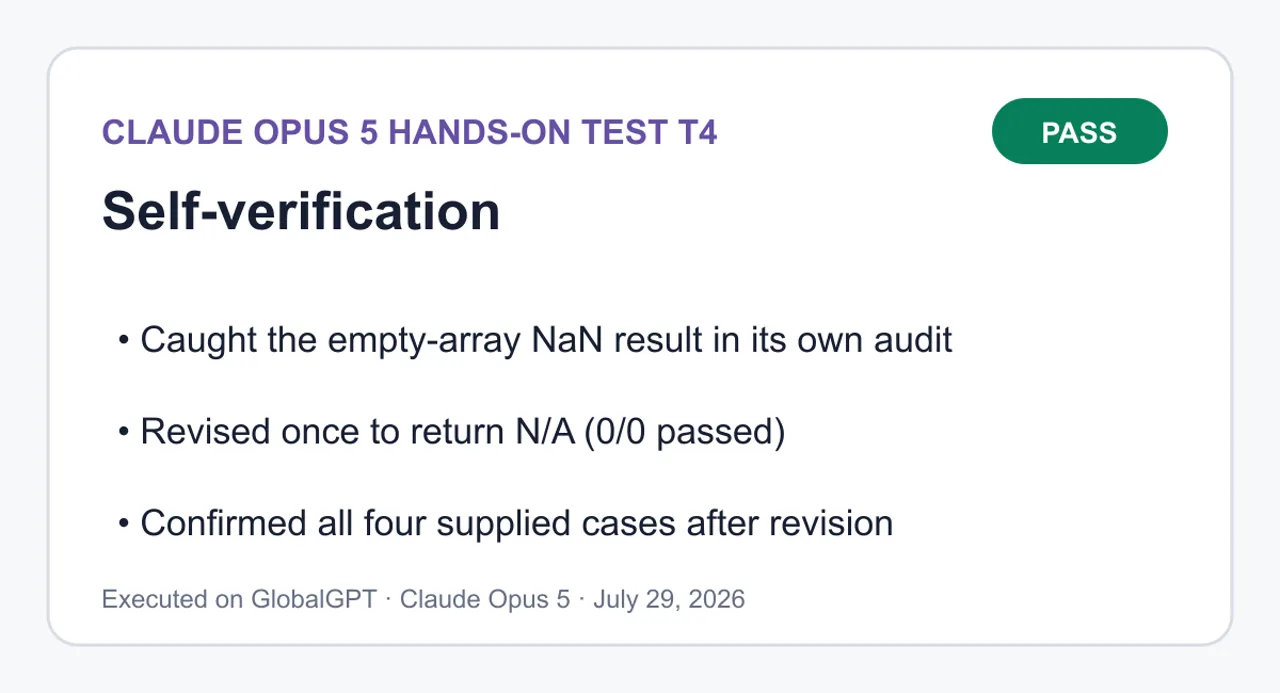
查看完整的 T4 題目與答案
請完成這項編號的約束條件任務,隨後進行審核,並僅在必要時修改一次。

任務約束條件:
1. 撰寫一個名為 `summarizeChecks(checks)` 的純 JavaScript 函式;`checks` 是一個布林值陣列。
2. 對於非空的輸入,請精確回傳 `% (/ 通過)`,其中 `rate` 保留一位小數,表示 `true` 值的百分比。 範例:`[true, true, false, true]` 會回傳 `75.0% (3/4 通過)`。
3. 不得修改輸入資料。
4. 不得使用 `for`、`while`、`forEach`、`eval`、外部函式庫或第二個函式。
5. 函式本體最多可包含三條陳述式。帶有初始化值的宣告計為一條陳述式。
6. 在宣告後將函式賦值給 `globalThis.summarizeChecks`,以便獨立的測試框架能呼叫它。

必填回覆格式:
- `首個解答`:在進行審核前,請將初始解法置於一個帶有 `js` 區塊標記的區塊中。
- `審核`:根據限制條件 1–6 以及此隱藏邊緣案例(空輸入必須精確返回 `N/A (0/0 通過)`)來檢查首個解答。針對每項內容說明通過或失敗。
- 若有任何審核項目未通過,僅可修改一次。請勿修改超過一次。
- `最終解答`:請在一個帶有 `js` 區塊標記的區塊中提供最終解決方案。在滿足空輸入邊緣案例的同時,須保留所有原始約束條件。

請在審核中使用以下獨立測試案例:
```text
[] -> N/A (0/0 通過)
[true] -> 100.0% (1/1 通過)
[false] -> 0.0% (0/1 通過)
[true, true, false, true] -> 75.0% (3/4 通過)
```
第一個答案
1function summarizeChecks(checks) {2 const total = checks.length;3 const passed = checks.filter(Boolean).length;4 return `${((通過數 / 總數) * 100).toFixed(1)}% (${通過數}/${總數} 通過)`;5}6 7globalThis.summarizeChecks = summarizeChecks;function summarizeChecks(checks) {
const total = checks.length;
const passed = checks.filter(Boolean).length;
return `${((通過數 / 總數) * 100).toFixed(1)}% (${通過數}/${總數} 通過)`;
}
globalThis.summarizeChecks = summarizeChecks;審計
#
限制條件
結果
1
名為 summarizeChecks(checks) 的普通函式
PASS — 普通宣告,一個參數,無類別或箭頭包裹。.
2
格式 % (/ 通過),比率保留一位小數
當輸入不為空時通過測試 — toFixed(1) 會固定小數點位置,且字面上的空格與規格完全吻合。.
3
無輸入突變
PASS — .length 和 .filter 皆為唯讀;filter 會傳回一個新的陣列。.
4
不得使用 for、while、forEach、eval、library 或 second 函式
PASS — .filter 是唯一的迭代操作,Boolean 是一個內建變數,用作謂詞參考,並非我定義的函式。.
5
正文中最多可包含三項陳述
PASS — 正好三個:兩個已初始化的宣告加上回傳值。.
6
在宣告後,將值賦予 globalThis.summarizeChecks
PASS — 賦值語句緊接在頂層宣告之後。.
獨立檢查案例:
輸入
預期
實際
結果
[]
不適用(0/0 通過)
NaN%(通過 0/0)
失敗
[true]
100.0%(1/1 通過)
100.0%(1/1 通過)
PASS
[false]
0.0%(通過 0/1)
0.0%(通過 0/1)
PASS
[true, true, false, true]
75.0%(通過率 3/4)
75.0%(通過率 3/4)
PASS
一次失敗。當傳入的數值為空(即 0 / 0)時,結果為 NaN;由於 NaN.toFixed(1) 會返回字串「NaN」而非拋出異常,因此該函式會靜默地輸出 NaN%(傳入值為 0/0)。.
修改一次。修正內容保留在現有的 return 語句中,作為一個條件式,因此語句數量不會改變。% 符號移至非空分支內,因為預期的空輸出為 N/A(0/0 通過),且不包含百分比符號。.
最終答案
1function summarizeChecks(checks) {2 const total = checks.length;3 const passed = checks.filter(Boolean).length;4 返回 `${total === 0 ? 'N/A' : `${((通過數 / 總數) * 100).toFixed(1)}%`} (${通過數}/${總數} 通過)`;5}6 7globalThis.summarizeChecks = summarizeChecks;function summarizeChecks(checks) {
const total = checks.length;
const passed = checks.filter(Boolean).length;
return `${total === 0 ? 'N/A' : `${((passed / total) * 100).toFixed(1)}%`} (${passed}/${total} 通過)`;
}
globalThis.summarizeChecks = summarizeChecks;四種情況在修訂後的確認結果:[] → 不適用 (0/0 通過),[true] → 100.0% (1/1 通過),[false] → 0.0% (0/1 通過), [true, true, false, true] → 75.0%(3/4 通過)。主體仍為三條陳述,輸入未經修改,且未引入任何被禁止的結構。.
第一個答案
```js
function summarizeChecks(checks) {
const total = checks.length;
const passed = checks.filter(Boolean).length;
return `${((passed / total) * 100).toFixed(1)}% (${passed}/${total} passed)`;
}
globalThis.summarizeChecks = summarizeChecks;
```
審計
#
限制條件
結果
1
名為 summarizeChecks(checks) 的純函式
通過 — 純宣告,一個參數,無類別或箭頭函式封裝。
2
格式 % (/ 通過),rate 保留一位小數
通過(輸入不為空)— toFixed(1) 固定了小數點位置,且字面量間距完全符合規格。
3
無輸入變異
通過 — .length 和 .filter 皆為唯讀;filter 返回一個新陣列。
4
無 for、while、forEach、eval、library 或第二個函式
通過 — .filter 是唯一的迭代操作,Boolean 為內建變數,用作謂詞參考,並非我定義的函式。
5
本體中最多三個陳述式
通過 — 正好三個:兩個初始化宣告加上 return 陳述式。
6
在宣告後將變數賦值給 globalThis.summarizeChecks
通過 — 賦值位於頂層宣告之後。
獨立測試案例:
輸入
預期結果
實際結果
結果
[]
不適用 (0/0 通過)
NaN% (0/0 通過)
未通過
[true]
100.0% (1/1 通過)
100.0% (1/1 通過)
通過
[false]
0.0% (0/1 通過)
0.0% (0/1 通過)
通過
[true, true, false, true]
75.0% (3/4 通過)
75.0% (3/4 通過)
通過
一次失敗。在空輸入通過 / 總數為 0 / 0 的情況下,結果為 NaN;NaN.toFixed(1) 會返回字串 "NaN" 而非拋出異常,因此函式會靜默地輸出 NaN% (0/0 通過)。
修改一次。修正內容保留在現有的 return 語句中作為條件式,因此語句數量不變。% 的標記移至非空分支內,因為預期的空輸出為 N/A(0/0 通過),且不包含百分比符號。
最終答案
```js
function summarizeChecks(checks) {
  const total = checks.length;
  const passed = checks.filter(Boolean).length;
  return `${total === 0 ? 'N/A' : `${((passed / total) * 100).toFixed(1)}%`} (${passed}/${total} 通過)`;
}

globalThis.summarizeChecks = summarizeChecks;
```
四種情況的修訂後確認結果:[] → N/A (0/0 通過),[true] → 100.0% (1/1 通過), [false] → 0.0%(0/1 通過),[true, true, false, true] → 75.0%(3/4 通過)。主體仍為三條陳述式,輸入未經修改,且未引入任何被禁止的結構。.即使選擇跨供應商進行選型,團隊仍應測試自身的儲存庫、工具套件以及審查負擔。更廣泛地說, Claude 與 ChatGPT 的編碼比較 有助於從這項單一結果之外的角度,釐清這些權衡取捨。.
Claude Opus 5 對 Opus 4.8 對 Fable 5
要理解 Opus 5,最簡潔的方式就是將其視為新一代的高階主力機型。 Opus 4.8 是其前代機型;Fable 5 則仍是業界的標竿。根據 Anthropic 的發表資料,Opus 5 不僅維持與 Opus 4.8 相同的基礎成本,更在特定評測項目上接近 Fable 5 的表現,同時每項任務的成本顯著降低。.
| 模型 | 職位 | 性價比指標 | 最適合 |
|---|---|---|---|
| Claude Opus 5 | 高階日常款;Opus 4.8 的後繼機型 | 每個輸入/輸出 MTok 為 $5/$25;Anthropic 公佈的每任務成本結果表現強勁 | 複雜的程式設計、自動化,以及可靠性至關重要的企業級工作 |
| 克勞德作品 4.8 | 上一代 Opus | 根據 Anthropic 的上市比較,其基礎售價與 Opus 5 相同 | 現有的已釘選工作流程,仍需進行遷移驗證 |
| 克勞德·法布爾 5 | 前沿情報層級 | 基準參考點;Anthropic 指出,Opus 5 在 CursorBench 測試中的表現與之相近,且每項任務的成本僅為其一半 | 當最大效能比經濟考量更為重要時,最艱鉅的任務 |
若您能對遷移過程進行回歸測試,且希望採用較新模型而不提高基礎 API 費率,請選擇 Opus 5 而非 Opus 4.8。若您自身的評估顯示,其額外功能對結果的影響足以證明支付溢價是合理的,則請選擇 Fable 5。 如需包含 Sonnet 5 在內的最新產品系列級別細分資訊,請使用 Claude Opus 5 與 Fable 5 及 Sonnet 5 的比較.
開發者與業界的反應
社群貼文雖能提供有關早期使用情況的有用線索,但並非中立的參考基準。Claude 的官方帳號將 Opus 5 描述為「設計周到且功能前瞻」,其性能接近 Fable 5 的尖端智慧型裝置,價格卻僅為其一半。這其實是 Anthropic 自身在產品上市時的定位,並非獨立第三方所證實的資訊。.

JetBrains 表示,根據其自身的評估顯示, 45% 的 Python 通過率高於 Opus 4.8, ,再加上對程式碼庫更深入的理解。這雖是來自一家開發者工具公司的具體且切合實際的觀察,但該結果屬於 JetBrains 的評估,不應將其泛化至每個 Python 基準測試或儲存庫。.
Harvey 報告指出,相較於 Opus 4.8,在包括公司治理與仲裁在內的各項法律工作流程中,品質與代幣效率均有顯著提升。這對法律科技的採購方而言具有重要意義,但這仍僅是 Harvey 對其業務領域工作流程的評估,而非普遍法律準確性的證明。.

綜合來看,這些貼文顯示,早期採用者已注意到在程式碼庫理解能力及領域專屬知識工作方面有所提升。接下來應採取的負責任步驟,仍是進行一項具代表性的試行計畫,其中應包含您自己的驗收測試、代幣預算以及人工審查流程。.
Claude Opus 5 API:模型 ID、範例與遷移注意事項
Claude 的官方 API 模型 ID 和別名皆為 克勞德-作品第5號. 以下是一個最簡化的 人類本位 API 請求範例。此範例僅展示官方的「訊息」端點;並未描述或保證 GlobalGPT 的後端實作方式。.
curl https://api.anthropic.com/v1/messages \
  --header "x-api-key: $ANTHROPIC_API_KEY" \
  --header "anthropic-version: 2023-06-01" \
  --header "content-type: application/json" \
  --data '{
    "model": "claude-opus-5",
    "max_tokens": 1024,
    "messages": [
 {
 "role": "user",
 "content": "找出根本原因,提出最簡潔的修正方案,並提供驗證指令。"
      }
    ]
  }'
遷移檢查清單
- 將模型值變更為
克勞德-作品第5號, 然後重新執行您自己的迴歸分析與安全性評估。. - 針對每 MTok 的 $5 輸入與 $25 輸出設定預算;監控輸出量較大的代理程式迴圈及工具重試次數。.
- 不要延續舊習
thinking.type: "enabled"設定。. Anthropic 的思考指南 表示目前已著手規劃《Opus 5》,並記錄了其適應性設定。. - 請將 128K 視為同步訊息 API 的最大輸出量。獨立的「訊息批次」測試版在搭配 Anthropic 文件中所述的測試版標頭時,最高可支援 300K。.
- 請查閱各供應商特定的型號名稱及存取權限。Anthropic 文件
anthropic.claude-opus-5適用於 Amazon Bedrock 以及克勞德-作品第5號適用於 Google Cloud。.
對於希望在 Claude Code 之外搭配使用命令列工作流程的開發者,實用設定指南如下: 如何在 Claude 程式碼中使用 GlobalGPT CLI. 請將此工作流程與上方的官方 Anthropic API 範例分開處理,以確保憑證、計費及服務供應商行為的區隔清晰明確。.
Claude Opus 5 值得購買嗎?
是的——當失敗的代價高昂,且工作量確實艱鉅時。. 當更精準的診斷、工具運用或長上下文判斷能為工程師或分析師節省時間時,Opus 5 的優勢便最為顯著。結合 100 萬個標記的上下文視窗、12.8 萬的同步輸出上限,以及令人鼓舞的每項任務成本聲稱,使其在高端主力產品中佔有一席之地。.
哪些人適合使用 Claude Opus 5?
- 工程團隊針對大型儲存庫執行編碼代理程式。.
- 營運團隊透過可量化的驗收標準,將多步驟的業務任務自動化。.
- 具備法律、財務或研究背景的團隊,能夠將該模型與領域審查及即時資料來源相結合。.
- 能夠透過快取、批次處理、路由及回歸測試來控制成本的開發人員。.
誰應該選擇其他東西呢?
- 以簡單的擷取、分類或簡短格式重寫為主的大量處理應用。.
- 對於對延遲敏感的產品而言,中等規格的模型運行速度過慢。.
- 沒有評估資料集、成本監控,或針對重要產出制定人工審查計畫的團隊。.
- 僅需偶爾進行一般性聊天,且不會使用額外語境或聊天機器人功能的買家。.
如果覺得 Opus 5 價格過高或過於專業,不妨將其與 2026 年 Claude 的 AI 替代方案. 若要獲得更廣泛的市場觀點,請參閱《 最適合實際應用場景的頂尖 AI 模型 有助於將工作負載與模型類別進行配對。.
編碼採購人員在將團隊工作流程標準化之前,也應比較當前的各種選項;該 2026 年最適合程式設計的 AI 模型 將性能與價格置於更廣泛的脈絡中來考量。.
最終結論: Claude Opus 5 值得用於硬編碼、自動化及知識型工作等任務,因為在這些情境下,更優異的成果足以抵銷較高的代幣成本。其官方規格表現強勁,Anthropic 的基準測試結果在成本控制方面表現得格外出色,而我們驗證過的除錯結果也精準且嚴謹。 請在處理具有可量化成果的艱鉅任務時選購此模型——而非僅因每項任務都需要 Opus 級別的模型。.
Claude Opus 5 常見問題
Claude Opus 5 的價格是多少?
Claude API 的官方基準價格為:每百萬個輸入代幣 $5,每百萬個輸出代幣 $25。 消費者版 Claude 方案則另行計價:Pro 方案每月 $20,若選擇按年計費則每月 $17;而 Max 方案每月起價為 $100。.
我該如何存取 Claude Opus 5?
Anthropic 表示,Opus 5 是 Claude Max 的預設模型,也是 Claude Pro 上最強大的模型。開發人員可以使用 Claude API,而受支援的雲端路徑包括 Amazon Bedrock 和 Google Cloud,但需符合各服務供應商特定的存取要求。.
Claude Opus 5 API 模型 ID 是什麼?
Claude API 的官方模型 ID 和別名均為 claude-opus-5。請在 Anthropic Messages API 請求的 model 欄位中精確使用此值,並在進行生產環境遷移前,重新執行您自身的回歸測試與安全性評估。.
Claude Opus 5 的背景與輸出限制為何?
Claude Opus 5 在同步 Messages API 中具備 100 萬個標記的上下文視窗,且最大輸出量為 128,000 個標記。Anthropic 則另行說明,若訊息批次帶有 beta 標頭,其輸出標記數量最高可達 300,000 個。.
Claude Opus 5 的基準測試結果是否經過獨立驗證?
此處引用的基準數據由 Anthropic 發布,並非為本評測而獨立重現。這些數據顯示了 Anthropic 經測試後的效能與成本表現,但買家應針對自身工作負載,自行驗證品質、延遲、工具使用情況及總成本。.
Claude Opus 5 是否比 Opus 4.8 或 Fable 5 更好?
Opus 5 是 Opus 4.8 的最新後繼版本,且基本成本相同,因此在回歸測試後,它自然成為最佳的遷移選項。Fable 5 仍是最先進的參考標準;僅當您的評估顯示其額外功能足以抵銷較高的成本時,才應選擇它。.
Claude Opus 5 是否可在 GlobalGPT 上使用?
是的。GlobalGPT 設有專屬的 Claude Opus 第 5 頁。可用性仍可能取決於帳戶狀態及平台條件,因此請在執行時效性較高的工作流程前確認存取權限,並將平台存取權限與官方 Anthropic API 計費分開處理。.
Claude Opus 5 的費用該由誰負擔?
Opus 5 最適合處理複雜編碼、自動化或需長期背景知識的知識型工作任務的團隊,在這些情境下,更佳的解答能為人類節省寶貴的時間。至於較為簡單、處理量大或對延遲敏感的工作,通常應選擇價格更低且速度更快的模型。.





