

Kimi K3.1 Pro gives developers a concrete reason to revisit K3: lower published API rates, the same 1M-token context window, and a new Highspeed option. The useful question is whether those changes fit your coding workload and budget.
The biggest distinction is billing. Kimi membership, Kimi Code, and the developer API are separate products. Below are the exact API rates, a worked bill, setup examples, and compact K3 comparison cards, followed by the results and limits of our API checks.
If you prefer comparing outputs in a browser, 多模型工作流程 can help you choose before building an integration. GlobalGPT’s verified Kimi entry is K3; our K3.1 Pro checks here used a separate API route.
What is Kimi K3.1 Pro?
Kimi describes K3.1 Pro as a post-trained version of K3, with more post-training compute and improvements aimed at coding, 3D creation, financial research, and agentic work. The official introduction positions it as the first model in the K3.1 series.
There are two API variants: kimi-k3.1-pro 和 kimi-k3.1-pro-highspeed. Kimi describes Highspeed as offering the same intelligence at roughly 2–3× the speed. That is a provider claim; we did not test Highspeed.
The announcement says full model weights will be released by November 4. As of our October 26 check, that wording does not establish that the downloadable weights have already been released. For the previous model’s background, see our Kimi K3 評測.
Kimi K3.1 Pro pricing: the full API rate table
的 official international pricing page lists these USD rates per 1,000,000 tokens. “Input†below means the uncached remainder; cached reads and cache writes have their own billing categories. These are API rates, not monthly subscription prices.
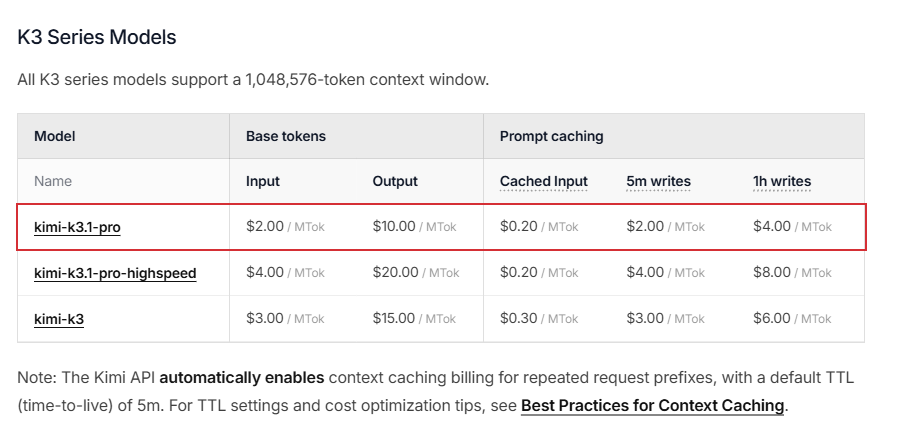
Lower API rates
K3.1 Pro
$2 / $10
Input / output per million tokens.
Both rates are 33.3% below K3. Cached reads: $0.20.
Pay more for responsiveness
Pro Highspeed
$4 / $20
Input / output per million tokens.
Twice Pro’s base rates; cached reads remain $0.20. Speed uplift is provider-reported.
Previous generation
K3
$3 / $15
Input / output per million tokens.
Same documented 1M context. Existing integrations still need workload-level migration checks.
For the same billable token mix, every listed Pro rate is two-thirds of K3’s USD rate, so the token subtotal is 33.3% lower. Actual task cost can differ if the models use different output lengths or cache patterns. Our Kimi K3 價格指南 gives the previous-generation pricing context.
A realistic bill, without counting cache writes twice
Suppose one request uses 100,000 input tokens: 60,000 cache reads, 30,000 new 5-minute cache writes, and 10,000 uncached tokens. It generates 8,000 billable output tokens, including reasoning. Using Kimi’s cache accounting rules, the calculation is:
K3.1 Pro = (60,000 × $0.20 + 30,000 × $2 + 10,000 × $2 + 8,000 × $10) / 1,000,000
          = $0.172
K3        = (60,000 × $0.30 + 30,000 × $3 + 10,000 × $3 + 8,000 × $15) / 1,000,000
          = $0.258
Savings   = $0.086, or 33.3%
This is a calculated official-rate example, not our third-party test invoice. It excludes applicable taxes, separately priced tools, and any platform markup. Do not charge the 30,000 cache-write tokens again as ordinary input, or add reasoning tokens a second time when they are already included in output.
Caching defaults to a 5-minute TTL; a 1-hour write costs more. A hit renews the entry under its existing TTL without another write charge. Repeated long prefixes benefit most; unrelated prompts do not automatically earn the cached-input rate.
Subscription, top-up, and regional prices
The API is pay-as-you-go, with billing separate from Kimi membership and Kimi Code. A consumer subscription is not proof of developer API credit. We have not verified a current consumer or coding-subscription price for this guide, so no monthly subscription amount is quoted.

的 API access requirements specify a minimum $1 top-up to begin using the flagship API. That is prepaid balance, not a $1 subscription or a $1 charge per request. Your recharge tier also governs concurrency and request/token limits; a large context window does not remove those limits.
For mainland billing, the separate RMB price page lists Pro at ¥13 input, ¥68 output, and ¥1.30 cached input per million tokens. Those are regional published rates, not a conversion of the USD table. Use the currency and platform associated with your actual account.
Kimi K3.1 Pro API: model ID, endpoints, and setup
Use the exact model ID kimi-k3.1-pro. . official API overview supports OpenAI Chat Completions, OpenAI Responses, and Anthropic Messages formats. The examples below follow the international developer documentation; pair your API key with its matching platform.
A minimal Python example
Create a key in the official API console, complete the required top-up, and make the key available as MOONSHOT_API_KEY. Install the OpenAI Python SDK with python -m pip install --upgrade openai. Then run:
import os
from openai import OpenAI

client = OpenAI(
    api_key=os.environ["MOONSHOT_API_KEY"],
    base_url="https://api.moonshot.ai/v1",
)

response = client.chat.completions.create(
    model="kimi-k3.1-pro",
    reasoning_effort="high",
    max_completion_tokens=8192,
    messages=[{
        "role": "user",
        "content": "Review this function for boundary errors: def pct(a,b): return a/b*100",
    }],
)

print(response.choices[0].message.content)
print(response.usage)
This is a documentation-based integration example, not a claim that we authenticated against the direct Moonshot endpoint. Our completed checks used the third-party route described below. An 8,192-token ceiling is a starting budget for reasoning plus the final answer; increase it when a legitimate task needs more, and inspect the finish reason.
Parameters that matter when migrating from K3 or K2
- Thinking stays on. Set top-level
推理_努力至低,高, 或max; the default ismax. Low reduces effort but does not disable thinking. - 使用
max_completion_tokens. The current Chat reference deprecatesmax_tokens. Do not blindly copy a parameter from a different protocol. - Omit sampling overrides. K3-family temperature is fixed at 1.0, top_p at 0.95, n at 1, and both penalties at 0. Incompatible values can produce errors.
- Keep complete assistant messages. Multi-turn and tool-call requests need the returned assistant message, including reasoning and tool-call fields, rather than only its final text.
- Remove K2-only thinking settings. K3 uses the reasoning-effort field instead. Switching effort mid-conversation also invalidates prefix-cache hits.
These constraints come from the model parameter reference. OpenAI-compatible does not mean every OpenAI parameter is supported. When wiring the model into a larger agent, keep endpoint configuration separate from the agent’s tools and permissions; the OpenClaw API setup guide covers that integration layer.
Kimi documents streaming, tool calling, vision input, and JSON-schema structured output. A prompt asking for JSON is not the same as enabling a strict schema. Parse final-answer 內容 separately from reasoning, and validate the returned object before sending it into another system.
Context window: what 1M tokens actually means
的 官方型號型錄 gives Pro, Highspeed, and K3 a context window of 1,048,576 個代幣. That is the available conversation budget, not a promise of a million-token answer plus another million-token input.
的 Chat Completions reference sets the K3-family default completion limit at 131,072 tokens and allows a configured limit up to 1,048,576, subject to remaining context. If input plus requested completion exceeds the window, the service reduces the generation limit; the input itself still must fit.
For repository review or long-document work, leave space for instructions, tool outputs, prior messages, reasoning, and the answer. Start with a representative project slice and verify whether the model finds the correct file or decision, rather than judging it by the maximum context number alone.
Our retrieval check used 10,340 input tokens, about 1% of the documented window. It tested conflicting records and exact evidence selection. It did not test retrieval accuracy at 1M tokens, sustained agent sessions, or large-repository coverage.
Coding and Kimi Code CLI: capabilities versus access
Kimi’s Pro announcement emphasizes repository fixes, full-project builds, front-end work, games, and 3D workflows involving tools such as Blender and CAD software. Its showcased projects are provider-selected demonstrations, not a guarantee that a bare API request will reproduce the same environment or assets.
For developers, the useful distinction is between generating code and running a coding agent. The model can propose code, but a working agent also needs repository access, shell tools, dependencies, tests, and permission boundaries. Our 程式設計模型選擇指南 covers the wider choice of workflows.
How the official CLI connects
With Kimi Code CLI already installed, the official API-key setup guide uses this sequence:
kimi
# Inside the interactive CLI:
/login
# Choose: Kimi Platform (API key · platform.kimi.ai)
# Enter a key created on that platform.
# Select the exact model offered to the account.
/status
Check that /狀態 identifies the model you intended to use. The documented flow saves the platform/model selection for later launches. On Windows, the guide requires Git for Windows and uses Git Bash as the shell environment.
We did not install the CLI, change its local configuration, or run a repository-editing session. The installed GlobalGPT CLI catalog listed K3 but did not list Pro in our check; the separate Anywhere API catalog did list kimi-k3.1-pro. A missing CLI entry is not evidence that the official Pro API is unavailable.
If you are choosing between a developer key and a coding subscription, the Kimi coding-plan guide explains that access decision. Confirm the exact model offered by your account before paying for a workflow that depends on Pro.
Kimi K3.1 Pro vs K3: compact comparison cards
Pro advantage
定價
Pro: $2 input / $10 output.
K3: $3 input / $15 output.
Pro’s published USD token rates are one-third lower for the same token mix. Task-level savings still depend on usage.
共通規格
Context and thinking
Both: 1,048,576-token context.
Both: always-on thinking.
Low / high / max effort. Pro does not expand the documented context beyond K3.
What still needs testing
Coding and responsiveness
Pro is positioned for stronger coding and agentic work. Highspeed carries a 2–3× provider speed claim.
Our limited checks do not establish a general coding-quality or model-speed winner.
The strongest verified reason to pilot Pro is its lower official USD rate. Keep K3 where your application is already validated until you have checked prompts, schemas, tools, and cost on representative jobs. For a broader neighboring-model comparison, see DeepSeek V4 Pro 與 Flash 比較.
What our API checks actually showed
The images below show saved results from our third-party API checks. Official Kimi documentation is shown separately in the pricing section.
Actual output · Pro route
Cache-aware bill calculation
Result: $0.172 for Pro versus $0.258 for K3. The task supplied the rates and asked the model to avoid double-counting cache writes.
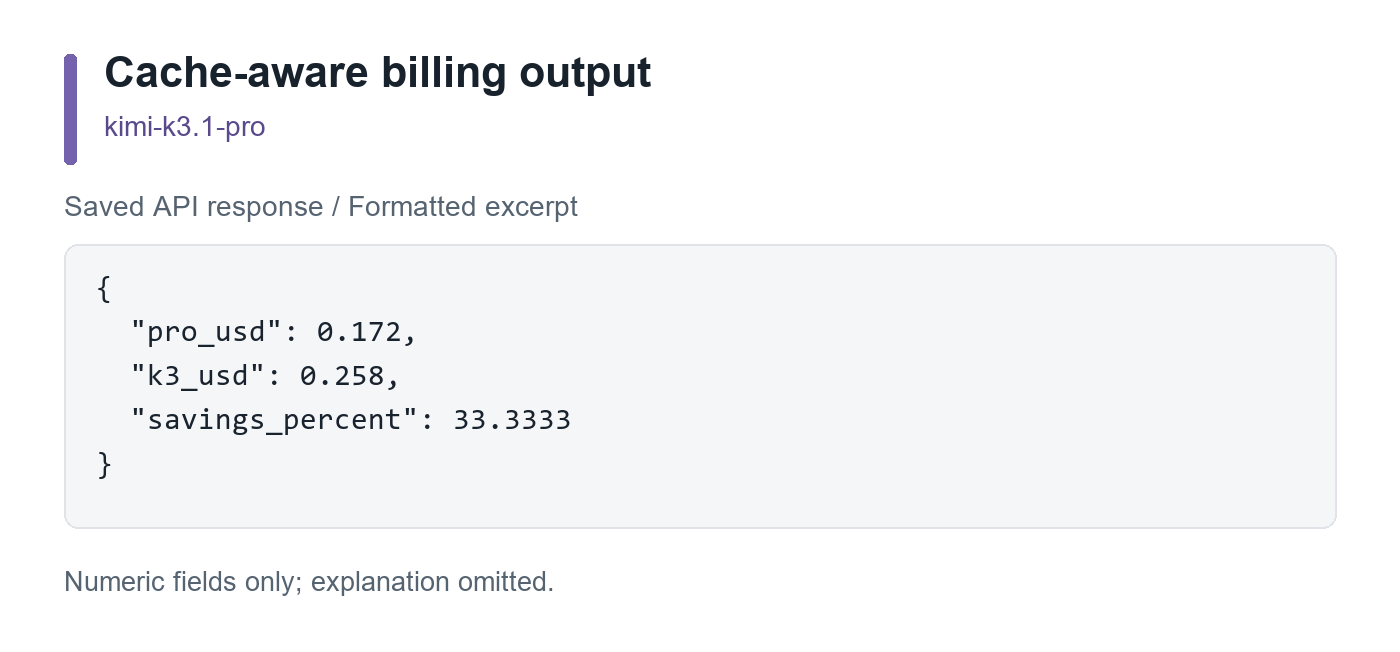
The numerical answer and JSON format were correct. This checks calculation using supplied rates, not live price discovery. The K3 request did not return a usable answer, so no head-to-head winner is assigned.
Actual outputs · matched task
Find the governing record
Both selected AP-42, owner Luis, 60 days, and rejected draft DR-99. The log contained 243 records and 10,340 input tokens.
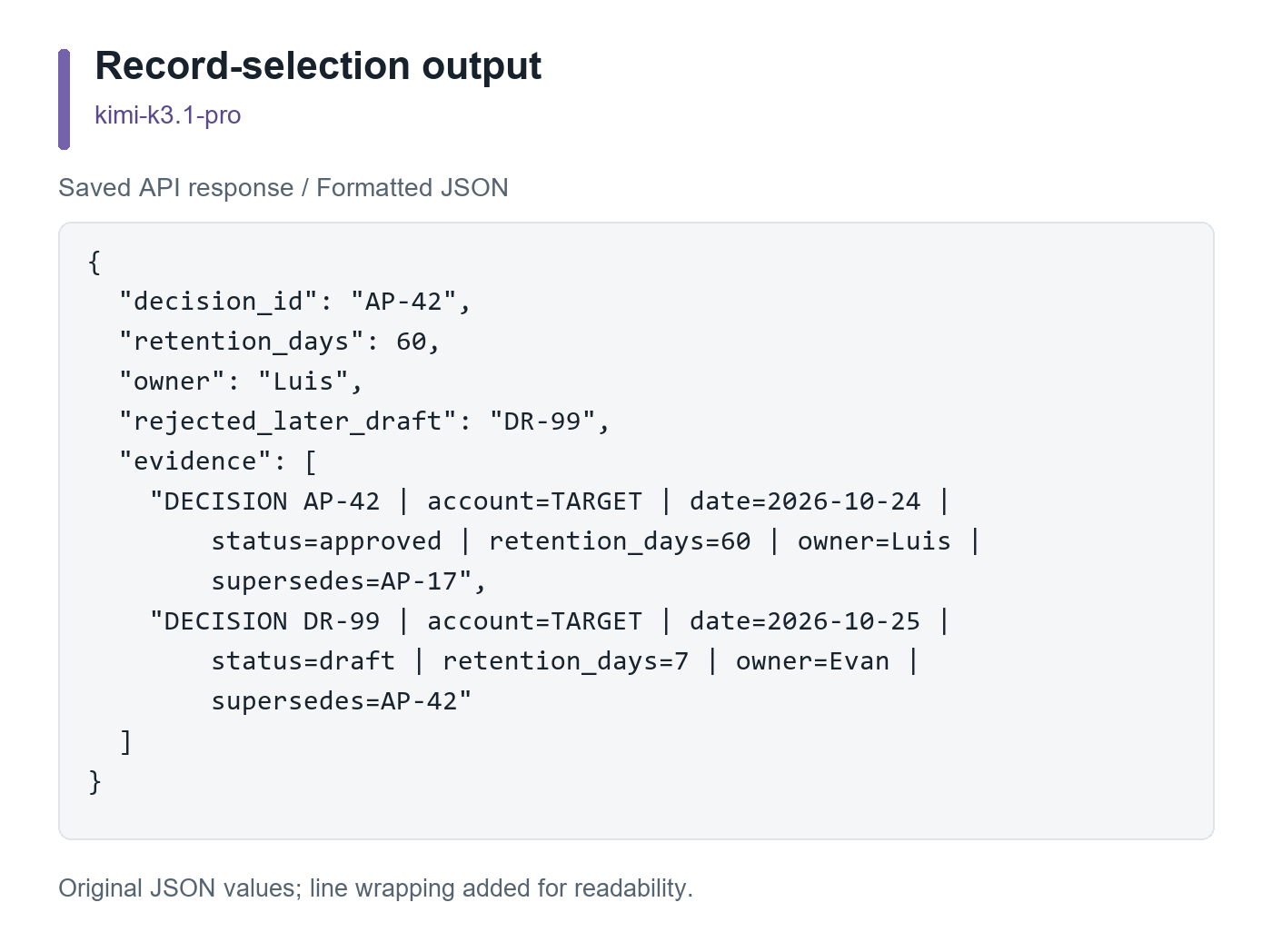
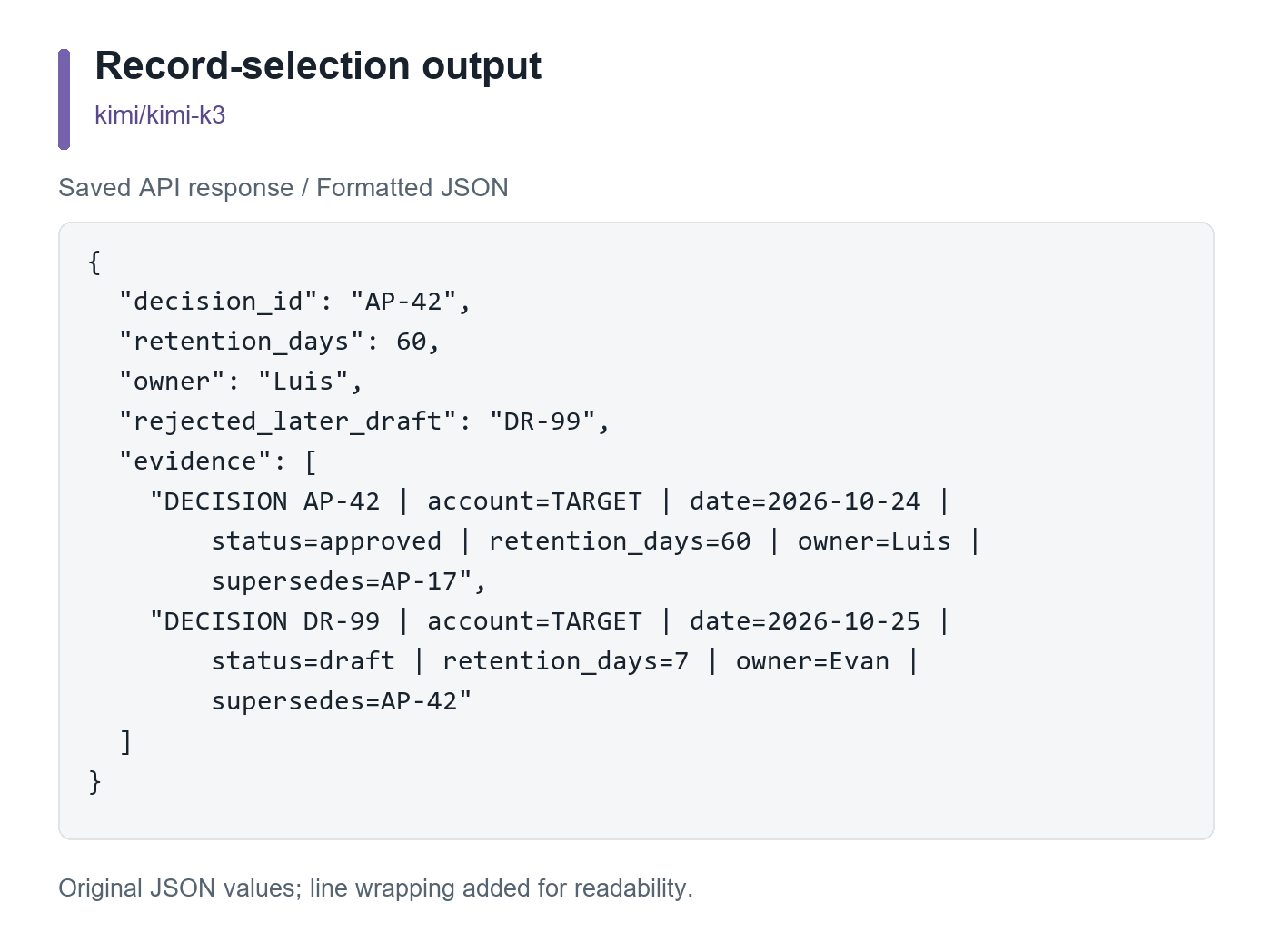
Both outputs parsed as JSON and quoted the correct evidence. This small retrieval check does not validate the full 1M-token window.
Execution limits
Coding check
The original interval-merging coding pair returned no usable code because of TLS/timeout failures. We then ran a new matched pair with a shorter prompt and HTTP/1.1 transport; that replacement pair also did not yield a completed pair for code evaluation. We assign no coding-quality score or winner.
The task required half-open intervals, overlap-only merging, reversed-input rejection, and no input mutation. Earlier failed attempts are excluded from completed-result counts. Transport failures are not scored as incorrect code.
Which Kimi model should you choose?
Start a new API pilot with Pro if your priority is the lower published USD rate and you can validate its outputs in your application. Compare complete task bills, not just per-token rates: answer length, tool use, retries, and cache behavior can change the result.
Consider Highspeed when latency matters enough to justify higher rates. Test it with your own prompts first. Its published base input/output rates are twice Pro’s; our regular-Pro checks cannot verify the Highspeed latency claim.
Keep an established K3 integration until migration checks pass. For a browser-based starting point, try Kimi K3 on GlobalGPT. That is the verified K3 route, not a promise of K3.1 Pro access or an official API-credit bundle.
常見問題
How much does the Kimi K3.1 Pro API cost?
The official USD API lists $2 per million uncached input tokens, $10 per million output tokens, and $0.20 per million cached-input tokens. Cache writes have separate 5-minute and 1-hour rates.
Is Kimi K3.1 Pro cheaper than K3?
Its published USD token rates are 33.3% lower for an identical token mix. The bill for a real task can still differ because the models may generate different output lengths or get different cache hits.
What is the Kimi K3.1 Pro API model name?
Use kimi-k3.1-pro for the standard model and kimi-k3.1-pro-highspeed for the faster variant. A product label in a third-party interface does not independently verify the upstream model.
Does a Kimi subscription include API usage?
Kimi API billing is separate from Kimi membership and Kimi Code. The official API is pay-as-you-go and requires at least a $1 top-up to start. That top-up is credit, not a monthly subscription price.
How large is the context window?
Pro, Highspeed, and K3 have a documented 1,048,576-token context window. Input, conversation history, tool results, and generated reasoning and answers must fit within that budget.
Can I turn thinking off?
No. K3.1 Pro always thinks. Set reasoning_effort to low, high, or max to control effort; max is the default. Reasoning tokens count toward billable output.
Can I use Kimi K3.1 Pro in Kimi Code CLI?
The official CLI guide supports Kimi API Platform keys. Run /login, select the matching platform, choose a model available to the account, and verify it with /status. We did not complete a local Pro CLI session.
Is Kimi K3.1 Pro available on GlobalGPT?
We verified GlobalGPT’s K3 entry and found Pro in a separate Anywhere API catalog. That does not verify a GlobalGPT Pro entry. The Pro results in this guide came from Anywhere, not the GlobalGPT browser or CLI.
Did these tests prove that Pro is better at coding?
No. The coding comparison did not produce a completed matched pair. Our successful checks support only the specific billing and record-selection observations described above; they do not establish general coding superiority.





