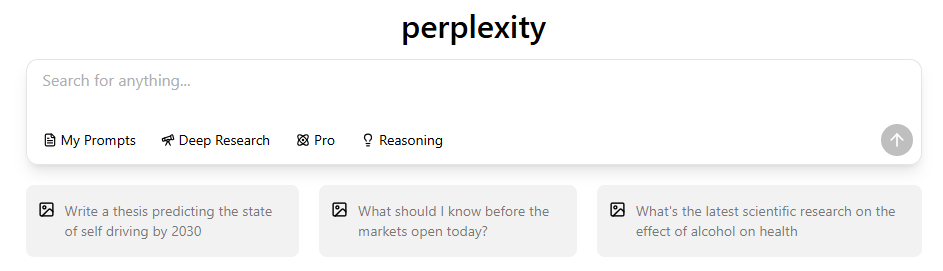
Perplexity is still hard to beat when you want a quick web answer with sources attached. It becomes less convincing when the next step is a long report, a campaign, a spreadsheet, a private browser session, a systematic literature review, or a workflow that crosses several AI models.
The right alternative depends on that next step. ChatGPT and Claude are broad assistants; Gemini and Microsoft Copilot fit their respective office ecosystems; Brave Leo keeps AI close to the browser; Elicit is built around research papers; and several writing tools trade search depth for production features.
If you want Perplexity access without making it your only AI subscription, GlobalGPT offers Perplexity alongside leading GPT, Claude, Gemini, image, and video models in one workspace. That is the easiest starting point when your work moves back and forth between research, writing, planning, and media creation.
Quick answer: GlobalGPT is the best all-in-one option, ChatGPT is the broadest general assistant, Claude is strongest for long-form analysis, Gemini fits Google workflows, Microsoft Copilot fits Microsoft 365, Brave Leo is the privacy-first browser choice, and Elicit is the specialist pick for academic literature.
Quick guide: which Perplexity alternative fits your job?
Start with the work you need to finish
Reader takeaway: there is no honest single winner across all four paths. Pick the tool that owns your next step, not the one with the longest feature list.
Scope: 11 tools grouped into four workflow paths. Unit: qualitative task fit, not a score or measured performance. Sources: official product and pricing pages for GlobalGPT, Writesonic, Claude, ChatGPT, Brave Leo, TextCortex, Microsoft Copilot, Gemini, Simplified, Elicit, and DeepSeek. Checked August 5, 2026.
Why consider an alternative to Perplexity?
Perplexity is a search-first product. That focus is useful, but it also explains why another tool may fit better:
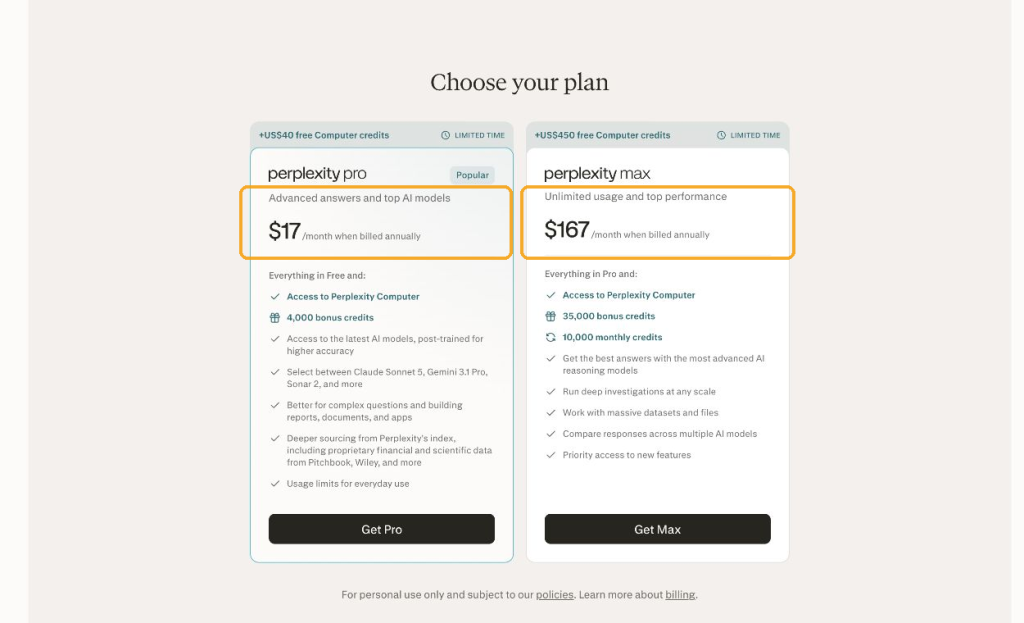
Use its own plans as the comparison baseline. On August 5, 2026, Perplexity’s official annual-plan view listed Pro at $17/month when billed annually and Max at $167/month when billed annually. Pro emphasizes advanced answers, leading AI models, Computer, and bonus credits; Max raises the credit allowance. Those are annual-billing prices, and credits are not directly comparable with another product’s messages, tokens, or seats.
- Your work continues after the answer. Drafting, revising, coding, analyzing files, and producing slides can matter more than the initial search.
- You already live in an app ecosystem. Gemini and Copilot reduce handoffs when the source material sits in Google or Microsoft tools.
- You need a specialist database. General web search is not the same as screening research papers for a literature review.
- You care about privacy or local control. Browser-based and open-source routes appeal to users who want a different data path.
- You are paying for several AI products. Compare what each subscription replaces before comparing headline prices. Our Perplexity subscription plan breakdown explains the official tiers and limits in more detail.
How the 11 tools are ranked
The numbers below are not a universal leaderboard. Broad tools appear first because they can replace more of an everyday Perplexity workflow; specialist tools appear later because they solve a narrower job better. Each pick is judged on four questions:
- Does it help you find or work with current information?
- What can you do after the research step?
- What ecosystem, data source, or workflow makes it distinctive?
- Is the pricing scope clear enough to compare without pretending unlike plans are equivalent?
The 11 best Perplexity alternatives in 2026
1. GlobalGPT — best all-in-one alternative
GlobalGPT is the strongest first stop for people who like Perplexity but do not want a search-only subscription. It keeps Perplexity access inside a wider workspace with leading language, image, and video models, so research can move into writing, planning, coding help, or media work without opening a new service for every step.
- Key features: Perplexity access, multiple leading model families, and text-to-media tools in one account.
- Pros: Fewer subscriptions and less tab switching; useful when the task changes shape.
- Cons: A broad model catalog takes more orientation than one search box, and it does not reproduce every official app control.
- Pricing: The official annual-plan view lists Basic at $5.8 per month, billed annually, as checked on August 5, 2026. See current GlobalGPT plans.

2. Chatsonic — best for search-connected marketing work
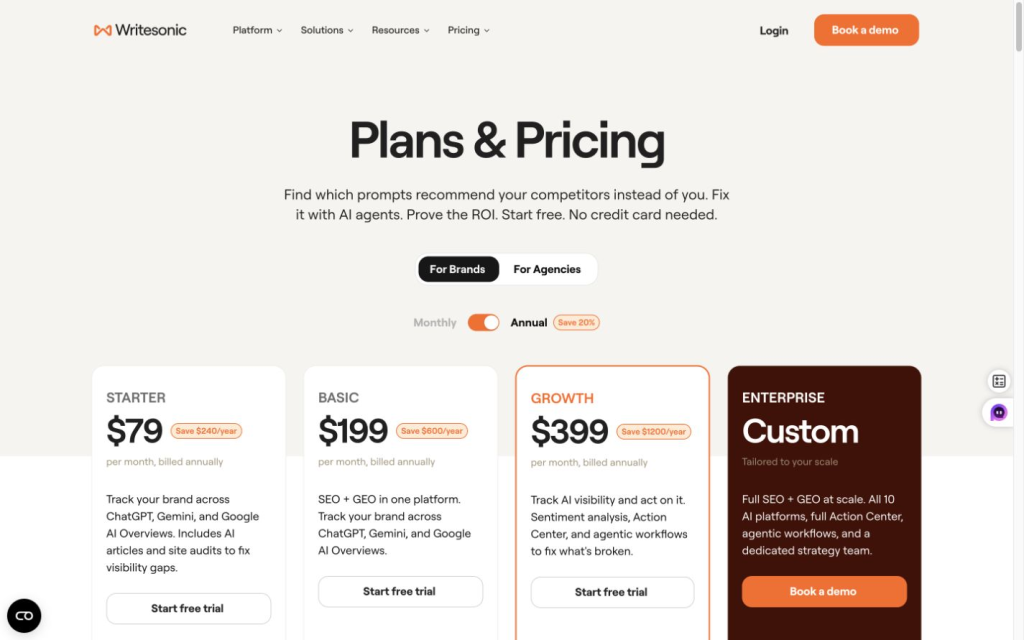
Chatsonic remains a sensible alternative when web research feeds marketing production. Writesonic now calls it an AI Marketing Agent that brings together models and marketing tools, while the broader Writesonic suite centers on AI search visibility, SEO, and GEO. It is less compelling as a neutral research engine than Perplexity, but it can shorten the path from “find the topic” to “publish the asset.”
- Key features: web-connected answers, marketing content workflows, and brand controls.
- Pros: Built around content production rather than stopping at a cited answer.
- Cons: The product is broader and busier than a focused research interface.
- Pricing: The broader Writesonic suite listed Starter at $79/month on annual billing on August 5, 2026. Do not assume that is a standalone Chatsonic price or that every tier includes the same Chatsonic access; check the live Writesonic pricing page before choosing.
3. Claude — best for long-form analysis
Claude is the better fit when research is only the beginning and the real job is reading long material, organizing an argument, or producing a careful draft. Its value is not “more search”; it is the quality of the work that follows the sources and files you provide.
- Key features: long documents, file analysis, structured writing, and project-based work.
- Pros: Strong fit for analytical writing and sustained context.
- Cons: Less search-first than Perplexity; limits vary by plan and demand.
- Pricing: Free and paid tiers are available; verify the current Claude plan page for your region.
If these are your two finalists, the practical differences are clearer in our Perplexity vs Claude comparison.

4. ChatGPT — best broad general assistant
ChatGPT is the best all-purpose alternative when you need one assistant for writing, files, data work, images, brainstorming, and web research. Perplexity is easier when the only goal is a concise answer with citations; ChatGPT is more flexible when the answer becomes a multi-step task.
- Key features: web search, file work, custom assistants, multimodal creation, and broad task coverage.
- Pros: The widest general-purpose workflow in this list.
- Cons: Source handling varies by mode, so important claims still need a source check.
- Pricing: Free and paid individual/business plans are available; check ChatGPT pricing for current limits and regional options.
For a focused choice between the two, read our evergreen Perplexity vs ChatGPT review.

5. Brave Leo — best privacy-first browser assistant
Brave Leo makes sense when the browser is the workspace. It can summarize pages, answer questions about open content, and help draft text without requiring a separate research tab. Privacy-minded users will also prefer Brave’s product direction to an ad-funded search workflow.
- Key features: browser-native assistance, page summaries, and writing help.
- Pros: Low-friction help while browsing; privacy is central to the product.
- Cons: Not as strong for deep, multi-source research or large project workflows.
- Pricing: Leo has free access and premium options; confirm current access on the official Brave Leo page.

6. TextCortex — best for brand knowledge and repeatable writing
TextCortex is not a direct search-engine replacement. It earns a place for teams that need AI to work from their own knowledge, follow a brand voice, and repeat a writing process across many assets. Choose it when personalization matters more than the cleanest citation interface.
- Key features: knowledge bases, personas/agents, templates, and multilingual writing.
- Pros: More controllable for recurring team content than a generic search answer.
- Cons: Weaker fit for users who only want neutral, source-led web research.
- Pricing: Free and paid plans vary by feature and usage; use the official TextCortex pricing page for a live quote.

7. Microsoft Copilot — best for Microsoft 365 work
Microsoft Copilot is the practical choice when your source material and deliverables already live in Word, Excel, PowerPoint, Outlook, or Teams. Its advantage is context and placement inside Microsoft tools, not a cleaner open-web answer than Perplexity.
- Key features: assistance across Microsoft apps, document creation, and organization-aware workflows on eligible plans.
- Pros: Fewer handoffs for Microsoft 365 users and teams.
- Cons: The best features depend on the right Microsoft license, account, and admin setup.
- Pricing: Consumer and business pricing differs by market and seat; use the official Copilot pricing page.

8. Gemini — best for Google apps and research workflows
Gemini replaces the old Komo recommendation in this list. Komo has moved away from consumer AI search toward an AI revenue workflow, while Gemini is a much clearer choice for users who want research to continue into Gmail, Docs, Drive, and the rest of Google’s ecosystem.
- Key features: web-connected research, multimodal input, files, and Google app integrations.
- Pros: Natural fit for people whose work already sits in Google services.
- Cons: Model access, limits, and connected-app behavior depend on plan, account, and region.
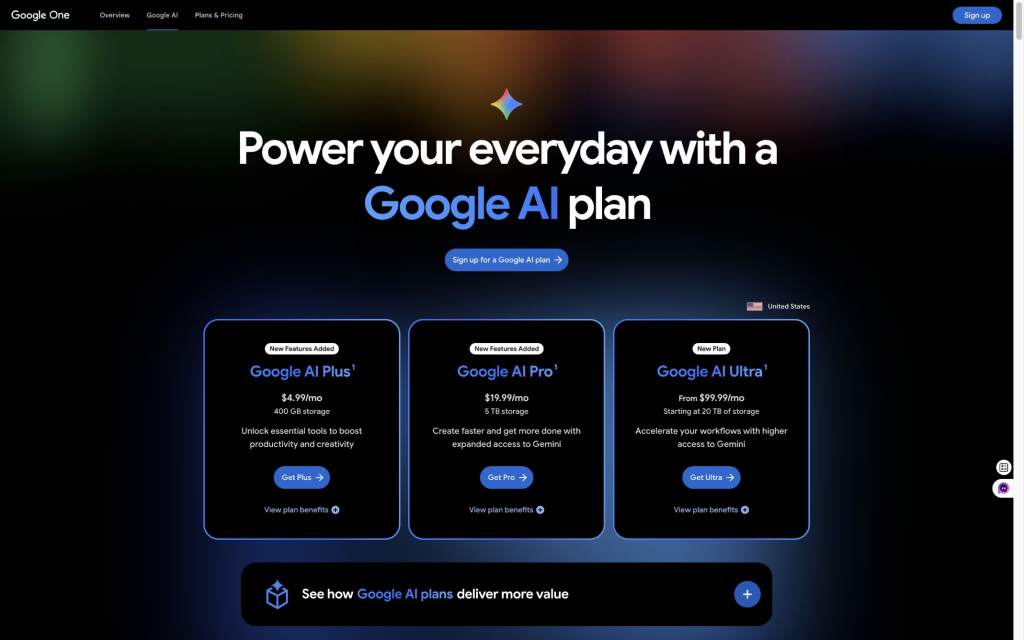
- Pricing: In the US plan view checked August 5, 2026, Google AI Plus was $4.99/month, Pro $19.99/month, and Ultra from $99.99/month. Features and availability vary by country and account; verify your market on the official Google AI plans page.
Our Gemini vs Perplexity feature comparison goes deeper into the ecosystem trade-off.
9. Simplified — best for producing marketing campaigns
Simplified has moved beyond a basic AI writer. Its current pitch is campaign production: brief an AI workflow, generate social, email, and ad assets, review the output, and publish through connected channels. That makes it a post-research production tool rather than a direct answer engine.
- Key features: campaign agents, writing, design, brand kit, approvals, and social scheduling.
- Pros: Keeps campaign production and review in one place.
- Cons: Overbuilt for someone who only wants cited answers or occasional chat.
- Pricing: The official page lists Simplified Starter at $79 per month, checked August 5, 2026. See Simplified pricing.

10. Elicit — best for literature reviews and research papers
Elicit is the clearest specialist alternative in the list. Its official page describes search across more than 138 million papers, plus paper summaries, reports, and systematic-review workflows. It is a stronger choice than general web search when the evidence base itself is academic literature.
- Key features: paper search, summaries, research reports, screening, extraction, and exports.
- Pros: Designed around research papers rather than mixed web pages.
- Cons: Narrower than Perplexity for news, shopping, travel, and general current events.
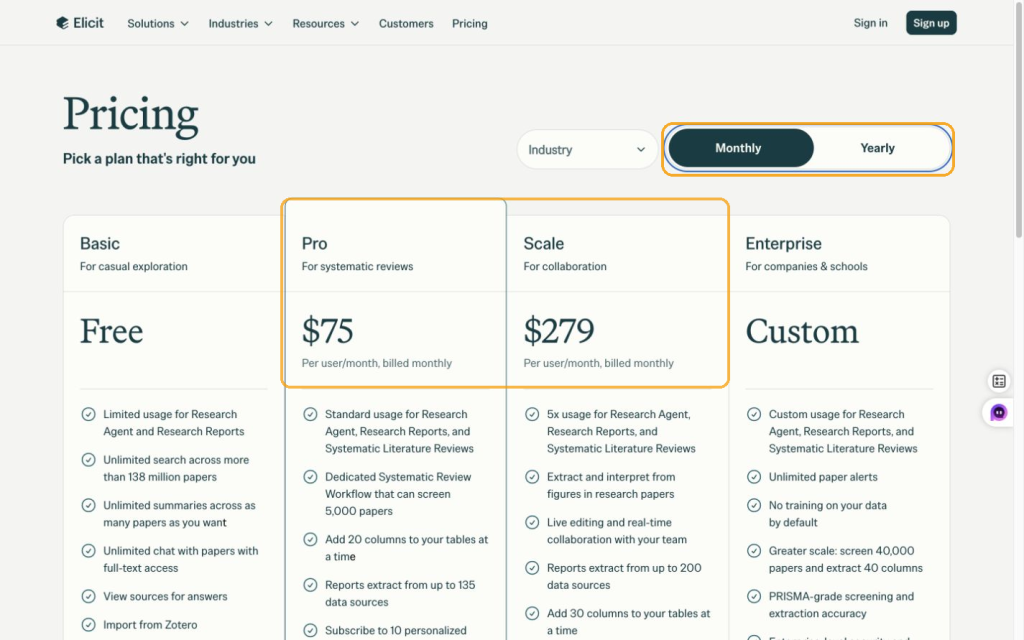
- Pricing: Basic is free. The official monthly view lists Pro at $75/user/month and Scale at $279/user/month. With annual billing, the effective rates are $49/user/month (billed $588 annually) and $169/user/month (billed $2,028 annually), checked August 5, 2026. See Elicit pricing.

11. DeepSeek — best for low-cost developer and API workflows
DeepSeek belongs near the end because it is not the closest Perplexity replacement for everyday search. It is valuable for developers who want strong models, long context, OpenAI- or Anthropic-style API formats, and usage-based pricing instead of another consumer subscription.
- Key features: V4 Flash and V4 Pro, 1M context, tool calls, JSON output, and familiar API formats.
- Pros: Very low published token prices and flexible developer integration.
- Cons: Building a reliable cited-search workflow requires more setup than opening Perplexity.
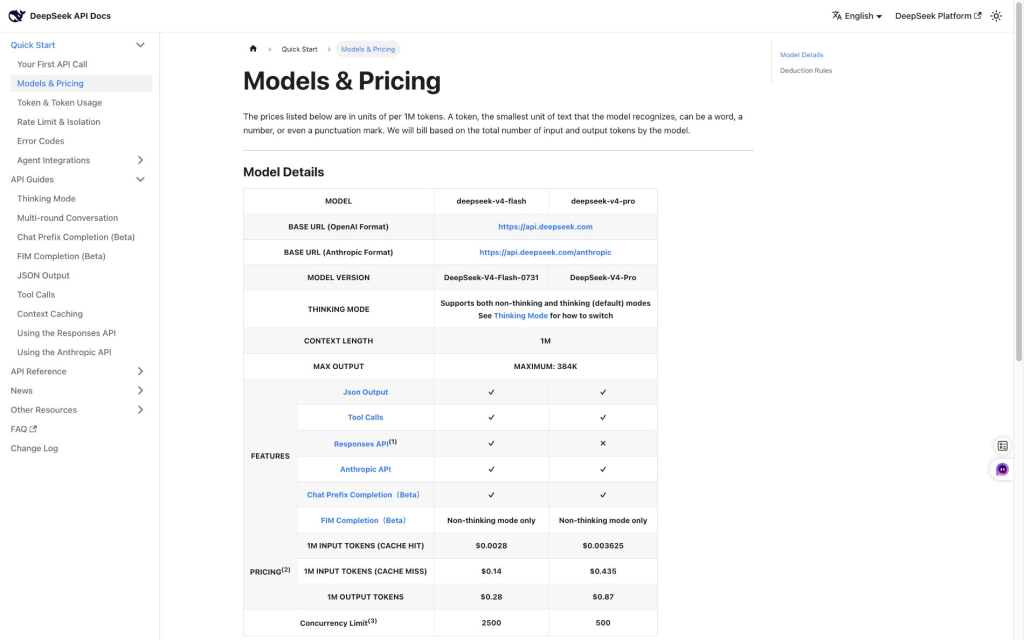
- Pricing: The official page lists V4 Flash at $0.14 per 1M uncached input tokens and $0.28 per 1M output tokens; V4 Pro is $0.435 input and $0.87 output. It also warns of a forthcoming peak/off-peak policy. Check the live DeepSeek API pricing page before budgeting.
How to compare prices without comparing the wrong things
A workspace subscription, a systematic-review product and a metered API buy different things. Compare the job each one replaces before comparing its dollar figure.
| Option | Price basis | What to check |
|---|---|---|
| GlobalGPT Basic | $5.80/month, billed annually | Current model costs and total annual commitment |
| Elicit Pro | $49/user/month, billed $588 annually | Systematic-review usage and paper extraction |
| DeepSeek V4.1 Flash API | $0.15–$0.30 input; $0.60–$1.20 output per 1M tokens | Peak/off-peak time and input/output volume |
These entries were checked September 14, 2026 against GlobalGPT pricing, Elicit pricing and DeepSeek API pricing. Other product prices earlier in the article retain their stated August check date.
Perplexity alternatives compared
| Tool | Best for | What it does better than Perplexity | Main trade-off |
|---|---|---|---|
| GlobalGPT | All-in-one work | Moves across model families and media tools | Broader catalog to learn |
| Chatsonic | Marketing content | Turns current information into publishable assets | Less research-focused |
| Claude | Long analysis | Sustained reasoning over documents and drafts | Not search-first |
| ChatGPT | General assistant work | Broader file, creation, and task workflow | Citations depend on mode |
| Brave Leo | Private browsing | Works directly with open pages in Brave | Narrower research workflow |
| TextCortex | Brand knowledge | Repeatable tone and organization-specific context | Not a pure search replacement |
| Microsoft Copilot | Microsoft 365 | Works where Office documents and meetings live | License-dependent |
| Gemini | Google ecosystem | Connects research with Google apps and files | Account/region limits |
| Simplified | Campaign production | Produces and schedules creative assets | Overkill for occasional research |
| Elicit | Academic evidence | Paper screening, extraction, and literature review | Narrow subject scope |
| DeepSeek | Developer/API work | Low metered costs and flexible integration | Requires setup for cited search |
A source check to run before switching
Give your two finalists the same source packet: an old annual price, a newer monthly and annual price, and an unsupported review. Ask for a current comparison with a citation beside every number. A useful answer identifies the newer source, converts annual billing correctly and refuses to invent a free offer. This is a practical selection exercise, not a claim that all 11 tools passed our test.
Final recommendation
Stay with Perplexity if your main need is fast, source-backed web research. Choose ChatGPT or Claude if research turns into a larger thinking or writing task, Gemini or Copilot if your apps decide the workflow, Brave Leo if browsing privacy matters most, and Elicit if the source set must be academic papers.
For most people who use several kinds of AI work during the same week, opening Perplexity inside GlobalGPT is the most practical way to keep cited research while gaining access to other model families and creation tools. Whichever route you choose, check the live plan page before paying because limits, models, and regional availability change faster than the core use cases do.
Frequently asked questions
What is the best Perplexity alternative in 2026?
GlobalGPT is the best all-in-one alternative when you want Perplexity plus other leading models in one workspace. ChatGPT is the broadest standalone assistant, Claude is best for long-form analysis, Gemini fits Google workflows, and Elicit is the specialist choice for academic literature.
Is there a free alternative to Perplexity?
ChatGPT, Claude, Gemini, Brave Leo, Elicit, and several other tools offer some free access, although limits and model availability change. A free tier is enough for occasional questions; regular deep research, higher limits, team features, or advanced models usually require a paid plan.
Is ChatGPT better than Perplexity?
ChatGPT is better for broad assistant work such as writing, files, data analysis, and multi-step tasks. Perplexity is better when you want a fast search-first answer with visible citations. The right choice depends on whether the answer is the finish line or the start of a larger task.
Which Perplexity alternative is best for academic research?
Elicit is the strongest pick in this list for literature reviews, paper screening, and structured extraction from academic research. Perplexity remains useful for general discovery, but Elicit is built around the research-paper workflow itself.
Which Perplexity alternative is best for privacy?
Brave Leo is the clearest privacy-first option for people who want AI assistance inside the browser. Users who need deeper local control can also explore open-source search stacks, but those require more setup than the tools ranked here.
Should I choose Gemini or Microsoft Copilot?
Choose Gemini when your files and daily work live in Google’s ecosystem. Choose Microsoft Copilot when Word, Excel, PowerPoint, Outlook, or Teams are the center of your workflow. Their main advantage is integration, not a universal lead in search quality.